🔍 🔎 本期带领大家一起来学习java课程设计(学生信息管理系统设计)+数据库的实现思路 🔍 🔎
文章目录
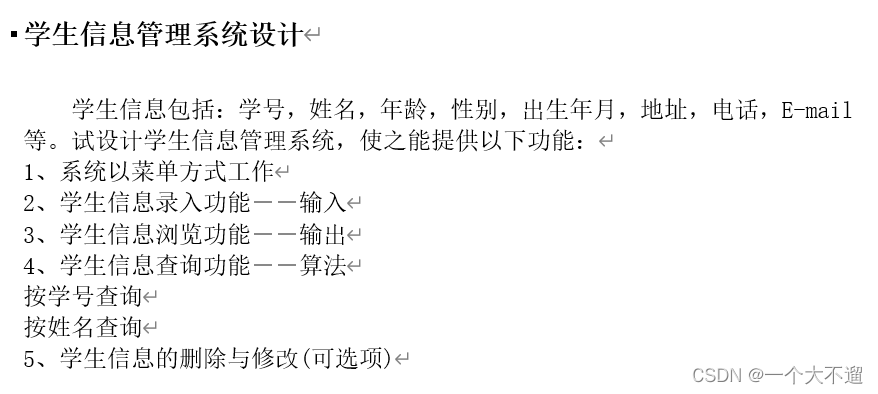
学生信息包括:学号,姓名,年龄,性别,出生年月,地址,电话,E-mail等。试设计学生信息管理系统,使之能提供以下功能:
1、系统以菜单方式工作
2、学生信息录入功能--输入
3、学生信息浏览功能--输出
4、学生信息查询功能--算法
按学号查询
按姓名查询
5、学生信息的删除与修改(可选项)

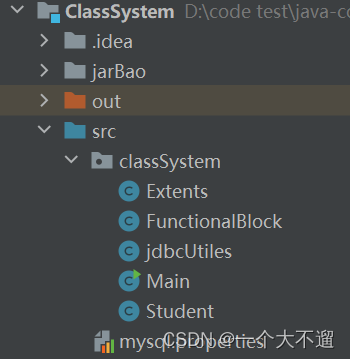
在idea创建一个工程文件,在工程文件下创建一个model模块,在model模块下创建一个classSystem包,然后再存放对应的类,如下图所示
需要注意是因为连接了数据库,所以需要导入相应的jar包
首先实现这个学生信息管理系统,我们需要先创建一个学生信息类
,包括学生的学号,姓名,年龄,地址,电话,邮箱,出生日期,具体代码如下✈️ 🛫 🛬
package classSystem;


public class Student {
    private int stuId;
    private String name;
    private int age;

    private String sex;
    private String birth;

    private String address;
    private String tel;
    private String Email;


    public Student() {
    }

    public Student(int stuId, String name, int age, String sex, String birth, String address, String tel, String email) {
        this.stuId = stuId;
        this.name = name;
        this.age = age;
        this.sex = sex;
        this.birth = birth;
        this.address = address;
        this.tel = tel;
        Email = email;
    }

    public int getStuId() {
        return stuId;
    }

    public void setStuId(int stuId) {
        this.stuId = stuId;
    }

    public String getName() {
        return name;
    }

    public void setName(String name) {
        this.name = name;
    }

    public int getAge() {
        return age;
    }

    public void setAge(int age) {
        this.age = age;
    }

    public String getAddress() {
        return address;
    }

    public void setAddress(String address) {
        this.address = address;
    }

    public String getSex() {
        return sex;
    }

    public void setSex(String sex) {
        this.sex = sex;
    }

    public String getBirth() {
        return birth;
    }

    public void setBirth(String birth) {
        this.birth = birth;
    }

    public String getTel() {
        return tel;
    }

    public void setTel(String tel) {
        this.tel = tel;
    }

    public String getEmail() {
        return Email;
    }

    public void setEmail(String email) {
        Email = email;
    }
}
🔍 🔎因为这个学生信息管理系统的java程序是连接了数据库,所以我们在录入我们的信息的时候,需要讲我们所录入的学生信息存放到数据库当中,所以我们需要运用到sql语句
去添加我们所录入的信息,做到了随时随地可以查询,更好地管理我们的学生信息🔍 🔎
public static void addStu(ArrayList<Student> stu) throws AWTException {
        while (true) {
            Extents.clearConsole();
            System.out.println(">首界面>功能界面>添加学生信息\n\n");
            Scanner sc = new Scanner(System.in);
            System.out.print("请输入学生学号(例:2022): ");
            int stuId=sc.nextInt();
            System.out.print("请输入学生姓名(例:张三): ");
            String name = sc.next();
            System.out.print("请输入学生年龄(例:18): ");
            int age = sc.nextInt();
            System.out.print("请输入学生性别(例:男): ");
            String sex =sc.next();
            System.out.print("请输入学生出生日期(例:2004-6-1): ");
            String birth =sc.next();
            System.out.print("请输入学生电话(例:123456): ");
            String tel=sc.next();
            System.out.print("请输入学生email(例:123456@qq.com): ");
            String emial =sc.next();
            System.out.print("请输入学生地址(例:深圳): ");
            String address = sc.next();

            System.out.println("\n\n-----------------------------------------------------");
            System.out.println( "\t\t学号: "+stuId+"\t\t姓名: " + name + "\t\t年龄: " + age + "\t\t地址: " + address
            +"\t\t性别: " +sex+"\t\t出生日期: " +birth+"\t\t地址: " +address+"\t\t电话: " +tel+"\t\t邮箱: " +emial);
            System.out.print("\n\n是否添加该学生信息? [Yes(1) / No(0)] :");
            Extents.isAdd(stu, sc, stuId,sex,birth,tel,emial, name, age, address);
            System.out.println("\n\n\n>首界面>功能界面>添加学生信息\n");
            System.out.println("\t                继续添加                   请输入1               ");
            System.out.println();
            System.out.println("\t                返回上级                   请输入0               ");
            System.out.println("\t ---------------------------------------------------------------");
            System.out.print("\n请输入您的选择:");
            while (true) {
                int choose = sc.nextInt();
                if (choose == 1) {
                    break;
                } else if (choose == 0) {
                    Extents.clearConsole();
                    return;
                } else {
                    System.out.print("看清选项! 再给你一次机会: ");
                }
            }
        }
    }
public static void isAdd(ArrayList<Student> stu, Scanner sc,int stuId ,String sex,String birth,String tel,String email, String name, int age, String address) throws AWTException {
        while (true) {
            int is = sc.nextInt();
            if (is == 0) {
                Extents.clearConsole();
                System.out.println("取消成功!");
                break;
            } else if (is == 1) {
                /*Student s = new Student(stuId,name, age,sex,birth, address,tel,email);
                stu.add(s);*/
                Connection connection =null;

                String sql ="insert into Student values(?,?,?,?,?,?,?,?)";
                PreparedStatement preparedStatement=null;
                try {

                    connection  = jdbcUtiles.getConnection();
                    preparedStatement = connection.prepareStatement(sql);

                   preparedStatement.setInt(1,stuId);
                   preparedStatement.setString(2,name);
                   preparedStatement.setInt(3,age);
                   preparedStatement.setString(4,sex);
                   preparedStatement.setString(5,address);
                   preparedStatement.setString(6,birth);
                   preparedStatement.setString(7,tel);
                   preparedStatement.setString(8,email);

                    //执行
                    preparedStatement.executeUpdate();
                } catch (SQLException e) {
                    throw new RuntimeException(e);
                }finally {
                    jdbcUtiles.close(null,preparedStatement,connection);
                }


                stuId += 1;
                Extents.clearConsole();
                System.out.println("添加信息成功!\n\n");
                FunctionalBlock.showStu(stu);
                break;
            }
            System.out.print("\n输入错误!请重新输入:");
        }
    }
相信大家看到这里会有点迷惑,那么现在我来梳理一下增加信息代码块的实现逻辑
首先我们先在FunctionalBlock当中的addStudan当中录入我们的信息🔑 🔑
然后再调用我们Extens当中的isAdd判断是否录入我们的信息
如果录入信息的话,使用sql语句进行与数据库的连接,并且将信息录入到数据库当中
并且会查询数据库当中的信息🔍 🔎
如果不录入信息的话,那么就取消录入
增加学生信息效果图如下


学生信息的删除功能的实现,先调用FunctionalBlock
当中的showStu的方法展示全部学生的信息💡💡
再选择需要删除的学生信息💡💡
同样先要判断所输入的学号是=是否存在,用到了Extents当中的getFlag的方法
如果不存在,则返回-1,存在的话则进行删除操作
同样用到了sql语句与数据库当中的学生信息进行了交互🔑
public static void deleteStu(ArrayList<Student> stu) throws AWTException {
        Scanner sc = new Scanner(System.in);
        showStu(stu);
        while (true) {
            System.out.print("\n请输入要删除的学生学号:");
            int sid = sc.nextInt();
            sc.nextLine();
            int flag = Extents.getFlag(stu, sid);
            if (flag == -1) {
                System.out.print("\n该学号不存在,请重新输入\n");
            } else {
                System.out.print("\n是否删除学号为:" + sid + " 的学生信息? [Yes(1) / No(0)] :");
                Extents.isDlete(stu, sc, flag);
                System.out.println("\n\n\n>首界面>功能界面>删除学生信息\n");
                System.out.println("\t                继续删除                   请输入1                ");
                System.out.println();
                System.out.println("\t                返回上级                   请输入0                ");
                System.out.println("\t ----------------------------------------------------------------");
                System.out.print("\n请输入您的选择: ");
                while (true) {
                    int choose = sc.nextInt();
                    if (choose == 1) {
                        break;
                    } else if (choose == 0) {
                        Extents.clearConsole();
                        return;
                    } else {
                        System.out.print("看清选项! 再给你一次机会: ");
                    }
                }
            }
        }
    }
删除学生信息效果图如下
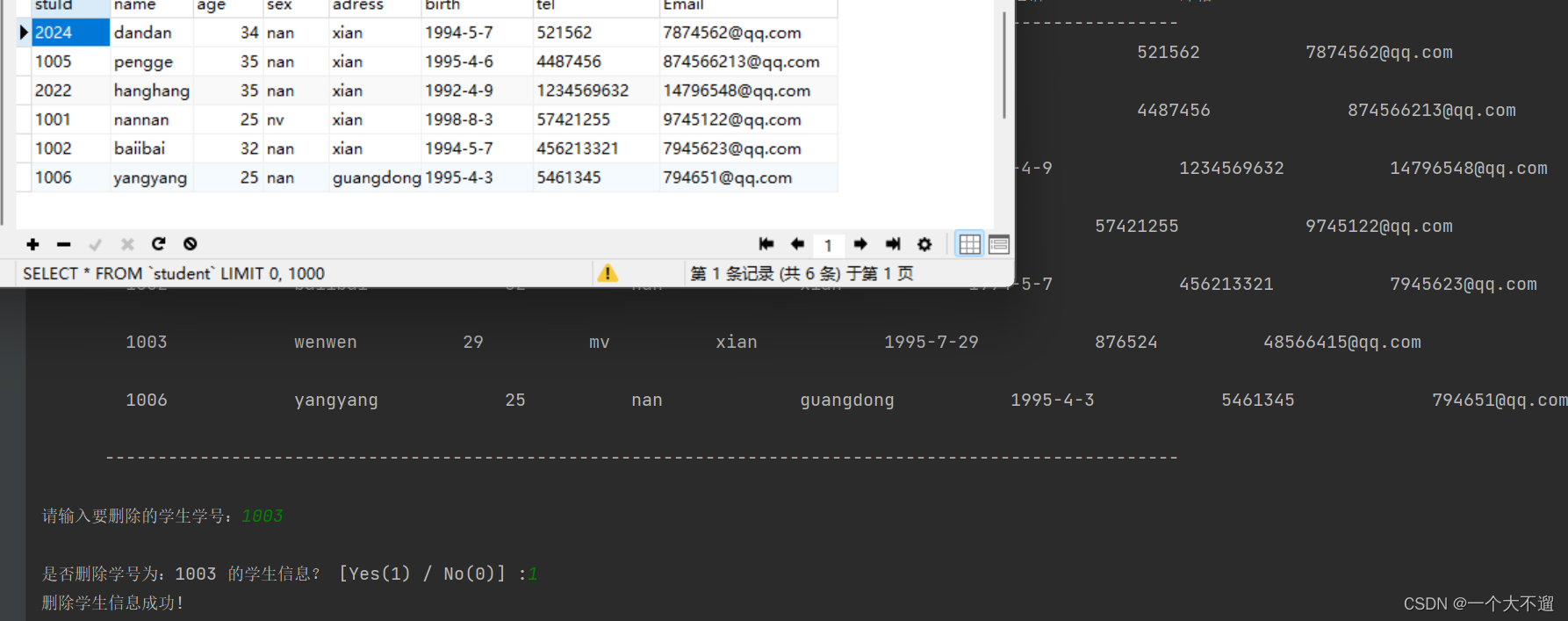
修改学生信息的功能呢,和上面删除学生信息 功能的实现类似,我们同样来看看如何实现的
学生信息的修改功能的实现,先调用FunctionalBlock当中的showStu的方法展示全部学生的信息
再选择需要修改的学生学号⌛️ ⏳⌛️ ⏳
同样先要判断所输入的学号是=是否存在,用到了Extents当中的getFlag的方法
如果不存在,则返回-1,存在的话则进行修改操作
再然后输入修改之后的学生信息💡💡
同样用到了sql语句与数据库当中的学生信息进行了交互
 public static void updateStu(ArrayList<Student> stu) throws AWTException {
        Scanner sc = new Scanner(System.in);
        while (true) {
            showStu(stu);
            System.out.print("\n\n请输入要修改信息的学生学号:");
            int sidUpdate = sc.nextInt();
            int flag = Extents.getFlag(stu, sidUpdate);
            Extents.clearConsole();
            if (flag == -1) {
                System.out.print("该学号不存在,请重新输入\n\n\n ");
            } else {
                System.out.println(">首界面>功能界面>修改学生信息\n\n");
                System.out.print("请输入学生学号(例:2022: ");
                int id=sc.nextInt();
                System.out.print("请输入学生姓名(例:张三): ");
                String name = sc.next();
                System.out.print("请输入学生年龄(例:18): ");
                int age = sc.nextInt();
                System.out.print("请输入学生性别(例:男): ");
                String sex =sc.next();
                System.out.print("请输入学生出生日期(例:2004-6-1): ");
                String birth =sc.next();
                System.out.print("请输入学生电话(例:123456): ");
                String tel=sc.next();
                System.out.print("请输入学生email(例:123456@qq.com): ");
                String emial =sc.next();
                System.out.print("请输入学生地址(例:深圳): ");
                String address = sc.next();
                Extents.clearConsole();
                Extents.getFlag(stu, sidUpdate);


                Connection connection =null;
                String sql ="update Student set stuId=? ,name=?,age=?,sex=?,adress=?,birth=?,tel=?,Email=?where stuId=?";
                PreparedStatement preparedStatement=null;
                try {
                    connection  = jdbcUtiles.getConnection();
                    preparedStatement = connection.prepareStatement(sql);
                    preparedStatement.setInt(1,id);
                    preparedStatement.setString(2,name);
                    preparedStatement.setInt(3,age);
                    preparedStatement.setString(4,sex);
                    preparedStatement.setString(5,address);
                    preparedStatement.setString(6,birth);
                    preparedStatement.setString(7,tel);
                    preparedStatement.setString(8,emial);
                    preparedStatement.setInt(9,flag);

                    //执行
                    preparedStatement.executeUpdate();
                } catch (SQLException e) {
                    throw new RuntimeException(e);
                }finally {
                    jdbcUtiles.close(null,preparedStatement,connection);
                }


                System.out.println(">首界面>功能界面>修改学生信息");
                System.out.println("\n\n------------------------------------------------------------------");

                System.out.println("修改后——>\n");
                System.out.println( "\t\t姓名: " + name + "\t\t年龄: " + age + "\t\t地址: " + address
                        +"\t\t性别: " +sex+"\t\t出生日期: " +birth+"\t\t地址: " +address+"\t\t电话: " +tel+"\t\t邮箱: " +emial);
                System.out.print("\n\n是否修改该学生信息? [Yes(1) / No(0)] :");
                Extents.isUpdata(stu, sc, sidUpdate, flag,sex,birth,tel,emial, name, age, address);
                System.out.println("\n\n\n>首界面>功能界面>修改学生信息\n");
                System.out.println("\t                继续修改                   请输入1              ");
                System.out.println();
                System.out.println("\t                返回上级                   请输入0              ");
                System.out.println("\t --------------------------------------------------------------");
                System.out.print("\n请输入您的选择:");
                while (true) {
                    int choose = sc.nextInt();
                    if (choose == 1) {
                        Extents.clearConsole();
                        break;
                    } else if (choose == 0) {
                        Extents.clearConsole();
                        return;
                    } else {
                        System.out.print("看清选项! 再给你一次机会: ");
                    }
                }
            }
        }
    }
修改学生信息效果图如下
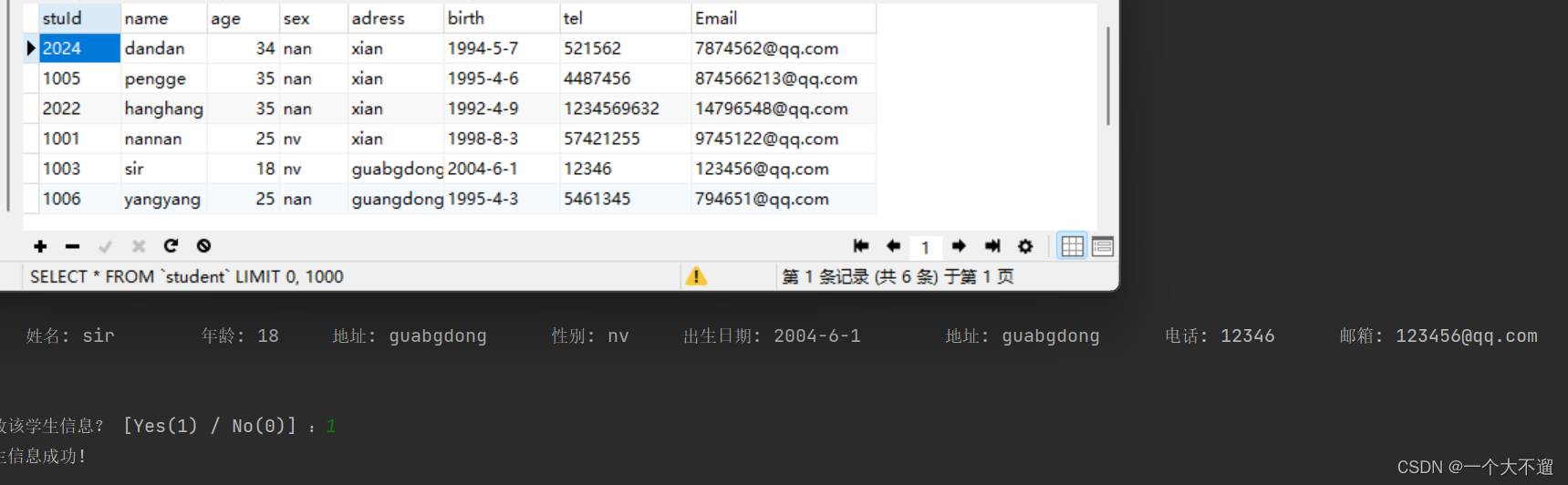
由于查看学生信息的功能在前面三个功能当中都有调用⌛️ ⏳⌛️ ⏳
所以我们为了使得代码更加简洁,将查询学生信息的功能封装起来了
避免了代码的冗余
同样我们来看看到底是如何实现的
因为我们的程序是连接了数据库,所以我们需要查询学生的信息的时候⌛️ ⏳⌛️ ⏳
需要用到查询的sql语句进行查询,同我们的数据库进行交互
 public static void showStu(ArrayList<Student> stu) {

        System.out.println("1.按学号查询");
        System.out.println("2.按姓名查询");
        System.out.println("3.查询全部 ");
        Scanner sc =new Scanner(System.in);
        int input=sc.nextInt();
        if(input==1){
            System.out.print("输入需要查询的学生学号:");
            int stuid=sc.nextInt();

            Connection connection =null;
            String sql="select stuId,name,age,sex,adress,birth,tel,Email from Student where stuId=?";
            PreparedStatement preparedStatement=null;
            ResultSet set=null;
            try {
                connection  = jdbcUtiles.getConnection();
                preparedStatement = connection.prepareStatement(sql);

                preparedStatement.setInt(1,stuid);
                //执行
                set = preparedStatement.executeQuery();

                while(set.next()){
                    int id=set.getInt("stuId");
                    String name=set.getString("name");
                    int age =set.getInt("age");
                    String sex =set.getString("sex");
                    String address=set.getString("adress");
                    String birth=set.getString("birth");
                    String tel=set.getString("tel");
                    String email=set.getString("Email");

                    System.out.println("\t\t" + id + " \t\t\t" + name
                            + " \t\t\t" + age + " \t\t\t" + sex +" \t\t\t" + address +
                            " \t\t\t" + birth+ " \t\t\t" + tel +" \t\t\t" + email +
                            "  \t\t\t"  + "\n");
                }
            } catch (SQLException e) {
                throw new RuntimeException(e);
            }finally {
                jdbcUtiles.close(set,preparedStatement,connection);
            }

        } else if (input==2) {


            System.out.print("输入需要查询的学生名字:");
            String stuname=sc.next();

            Connection connection =null;
            String sql="select stuId,name,age,sex,adress,birth,tel,Email from Student where name=?";
            PreparedStatement preparedStatement=null;
            ResultSet set=null;
            try {
                connection  = jdbcUtiles.getConnection();
                preparedStatement = connection.prepareStatement(sql);

                preparedStatement.setString(1,stuname);
                //执行
                set = preparedStatement.executeQuery();

                while(set.next()){
                    int id=set.getInt("stuId");
                    String name=set.getString("name");
                    int age =set.getInt("age");
                    String sex =set.getString("sex");
                    String address=set.getString("adress");
                    String birth=set.getString("birth");
                    String tel=set.getString("tel");
                    String email=set.getString("Email");

                    System.out.println("\t\t" + id + " \t\t\t" + name
                            + " \t\t\t" + age + " \t\t\t" + sex +" \t\t\t" + address +
                            " \t\t\t" + birth+ " \t\t\t" + tel +" \t\t\t" + email +
                            "  \t\t\t"  + "\n");
                }
            } catch (SQLException e) {
                throw new RuntimeException(e);
            }finally {
                jdbcUtiles.close(set,preparedStatement,connection);
            }
        }else{
            System.out.println(">学生信息显示\n");

            System.out.println("\t --------------------------------------------------------------------------------------------------------");
            System.out.println("\t   学号\t\t" + "   姓名\t\t" + " \t年龄\t" + "\t\t性别" + " \t\t\t地址"+
                    " \t\t\t出生日期"+" \t\t\t电话"+" \t\t\t邮箱" );
            System.out.println("\t  ------------------------------------------------------------------------------------------------------");

            Connection connection =null;
            String sql="select * from Student";
            PreparedStatement preparedStatement=null;
            ResultSet set=null;
            try {
                connection  = jdbcUtiles.getConnection();
                preparedStatement = connection.prepareStatement(sql);

                //执行
                set = preparedStatement.executeQuery();

                while(set.next()){
                    int id=set.getInt("stuId");
                    String name=set.getString("name");
                    int age =set.getInt("age");
                    String sex =set.getString("sex");
                    String address=set.getString("adress");
                    String birth=set.getString("birth");
                    String tel=set.getString("tel");
                    String email=set.getString("Email");

                    System.out.println("\t\t" + id + " \t\t\t" + name
                            + " \t\t\t" + age + " \t\t\t" + sex +" \t\t\t" + address +
                            " \t\t\t" + birth+ " \t\t\t" + tel +" \t\t\t" + email +
                            "  \t\t\t"  + "\n");
                }
            } catch (SQLException e) {
                throw new RuntimeException(e);
            }finally {
                jdbcUtiles.close(set,preparedStatement,connection);
            }
            System.out.println("\t  ------------------------------------" +
                    "------------------------------------------------------------------");
        }
        }
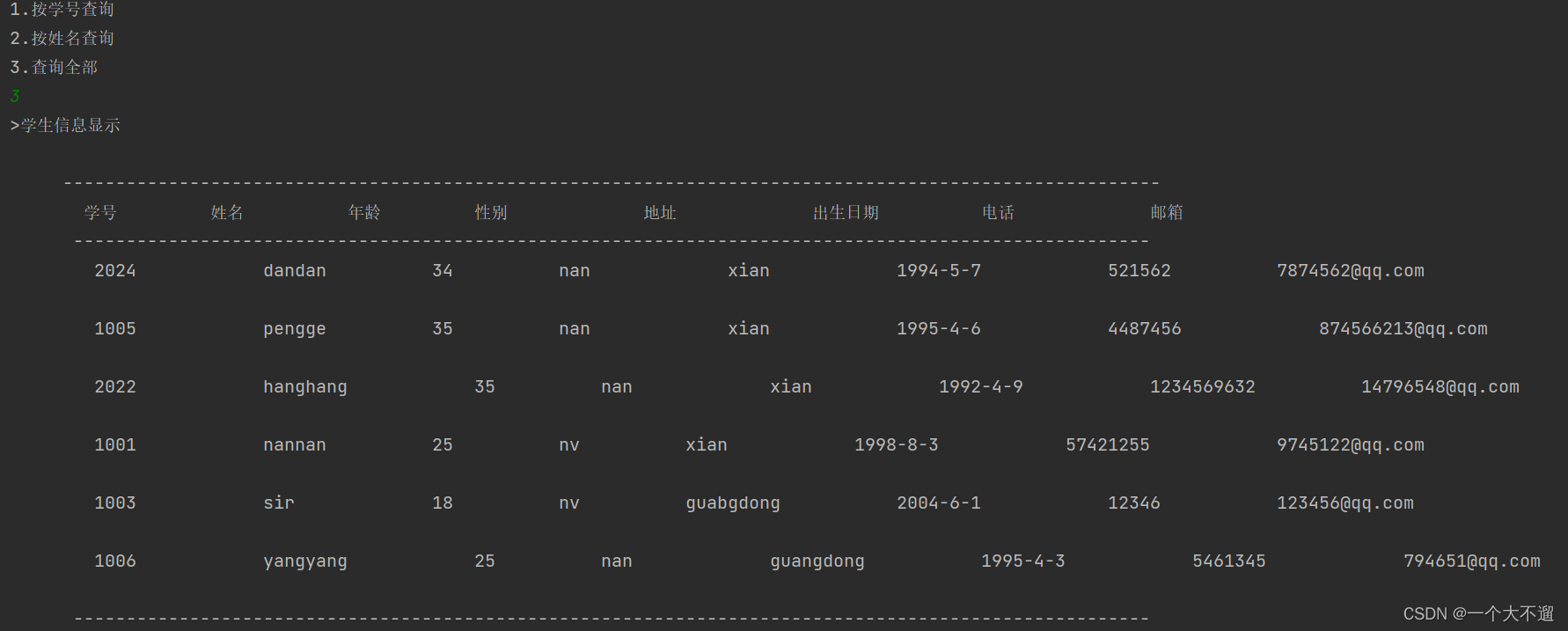
查询学生信息效果图如下
首先出现登陆的界面,我们需要输入我们的用户名和密码,然后判断是否正确
正确的话则执行下一步操作🍗 🍖 🦴
 public static void interFace() throws AWTException {
        System.out.println(">首界面\n");
        System.out.println("\t*****************************************************************");
        System.out.println("\t                           首界面                              ");
        System.out.println("\t ---------------------------------------------------------------");
        System.out.println("\t                开始登录                   请输入1               ");
        System.out.println("\t ---------------------------------------------------------------");
        System.out.println("\t                退出                      请输入0               ");
        System.out.println("\t*****************************************************************");
        Scanner sc = new Scanner(System.in);
        System.out.print("\n请输入您的选择: ");
        while (true) {
            int choose = sc.nextInt();
            if (choose == 1) {

                register();
                break;
            } else if (choose == 0) {
                System.out.println("退出成功!");
                System.exit(0);
            } else {
                System.out.print("看清选项! 再给你一次机会:");
            }
        }
    }
  public static void register() throws AWTException {
        for (int i = COUNT; i >= 0; i--) {
            Scanner sc = new Scanner(System.in);
            System.out.print("请输入您的用户名: ");
            String loginSid = sc.nextLine();
            System.out.print("请输入您的密码: ");
            String loginPassWd = sc.nextLine();
            if (loginSid.equals(MYSID) && loginPassWd.equals(MYPASSWD)) {
                Extents.clearConsole();
                System.out.println("欢迎登录! 用户:" + MYSID + "\n\n");
                menu();
                break;
            } else {
                if (i == 0) {
                    System.out.println("你是不是傻!");
                    System.exit(0);
                }
                System.out.println("错了错了, 你还有 " + i + " 次机会");
            }
        }
    }
 public static void menu() throws AWTException {
        ArrayList<Student> stu = new ArrayList<>();
        while (true) {
            System.out.println(">首界面>功能界面\n");
            System.out.println("\t*****************************************************************");
            System.out.println("\t                      欢迎来到学生管理系统!                      ");
            System.out.println("\t ---------------------------------------------------------------");
            System.out.println("\t                         1.添加学生信息                          ");
            System.out.println("\t ---------------------------------------------------------------");
            System.out.println("\t                         2.删除学生信息                          ");
            System.out.println("\t ---------------------------------------------------------------");
            System.out.println("\t                         3.修改学生信息                          ");
            System.out.println("\t ---------------------------------------------------------------");
            System.out.println("\t                         4.查看学生信息                          ");
            System.out.println("\t ---------------------------------------------------------------");
            System.out.println("\t         q:返回上级菜单                  p:退出管理系统          ");
            System.out.println("\t******************************************************************");
            Scanner sc = new Scanner(System.in);
            System.out.print("\n请输入您的选择:");
            String choose = sc.nextLine();
            switch (choose) {
                case "1":
                    FunctionalBlock.addStu(stu);
                    break;
                case "2":
                    Extents.clearConsole();
                    FunctionalBlock.deleteStu(stu);
                    break;
                case "3":
                    Extents.clearConsole();
                    FunctionalBlock.updateStu(stu);
                    break;
                case "4":
                    Extents.clearConsole();
                    FunctionalBlock.showStu(stu);
                    Extents.isShow(sc);
                    break;
                case "q":
                    Extents.clearConsole();
                    interFace();
                    return;
                case "p":
                    System.out.println("退出成功!");
                    System.exit(0);
                default:
                    Extents.clearConsole();
                    System.out.println("这都错!看清选项再选\n\n\n");
                    break;
            }
        }
    }
Extents是完成相关的善后操作,是对FunctionalBlock里面功能实现的相关善后的操作
目的是为了使得更加程序逻辑清晰🍗 🍖 🦴
package classSystem;

import java.awt.*;
import java.awt.event.KeyEvent;
import java.sql.Connection;
import java.sql.PreparedStatement;
import java.sql.ResultSet;
import java.sql.SQLException;
import java.util.ArrayList;
import java.util.Scanner;


public class Extents {


    public static void isAdd(ArrayList<Student> stu, Scanner sc,int stuId ,String sex,String birth,String tel,String email, String name, int age, String address) throws AWTException {
        while (true) {
            int is = sc.nextInt();
            if (is == 0) {
                Extents.clearConsole();
                System.out.println("取消成功!");
                break;
            } else if (is == 1) {
                /*Student s = new Student(stuId,name, age,sex,birth, address,tel,email);
                stu.add(s);*/
                Connection connection =null;

                String sql ="insert into Student values(?,?,?,?,?,?,?,?)";
                PreparedStatement preparedStatement=null;
                try {

                    connection  = jdbcUtiles.getConnection();
                    preparedStatement = connection.prepareStatement(sql);

                   preparedStatement.setInt(1,stuId);
                   preparedStatement.setString(2,name);
                   preparedStatement.setInt(3,age);
                   preparedStatement.setString(4,sex);
                   preparedStatement.setString(5,address);
                   preparedStatement.setString(6,birth);
                   preparedStatement.setString(7,tel);
                   preparedStatement.setString(8,email);

                    //执行
                    preparedStatement.executeUpdate();
                } catch (SQLException e) {
                    throw new RuntimeException(e);
                }finally {
                    jdbcUtiles.close(null,preparedStatement,connection);
                }


                stuId += 1;
                Extents.clearConsole();
                System.out.println("添加信息成功!\n\n");
                FunctionalBlock.showStu(stu);
                break;
            }
            System.out.print("\n输入错误!请重新输入:");
        }
    }

    public static void isDlete(ArrayList<Student> stu, Scanner sc, int flag) throws AWTException {
        while (true) {
            int is = sc.nextInt();
            if (is == 0) {
                Extents.clearConsole();
                System.out.println("取消成功!");
                break;
            } else if (is == 1) {

                Connection connection =null;
                String sql ="delete from Student  where stuId=?";

                PreparedStatement preparedStatement=null;
                try {

                    connection  = jdbcUtiles.getConnection();
                    preparedStatement = connection.prepareStatement(sql);
                    preparedStatement.setInt(1,flag);

                    //执行
                    preparedStatement.executeUpdate();
                } catch (SQLException e) {
                    throw new RuntimeException(e);
                }finally {
                    jdbcUtiles.close(null,preparedStatement,connection);
                }


                Extents.clearConsole();
                System.out.println("删除学生信息成功!\n\n");
                FunctionalBlock.showStu(stu);
                break;
            }
            System.out.print("\n输入错误!请重新输入:");
        }
    }

    public static void isUpdata(ArrayList<Student> stu, Scanner sc, int sidUpdate, int flag, String sex,String birth,String tel,String email, String name, int age, String address) throws AWTException {
        while (true) {
            int is = sc.nextInt();
            if (is == 0) {
                Extents.clearConsole();
                System.out.println("取消成功!");
                break;
            } else if (is == 1) {
                Student newStu = new Student(sidUpdate, name,age,sex,birth,address, tel,email);
                Extents.clearConsole();
                System.out.println("修改学生信息成功!\n\n");
                FunctionalBlock.showStu(stu);
                break;
            }
            System.out.print("\n输入错误!请重新输入:");
        }
    }

    public static void isShow(Scanner sc) throws AWTException {
        System.out.println("\n\n\n>首界面>功能界面>查看学生信息\n\n");
        System.out.println("\t              返回上级                     请输入0           ");
        System.out.println("\t ---------------------------------------------------------------");
        System.out.print("\n请输入您的选择: ");
        while (true) {
            int choose1 = sc.nextInt();
            if (choose1 == 0) {
                Extents.clearConsole();
                break;
            } else {
                System.out.print("看清选项! 再给你一次机会: ");
            }
        }
    }

    public static int getFlag(ArrayList<Student> stu, int sid) {

        Connection connection =null;
        String sql="select * from Student";
        PreparedStatement preparedStatement=null;
        ResultSet set=null;
        try {
            connection  = jdbcUtiles.getConnection();
            preparedStatement = connection.prepareStatement(sql);

            //执行
            set = preparedStatement.executeQuery();

            while(set.next()){

                int id  =set.getInt("stuId");
                if(sid==id){
                    return id;
                }
            }
            return -1;
        } catch (SQLException e) {
            throw new RuntimeException(e);
        }finally {
            jdbcUtiles.close(set,preparedStatement,connection);
        }


    }

    public static void clearConsole() throws AWTException {
        Robot r = new Robot();
        // 按下Ctrl键
        r.keyPress(KeyEvent.VK_CONTROL);
        // 按下R键
        r.keyPress(KeyEvent.VK_R);
        // 释放R键
        r.keyRelease(KeyEvent.VK_R);
        // 释放Ctrl键
        r.keyRelease(KeyEvent.VK_CONTROL);
        r.delay(50);
    }
}
毕竟我们的这个项目是要连接到数据库当中的
🚴🏼♂️ 🚵🏼♀️所以我们需要手动操作完成数据库连接的相关代码 🚴🏼♂️ 🚵🏼♀️
package classSystem;

import java.io.FileInputStream;
import java.io.IOException;
import java.sql.*;
import java.util.Properties;

public class jdbcUtiles {

    //工具类,连接mysql的连接和关闭

    private static String user;
    private static String password;
    private static String url;
    private static String driver;

    static {
        Properties properties =new Properties();
        try {
            properties.load(new FileInputStream("src\\mysql.properties"));

            //读取相关属性
            user=properties.getProperty("uesr");
            password =properties.getProperty("password");
            url=properties.getProperty("url");
            driver = properties.getProperty("driver");


        } catch (IOException e) {
            throw new RuntimeException(e);
        }


    }
    //连接数据库

    public static Connection getConnection(){

        try {
            return DriverManager.getConnection(url,user,password);
        } catch (SQLException e) {
            throw new RuntimeException(e);
        }
    }


    //关闭相关资源
    public static void close(ResultSet set, PreparedStatement preparedStatement,Connection connection){

        try {
            if(set!=null){
                set.close();
            }
            if(preparedStatement!=null){
                preparedStatement.close();
            }
            if(connection!=null){
                connection.close();
            }
        } catch (SQLException e) {
            throw new RuntimeException(e);
        }


    }

}

🌹🌹🌹如果大家通过本篇博客收获了,对通过ava实现学生课程管理系统(数据库)
有了更好的了解的话
那么希望支持一下哦如果还有不明白的,疑惑的话,或者什么比较好的建议的话,可以发到评论区,
我们一起解决,共同进步 ❗️❗️❗️
最后谢谢大家❗️❗️❗️💯💯💯
我正在使用i18n从头开始构建一个多语言网络应用程序,虽然我自己可以处理一大堆yml文件,但我说的语言(非常)有限,最终我想寻求外部帮助帮助。我想知道这里是否有人在使用UI插件/gem(与django上的django-rosetta不同)来处理多个翻译器,其中一些翻译器不愿意或无法处理存储库中的100多个文件,处理语言数据。谢谢&问候,安德拉斯(如果您已经在rubyonrails-talk上遇到了这个问题,我们深表歉意) 最佳答案 有一个rails3branchofthetolkgem在github上。您可以通过在Gemfi
我有一个模型:classItem项目有一个属性“商店”基于存储的值,我希望Item对象对特定方法具有不同的行为。Rails中是否有针对此的通用设计模式?如果方法中没有大的if-else语句,这是如何干净利落地完成的? 最佳答案 通常通过Single-TableInheritance. 关于ruby-on-rails-Rails-子类化模型的设计模式是什么?,我们在StackOverflow上找到一个类似的问题: https://stackoverflow.co
大约一年前,我决定确保每个包含非唯一文本的Flash通知都将从模块中的方法中获取文本。我这样做的最初原因是为了避免一遍又一遍地输入相同的字符串。如果我想更改措辞,我可以在一个地方轻松完成,而且一遍又一遍地重复同一件事而出现拼写错误的可能性也会降低。我最终得到的是这样的:moduleMessagesdefformat_error_messages(errors)errors.map{|attribute,message|"Error:#{attribute.to_s.titleize}#{message}."}enddeferror_message_could_not_find(obje
我主要使用Ruby来执行此操作,但到目前为止我的攻击计划如下:使用gemsrdf、rdf-rdfa和rdf-microdata或mida来解析给定任何URI的数据。我认为最好映射到像schema.org这样的统一模式,例如使用这个yaml文件,它试图描述数据词汇表和opengraph到schema.org之间的转换:#SchemaXtoschema.orgconversion#data-vocabularyDV:name:namestreet-address:streetAddressregion:addressRegionlocality:addressLocalityphoto:i
我将应用程序升级到Rails4,一切正常。我可以登录并转到我的编辑页面。也更新了观点。使用标准View时,用户会更新。但是当我添加例如字段:name时,它不会在表单中更新。使用devise3.1.1和gem'protected_attributes'我需要在设备或数据库上运行某种更新命令吗?我也搜索过这个地方,找到了许多不同的解决方案,但没有一个会更新我的用户字段。我没有添加任何自定义字段。 最佳答案 如果您想允许额外的参数,您可以在ApplicationController中使用beforefilter,因为Rails4将参数
我真的很习惯使用Ruby编写以下代码:my_hash={}my_hash['test']=1Java中对应的数据结构是什么? 最佳答案 HashMapmap=newHashMap();map.put("test",1);我假设? 关于java-等价于Java中的RubyHash,我们在StackOverflow上找到一个类似的问题: https://stackoverflow.com/questions/22737685/
有时我需要处理键/值数据。我不喜欢使用数组,因为它们在大小上没有限制(很容易不小心添加超过2个项目,而且您最终需要稍后验证大小)。此外,0和1的索引变成了魔数(MagicNumber),并且在传达含义方面做得很差(“当我说0时,我的意思是head...”)。散列也不合适,因为可能会不小心添加额外的条目。我写了下面的类来解决这个问题:classPairattr_accessor:head,:taildefinitialize(h,t)@head,@tail=h,tendend它工作得很好并且解决了问题,但我很想知道:Ruby标准库是否已经带有这样一个类? 最佳
我安装了ruby版本管理器,并将RVM安装的ruby实现设置为默认值,这样'哪个ruby'显示'~/.rvm/ruby-1.8.6-p383/bin/ruby'但是当我在emacs中打开inf-ruby缓冲区时,它使用安装在/usr/bin中的ruby。有没有办法让emacs像shell一样尊重ruby的路径?谢谢! 最佳答案 我创建了一个emacs扩展来将rvm集成到emacs中。如果您有兴趣,可以在这里获取:http://github.com/senny/rvm.el
我正在尝试使用boilerpipe来自JRuby。我看过guide从JRuby调用Java,并成功地将它与另一个Java包一起使用,但无法弄清楚为什么同样的东西不能用于boilerpipe。我正在尝试基本上从JRuby中执行与此Java等效的操作:URLurl=newURL("http://www.example.com/some-location/index.html");Stringtext=ArticleExtractor.INSTANCE.getText(url);在JRuby中试过这个:require'java'url=java.net.URL.new("http://www
我只想对我一直在思考的这个问题有其他意见,例如我有classuser_controller和classuserclassUserattr_accessor:name,:usernameendclassUserController//dosomethingaboutanythingaboutusersend问题是我的User类中是否应该有逻辑user=User.newuser.do_something(user1)oritshouldbeuser_controller=UserController.newuser_controller.do_something(user1,user2)我