下载安装node.js,win7使用node.js v12版的(为目前通用,建议都是用这个版本),win10可以使用最新版本的。CLI至少要求v12版本的。
安装完成后开启cmd,检验版本:
node -v搜索npm淘宝镜像,加速后续包的下载,在cmd中配置:
npm config set registry https://registry.npm.taobao.org检验配置的淘宝镜像:
npm config get registry搜索VUE CLI,安装下载 :
npm install -g @vue/cli在cmd中cd到需要建立项目的目录下,安装vue2:
vue create project_name注:
project_name为项目名称,请自定义创建
后续参数配置如下:
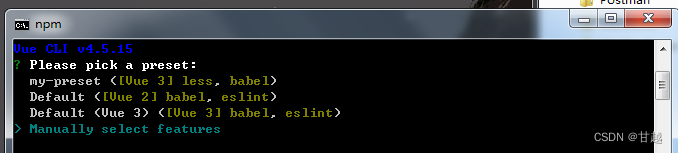


npm i vant@latest-v2 -Snpm i element-ui -Snpm install axios在src下新建plugins文件夹,里面一个文件就是一个包的配置文件,最后逐个引入main.js:
npm i babel-plugin-import -D新建VantUI.js:
import Vue from "vue"
import { Button, Form, Field } from "vant"

Vue.use(Button)
Vue.use(Form)
Vue.use(Field)npm install babel-plugin-component -D新建ElementUI.js:
import Vue from 'vue'
import { Button } from "element-ui"

Vue.use(Button)新建Axios.js:
import Vue from "vue";
import axios from "axios";

const url = "http://localhost/" //后台地址
axios.defaults.baseURL = url; //请求默认后台地址
axios.defaults.headers.post['Content-Type'] = 'application/json;charset=UTF-8';
Vue.prototype.$http = axios //后续请求使用
Vue.prototype.$http_url = url //全局后台地址import Vue from 'vue'
import App from './App.vue'
import router from './router'
import './plugins/VantUI'
import './plugins/ElementUI'
import './plugins/Axios'
Vue.config.productionTip = false
new Vue({
router,
render: h => h(App)
}).$mount('#app')使用了按需引入后,需要修改项目根目录下babel.config.js,修改为:
module.exports = {
  presets: [
    '@vue/cli-plugin-babel/preset',
    [
      "@babel/preset-env", { "modules": false }
    ]
  ],
  plugins: [
    [
      "component",
      {
        "libraryName": "element-ui",
        "styleLibraryName": "theme-chalk"
      }
    ],
    [
      'import',
      {
      libraryName: 'vant',
      libraryDirectory: 'es',
      style: true
      },
      'vant'
    ]
  ]
}router/index.js修改如下:
import Vue from 'vue'
import VueRouter from 'vue-router'

Vue.use(VueRouter)

const routes = [
  //初始路由
  {
    name: '/',
    path: "/",
    redirect: {
        name: 'NotFound', //默认导向的路由名
    }
  },
  //未匹配到的路由默认导向这里
  {
    path: '/:pathMatch(.*)*',
    name: 'NotFound',
    component: () => import('../components/Error.vue'),
  },
]

const router = new VueRouter({
  mode: 'history',
  base: '/web',
  routes
})

export default router修改为如下:
<template>
  <div id="app">
    <router-view/>
  </div>
</template>

<style>
*{
  margin: 0;
  padding: 0;
  list-style: none;
  text-decoration: none;
  box-sizing: border-box;
  }
html{
  width: 100%;
  height: 100%;
}
body {
  width: 100%;
  height: 100%;
  font-family: "Helvetica Neue", Helvetica, Arial, Tahoma, "Microsoft Yahei","PingFang SC", "Hiragino Sans GB", "WenQuanYi Micro Hei", sans-serif;
  }
#app{
  width: 100%;
  height: 100%;
}
</style>在public/index.html,需要修改如下属性:
<meta name="viewport" content="width=device-width,initial-scale=1.0,minimum-scale=1.0,maximum-scale=1.0,user-scalable=no">可变更项目标题与logo。
项目根目录下增加如下内容的vue.config.js:
module.exports = {
  publicPath: '/web/',
}
注:指定访问相对路径前缀为:根目录/web/下。目前项目都以web为访问前缀。比如:原访问地址为:http://www.demo.com/现在需要为http://www.demo.com/web。作用在于后续与后端结合,为避免跨域使用。
删除views文件夹,为与vue3统一,所有组件放在components中,放置Error.vue :
<template>
  <p>hello man</p>
</template>
在文件夹地址前加cmd,回车直接打开运行:
npm run serve运行成功后,复制地址,在浏览器上查看。
这里统一放置静态资源与文件。
这里放置模板文件。
我想为Heroku构建一个Rails3应用程序。他们使用Postgres作为他们的数据库,所以我通过MacPorts安装了postgres9.0。现在我需要一个postgresgem并且共识是出于性能原因你想要pggem。但是我对我得到的错误感到非常困惑当我尝试在rvm下通过geminstall安装pg时。我已经非常明确地指定了所有postgres目录的位置可以找到但仍然无法完成安装:$envARCHFLAGS='-archx86_64'geminstallpg--\--with-pg-config=/opt/local/var/db/postgresql90/defaultdb/po
在我的gem中,我需要yaml并且在我的本地计算机上运行良好。但是在将我的gem推送到rubygems.org之后,当我尝试使用我的gem时,我收到一条错误消息=>"uninitializedconstantPsych::Syck(NameError)"谁能帮我解决这个问题?附言RubyVersion=>ruby1.9.2,GemVersion=>1.6.2,Bundlerversion=>1.0.15 最佳答案 经过几个小时的研究,我发现=>“YAML使用未维护的Syck库,而Psych使用现代的LibYAML”因此,为了解决
我打算为ruby脚本创建一个安装程序,但我希望能够确保机器安装了RVM。有没有一种方法可以完全离线安装RVM并且不引人注目(通过不引人注目,就像创建一个可以做所有事情的脚本而不是要求用户向他们的bash_profile或bashrc添加一些东西)我不是要脚本本身,只是一个关于如何走这条路的快速指针(如果可能的话)。我们还研究了这个很有帮助的问题:RVM-isthereawayforsimpleofflineinstall?但有点误导,因为答案只向我们展示了如何离线在RVM中安装ruby。我们需要能够离线安装RVM本身,并查看脚本https://raw.github.com/wayn
我有一个奇怪的问题:我在rvm上安装了rubyonrails。一切正常,我可以创建项目。但是在我输入“railsnew”时重新启动后,我有“程序'rails'当前未安装。”。SystemUbuntu12.04ruby-v"1.9.3p194"gemlistactionmailer(3.2.5)actionpack(3.2.5)activemodel(3.2.5)activerecord(3.2.5)activeresource(3.2.5)activesupport(3.2.5)arel(3.0.2)builder(3.0.0)bundler(1.1.4)coffee-rails(
我刚刚为fedora安装了emacs。我想用emacs编写ruby。为ruby提供代码提示、代码完成类型功能所需的工具、扩展是什么? 最佳答案 ruby-mode已经包含在Emacs23之后的版本中。不过,它也可以通过ELPA获得。您可能感兴趣的其他一些事情是集成RVM、feature-mode(Cucumber)、rspec-mode、ruby-electric、inf-ruby、rinari(用于Rails)等。这是我当前用于Ruby开发的Emacs配置:https://github.com/citizen428/emacs
我正在尝试在我的centos服务器上安装therubyracer,但遇到了麻烦。$geminstalltherubyracerBuildingnativeextensions.Thiscouldtakeawhile...ERROR:Errorinstallingtherubyracer:ERROR:Failedtobuildgemnativeextension./usr/local/rvm/rubies/ruby-1.9.3-p125/bin/rubyextconf.rbcheckingformain()in-lpthread...yescheckingforv8.h...no***e
我的最终目标是安装当前版本的RubyonRails。我在OSXMountainLion上运行。到目前为止,这是我的过程:已安装的RVM$\curl-Lhttps://get.rvm.io|bash-sstable检查已知(我假设已批准)安装$rvmlistknown我看到当前的稳定版本可用[ruby-]2.0.0[-p247]输入命令安装$rvminstall2.0.0-p247注意:我也试过这些安装命令$rvminstallruby-2.0.0-p247$rvminstallruby=2.0.0-p247我很快就无处可去了。结果:$rvminstall2.0.0-p247Search
我实际上是在尝试使用RVM在我的OSX10.7.5上更新ruby,并在输入以下命令后:rvminstallruby我得到了以下回复:Searchingforbinaryrubies,thismighttakesometime.Checkingrequirementsforosx.Installingrequirementsforosx.Updatingsystem.......Errorrunning'requirements_osx_brew_update_systemruby-2.0.0-p247',pleaseread/Users/username/.rvm/log/138121
由于fast-stemmer的问题,我很难安装我想要的任何rubygem。我把我得到的错误放在下面。Buildingnativeextensions.Thiscouldtakeawhile...ERROR:Errorinstallingfast-stemmer:ERROR:Failedtobuildgemnativeextension./System/Library/Frameworks/Ruby.framework/Versions/2.0/usr/bin/rubyextconf.rbcreatingMakefilemake"DESTDIR="cleanmake"DESTDIR=
我在Rails工作并有以下类(class):classPlayer当我运行时bundleexecrailsconsole然后尝试:a=Player.new("me",5.0,"UCLA")我回来了:=>#我不知道为什么Player对象不会在这里初始化。关于可能导致此问题的操作/解释的任何建议?谢谢,马里奥格 最佳答案 havenoideawhythePlayerobjectwouldn'tbeinitializedhere它没有初始化很简单,因为你还没有初始化它!您已经覆盖了ActiveRecord::Base初始化方法,但您没有调
