文章目录
git clone https://git.ffmpeg.org/ffmpeg.git ffmpeg
进入下载目录,将ffmpeg编译成arm64平台的版本,编译后的文件存放于./instal_arm64中。
sudo ./configure --prefix=./instal_arm64 --enable-shared --disable-static --enable-cross-compile --arch=arm64 --disable-stripping --target-os=linux --cc=aarch64-linux-gnu-gcc
验证:进入instal_arm64/lib文件夹,使用file命令查看文件格式,若显示为ARM aarch64即成功。

需要将交叉编译好的lib/include 文件夹导入项目中,修改cmakelist.txt如下图所示。
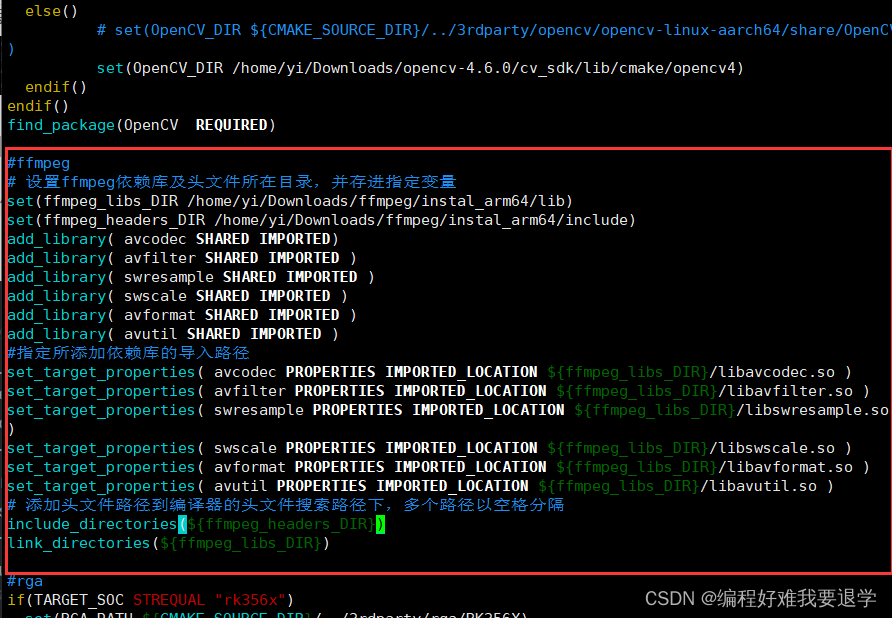
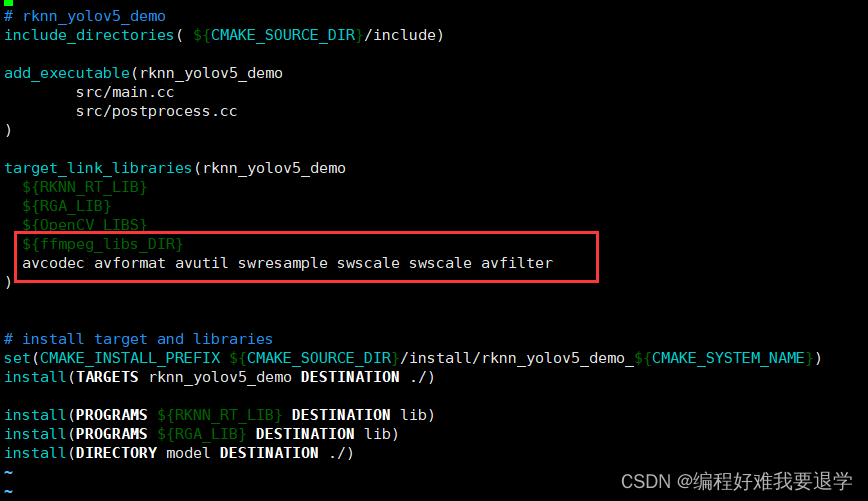
为方便复制这里将改动内容的文字贴在下面,路径需要改成自己的下载路径。
#ffmpeg
# 设置ffmpeg依赖库及头文件所在目录,并存进指定变量
set(ffmpeg_libs_DIR /home/yi/Downloads/ffmpeg/instal_arm64/lib)
set(ffmpeg_headers_DIR /home/yi/Downloads/ffmpeg/instal_arm64/include)
add_library( avcodec SHARED IMPORTED)
add_library( avfilter SHARED IMPORTED )
add_library( swresample SHARED IMPORTED )
add_library( swscale SHARED IMPORTED )
add_library( avformat SHARED IMPORTED )
add_library( avutil SHARED IMPORTED )
#指定所添加依赖库的导入路径
set_target_properties( avcodec PROPERTIES IMPORTED_LOCATION ${ffmpeg_libs_DIR}/libavcodec.so )
set_target_properties( avfilter PROPERTIES IMPORTED_LOCATION ${ffmpeg_libs_DIR}/libavfilter.so )
set_target_properties( swresample PROPERTIES IMPORTED_LOCATION ${ffmpeg_libs_DIR}/libswresample.so )
set_target_properties( swscale PROPERTIES IMPORTED_LOCATION ${ffmpeg_libs_DIR}/libswscale.so )
set_target_properties( avformat PROPERTIES IMPORTED_LOCATION ${ffmpeg_libs_DIR}/libavformat.so )
set_target_properties( avutil PROPERTIES IMPORTED_LOCATION ${ffmpeg_libs_DIR}/libavutil.so )
# 添加头文件路径到编译器的头文件搜索路径下,多个路径以空格分隔
include_directories(${ffmpeg_headers_DIR})
link_directories(${ffmpeg_libs_DIR})

--------省略若干字。。。。。----------------------

target_link_libraries(rknn_yolov5_demo
  ${RKNN_RT_LIB}
  ${RGA_LIB}
  ${OpenCV_LIBS}
  ${ffmpeg_libs_DIR}
  avcodec avformat avutil swresample swscale swscale avfilter
)
这里也许可以只复制项目中需要的lib文件.
sudo cp ~/Downloads/ffmpeg/instal_arm64/lib/* install/rknn_yolov5_demo_Linux/lib/
这里用一个ffpeg解析rtsp流的案例来测试是否成功。因为源码篇幅过长,放到本文最后。程序大意是:读取rtsp流,将rtsp流解析成帧,并且输入到输出文件,同时统计帧数。
sudo ./build-rk3588…
adb push …
这里省略
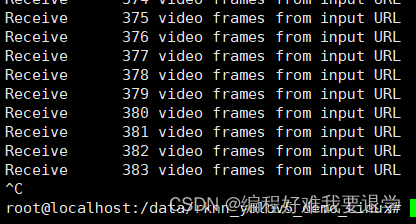
最终可得到如图所示的结果,表示编译运行成功。
运行时出现了Failed to resolve hostname …无法解析域名的错误。

解决方案:
有两种可能的原因,1.没有配置域名服务器114.114.114.114 。2.开发板没有网络。

案例源码:
#ifndef INT64_C
#define INT64_C(c) (c ## LL)
#define UINT64_C(c) (c ## ULL)
#endif

extern "C" {
	/*Include ffmpeg header file*/
#include <libavformat/avformat.h>
#include <libavcodec/avcodec.h>
#include <libswscale/swscale.h>

#include <libavutil/imgutils.h>
#include <libavutil/opt.h>
#include <libavutil/mathematics.h>
#include <libavutil/samplefmt.h>
}

#include <iostream>
using namespace std;

int main(void)
{
	AVFormatContext* ifmt_ctx = NULL, * ofmt_ctx = NULL;
	const char* in_filename, * out_filename;
	//in_filename = "rtsp://admin:WY@123456@192.168.0.64/h264/ch1/main/av_stream";
	in_filename="rtsp://wowzaec2demo.streamlock.net/vod/mp4:BigBuckBunny_115k.mp4";
	out_filename = "output.flv";

	avformat_network_init();

	AVDictionary* avdic = NULL;
	char option_key[] = "rtsp_transport";
	char option_value[] = "tcp";
	av_dict_set(&avdic, option_key, option_value, 0);
	char option_key2[] = "max_delay";
	char option_value2[] = "5000000";
	av_dict_set(&avdic, option_key2, option_value2, 0);

	AVPacket pkt;
	AVOutputFormat* ofmt = NULL;
	int video_index = -1;
	int frame_index = 0;

	int i;

	//打开输入流
	int ret;
	if ((ret = avformat_open_input(&ifmt_ctx, in_filename, 0, &avdic)) < 0)
	{
		cout<<"Could not open input file."<<endl;
		goto end;
	}
	if ((ret = avformat_find_stream_info(ifmt_ctx, 0)) < 0)
	{
		cout<<"Failed to retrieve input stream information"<<endl;
		goto end;
	}


	//nb_streams代表有几路流

	for (i = 0; i < ifmt_ctx->nb_streams; i++)
	{
		if (ifmt_ctx->streams[i]->codecpar->codec_type == AVMEDIA_TYPE_VIDEO)
		{
			//视频流
			video_index = i;
			cout << "get videostream." << endl;
			break;
		}
	}

	av_dump_format(ifmt_ctx, 0, in_filename, 0);

	//打开输出流
	avformat_alloc_output_context2(&ofmt_ctx, NULL, NULL, out_filename);

	if (!ofmt_ctx)
	{
		printf("Could not create output context\n");
		ret = AVERROR_UNKNOWN;
		goto end;
	}
	ofmt = ofmt_ctx->oformat;

	for (i = 0; i < ifmt_ctx->nb_streams; i++)
	{
		AVStream* in_stream = ifmt_ctx->streams[i];
		AVStream* out_stream = avformat_new_stream(ofmt_ctx, in_stream->codec->codec);

		if (!out_stream)
		{
			printf("Failed allocating output stream.\n");
			ret = AVERROR_UNKNOWN;
			goto end;
		}

		//将输出流的编码信息复制到输入流
		ret = avcodec_copy_context(out_stream->codec, in_stream->codec);
		if (ret < 0)
		{
			printf("Failed to copy context from input to output stream codec context\n");
			goto end;
		}

		out_stream->codec->codec_tag = 0;

		if (ofmt_ctx->oformat->flags & AVFMT_GLOBALHEADER)
			out_stream->codec->flags |= AV_CODEC_FLAG_GLOBAL_HEADER;

	}

	av_dump_format(ofmt_ctx, 0, out_filename, 1);

	if (!(ofmt->flags & AVFMT_NOFILE))
	{
		ret = avio_open(&ofmt_ctx->pb, out_filename, AVIO_FLAG_WRITE);
		if (ret < 0)
		{
			printf("Could not open output URL '%s'", out_filename);
			goto end;
		}
	}

	//写文件头到输出文件
	ret = avformat_write_header(ofmt_ctx, NULL);
	if (ret < 0)
	{
		printf("Error occured when opening output URL\n");
		goto end;
	}


	//while循环中持续获取数据包,不管音频视频都存入文件
	while (1)
	{
		AVStream* in_stream, * out_stream;
		//从输入流获取一个数据包
		ret = av_read_frame(ifmt_ctx, &pkt);
		if (ret < 0)
			break;

		in_stream = ifmt_ctx->streams[pkt.stream_index];
		out_stream = ofmt_ctx->streams[pkt.stream_index];
		//copy packet
		//转换 PTS/DTS 时序
		pkt.pts = av_rescale_q_rnd(pkt.pts, in_stream->time_base, out_stream->time_base, (enum AVRounding)(AV_ROUND_NEAR_INF | AV_ROUND_PASS_MINMAX));
		pkt.dts = av_rescale_q_rnd(pkt.dts, in_stream->time_base, out_stream->time_base, (enum AVRounding)(AV_ROUND_NEAR_INF | AV_ROUND_PASS_MINMAX));
		//printf("pts %d dts %d base %d\n",pkt.pts,pkt.dts, in_stream->time_base);
		pkt.duration = av_rescale_q(pkt.duration, in_stream->time_base, out_stream->time_base);
		pkt.pos = -1;

		//此while循环中并非所有packet都是视频帧,当收到视频帧时记录一下
		if (pkt.stream_index == video_index)
		{
			printf("Receive %8d video frames from input URL\n", frame_index);
			frame_index++;
		}

		//将包数据写入到文件。
		ret = av_interleaved_write_frame(ofmt_ctx, &pkt);
		if (ret < 0)
		{
			if (ret == -22) {
				continue;
			}
			else {
				printf("Error muxing packet.error code %d\n", ret);
				break;
			}

		}

		//av_free_packet(&pkt); //此句在新版本中已deprecated 由av_packet_unref代替
		av_packet_unref(&pkt);
	}


	//写文件尾
	av_write_trailer(ofmt_ctx);

end:
	av_dict_free(&avdic);
	avformat_close_input(&ifmt_ctx);
	//Close input
	if (ofmt_ctx && !(ofmt->flags & AVFMT_NOFILE))
		avio_close(ofmt_ctx->pb);
	avformat_free_context(ofmt_ctx);
	if (ret < 0 && ret != AVERROR_EOF)
	{
		cout<<"Error occured."<<endl;
		return -1;
	}

	return 0;
}
我不知道为什么,但是当我设置这个设置时它无法编译设置:static_cache_control,[:public,:max_age=>300]这是我得到的syntaxerror,unexpectedtASSOC,expecting']'(SyntaxError)set:static_cache_control,[:public,:max_age=>300]^我只想将“过期”header设置为css、javaascript和图像文件。谢谢。 最佳答案 我猜您使用的是Ruby1.8.7。Sinatra文档中显示的语法似乎是在Ruby1.
2022/8/4更新支持加入水印水印必须包含透明图像,并且水印图像大小要等于原图像的大小pythonconvert_image_to_video.py-f30-mwatermark.pngim_dirout.mkv2022/6/21更新让命令行参数更加易用新的命令行使用方法pythonconvert_image_to_video.py-f30im_dirout.mkvFFMPEG命令行转换一组JPG图像到视频时,是将这组图像视为MJPG流。我需要转换一组PNG图像到视频,FFMPEG就不认了。pyav内置了ffmpeg库,不需要系统带有ffmpeg工具因此我使用ffmpeg的python包装p
最近因为项目需要,需要将Android手机系统自带的某个系统软件反编译并更改里面某个资源,并重新打包,签名生成新的自定义的apk,下面我来介绍一下我的实现过程。APK修改,分为以下几步:反编译解包,修改,重打包,修改签名等步骤。安卓apk修改准备工作1.系统配置好JavaJDK环境变量2.需要root权限的手机(针对系统自带apk,其他软件免root)3.Auto-Sign签名工具4.apktool工具安卓apk修改开始反编译本文拿Android系统里面的Settings.apk做demo,具体如何将apk获取出来在此就不过多介绍了,直接进入主题:按键win+R输入cmd,打开命令窗口,并将路
我正在尝试使用以下代码通过将ffmpeg实用程序作为子进程运行并获取其输出并解析它来确定视频分辨率:IO.popen'ffmpeg-i'+path_to_filedo|ffmpegIO|#myparsegoeshereend...但是ffmpeg输出仍然连接到标准输出并且ffmepgIO.readlines是空的。ffmpeg实用程序是否需要一些特殊处理?或者还有其他方法可以获得ffmpeg输出吗?我在WinXP和FedoraLinux下测试了这段代码-结果是一样的。 最佳答案 要跟进mouviciel的评论,您需要使用类似pope
是否有适用于Ruby语言的.NETFramework编译器?我听说过DLR(动态语言运行时),这是否将使Ruby能够用于.NET开发? 最佳答案 IronRuby是Microsoft支持的项目,建立在动态语言运行时之上。 关于.net-是否有Ruby.NET编译器?,我们在StackOverflow上找到一个类似的问题: https://stackoverflow.com/questions/199638/
我给自己买了一个新的8gigUSBkey,我正在寻找一个合适的解决方案来拥有一个可移植RoR环境来学习。我在谷歌上搜索了一下,发现了一些可能性,但我很想听听一些现实生活中的经历和意见。谢谢! 最佳答案 我喜欢InstantRails,非常容易使用,无需安装程序,也不会修改您的系统环境。 关于ruby-on-rails-可移植RubyonRails环境,我们在StackOverflow上找到一个类似的问题: https://stackoverflow.com/q
关闭。这个问题是off-topic.它目前不接受答案。想改进这个问题吗?Updatethequestion所以它是on-topic用于堆栈溢出。关闭10年前。ImprovethisquestionLinux专家正在转向Mac(10.8)。因为我懒...我使用MacPorts安装MacVim。它似乎安装没有错误。我只需要mvim中的python、ruby和perl支持。$/opt/local/bin/mvim--version|egrep'patches|python|ruby|perl'Includedpatches:1-244,246-646+multi_lang-mzscheme+
当我刚刚运行middleman时服务,all.css编译得很好,只包含对+box-shadow(none)的调用:/*line1,/home/yang/asdf/source/stylesheets/content.css.sass*/div{-webkit-box-shadow:none;-moz-box-shadow:none;box-shadow:none;}但是当我构建网站时,我得到了这个Sass/Compass错误:$middlemanbuildSlim::EmbeddedEngineisdeprecated,itiscalledSlim::EmbeddedinSlim2.0
我知道Ruby是动态和强类型的,但据我所知,由于每个参数缺少显式类型表示法(或契约),当前语法不允许在编译时检查参数类型。如果我想执行编译时类型检查,我有哪些(实际成熟的)选项?更新我的意思是类型检查类似于典型的静态类型语言。比如C。例如,C函数表示每个参数的类型,编译器检查传入的参数是否正确。voidfunc1(structAAAaaa){structBBBbbb;func1(bbb);//Wrongtype.Compiletimeerror.}作为另一个例子,Objective-C通过放置显式类型信息来做到这一点。-(id)method1:(AAA*)aaa{BBB*bbb=[[A
关闭。这个问题是opinion-based.它目前不接受答案。想要改进这个问题?更新问题,以便editingthispost可以用事实和引用来回答它.关闭7年前。ImprovethisquestionC、Java、C#和Python都是从头编译的。感谢Facebook,PHP现在也可以编译并可以在HHVM上运行,从而提高程序的性能。Ruby不可编译并且比上述语言慢。Ruby有没有可能在未来被编译(就像PHP和HHVM一样)?或者可能有一些原因不能做到?
