文章目录
前置条件
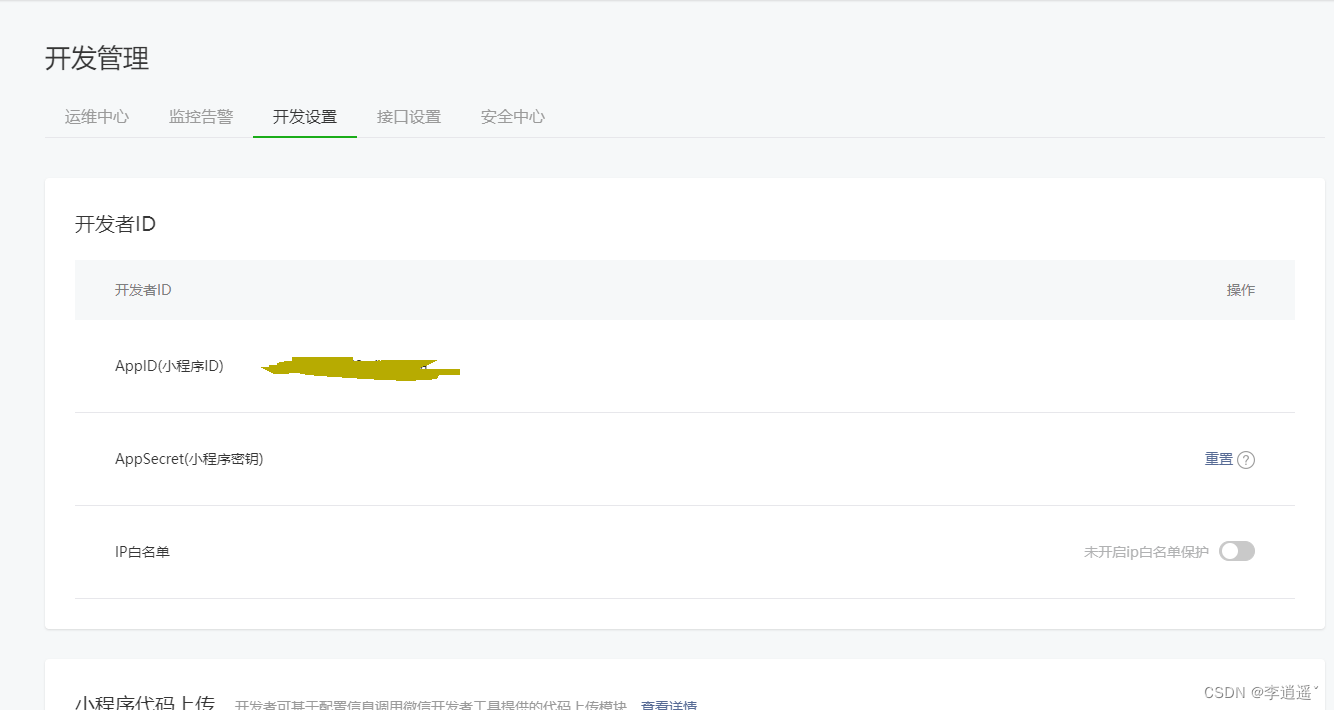
已开通微信应用(小程序),授权登录主要用到AppID(小程序ID)+AppSecret(小程序密钥)
        <dependency>
            <groupId>com.github.binarywang</groupId>
            <artifactId>weixin-java-miniapp</artifactId>
            <version>4.0.0</version>
        </dependency>
#微信配置
wx:
  pay:
    #微信公众号或者小程序等的appid
    app-id: xxxxxxxxxxxxxxxxxxxxxxxxx
    #应用密钥
    app-secret: xxxxxxxxxxxxxxxxxxxxxxxxx
import lombok.Data;
import org.springframework.boot.context.properties.ConfigurationProperties;
import org.springframework.context.annotation.Configuration;
import org.springframework.context.annotation.Primary;

@Data
@Configuration(proxyBeanMethods = false)
@ConfigurationProperties(prefix = "wx.pay")
@Primary //覆盖 当有多个这个的WxPayProperties实现类 注入这个
public class WeiXinProperties {

    /** appId : 微信公众号或者小程序等的appid */
    private String appId;
    /** appSecret : 应用密钥 */
    private String appSecret;
 }
import cn.binarywang.wx.miniapp.api.WxMaService;
import cn.binarywang.wx.miniapp.api.impl.WxMaServiceImpl;
import cn.binarywang.wx.miniapp.config.WxMaConfig;
import cn.binarywang.wx.miniapp.config.impl.WxMaDefaultConfigImpl;
import com.github.binarywang.wxpay.config.WxPayConfig;
import com.github.binarywang.wxpay.service.WxPayService;
import com.github.binarywang.wxpay.service.impl.WxPayServiceImpl;
import com.jiuren.common.utils.StringUtils;
import lombok.RequiredArgsConstructor;
import lombok.extern.slf4j.Slf4j;
import org.springframework.boot.autoconfigure.condition.ConditionalOnClass;
import org.springframework.boot.autoconfigure.condition.ConditionalOnMissingBean;
import org.springframework.boot.context.properties.EnableConfigurationProperties;
import org.springframework.context.annotation.Bean;
import org.springframework.context.annotation.Configuration;

/**
 * 支付配置
 * @author LWL
 * @date 2022-03-17
 */
@Slf4j
@Configuration
@ConditionalOnClass(WxPayService.class) //引入WxPayService这个类 下面两个才会实例化
@EnableConfigurationProperties(WeiXinProperties.class) //注入WxPayProperties类
@RequiredArgsConstructor
public class WxConfiguration {

    private final WeiXinProperties properties;

    /**
     *  获取小程序WxMaService
     * @return
     */
    @Bean
    @ConditionalOnMissingBean
    public WxMaService wxMaService() {
        //实例这个 WxMaConfig
        WxMaConfig wxMaConfig = new WxMaDefaultConfigImpl();
        ((WxMaDefaultConfigImpl) wxMaConfig).setAppid(StringUtils.trimToNull(this.properties.getAppId()));
        ((WxMaDefaultConfigImpl) wxMaConfig).setSecret(StringUtils.trimToNull(this.properties.getAppSecret()));
        WxMaService wxMaService = new WxMaServiceImpl();
        //设置配置文件
        wxMaService.setWxMaConfig(wxMaConfig);
        return wxMaService;
    }

}
微信授权入参对象
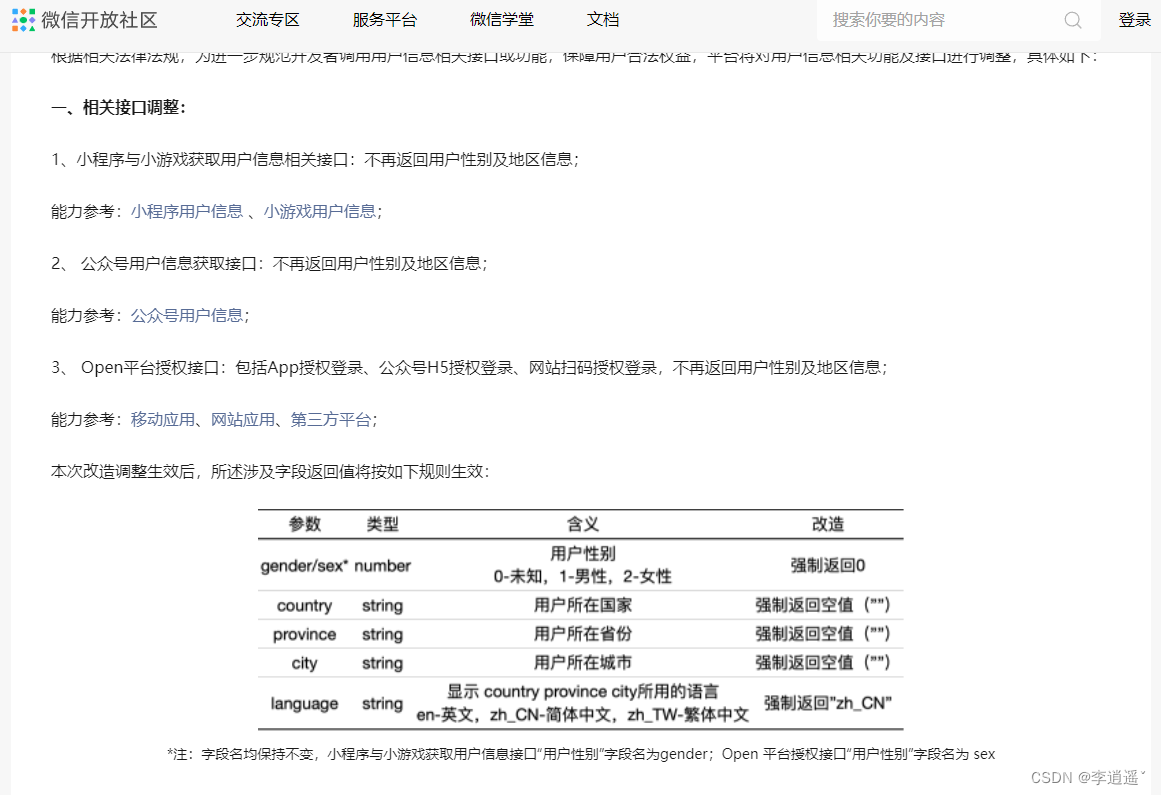
code、encryptedData、iv、nickName、avatar、gender这几个参数由前端调取wx.login和wx.getUserinfo获取
(现在微信获取用户信息不再返回性别和地址信息)
@Data
@ApiModel(value = "微信授权参数", description = "")
@AllArgsConstructor
@Builder
@NoArgsConstructor
public class WxLoginEntity implements Serializable {

    @ApiModelProperty(value = "用户登录凭证")
    private String code;

    @ApiModelProperty(value = "加密用户数据")
    private String encryptedData;

    @ApiModelProperty(value = "加密算法的初始向量")
    private String iv;

    @ApiModelProperty(value = "昵称")
    private String nickName;

    @ApiModelProperty(value = "头像")
    private String avatar;

    @ApiModelProperty(value = "openid")
    private String openId;

    @ApiModelProperty(value = "性别: 0:未知、1:男、2:女")
    private Integer gender;

    @ApiModelProperty(value = "手机号")
    private String phoneNumber;
}
实现方法
/**
     *  微信授权获取用户信息
     * @param entity
     * @return
     * @throws WxErrorException
     */
    public WxLoginEntity wxAuth(WxLoginEntity entity) throws WxErrorException {

        // 获取微信用户session
        WxMaJscode2SessionResult session = wxMaService.getUserService().getSessionInfo(entity.getCode());
        //ValidationUtill是我自己封装的参数验证判空的方法
        ValidationUtil.isNull(session,"获取微信Session失败");
        ValidationUtil.isNull(session.getOpenid(),"获取openid失败");


        // 解密手机号码信息
        WxMaPhoneNumberInfo wxMaPhoneNumberInfo = wxMaService.getUserService().getPhoneNoInfo(session.getSessionKey(),
                entity.getEncryptedData(), entity.getIv());
        if (wxMaPhoneNumberInfo == null || StringUtils.isEmpty(wxMaPhoneNumberInfo.getPhoneNumber())){
            throw new BadRequestException("获取用户手机号失败");
        }
        log.info(String.format("============用户登录注册获取微信用户信息===========> openId=%s, nickName=%s,phone=%s", session.getOpenid(), entity.getNickName(),wxMaPhoneNumberInfo.getPhoneNumber()));
        //封装返回用户信息
        WxLoginEntity wxLoginEntity = WxLoginEntity.builder()
                .avatar(entity.getAvatar())
                .nickName(entity.getNickName())
                .openId(session.getOpenid())
                .gender(Number.ZERO)
                .phoneNumber(wxMaPhoneNumberInfo.getPhoneNumber())
                .build();

        return wxLoginEntity;
    }
拿到微信授权信息和openid就可以实现自己的注册登录逻辑(用openid在数据库是否可以查询到用户:有-登录;没有-注册)
前置条件
已开通微信支付,主要用到商户号+商户秘钥+商户证书
weixin-java-pay 包含支付,退款,商家打款等操作
        <dependency>
            <groupId>com.github.binarywang</groupId>
            <artifactId>weixin-java-pay</artifactId>
            <version>4.0.0</version>
        </dependency>
#微信配置
wx:
  pay:
    #微信公众号或者小程序等的appid
    app-id: xxxxxxxxxxxxxxxxxx
    #应用密钥
    app-secret: xxxxxxxxxxxxxxxxxx
    #微信支付商户号
    mch-id: xxxxxxxxxxxxxxxxxx
    #微信支付商户密钥
    mch-key: xxxxxxxxxxxxxxxxxx
import com.jiuren.common.utils.FileUtil;
import lombok.Data;
import org.springframework.boot.context.properties.ConfigurationProperties;
import org.springframework.context.annotation.Configuration;
import org.springframework.context.annotation.Primary;

@Data
@Configuration(proxyBeanMethods = false)
@ConfigurationProperties(prefix = "wx.pay")
@Primary //覆盖 当有多个这个的WxPayProperties实现类 注入这个
public class WeiXinProperties {

    /** appId : 微信公众号或者小程序等的appid */
    private String appId;
    /** appSecret : 应用密钥 */
    private String appSecret;
    /** mchId : 微信支付商户号 */
    private String mchId;
    /** mchKey : 微信支付商户密钥 */
    private String mchKey;
	/** mchKey : 商户证书目录 */
    private String keyPath = FileUtil.getResourcesPath()+ "refund_certificate/apiclient_cert.p12";
}
    @Bean
    @ConditionalOnMissingBean
    public WxPayService wxPayService() {

        //实例payConfig 设置固定参数
        WxPayConfig payConfig = new WxPayConfig();
        payConfig.setAppId(StringUtils.trimToNull(this.properties.getAppId()));
        payConfig.setMchId(StringUtils.trimToNull(this.properties.getMchId()));
        payConfig.setMchKey(StringUtils.trimToNull(this.properties.getMchKey()));
//        payConfig.setSubAppId(StringUtils.trimToNull(this.properties.getSubAppId()));
//        payConfig.setSubMchId(StringUtils.trimToNull(this.properties.getSubMchId()));
        payConfig.setKeyPath(StringUtils.trimToNull(this.properties.getKeyPath()));

        // 可以指定是否使用沙箱环境
        payConfig.setUseSandboxEnv(false);

        WxPayService wxPayService = new WxPayServiceImpl();
        wxPayService.setConfig(payConfig);
        return wxPayService;
    }
	private final WxPayService wxPayService;

    public Object wxPay(WxPayEntity entity) {
        /**
         * 处理内部业务,校验订单等
         */
        final WxPayUnifiedOrderRequest wxPayUnifiedOrderRequest = WxPayUnifiedOrderRequest.newBuilder()
                //调起支付的人的 openId
                .openid("这里写openid")
                //订单编号
                .outTradeNo("自己生成的订单号")
                //小程序支付
                .tradeType(WxPayConstants.TradeType.JSAPI)
                //订单金额(单位是分)BaseWxPayRequest.yuanToFen()这个方法是将元转分
                .totalFee(BaseWxPayRequest.yuanToFen("这里写支付金额"))
                //商品描述
                .body("描述")
                //获取本地IP
                .spbillCreateIp("客户端ip")
                //回调的 URL 地址
                .notifyUrl("这里写支付成功后微信的微信接口")
                //过期时间 格式yyyyMMddHHmmss (一般设置个10分钟后)
                .timeExpire("支付过期时间"))
                //当前时间 格式yyyyMMddHHmmss
                .timeStart("当前时间")
                .build();
        wxPayUnifiedOrderRequest.setSignType(WxPayConstants.SignType.MD5);

        Object order = null;
        try {
            order = wxPayService.createOrder(wxPayUnifiedOrderRequest);
        } catch (WxPayException e) {
            throw new BadRequestException(e.getErrCodeDes());
        }
        return order;
    }
然后将微信返回的参数order返回给前端,由前端调起支付
用户支付成功后微信会回调我们写的回调接口,需要在回调接口写上处理订单的业务逻辑
    private final WxPayService wxPayService;

	@ApiOperation("微信支付回调接口")
    @RequestMapping(value = "/payNotify")
    public String payNotify(HttpServletRequest request) {
        try {
            String xmlResult = IOUtils.toString(request.getInputStream(), request.getCharacterEncoding());
            WxPayOrderNotifyResult notifyResult = wxPayService.parseOrderNotifyResult(xmlResult);
            //getOutTradeNo 自己生成的订单号
            String orderId = notifyResult.getOutTradeNo();
            //支付成功
            if("SUCCESS".equals(notifyResult.getResultCode())) {
                log.info("================>微信支付回调:订单号<{}>",orderId);
                //自己处理订单的业务逻辑,需要判断订单是否已经支付过,否则可能会重复调用

            }
            //必须要给微信返回回调成功状态,否则微信会一直回调
            return WxPayNotifyResponse.success("成功");
        } catch (Exception e) {
            log.error("微信回调结果异常,异常原因{}", e.getMessage());
            return WxPayNotifyResponse.success("code:"+9999+"微信回调结果异常,异常原因:"+e.getMessage());
        }
    }
依赖和配置参数在上面小程序支付。下面直接写实现方法
    private final WxPayService wxPayService;

	/**
     * 退款
     * @throws WxPayException
     */
    public void refundOrder(WxRefundEntity entity) {

        WxPayRefundRequest wxPayRefundRequest = WxPayRefundRequest.newBuilder()
                //订单总金额(分)
                .totalFee(BaseWxPayRequest.yuanToFen("支付的总金额"))
                //订单编号
                .outTradeNo("这个订单号是小程序支付的时候填写的订单号")
                //退款编号
                .outRefundNo("这个是退款的订单号")
                //退款金额(分)
                .refundFee(BaseWxPayRequest.yuanToFen("退款金额"))
                //回调接口
                .notifyUrl("微信退款成功后的回调接口")
                .build();

        try {
            wxPayService.refund(wxPayRefundRequest);
        } catch (WxPayException e) {
            throw new BadRequestException(e.getErrCodeDes());
        }
    }
退款不需要前端操作,到此退款已经申请完成。等待微信处理(一般也就是不到一分钟吧)
    private final WxPayService wxPayService;

    @ApiOperation("微信退款回调接口")
    @RequestMapping(value = "/refundNotify")
    public String refundNotify(HttpServletRequest request) {
        try {
            String xmlResult = IOUtils.toString(request.getInputStream(), request.getCharacterEncoding());
            WxPayRefundNotifyResult wxPayRefundNotifyResult = wxPayService.parseRefundNotifyResult(xmlResult);
            //小程序支付时的订单号(不是退款订单号)
            String outTradeNo = wxPayRefundNotifyResult.getReqInfo().getOutTradeNo();
            //退款金额
            Integer refundFee = wxPayRefundNotifyResult.getReqInfo().getRefundFee();
            //还有其他返回的参数从getReqInfo方法返回的ReqInfo这个对象中取,有退款订单号等等。

            //退款成功
            if("SUCCESS".equals(wxPayRefundNotifyResult.getReqInfo().getRefundStatus())) {
			//自己处理订单退款成功后的业务逻辑,需要判断该退款订单是否已经退款过,否则可能会重复调用

            }
			//必须要给微信返回回调成功状态,否则微信会一直回调
            return WxPayNotifyResponse.success("成功");
        } catch (Exception e) {
            log.error("微信回调结果异常,异常原因{}", e.getMessage());
            return WxPayNotifyResponse.success("code:"+9999+"微信回调结果异常,异常原因:"+e.getMessage());
        }
    }
前置条件
已开通微信商户,并且开通企业付款到零钱,主要用到商户号+商户秘钥+商户证书
依赖和配置参数在上面小程序支付。下面直接写实现方法
    private final WxPayService wxPayService;

	/**
     * 企业打款
     */
    public EntPayResult entPay(WxEntPayEntity entity) {

        EntPayRequest entPayRequest = EntPayRequest.newBuilder()
                .openid("openid")
                //商户订单号,需保持唯一性(只能是字母或者数字,不能包含有其它字符)
                .partnerTradeNo("自己生成一个提现订单号")
                //是否检验真实姓名  NO_CHECK:不校验真实姓名 FORCE_CHECK:强校验真实姓名
                .checkName("FORCE_CHECK")
                //收款用户真实姓名。如果check_name设置为FORCE_CHECK,则必填用户真实姓名 如需电子回单,需要传入收款用户姓名
                .reUserName("微信实名认证的真实姓名")
                //转账金额,单位为分
                .amount(BaseWxPayRequest.yuanToFen("提现金额"))
                //付款备注,必填。注意:备注中的敏感词会被转成字符*
                .description("备注")
                //该IP同在商户平台设置的IP白名单中的IP没有关联,该IP可传用户端或者服务端的IP。
                .spbillCreateIp("用户客户端ip"))
                .build();

        try {
            return wxPayService.getEntPayService().entPay(entPayRequest);
        } catch (WxPayException e) {
            throw new BadRequestException(e.getErrCodeDes());
        }
    }
//示例代码
wx.login({
  success (res) {
    if (res.code) {
      //发起网络请求
      wx.request({
        url: 'https://example.com/onLogin',
        data: {
          code: res.code
        }
      })
    } else {
      console.log('登录失败!' + res.errMsg)
    }
  }
})
注:临时登录凭证 code 只能使用一次,code生成以后5分钟失效
<button class="btn" wx:if="{{canIUseGetUserProfile}}" bindtap="getUserProfile"> 微信登录 </button>
//在JS中
 getUserProfile(e) {
    // 推荐使用wx.getUserProfile获取用户信息,开发者每次通过该接口获取用户个人信息均需用户确认
    // 开发者妥善保管用户快速填写的头像昵称,避免重复弹窗
    wx.getUserProfile({
      desc: '用于登录', // 声明获取用户个人信息后的用途,后续会展示在弹窗中,请谨慎填写
      success: (res) => {
        this.setData({
          userInfo: res.userInfo,
          hasUserInfo: true
        })

        // 4 授权成功后,发送用户信息(昵称+头像和code)给后端,返回完整的用户信息
        let session_id = wx.getStorageSync('sessionid');

        console.log("发起授权网络请求")
        wx.request({
          url: '后端登录接口',
          method: 'POST',
          data: {
            nickname: res.userInfo.nickName,
            avatar_url: res.userInfo.avatarUrl,
          },
          header: { 'content-type': 'application/x-www-form-urlencoded', 'Cookie': session_id ,
          'token': app.globalData.token},
          success (res) {
            if(res.data.code == 200) {
              wx.setStorageSync('isLogin', true)
              //把数据存在全局变量
              app.globalData.user = res.data.data
              //打印出来看看,确认已经头像和昵称已经有了
              console.log("app.globalData.user"+app.globalData.user)
              //跳转进入首页
              wx.switchTab({
                url:'/pages/index/index'
              })
            }
            else{
              console.log("res.data.code="+res.data.code)
            }
          },
          fail:function(err){
            console.log("跳转")
            console.log(err)
          },
          complete:function(){
            console.log("complete")
          }
        })
      }
    })
  },
<view class="tx-18" bindtap="postMoney">确认支付</view>
postMoney() { // 点击确认支付
    wx.showLoading({
      title: '加载中',
    })
    let that = this
    app.http.getData({ //第一步请求后台接口,获取发起支付所需要的数据
      amount: that.data.orderId // 我这里发起请求传过去的是订单编号
    }).then((res1) => {
            if (res1.code == 200) {
                wx.requestPayment({ // 这一步是调起微信支付
                  "appId": res1.appId,
                  "timeStamp": res1.timeStamp,
                  "nonceStr": res1.nonceStr,
                  "package": res1.package,
                  "signType": res1.signType,
                  "paySign": res1.paySign,
                  "success": function (res) {
                    wx.hideLoading({})
                    app.ShowToast('支付成功')
                  },
                  "fail": function (res) {
                    app.ShowToast('支付失败');
                  },
                  "complete": function (res) {
                    app.ShowToast('取消支付');
                  }
                })
            } else {
              wx.hideLoading({})
              app.ShowToast('支付失败')
            }
    })
  },
后端源码地址:https://gitee.com/ssoocc1995/wx_demo.git
我需要在客户计算机上运行Ruby应用程序。通常需要几天才能完成(复制大备份文件)。问题是如果启用sleep,它会中断应用程序。否则,计算机将持续运行数周,直到我下次访问为止。有什么方法可以防止执行期间休眠并让Windows在执行后休眠吗?欢迎任何疯狂的想法;-) 最佳答案 Here建议使用SetThreadExecutionStateWinAPI函数,使应用程序能够通知系统它正在使用中,从而防止系统在应用程序运行时进入休眠状态或关闭显示。像这样的东西:require'Win32API'ES_AWAYMODE_REQUIRED=0x0
Rackup通过Rack的默认处理程序成功运行任何Rack应用程序。例如:classRackAppdefcall(environment)['200',{'Content-Type'=>'text/html'},["Helloworld"]]endendrunRackApp.new但是当最后一行更改为使用Rack的内置CGI处理程序时,rackup给出“NoMethodErrorat/undefinedmethod`call'fornil:NilClass”:Rack::Handler::CGI.runRackApp.newRack的其他内置处理程序也提出了同样的反对意见。例如Rack
我想用ruby编写一个小的命令行实用程序并将其作为gem分发。我知道安装后,Guard、Sass和Thor等某些gem可以从命令行自行运行。为了让gem像二进制文件一样可用,我需要在我的gemspec中指定什么。 最佳答案 Gem::Specification.newdo|s|...s.executable='name_of_executable'...endhttp://docs.rubygems.org/read/chapter/20 关于ruby-在Ruby中编写命令行实用程序
我构建了两个需要相互通信和发送文件的Rails应用程序。例如,一个Rails应用程序会发送请求以查看其他应用程序数据库中的表。然后另一个应用程序将呈现该表的json并将其发回。我还希望一个应用程序将存储在其公共(public)目录中的文本文件发送到另一个应用程序的公共(public)目录。我从来没有做过这样的事情,所以我什至不知道从哪里开始。任何帮助,将不胜感激。谢谢! 最佳答案 无论Rails是什么,几乎所有Web应用程序都有您的要求,大多数现代Web应用程序都需要相互通信。但是有一个小小的理解需要你坚持下去,网站不应直接访问彼此
我尝试运行2.x应用程序。我使用rvm并为此应用程序设置其他版本的ruby:$rvmuseree-1.8.7-head我尝试运行服务器,然后出现很多错误:$script/serverNOTE:Gem.source_indexisdeprecated,useSpecification.Itwillberemovedonorafter2011-11-01.Gem.source_indexcalledfrom/Users/serg/rails_projects_terminal/work_proj/spohelp/config/../vendor/rails/railties/lib/r
刚入门rails,开始慢慢理解。有人可以解释或给我一些关于在application_controller中编码的好处或时间和原因的想法吗?有哪些用例。您如何为Rails应用程序使用应用程序Controller?我不想在那里放太多代码,因为据我了解,每个请求都会调用此Controller。这是真的? 最佳答案 ApplicationController实际上是您应用程序中的每个其他Controller都将从中继承的类(尽管这不是强制性的)。我同意不要用太多代码弄乱它并保持干净整洁的态度,尽管在某些情况下ApplicationContr
我发现ActiveRecord::Base.transaction在复杂方法中非常有效。我想知道是否可以在如下事务中从AWSS3上传/删除文件:S3Object.transactiondo#writeintofiles#raiseanexceptionend引发异常后,每个操作都应在S3上回滚。S3Object这可能吗?? 最佳答案 虽然S3API具有批量删除功能,但它不支持事务,因为每个删除操作都可以独立于其他操作成功/失败。该API不提供任何批量上传功能(通过PUT或POST),因此每个上传操作都是通过一个独立的API调用完成的
我是一个Rails初学者,但我想从我的RailsView(html.haml文件)中查看Ruby变量的内容。我试图在ruby中打印出变量(认为它会在终端中出现),但没有得到任何结果。有什么建议吗?我知道Rails调试器,但更喜欢使用inspect来打印我的变量。 最佳答案 您可以在View中使用puts方法将信息输出到服务器控制台。您应该能够在View中的任何位置使用Haml执行以下操作:-puts@my_variable.inspect 关于ruby-on-rails-如何在我的R
我有一个用户工厂。我希望默认情况下确认用户。但是鉴于unconfirmed特征,我不希望它们被确认。虽然我有一个基于实现细节而不是抽象的工作实现,但我想知道如何正确地做到这一点。factory:userdoafter(:create)do|user,evaluator|#unwantedimplementationdetailshereunlessFactoryGirl.factories[:user].defined_traits.map(&:name).include?(:unconfirmed)user.confirm!endendtrait:unconfirmeddoenden
如何检查Ruby文件是否是通过“require”或“load”导入的,而不是简单地从命令行执行的?例如:foo.rb的内容:puts"Hello"bar.rb的内容require'foo'输出:$./foo.rbHello$./bar.rbHello基本上,我想调用bar.rb以不执行puts调用。 最佳答案 将foo.rb改为:if__FILE__==$0puts"Hello"end检查__FILE__-当前ruby文件的名称-与$0-正在运行的脚本的名称。 关于ruby-检查是否