$ python django-admin startproject mysite
mysite/               # 项目容器、可任意命名
    manage.py         # 命令行工具
    mysite/           # 纯 Python 包 # 你引用任何东西都要用到它
        __init__.py   # 空文件 告诉Python这个目录是Python包
        settings.py   # Django 项目配置文件
        urls.py       # URL 声明  # 就像网站目录
        asgi.py       # 部署时用的配置 # 运行在ASGI兼容的Web服务器上的 入口
        wsgi.py       # 部署时用的配置 # 运行在WSGI兼容的Web服务器上的
$ python mangae.py makemigrations

$ python manage.py migrate
用于开发使用,Django 在网络框架方面很NB, 但在网络服务器方面不行~
专业的事让专业的程序做嘛,最后部署到 Nginx Apache 等专业网络服务器上就行啦。
自动重启服务器
对每次访问请求、重新载入一遍 Python 代码
新添加文件等一些操作 不会触发重启
命令
$ python manage.py runserver
E:\PYTHON\0CODE\mysite>
E:\PYTHON\0CODE\mysite>python manage.py runserver
Watching for file changes with StatReloader
Performing system checks...

System check identified no issues (0 silenced).
June 29, 2022 - 22:35:10
Django version 4.0.5, using settings 'mysite.settings'
Starting development server at http://127.0.0.1:8000/
Quit the server with CTRL-BREAK.
指定端口
$ python manage.py runserver 8080
$ python manage.py startapp polls
polls/
    __init__.py
    admin.py
    apps.py
    migrations/
        __init__.py
    models.py
    tests.py
    views.py
# polls/views.py

from django.shortcuts import render

# Create your views here.

from django.http import HttpRespose


def index(rquest):

    return HttpResponse("投票应用 -首页")
配置路由
# polls/urls.py  子应用路由

from django.urls import path

from . import views

urlpatterns = [
    path('', views.index, name='index'),
]
# mysite/urls.py  全局路由 include()即插即用

from django.contrib import admin
from django.urls import include, path

urlpatterns = [
    path('polls/', include('polls.urls')),
    path('admin/', admin.site.urls),
]
效果
path('', views.index, name='index'),
path('polls/', include('polls.urls'))
route 路径
一个匹配URL的规则,类似正则表达式。不匹配GET、POST传参 、域名
view 视图函数
Django 调用这个函数,默认传给函数一个 HttpRequest 参数
kwargs 视图函数参数
字典格式
name 给这条URL取一个温暖的名子~
可以在 Django 的任意地方唯一的引用。允许你只改一个文件就能全局地修改某个 URL 模式。
时区和语言
# mysite/mysite/settings.py

# Internationalization
# https://docs.djangoproject.com/en/4.0/topics/i18n/

LANGUAGE_CODE = 'zh-hans'   # 'en-us'

TIME_ZONE = 'UTC'

USE_I18N = True

USE_TZ = True
为啥要在数据库之前?
配置时区,数据库可以以此做相应配置。比如时间的存放是以UTC还是本地时间...
# mysite/mysite/settings.py

# Database
# https://docs.djangoproject.com/en/4.0/ref/settings/#databases

DATABASES = {
    'default': {
        'ENGINE': 'django.db.backends.sqlite3',
        'NAME': BASE_DIR / 'db.sqlite3',
    }
}
python manage.py migrate
编写
# mysite/polls/models.py

from django.db import models


class Question(models.Model):
    question_text = models.CharField(max_length=200)
    pub_date = models.DateTimeField('date published')


class Choice(models.Model):
    question = models.ForeignKey(Question, on_delete=models.CASCADE)
    choice_text = models.CharField(max_length=200)
    votes = models.IntegerField(default=0)
很多数据库的知识 都可以用到里面
Question Choice 类都是基于models.Model, 是它的子类。
类的属性--------表的字段
类名-----------表名
还有pub_date on_delete=models.CASCAD 级联删除, pub_date 的字段描述, vo tes的默认值, 都和数据库很像。
而且max_length这个个字段,让Django可以在前端自动校验我们的数据
把配置注册到项目
# mysite/mysite/settings.py

# Application definition

INSTALLED_APPS = [
    'polls.apps.PollsConfig',

    'django.contrib.admin',
    'django.contrib.auth',
    'django.contrib.contenttypes',
    'django.contrib.sessions',
    'django.contrib.messages',
    'django.contrib.staticfiles',
]
做迁移-
仅仅把模型的配置信息转化成 Sql 语言
(venv) E:\PYTHON\0CODE\mysite>python manage.py makemigrations polls
Migrations for 'polls':
  polls\migrations\0001_initial.py
    - Create model Question
    - Create model Choice
查看 Sql 语言 (对应我们配的 Sqlite 数据库的语法)
(venv) E:\PYTHON\0CODE\mysite>python manage.py sqlmigrate polls 0001
BEGIN;
--
  -- Create model Question
  --

  CREATE TABLE "polls_question" ("id" integer NOT NULL PRIMARY KEY AUTOINCREMENT, "question_text" varchar(200) NOT NULL, "pub_data" datetime NOT NULL
);
--
  -- Create model Choice
  --

  CREATE TABLE "polls_choice" ("id" integer NOT NULL PRIMARY KEY AUTOINCREMENT, "choice_text" varchar(200) NOT NULL, "votes" integer NOT NULL, "quest
ion_id" bigint NOT NULL REFERENCES "polls_question" ("id") DEFERRABLE INITIALLY DEFERRED);
CREATE INDEX "polls_choice_question_id_c5b4b260" ON "polls_choice" ("question_id");
COMMIT;
(venv) E:\PYTHON\0CODE\mysite>python manage.py migrate
Operations to perform:
  Apply all migrations: admin, auth, contenttypes, polls, sessions
Running migrations:
  Applying polls.0001_initial... OK

(venv) E:\PYTHON\0CODE\mysite>
python manage.py shell
- (venv) E:\PYTHON\0CODE\mysite>python manage.py shell
Python 3.9.1 (tags/v3.9.1:1e5d33e, Dec  7 2020, 17:08:21) [MSC v.1927 64 bit (AMD64)] on win32
Type "help", "copyright", "credits" or "license" for more information.
(InteractiveConsole)
>>>
>>> from polls.models import Question, Choice
>>> from django.utils import timezone
>>>
>>> q = Question( question_text = "what's up ?", pub_date=timezone.now() )
>>>
>>> q.save()
>>>
>>> q.id
1
>>> q.question_text
"what's up ?"
>>>
>>> q.pub_date
datetime.datetime(2022, 7, 6, 5, 46, 10, 997140, tzinfo=datetime.timezone.utc)
>>>
>>> q.question_text = 'are you kidding me ?'
>>> q.save()
>>>
>>> q.question_text
'are you kidding me ?'
>>>

>>>
>>>
>>> Question.objects.all()
<QuerySet [<Question: Question object (1)>]>
>>>
>>>
下面写点更人性化的方法
__str__方法
默认打印自己的text字段,便于查看
后台展示对象数据也会用这个字段
class Question(models.Model):
    ...

    def __str__(self):
        return self.question_text


class Choice(models.Model):
    ...

    def __str__(self):
        return self.choice_text
class Question(models.Model):
    ...

    def was_published_recently(self):
        return self.pub_date >= timezone.now()-datetime.timedelta(days=1)
__str__方法效果
(venv) E:\PYTHON\0CODE\mysite>python manage.py shell
Python 3.9.1 (tags/v3.9.1:1e5d33e, Dec  7 2020, 17:08:21) [MSC v.1927 64 bit (AMD64)] on win32
Type "help", "copyright", "credits" or "license" for more information.
(InteractiveConsole)
>>>
>>> from polls.models import Question, Choice
>>>
>>> Question.objects.all()
<QuerySet [<Question: are you kidding me ?>]>
>>>
>>> Question.objects.filter(id=1)
<QuerySet [<Question: are you kidding me ?>]>
>>>
按属性查
>>>
>>> Question.objects.filter(question_text__startswith='are')
<QuerySet [<Question: are you kidding me ?>]>
>>>


>>> from django.utils import timezone
>>>
>>> current_year = timezone.now().year
>>> Question.objects.get(pub_date__year=current_year)
<Question: are you kidding me ?>
>>>


>>> Question.objects.get(id=2)
Traceback (most recent call last):
  File "<console>", line 1, in <module>
  File "E:\PYTHON\0CODE\StudyBuddy\venv\lib\site-packages\django\db\models\manager.py", line 85, in manager_method
    return getattr(self.get_queryset(), name)(*args, **kwargs)
  File "E:\PYTHON\0CODE\StudyBuddy\venv\lib\site-packages\django\db\models\query.py", line 496, in get
    raise self.model.DoesNotExist(
polls.models.Question.DoesNotExist: Question matching query does not exist.
>>>
>>>
更多操作
用pk找更保险一些,有的model 不以id 为主键
>>> Question.objects.get(pk=1)
<Question: are you kidding me ?>
>>>
# 自定义查找条件
>>> q = Question.objects.get(pk=1)
>>> q.was_published_recently()
True
>>>

# 安主键获取对象
>>> q = Question.objects.get(pk=1)
>>> q.choice_set.all()
<QuerySet []>
>>>

# 增  问题对象关系到选项对象
>>> q.choice_set.create(choice_text='Not much', votes=0)
<Choice: Not much>
>>>
>>> q.choice_set.create(choice_text='The sky', votes=0)
<Choice: The sky>
>>>
>>> q.choice_st.create(choice_text='Just hacking agin', votes=0)
Traceback (most recent call last):
  File "<console>", line 1, in <module>
AttributeError: 'Question' object has no attribute 'choice_st'
>>>
>>> q.choice_set.create(choice_text='Just hacking agin', votes=0)
<Choice: Just hacking agin>
>>>
>>>
>>> c = q.choice_set.create(choic_text='Oh my god.', votes=0)
Traceback (most recent call last):
  File "<console>", line 1, in <module>
  File "E:\PYTHON\0CODE\StudyBuddy\venv\lib\site-packages\django\db\models\fields\related_descriptors.py", line 747, in create
    return super(RelatedManager, self.db_manager(db)).create(**kwargs)
  File "E:\PYTHON\0CODE\StudyBuddy\venv\lib\site-packages\django\db\models\manager.py", line 85, in manager_method
    return getattr(self.get_queryset(), name)(*args, **kwargs)
  File "E:\PYTHON\0CODE\StudyBuddy\venv\lib\site-packages\django\db\models\query.py", line 512, in create
    obj = self.model(**kwargs)
  File "E:\PYTHON\0CODE\StudyBuddy\venv\lib\site-packages\django\db\models\base.py", line 559, in __init__
    raise TypeError(
TypeError: Choice() got an unexpected keyword argument 'choic_text'
>>>


# 选项 关系 到问题
>>> c = q.choice_set.create(choice_text='Oh my god.', votes=0)
>>>
>>> c.question
<Question: are you kidding me ?>
>>>
>>> q.choice_set.all()
<QuerySet [<Choice: Not much>, <Choice: The sky>, <Choice: Just hacking agin>, <Choice: Oh my god.>]>
>>>
>>>
>>> q.choice_set.count()
4
>>>
>>> Choice.objects.filter(question__pub_date__year=current_year)
<QuerySet [<Choice: Not much>, <Choice: The sky>, <Choice: Just hacking agin>, <Choice: Oh my god.>]>
>>>
>>>
删
>>> c = q.choice_set.filter(choice_text__startswith='Just hacking')
>>> c.delete()
(1, {'polls.Choice': 1})
>>>
>>> q.choice_set.all()
<QuerySet [<Choice: Not much>, <Choice: The sky>, <Choice: Oh my god.>]>
>>>
>>>
(venv) E:\PYTHON\0CODE\mysite>python manage.py createsuperuser


用户名: admin
电子邮件地址: admin@qq.com
Password:
Password (again):
密码长度太短。密码必须包含至少 8 个字符。
这个密码太常见了。
Bypass password validation and create user anyway? [y/N]: y
Superuser created successfully.
python manage.py runserver
http://localhost:8000/admin/
# mysite/polls/admin.py


from .models import Question, Choice

admin.site.register(Question)
admin.site.register(Choice)
# polls/views.py

...

def detail(request, question_id):

    return HttpResponse(f"当前问题id:{question_id}")


def results(request, question_id):

    return HttpResponse(f"问题id:{question_id}的投票结果")


def vote(request, question_id):

    return HttpResponse(f"给问题id:{question_id}投票")
urlpatterns = [
    path('admin/', admin.site.urls),
    path('polls/', include('polls.urls')),

]
# polls/urls.py

from django.urls import path

from . import views

urlpatterns = [
    path('', views.index, name='index'),

    path('<int:question_id>/', views.detail, name='detail'),

    path('<int:question_id>/results/', views.results, name='results'),

    path('<int:question_id>/vote/', views.vote, name='vote'),
]
path 里的参数很敏感 结尾含/ 的访问时也必须含 / 否则404




以 /polls/1/ 为例分析匹配过程
ROOT_URLCONF = 'mysite.urls'polls.urls编写视图
def index(request):
    latest_question_list = Question.objects.order_by('-pub_date')[:5]
    output = ','.join([q.question_text for q  in latest_question_list])

    return HttpResponse(output)
好吧,总共就一个

加点

这里直接把页面内容,写到了视图函数里,写死的。很不方便,下面用模板文件来处理这个问题
polls/templates/polls/
# polls/templates/polls/index.html

{% if latest_question_list %}
  <ul>
    {% for question in latest_question_list %}
        <li>
          <a href="/polls/{{ question.id }}/">{{question.question_text}}</a>
        </li>
    {% endfor %}
  </ul>
{% else %}
    <p>暂时没有开放的投票。</p>
{% endif %}
修改视图函数
这里函数载入index.html模本,还传给他一个上下文字典context,字典把模板里的变量映射成了Python 对象
# polls/views.py

...
from django.template import loader


def index(request):
    latest_question_list = Question.objects.order_by('-pub_date')[:5]

    template = loader.get_template('polls/index.html')
    context = {
        'latest_question_list': latest_question_list,
    }

    return HttpResponse(template.render(context, request))

...
效果

快捷函数 render()
上面的视图函数用法很普遍,有种更简便的函数替代这一过程
# polls/views.py
...
from django.template import loader

import django.shortcuts import render

def index(request):
    latest_question_list = Question.objects.order_by('-pub_date')[:5]

    #template = loader.get_template('polls/index.html')
    context = {
        'latest_question_list': latest_question_list,
    }

    #return HttpResponse(template.render(context, request))
    return render(request, 'polls/index.html', context)

...
修改 detail 视图函数
# polls/views.py

...

def detail(request, question_id):
    try:
        question = Question.objects.get(pk=question_id)

    except:
        raise Http404("问题不存在 !")

    # return HttpResponse(f"当前问题id:{question_id}")
    return render(request, 'polls/detail.html', {'question': question})
编写模板
# polls/templates/polls/detail.html


{{ question }}
效果
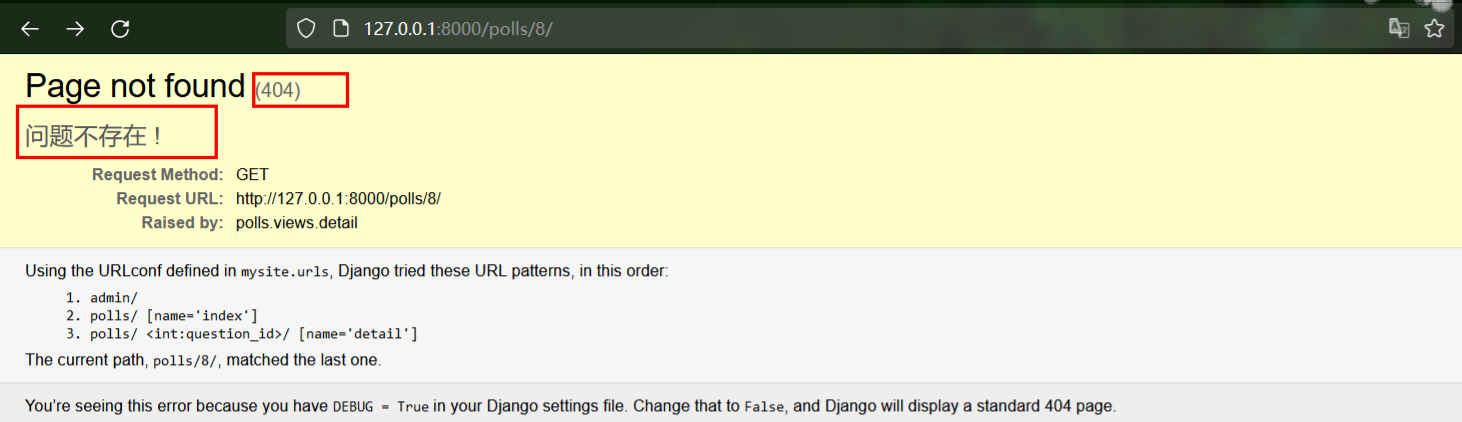
快捷函数 get_object_or_404()
# polls/views.py
from django.shortcuts import render, get_object_or_404

...

def detail(request, question_id):

    question = get_object_or_404(Question, pk=question_id)
    return render(request, 'polls/detail.html', {'question': question})
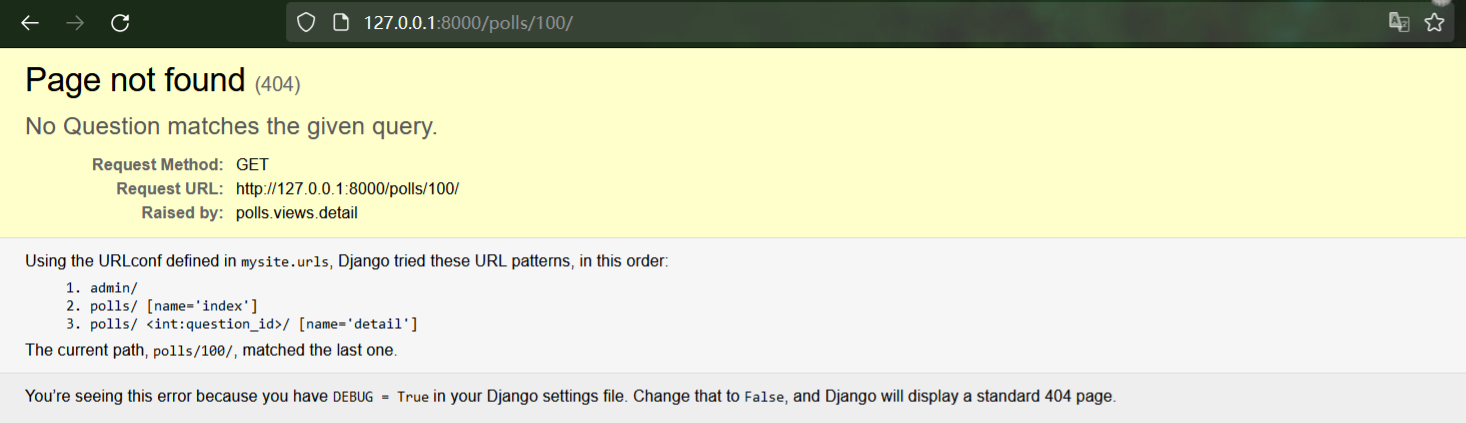
模板系统用.来访问变量属性
如question.question_text先对question用字典查找nobj.get(str)------>属性查找obj.str---------->列表查找obj[int]当然在第二步就成功的获取了question_text属性,不在继续进行。
其中 question.choice_set.all解释为Python代码question.choice_set.all()
# polls/templates/polls/detail.html

<h1>{{ question.question_text }}</h1>
<ul>
    {% for choice in question.choice_set.all %}
        <li>{{ choice.choice_text }}</li>
    {% endfor %}
</ul>

# polls/urls.py

path('<int:question_id>/', views.detail, name='detail'),
# polls/templates/polls/index.html

<!--<li>-->
<!--       <a href="/polls/{{ question.id }}/">{{question.question_text}}</a>-->
<!--</li>-->

<li>
       <a href="{% url 'detail' question.id %}">{{question.question_text}}</a>
</li>
简单明了 书写方便
我们修改.html 的真实位置后, 只需在urls.py 同步修改一条记录, 就会在所有模板文件的无数个连接中生效
大大的节省时间
为什么?
上面去除硬链接方便了我们。我们只有1个应用polls有自己的detail.html模板,但有多个应用同时有名字为detail.html的模板时呢?
Django看到{% url %} 咋知道是哪个应用呢?
怎么加 ?
# polls/urls.py

app_name = 'polls'

...
修改.html模板文件
# polls/templates/polls/index.html

<!--<li>-->
<!--       <a href="/polls/{{ question.id }}/">{{question.question_text}}</a>-->
<!--</li>-->

<!--<li>-->
<!--       <a href="{% url 'detail' question.id %}">{{question.question_text}}</a>-->
<!--</li>-->

<li>
       <a href="{% url 'polls:detail' question.id %}">{{question.question_text}}</a>
</li>
# polls/templates/polls/detail.html

{#<h1>{{ question.question_text }}</h1>#}
{#<ul>#}
{#    {% for choice in question.choice_set.all %}#}
{#        <li>{{ choice.choice_text }}</li>#}
{#    {% endfor %}#}
{#</ul>#}


<form action="{% url 'polls:vote' question.id %}" method="post">
    {% csrf_token %}
    <fieldset>

        ...

    </fieldset>
    <input type="submit" value="投票">
</form>
# polls/templates/polls/detail.html


<form action="{% url 'polls:vote' question.id %}" method="post">
    {% csrf_token %}
    <fieldset>

        <legend><h1>{{ question.question_text }}</h1></legend>

        {% if error_message  %}
            <strong><p>{{ error_message }}</p></strong>
        {% endif %}

        {% for choice in question.choice_set.all %}
            <input type="radio" name="choice" id="choice{{ forloop.counter }}" value="{{ choice.id }}">
            <label for="choice{{ forloop.counter }}">{{ choice.choice_text }}</label>
        {% endfor %}

    </fieldset>
    <input type="submit" value="投票">
</form>
# polls/urls.py

path('<int:question_id>/vote/', views.vote, name='vote'),
# polls/views.py

# ...

from django.http import HttpResponseRedirect
from django.urls import reverse

# ...


# def vote(request, question_id):
#     return HttpResponse(f"给问题id:{question_id}投票")

def vote(request, question_id):
    question = get_object_or_404(Question, pk=question_id)
    try:
        selected_choice = question.choice_set.get(pk=request.POST['choice'])
    except (KeyError, Choice.DoesNotExist):
        return render(request, 'polls/detail.html', {
            'question': question,
            'error_message': "选择为空, 无法提交 !"
        })
    else:
        selected_choice.votes += 1
        selected_choice.save()
        # 重定向到其他页面 防止误触重复投票
        return HttpResponse(reverse('polls:results', args=(question.id, )))
# polls/views.py

from django.shortcuts import get_object_or_404, render


def results(request, question_id):
    question = get_object_or_404(Question, pk=question_id)
    return render(request, 'polls/results.html', {'question': question})
新建文件
# polls/templates/polls/results.html

<h1>{{ question.question_text }}</h1>

<ul>
    {% for choice in question.choice_set.all %}
        <li>{{ choice.choice_text }} -- {{ choice.votes }} vote {{ choice.votes|pluralize }}</li>
    {% endfor %}
</ul>

<a href="{% url 'polls:detail' question.id %}">继续投票</a>
# mysite/polls/urls.py

from django.urls import path

from . import views

app_name = 'polls'

# urlpatterns = [
#
#     path('', views.index, name='index'),
#
#     path('<int:question_id>/', views.detail, name='detail'),
#
#     path('<int:question_id>/results/', views.results, name='results'),
#
#     path('<int:question_id>/vote/', views.vote, name='vote'),
#
#
# ]

urlpatterns = [
    path('', views.IndexView.as_view(), name='index'),
    path('<int:pk>/', views.DeatilView.as_view(), name='detail'),
    path('<int:pl>/results/', views.ResultsViews.as_view(), name='results'),
    path('<int:question_id>/vote/', views.vote, name='vote')
]
ListView 和 DetailView 。这两个视图分别抽象“显示一个对象列表”和“显示一个特定类型对象的详细信息页面”这两种概念。
每个通用视图需要知道它将作用于哪个模型。 这由 model 属性提供。
template_name 属性是用来告诉 Django 使用一个指定的模板名字,而不是自动生成的默认名字。
自动生成的 context 变量是 question_list。为了覆盖这个行为,我们提供 context_object_name 属性,表示我们想使用 latest_question_list。作为一种替换方案,
# polls/views.py

from django.urls import reverse
# ...

# def index(request):
#     latest_question_list = Question.objects.order_by('-pub_date')[:5]
#
#     template = loader.get_template('polls/index.html')
#     context = {
#         'latest_question_list': latest_question_list,
#     }
#
#     return HttpResponse(template.render(context, request))

# 用Django 通用视图 重写index, detail, results视图


class IndexView(generic.ListView):
    template_name = 'polls/index.html'
    context_object_name = 'latest_question_list'

    def get_queryset(self):
        """返回最近的 5 个投票问题"""
        return Question.objects.order_by('-pub_date')[:5]


class DetailView(generic.DetailView):
    model = Question
    template_name = 'polls/detail.html'


class ResultsView(generic.DetailView):
    model = Question
    template_name = 'polls/detail.html'


# def detail(request, question_id):
#     # try:
#     #     question = Question.objects.get(pk=question_id)
#     #
#     # except:
#     #     raise Http404("问题不存在 !")
#
#     # return HttpResponse(f"当前问题id:{question_id}")
#
#     question = get_object_or_404(Question, pk=question_id)
#     return render(request, 'polls/detail.html', {'question': question})
#
#
# # def results(request, question_id):
# #     return HttpResponse(f"问题id:{question_id}的投票结果")
#
# def results(request, question_id):
#     question = get_object_or_404(Question, pk=question_id)
#     return render(request, 'polls/results.html', {'question': question})


# def vote(request, question_id):
#     return HttpResponse(f"给问题id:{question_id}投票")
当设定发布时间为很远的未来的时间时,函数.was_published_recently()竟然返回True
$ python manage.py shell

>>> import datetime
>>> from django.utils import timezone
>>> from polls.models import Question
>>> # create a Question instance with pub_date 30 days in the future
>>> future_question = Question(pub_date=timezone.now() + datetime.timedelta(days=30))
>>> # was it published recently?
>>> future_question.was_published_recently()
True
针对上面的bug写个脚本,用来测试这个bug
# polls/tests.py

import datetime

from django.test import TestCase
from django.utils import timezone

from .models import Question


class QuestionModelTests(TestCase):

    def test_was_published_recently_with_future_question(self):
        """
        was_published_recently() returns False for questions whose pub_date
        is in the future.
        """
        time = timezone.now() + datetime.timedelta(days=30)
        future_question = Question(pub_date=time)
        self.assertIs(future_question.was_published_recently(), False)
我们创建了一个 django.test.TestCase 的子类,并添加了一个方法,此方法创建一个 pub_date 时未来某天的 Question 实例。然后检查它的 was_published_recently() 方法的返回值——它 应该 是 False。
# python manage.py test polls
(venv) E:\PYTHON\0CODE\mysite>
(venv) E:\PYTHON\0CODE\mysite>python manage.py test polls
Found 1 test(s).
Creating test database for alias 'default'...
System check identified no issues (0 silenced).
E
======================================================================
ERROR: test_was_published_recently_with_future_questsion (polls.tests.QuestionModelTests)
当日期为 未来 时间时 was_published_recently() 应该返回 False
----------------------------------------------------------------------
Traceback (most recent call last):
  File "E:\PYTHON\0CODE\mysite\polls\tests.py", line 16, in test_was_published_recently_with_future_questsion
    time = timezone.now() + datetime.timedelta(day=30)
TypeError: 'day' is an invalid keyword argument for __new__()

----------------------------------------------------------------------
Ran 1 test in 0.001s

FAILED (errors=1)
Destroying test database for alias 'default'...

(venv) E:\PYTHON\0CODE\mysite>
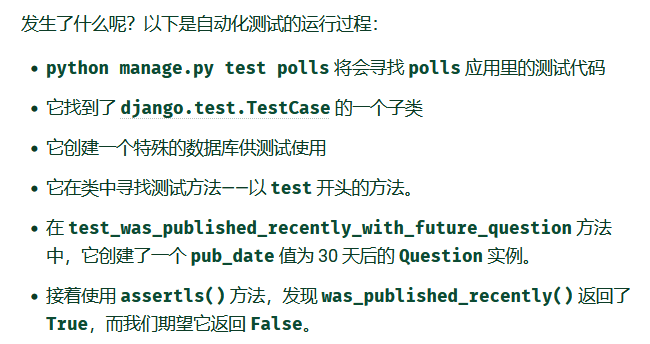
限制下界为当前
# mysite/polls/models.py

#...

class Question(models.Model):
    question_text = models.CharField(max_length=200)
    pub_date = models.DateTimeField('date published')

    def __str__(self):
        return self.question_text

    # def was_published_recently(self):
    #
    #     return self.pub_date >= timezone.now()-datetime.timedelta(days=1)
    def was_published_recently(self):
        now = timezone.now()
        # 发布时间比现在小 比一天之前大 (即最近一天发布)
        return now - datetime.timedelta(days=1) <= self.pub_date <= now

#...
测试其他时间段情况
class QuestionModelTests(TestCase):

    def test_was_published_recently_with_future_question(self):
        """
        当日期为 未来 时间时 was_published_recently() 应该返回 False
        """
        time = timezone.now() + datetime.timedelta(days=30)
        future_question = Question(pub_date=time)
        self.assertIs(future_question.was_published_recently(), False)

    def test_was_published_recently_with_recent_question(self):
        """
        当日期为 最近 时间时 was_published_recently() 应该返回 False
        """
        time = timezone.now() - datetime.timedelta(hours=23, minutes=59, seconds=59)
        future_question = Question(pub_date=time)
        self.assertIs(future_question.was_published_recently(), True)

    def test_was_published_recently_with_old_question(self):
        """
        当日期为 过去(至少一天前) 时间时 was_published_recently() 应该返回 False
        """
        time = timezone.now() + datetime.timedelta(days=1, seconds=1)
        future_question = Question(pub_date=time)
        self.assertIs(future_question.was_published_recently(), False)
运行
Microsoft Windows [版本 10.0.22000.978]
(c) Microsoft Corporation。保留所有权利。
(venv) E:\PYTHON\0CODE\mysite>python manage.py polls test
Unknown command: 'polls'
Type 'manage.py help' for usage.

(venv) E:\PYTHON\0CODE\mysite>python manage.py test polls
Found 3 test(s).
Creating test database for alias 'default'...
System check identified no issues (0 silenced).
...
----------------------------------------------------------------------
Ran 3 tests in 0.002s

OK
Destroying test database for alias 'default'...

(venv) E:\PYTHON\0CODE\mysite>
这个很像我之前学过的,requests
但他更细节更贴合Django的视图,它可以直接捕获视图函数传过来的参数
Microsoft Windows [版本 10.0.22000.978]
(c) Microsoft Corporation。保留所有权利。

(venv) E:\PYTHON\0CODE\mysite>python manage.py shell
Python 3.9.1 (tags/v3.9.1:1e5d33e, Dec  7 2020, 17:08:21) [MSC v.1927 64 bit (AMD64)] on win32
Type "help", "copyright", "credits" or "license" for more information.
(InteractiveConsole)
>>>
>>>
>>> from django.test.utils import setup_test_environment
>>>
>>> setup_test_environment()
>>>
>>>
>>> from django.test import Client
>>>
>>> client = Client()
>>>
>>> r = client.get('/')
Not Found: /
>>>
>>> r.status_code
404
>>>
>>> from django.urls import reverse
>>>
>>> r = client.get(reverse("polls:index"))
>>>
>>> r .status_code
200
>>>
>>>
>>>
>>>
>>>
>>> r.content
b'\n  <ul>\n    \n        <li>\n          <a href="/polls/5/">Django is nice?</a>\n        </li>\n    \n        <li>\n          <a href="/polls/4/">I love Lisa.</a>\n        </li>\n    \
n        <li>\n          <a href="/polls/3/">do you lik ch best?</a>\n        </li>\n    \n        <li>\n          <a href="/polls/2/">are you okay?</a>\n        </li>\n    \n        <li
>\n          <a href="/polls/1/">are you kidding me ?</a>\n        </li>\n    \n  </ul>\n\n'
>>>
>>>
>>>
>>>
>>>
>>> r.context['latest_question_list']
<QuerySet [<Question: Django is nice?>, <Question: I love Lisa.>, <Question: do you lik ch best?>, <Question: are you okay?>, <Question: are you kidding me ?>]>
>>>
>>>
按照逻辑,当投票发布时间是未来时,视图应当忽略这些投票
# polls/views.py

class IndexView(generic.ListView):
    template_name = 'polls/index.html'
    context_object_name = 'latest_question_list'

    def get_queryset(self):
        """返回最近的 5 个投票问题"""
        #return Question.objects.order_by('-pub_date')[:5]
        return Question.objects.filter(pub_date__lte=timezone.now()).order_by('-pub_date')[:5]
写个投票脚本,用于产生数据
# polls/test.py

def create_question(question_text, days):
    """
    一个公用的快捷函数用于创建投票问题
    """
    time = timezone.now() + datetime.timedelta(days=days)
    return Question.objects.create(question_text=question_text, pub_date=time)
测试类
class QuestionIndexViewTests(TestCase):
    def test_no_questions(self):
        """
        不存在 questions 时候 显示
        """
        res = self.client.get(reverse('polls:index'))
        self.assertEqual(res.status_code, 200)
        #self.assertContains(res, "没有【正在进行】的投票。")  # 是否显示“没有【正在进行】的投票。”字样
        self.assertQuerysetEqual(res.context['latest_question_list'], [])

    def test_past_question(self):
        """
        发布时间是 past 的 question 显示到首页
        """
        question = create_question(question_text="Past question.", days=-30)
        res = self.client.get(reverse("polls:index"))
        self.assertQuerysetEqual(
            res.context['latest_question_list'],
            [question],
        )

    def test_future_question(self):
        """
        发布时间是 future 不显示
        """
        create_question(question_text="未来问题!", days=30)
        res = self.client.get(reverse('polls:index'))
        #self.assertContains(res, "没有【可用】的投票")
        self.assertQuerysetEqual(res.context['latest_question_list'], [])

    def test_future_question_and_past_question(self):
        """
        存在 past 和 future 的 questions 仅仅显示 past
        """
        question = create_question(question_text="【过去】问题!", days=-30)
        create_question(question_text="【未来】问题!", days=30)
        response = self.client.get(reverse('polls:index'))
        self.assertQuerysetEqual(
            response.context['latest_question_list'],
            [question],
        )

    def test_two_past_question(self):
        """
        首页可能展示 多个 questions
        """
        q1 = create_question(question_text="过去 问题 1", days=-30)
        q2 = create_question(question_text="过去 问题 2", days=-5)
        res = self.client.get(reverse('polls:index'))
        self.assertQuerysetEqual(
            res.context['latest_question_list'],
            [q2, q1],
        )
(venv) E:\PYTHON\0CODE\mysite>
(venv) E:\PYTHON\0CODE\mysite>python manage.py test polls
Found 8 test(s).
Creating test database for alias 'default'...
System check identified no issues (0 silenced).
........
----------------------------------------------------------------------
Ran 8 tests in 0.030s

OK
Destroying test database for alias 'default'...

(venv) E:\PYTHON\0CODE\mysite>
发布日期时未来的那些投票不会在目录页 index 里出现,但是如果用户知道或者猜到正确的 URL ,还是可以访问到它们。所以我们得在 DetailView 里增加一些约束:
加强限制,搜寻结果只返回时间小于当前的投票
# polls/views.py

class DetailView(generic.DetailView):
    ...
    def get_queryset(self):
        """
        Excludes any questions that aren't published yet.
        """
        return Question.objects.filter(pub_date__lte=timezone.now())
检验
# polls/tests.py

class QuestionDetailViewTests(TestCase):
    def test_future_question(self):
        """
        The detail view of a question with a pub_date in the future
        returns a 404 not found.
        """
        future_question = create_question(question_text='Future question.', days=5)
        url = reverse('polls:detail', args=(future_question.id,))
        response = self.client.get(url)
        self.assertEqual(response.status_code, 404)

    def test_past_question(self):
        """
        The detail view of a question with a pub_date in the past
        displays the question's text.
        """
        past_question = create_question(question_text='Past Question.', days=-5)
        url = reverse('polls:detail', args=(past_question.id,))
        response = self.client.get(url)
        self.assertContains(response, past_question.question_text)
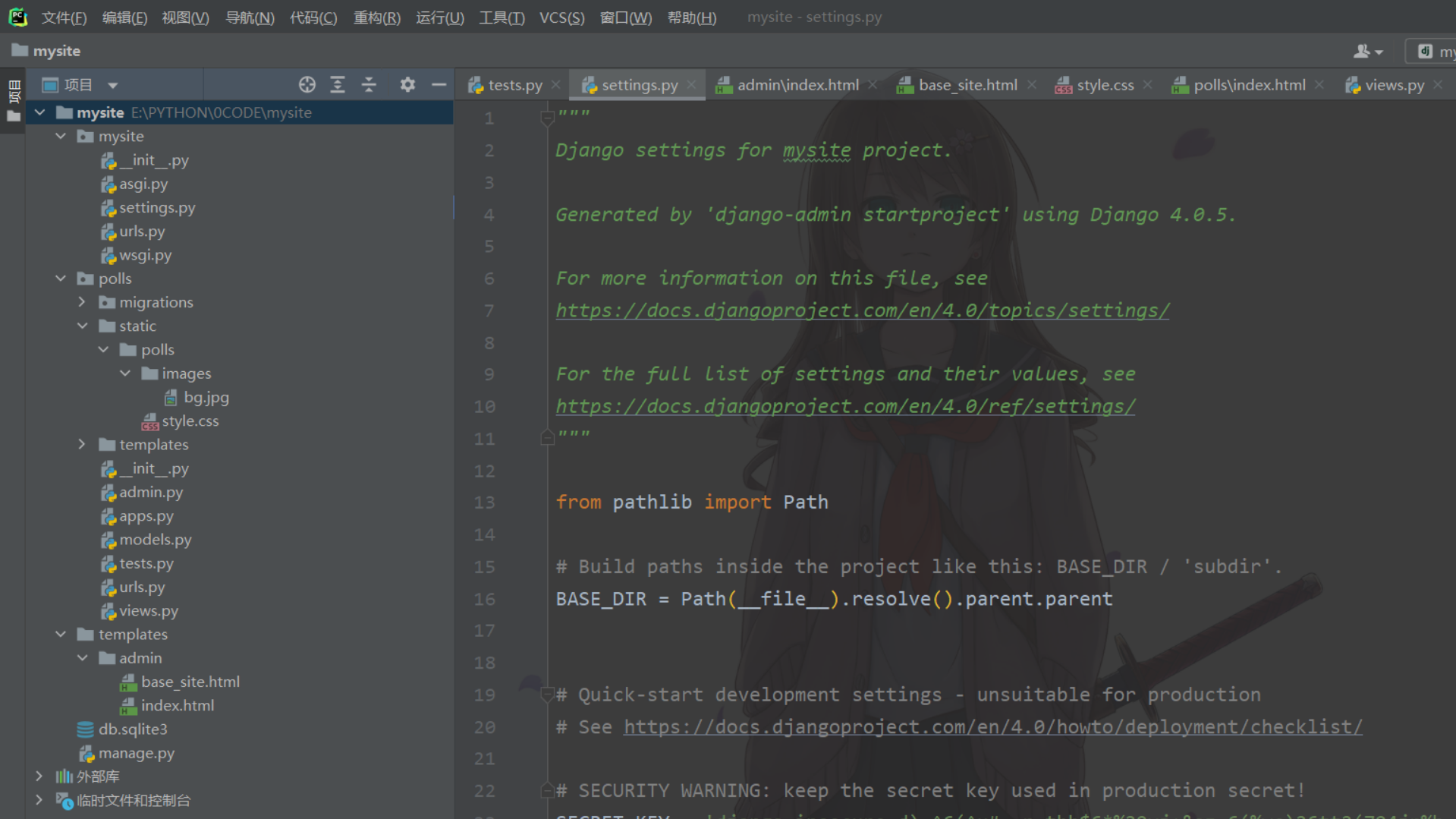
新建 mysite/polls/static 目录 ,写入下面的文件
static/        #框架会从此处收集所有子应用静态文件 所以需要建一个新的polls目录区分不同应用
  polls/       #所以写一个重复的polls很必要 否则Django直接使用找到的第一个style.css
    style.css
定义 a 标签
# /style.css

li a{
    color: green;
}
新建 images 目录
static/        #框架会从此处收集所有子应用静态文件 所以需要建一个新的polls目录区分不同应用
  polls/
    style.css
    images/
      bg.jpg
定义 背景
# /style.css

li a{
    color: green;
}

body {
    background: white url("images/bg.jpg") no-repeat;
}
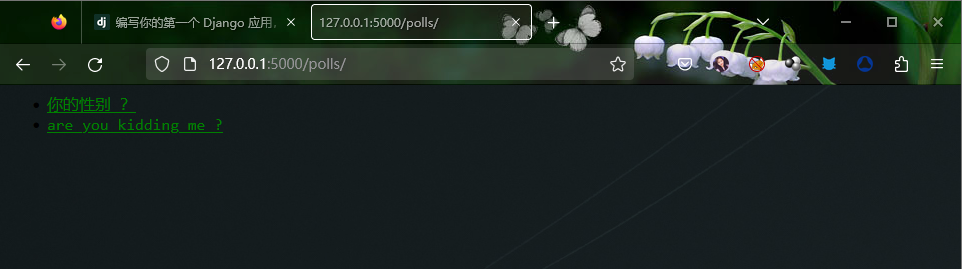
替换注释部分
# /mysite/polls/templates/admin.py


# admin.site.register(Question)


class QuestionAdmin(admin.ModelAdmin):
    fields = ['question_text', 'pub_date']  # 列表里的顺序 表示后台的展示顺序

admin.site.register(Question,QuestionAdmin)
效果
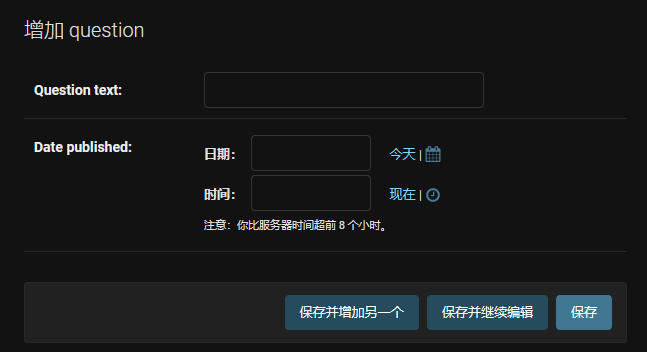
当字段比较多时,可以把多个字段分为几个字段集
注意变量 fields 变为 fieldsets
class QuestionAdmin(admin.ModelAdmin):
    #fields = ['question_text', 'pub_date']  # 列表里的顺序 表示后台的展示顺序
    fieldsets = [
        (None, {'fields': ['question_text']}),
        ('日期信息', {'fields': ['pub_date']}),

    ]
效果
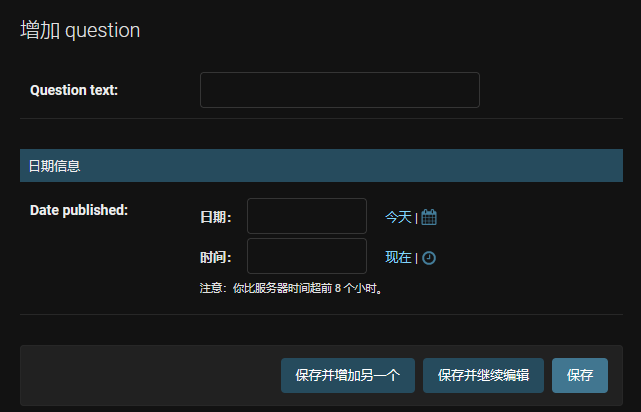
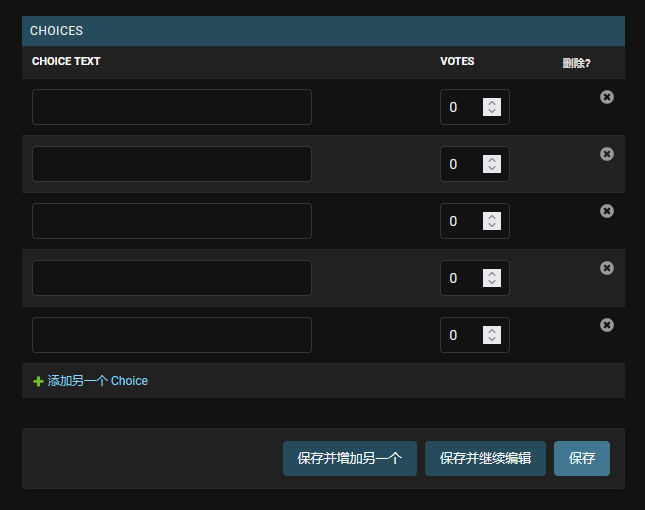
这样可以在创建 question 时 同时创建 choice
# /mysite/polls/templates/admin.py
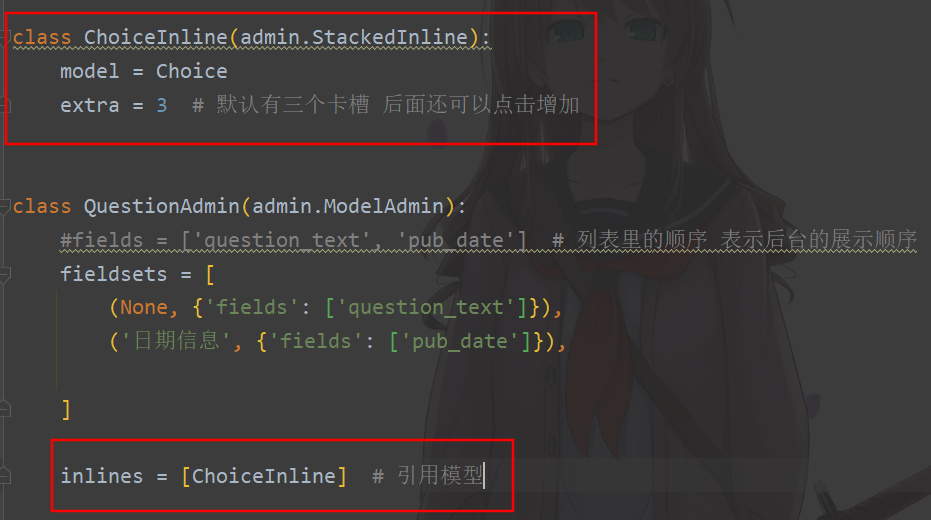
效果
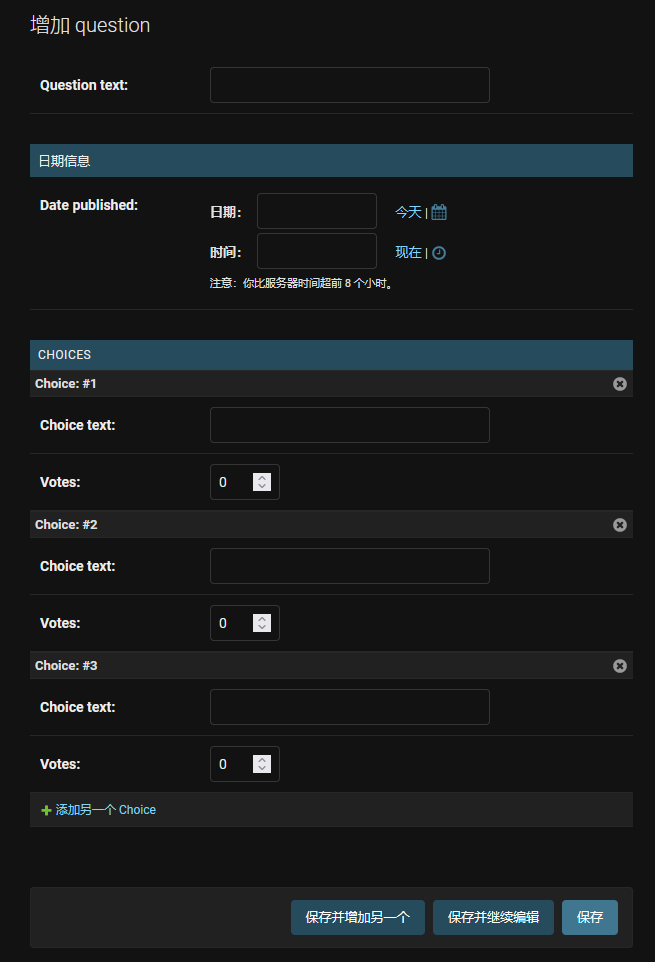
替换 StackedInline 为 TabularInline
#class ChoiceInline(admin.StackedInline):
class ChoiceInline(admin.TabularInline):
    model = Choice
    extra = 3  # 默认有三个卡槽 后面还可以点击增加
效果
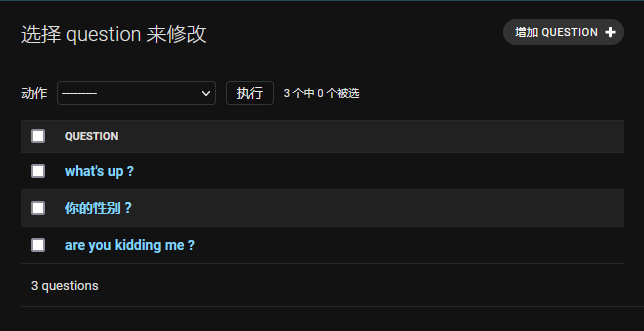
Django默认返回模型的 str 方法里写的内容
添加字段 list_display 让其同时展示更多
方法was_published_recently 和他的返回内容 也可以当做字段展示
# mysite/polls/templates/admin.py

# class QuestionAdmin(admin.ModelAdmin):
#     # fields = ['question_text', 'pub_date']  # 列表里的顺序 表示后台的展示顺序
#     fieldsets = [
#         (None, {'fields': ['question_text']}),
#         ('日期信息', {'fields': ['pub_date']}),

#     ]

#     inlines = [ChoiceInline]  # 引用模型

    list_display = ('question_text', 'pub_date', 'was_published_recently')
效果 点击还可以按照该字段名排序
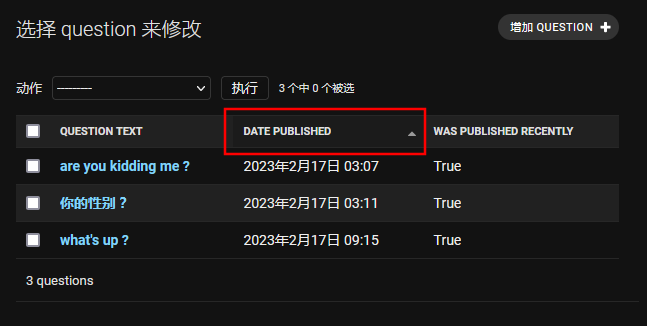
方法 was_published_recently 默认用空格替换下划线展示字段
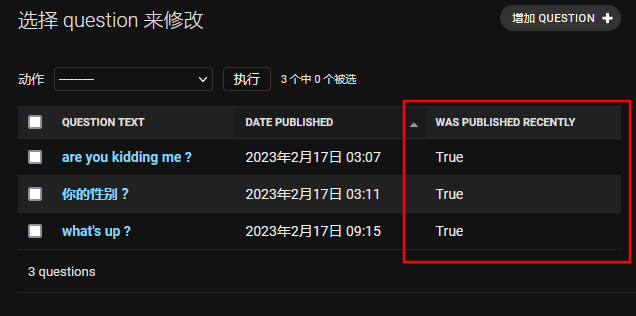
用装饰器优化一下
# /mysite/polls/templates/models.py

from django.contrib import admin  # 装饰器

class Question(models.Model):
    #....

    @admin.display(
            boolean=True,
            ordering='pub_date',
            description='最近发布的吗 ?',
        )
    def was_published_recently(self):
        now = timezone.now()
        # 发布时间距离现在不超过24小时 比现在小 比一天之前大 (即最近一天发布)

        return (now - datetime.timedelta(days=1)) <= self.pub_date <= now
效果
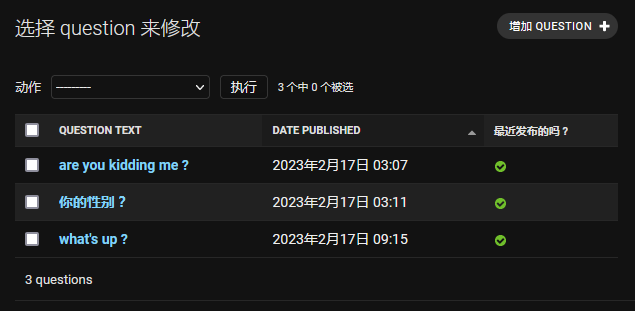
添加一个 list_filter 字段即可
# mysite/polls/templates/admin.py

# class QuestionAdmin(admin.ModelAdmin):
#     # fields = ['question_text', 'pub_date']  # 列表里的顺序 表示后台的展示顺序
#     fieldsets = [
#         (None, {'fields': ['question_text']}),
#         ('日期信息', {'fields': ['pub_date']}),

#     ]

#     inlines = [ChoiceInline]  # 引用模型

#     list_display = ('question_text', 'pub_date', 'was_published_recently')

    list_filter = ['pub_date']  # 过滤器
效果
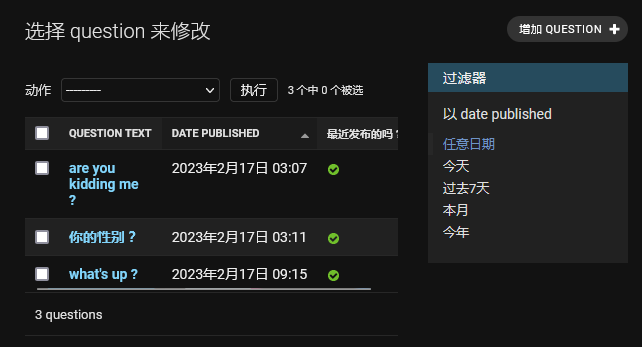
同上
#...
search_fields = ['question_text', 'pub_date']  # 检索框 可添加多个字段
效果

自定义工程模板(就是在manage.py的同级目录哪里) 再建一个templates
/mysite
  /templates  # 新建
修改 mysite/settings.py DIR是一个待检索路径 在django启动时加载
把所有模板文件存放在同一个templates中也可以 但分开会方便以后扩展复用代码
 #...

# TEMPLATES = [
#     {
#         'BACKEND': 'django.template.backends.django.DjangoTemplates',
        #'DIRS': [],
        'DIRS': [BASE_DIR / 'templates'],
#         'APP_DIRS': True,
#         'OPTIONS': {
#             'context_processors': [
#                 'django.template.context_processors.debug',
#                 'django.template.context_processors.request',
#                 'django.contrib.auth.context_processors.auth',
#                 'django.contrib.messages.context_processors.messages',
#             ],
#         },
#     },
# ]
新建一个admin文件夹 复制 base_site.html 复制到里面
base_site.html 是django默认的模板 它存放在 django/contrib/admin/templates 的 admin/base_site.html 里面
可以用 ...\> py -c "import django; print(django.__path__)"命令查找源文件django位置
/mysite
  /templates  # 新建
    /admin   # 新建
      base_site.html  # 本地是到E:\PYTHON\0CODE\StudyBuddy\venv\Lib\site-packages\
                      #     django\contrib\admin\templates\admin            复制
修改 base_site.html 内容
<!--{% extends "admin/base.html" %}-->

<!--{% block title %}{% if subtitle %}{{ subtitle }} | {% endif %}{{ title }} | {{ site_title|default:_('Django site admin') }}{% endblock %}-->

<!--{% block branding %}-->
<!--<h1 id="site-name"><a href="{% url 'admin:index' %}">{{ site_header|default:_('Django administration') }}</a></h1>-->
<h1 id="site-name"><a href="{% url 'admin:index' %}">投票 管理</a></h1>
<!--{% endblock %}-->

<!--{% block nav-global %}{% endblock %}-->
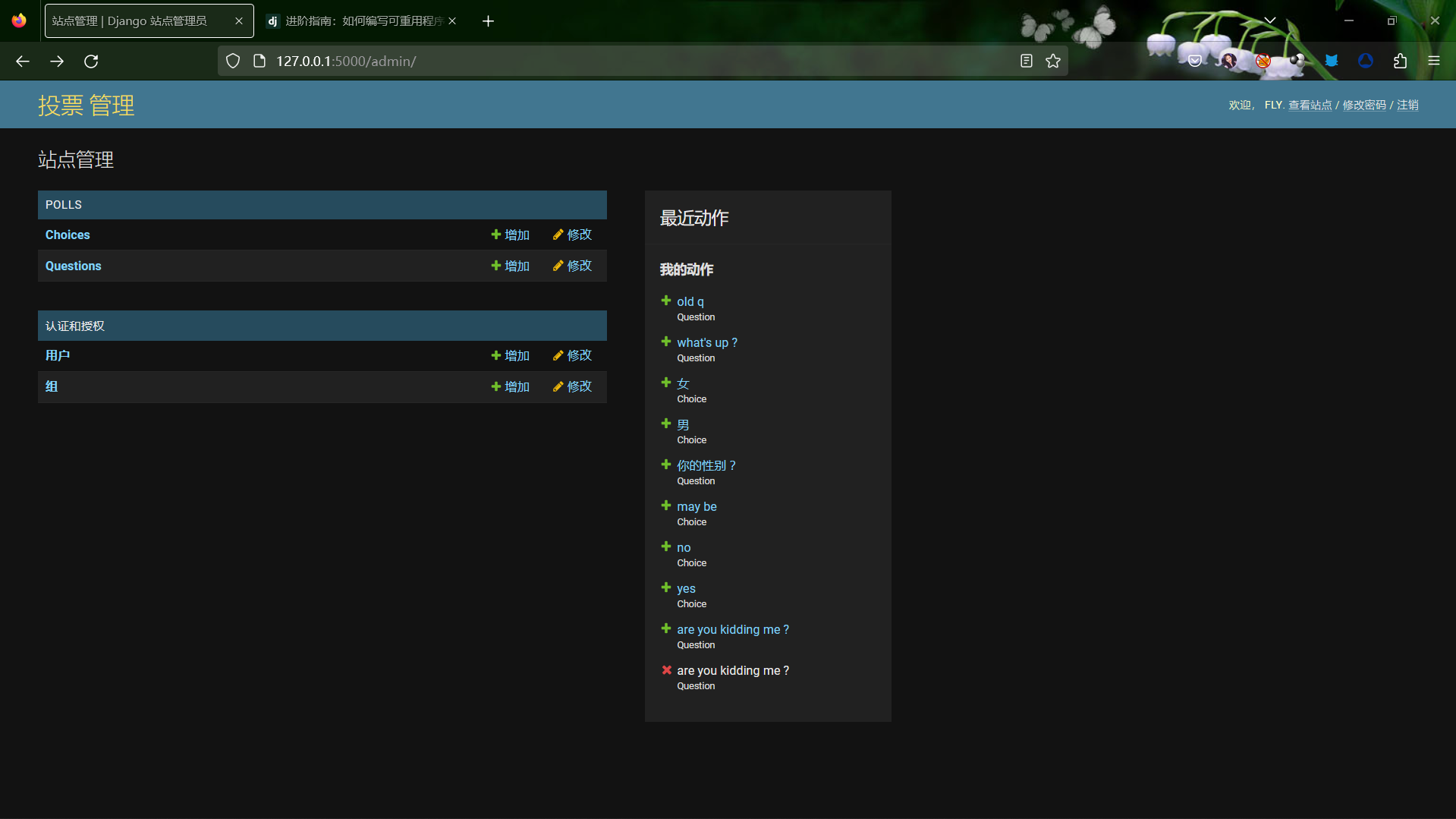
效果

注意,所有的 Django 默认后台模板均可被复写。若要复写模板,像你修改 base_site.html 一样修改其它文件——先将其从默认目录中拷贝到你的自定义目录,再做修改
当然 也可以用 django.contrib.admin.AdminSite.site_header 来进行简单的定制。
机智的同学可能会问: DIRS 默认是空的,Django 是怎么找到默认的后台模板的?因为 APP_DIRS 被置为 True,Django 会自动在每个应用包内递归查找 templates/ 子目录(不要忘了 django.contrib.admin 也是一个应用)。
我们的投票应用不是非常复杂,所以无需自定义后台模板。不过,如果它变的更加复杂,需要修改 Django 的标准后台模板功能时,修改 应用 的模板会比 工程 的更加明智。这样,在其它工程包含这个投票应用时,可以确保它总是能找到需要的自定义模板文件。
更多关于 Django 如何查找模板的文档,参见 加载模板文档。
同之前base_site.html
复制 E:\PYTHON\0CODE\StudyBuddy\venv\Lib\site-packages\django\contrib\admin\templates\admin\index.html
到mysite/templates/admin/index.html 直接修改
如何在buildr项目中使用Ruby?我在很多不同的项目中使用过Ruby、JRuby、Java和Clojure。我目前正在使用我的标准Ruby开发一个模拟应用程序,我想尝试使用Clojure后端(我确实喜欢功能代码)以及JRubygui和测试套件。我还可以看到在未来的不同项目中使用Scala作为后端。我想我要为我的项目尝试一下buildr(http://buildr.apache.org/),但我注意到buildr似乎没有设置为在项目中使用JRuby代码本身!这看起来有点傻,因为该工具旨在统一通用的JVM语言并且是在ruby中构建的。除了将输出的jar包含在一个独特的、仅限ruby
我在我的Rails项目中使用Pow和powifygem。现在我尝试升级我的ruby版本(从1.9.3到2.0.0,我使用RVM)当我切换ruby版本、安装所有gem依赖项时,我通过运行railss并访问localhost:3000确保该应用程序正常运行以前,我通过使用pow访问http://my_app.dev来浏览我的应用程序。升级后,由于错误Bundler::RubyVersionMismatch:YourRubyversionis1.9.3,butyourGemfilespecified2.0.0,此url不起作用我尝试过的:重新创建pow应用程序重启pow服务器更新战俘
我已经像这样安装了一个新的Rails项目:$railsnewsite它执行并到达:bundleinstall但是当它似乎尝试安装依赖项时我得到了这个错误Gem::Ext::BuildError:ERROR:Failedtobuildgemnativeextension./System/Library/Frameworks/Ruby.framework/Versions/2.0/usr/bin/rubyextconf.rbcheckingforlibkern/OSAtomic.h...yescreatingMakefilemake"DESTDIR="cleanmake"DESTDIR="
假设我有这个范围:("aaaaa".."zzzzz")如何在不事先/每次生成整个项目的情况下从范围中获取第N个项目? 最佳答案 一种快速简便的方法:("aaaaa".."zzzzz").first(42).last#==>"aaabp"如果出于某种原因你不得不一遍又一遍地这样做,或者如果你需要避免为前N个元素构建中间数组,你可以这样写:moduleEnumerabledefskip(n)returnto_enum:skip,nunlessblock_given?each_with_indexdo|item,index|yieldit
HashMap中为什么引入红黑树,而不是AVL树呢1.概述开始学习这个知识点之前我们需要知道,在JDK1.8以及之前,针对HashMap有什么不同。JDK1.7的时候,HashMap的底层实现是数组+链表JDK1.8的时候,HashMap的底层实现是数组+链表+红黑树我们要思考一个问题,为什么要从链表转为红黑树呢。首先先让我们了解下链表有什么不好???2.链表上述的截图其实就是链表的结构,我们来看下链表的增删改查的时间复杂度增:因为链表不是线性结构,所以每次添加的时候,只需要移动一个节点,所以可以理解为复杂度是N(1)删:算法时间复杂度跟增保持一致查:既然是非线性结构,所以查询某一个节点的时候
本文主要介绍在使用Selenium进行自动化测试或者任务时,对于使用了iframe的页面,如何定位iframe中的元素文章目录场景描述解决方案具体代码场景描述当我们在使用Selenium进行自动化测试的时候,可能会遇到一些界面或者窗体是使用HTML的iframe标签进行承载的。对于iframe中的标签,如果直接查找是无法找到的,会抛出没有找到元素的异常。比如近在咫尺的例子就是,CSDN的登录窗体就是使用的iframe,大家可以尝试通过F12开发者模式查看到的tag_name,class_name,id或者xpath来定位中的页面元素,会抛出NoSuchElementException异常。解决
我正在尝试创建一个带有项目符号字符的Ruby1.9.3字符串。str="•"+"helloworld"但是,当我输入它时,我收到有关非ASCII字符的语法错误。我该怎么做? 最佳答案 你可以把Unicode字符放在那里。str="\u2022"+"helloworld" 关于ruby-如何在Ruby字符串中插入项目符号字符?,我们在StackOverflow上找到一个类似的问题: https://stackoverflow.com/questions/1195
我的Rails站点使用了一个确实不是很好的gem。每次我需要做一些新的事情时,我最终不得不花费与向实际Rails项目添加代码一样多的时间来为gem添加功能。但我不介意,我将我的Gemfile设置为指向我的gem的GitHub分支(我尝试提交PR,但维护者似乎已经下台)。问题是我真的没有找到一种合理的方法来测试我添加到gem的新东西。在railsc中测试它会特别好,但我能想到的唯一方法是a)更改~/.rvm/gems/.../foo。rb,这看起来不对或者b)升级版本,推送到Github,然后运行bundleup,这除了耗时之外显然是一场灾难,因为我不确定我所做的promise是否正
我一直在尝试使用nanoc用于生成静态网站。我需要组织一个复杂的排列页面,我想让我的内容保持干燥。包含或合并的概念在nanoc系统中如何运作?我已阅读文档,但似乎找不到我想要的内容。例如:我如何获取两个部分内容项并将它们合并到一个新的内容项中。在staticmatic您可以在您的页面中执行以下操作。=partial('partials/shared/navigation')类似的约定在nanoc中如何运作? 最佳答案 这里是nanoc的作者。在nanoc中,部分是布局。因此,您可以拥有layouts/partials/shared/
我安装了ruby、yeoman,当我运行我的项目时,出现了这个错误:Warning:Running"compass:dist"(compass)taskWarning:YouneedtohaveRubyandCompassinstalledthistasktowork.Moreinfo:https://github.com/gruUse--forcetocontinue.Use--forcetocontinue.我有进入可变session目标的路径,但它不起作用。谁能帮帮我? 最佳答案 我必须运行这个:geminstallcom
