转载请标明出处:http://blog.csdn.net/zhaoyanjun6/article/details/127358235
本文出自【赵彦军的博客】
文章目录
官方文档:https://developer.android.com/topic/libraries/architecture/datastore
Jetpack DataStore 是一种数据存储解决方案,允许您使用协议缓冲区存储键值对或类型化对象。DataStore 使用 Kotlin 协程和 Flow 以异步、一致的事务方式存储数据。
添加依赖:
implementation "androidx.datastore:datastore-preferences:1.0.0"
定义dataStore
//定义DataStore
val Context.dataStore: DataStore<Preferences> by preferencesDataStore(name = "user_info")

//定义key
val keyName = stringPreferencesKey("name")
val keyAge = intPreferencesKey("age")
保存数据:
import android.os.Bundle
import androidx.appcompat.app.AppCompatActivity
import androidx.datastore.preferences.core.edit
import androidx.lifecycle.lifecycleScope
import kotlinx.coroutines.launch

class MainActivity : AppCompatActivity() {

    override fun onCreate(savedInstanceState: Bundle?) {
        super.onCreate(savedInstanceState)

        lifecycleScope.launch {
            saveData("zhaoyanjun", 18)
        }
    }

    //dataStore保存数据
    suspend fun saveData(name: String, age: Int) {
        dataStore.edit {
            it[keyName] = name //保存字符串
            it[keyAge] = age //保存int
        }
    }

}
获取数据
class MainActivity : AppCompatActivity() {

    override fun onCreate(savedInstanceState: Bundle?) {
        super.onCreate(savedInstanceState)

        lifecycleScope.launch {
            getData()
        }

    }

    //dataStore获取数据,collect 是一个挂起函数,所以会一直挂起,只要name的值发起变更,collect 就会回调
    suspend fun getData() {
        val nameFlow = dataStore.data.map {
            it[keyName]
        }
        nameFlow.collect { name ->
            Log.d("getData ", "name $name")
        }
    }
}
dataStore.data 是一个 Flow 对象,使用一个 collect 操作符 可以接受 值的变化,一旦值发生变化,collect { } 就会回调,可以实现数据驱动 UI 的效果。
DataStore 文件在 files/datastore/ 目录,完整路径是
/data/data/com.zyj.exoplayerdemo/files/datastore/user_info.preferences_pb
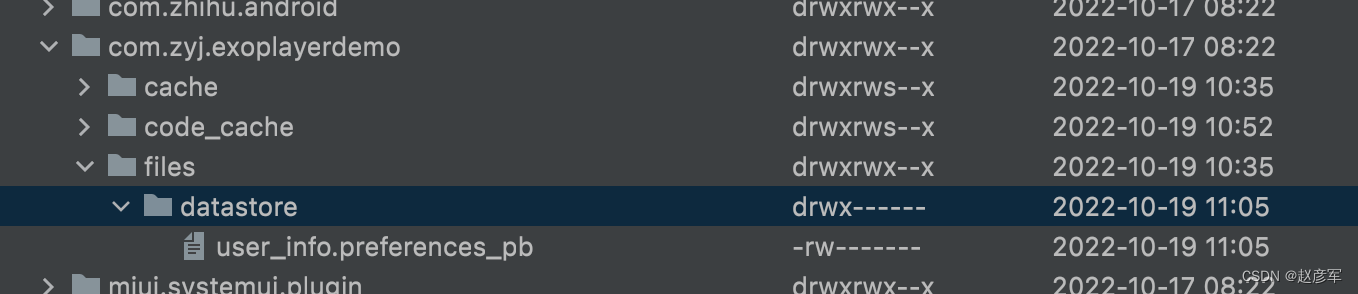
双击 user_info.preferences_pb 在 AS 里打开
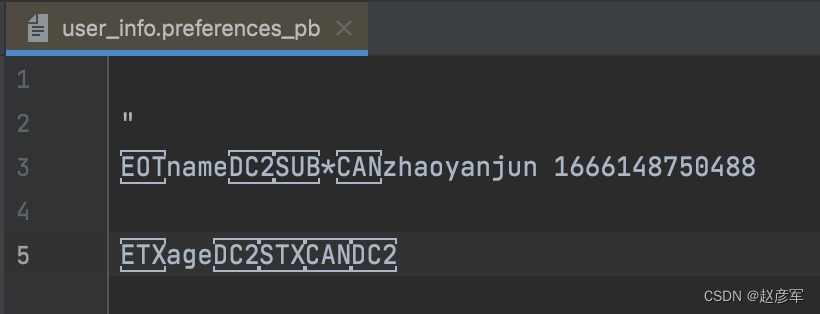
发现是乱码。
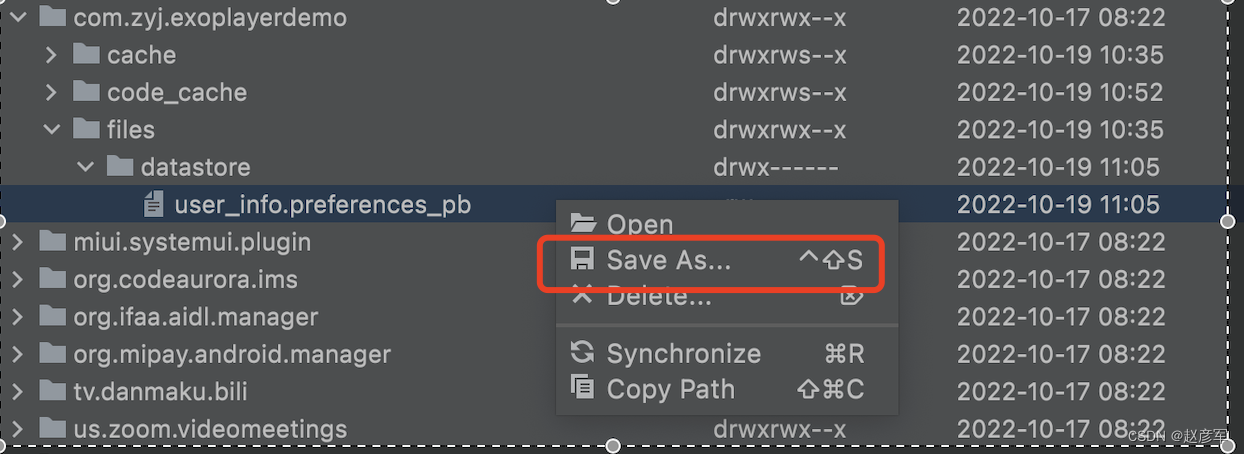
点击右键把 user_info.preferences_pb 导出到桌面
在 mac appStore 下载安装 Protobuf Viewer
用 Protobuf Viewer 打开我们导出的 pb 文件
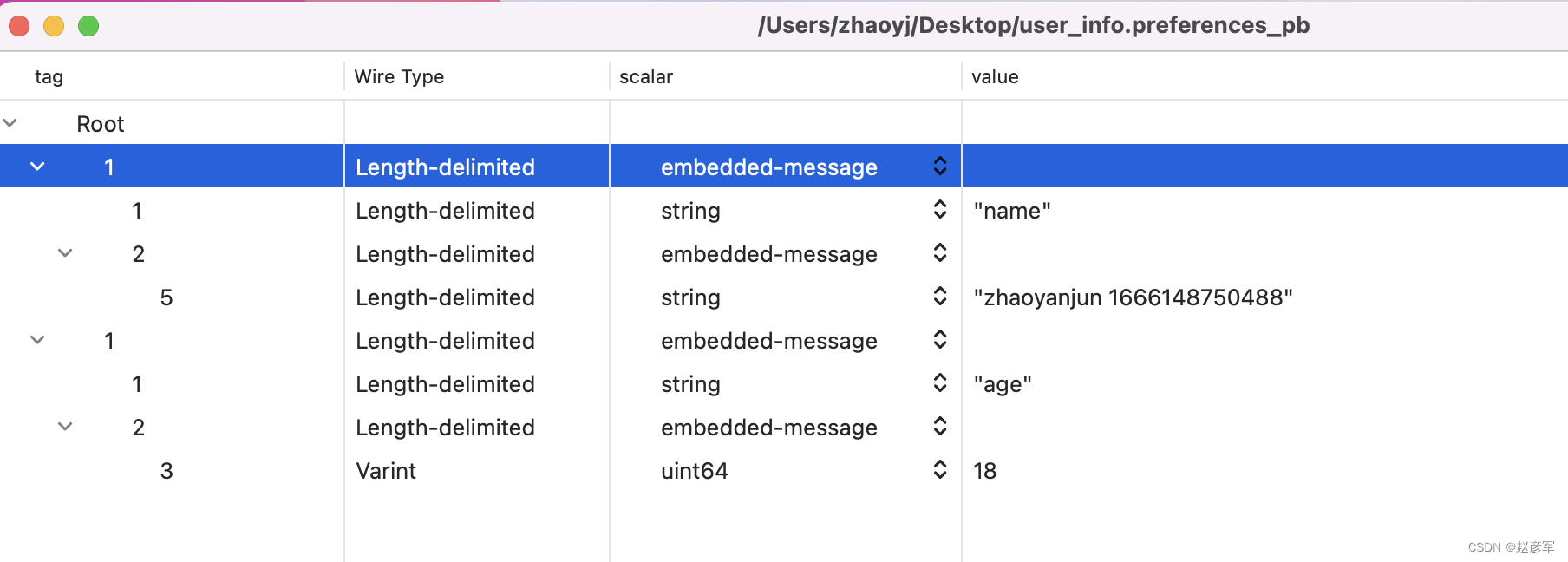
在文中我们用到了
stringPreferencesKey("name")
intPreferencesKey("age")
除此之外,DataStore 还提供了其他类型的 Key
@JvmName("intKey")
public fun intPreferencesKey(name: String): Preferences.Key<Int> = Preferences.Key(name)

@JvmName("doubleKey")
public fun doublePreferencesKey(name: String): Preferences.Key<Double> = Preferences.Key(name)

@JvmName("stringKey")
public fun stringPreferencesKey(name: String): Preferences.Key<String> = Preferences.Key(name)

@JvmName("booleanKey")
public fun booleanPreferencesKey(name: String): Preferences.Key<Boolean> = Preferences.Key(name)

@JvmName("floatKey")
public fun floatPreferencesKey(name: String): Preferences.Key<Float> = Preferences.Key(name)

@JvmName("longKey")
public fun longPreferencesKey(name: String): Preferences.Key<Long> = Preferences.Key(name)

@JvmName("stringSetKey")
public fun stringSetPreferencesKey(name: String): Preferences.Key<Set<String>> =
    Preferences.Key(name)
在上面的演示过程中,我们使用 Flow 的 collect { } 操作符 , 但是 collect { } 会一直处于挂起状态,只要值发生变化,我们就会收到通知,符合数据驱动 UI 的设计模式。
但是在现实开发中,我们往往需要一个同步 api , 仅仅获取当前一次值,我们只关注本次的值是什么,至于以后得值变化,我们不关心。DataStore 提供了 同步api 来供我们使用 。
override fun onCreate(savedInstanceState: Bundle?) {
        super.onCreate(savedInstanceState)

        lifecycleScope.launch {
            //同步api
            val first = dataStore.data.first()
            val name = first[keyName]
            val age = first[keyAge]
            Log.d("getData ", "name $name")
            Log.d("getData ", "age $age")
        }
    }
如果是 pb 文件里面没有值,那么就会返回 null
com.zyj.exoplayerdemo D/getData: name null
com.zyj.exoplayerdemo D/getData: age null
所以我们可以把获取名字,封装成一个同步方法
suspend fun getNameData(): String? {
    val nameFlow = dataStore.data.map {
            it[keyName]
    }
    return nameFlow.first()
}
清除某个key
val keyName = stringPreferencesKey("name")

suspend fun clear() {
        dataStore.edit {
            it.remove(keyName)
        }
}
清除所有值
   suspend fun clear() {
        dataStore.edit {
            it.clear()
        }
    }
suspend fun contains() {
     dataStore.edit {
        //是否包含某个key
        var result =  it.contains(keyName)
   }
}
如果你原来是用 SharedPreferences , 想换到 DataStore 上,DataStore 提供了一键迁移,就一行代码就搞定了。
val Context.dataStore: DataStore<Preferences> by preferencesDataStore(
    name = "user_info",
    produceMigrations = { context ->
        listOf(SharedPreferencesMigration(context, "sp_file_name"))
    })
DataStore 是一个接口
public interface DataStore<T> {
    /**
     * Provides efficient, cached (when possible) access to the latest durably persisted state.
     * The flow will always either emit a value or throw an exception encountered when attempting
     * to read from disk. If an exception is encountered, collecting again will attempt to read the
     * data again.
     *
     * Do not layer a cache on top of this API: it will be be impossible to guarantee consistency.
     * Instead, use data.first() to access a single snapshot.
     *
     * @return a flow representing the current state of the data
     * @throws IOException when an exception is encountered when reading data
     */
    public val data: Flow<T>

    /**
     * Updates the data transactionally in an atomic read-modify-write operation. All operations
     * are serialized, and the transform itself is a coroutine so it can perform heavy work
     * such as RPCs.
     *
     * The coroutine completes when the data has been persisted durably to disk (after which
     * [data] will reflect the update). If the transform or write to disk fails, the
     * transaction is aborted and an exception is thrown.
     *
     * @return the snapshot returned by the transform
     * @throws IOException when an exception is encountered when writing data to disk
     * @throws Exception when thrown by the transform function
     */
    public suspend fun updateData(transform: suspend (t: T) -> T): T
}
我正在学习如何使用Nokogiri,根据这段代码我遇到了一些问题:require'rubygems'require'mechanize'post_agent=WWW::Mechanize.newpost_page=post_agent.get('http://www.vbulletin.org/forum/showthread.php?t=230708')puts"\nabsolutepathwithtbodygivesnil"putspost_page.parser.xpath('/html/body/div/div/div/div/div/table/tbody/tr/td/div
我有一个Ruby程序,它使用rubyzip压缩XML文件的目录树。gem。我的问题是文件开始变得很重,我想提高压缩级别,因为压缩时间不是问题。我在rubyzipdocumentation中找不到一种为创建的ZIP文件指定压缩级别的方法。有人知道如何更改此设置吗?是否有另一个允许指定压缩级别的Ruby库? 最佳答案 这是我通过查看rubyzip内部创建的代码。level=Zlib::BEST_COMPRESSIONZip::ZipOutputStream.open(zip_file)do|zip|Dir.glob("**/*")d
类classAprivatedeffooputs:fooendpublicdefbarputs:barendprivatedefzimputs:zimendprotecteddefdibputs:dibendendA的实例a=A.new测试a.foorescueputs:faila.barrescueputs:faila.zimrescueputs:faila.dibrescueputs:faila.gazrescueputs:fail测试输出failbarfailfailfail.发送测试[:foo,:bar,:zim,:dib,:gaz].each{|m|a.send(m)resc
很好奇,就使用rubyonrails自动化单元测试而言,你们正在做什么?您是否创建了一个脚本来在cron中运行rake作业并将结果邮寄给您?git中的预提交Hook?只是手动调用?我完全理解测试,但想知道在错误发生之前捕获错误的最佳实践是什么。让我们理所当然地认为测试本身是完美无缺的,并且可以正常工作。下一步是什么以确保他们在正确的时间将可能有害的结果传达给您? 最佳答案 不确定您到底想听什么,但是有几个级别的自动代码库控制:在处理某项功能时,您可以使用类似autotest的内容获得关于哪些有效,哪些无效的即时反馈。要确保您的提
假设我做了一个模块如下:m=Module.newdoclassCendend三个问题:除了对m的引用之外,还有什么方法可以访问C和m中的其他内容?我可以在创建匿名模块后为其命名吗(就像我输入“module...”一样)?如何在使用完匿名模块后将其删除,使其定义的常量不再存在? 最佳答案 三个答案:是的,使用ObjectSpace.此代码使c引用你的类(class)C不引用m:c=nilObjectSpace.each_object{|obj|c=objif(Class===objandobj.name=~/::C$/)}当然这取决于
我正在尝试使用ruby和Savon来使用网络服务。测试服务为http://www.webservicex.net/WS/WSDetails.aspx?WSID=9&CATID=2require'rubygems'require'savon'client=Savon::Client.new"http://www.webservicex.net/stockquote.asmx?WSDL"client.get_quotedo|soap|soap.body={:symbol=>"AAPL"}end返回SOAP异常。检查soap信封,在我看来soap请求没有正确的命名空间。任何人都可以建议我
关闭。这个问题是opinion-based.它目前不接受答案。想要改进这个问题?更新问题,以便editingthispost可以用事实和引用来回答它.关闭4年前。Improvethisquestion我想在固定时间创建一系列低音和高音调的哔哔声。例如:在150毫秒时发出高音调的蜂鸣声在151毫秒时发出低音调的蜂鸣声200毫秒时发出低音调的蜂鸣声250毫秒的高音调蜂鸣声有没有办法在Ruby或Python中做到这一点?我真的不在乎输出编码是什么(.wav、.mp3、.ogg等等),但我确实想创建一个输出文件。
我在我的项目目录中完成了compasscreate.和compassinitrails。几个问题:我已将我的.sass文件放在public/stylesheets中。这是放置它们的正确位置吗?当我运行compasswatch时,它不会自动编译这些.sass文件。我必须手动指定文件:compasswatchpublic/stylesheets/myfile.sass等。如何让它自动运行?文件ie.css、print.css和screen.css已放在stylesheets/compiled。如何在编译后不让它们重新出现的情况下删除它们?我自己编译的.sass文件编译成compiled/t
我想将html转换为纯文本。不过,我不想只删除标签,我想智能地保留尽可能多的格式。为插入换行符标签,检测段落并格式化它们等。输入非常简单,通常是格式良好的html(不是整个文档,只是一堆内容,通常没有anchor或图像)。我可以将几个正则表达式放在一起,让我达到80%,但我认为可能有一些现有的解决方案更智能。 最佳答案 首先,不要尝试为此使用正则表达式。很有可能你会想出一个脆弱/脆弱的解决方案,它会随着HTML的变化而崩溃,或者很难管理和维护。您可以使用Nokogiri快速解析HTML并提取文本:require'nokogiri'h
我想为Heroku构建一个Rails3应用程序。他们使用Postgres作为他们的数据库,所以我通过MacPorts安装了postgres9.0。现在我需要一个postgresgem并且共识是出于性能原因你想要pggem。但是我对我得到的错误感到非常困惑当我尝试在rvm下通过geminstall安装pg时。我已经非常明确地指定了所有postgres目录的位置可以找到但仍然无法完成安装:$envARCHFLAGS='-archx86_64'geminstallpg--\--with-pg-config=/opt/local/var/db/postgresql90/defaultdb/po
