最近1周一直研究ROS2的时间同步,翻越很多博客,很少有人使用ROS2进行时间同步的代码,无奈不断尝试与源码阅读,终于将其搞定,
为此,本博客将介绍基于python的ROS2的时间同步方法。
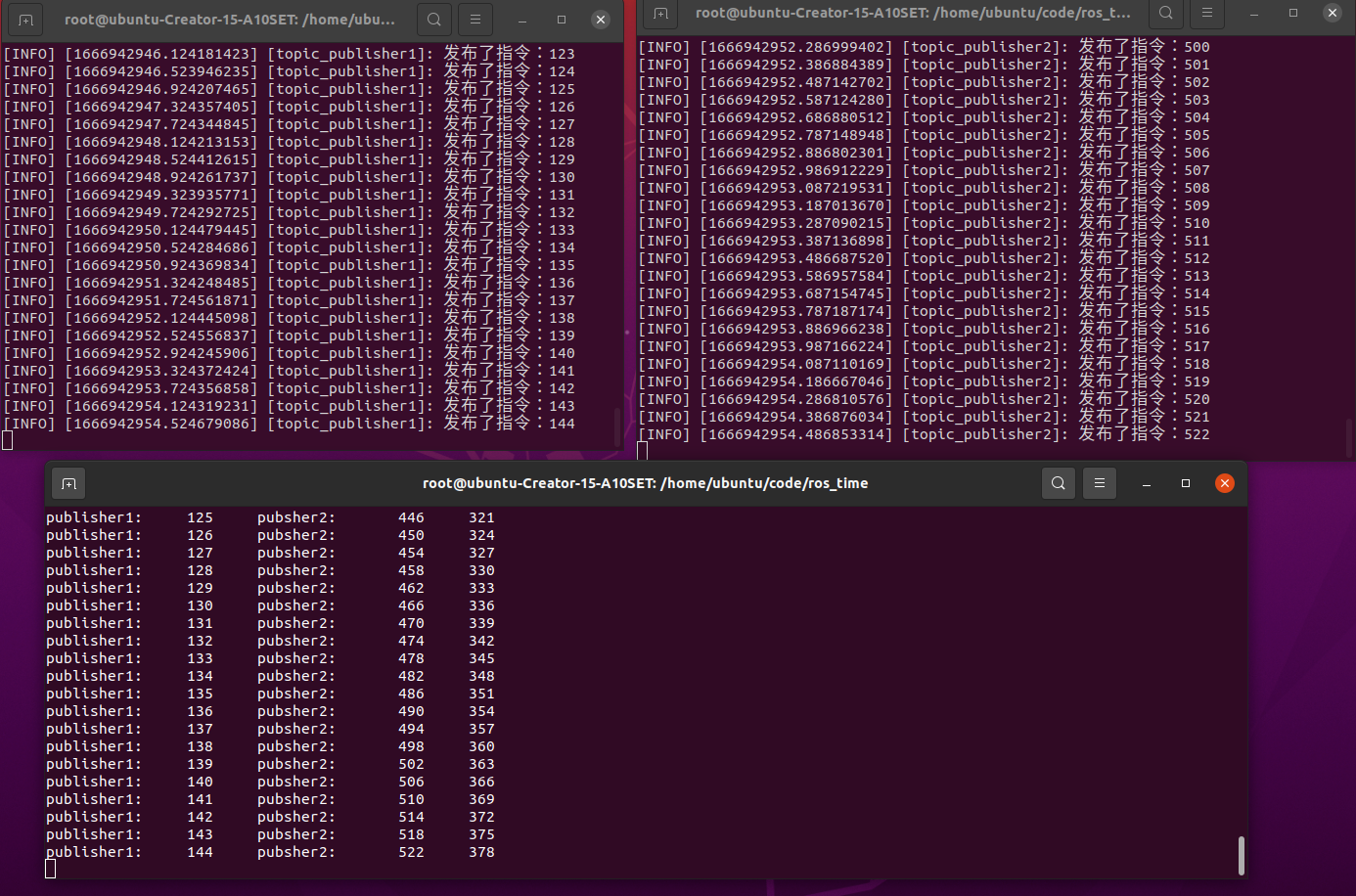
本博客内容结构为话题发布代码,话题订阅与时间同步代码,代码文件夹结构及结果显示图片。本博客假设2个publisher和一个scribe,同步是在scibe中完成。
一.话题发布代码
发布1为第二个发布者,可理解为某传感器
publisher1代码如下:
#!/usr/bin/env python3
import rclpy
from rclpy.node import Node
from std_msgs.msg import String,Float32,Int32
import cv2
# from std_msgs.msg import Header
import time
class NodePublisher(Node):
    def __init__(self,name):
        super().__init__(name)
        self.get_logger().info("大家好,我是%s!" % name)
        self.num=0
        self.command_publisher1 = self.create_publisher(Int32,"command1", 10)
        self.timer = self.create_timer(0.4, self.timer_callback)  #
        # self.inputdata1()
    def inputdata1(self):
        msg = Int32() #String()
        period=0.5
        print("publisher1-周期",period)
        self.get_logger().info(f'发布了指令:{msg.data}')    #打印一下发布的数据
        num=0
        while True:
            num=num+1
            msg.data = num #str(num)

            self.command_publisher_.publish(msg)
            # time.sleep(period)
            self.get_logger().info(f'发布了指令:{msg.data}')    #打印一下发布的数据
    def timer_callback(self):
        msg = Int32() #String()
        self.num+=1
        msg.data = self.num #str(num)
        self.command_publisher1.publish(msg)
        self.get_logger().info(f'发布了指令:{msg.data}')    #打印一下发布的数据
def main(args=None):
    rclpy.init(args=args) # 初始化rclpy
    node = NodePublisher("topic_publisher1")  # 新建一个节点
    rclpy.spin(node) # 保持节点运行,检测是否收到退出指令(Ctrl+C)
    rclpy.shutdown() # 关闭rclpy
发布2为第二个发布者,可理解为某传感器
publisher2代码如下:
#!/usr/bin/env python3
import rclpy
from rclpy.node import Node
from std_msgs.msg import String,Float32,Int32
import time
class NodePublisher(Node):
    def __init__(self,name):
        super().__init__(name)
        self.get_logger().info("大家好,我是%s!" % name)
        self.num=0
        self.command_publisher2= self.create_publisher(Int32,"command2", 10)
        self.timer = self.create_timer(0.2, self.timer_callback)  #
    def timer_callback(self):
        msg = Int32() #String()
        self.num+=1
        msg.data = self.num #str(num)
        self.command_publisher2.publish(msg)
        self.get_logger().info(f'发布了指令:{msg.data}')    #打印一下发布的数据
def main(args=None):
    rclpy.init(args=args) # 初始化rclpy
    node = NodePublisher("topic_publisher2")  # 新建一个节点
    rclpy.spin(node) # 保持节点运行,检测是否收到退出指令(Ctrl+C)
    rclpy.shutdown() # 关闭rclpy
二.话题订阅及时间同步代码
订阅发布者信息,并将其同步,可理解为同步不同传感器
scriabe代码如下:
#!/usr/bin/env python3
import rclpy
from rclpy.node import Node
import message_filters
from std_msgs.msg import String,Float32,Int32
import message_filters
from sensor_msgs.msg import Image, CameraInfo
def callback(image_sub,info_sub):
    res=int(info_sub.data)-int(image_sub.data)
    print("publisher1:\t{}\tpubsher2:\t{}\t{}".format(str(image_sub.data),str(info_sub.data),res))
def main(args=None):
    rclpy.init(args=args) # 初始化rclpy
    scribe_node=Node('scribe_time')

    image_sub = message_filters.Subscriber(scribe_node, Int32,'command1')
    info_sub = message_filters.Subscriber(scribe_node, Int32,'command2')

    ts = message_filters.ApproximateTimeSynchronizer([image_sub, info_sub], 10, 0.1, allow_headerless=True) # allow_headerless=True,可以不使用时间戳
    # ts = message_filters.TimeSynchronizer([image_sub, info_sub], 10) # 这个需要时间戳才可调用
    ts.registerCallback(callback)
    rclpy.spin(scribe_node)
    rospy.spin()
三.参数配置及文件格式
setup.py设置如下:
from setuptools import setup
package_name = 'topic_time'
setup(
    name=package_name,
    version='0.0.0',
    packages=[package_name],
    data_files=[
        ('share/ament_index/resource_index/packages',
            ['resource/' + package_name]),
        ('share/' + package_name, ['package.xml']),
    ],
    install_requires=['setuptools'],
    zip_safe=True,
    maintainer='root',
    maintainer_email='root@todo.todo',
    description='TODO: Package description',
    license='TODO: License declaration',
    tests_require=['pytest'],
    entry_points={
        'console_scripts': [
        "publisher1_node = topic_time.publisher1:main",
        "publisher2_node = topic_time.publisher2:main",
        "subscribe_node = topic_time.subscribe:main",
        "subscribe2_node = topic_time.subscribe2:main"

        ],
    },
)
文件格式如下:

通过以上代码将可看到同步的scribe中发布1时间无间隔,发布2时间间隔为4,恰好与设置周期同等,结果显示如下:
关闭。这个问题是opinion-based.它目前不接受答案。想要改进这个问题?更新问题,以便editingthispost可以用事实和引用来回答它.关闭4年前。Improvethisquestion我想在固定时间创建一系列低音和高音调的哔哔声。例如:在150毫秒时发出高音调的蜂鸣声在151毫秒时发出低音调的蜂鸣声200毫秒时发出低音调的蜂鸣声250毫秒的高音调蜂鸣声有没有办法在Ruby或Python中做到这一点?我真的不在乎输出编码是什么(.wav、.mp3、.ogg等等),但我确实想创建一个输出文件。
我需要检查DateTime是否采用有效的ISO8601格式。喜欢:#iso8601?我检查了ruby是否有特定方法,但没有找到。目前我正在使用date.iso8601==date来检查这个。有什么好的方法吗?编辑解释我的环境,并改变问题的范围。因此,我的项目将使用jsapiFullCalendar,这就是我需要iso8601字符串格式的原因。我想知道更好或正确的方法是什么,以正确的格式将日期保存在数据库中,或者让ActiveRecord完成它们的工作并在我需要时间信息时对其进行操作。 最佳答案 我不太明白你的问题。我假设您想检查
这个问题在这里已经有了答案:Railsformattingdate(4个答案)关闭4年前。我想格式化Time.Now函数以显示YYYY-MM-DDHH:MM:SS而不是:“2018-03-0909:47:19+0000”该函数需要放在时间中.现在功能。require‘roo’require‘roo-xls’require‘byebug’file_name=ARGV.first||“Template.xlsx”excel_file=Roo::Spreadsheet.open(“./#{file_name}“,extension::xlsx)xml=Nokogiri::XML::Build
我正在尝试解析一个CSV文件并使用SQL命令自动为其创建一个表。CSV中的第一行给出了列标题。但我需要推断每个列的类型。Ruby中是否有任何函数可以找到每个字段中内容的类型。例如,CSV行:"12012","Test","1233.22","12:21:22","10/10/2009"应该产生像这样的类型['integer','string','float','time','date']谢谢! 最佳答案 require'time'defto_something(str)if(num=Integer(str)rescueFloat(s
这个问题在这里已经有了答案:关闭10年前。PossibleDuplicate:Pythonconditionalassignmentoperator对于这样一个简单的问题表示歉意,但是谷歌搜索||=并不是很有帮助;)Python中是否有与Ruby和Perl中的||=语句等效的语句?例如:foo="hey"foo||="what"#assignfooifit'sundefined#fooisstill"hey"bar||="yeah"#baris"yeah"另外,类似这样的东西的通用术语是什么?条件分配是我的第一个猜测,但Wikipediapage跟我想的不太一样。
什么是ruby的rack或python的Java的wsgi?还有一个路由库。 最佳答案 来自Python标准PEP333:Bycontrast,althoughJavahasjustasmanywebapplicationframeworksavailable,Java's"servlet"APImakesitpossibleforapplicationswrittenwithanyJavawebapplicationframeworktoruninanywebserverthatsupportstheservletAPI.ht
华为OD机试题本篇题目:明明的随机数题目输入描述输出描述:示例1输入输出说明代码编写思路最近更新的博客华为od2023|什么是华为od,od薪资待遇,od机试题清单华为OD机试真题大全,用Python解华为机试题|机试宝典【华为OD机试】全流程解析+经验分享,题型分享,防作弊指南华为o
文章目录一、概述简介原理模块二、配置Mysql使用版本环境要求1.操作系统2.mysql要求三、配置canal-server离线下载在线下载上传解压修改配置单机配置集群配置分库分表配置1.修改全局配置2.实例配置垂直分库水平分库3.修改group-instance.xml4.启动监听四、配置canal-adapter1修改启动配置2配置映射文件3启动ES数据同步查询所有订阅同步数据同步开关启动4.验证五、配置canal-admin一、概述简介canal是Alibaba旗下的一款开源项目,Java开发。基于数据库增量日志解析,提供增量数据订阅&消费。Git地址:https://github.co
我想解析一个已经存在的.mid文件,改变它的乐器,例如从“acousticgrandpiano”到“violin”,然后将它保存回去或作为另一个.mid文件。根据我在文档中看到的内容,该乐器通过program_change或patch_change指令进行了更改,但我找不到任何在已经存在的MIDI文件中执行此操作的库.他们似乎都只支持从头开始创建的MIDI文件。 最佳答案 MIDIpackage会为您完成此操作,但具体方法取决于midi文件的原始内容。一个MIDI文件由一个或多个音轨组成,每个音轨是十六个channel中任何一个上的
本文主要介绍在使用Selenium进行自动化测试或者任务时,对于使用了iframe的页面,如何定位iframe中的元素文章目录场景描述解决方案具体代码场景描述当我们在使用Selenium进行自动化测试的时候,可能会遇到一些界面或者窗体是使用HTML的iframe标签进行承载的。对于iframe中的标签,如果直接查找是无法找到的,会抛出没有找到元素的异常。比如近在咫尺的例子就是,CSDN的登录窗体就是使用的iframe,大家可以尝试通过F12开发者模式查看到的tag_name,class_name,id或者xpath来定位中的页面元素,会抛出NoSuchElementException异常。解决
