RestTemplate是Spring提供的用于访问Rest服务的客户端,RestTemplate提供了多种便捷访问远程Http服务的方法,能够大大提高客户端的编写效率。
我之前的HTTP开发是用apache的HttpClient开发,代码复杂,还得操心资源回收等。代码很复杂,冗余代码多,稍微截个图,这是我封装好的一个post请求工具:

本教程将带领大家实现Spring生态内RestTemplate的Get请求和Post请求还有exchange指定请求类型的实践和RestTemplate核心方法源码的分析,看完你就会用优雅的方式来发HTTP请求。
是
Spring用于同步client端的核心类,简化了与http服务的通信,并满足RestFul原则,程序代码可以给它提供URL,并提取结果。默认情况下,RestTemplate默认依赖jdk的HTTP连接工具。当然你也可以 通过setRequestFactory属性切换到不同的HTTP源,比如Apache HttpComponents、Netty和OkHttp。
RestTemplate能大幅简化了提交表单数据的难度,并且附带了自动转换JSON数据的功能,但只有理解了HttpEntity的组成结构(header与body),且理解了与uriVariables之间的差异,才能真正掌握其用法。这一点在Post请求更加突出,下面会介绍到。
该类的入口主要是根据HTTP的六个方法制定:
| HTTP method | RestTemplate methods |
|---|---|
| DELETE | delete |
| GET | getForObject |
| getForEntity | |
| HEAD | headForHeaders |
| OPTIONS | optionsForAllow |
| POST | postForLocation |
| postForObject | |
| PUT | put |
| any | exchange |
| execute |
此外,exchange和excute可以通用上述方法。
在内部,RestTemplate默认使用HttpMessageConverter实例将HTTP消息转换成POJO或者从POJO转换成HTTP消息。默认情况下会注册主mime类型的转换器,但也可以通过setMessageConverters注册其他的转换器。(其实这点在使用的时候是察觉不到的,很多方法有一个responseType 参数,它让你传入一个响应体所映射成的对象,然后底层用HttpMessageConverter将其做映射)
HttpMessageConverterExtractor<T> responseExtractor =
				new HttpMessageConverterExtractor<>(responseType, getMessageConverters(), logger);
复制代码HttpMessageConverter.java源码:
public interface HttpMessageConverter<T> {
        //指示此转换器是否可以读取给定的类。
	boolean canRead(Class<?> clazz, @Nullable MediaType mediaType);

        //指示此转换器是否可以写给定的类。
	boolean canWrite(Class<?> clazz, @Nullable MediaType mediaType);

        //返回List<MediaType>
	List<MediaType> getSupportedMediaTypes();

        //读取一个inputMessage
	T read(Class<? extends T> clazz, HttpInputMessage inputMessage)
			throws IOException, HttpMessageNotReadableException;

        //往output message写一个Object
	void write(T t, @Nullable MediaType contentType, HttpOutputMessage outputMessage)
			throws IOException, HttpMessageNotWritableException;

}
复制代码在内部,RestTemplate默认使用SimpleClientHttpRequestFactory和DefaultResponseErrorHandler来分别处理HTTP的创建和错误,但也可以通过setRequestFactory和setErrorHandler来覆盖。
2.1. getForObject()方法
public <T> T getForObject(String url, Class<T> responseType, Object... uriVariables){}
public <T> T getForObject(String url, Class<T> responseType, Map<String, ?> uriVariables)
public <T> T getForObject(URI url, Class<T> responseType)
复制代码getForObject()其实比getForEntity()多包含了将HTTP转成POJO的功能,但是getForObject没有处理response的能力。因为它拿到手的就是成型的pojo。省略了很多response的信息。
2.1.1 POJO:
public class Notice {
    private int status;
    private Object msg;
    private List<DataBean> data;
}
public  class DataBean {
  private int noticeId;
  private String noticeTitle;
  private Object noticeImg;
  private long noticeCreateTime;
  private long noticeUpdateTime;
  private String noticeContent;
}
复制代码
示例:2.1.2 不带参的get请求
	/**
	 * 不带参的get请求
	 */
	@Test
	public void restTemplateGetTest(){
		RestTemplate restTemplate = new RestTemplate();
		Notice notice = restTemplate.getForObject("http://xxx.top/notice/list/1/5"
				, Notice.class);
		System.out.println(notice);
	}
复制代码
控制台打印:
INFO 19076 --- [           main] c.w.s.c.w.c.HelloControllerTest
: Started HelloControllerTest in 5.532 seconds (JVM running for 7.233)

Notice{status=200, msg=null, data=[DataBean{noticeId=21, noticeTitle='aaa', noticeImg=null,
noticeCreateTime=1525292723000, noticeUpdateTime=1525292723000, noticeContent='<p>aaa</p>'},
DataBean{noticeId=20, noticeTitle='ahaha', noticeImg=null, noticeCreateTime=1525291492000,
noticeUpdateTime=1525291492000, noticeContent='<p>ah.......'
复制代码
示例:2.1.3 带参数的get请求1
Notice notice = restTemplate.getForObject("http://fantj.top/notice/list/{1}/{2}"
				, Notice.class,1,5);
复制代码明眼人一眼能看出是用了占位符{1}。
示例:2.1.4 带参数的get请求2
		Map<String,String> map = new HashMap();
		map.put("start","1");
		map.put("page","5");
		Notice notice = restTemplate.getForObject("http://fantj.top/notice/list/"
				, Notice.class,map);
复制代码明眼人一看就是利用map装载参数,不过它默认解析的是PathVariable的url形式。
2.2 getForEntity()方法
public <T> ResponseEntity<T> getForEntity(String url, Class<T> responseType, Object... uriVariables){}
public <T> ResponseEntity<T> getForEntity(String url, Class<T> responseType, Map<String, ?> uriVariables){}
public <T> ResponseEntity<T> getForEntity(URI url, Class<T> responseType){}
复制代码与getForObject()方法不同的是返回的是ResponseEntity对象,如果需要转换成pojo,还需要json工具类的引入,这个按个人喜好用。不会解析json的可以百度FastJson或者Jackson等工具类。然后我们就研究一下ResponseEntity下面有啥方法。
ResponseEntity、HttpStatus、BodyBuilder结构
ResponseEntity.java
public HttpStatus getStatusCode(){}
public int getStatusCodeValue(){}
public boolean equals(@Nullable Object other) {}
public String toString() {}
public static BodyBuilder status(HttpStatus status) {}
public static BodyBuilder ok() {}
public static <T> ResponseEntity<T> ok(T body) {}
public static BodyBuilder created(URI location) {}
...
复制代码
HttpStatus.java
public enum HttpStatus {
public boolean is1xxInformational() {}
public boolean is2xxSuccessful() {}
public boolean is3xxRedirection() {}
public boolean is4xxClientError() {}
public boolean is5xxServerError() {}
public boolean isError() {}
}
复制代码
BodyBuilder.java
public interface BodyBuilder extends HeadersBuilder<BodyBuilder> {
    //设置正文的长度,以字节为单位,由Content-Length标头
      BodyBuilder contentLength(long contentLength);
    //设置body的MediaType 类型
      BodyBuilder contentType(MediaType contentType);
    //设置响应实体的主体并返回它。
      <T> ResponseEntity<T> body(@Nullable T body);
}
复制代码
可以看出来,ResponseEntity包含了HttpStatus和BodyBuilder的这些信息,这更方便我们处理response原生的东西。
示例:
@Test
public void rtGetEntity(){
		RestTemplate restTemplate = new RestTemplate();
        ResponseEntity<Notice> entity = restTemplate.getForEntity("http://fantj.top/notice/list/1/5"
                , Notice.class);

        HttpStatus statusCode = entity.getStatusCode();
        System.out.println("statusCode.is2xxSuccessful()"+statusCode.is2xxSuccessful());

        Notice body = entity.getBody();
        System.out.println("entity.getBody()"+body);


        ResponseEntity.BodyBuilder status = ResponseEntity.status(statusCode);
        status.contentLength(100);
        status.body("我在这里添加一句话");
        ResponseEntity<Class<Notice>> body1 = status.body(Notice.class);
        Class<Notice> body2 = body1.getBody();
        System.out.println("body1.toString()"+body1.toString());
    }
复制代码
statusCode.is2xxSuccessful()true
entity.getBody()Notice{status=200, msg=null, data=[DataBean{noticeId=21, noticeTitle='aaa', ...
body1.toString()<200 OK,class com.waylau.spring.cloud.weather.pojo.Notice,{Content-Length=[100]}>
复制代码当然,还有getHeaders()等方法没有举例。
同样的,post请求也有
postForObject和postForEntity。
public <T> T postForObject(String url, @Nullable Object request, Class<T> responseType, Object... uriVariables)
			throws RestClientException {}
public <T> T postForObject(String url, @Nullable Object request, Class<T> responseType, Map<String, ?> uriVariables)
			throws RestClientException {}
public <T> T postForObject(URI url, @Nullable Object request, Class<T> responseType) throws RestClientException {}
复制代码
示例
我用一个验证邮箱的接口来测试。
@Test
public void rtPostObject(){
    RestTemplate restTemplate = new RestTemplate();
    String url = "http://47.xxx.xxx.96/register/checkEmail";
    HttpHeaders headers = new HttpHeaders();
    headers.setContentType(MediaType.APPLICATION_FORM_URLENCODED);
    MultiValueMap<String, String> map= new LinkedMultiValueMap<>();
    map.add("email", "844072586@qq.com");

    HttpEntity<MultiValueMap<String, String>> request = new HttpEntity<>(map, headers);
    ResponseEntity<String> response = restTemplate.postForEntity( url, request , String.class );
    System.out.println(response.getBody());
}
复制代码
执行结果:
{"status":500,"msg":"该邮箱已被注册","data":null}
复制代码

代码中,MultiValueMap是Map的一个子类,它的一个key可以存储多个value,简单的看下这个接口:
public interface MultiValueMap<K, V> extends Map<K, List<V>> {...}
复制代码为什么用MultiValueMap?因为HttpEntity接受的request类型是它。
public HttpEntity(@Nullable T body, @Nullable MultiValueMap<String, String> headers){}
我这里只展示它的一个construct,从它可以看到我们传入的map是请求体,headers是请求头。
复制代码为什么用HttpEntity是因为restTemplate.postForEntity方法虽然表面上接收的request是@Nullable Object request类型,但是你追踪下去会发现,这个request是用HttpEntity来解析。核心代码如下:
if (requestBody instanceof HttpEntity) {
	this.requestEntity = (HttpEntity<?>) requestBody;
}else if (requestBody != null) {
	this.requestEntity = new HttpEntity<>(requestBody);
}else {
	this.requestEntity = HttpEntity.EMPTY;
}
复制代码
我曾尝试用map来传递参数,编译不会报错,但是执行不了,是无效的url request请求(400 ERROR)。其实这样的请求方式已经满足post请求了,cookie也是属于header的一部分。可以按需求设置请求头和请求体。其它方法与之类似。
exchange()方法跟上面的getForObject()、getForEntity()、postForObject()、postForEntity()等方法不同之处在于它可以指定请求的HTTP类型。
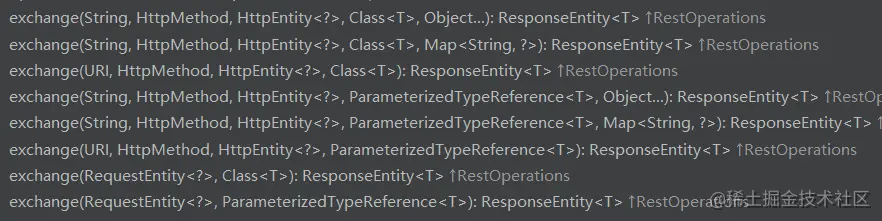
但是你会发现exchange的方法中似乎都有@Nullable HttpEntity<?> requestEntity这个参数,这就意味着我们至少要用HttpEntity来传递这个请求体,之前说过源码所以建议就使用HttpEntity提高性能。
示例
    @Test
    public void rtExchangeTest() throws JSONException {
        RestTemplate restTemplate = new RestTemplate();
        String url = "http://xxx.top/notice/list";
        HttpHeaders headers = new HttpHeaders();
        headers.setContentType(MediaType.APPLICATION_FORM_URLENCODED);
        JSONObject jsonObj = new JSONObject();
        jsonObj.put("start",1);
        jsonObj.put("page",5);

        HttpEntity<String> entity = new HttpEntity<>(jsonObj.toString(), headers);
        ResponseEntity<JSONObject> exchange = restTemplate.exchange(url,
                                          HttpMethod.GET, entity, JSONObject.class);
        System.out.println(exchange.getBody());
    }
复制代码这次可以看到,我使用了JSONObject对象传入和返回。
当然,HttpMethod方法还有很多,用法类似。
excute()的用法与exchange()大同小异了,它同样可以指定不同的HttpMethod,不同的是它返回的对象是响应体所映射成的对象<T>,而不是ResponseEntity<T>。
需要强调的是,execute()方法是以上所有方法的底层调用。随便看一个:
	@Override
	@Nullable
	public <T> T postForObject(String url, @Nullable Object request, Class<T> responseType, Map<String, ?> uriVariables)
			throws RestClientException {

		RequestCallback requestCallback = httpEntityCallback(request, responseType);
		HttpMessageConverterExtractor<T> responseExtractor =
				new HttpMessageConverterExtractor<>(responseType, getMessageConverters(), logger);
return execute(url, HttpMethod.POST, requestCallback, responseExtractor, uriVariables);我试图获取一个长度在1到10之间的字符串,并输出将字符串分解为大小为1、2或3的连续子字符串的所有可能方式。例如:输入:123456将整数分割成单个字符,然后继续查找组合。该代码将返回以下所有数组。[1,2,3,4,5,6][12,3,4,5,6][1,23,4,5,6][1,2,34,5,6][1,2,3,45,6][1,2,3,4,56][12,34,5,6][12,3,45,6][12,3,4,56][1,23,45,6][1,2,34,56][1,23,4,56][12,34,56][123,4,5,6][1,234,5,6][1,2,345,6][1,2,3,456][123
我主要使用Ruby来执行此操作,但到目前为止我的攻击计划如下:使用gemsrdf、rdf-rdfa和rdf-microdata或mida来解析给定任何URI的数据。我认为最好映射到像schema.org这样的统一模式,例如使用这个yaml文件,它试图描述数据词汇表和opengraph到schema.org之间的转换:#SchemaXtoschema.orgconversion#data-vocabularyDV:name:namestreet-address:streetAddressregion:addressRegionlocality:addressLocalityphoto:i
是的,我知道最好使用webmock,但我想知道如何在RSpec中模拟此方法:defmethod_to_testurl=URI.parseurireq=Net::HTTP::Post.newurl.pathres=Net::HTTP.start(url.host,url.port)do|http|http.requestreq,foo:1endresend这是RSpec:let(:uri){'http://example.com'}specify'HTTPcall'dohttp=mock:httpNet::HTTP.stub!(:start).and_yieldhttphttp.shou
在我的Controller中,我通过以下方式在我的index方法中支持HTML和JSON:respond_todo|format|format.htmlformat.json{renderjson:@user}end在浏览器中拉起它时,它会自然地以HTML呈现。但是,当我对/user资源进行内容类型为application/json的curl调用时(因为它是索引方法),我仍然将HTML作为响应。如何获取JSON作为响应?我还需要说明什么? 最佳答案 您应该将.json附加到请求的url,提供的格式在routes.rb的路径中定义。这
question的一些答案关于redirect_to让我想到了其他一些问题。基本上,我正在使用Rails2.1编写博客应用程序。我一直在尝试自己完成大部分工作(因为我对Rails有所了解),但在需要时会引用Internet上的教程和引用资料。我设法让一个简单的博客正常运行,然后我尝试添加评论。靠我自己,我设法让它进入了可以从script/console添加评论的阶段,但我无法让表单正常工作。我遵循的其中一个教程建议在帖子Controller中创建一个“评论”操作,以添加评论。我的问题是:这是“标准”方式吗?我的另一个问题的答案之一似乎暗示应该有一个CommentsController参
rails中是否有任何规定允许站点的所有AJAXPOST请求在没有authenticity_token的情况下通过?我有一个调用Controller方法的JqueryPOSTajax调用,但我没有在其中放置任何真实性代码,但调用成功。我的ApplicationController确实有'request_forgery_protection'并且我已经改变了config.action_controller.consider_all_requests_local在我的environments/development.rb中为false我还搜索了我的代码以确保我没有重载ajaxSend来发送
我目前正在使用以下方法获取页面的源代码:Net::HTTP.get(URI.parse(page.url))我还想获取HTTP状态,而无需发出第二个请求。有没有办法用另一种方法做到这一点?我一直在查看文档,但似乎找不到我要找的东西。 最佳答案 在我看来,除非您需要一些真正的低级访问或控制,否则最好使用Ruby的内置Open::URI模块:require'open-uri'io=open('http://www.example.org/')#=>#body=io.read[0,50]#=>"["200","OK"]io.base_ur
在应用开发中,有时候我们需要获取系统的设备信息,用于数据上报和行为分析。那在鸿蒙系统中,我们应该怎么去获取设备的系统信息呢,比如说获取手机的系统版本号、手机的制造商、手机型号等数据。1、获取方式这里分为两种情况,一种是设备信息的获取,一种是系统信息的获取。1.1、获取设备信息获取设备信息,鸿蒙的SDK包为我们提供了DeviceInfo类,通过该类的一些静态方法,可以获取设备信息,DeviceInfo类的包路径为:ohos.system.DeviceInfo.具体的方法如下:ModifierandTypeMethodDescriptionstatic StringgetAbiList()Obt
1.错误信息:Errorresponsefromdaemon:Gethttps://registry-1.docker.io/v2/:net/http:requestcanceledwhilewaitingforconnection(Client.Timeoutexceededwhileawaitingheaders)或者:Errorresponsefromdaemon:Gethttps://registry-1.docker.io/v2/:net/http:TLShandshaketimeout2.报错原因:docker使用的镜像网址默认为国外,下载容易超时,需要修改成国内镜像地址(首先阿里
使用rails4,ruby2。我在rails配置中为我的cookiesession设置了30分钟的超时时间。问题是,如果我转到表单,让session超时,然后提交表单,我会收到此ActionController::InvalidAuthenticityToken错误。如何在Rails中优雅地处理这个错误?比如说,重定向到登录屏幕? 最佳答案 在您的ApplicationController:rescue_fromActionController::InvalidAuthenticityTokendoredirect_tosome_p
