K8S集群部署过程耗时:不到1小时。
经过最近几次的k8s部署操作,自己也是踩过很多坑,总结记录一下详细、完整的部署过程,供对Kubernetes感兴趣的朋友参考,一起学习;
本次使用的3台2C4G的ECS百度云服务器,确保可以相互访问,如果跨VPC,可以建立“对等连接”:
| 主机名 | IP | 角色 | 操作系统 |
| k8s-master | 192.168.16.4 | master | CentOS Linux 7.9 |
| k8s-node01 | 192.168.16.5 | node-01 | CentOS Linux 7.9 |
| k8s-node02 | 172.17.22.4 | node-02 | CentOS Linux 7.9 |
全部节点执行:
1、关闭 SELinux
## 临时并永久关闭SELinux
setenforce 0 && sed -i 's/^SELINUX=.*/SELINUX=disabled/' /etc/selinux/config
2、关闭防火墙
## 临时并永久关闭防火墙
systemctl stop firewalld && systemctl disable firewalld
3、关闭SWAP
# 1、临时并永久关闭交换空间
swapoff -a &&  sed -i '/ swap / s/^\(.*\)$/#\1/g' /etc/fstab

# 2、查看是否关闭成功
free -m
4、修改名hosts文件(/etc/hosts)
cat  >> /etc/hosts << EOF
192.168.16.4 k8s-master
192.168.16.5 k8s-node01
172.17.22.4 k8s-node02
EOF
5、配置ECS云服务器的主机名
# 在各自对应的主机上执行对应操作
hostnamectl set-hostname k8s-master
hostnamectl set-hostname k8s-node01
hostnamectl set-hostname k8s-node021、卸载旧版本
yum remove docker \
           docker-client \
           docker-client-latest \
           docker-common \
           docker-latest \
           docker-latest-logrotate \
           docker-logrotate \
           docker-engine
2、安装依赖包
yum install -y yum-utils3、设置镜像仓库
Docker默认的国外官方镜像库拉取会非常慢,建议改用国内阿里云地址
yum-config-manager \
    --add-repo \
    http://mirrors.aliyun.com/docker-ce/linux/centos/docker-ce.repo   #地址为国内阿里云地址
4、更新YUM索引
yum makecache5、安装 Docker
直接安装最新版
#docker-ce 表示社区版,ee 表示企业版,默认安装最新版
yum -y install docker-ce docker-ce-cli containerd.io
6、启动Docker
systemctl start docker
systemctl enable docker #设置开机启动
7、查看信息
1、查看Docker 启动版本
docker version
# 2、查看信息
docker info
# 3、测试docker 服务
docker run hello-world在K8S中建议Docker与K8S使用的Cgroupdriver值为 “systemd”,所以每一个节点还需要进行如下的修改 :
## Create /etc/docker directory.
mkdir /etc/docker

# Setup daemon.
cat > /etc/docker/daemon.json <<EOF
{
  "exec-opts": ["native.cgroupdriver=systemd"],
  "log-driver": "json-file",
  "log-opts": {
    "max-size": "100m"
  },
  "storage-driver": "overlay2",
  "storage-opts": [
    "overlay2.override_kernel_check=true"
  ]
}
EOF

mkdir -p /etc/systemd/system/docker.service.d

# Restart Docker
systemctl daemon-reload
systemctl restart docker#1、配置YUM源
cat << EOF > /etc/yum.repos.d/kubernetes.repo
[kubernetes]
name=Kubernetes
baseurl=https://mirrors.aliyun.com/kubernetes/yum/repos/kubernetes-el7-x86_64/
enabled=1
gpgcheck=0
EOF
# 2、所有节点安装必备工具,版本不加默认为最新版,也可以指定版本号
yum -y install kubelet kubeadm kubectl --disableexcludes=kubernetes(用自定义的Kubernetes)
# 3、启动服务(设置系统重启后自动启动)
systemctl enable kubelet
# 4、查看版本
kubeadm version #kubeadm版本号
kubelet --version #kubelet版本号
kubectl version #kubectl版本号1、创建集群目录并进入
mkdir -p /usr/local/kubernetes/cluster
cd /usr/local/kubernetes/cluster
# 2、导出配置文件
kubeadm config print init-defaults --kubeconfig ClusterConfiguration > kubeadm.yml
# 3、备份并修改导出的配置文件,修改内容如下
[root@k8s-master cluster]# cp kubeadm.yml kubeadm.yml-bak
[root@k8s-master cluster]# cat kubeadm.yml
apiVersion: kubeadm.k8s.io/v1beta3
bootstrapTokens:
- groups:
- system:bootstrappers:kubeadm:default-node-token
token: abcdef.0123456789abcdef
ttl: 24h0m0s
usages:
- signing
- authentication
kind: InitConfiguration
localAPIEndpoint:
advertiseAddress: 192.168.16.4 #######修改一: 修改为主节点IP为maser的实际IP,默认配置为1.2.3.4
bindPort: 6443
nodeRegistration:
criSocket: /var/run/dockershim.sock
imagePullPolicy: IfNotPresent
name: k8s-master #######修改二: 修改为主节点k8s-maser
taints: null
---
apiServer:
timeoutForControlPlane: 4m0s
apiVersion: kubeadm.k8s.io/v1beta3
certificatesDir: /etc/kubernetes/pki
clusterName: kubernetes
controllerManager: {}
dns: {}
etcd:
local:
dataDir: /var/lib/etcd
imageRepository: registry.aliyuncs.com/google_containers #######修改三: 修改镜像下载地址为阿里云地址,默认为国外下载地址:k8s.gcr.io
kind: ClusterConfiguration
kubernetesVersion: 1.23.6 #######修改四:修改为Kubernetes实际安装版本,否则服务起不来。查看版本命名kubeadm version
networking:
dnsDomain: cluster.local
podSubnet: "10.244.0.0/16" #######修改五:配置Pod所在网段为我们虚拟机不冲突的网段(这里用的是Flannel默认网段),默认配置为:podSubnet: ""
serviceSubnet: 10.96.0.0/12
scheduler: {}[root@k8s-master cluster]# kubeadm init --config=kubeadm.yml --upload-certs | tee kubeadm-init.log
###########以下为输出信息,内容同步到kubeadm-init.log日志里,方便后续查看内容信息
[root@k8s-master cluster]# kubeadm init --config=kubeadm.yml --upload-certs | tee kubeadm-init.log
[init] Using Kubernetes version: v1.23.6
[preflight] Running pre-flight checks
[preflight] Pulling images required for setting up a Kubernetes cluster
[preflight] This might take a minute or two, depending on the speed of your internet connection
[preflight] You can also perform this action in beforehand using 'kubeadm config images pull'
[certs] Using certificateDir folder "/etc/kubernetes/pki"
[certs] Generating "ca" certificate and key
[certs] Generating "apiserver" certificate and key
[certs] apiserver serving cert is signed for DNS names [k8s-master kubernetes kubernetes.default kubernetes.default.svc kubernetes.default.svc.cluster.local] and IPs [10.96.0.1 192.168.16.4]
[certs] Generating "apiserver-kubelet-client" certificate and key
[certs] Generating "front-proxy-ca" certificate and key
[certs] Generating "front-proxy-client" certificate and key
[certs] Generating "etcd/ca" certificate and key
[certs] Generating "etcd/server" certificate and key
[certs] etcd/server serving cert is signed for DNS names [k8s-master localhost] and IPs [192.168.16.4 127.0.0.1 ::1]
[certs] Generating "etcd/peer" certificate and key
[certs] etcd/peer serving cert is signed for DNS names [k8s-master localhost] and IPs [192.168.16.4 127.0.0.1 ::1]
[certs] Generating "etcd/healthcheck-client" certificate and key
[certs] Generating "apiserver-etcd-client" certificate and key
[certs] Generating "sa" key and public key
[kubeconfig] Using kubeconfig folder "/etc/kubernetes"
[kubeconfig] Writing "admin.conf" kubeconfig file
[kubeconfig] Writing "kubelet.conf" kubeconfig file
[kubeconfig] Writing "controller-manager.conf" kubeconfig file
[kubeconfig] Writing "scheduler.conf" kubeconfig file
[kubelet-start] Writing kubelet environment file with flags to file "/var/lib/kubelet/kubeadm-flags.env"
[kubelet-start] Writing kubelet configuration to file "/var/lib/kubelet/config.yaml"
[kubelet-start] Starting the kubelet
[control-plane] Using manifest folder "/etc/kubernetes/manifests"
[control-plane] Creating static Pod manifest for "kube-apiserver"
[control-plane] Creating static Pod manifest for "kube-controller-manager"
[control-plane] Creating static Pod manifest for "kube-scheduler"
[etcd] Creating static Pod manifest for local etcd in "/etc/kubernetes/manifests"
[wait-control-plane] Waiting for the kubelet to boot up the control plane as static Pods from directory "/etc/kubernetes/manifests". This can take up to 4m0s
[apiclient] All control plane components are healthy after 7.003639 seconds
[upload-config] Storing the configuration used in ConfigMap "kubeadm-config" in the "kube-system" Namespace
[kubelet] Creating a ConfigMap "kubelet-config-1.23" in namespace kube-system with the configuration for the kubelets in the cluster
NOTE: The "kubelet-config-1.23" naming of the kubelet ConfigMap is deprecated. Once the UnversionedKubeletConfigMap feature gate graduates to Beta the default name will become just "kubelet-config". Kubeadm upgrade will handle this transition transparently.
[upload-certs] Storing the certificates in Secret "kubeadm-certs" in the "kube-system" Namespace
[upload-certs] Using certificate key:
59431c553915b0d1c83bbf63db5ab840973aeae000bf4b2a9453931913a7d9f0
[mark-control-plane] Marking the node k8s-master as control-plane by adding the labels: [node-role.kubernetes.io/master(deprecated) node-role.kubernetes.io/control-plane node.kubernetes.io/exclude-from-external-load-balancers]
[mark-control-plane] Marking the node k8s-master as control-plane by adding the taints [node-role.kubernetes.io/master:NoSchedule]
[bootstrap-token] Using token: abcdef.0123456789abcdef
[bootstrap-token] Configuring bootstrap tokens, cluster-info ConfigMap, RBAC Roles
[bootstrap-token] configured RBAC rules to allow Node Bootstrap tokens to get nodes
[bootstrap-token] configured RBAC rules to allow Node Bootstrap tokens to post CSRs in order for nodes to get long term certificate credentials
[bootstrap-token] configured RBAC rules to allow the csrapprover controller automatically approve CSRs from a Node Bootstrap Token
[bootstrap-token] configured RBAC rules to allow certificate rotation for all node client certificates in the cluster
[bootstrap-token] Creating the "cluster-info" ConfigMap in the "kube-public" namespace
[kubelet-finalize] Updating "/etc/kubernetes/kubelet.conf" to point to a rotatable kubelet client certificate and key
[addons] Applied essential addon: CoreDNS
[addons] Applied essential addon: kube-proxy
Your Kubernetes control-plane has initialized successfully!
To start using your cluster, you need to run the following as a regular user:
mkdir -p $HOME/.kube
sudo cp -i /etc/kubernetes/admin.conf $HOME/.kube/config
sudo chown $(id -u):$(id -g) $HOME/.kube/config
Alternatively, if you are the root user, you can run:
export KUBECONFIG=/etc/kubernetes/admin.conf
You should now deploy a pod network to the cluster.
Run "kubectl apply -f [podnetwork].yaml" with one of the options listed at:
https://kubernetes.io/docs/concepts/cluster-administration/addons/
Then you can join any number of worker nodes by running the following on each as root:
kubeadm join 192.168.16.4:6443 --token abcdef.0123456789abcdef \
--discovery-token-ca-cert-hash sha256:cc7a93795871aa97b47dda0d8cbc18d19577245b40e6068f1f4aaebb9b40e6b4
[root@k8s-master cluster]#
[root@k8s-master cluster]#
[root@k8s-master cluster]#
[root@k8s-master cluster]#mkdir -p $HOME/.kube
[root@k8s-master cluster]#sudo cp -i /etc/kubernetes/admin.conf $HOME/.kube/configroot@k8s-master cluster]# kubectl get nodes
NAME STATUS ROLES AGE VERSION
k8s-master01 NotReady master 6m10s v1.14.0
# NotReady 是因为还没有配置网络插件,需要网络插件,如Flannel其中需要在master节点和全部node节点都安装flannel插件
# 1、下载资源配置清单
wget https://raw.githubusercontent.com/coreos/flannel/master/Documentation/kube-flannel.yml

# 2、运行资源清单
kubectl apply -f kube-flannel.yml

# 3、再次查看状态信息(STATUS 状态变成 Ready)
kubectl get nodes

# 输出如下:
[root@k8s-master cluster]# kubectl get nodes
NAME         STATUS   ROLES                  AGE     VERSION
k8s-master   Ready    control-plane,master   6m15s   v1.23.6


# 4、查看网卡,发现多处一个 flannel.1: 网卡
ifconfig 在k8s-node01,k8s-node02节点上执行:
# 验证信息从主节点初始化日志里面查找
kubeadm join 192.168.16.4:6443 --token abcdef.0123456789abcdef \
        --discovery-token-ca-cert-hash sha256:cc7a93795871aa97b47dda0d8cbc18d19577245b40e6068f1f4aaebb9b40e6b4


## 以下为输出信息
[root@k8s-node01 docker]# kubeadm join 192.168.16.4:6443 --token abcdef.0123456789abcdef \
>         --discovery-token-ca-cert-hash sha256:cc7a93795871aa97b47dda0d8cbc18d19577245b40e6068f1f4aaebb9b40e6b4
[preflight] Running pre-flight checks
[preflight] Reading configuration from the cluster...
[preflight] FYI: You can look at this config file with 'kubectl -n kube-system get cm kubeadm-config -o yaml'
[kubelet-start] Writing kubelet configuration to file "/var/lib/kubelet/config.yaml"
[kubelet-start] Writing kubelet environment file with flags to file "/var/lib/kubelet/kubeadm-flags.env"
[kubelet-start] Starting the kubelet
[kubelet-start] Waiting for the kubelet to perform the TLS Bootstrap...

This node has joined the cluster:
* Certificate signing request was sent to apiserver and a response was received.
* The Kubelet was informed of the new secure connection details.

Run 'kubectl get nodes' on the control-plane to see this node join the cluster.

[root@k8s-node01 docker]#

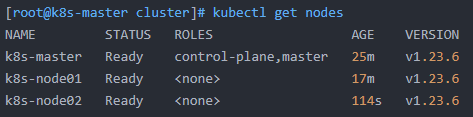
[root@k8s-master cluster]# kubectl get nodes
NAME         STATUS   ROLES                  AGE    VERSION
k8s-master   Ready    control-plane,master   25m    v1.23.6
k8s-node01   Ready    <none>                 17m    v1.23.6
k8s-node02   Ready    <none>                 114s   v1.23.6
Kubernetes集群顺利搭建完成!
问题记录:
1、K8S Node节点报错The connection to the server localhost:8080 was refused - did you specify the right host or port?
出现这个问题的原因是kubectl命令需要使用kubernetes-admin来运行,解决方法如下,将主节点中的【/etc/kubernetes/admin.conf】文件拷贝到从节点相同目录下,然后配置环境变量:
echo "export KUBECONFIG=/etc/kubernetes/admin.conf" >> ~/.bash_profile

立即生效

source ~/.bash_profile
2、解决docker网络与宿主机网络冲突问题
vim /etc/docker/daemon.json(这里没有这个文件的话,自行创建)

{

"bip":"172.16.10.1/24"

}

[root@k8s-node02 docker]# vim daemon.json
[root@k8s-node02 docker]# systemctl daemon-reload
[root@k8s-node02 docker]# systemctl restart docker
[root@k8s-node02 docker]#参考资料:https://www.cnblogs.com/wangzy-Zj/p/14078816.html
我已经构建了一些serverspec代码来在多个主机上运行一组测试。问题是当任何测试失败时,测试会在当前主机停止。即使测试失败,我也希望它继续在所有主机上运行。Rakefile:namespace:specdotask:all=>hosts.map{|h|'spec:'+h.split('.')[0]}hosts.eachdo|host|begindesc"Runserverspecto#{host}"RSpec::Core::RakeTask.new(host)do|t|ENV['TARGET_HOST']=hostt.pattern="spec/cfengine3/*_spec.r
我有一个存储主机名的Ruby数组server_names。如果我打印出来,它看起来像这样:["hostname.abc.com","hostname2.abc.com","hostname3.abc.com"]相当标准。我想要做的是获取这些服务器的IP(可能将它们存储在另一个变量中)。看起来IPSocket类可以做到这一点,但我不确定如何使用IPSocket类遍历它。如果它只是尝试像这样打印出IP:server_names.eachdo|name|IPSocket::getaddress(name)pnameend它提示我没有提供服务器名称。这是语法问题还是我没有正确使用类?输出:ge
导读:随着叮咚买菜业务的发展,不同的业务场景对数据分析提出了不同的需求,他们希望引入一款实时OLAP数据库,构建一个灵活的多维实时查询和分析的平台,统一数据的接入和查询方案,解决各业务线对数据高效实时查询和精细化运营的需求。经过调研选型,最终引入ApacheDoris作为最终的OLAP分析引擎,Doris作为核心的OLAP引擎支持复杂地分析操作、提供多维的数据视图,在叮咚买菜数十个业务场景中广泛应用。作者|叮咚买菜资深数据工程师韩青叮咚买菜创立于2017年5月,是一家专注美好食物的创业公司。叮咚买菜专注吃的事业,为满足更多人“想吃什么”而努力,通过美好食材的供应、美好滋味的开发以及美食品牌的孵
C#实现简易绘图工具一.引言实验目的:通过制作窗体应用程序(C#画图软件),熟悉基本的窗体设计过程以及控件设计,事件处理等,熟悉使用C#的winform窗体进行绘图的基本步骤,对于面向对象编程有更加深刻的体会.Tutorial任务设计一个具有基本功能的画图软件**·包括简单的新建文件,保存,重新绘图等功能**·实现一些基本图形的绘制,包括铅笔和基本形状等,学习橡皮工具的创建**·设计一个合理舒适的UI界面**注明:你可能需要先了解一些关于winform窗体应用程序绘图的基本知识,以及关于GDI+类和结构的知识二.实验环境Windows系统下的visualstudio2017C#窗体应用程序三.
在VMware16.2.4安装Ubuntu一、安装VMware1.打开VMwareWorkstationPro官网,点击即可进入。2.进入后向下滑动找到Workstation16ProforWindows,点击立即下载。3.下载完成,文件大小615MB,如下图:4.鼠标右击,以管理员身份运行。5.点击下一步6.勾选条款,点击下一步7.先勾选,再点击下一步8.去掉勾选,点击下一步9.点击下一步10.点击安装11.点击许可证12.在百度上搜索VM16许可证,复制填入,然后点击输入即可,亲测有效。13.点击完成14.重启系统,点击是15.双击VMwareWorkstationPro图标,进入虚拟机主
需求:要创建虚拟机,就需要给他提供一个虚拟的磁盘,我们就在/opt目录下创建一个10G大小的raw格式的虚拟磁盘CentOS-7-x86_64.raw命令格式:qemu-imgcreate-f磁盘格式磁盘名称磁盘大小qemu-imgcreate-f磁盘格式-o?1.创建磁盘qemu-imgcreate-fraw/opt/CentOS-7-x86_64.raw10G执行效果#ls/opt/CentOS-7-x86_64.raw2.安装虚拟机使用virt-install命令,基于我们提供的系统镜像和虚拟磁盘来创建一个虚拟机,另外在创建虚拟机之前,提前打开vnc客户端,在创建虚拟机的时候,通过vnc
我正在使用DMOZ的listofurltopics,其中包含一些具有包含下划线的主机名的url。例如:608609TheOuterHeaven610InformationandimagegalleryofMcFarlane'sactionfiguresforTrigun,Akira,TenchiMuyoandotherJapaneseSci-Fianimations.611Top/Arts/Animation/Anime/Collectibles/Models_and_Figures/Action_Figures612虽然此url可以在网络浏览器中使用(或者至少在我的浏览器中可以使用:
我正在寻找用于Rails的优质管理插件。似乎大多数现有的插件/gem(例如“restful_authentication”、“acts_as_authenticated”)都围绕着self注册等展开。但是,我正在寻找一种功能齐全的基于管理/管理角色的解决方案——但不是简单地附加到另一个非基于角色的解决方案。如果我找不到,我想我会自己动手......只是不想重新发明轮子。 最佳答案 RyanBates最近做了两个关于授权的railscast(注意身份验证和授权之间的区别;身份验证检查用户是否如她所说的那样,授权检查用户是否有权访问资源
我刚刚在我的Ubuntu9.10服务器上安装了TeamBox。我使用提供的服务器脚本在端口3000上启动并运行它。它的运行速度非常慢,从另一台计算机连接时每个HTTP请求最多需要30秒。我使用链接从shell加载TeamBox,一点也不花时间。然后我设置了一个SSH隧道,它再次运行得非常快。我通过此服务器上的apache以及SAMBA等运行了大约30个虚拟主机,没有任何问题。我该如何解决这个问题? 最佳答案 我的redmine(ruby,webrick)太慢了。现在我解决了这个问题:apt-getinstallmongrelruby
我正在根据Rakefile中的现有测试文件动态生成测试任务。假设您有各种以模式命名的单元测试文件test_.rb.所以我正在做的是创建一个以“测试”命名空间内的文件名命名的任务。使用下面的代码,我可以用raketest:调用所有测试require'rake/testtask'task:default=>'test:all'namespace:testdodesc"Runalltests"Rake::TestTask.new(:all)do|t|t.test_files=FileList['test_*.rb']endFileList['test_*.rb'].eachdo|task|n
