1.通过实验掌握基本的MapReduce编程方法;
2.掌握用MapReduce解决一些常见的数据处理问题,包括数据去重、数据排序和数据挖掘等。
已经配置完成的Hadoop伪分布式环境。
对于两个输入文件,即文件A和文件B,请编写MapReduce程序,对两个文件进行合并,并剔除其中重复的内容,得到一个新的输出文件C。下面是输入文件和输出文件的一个样例供参考。
输入文件A的样例如下:
20150101 x
20150102 y
20150103 x
20150104 y
20150105 z
20150106 x
输入文件B的样例如下:
20150101 y
20150102 y
20150103 x
20150104 z
20150105 y
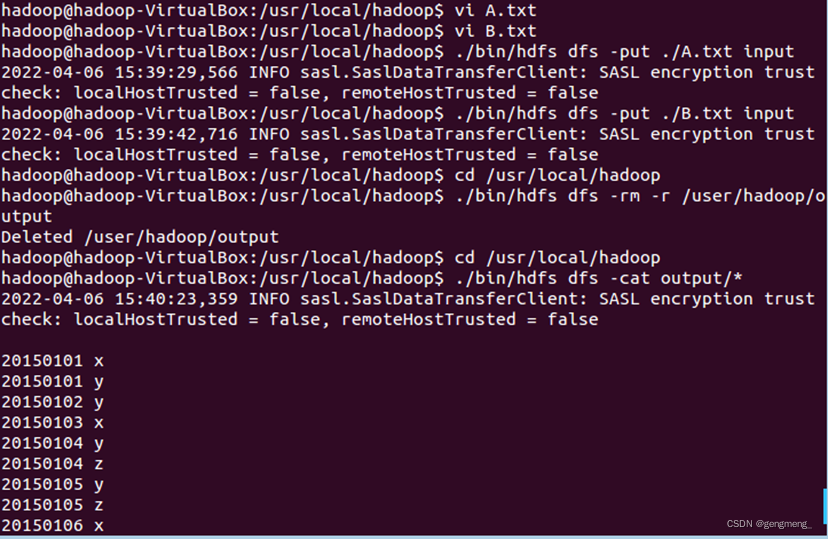
根据输入文件A和B合并得到的输出文件C的样例如下:
20150101 x
20150101 y
20150102 y
20150103 x
20150104 y
20150104 z
20150105 y
20150105 z
20150106 x
需要首先删除HDFS中与当前Linux用户hadoop对应的input和output目录(即HDFS中的“/user/hadoop/input”和“/user/hadoop/output”目录),这样确保后面程序运行不会出现问题
cd /usr/local/hadoop
./bin/hdfs dfs -rm -r input
./bin/hdfs dfs -rm -r output
然后,再在HDFS中新建与当前Linux用户hadoop对应的input目录,即“/user/hadoop/input”目录
cd /usr/local/hadoop
./bin/hdfs dfs -mkdir input
创建A.txt B.txt,输入上述内容
vi A.txt
vi B.txt
将A,B上传到HDFS中
cd /usr/local/hadoop
./bin/hdfs dfs -put ./A.txt input
./bin/hdfs dfs -put ./B.txt input
运行代码:
import java.io.IOException;

import org.apache.hadoop.conf.Configuration;
import org.apache.hadoop.fs.Path;
import org.apache.hadoop.io.IntWritable;
import org.apache.hadoop.io.Text;
import org.apache.hadoop.mapreduce.Job;
import org.apache.hadoop.mapreduce.Mapper;
import org.apache.hadoop.mapreduce.Reducer;
import org.apache.hadoop.mapreduce.lib.input.FileInputFormat;
import org.apache.hadoop.mapreduce.lib.output.FileOutputFormat;
import org.apache.hadoop.util.GenericOptionsParser;

public class Merge {

	/**
	 * @param args
	 * 对A,B两个文件进行合并,并剔除其中重复的内容,得到一个新的输出文件C
	 */
	//重载map函数,直接将输入中的value复制到输出数据的key上
	public static class Map extends Mapper<Object, Text, Text, Text>{
		private static Text text = new Text();
		public void map(Object key, Text value, Context context) throws IOException,InterruptedException{
			text = value;
			context.write(text, new Text(""));
		}
	}

	//重载reduce函数,直接将输入中的key复制到输出数据的key上
	public static class Reduce extends Reducer<Text, Text, Text, Text>{
		public void reduce(Text key, Iterable<Text> values, Context context ) throws IOException,InterruptedException{
			context.write(key, new Text(""));
		}
	}

	public static void main(String[] args) throws Exception{

		// TODO Auto-generated method stub
		Configuration conf = new Configuration();
        conf.set("fs.default.name","hdfs://localhost:9000");
		String[] otherArgs = new String[]{"input","output"}; /* 直接设置输入参数 */
		if (otherArgs.length != 2) {
			System.err.println("Usage: wordcount <in> <out>");
			System.exit(2);
			}
		Job job = Job.getInstance(conf,"Merge and duplicate removal");
		job.setJarByClass(Merge.class);
		job.setMapperClass(Map.class);
		job.setCombinerClass(Reduce.class);
		job.setReducerClass(Reduce.class);
		job.setOutputKeyClass(Text.class);
		job.setOutputValueClass(Text.class);
		FileInputFormat.addInputPath(job, new Path(otherArgs[0]));
		FileOutputFormat.setOutputPath(job, new Path(otherArgs[1]));
		System.exit(job.waitForCompletion(true) ? 0 : 1);
	}

}
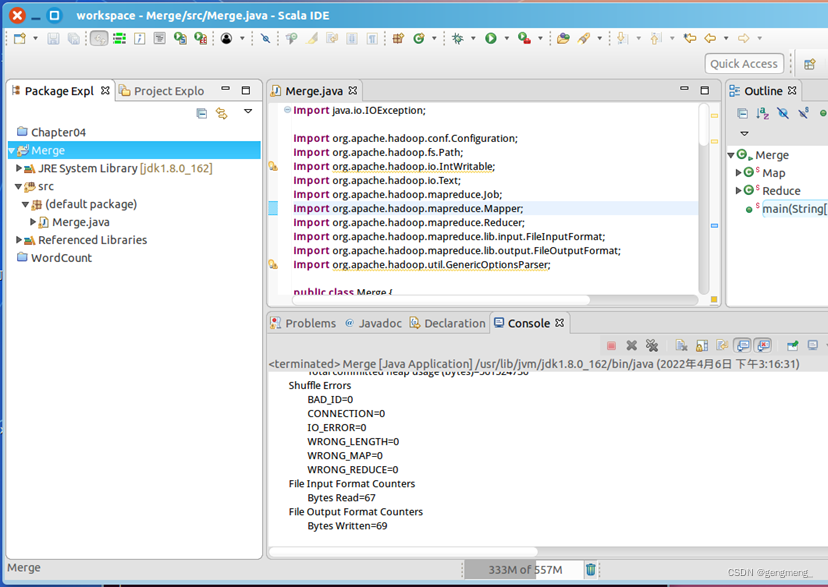
编译运行:
查看实验结果:
cd /usr/local/hadoop
./bin/hdfs dfs -cat output/*
现在有多个输入文件,每个文件中的每行内容均为一个整数。要求读取所有文件中的整数,进行升序排序后,输出到一个新的文件中,输出的数据格式为每行两个整数,第一个数字为第二个整数的排序位次,第二个整数为原待排列的整数。下面是输入文件和输出文件的一个样例供参考。
输入文件1的样例如下:
33
37
12
40
输入文件2的样例如下:
4
16
39
5
输入文件3的样例如下:
1
45
25
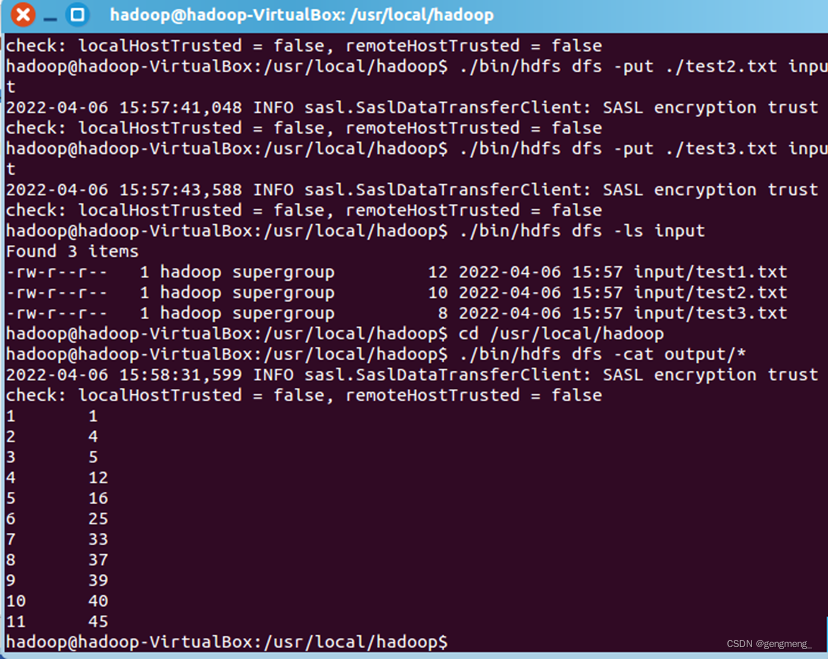
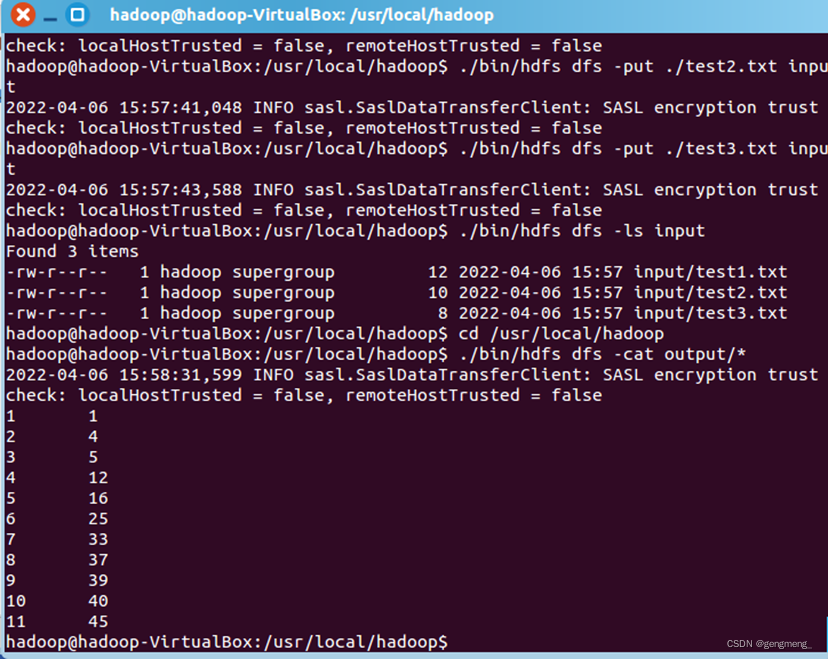
根据输入文件1、2和3得到的输出文件如下:
1 1
2 4
3 5
4 12
5 16
6 25
7 33
8 37
9 39
10 40
11 45
需要首先删除HDFS中与当前Linux用户hadoop对应的input和output目录(即HDFS中的“/user/hadoop/input”和“/user/hadoop/output”目录),这样确保后面程序运行不会出现问题
cd /usr/local/hadoop
./bin/hdfs dfs -rm -r input
./bin/hdfs dfs -rm -r output
然后,再在HDFS中新建与当前Linux用户hadoop对应的input目录,即“/user/hadoop/input”目录
cd /usr/local/hadoop
./bin/hdfs dfs -mkdir input
创建test1.txt test2.txt test3,输入上述内容
vi test1.txt
vi test2.txt
vi test3.txt
将test1,test2,test3上传到HDFS中
cd /usr/local/hadoop
./bin/hdfs dfs -put ./test1.txt input
./bin/hdfs dfs -put ./test2.txt input
./bin/hdfs dfs -put ./test3.txt input
运行代码:
import java.io.IOException;

import org.apache.hadoop.conf.Configuration;
import org.apache.hadoop.fs.Path;
import org.apache.hadoop.io.IntWritable;
import org.apache.hadoop.io.Text;
import org.apache.hadoop.mapreduce.Job;
import org.apache.hadoop.mapreduce.Mapper;
import org.apache.hadoop.mapreduce.Partitioner;
import org.apache.hadoop.mapreduce.Reducer;
import org.apache.hadoop.mapreduce.lib.input.FileInputFormat;
import org.apache.hadoop.mapreduce.lib.output.FileOutputFormat;
import org.apache.hadoop.util.GenericOptionsParser;


public class Merge {

	/**
	 * @param args
	 * 输入多个文件,每个文件中的每行内容均为一个整数
	 * 输出到一个新的文件中,输出的数据格式为每行两个整数,第一个数字为第二个整数的排序位次,第二个整数为原待排列的整数
	 */
	//map函数读取输入中的value,将其转化成IntWritable类型,最后作为输出key
	public static class Map extends Mapper<Object, Text, IntWritable, IntWritable>{

		private static IntWritable data = new IntWritable();
		public void map(Object key, Text value, Context context) throws IOException,InterruptedException{
			String text = value.toString();
			data.set(Integer.parseInt(text));
			context.write(data, new IntWritable(1));
		}
	}

	//reduce函数将map输入的key复制到输出的value上,然后根据输入的value-list中元素的个数决定key的输出次数,定义一个全局变量line_num来代表key的位次
	public static class Reduce extends Reducer<IntWritable, IntWritable, IntWritable, IntWritable>{
		private static IntWritable line_num = new IntWritable(1);

		public void reduce(IntWritable key, Iterable<IntWritable> values, Context context) throws IOException,InterruptedException{
			for(IntWritable val : values){
				context.write(line_num, key);
				line_num = new IntWritable(line_num.get() + 1);
			}
		}
	}

	//自定义Partition函数,此函数根据输入数据的最大值和MapReduce框架中Partition的数量获取将输入数据按照大小分块的边界,然后根据输入数值和边界的关系返回对应的Partiton ID
	public static class Partition extends Partitioner<IntWritable, IntWritable>{
		public int getPartition(IntWritable key, IntWritable value, int num_Partition){
			int Maxnumber = 65223;//int型的最大数值
			int bound = Maxnumber/num_Partition+1;
			int keynumber = key.get();
			for (int i = 0; i<num_Partition; i++){
				if(keynumber<bound * (i+1) && keynumber>=bound * i){
					return i;
				}
			}
			return -1;
		}
	}

	public static void main(String[] args) throws Exception{
		// TODO Auto-generated method stub
		Configuration conf = new Configuration();
        conf.set("fs.default.name","hdfs://localhost:9000");
		String[] otherArgs = new String[]{"input","output"}; /* 直接设置输入参数 */
		if (otherArgs.length != 2) {
			System.err.println("Usage: wordcount <in> <out>");
			System.exit(2);
			}
        Job job = Job.getInstance(conf,"Merge and sort");
		job.setJarByClass(Merge.class);
		job.setMapperClass(Map.class);
		job.setReducerClass(Reduce.class);
		job.setPartitionerClass(Partition.class);
		job.setOutputKeyClass(IntWritable.class);
		job.setOutputValueClass(IntWritable.class);
		FileInputFormat.addInputPath(job, new Path(otherArgs[0]));
		FileOutputFormat.setOutputPath(job, new Path(otherArgs[1]));
		System.exit(job.waitForCompletion(true) ? 0 : 1);

	}

}
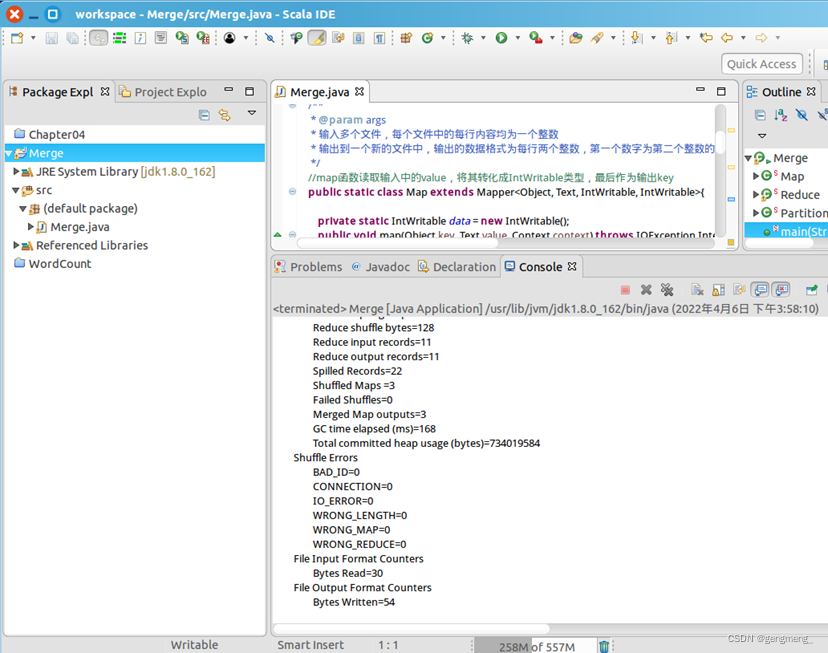
编译运行:
查看实验结果:
cd /usr/local/hadoop
./bin/hdfs dfs -cat output/*
下面给出一个child-parent的表格,要求挖掘其中的父子辈关系,给出祖孙辈关系的表格。
输入文件内容如下:
child parent
Steven Lucy
Steven Jack
Jone Lucy
Jone Jack
Lucy Mary
Lucy Frank
Jack Alice
Jack Jesse
David Alice
David Jesse
Philip David
Philip Alma
Mark David
Mark Alma
输出文件内容如下:
grandchild grandparent
Mark Jesse
Mark Alice
Philip Jesse
Philip Alice
Jone Jesse
Jone Alice
Steven Jesse
Steven Alice
Steven Frank
Steven Mary
Jone Frank
Jone Mary
需要首先删除HDFS中与当前Linux用户hadoop对应的input和output目录(即HDFS中的“/user/hadoop/input”和“/user/hadoop/output”目录),这样确保后面程序运行不会出现问题
cd /usr/local/hadoop
./bin/hdfs dfs -rm -r input
./bin/hdfs dfs -rm -r output
然后,再在HDFS中新建与当前Linux用户hadoop对应的input目录,即“/user/hadoop/input”目录
cd /usr/local/hadoop
./bin/hdfs dfs -mkdir input
创建test1.txt,输入上述内容
vi test1.txt
将test1上传到HDFS中
cd /usr/local/hadoop
./bin/hdfs dfs -put ./test1.txt input
运行代码:
import java.io.IOException;
import java.util.*;

import org.apache.hadoop.conf.Configuration;
import org.apache.hadoop.fs.Path;
import org.apache.hadoop.io.IntWritable;
import org.apache.hadoop.io.Text;
import org.apache.hadoop.mapreduce.Job;
import org.apache.hadoop.mapreduce.Mapper;
import org.apache.hadoop.mapreduce.Reducer;
import org.apache.hadoop.mapreduce.lib.input.FileInputFormat;
import org.apache.hadoop.mapreduce.lib.output.FileOutputFormat;
import org.apache.hadoop.util.GenericOptionsParser;

public class Merge{
	public static int time = 0;

	/**
	 * @param args
	 * 输入一个child-parent的表格
	 * 输出一个体现grandchild-grandparent关系的表格
	 */
	//Map将输入文件按照空格分割成child和parent,然后正序输出一次作为右表,反序输出一次作为左表,需要注意的是在输出的value中必须加上左右表区别标志
	public static class Map extends Mapper<Object, Text, Text, Text>{
		public void map(Object key, Text value, Context context) throws IOException,InterruptedException{
			String child_name = new String();
			String parent_name = new String();
			String relation_type = new String();
			String line = value.toString();
			int i = 0;
			while(line.charAt(i) != ' '){
				i++;
			}
			String[] values = {line.substring(0,i),line.substring(i+1)};
			if(values[0].compareTo("child") != 0){
				child_name = values[0];
				parent_name = values[1];
				relation_type = "1";//左右表区分标志
				context.write(new Text(values[1]), new Text(relation_type+"+"+child_name+"+"+parent_name));
				//左表
				relation_type = "2";
				context.write(new Text(values[0]), new Text(relation_type+"+"+child_name+"+"+parent_name));
				//右表
			}
		}
	}

	public static class Reduce extends Reducer<Text, Text, Text, Text>{
		public void reduce(Text key, Iterable<Text> values,Context context) throws IOException,InterruptedException{
			if(time == 0){   //输出表头
				context.write(new Text("grand_child"), new Text("grand_parent"));
				time++;
			}
			int grand_child_num = 0;
			String grand_child[] = new String[10];
			int grand_parent_num = 0;
			String grand_parent[]= new String[10];
			Iterator ite = values.iterator();
			while(ite.hasNext()){
				String record = ite.next().toString();
				int len = record.length();
				int i = 2;
				if(len == 0) continue;
				char relation_type = record.charAt(0);
				String child_name = new String();
				String parent_name = new String();
				//获取value-list中value的child

				while(record.charAt(i) != '+'){
					child_name = child_name + record.charAt(i);
					i++;
				}
				i=i+1;
				//获取value-list中value的parent
				while(i<len){
					parent_name = parent_name+record.charAt(i);
					i++;
				}
				//左表,取出child放入grand_child
				if(relation_type == '1'){
					grand_child[grand_child_num] = child_name;
					grand_child_num++;
				}
				else{//右表,取出parent放入grand_parent
					grand_parent[grand_parent_num] = parent_name;
					grand_parent_num++;
				}
			}

			if(grand_parent_num != 0 && grand_child_num != 0 ){
				for(int m = 0;m<grand_child_num;m++){
					for(int n=0;n<grand_parent_num;n++){
						context.write(new Text(grand_child[m]), new Text(grand_parent[n]));
						//输出结果
					}
				}
			}
		}
	}
	public static void main(String[] args) throws Exception{
		// TODO Auto-generated method stub
		Configuration conf = new Configuration();
        conf.set("fs.default.name","hdfs://localhost:9000");
		String[] otherArgs = new String[]{"input","output"}; /* 直接设置输入参数 */
		if (otherArgs.length != 2) {
			System.err.println("Usage: wordcount <in> <out>");
			System.exit(2);
			}
        Job job = Job.getInstance(conf,"Single table join ");
		job.setJarByClass(Merge.class);
		job.setMapperClass(Map.class);
		job.setReducerClass(Reduce.class);
		job.setOutputKeyClass(Text.class);
		job.setOutputValueClass(Text.class);
		FileInputFormat.addInputPath(job, new Path(otherArgs[0]));
		FileOutputFormat.setOutputPath(job, new Path(otherArgs[1]));
		System.exit(job.waitForCompletion(true) ? 0 : 1);
	}
}
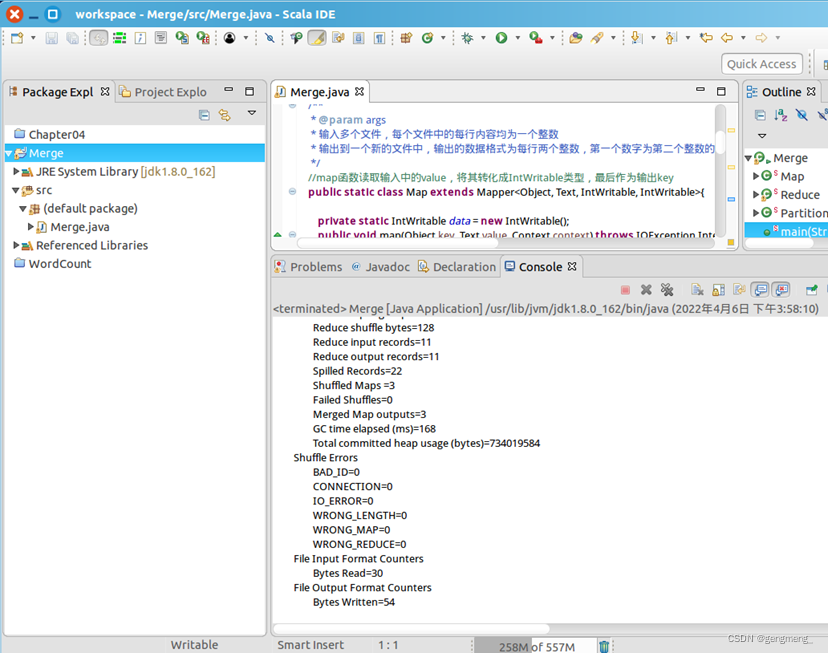
编译运行:
查看实验结果:
cd /usr/local/hadoop
./bin/hdfs dfs -cat output/*
问题1:
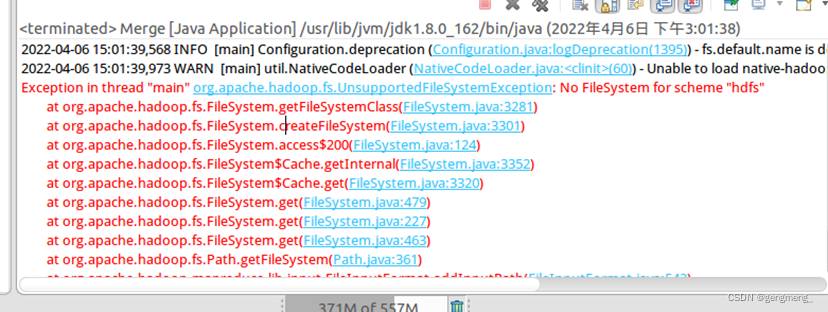
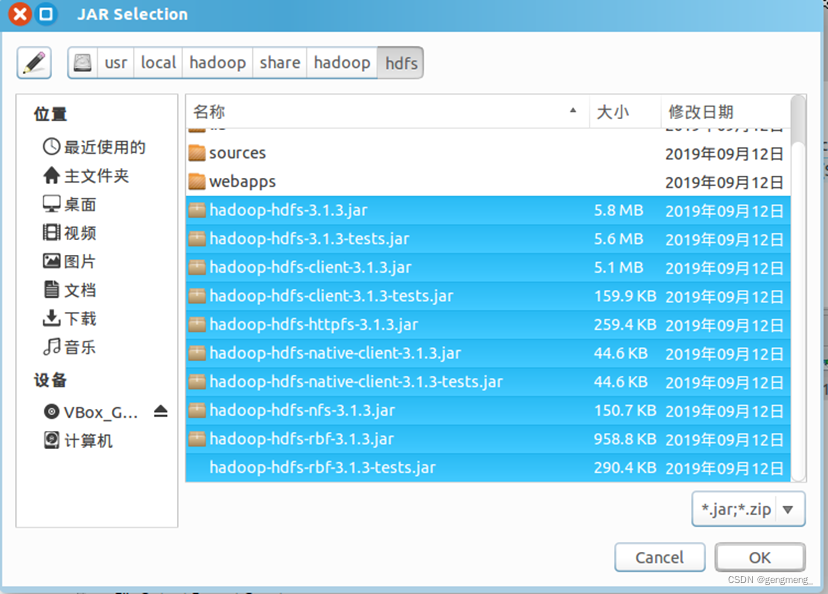
解决方法:引入hdfs包
问题2:
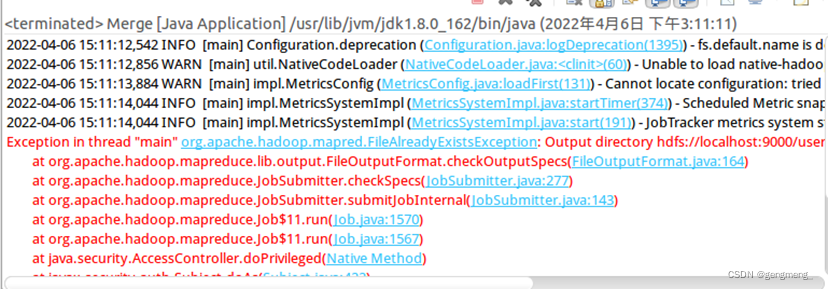
解决方法:hdfs的output目录已经存在,删除即可

问题三:
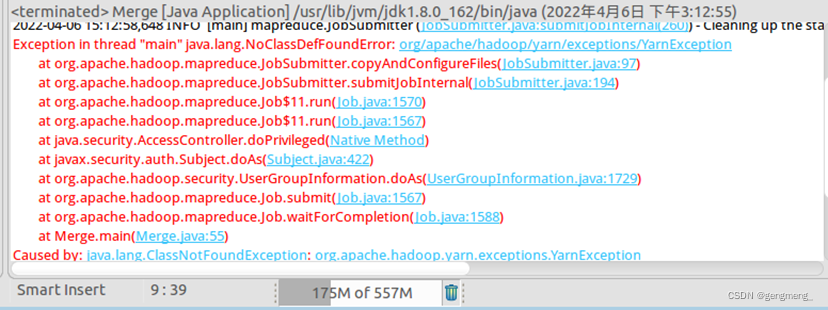
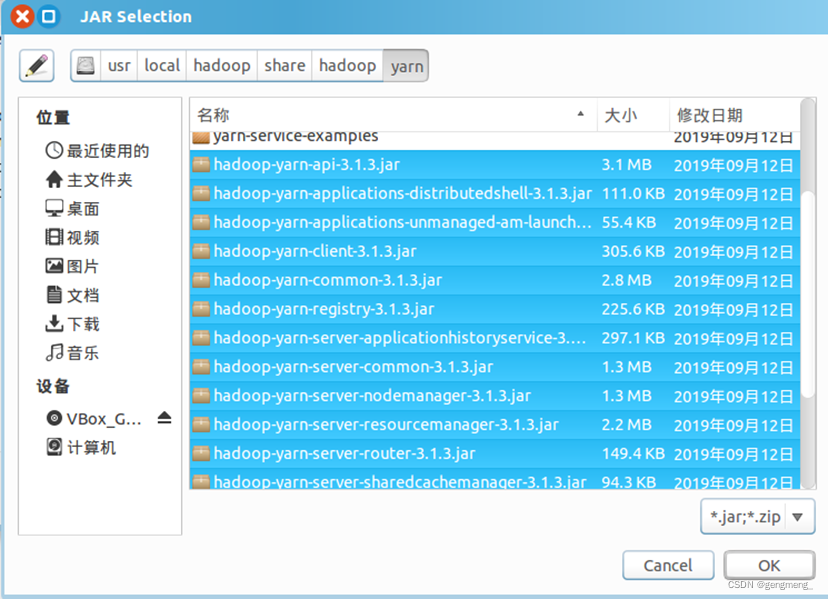
解决方法:引入yarn包
很好奇,就使用rubyonrails自动化单元测试而言,你们正在做什么?您是否创建了一个脚本来在cron中运行rake作业并将结果邮寄给您?git中的预提交Hook?只是手动调用?我完全理解测试,但想知道在错误发生之前捕获错误的最佳实践是什么。让我们理所当然地认为测试本身是完美无缺的,并且可以正常工作。下一步是什么以确保他们在正确的时间将可能有害的结果传达给您? 最佳答案 不确定您到底想听什么,但是有几个级别的自动代码库控制:在处理某项功能时,您可以使用类似autotest的内容获得关于哪些有效,哪些无效的即时反馈。要确保您的提
我主要使用Ruby来执行此操作,但到目前为止我的攻击计划如下:使用gemsrdf、rdf-rdfa和rdf-microdata或mida来解析给定任何URI的数据。我认为最好映射到像schema.org这样的统一模式,例如使用这个yaml文件,它试图描述数据词汇表和opengraph到schema.org之间的转换:#SchemaXtoschema.orgconversion#data-vocabularyDV:name:namestreet-address:streetAddressregion:addressRegionlocality:addressLocalityphoto:i
我有一个这样的哈希数组:[{:foo=>2,:date=>Sat,01Sep2014},{:foo2=>2,:date=>Sat,02Sep2014},{:foo3=>3,:date=>Sat,01Sep2014},{:foo4=>4,:date=>Sat,03Sep2014},{:foo5=>5,:date=>Sat,02Sep2014}]如果:date相同,我想合并哈希值。我对上面数组的期望是:[{:foo=>2,:foo3=>3,:date=>Sat,01Sep2014},{:foo2=>2,:foo5=>5:date=>Sat,02Sep2014},{:foo4=>4,:dat
我有一个用户工厂。我希望默认情况下确认用户。但是鉴于unconfirmed特征,我不希望它们被确认。虽然我有一个基于实现细节而不是抽象的工作实现,但我想知道如何正确地做到这一点。factory:userdoafter(:create)do|user,evaluator|#unwantedimplementationdetailshereunlessFactoryGirl.factories[:user].defined_traits.map(&:name).include?(:unconfirmed)user.confirm!endendtrait:unconfirmeddoenden
有时我需要处理键/值数据。我不喜欢使用数组,因为它们在大小上没有限制(很容易不小心添加超过2个项目,而且您最终需要稍后验证大小)。此外,0和1的索引变成了魔数(MagicNumber),并且在传达含义方面做得很差(“当我说0时,我的意思是head...”)。散列也不合适,因为可能会不小心添加额外的条目。我写了下面的类来解决这个问题:classPairattr_accessor:head,:taildefinitialize(h,t)@head,@tail=h,tendend它工作得很好并且解决了问题,但我很想知道:Ruby标准库是否已经带有这样一个类? 最佳
几个月前,我读了一篇关于rubygem的博客文章,它可以通过阅读代码本身来确定编程语言。对于我的生活,我不记得博客或gem的名称。谷歌搜索“ruby编程语言猜测”及其变体也无济于事。有人碰巧知道相关gem的名称吗? 最佳答案 是这个吗:http://github.com/chrislo/sourceclassifier/tree/master 关于ruby-寻找通过阅读代码确定编程语言的rubygem?,我们在StackOverflow上找到一个类似的问题:
我正在尝试使用Curbgem执行以下POST以解析云curl-XPOST\-H"X-Parse-Application-Id:PARSE_APP_ID"\-H"X-Parse-REST-API-Key:PARSE_API_KEY"\-H"Content-Type:image/jpeg"\--data-binary'@myPicture.jpg'\https://api.parse.com/1/files/pic.jpg用这个:curl=Curl::Easy.new("https://api.parse.com/1/files/lion.jpg")curl.multipart_form_
无论您是想搭建桌面端、WEB端或者移动端APP应用,HOOPSPlatform组件都可以为您提供弹性的3D集成架构,同时,由工业领域3D技术专家组成的HOOPS技术团队也能为您提供技术支持服务。如果您的客户期望有一种在多个平台(桌面/WEB/APP,而且某些客户端是“瘦”客户端)快速、方便地将数据接入到3D应用系统的解决方案,并且当访问数据时,在各个平台上的性能和用户体验保持一致,HOOPSPlatform将帮助您完成。利用HOOPSPlatform,您可以开发在任何环境下的3D基础应用架构。HOOPSPlatform可以帮您打造3D创新型产品,HOOPSSDK包含的技术有:快速且准确的CAD
导读:随着叮咚买菜业务的发展,不同的业务场景对数据分析提出了不同的需求,他们希望引入一款实时OLAP数据库,构建一个灵活的多维实时查询和分析的平台,统一数据的接入和查询方案,解决各业务线对数据高效实时查询和精细化运营的需求。经过调研选型,最终引入ApacheDoris作为最终的OLAP分析引擎,Doris作为核心的OLAP引擎支持复杂地分析操作、提供多维的数据视图,在叮咚买菜数十个业务场景中广泛应用。作者|叮咚买菜资深数据工程师韩青叮咚买菜创立于2017年5月,是一家专注美好食物的创业公司。叮咚买菜专注吃的事业,为满足更多人“想吃什么”而努力,通过美好食材的供应、美好滋味的开发以及美食品牌的孵
华为OD机试题本篇题目:明明的随机数题目输入描述输出描述:示例1输入输出说明代码编写思路最近更新的博客华为od2023|什么是华为od,od薪资待遇,od机试题清单华为OD机试真题大全,用Python解华为机试题|机试宝典【华为OD机试】全流程解析+经验分享,题型分享,防作弊指南华为o
