本篇主要讲解一下 rest-high-level-client 去操作 Elasticsearch , 虽然这个客户端在后续版本中会慢慢淘汰,但是目前大部分公司中使用Elasticsearch 版本都是6.x 所以这个客户端还是有一定的了解

注意: 我使用的是 springboot 2.2.11 版本 , 它内部的 elasticsearch 和 elasticsearch-rest-client 都是 6.8.13 需要注意
   <dependency>
            <groupId>org.springframework.boot</groupId>
            <artifactId>spring-boot-starter-web</artifactId>
        </dependency>

        <dependency>
            <groupId>org.projectlombok</groupId>
            <artifactId>lombok</artifactId>
            <optional>true</optional>
        </dependency>
        <dependency>
            <groupId>org.springframework.boot</groupId>
            <artifactId>spring-boot-starter-test</artifactId>
            <scope>test</scope>
        </dependency>
       <!-- 引入 elasticsearch 7.4.2  -->
        <dependency>
            <groupId>org.elasticsearch</groupId>
            <artifactId>elasticsearch</artifactId>
            <version>7.4.2</version>
            <exclusions>
                <exclusion>
                    <artifactId>log4j-api</artifactId>
                    <groupId>org.apache.logging.log4j</groupId>
                </exclusion>
            </exclusions>
        </dependency>

      <!-- 排除 elasticsearch-rest-client , 也可不排除 为了把maven冲突解决   -->
        <dependency>
            <groupId>org.elasticsearch.client</groupId>
            <artifactId>elasticsearch-rest-high-level-client</artifactId>
            <version>7.4.2</version>
            <exclusions>
                <exclusion>
                    <groupId>org.elasticsearch.client</groupId>
                    <artifactId>elasticsearch-rest-client</artifactId>
                </exclusion>
                <exclusion>
                    <artifactId>elasticsearch</artifactId>
                    <groupId>org.elasticsearch</groupId>
                </exclusion>
            </exclusions>
        </dependency>

        <!-- 不引入会导致可能 使用 springboot的 elasticsearch-rest-client 6.8.13 -->
        <dependency>
            <groupId>org.elasticsearch.client</groupId>
            <artifactId>elasticsearch-rest-client</artifactId>
            <version>7.4.2</version>
        </dependency>

        <!-- elasticsearch 依赖 2.x 的 log4j -->
        <dependency>
            <groupId>org.apache.logging.log4j</groupId>
            <artifactId>log4j-core</artifactId>
            <version>2.8.2</version>
            <!--  排除掉 log4j-api 因为springbootstarter 中引入了loging模块 -->
            <exclusions>
                <exclusion>
                    <artifactId>log4j-api</artifactId>
                    <groupId>org.apache.logging.log4j</groupId>
                </exclusion>
            </exclusions>
        </dependency>

        <!-- junit 单元测试 -->
        <dependency>
            <groupId>junit</groupId>
            <artifactId>junit</artifactId>
            <version>4.12</version>
        </dependency>
highlevelclient 是 高级客户端 需要通过它去操作 Elasticsearch , 它底层也是要依赖 rest-client 低级客户端
@Slf4j
public class TestEsClient {

    private RestHighLevelClient client = null;
    private ObjectMapper objectMapper = new ObjectMapper();

    //构建 RestHighLevelClient
    @Before
    public void prepare() {
        // 创建Client连接对象
        String[] ips = {"172.16.225.111:9200"};
        HttpHost[] httpHosts = new HttpHost[ips.length];
        for (int i = 0; i < ips.length; i++) {
            httpHosts[i] = HttpHost.create(ips[i]);
        }
        RestClientBuilder builder = RestClient.builder(httpHosts);
        client = new RestHighLevelClient(builder);
    }
}
创建索引 需要使用 CreateIndexRequest 对象 , 操作 索引基本上是 client.indices().xxx
构建 CreateIndexRequest 对象
@Test
public void test1() {
    CreateIndexRequest request = new CreateIndexRequest("blog1");
    try {
        CreateIndexResponse createIndexResponse =
                client.indices().create(request, RequestOptions.DEFAULT);
        boolean acknowledged = createIndexResponse.isAcknowledged();
        log.info("[create index blog :{}]", acknowledged);
    } catch (IOException e) {
        e.printStackTrace();
    }
}
构建 DeleteIndexRequest 对象
@Test
public void testDeleteIndex(){
    DeleteIndexRequest deleteIndexRequest = new DeleteIndexRequest("blog1");
    try {
        AcknowledgedResponse response = client.indices().delete(deleteIndexRequest, RequestOptions.DEFAULT);
        log.info("[delete index response: {}", response.isAcknowledged());
    } catch (IOException e) {
        e.printStackTrace();
    }

}
构建 GetIndexRequest 对象
@Test
public void testSearchIndex() {

    GetIndexRequest request = new GetIndexRequest("blog1");
    try {
        GetIndexResponse getIndexResponse =
                client.indices().get(request, RequestOptions.DEFAULT);
        Map<String, List<AliasMetaData>> aliases = getIndexResponse.getAliases();
        Map<String, MappingMetaData> mappings = getIndexResponse.getMappings();
        Map<String, Settings> settings = getIndexResponse.getSettings();
        log.info("[aliases: {}]", aliases);
        log.info("[mappings: {}]", mappings);
        log.info("[settings: {}", settings);
    } catch (IOException e) {
        e.printStackTrace();
    }
}

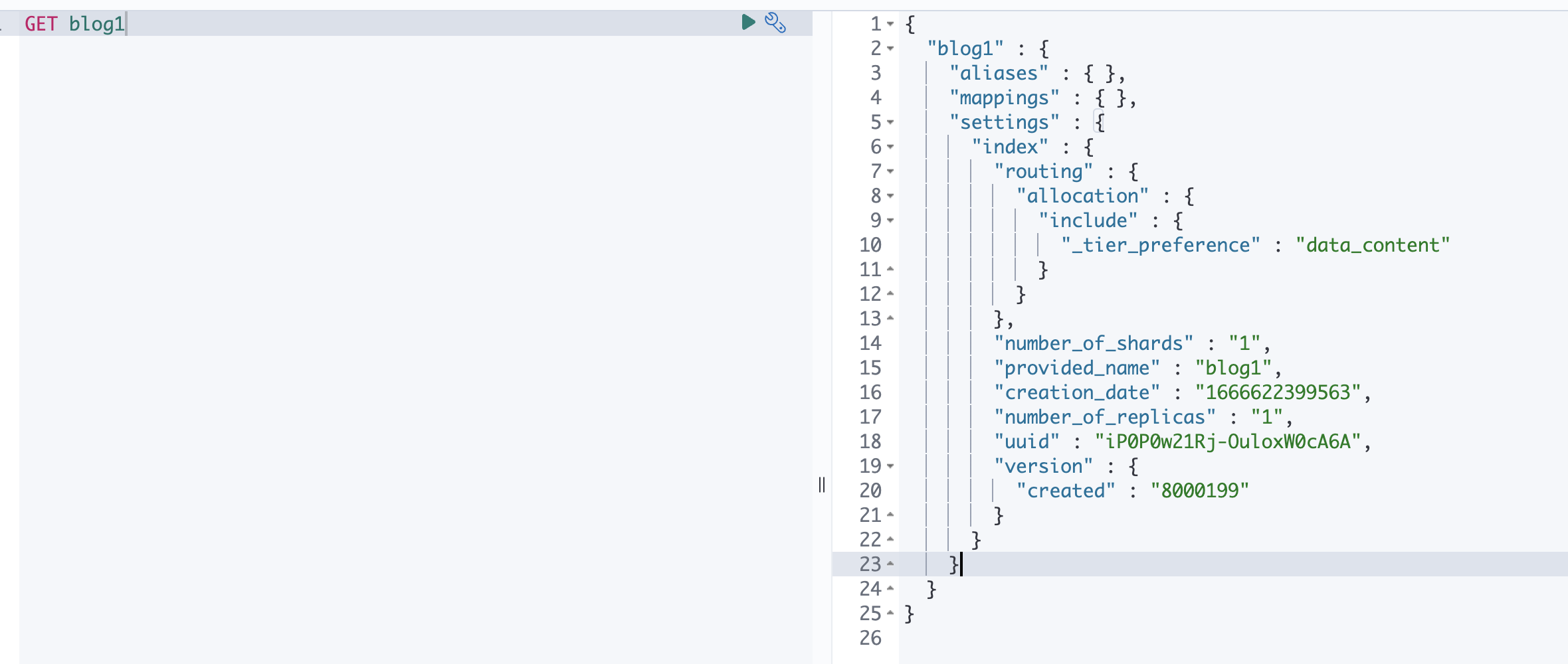
可以根据 response 获取 aliases , mappings , settings 等等 和 Kibana 中返回的一样
插入文档 需要使用 IndexRequest 对象 , 注意 不是 InsertRequest , 不知道为什么不这样定义 感觉会更加好理解
request.source(blogInfoJsonStr, XContentType.JSON);
@Test
public void insertDoc() {
    IndexRequest request = new IndexRequest();
    request.index("blog1").id("1");
    BlogInfo blogInfo =
            new BlogInfo()
                    .setBlogName("Elasticsearch 入门第一章")
                    .setBlogType("Elasticsearch")
                    .setBlogDesc("本篇主要介绍了Elasticsearch 的基本client操作");
    try {
         //提供java 对象的 json str
        String blogInfoJsonStr = objectMapper.writeValueAsString(blogInfo);

        request.source(blogInfoJsonStr, XContentType.JSON);
        // 这里会抛错 原因是 我的 Elasticsearch 版本8.x 而 使用的 restHighLevel 已经解析不了,因为新的es已经不推荐使用
        // restHighLevel,而使用 Elasticsearch Java API Client
        IndexResponse index = client.index(request, RequestOptions.DEFAULT);
        log.info("[Result insert doc :{} ]", index);
    } catch (IOException e) {
    }
}
注意 getResponse.getSourceAsString() 返回文档数据
@Test
public void testSelectDoc() {
    GetRequest getRequest = new GetRequest();
    getRequest.index("blog1").id("1");
    try {
        GetResponse getResponse = client.get(getRequest, RequestOptions.DEFAULT);
        BlogInfo blogInfo =
                objectMapper.readValue(getResponse.getSourceAsString(), BlogInfo.class);
        log.info("[get doc :{}] ", blogInfo);
    } catch (IOException e) {
        e.printStackTrace();
    }
}

注意 删除文档 的 response 也解析不了 Elasticsearch 8.x 版本
@Test
public void testDeleteDoc() {
    DeleteRequest deleteRequest = new DeleteRequest();
    deleteRequest.index("blog1").id("1");
    try {
        // 这里也会抛错 和上面的一样
        DeleteResponse deleteResponse = client.delete(deleteRequest, RequestOptions.DEFAULT);
        log.info("[delete response:{} ]", deleteResponse);
    } catch (IOException e) {
    }
}
本篇主要介绍了 java 操作Elasticsearch 的客户端 rest-high-level-client 的基本使用 , 如果你是使用springboot 需要注意jar 冲突问题, 后续操作 Elasticsearch 客户端 逐渐变成 Elasticsearch Java API Client , 不过目前大部分还是使用 rest-high-level-client
欢迎大家访问 个人博客 Johnny小屋
欢迎关注个人公众号

?博客主页:https://xiaoy.blog.csdn.net?本文由呆呆敲代码的小Y原创,首发于CSDN??学习专栏推荐:Unity系统学习专栏?游戏制作专栏推荐:游戏制作?Unity实战100例专栏推荐:Unity实战100例教程?欢迎点赞?收藏⭐留言?如有错误敬请指正!?未来很长,值得我们全力奔赴更美好的生活✨------------------❤️分割线❤️-------------------------
项目介绍随着我国经济迅速发展,人们对手机的需求越来越大,各种手机软件也都在被广泛应用,但是对于手机进行数据信息管理,对于手机的各种软件也是备受用户的喜爱小学生兴趣延时班预约小程序的设计与开发被用户普遍使用,为方便用户能够可以随时进行小学生兴趣延时班预约小程序的设计与开发的数据信息管理,特开发了小程序的设计与开发的管理系统。小学生兴趣延时班预约小程序的设计与开发的开发利用现有的成熟技术参考,以源代码为模板,分析功能调整与小学生兴趣延时班预约小程序的设计与开发的实际需求相结合,讨论了小学生兴趣延时班预约小程序的设计与开发的使用。开发环境开发说明:前端使用微信微信小程序开发工具:后端使用ssm:VU
Rails相对较新。我正在尝试调用一个API,它应该向我返回一个唯一的URL。我的应用程序中捆绑了HTTParty。我已经创建了一个UniqueNumberController,并且我已经阅读了几个HTTParty指南,直到我想要什么,但也许我只是有点迷路,真的不知道该怎么做。基本上,我需要做的就是调用API,获取它返回的URL,然后将该URL插入到用户的数据库中。谁能给我指出正确的方向或与我分享一些代码? 最佳答案 假设API为JSON格式并返回如下数据:{"url":"http://example.com/unique-url"
我正在尝试复制此GETcurl请求:curl-D--XGET-H"Authorization:BasicdGVzdEB0YXByZXNlYXJjaC5jb206NGMzMTg2Mjg4YWUyM2ZkOTY2MWNiNWRmY2NlMTkzMGU="-H"Content-Type:application/json"http://staging.example.com/api/v1/campaigns在Ruby中,通过电子邮件+apikey生成身份验证:auth="Basic"+Base64::encode64("test@example.com:4c3186288ae23fd9661c
很高兴看到google代码:google-api-ruby-client项目,因为这对我来说意味着Ruby人员可以使用GoogleAPI-s来完善代码。虽然我现在很困惑,因为给出的唯一示例使用Buzz,并且根据我的实验,Google翻译(v2)api的行为必须与google-api-ruby-client中的Buzz完全不同。.我对“Explorer”演示示例很感兴趣——但据我所知,它并不是一个探索器。它所做的只是调用一个Buzz服务,然后浏览它已经知道的关于Buzz服务的事情。对我来说,Explorer应该让您“发现”所公开的服务和方法/功能,而不一定已经知道它们。我很想听听使用这个
我有这个ruby代码:defget_sumnreturn0ifn似乎正在为999之前的值工作。当我尝试9999时,它给了我这个:stackleveltoodeep(SystemStackError)所以,我添加了这个:RubyVM::InstructionSequence.compile_option={:tailcall_optimization=>true,:trace_instruction=>false}但什么也没发生。我的ruby版本是:ruby1.9.3p392(2013-02-22revision39386)[x86_64-darwin12.2.1]我还增加了机器的堆栈大
文章目录一、项目场景二、基本模块原理与调试方法分析——信源部分:三、信号处理部分和显示部分:四、基本的通信链路搭建:四、特殊模块:interpretedMATLABfunction:五、总结和坑点提醒一、项目场景 最近一个任务是使用simulink搭建一个MIMO串扰消除的链路,并用实际收到的数据进行测试,在搭建的过程中也遇到了不少的问题(当然这比vivado里面的debug好不知道多少倍)。准备趁着这个机会,先以一个很基本的通信链路对simulink基础和相关的debug方法进行总结。 在本篇中,主要记录simulink的基本原理和基本的SISO通信传输链路(QPSK方式),计划在下篇记
行为:Ruby1.9.2p180因“非法指令”而失败,没有其他详细信息。Ruby1.9.1p378运行完全没有问题。失败发生在pin=fronto.index(k)行中,仅在某些迭代中发生。from和into都是对象数组,by是该对象的属性(x或y)。代码:defadd_from_to_byfrom,into,bynto=into.sort_by{|k|k.send(by)}fronto=(from+nto).sort_by{|k|k.send(by)}dict={}nto.each{|k|dict[k]=[]}nto.eachdo|k|pin=fronto.index(k)up=pi
我找不到任何使用Rack::Session::Cookie的简单示例,并且希望能够将信息存储在cookie中,并在以后的请求中访问它并让它过期.这些是我能找到的唯一示例:HowdoIset/getsessionvarsinaRackapp?http://rack.rubyforge.org/doc/classes/Rack/Session/Cookie.html这是我得到的:useRack::Session::Cookie,:key=>'rack.session',:domain=>'foo.com',:path=>'/',:expire_after=>2592000,:secret=
我正在尝试使用GnipPowerTrackAPI,这需要我使用基本身份验证连接到JSON的HTTPS流。我觉得这应该是相当微不足道的,所以我希望一些比我聪明的rubyist可以指出我明显的错误。这是我的ruby1.9.3代码的相关部分:require'eventmachine'require'em-http'require'json'usage="#{$0}"abortusageunlessuser=ARGV.shiftabortusageunlesspassword=ARGV.shiftGNIP_STREAMING_URL='https://stream.gnip.com:4
