
在使用 selenium 浏览器渲染技术,爬取网站信息时,默认情况下就是一个普通的纯净的 chrome 浏览器,而我们平时在使用浏览器时,经常就添加一些插件,扩展,代理之类的应用。相对应的,当我们用chrome浏览器爬取网站时,可能需要对这个chrome做一些特殊的配置,以满足爬虫的行为。
常用的控制行为有:
小编常用的功能就是:禁用浏览器启动,让 selenium 操作的就像 BeautifulSoup 那样后台执行。
随便展示一段 selenium 操作的代码,流程如下:打开网页 → 输入搜索内容 → 触发搜索→ 滑动页面→ 关闭网页。
#_*_coding:utf-8_*_
import time
from selenium.webdriver.common.keys import Keys                     # 模仿键盘,操作下拉框的
from selenium import webdriver                                      # selenium驱动
from selenium.webdriver.support.wait import WebDriverWait           # 导入等待类
from selenium.webdriver.support import expected_conditions as EC    # 等待条件
from selenium.webdriver.common.by import By                         # 节点定位

def test_open():
    print("—————————— open ——————————")
    # 方式一:默认打开浏览器驱动
    driver = webdriver.Chrome()
    # 方式二:通过设置参数,不打开浏览器
    # driver = webdriver.Chrome(options=add_options())
    driver.get('https://www.jd.com/')
    driver.implicitly_wait(5)
    # 找到id=key的标签
    _input = driver.find_element(By.ID,'key')
    # 输入内容,查询商品信息
    _input.send_keys('iphone14')
    time.sleep(1)
    _input.clear()
    time.sleep(1)
    _input.send_keys('华为mate50pro')
    time.sleep(1)
    _input.send_keys(Keys.ENTER)
    # 触发点击事件的两种方式:1.调用键盘回车键;2.触发按钮的click事件
    # driver.find_element(By.CLASS_NAME, 'button.cw-icon').click()
    # 等待商品列表加载
    wait = WebDriverWait(driver, 5)
    wait.until(EC.presence_of_element_located((By.ID, "J_goodsList")))
    # 滚动到页面底部
    driver.execute_script('window.scrollTo(0,document.body.scrollHeight)')
    time.sleep(1)
    # 滚动到页面顶部
    driver.execute_script('window.scrollTo(0,0)')
    time.sleep(1)
    # 打印看看商品信息
    list = driver.find_elements(By.CLASS_NAME, "gl-item")
    for item in list:
        print(item.text)
    driver.close()
    pass

if __name__ == "__main__":
    test_open()
    print("—————————— end ——————————")
除非是在测试阶段,否则每次执行程序都要弹出一个网页确实非常不友好,我们可以通过设置 chrome 浏览器的 options 参数禁用浏览器功能。
options.add_argument('--headless'):无浏览器模式
def add_options():
    print("—————————— options ——————————")
    # 创建谷歌浏览器驱动参数对象
    chrome_options = webdriver.ChromeOptions()
    # 不加载图片
    prefs = {"profile.managed_default_content_settings.images": 2}
    chrome_options.add_experimental_option("prefs", prefs)
    # 使用无界面浏览器模式!!
    chrome_options.add_argument('--headless')
    # 使用隐身模式(无痕模式)
    chrome_options.add_argument('--incognito')
    # 禁用GPU加速
    chrome_options.add_argument('--disable-gpu')
    return chrome_options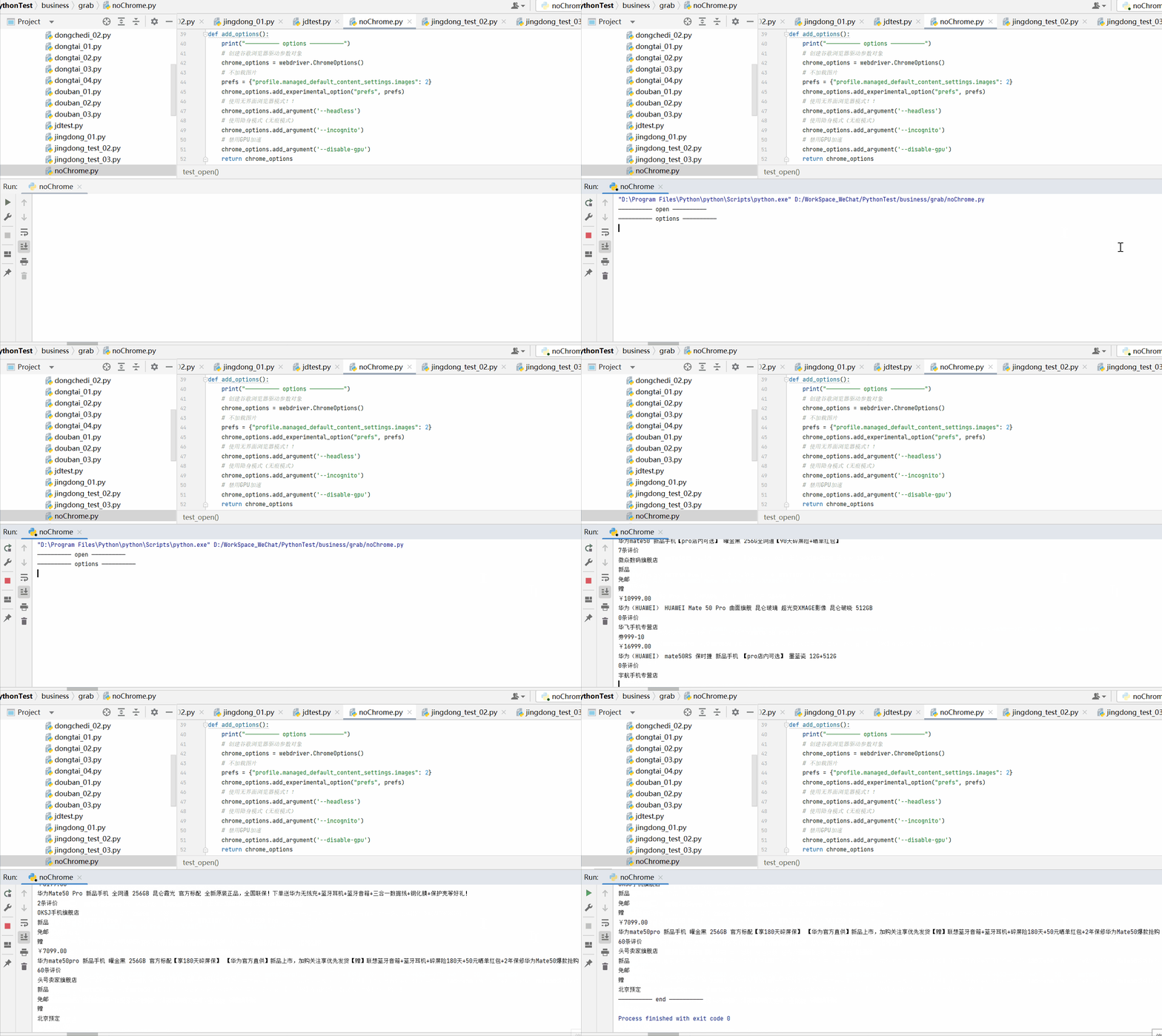
因为 ChromeOptions 的参数比较多,少部分未经验证,请见谅...
| 参数 | 说明 |
|---|---|
| options.add_argument('--disable-infobars') | 禁止策略化 |
| options.add_argument('--no-sandbox') | 解决DevToolsActivePort文件不存在的报错 |
| options.add_argument('window-size=1920x3000') | 指定浏览器分辨率 |
| options.add_argument('--disable-gpu') | 谷歌禁用GPU加速 |
| options.add_argument('--disable-javascript') | 禁用javascript |
| options.add_argument('--incognito') | 隐身模式(无痕模式) |
| options.add_argument('--start-maximized') | 最大化运行(全屏窗口),不设置,取元素会报错 |
| options.add_argument('--hide-scrollbars') | 隐藏滚动条, 应对一些特殊页面 |
| options.add_argument('blink-settings=imagesEnabled=false') | 不加载图片, 提升速度 |
| options.add_argument('--headless') | 浏览器不提供可视化页面(无头模式). linux下如果系统不支持可视化不加这条会启动失败 |
| options.add_argument('disable-infobars') | 去掉Chrome提示受到自动软件控制 |
| options.add_argument('lang=en_US') | 设置语言 |
| options.add_argument('User-Agent=xxxxxx') | 设置User-Agent属性 |
| options.add_argument('--kiosk-printing') | 默认打印机进行打印 |
| options.binary_location = r"...\chrome.exe" | 手动指定使用的浏览器位置 |
| options.add_experimental_option("debuggerAddress", "127.0.0.1:9222") | 调用原来的浏览器,不用再次登录即可重启 |
| prefs = {"":""} prefs["credentials_enable_service"] = False prefs["profile.password_manager_enabled"] = False options.add_experimental_option("prefs", prefs) | 设置prefs属性,屏蔽'保存密码'提示框 |
| options.add_experimental_option('excludeSwitches', ['enable-automation']) | 以开发者模式启动调试chrome,可以去掉提示受到自动软件控制 |
| options.add_experimental_option('useAutomationExtension', False) | 去掉提示以开发者模式调用 |
| options.add_argument(’–disable-setuid-sandbox’) | 禁用沙盒 |
| options.add_argument(“–disable-popup-blocking”) | 允许弹窗 |
| options.add_argument(’–disable-notifications’) | 禁用通知警告 |
| options.add_argument(’–allow-running-insecure-content’) | 允许运行不安全的内容 |
我有一个Ruby程序,它使用rubyzip压缩XML文件的目录树。gem。我的问题是文件开始变得很重,我想提高压缩级别,因为压缩时间不是问题。我在rubyzipdocumentation中找不到一种为创建的ZIP文件指定压缩级别的方法。有人知道如何更改此设置吗?是否有另一个允许指定压缩级别的Ruby库? 最佳答案 这是我通过查看rubyzip内部创建的代码。level=Zlib::BEST_COMPRESSIONZip::ZipOutputStream.open(zip_file)do|zip|Dir.glob("**/*")d
关闭。这个问题是opinion-based.它目前不接受答案。想要改进这个问题?更新问题,以便editingthispost可以用事实和引用来回答它.关闭4年前。Improvethisquestion我想在固定时间创建一系列低音和高音调的哔哔声。例如:在150毫秒时发出高音调的蜂鸣声在151毫秒时发出低音调的蜂鸣声200毫秒时发出低音调的蜂鸣声250毫秒的高音调蜂鸣声有没有办法在Ruby或Python中做到这一点?我真的不在乎输出编码是什么(.wav、.mp3、.ogg等等),但我确实想创建一个输出文件。
我在使用omniauth/openid时遇到了一些麻烦。在尝试进行身份验证时,我在日志中发现了这一点:OpenID::FetchingError:Errorfetchinghttps://www.google.com/accounts/o8/.well-known/host-meta?hd=profiles.google.com%2Fmy_username:undefinedmethod`io'fornil:NilClass重要的是undefinedmethodio'fornil:NilClass来自openid/fetchers.rb,在下面的代码片段中:moduleNetclass
exe应该在我打开页面时运行。异步进程需要运行。有什么方法可以在ruby中使用两个参数异步运行exe吗?我已经尝试过ruby命令-system()、exec()但它正在等待过程完成。我需要用参数启动exe,无需等待进程完成是否有任何rubygems会支持我的问题? 最佳答案 您可以使用Process.spawn和Process.wait2:pid=Process.spawn'your.exe','--option'#Later...pid,status=Process.wait2pid您的程序将作为解释器的子进程执行。除
我正在查看instance_variable_set的文档并看到给出的示例代码是这样做的:obj.instance_variable_set(:@instnc_var,"valuefortheinstancevariable")然后允许您在类的任何实例方法中以@instnc_var的形式访问该变量。我想知道为什么在@instnc_var之前需要一个冒号:。冒号有什么作用? 最佳答案 我的第一直觉是告诉你不要使用instance_variable_set除非你真的知道你用它做什么。它本质上是一种元编程工具或绕过实例变量可见性的黑客攻击
我有一些Ruby代码,如下所示:Something.createdo|x|x.foo=barend我想编写一个测试,它使用double代替block参数x,这样我就可以调用:x_double.should_receive(:foo).with("whatever").这可能吗? 最佳答案 specify'something'dox=doublex.should_receive(:foo=).with("whatever")Something.should_receive(:create).and_yield(x)#callthere
我正在为一个项目制作一个简单的shell,我希望像在Bash中一样解析参数字符串。foobar"helloworld"fooz应该变成:["foo","bar","helloworld","fooz"]等等。到目前为止,我一直在使用CSV::parse_line,将列分隔符设置为""和.compact输出。问题是我现在必须选择是要支持单引号还是双引号。CSV不支持超过一个分隔符。Python有一个名为shlex的模块:>>>shlex.split("Test'helloworld'foo")['Test','helloworld','foo']>>>shlex.split('Test"
我不确定传递给方法的对象的类型是否正确。我可能会将一个字符串传递给一个只能处理整数的函数。某种运行时保证怎么样?我看不到比以下更好的选择:defsomeFixNumMangler(input)raise"wrongtype:integerrequired"unlessinput.class==FixNumother_stuffend有更好的选择吗? 最佳答案 使用Kernel#Integer在使用之前转换输入的方法。当无法以任何合理的方式将输入转换为整数时,它将引发ArgumentError。defmy_method(number)
我想设置一个默认日期,例如实际日期,我该如何设置?还有如何在组合框中设置默认值顺便问一下,date_field_tag和date_field之间有什么区别? 最佳答案 试试这个:将默认日期作为第二个参数传递。youcorrectlysetthedefaultvalueofcomboboxasshowninyourquestion. 关于ruby-on-rails-date_field_tag,如何设置默认日期?[rails上的ruby],我们在StackOverflow上找到一个类似的问
两者都可以defsetup(options={})options.reverse_merge:size=>25,:velocity=>10end和defsetup(options={}){:size=>25,:velocity=>10}.merge(options)end在方法的参数中分配默认值。问题是:哪个更好?您更愿意使用哪一个?在性能、代码可读性或其他方面有什么不同吗?编辑:我无意中添加了bang(!)...并不是要询问nobang方法与bang方法之间的区别 最佳答案 我倾向于使用reverse_merge方法:option
