工作流。通过计算机对业务流程自动化执行管理,主要解决的是“使在多个参与者之间按照某种预定义的规则自动进行传递文档、信息或任务的过程,从而实现某个预期的业务目标,或者促使此目标的实现”。
Activiti是一个工作流引擎,Activiti可以将业务系统中复杂的业务流程抽取出来,使用专门的建模语言BPMN2.0进行定义,业务流程按照预先定义的流程进行执行,实现了系统的流程由Activiti进行管理,减少业务系统由于流程变更进行系统升级改造的工作量,从而提高系统的健壮性,同时也减少了系统开发维护成本。
在使用activiti之前,首先需要编写activiti.cfg.xml配置文件。并且引入相关依赖。
<dependencies>
    <!--activiti的核心包-->
    <dependency>
        <groupId>org.activiti</groupId>
        <artifactId>activiti-engine</artifactId>
        <version>6.0.0</version>
    </dependency>
    <dependency>
        <groupId>org.activiti</groupId>
        <artifactId>activiti-spring</artifactId>
        <version>6.0.0</version>
    </dependency>
    <dependency>
        <groupId>org.activiti</groupId>
        <artifactId>activiti-bpmn-model</artifactId>
        <version>6.0.0</version>
    </dependency>
    <dependency>
        <groupId>javax.servlet</groupId>
        <artifactId>servlet-api</artifactId>
        <version>2.5</version>
    </dependency>
    <dependency>
        <groupId>org.activiti</groupId>
        <artifactId>activiti-bpmn-converter</artifactId>
        <version>6.0.0</version>
    </dependency>
    <dependency>
        <groupId>org.activiti</groupId>
        <artifactId>activiti-json-converter</artifactId>
        <version>6.0.0</version>
    </dependency>
    <dependency>
        <groupId>org.activiti</groupId>
        <artifactId>activiti-bpmn-layout</artifactId>
        <version>6.0.0</version>
    </dependency>
    <dependency>
        <groupId>org.activiti.cloud</groupId>
        <artifactId>activiti-cloud-services-api</artifactId>
        <version>7-201710-EA</version>
    </dependency>
    <dependency>
        <groupId>aspectj</groupId>
        <artifactId>aspectjweaver</artifactId>
        <version>1.5.4</version>
    </dependency>
    <dependency>
        <groupId>mysql</groupId>
        <artifactId>mysql-connector-java</artifactId>
        <version>5.1.40</version>
    </dependency>
    <dependency>
        <groupId>org.springframework</groupId>
        <artifactId>spring-test</artifactId>
        <version>5.0.7.RELEASE</version>
    </dependency>
    <dependency>
        <groupId>org.springframework</groupId>
        <artifactId>spring-core</artifactId>
        <version>4.1.6.RELEASE</version>
    </dependency>
    <dependency>
        <groupId>org.mybatis</groupId>
        <artifactId>mybatis</artifactId>
        <version>3.4.5</version>
    </dependency>
    <dependency>
        <groupId>commons-dbcp</groupId>
        <artifactId>commons-dbcp</artifactId>
        <version>1.4</version>
    </dependency>
    <dependency>
        <groupId>junit</groupId>
        <artifactId>junit</artifactId>
        <version>4.12</version>
    </dependency>
    <dependency>
        <groupId>log4j</groupId>
        <artifactId>log4j</artifactId>
        <version>1.2.17</version>
    </dependency>
    <dependency>
        <groupId>org.slf4j</groupId>
        <artifactId>slf4j-log4j12</artifactId>
        <version>1.7.21</version>
    </dependency>
    <dependency>
        <groupId>org.slf4j</groupId>
        <artifactId>slf4j-api</artifactId>
        <version>1.7.25</version>
    </dependency>
    <dependency>
        <groupId>commons-io</groupId>
        <artifactId>commons-io</artifactId>
        <version>2.6</version>
    </dependency>
    <dependency>
        <groupId>org.projectlombok</groupId>
        <artifactId>lombok</artifactId>
        <version>1.16.18</version>
        <scope>provided</scope>
    </dependency>
</dependencies>
activiti的引擎配置文件,包括:ProcessEngineConfiguration的定义、数据源定义、事务管理器等。其实就是一个Spring配置文件。
<?xml version="1.0" encoding="UTF-8"?>
<beans xmlns="http://www.springframework.org/schema/beans"
       xmlns:xsi="http://www.w3.org/2001/XMLSchema-instance"
       xsi:schemaLocation="http://www.springframework.org/schema/beans
                            http://www.springframework.org/schema/beans/spring-beans.xsd">

    <!--dbcp连接池-->
    <bean id="dataSource" class="org.apache.commons.dbcp.BasicDataSource">
        <property name="driverClassName" value="com.mysql.jdbc.Driver"/>
        <property name="url" value="jdbc:mysql://localhost:3306/activiti"/>
        <property name="username" value="root"/>
        <property name="password" value="root"/>
        <property name="maxActive" value="3"/>
        <property name="maxIdle" value="1"/>
    </bean>

    <!--在默认方式下,bean的id固定为processEngineConfiguration-->
    <bean id="processEngineConfiguration" class="org.activiti.engine.impl.cfg.StandaloneProcessEngineConfiguration">
        <!--配置数据库相关信息-->
        <property name="dataSource" ref="dataSource"/>
        <!--
            activiti数据库表处理策略
                false(默认值):检查数据库的版本和依赖库的版本,如果不匹配就抛出异常
                true:构建流程引擎时,执行检查,如果需要就执行更新。如果表不存在,就创建。
                create-drop:构建流程引擎时创建数据库报表,关闭流程引擎时就删除这些表。
                drop-create:先删除表再创建表。
                create:构建流程引擎时创建数据库表,关闭流程引擎时不删除这些表
        -->
        <property name="databaseSchemaUpdate" value="true"/>
        <property name="asyncExecutorActivate" value="false"/>
        <property name="mailServerHost" value="mail.my-corp.com"/>
        <property name="mailServerPort" value="5025"/>
    </bean>

</beans>
Activiti流程框架,在前期主要需要了解的就是数据库表的创建、流程的部署、流程的启动和各个阶段任务的完成。
流程引擎配置类(ProcessEngineConfiguration),通过ProcessEngineConfiguration 可以创建工作流引擎 ProceccEngine。
工作流引擎的创建主要有两种方式:默认创建方式和一般创建方式
ProcessEngine processEngine = ProcessEngines.getDefaultProcessEngine();
System.out.println(processEngine);
//使用自定义方式创建
ProcessEngineConfiguration processEngineConfiguration = ProcessEngineConfiguration.createProcessEngineConfigurationFromResource("activiti.cfg.xml");
//获取流程引擎对象:通过 ProcessEngineConfiguration 创建 ProcessEngine,此时会创建数据库
ProcessEngine processEngine = processEngineConfiguration.buildProcessEngine();
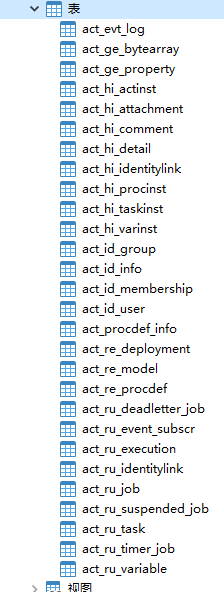
当创建好工作流引擎后,对应的数据库中会自动生成25张数据库表。
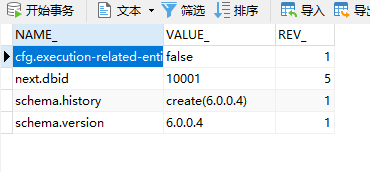
ACT_GE_PROPERTY中会先展示下一次流程的ID(next.dbid),并且在下一次流程部署的时候,对下一次流程的ID进行赋值。
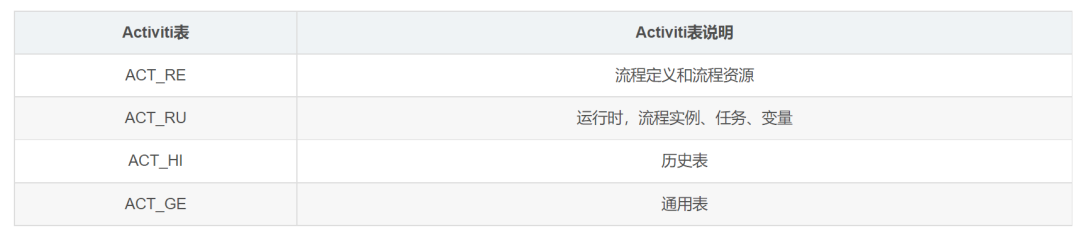
这里以表名的前缀进行说明:
Activiti中还有许多的Service服务接口。这些Service 是工作流引擎提供用于进行工作流部署、执行、管理的服务接口,我们可以使用这些接口操作服务对应的数据表。
通过ProcessEngine创建Service方式:
Runtimeservice runtimeService = processEngine.getRuntimeService();
RepositoryService repositoryService = processEngine.getRepositoryService();
TaskService taskService = processEngine.getTaskService();
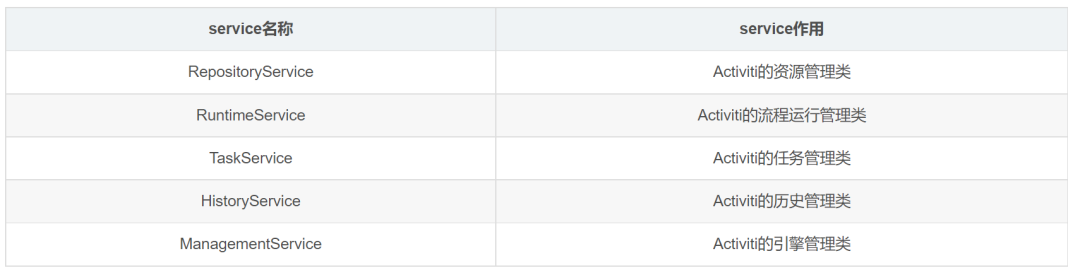
RepositoryService
Activiti 的资源管理类,提供了管理和控制流程发布包和流程定义的操作。使用工作流建模工具设计的业务流程图需要使用此service将流程定义文件的内容部署到计算机。除了部署流程定义以外,还可以查询引擎中的发布包和流程定义。
暂停或激活发布包,对应全部和特定流程定义。暂停意味着它们不能再执行任何操作了,激活是对应的反向操作。获得多种资源,像是包含在发布包里的文件,或引擎自动生成的流程图。获得流程定义的pojo版本,可以用来通过java解析流程,而不必通过xml。
Runtimeservice
Activiti的流程运行管理类。可以从这个服务类中获取很多关于流程执行相关的信息
Taskservice
Activiti的任务管理类。可以从这个类中获取任务的信息。
Historyservice
Activiti的历史管理类,可以查询历史信息,执行流程时,引擎会保存很多数据(根据配置),比如流程实例启动时间,任务的参与者,完成任务的时间,每个流程实例的执行路径,等等。这个服务主要通过查询功能来获得这些数据。
ManagementService
Activiti的引擎管理类,提供了对Activiti流程引擎的管理和维护功能,这些功能不在工作流驱动的应用程序中使用,主要用于Activiti 系统的日常维护。

使用IDEA进行开发,建议下载一个插件。actiBPM插件,直接搜索下载。
流程符号:事件Event,活动Activity,网关Gateway,流向
使用流程设计器画出流程图
创建bpmn文件,在流程设计器使用流程符号来表达流程,指定流程的key,指定任务负责人
生成png文件
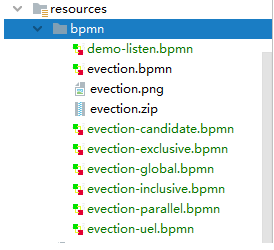
创建的bpmn文件要放在resourse下的bpmn文件夹下。
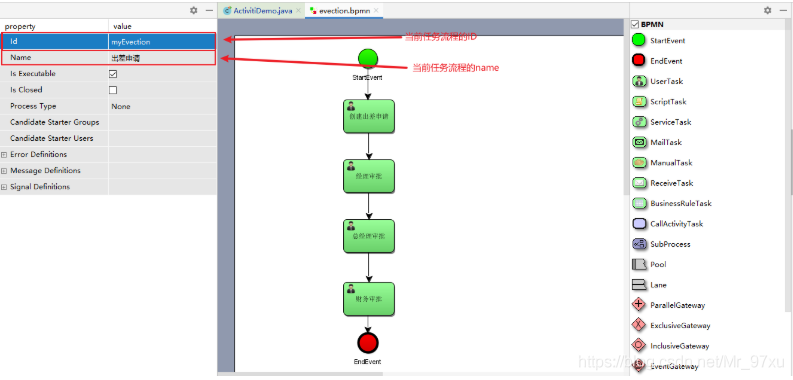
注意:当前任务流程的ID不能是数字开头。

找到本地的文件,选择notepad打开
<?xml version="1.0" encoding="UTF-8" standalone="yes"?>
<definitions xmlns="http://www.omg.org/spec/BPMN/20100524/MODEL" xmlns:activiti="http://activiti.org/bpmn" xmlns:bpmndi="http://www.omg.org/spec/BPMN/20100524/DI" xmlns:omgdc="http://www.omg.org/spec/DD/20100524/DC" xmlns:omgdi="http://www.omg.org/spec/DD/20100524/DI" xmlns:tns="http://www.activiti.org/test" xmlns:xsd="http://www.w3.org/2001/XMLSchema" xmlns:xsi="http://www.w3.org/2001/XMLSchema-instance" expressionLanguage="http://www.w3.org/1999/XPath" id="m1611283406582" name="" targetNamespace="http://www.activiti.org/test" typeLanguage="http://www.w3.org/2001/XMLSchema">
  <process id="myEvection" isClosed="false" isExecutable="true" name="出差申请" processType="None">
    <startEvent id="_2" name="StartEvent"/>
    <userTask activiti:assignee="zhangsan" activiti:exclusive="true" id="_3" name="创建出差申请"/>
    <userTask activiti:assignee="jerry" activiti:exclusive="true" id="_4" name="经理审批"/>
    <userTask activiti:assignee="jack" activiti:exclusive="true" id="_5" name="总经理审批"/>
    <userTask activiti:assignee="rose" activiti:exclusive="true" id="_6" name="财务审批"/>
    <endEvent id="_7" name="EndEvent"/>
    <sequenceFlow id="_8" sourceRef="_2" targetRef="_3"/>
    <sequenceFlow id="_9" sourceRef="_3" targetRef="_4"/>
    <sequenceFlow id="_10" sourceRef="_4" targetRef="_5"/>
    <sequenceFlow id="_11" sourceRef="_5" targetRef="_6"/>
    <sequenceFlow id="_12" sourceRef="_6" targetRef="_7"/>
  </process>
  <bpmndi:BPMNDiagram documentation="background=#FFFFFF;count=1;horizontalcount=1;orientation=0;width=842.4;height=1195.2;imageableWidth=832.4;imageableHeight=1185.2;imageableX=5.0;imageableY=5.0" id="Diagram-_1" name="New Diagram">
    <bpmndi:BPMNPlane bpmnElement="myEvection">
      <bpmndi:BPMNShape bpmnElement="_2" id="Shape-_2">
        <omgdc:Bounds height="32.0" width="32.0" x="185.0" y="0.0"/>
        <bpmndi:BPMNLabel>
          <omgdc:Bounds height="32.0" width="32.0" x="0.0" y="0.0"/>
        </bpmndi:BPMNLabel>
      </bpmndi:BPMNShape>
      <bpmndi:BPMNShape bpmnElement="_3" id="Shape-_3">
        <omgdc:Bounds height="55.0" width="85.0" x="160.0" y="85.0"/>
        <bpmndi:BPMNLabel>
          <omgdc:Bounds height="55.0" width="85.0" x="0.0" y="0.0"/>
        </bpmndi:BPMNLabel>
      </bpmndi:BPMNShape>
      <bpmndi:BPMNShape bpmnElement="_4" id="Shape-_4">
        <omgdc:Bounds height="55.0" width="85.0" x="160.0" y="185.0"/>
        <bpmndi:BPMNLabel>
          <omgdc:Bounds height="55.0" width="85.0" x="0.0" y="0.0"/>
        </bpmndi:BPMNLabel>
      </bpmndi:BPMNShape>
      <bpmndi:BPMNShape bpmnElement="_5" id="Shape-_5">
        <omgdc:Bounds height="55.0" width="85.0" x="160.0" y="285.0"/>
        <bpmndi:BPMNLabel>
          <omgdc:Bounds height="55.0" width="85.0" x="0.0" y="0.0"/>
        </bpmndi:BPMNLabel>
      </bpmndi:BPMNShape>
      <bpmndi:BPMNShape bpmnElement="_6" id="Shape-_6">
        <omgdc:Bounds height="55.0" width="85.0" x="160.0" y="390.0"/>
        <bpmndi:BPMNLabel>
          <omgdc:Bounds height="55.0" width="85.0" x="0.0" y="0.0"/>
        </bpmndi:BPMNLabel>
      </bpmndi:BPMNShape>
      <bpmndi:BPMNShape bpmnElement="_7" id="Shape-_7">
        <omgdc:Bounds height="32.0" width="32.0" x="185.0" y="475.0"/>
        <bpmndi:BPMNLabel>
          <omgdc:Bounds height="32.0" width="32.0" x="0.0" y="0.0"/>
        </bpmndi:BPMNLabel>
      </bpmndi:BPMNShape>
      <bpmndi:BPMNEdge bpmnElement="_12" id="BPMNEdge__12" sourceElement="_6" targetElement="_7">
        <omgdi:waypoint x="201.0" y="445.0"/>
        <omgdi:waypoint x="201.0" y="475.0"/>
        <bpmndi:BPMNLabel>
          <omgdc:Bounds height="0.0" width="0.0" x="0.0" y="0.0"/>
        </bpmndi:BPMNLabel>
      </bpmndi:BPMNEdge>
      <bpmndi:BPMNEdge bpmnElement="_8" id="BPMNEdge__8" sourceElement="_2" targetElement="_3">
        <omgdi:waypoint x="201.0" y="32.0"/>
        <omgdi:waypoint x="201.0" y="85.0"/>
        <bpmndi:BPMNLabel>
          <omgdc:Bounds height="0.0" width="0.0" x="0.0" y="0.0"/>
        </bpmndi:BPMNLabel>
      </bpmndi:BPMNEdge>
      <bpmndi:BPMNEdge bpmnElement="_9" id="BPMNEdge__9" sourceElement="_3" targetElement="_4">
        <omgdi:waypoint x="202.5" y="140.0"/>
        <omgdi:waypoint x="202.5" y="185.0"/>
        <bpmndi:BPMNLabel>
          <omgdc:Bounds height="0.0" width="0.0" x="0.0" y="0.0"/>
        </bpmndi:BPMNLabel>
      </bpmndi:BPMNEdge>
      <bpmndi:BPMNEdge bpmnElement="_11" id="BPMNEdge__11" sourceElement="_5" targetElement="_6">
        <omgdi:waypoint x="202.5" y="340.0"/>
        <omgdi:waypoint x="202.5" y="390.0"/>
        <bpmndi:BPMNLabel>
          <omgdc:Bounds height="0.0" width="0.0" x="0.0" y="0.0"/>
        </bpmndi:BPMNLabel>
      </bpmndi:BPMNEdge>
      <bpmndi:BPMNEdge bpmnElement="_10" id="BPMNEdge__10" sourceElement="_4" targetElement="_5">
        <omgdi:waypoint x="202.5" y="240.0"/>
        <omgdi:waypoint x="202.5" y="285.0"/>
        <bpmndi:BPMNLabel>
          <omgdc:Bounds height="0.0" width="0.0" x="0.0" y="0.0"/>
        </bpmndi:BPMNLabel>
      </bpmndi:BPMNEdge>
    </bpmndi:BPMNPlane>
  </bpmndi:BPMNDiagram>
</definitions>
使用 Activiti 提供的 API 把流程图的内容写入到数据库中
属于资源操作类,使用 RepositoryService
单文件部署:把bpmn文件和png文件逐个处理
压缩包部署:把bpmn文件和png文件打成压缩包来处理
部署操作表:act_re_deployment、act_re_procdef、act_ge_bytearray
/
 * 流程部署
 */
public void deployment() {
    // 创建 ProcessEngine
    ProcessEngine processEngine = ProcessEngines.getDefaultProcessEngine();
    // 获取 RepositoryService
    RepositoryService repositoryService = processEngine.getRepositoryService();
    // 使用 service 进行流程的部署,定义一个流程的名字,把bpmn和png部署到数据中
    Deployment deployment = repositoryService.createDeployment()
            .name("出差申请流程") //流程图标的名字
            .addClasspathResource("bpmn/evection.bpmn") //bpmn文件
            .addClasspathResource("bpmn/evection.png") //bpmn文件生成的
            .deploy();
    // 输出部署信息
    System.out.println("流程部署ID:" + deployment.getId());
    System.out.println("流程部署名字:" + deployment.getName());
}
有时候我们会有多个流程,需要创建多个bpmn流程文件,这个时候想要同时部署,我们可以对bpmn文件进行打包压缩,使用Zip包进行批量的部署
/
 * 使用Zip包进行批量的部署
 */
@Test
public void deployProcessByZip() {
    // 获取流程引擎
    ProcessEngine processEngine = ProcessEngines.getDefaultProcessEngine();
    // 获取 RepositoryService
    RepositoryService repositoryService = processEngine.getRepositoryService();
    // 流程部署
    // 读取资源包文件,构造成 InputStream
    InputStream inputStream = this.getClass().getClassLoader().getResourceAsStream("bpmn/evection.zip");
    // 使用 InputStream 构造 ZipInputStream
    ZipInputStream zipInputStream = new ZipInputStream(inputStream);
    // 使用压缩包的流,进行流程的部署
    Deployment deploy = repositoryService.createDeployment()
            .addZipInputStream(zipInputStream)
            .deploy();
    // 输出
    System.out.println("流程部署的ID:" + deploy.getId());
    System.out.println("流程部署的名称:" + deploy.getName());
}
操作的数据库表:
act_ge_bytearray
act_ge_property
act_re_deployment
act_re_procdef
流程部署完成以后,需要启动流程实例。使用 RuntimeService 根据流程定义的 key进行启动。
核心代码:
/
 * 启动流程
 */
public void starProcess() {
    // 创建 ProcessEngine
    ProcessEngine processEngine = ProcessEngines.getDefaultProcessEngine();
    // 获取 RunTimeService
    RuntimeService runtimeService = processEngine.getRuntimeService();
    // 根据流程定义的ID启动流程
    ProcessInstance instance = runtimeService.startProcessInstanceByKey("myEvection");
    // 输出内容
    System.out.println("流程定义ID:" + instance.getProcessDefinitionId());
    System.out.println("流程实例的ID:" + instance.getId());
    System.out.println("当前活动的ID:" + instance.getActivityId());
}
使用 TaskService ,根据流程定义的 key ,任务负责人来进行查询
核心代码:
/
 * 查询个人待执行的任务
 */
@Test
public void findPersonalTaskList() {
    // 获取流程引擎
    ProcessEngine processEngine = ProcessEngines.getDefaultProcessEngine();
    // 获取TaskService
    TaskService taskService = processEngine.getTaskService();
    // 根据流程的key和任务的负责人去查询任务
    List<Task> taskList = taskService.createTaskQuery()
            .processDefinitionKey("myEvection")  // 流程的key
            .includeProcessVariables()
            .taskAssignee("zhangsan")           // 要查询的负责人
            .list();
    // 输出
    for (Task task : taskList) {
        System.out.println("流程实例的ID:" + task.getProcessInstanceId());
        System.out.println("任务的ID:" + task.getId());
        System.out.println("任务的负责人:" + task.getAssignee());
        System.out.println("任务的名称:" + task.getName());
    }
}
使用 TaskService ,用任务 ID 直接完成任务。
核心代码:
/
 * 完成个人任务
 */
@Test
public void completTask() {
    String key = "testCandidiate";
    String assignee = "张三1"; //任务的负责人
    ProcessEngine processEngine = ProcessEngines.getDefaultProcessEngine();
    TaskService taskService = processEngine.getTaskService();
    Task task = taskService.createTaskQuery()
            .processDefinitionKey(key)
            .taskAssignee(assignee)
            .singleResult();
    if (task != null) {
        taskService.complete(task.getId());
    }
}
全部流程实例的挂起和激活
/
 * 全部流程实例的挂起和激活
 */
@Test
public void suspendAllProcessInstance() {
    // 1.获取流程引擎
    ProcessEngine processEngine = ProcessEngines.getDefaultProcessEngine();
    // 2.获取 RepositoryService
    RepositoryService repositoryService = processEngine.getRepositoryService();
    // 3.查询流程定义
    ProcessDefinition processDefinition = repositoryService.createProcessDefinitionQuery()
            .processDefinitionKey("myEvection")
            .singleResult();
    // 4.获取当前流程定义的实例是否都是挂起状态
    boolean flag = processDefinition.isSuspended();
    // 5.获取流程定义的ID
    String id = processDefinition.getId();
    // 6.判断是否挂起状态。是:改为激活;否:改为挂起
    if (flag) {
        // 改为激活. 参数1:流程定义的ID,参数2:是否激活,参数3:激活时间
        repositoryService.activateProcessDefinitionById(id, true, null);
        System.out.println("流程定义ID:" + id + "已激活");
    } else {
        // 改为挂起. 参数1:流程定义的ID;参数2:是否挂起;参数3:挂起时间
        repositoryService.suspendProcessDefinitionById(id, true, null);
        System.out.println("流程定义ID:" + id + "已挂起");
    }
}
单个流程实例的挂起和激活
/
 * 单个流程实例的挂起和激活
 */
@Test
public void suspendSingleProcessInstance() {
    // 1.获取流程引擎
    ProcessEngine processEngine = ProcessEngines.getDefaultProcessEngine();
    // 2.获取 RuntimeService
    RuntimeService runtimeService = processEngine.getRuntimeService();
    // 3.通过 RuntimeService 获取流程实例对象
    ProcessInstance instance = runtimeService.createProcessInstanceQuery()
            .processInstanceId("17501")
            .singleResult();
    // 4.得到当前流程实例的暂停状态
    boolean flag = instance.isSuspended();
    // 5.获取流程实例的ID
    String instanceId = instance.getId();
    // 6.判断是否暂停。是:改为激活;否:改为暂停
    if (flag) {
        runtimeService.activateProcessInstanceById(instanceId);
        System.out.println("流程实例ID:" + instanceId + "已激活");
    } else {
        runtimeService.suspendProcessInstanceById(instanceId);
        System.out.println("流程实例ID:" + instanceId + "已暂停");
    }
}
注意:流程实例在挂起的状态下是无法进行下一步操作的。
我们在使用流程变量的时候。如果我们将一个对象存储到一个流程变量中,那么这个对象需要实现Serializable接口。
/
 * 出差申请中的流程变量对象
 */
@NoArgsConstructor
@AllArgsConstructor
@Data
public class Evection implements Serializable {

    private Long id;                //主键ID
    private Integer days;            //出差天数
    private String evectionName;    //出差单名字
    private Date startTime;         //出差开始时间
    private Date endTime;           //出差结束时间
    private String address;         //目的地
    private String reason;          //出差原因

}
流程变量的作用域
整个流程实例、任务、执行实例。
默认:整个流程实例。
在属性上使用UEL表达式 ${assignee},assignee就是一个流程变量的名称。
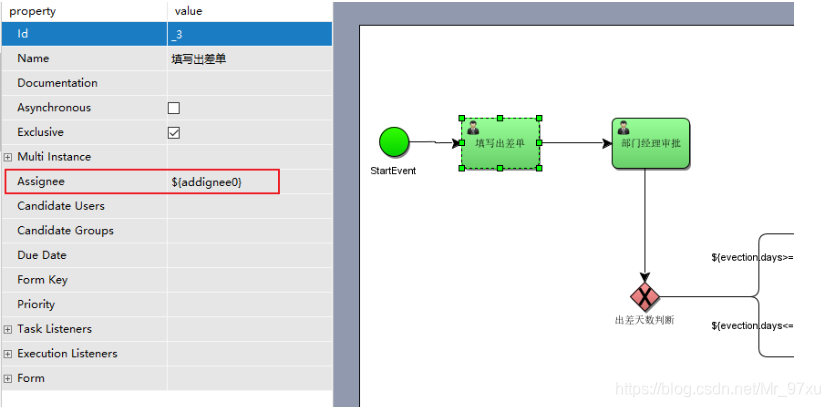
在连线上使用UEL表达式 ${days<=3},days就是一个流程变量名称,返回结果为true或者false。

Activiti有很多种方式设置流程变量,这里简单介绍两种:
启动流程时设置流程变量
/
 * 启动流程
 */
@Test
public void startProcess() {
    ProcessEngine processEngine = ProcessEngines.getDefaultProcessEngine();
    RuntimeService runtimeService = processEngine.getRuntimeService();
    // 流程变量map
    Map<String, Object> map = new HashMap<>();
    // 设置流程变量
    Evection evection = new Evection();
    evection.setDays(2);
    // 把流程变量的pojo放入map
    map.put("evection", evection);
    map.put("assignee0", "张三");
    map.put("assignee1", "李经理");
    map.put("assignee2", "王财务");
    map.put("assignee3", "赵总经理");
    runtimeService.startProcessInstanceByKey("myProcess_1", map);
}
任务办理时设置
/
 * 完成任务
 */
@Test
public void completTask() {
    ProcessEngine processEngine = ProcessEngines.getDefaultProcessEngine();
    TaskService taskService = processEngine.getTaskService();
    Evection evection = new Evection();
    evection.setDays(2);
    Map<String, Object> map = new HashMap<>();
    map.put("evection", evection);
    Task task = taskService.createTaskQuery()
            .processDefinitionKey("myProcess_2")
            .taskAssignee("王财务0")
            .singleResult();
    if (task != null) {
        String taskId = task.getId();
        // 完成任务
        taskService.complete(taskId, map);
    }
}
用来控制流程的走向
用来在流程中实现决策,当流程执行到这个网关,所有的分支都会判断条件是否为true,如果为true,则执行该分支。
注意:排他网关只会选择一个作为true的分支执行,如果有两个分支都为true,排他网关会选择ID值比较小的一条分支去执行。
如果从排他网关出去的流程所有的条件都不满足,则会抛出异常。
并行网关,允许流程分成多条分支,也可以把多分支汇聚到一起,并行网关的功能是基于进入和外出顺序流的:
fork分支:并行后的所有外出顺序流,为每个顺序流都创建一个并发分支
join汇聚:所有到达并行网关,在此等待的分支,直到所有进入顺序流的分支都到达以后,流程就会通过汇聚网关。
注意:如果同一个并行网关有多个进入和多个外出顺序流,它就同时具有分支和汇聚功能,这时,网关会先汇聚所有进入的顺序流,然后再切分成多个并行分支。
与其他网关的主要区别是:并行网关不会解析条件,即使顺序流中定义了条件,也会被忽略。
并行网关需要所有分支的全部运行完了,才会汇聚,继续向下执行。
包含网关可以看成是排他网关和并行网关的结合体,和排他网关一样,可以在外出顺序流上定义条件,包含网关会解析它们,但是主要的区别是:包含网关可以选择多于一条顺序流,这和并行网关一样。
包含网关的功能是基于进入和外出顺序流的。
分支:所有外出顺序流的条件都会被解析,结果为true的顺序流会以并行方式继续执行,会为每一个顺序流创建一个分支。
汇聚:所有并行分支到达包含网关,会进入等待状态,直到每个包含流程token的进入顺序流的分支都到达。这是和并行网关最大的不同。
Activiti和Spring的整合开发
配置文件:
<?xml version="1.0" encoding="UTF-8"?>
<beans xmlns="http://www.springframework.org/schema/beans"
       xmlns:xsi="http://www.w3.org/2001/XMLSchema-instance"
       xmlns:tx="http://www.springframework.org/schema/tx"
       xsi:schemaLocation="http://www.springframework.org/schema/beans
        http://www.springframework.org/schema/beans/spring-beans-4.3.xsd
         http://www.springframework.org/schema/tx
        http://www.springframework.org/schema/tx/spring-tx.xsd">

    <!--工作流引擎配置对象-->
    <bean id="processEngineConfiguration" class="org.activiti.spring.SpringProcessEngineConfiguration">
        <!--数据源-->
        <property name="dataSource" ref="dataSource"/>
        <!--使用Spring的事务管理器-->
        <property name="transactionManager" ref="transactionManager"/>
        <!--
        数据库策略:
            false:默认值。activiti在启动时,会对比数据库表中保存的版本。如果没有表或者版本不匹配,将抛出     异常。
            true:activiti会对数据库中所有表进行更新操作,如果表不存在,则会自动创建。
            create_drop:在activiti启动时创建表,在关闭时删除表(必须手动关闭引擎,才能删除表)。
            drop-create:在activiti启动时删除原来的旧表,然后再创建新表(不需要手动关闭引擎)。
        -->
        <property name="databaseSchemaUpdate" value="true"/>
    </bean>

    <!--配置数据源-->
    <bean id="dataSource" class="org.apache.commons.dbcp.BasicDataSource">
        <property name="driverClassName" value="com.mysql.jdbc.Driver"/>
        <property name="url" value="jdbc:mysql://localhost:3306/actspring"/>
        <property name="username" value="root"/>
        <property name="password" value="root"/>
        <property name="maxActive" value="3"/>
        <property name="maxIdle" value="1"/>
    </bean>

    <!-- 流程引擎对象 -->
    <bean id="processEngine" class="org.activiti.spring.ProcessEngineFactoryBean">
        <property name="processEngineConfiguration" ref="processEngineConfiguration"/>
    </bean>

    <!--资源服务-->
    <bean id="repositoryService" factory-bean="processEngine" factory-method="getRepositoryService"/>
    <!--流程管理-->
    <bean id="runtimeService" factory-bean="processEngine" factory-method="getRuntimeService"/>
    <!--任务管理-->
    <bean id="taskService" factory-bean="processEngine" factory-method="getTaskService"/>
    <!--历史管理-->
    <bean id="historyService" factory-bean="processEngine" factory-method="getHistoryService"/>

    <!--事务管理器-->
    <bean id="transactionManager" class="org.springframework.jdbc.datasource.DataSourceTransactionManager">
        <property name="dataSource" ref="dataSource"/>
    </bean>

    <!--通知-->
    <tx:advice id="txAdvice" transaction-manager="transactionManager">
        <tx:attributes>
            <!--传播行为-->
            <tx:method name="save*" propagation="REQUIRED"/>
            <tx:method name="insert*" propagation="REQUIRED"/>
            <tx:method name="delete*" propagation="REQUIRED"/>
            <tx:method name="update*" propagation="REQUIRED"/>
            <tx:method name="find*" propagation="SUPPORTS" read-only="true"/>
            <tx:method name="get*" propagation="SUPPORTS" read-only="true"/>
        </tx:attributes>
    </tx:advice>
</beans>
Activiti和SpringBoot的整合开发
配置文件:
spring:
  application:
    name: actspringboot
  datasource:
    driver-class-name: com.mysql.jdbc.Driver
    url: jdbc:mysql://localhost:3306/actspring?useUnicode=true&characterEncoding=utf-8&useSSL=false&autoReconnect=true&serverTimezone=UTC
    username: root
    password: root
  activiti:
    # false:默认值。activiti在启动时,会对比数据库表中保存的版本。如果没有表或者版本不匹配,将抛出异常
    # true:activiti会对数据库中所有表进行更新操作,如果表不存在,则会自动创建
    # create_drop:在activiti启动时创建表,在关闭时删除表(必须手动关闭引擎,才能删除表)
    # drop-create:在activiti启动时删除原来的旧表,然后再创建新表(不需要手动关闭引擎)
    # 线上一般使用false,开发中使用true
    database-schema-update: true
    # 自动部署验证设置:true-开启(默认)、false-关闭
    check-process-definitions: false
    # 开启历史表
    db-history-used: true
    # 历史记录存储等级
    history-level: full
server:
port: 8082我在从html页面生成PDF时遇到问题。我正在使用PDFkit。在安装它的过程中,我注意到我需要wkhtmltopdf。所以我也安装了它。我做了PDFkit的文档所说的一切......现在我在尝试加载PDF时遇到了这个错误。这里是错误:commandfailed:"/usr/local/bin/wkhtmltopdf""--margin-right""0.75in""--page-size""Letter""--margin-top""0.75in""--margin-bottom""0.75in""--encoding""UTF-8""--margin-left""0.75in""-
我在我的项目目录中完成了compasscreate.和compassinitrails。几个问题:我已将我的.sass文件放在public/stylesheets中。这是放置它们的正确位置吗?当我运行compasswatch时,它不会自动编译这些.sass文件。我必须手动指定文件:compasswatchpublic/stylesheets/myfile.sass等。如何让它自动运行?文件ie.css、print.css和screen.css已放在stylesheets/compiled。如何在编译后不让它们重新出现的情况下删除它们?我自己编译的.sass文件编译成compiled/t
我在开发的Rails3网站的一些搜索功能上遇到了一个小问题。我有一个简单的Post模型,如下所示:classPost我正在使用acts_as_taggable_on来更轻松地向我的帖子添加标签。当我有一个标记为“rails”的帖子并执行以下操作时,一切正常:@posts=Post.tagged_with("rails")问题是,我还想搜索帖子的标题。当我有一篇标题为“Helloworld”并标记为“rails”的帖子时,我希望能够通过搜索“hello”或“rails”来找到这篇帖子。因此,我希望标题列的LIKE语句与acts_as_taggable_on提供的tagged_with方法
我花了三天的时间用头撞墙,试图弄清楚为什么简单的“rake”不能通过我的规范文件。如果您遇到这种情况:任何文件夹路径中都不要有空格!。严重地。事实上,从现在开始,您命名的任何内容都没有空格。这是我的控制台输出:(在/Users/*****/Desktop/LearningRuby/learn_ruby)$rake/Users/*******/Desktop/LearningRuby/learn_ruby/00_hello/hello_spec.rb:116:in`require':cannotloadsuchfile--hello(LoadError) 最佳
关闭。这个问题需要detailsorclarity.它目前不接受答案。想改进这个问题吗?通过editingthispost添加细节并澄清问题.关闭8年前。Improvethisquestion在首页我有:汽车:VolvoSaabMercedesAudistatic_pages_spec.rb中的测试代码:it"shouldhavetherightselect"dovisithome_pathit{shouldhave_select('cars',:options=>['volvo','saab','mercedes','audi'])}end响应是rspec./spec/request
在Rails4.0.2中,我使用s3_direct_upload和aws-sdkgems直接为s3存储桶上传文件。在开发环境中它工作正常,但在生产环境中它会抛出如下错误,ActionView::Template::Error(noimplicitconversionofnilintoString)在View中,create_cv_url,:id=>"s3_uploader",:key=>"cv_uploads/{unique_id}/${filename}",:key_starts_with=>"cv_uploads/",:callback_param=>"cv[direct_uplo
我有一个用户工厂。我希望默认情况下确认用户。但是鉴于unconfirmed特征,我不希望它们被确认。虽然我有一个基于实现细节而不是抽象的工作实现,但我想知道如何正确地做到这一点。factory:userdoafter(:create)do|user,evaluator|#unwantedimplementationdetailshereunlessFactoryGirl.factories[:user].defined_traits.map(&:name).include?(:unconfirmed)user.confirm!endendtrait:unconfirmeddoenden
使用Ruby1.9.2运行IDE提示说需要gemruby-debug-base19x并提供安装它。但是,在尝试安装它时会显示消息Failedtoinstallgems.Followinggemswerenotinstalled:C:/ProgramFiles(x86)/JetBrains/RubyMine3.2.4/rb/gems/ruby-debug-base19x-0.11.30.pre2.gem:Errorinstallingruby-debug-base19x-0.11.30.pre2.gem:The'linecache19'nativegemrequiresinstall
华为OD机试题本篇题目:明明的随机数题目输入描述输出描述:示例1输入输出说明代码编写思路最近更新的博客华为od2023|什么是华为od,od薪资待遇,od机试题清单华为OD机试真题大全,用Python解华为机试题|机试宝典【华为OD机试】全流程解析+经验分享,题型分享,防作弊指南华为o
C#实现简易绘图工具一.引言实验目的:通过制作窗体应用程序(C#画图软件),熟悉基本的窗体设计过程以及控件设计,事件处理等,熟悉使用C#的winform窗体进行绘图的基本步骤,对于面向对象编程有更加深刻的体会.Tutorial任务设计一个具有基本功能的画图软件**·包括简单的新建文件,保存,重新绘图等功能**·实现一些基本图形的绘制,包括铅笔和基本形状等,学习橡皮工具的创建**·设计一个合理舒适的UI界面**注明:你可能需要先了解一些关于winform窗体应用程序绘图的基本知识,以及关于GDI+类和结构的知识二.实验环境Windows系统下的visualstudio2017C#窗体应用程序三.
