随着计算机的快速发展,GIS已经在各大领域得到应用,和我们的生活息息相关, 但是基于GIS几大厂商搭建服务,都会有一定的门槛,尤其是需要server,成本高,难度大,这里介绍一种在线GIS云平台,帮你快速解决服务端的问题,你只需要考虑自己客户端的业务层即可
SuperMap Online,可在线上传数据,发布多种REST服务,为您节省购买和部署SuperMap iServer的大量财力和时间成本,将数据和服务进行安全稳定的托管。
发布为REST数据服务的数据,可以通过少量代码开发来实现要素编辑即点、线、面数据的增删改查等功能。下面带领大家快速玩转REST数据服务!
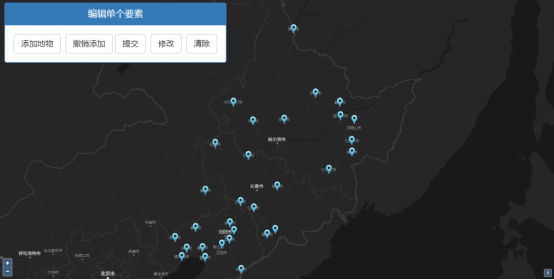
要素编辑
(点击“在线演示”可在线查看)
打开SuperMap Online并登录您的账号,依次点击“资源中心”-“数据”-“上传数据”。

上传数据
选择数据类型并进行上传。本示例使用的是SuperMap工作空间数据—“china.zip”。(示例数据百度云下载链接: https://pan.baidu.com/s/17gsAySUvb_nbsYWHQi4UHQ 提取码: h845 )。
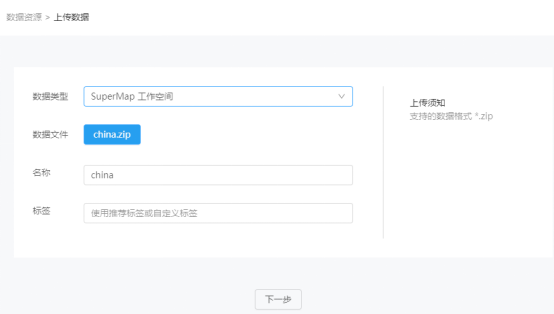
选择数据并上传
云存储支持将上传的数据发布为地图、数据、三维、空间分析等多种类型的REST服务。本示例选择发布的服务类型为“REST数据服务”。
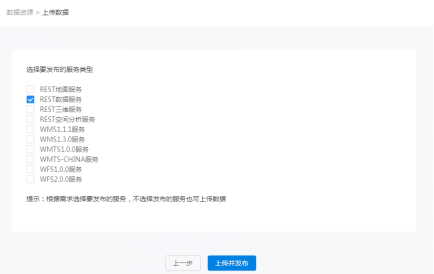
选择服务类型并发布
发布完成后的数据可以在“资源中心”-“数据”-“我的数据”查看。调用服务前需要开启数据共享。点击服务名称下对应服务地址,选择目标目录复制链接即可调用该REST数据服务,数据服务的子资源在 SuperMap iServer中是数据查询和操作的入口,提供了数据源集合和数据查询功能的资源信息。
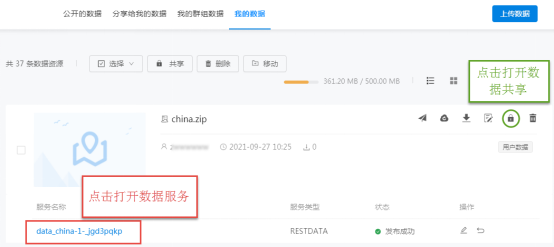
修改数据权限,打开REST数据服务

选择目标目录
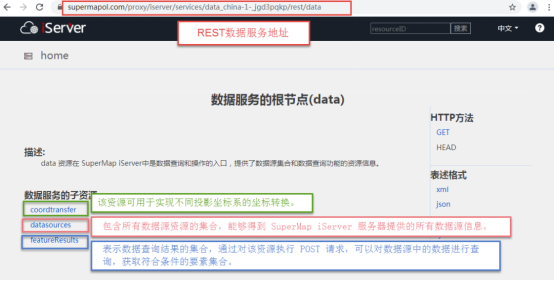
获取REST数据服务地址
REST数据服务也可以通过使用“密钥key”的方式来进行调用,搜索并打开SuperMap Online,在首页下方找到开发模块,更多服务调用方式等你发现!
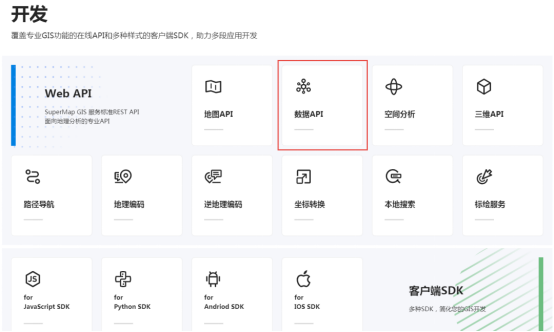
SuperMap Online首页开发模块
获取服务地址后,即可在网页中调用REST数据服务。示例中,底图调用的是REST地图服务,点击可查看REST地图服务使用方法哦!
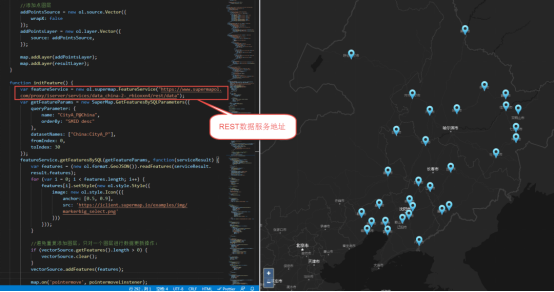
调用REST数据服务
通过简单代码编写,可以对REST数据服务进行编辑。如已知某点坐标,即可以直接在REST数据服务中添加该点。
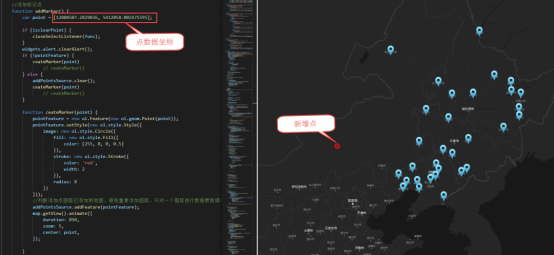
新增点数据
REST数据服务也可以用于打造在线数据编辑平台,可以实现点、线、面要素的增删改查,修改后的结果可以同步到REST数据服务当中。
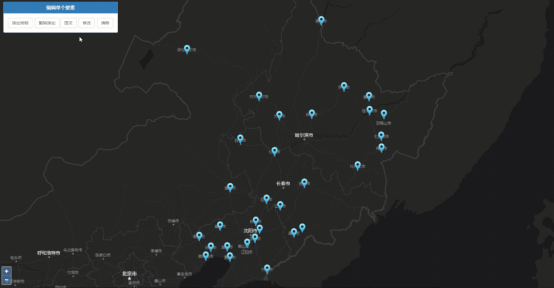
要素编辑
源码如下:
<!DOCTYPE html>
<html>
<head>
<meta charset="UTF-8">
<meta name="viewport" content="width=device-width, initial-scale=1.0, maximum-scale=1.0, user-scalable=0" />
<link href="https://cdn.jsdelivr.net/gh/openlayers/openlayers.github.io@master/en/v6.4.3/css/ol.css" rel="stylesheet" />
<link href='https://iclient.supermap.io/dist/ol/iclient-ol.min.css' rel='stylesheet' />
<script type="text/javascript" src="https://cdn.jsdelivr.net/gh/openlayers/openlayers.github.io@master/en/v6.4.3/build/ol.js"></script>
<script type="text/javascript" src="https://cdn.bootcss.com/jquery/3.2.1/jquery.min.js"></script>
<script type="text/javascript" src="https://iclient.supermap.io/dist/ol/iclient-ol.min.js"></script>
<link href='https://cdn.bootcss.com/twitter-bootstrap/3.3.7/css/bootstrap.min.css' rel='stylesheet' />
<script type="text/javascript" src="https://cdn.bootcss.com/twitter-bootstrap/3.3.7/js/bootstrap.min.js"></script>
<script type="text/javascript" src="https://iclient.supermap.io/examples/js/widgets.js"></script>
<title>地物编辑</title>
<style>
.ol-zoom {
bottom: .5em;
font-size: 18px;
top: unset;
}
.editPane {
position: absolute;
left: 15px;
top: 8px;
text-align: center;
background: #FFF;
z-index: 1000;
border-radius: 4px;
}
.ol-popup {
position: absolute;
background-color: white;
-webkit-filter: drop-shadow(0 1px 4px rgba(0, 0, 0, 0.2));
filter: drop-shadow(0 1px 4px rgba(0, 0, 0, 0.2));
padding: 15px;
border-radius: 10px;
border: 1px solid #cccccc;
bottom: 12px;
left: -50px;
min-width: 120px;
}
.ol-popup:after,
.ol-popup:before {
top: 100%;
border: solid transparent;
content: " ";
height: 0;
width: 0;
position: absolute;
pointer-events: none;
}
.ol-popup:after {
border-top-color: white;
border-width: 10px;
left: 48px;
margin-left: -10px;
}
.ol-popup:before {
border-top-color: #cccccc;
border-width: 11px;
left: 48px;
margin-left: -11px;
}
.tooltip {
position: relative;
background: rgba(0, 0, 0, 0.5);
border-radius: 4px;
color: white;
padding: 4px 8px;
opacity: 0.7;
white-space: nowrap;
}
@media only screen and (max-width: 640px) {
#msg_container {
transform: translate(-35%, -20%);
}
}
</style>
</head>
<body style=" margin: 0;overflow: hidden;background: #fff;width: 100%;height:100%; position: absolute;top: 0;">
<div id="map" style="width: 100%;height:100%"></div>
<div id="popup" class="ol-popup">
<div id="popup-content"></div>
</div>
<div>
<div class="panel panel-primary editPane" id="editPane">
<div class='panel-heading'>
<h5 class='panel-title text-center'>编辑单个要素</h5>
</div>
<div class='panel-body content'>
<input type='button' class='btn btn-default' value="添加地物" onclick='addMarker()' />
<input type='button' class='btn btn-default' value="撤销添加" onclick='revocationMarker()' />
<input type='button' class='btn btn-default' value="提交" onclick='commit()' />
<input type='button' class='btn btn-default' value="修改" onclick='clearLayer(selectFeaturForUpdate)' />
<input type='button' class='btn btn-default' value="清除" onclick='clearLayer(selectFeatureForDelete)' />
</div>
</div>
</div>
<div id="pointInfoModal" class="modal fade" tabindex="-1" role="dialog" aria-labelledby="largerModal">
<div class="modal-dialog modal-sm" role="document">
<div class="modal-content">
<div class="modal-header">输入新增点名字</div>
<div class="modal-body">
<input type="text" class="form-control" id="point-info" autocomplete="off">
</div>
<div class="modal-footer">
<button type="button" class="btn btn-default" data-dismiss="modal" onclick="revocationMarker()">取消</button>
<button type="button" class="btn btn-primary" onclick="setPointName()">确定</button>
</div>
</div>
</div>
</div>
<div class="modal fade" id="updatePointModal" tabindex="-1" role="dialog" aria-labelledby="myModalLabel">
<div class="modal-dialog modal-sm">
<div class="modal-content" style="width: 400px;">
<div class="modal-header">
<button type="button" class="close" data-dismiss="modal">
×
</button>
<h4 class="modal-title" id="myModalLabel">
要素信息
</h4>
</div>
<div class="modal-body">
<form class="form-horizontal" role="form">
<div class="form-group">
<label for="name" class="col-sm-3 control-label" style="width: 21%;">Name</label>
<div class="col-sm-9">
<input type="text" class="form-control" id="name" name="name" value="">
</div>
</div>
<div class="form-group">
<label for="x" class="col-sm-3 control-label" style="width: 21%;">X(m)</label>
<div class="col-sm-9">
<input type="text" class="form-control" name="x" value="" id="x">
</div>
</div>
<div class="form-group">
<label for="y" class="col-sm-3 control-label" style="width: 21%;">Y(m)</label>
<div class="col-sm-9">
<input type="text" class="form-control" name="y" value="" id="y">
</div>
</div>
</form>
</div>
<div class="modal-footer">
<button type="button" class="btn btn-default" data-dismiss="modal">关闭</button>
<button type="submit" class="btn btn-primary" onclick="updateFeature()">修改</button>
</div>
</div>
</div>
</div>
<div class="modal fade" id="confirmModel">
<div class="modal-dialog">
<div class="modal-content message_align" style="width: 400px;">
<div class="modal-header">
<button type="button" class="close" data-dismiss="modal" aria-label="Close"><span
aria-hidden="true">×</span></button>
<h4 class="modal-title">确认信息</h4>
</div>
<div class="modal-body">
<p id="delcfmMsg">您确认要删除吗?</p>
</div>
<div class="modal-footer">
<input type="hidden" id="submitUrl" />
<button type="button" class="btn btn-default" data-dismiss="modal">取消</button>
<a onclick="deleteFeature()" class="btn btn-success" data-dismiss="modal">确定</a>
</div>
</div>
</div>
</div>
<script type="text/javascript">
var map, draw, pointFeature, vectorSource, resultLayer, addPointsSource, addPointsLayer,
func, update, deletedId, helpTooltipElement, helpTooltip, isclearPoint,
baseMap = "https://maptiles.supermapol.com/iserver/services/map_China/rest/maps/China_Dark",
//替换为在online上发布的数据服务,需要设置为公开
dataService = "https://www.supermapol.com/proxy/iserver/services/data_china_54y8bdc4/rest/data",
editFeaturesService = new ol.supermap.FeatureService(dataService),
container = document.getElementById('popup'),
content = document.getElementById('popup-content'),
pointName = document.getElementById('point-info'),
overlay = new ol.Overlay(({
element: container,
autoPan: true,
autoPanAnimation: {
duration: 250
},
offset: [0, -20]
})),
map = new ol.Map({
target: 'map',
controls: ol.control.defaults({
attributionOptions: {
collapsed: true
}
})
.extend([]),
view: new ol.View({
center: [12962344.405822188, 4830679.745330002],
zoom: 5,
projection: 'EPSG:3857',
multiWorld: true
}),
});
var layer = new ol.layer.Tile({
source: new ol.source.TileSuperMapRest({
url: baseMap
}),
projection: 'EPSG:3857'
});
map.addLayer(layer);
createHelpTooltip();
initFeature();
loadLayer();
//创建鼠标操作提示
function createHelpTooltip() {
if (helpTooltipElement) {
helpTooltipElement.parentNode.removeChild(helpTooltipElement);
}
helpTooltipElement = document.createElement('div');
helpTooltipElement.className = 'tooltip hidden';
helpTooltip = new ol.Overlay({
element: helpTooltipElement,
offset: [15, 0],
positioning: 'center-left'
});
}
//查询数据,页面初始化显示
function initFeature() {
var getFeatureParams = new SuperMap.GetFeaturesBySQLParameters({
//查询参数,根据自己的服务设置参数
queryParameter: {
name: "CityA_P@China",
orderBy: "SMID desc"
},
datasetNames: ["China:CityA_P"],
fromIndex: 0,
toIndex: 30
});
editFeaturesService.getFeaturesBySQL(getFeatureParams, function(serviceResult) {
var features = (new ol.format.GeoJSON()).readFeatures(serviceResult.result.features);
for (var i = 0; i < features.length; i++) {
features[i].setStyle(new ol.style.Style({
image: new ol.style.Icon(({
anchor: [0.5, 0.9],
src: 'https://iclient.supermap.io/examples/img/markerbig_select.png'
}))
}));
}
//避免重复添加图层,只对一个图层进行数据更新操作:
if (vectorSource.getFeatures().length > 0) {
vectorSource.clear();
}
vectorSource.addFeatures(features);
map.on('pointermove', pointermoveLinstener);
});
}
//添加图层
function loadLayer() {
//添加查询结果图层
vectorSource = new ol.source.Vector({
wrapX: false
});
resultLayer = new ol.layer.Vector({
source: vectorSource,
});
//添加点图层
addPointsSource = new ol.source.Vector({
wrapX: false
});
addPointsLayer = new ol.layer.Vector({
source: addPointsSource,
});
map.addLayer(addPointsLayer);
map.addLayer(resultLayer);
}
//鼠标移动监听,移动到点上显示名字
function pointermoveLinstener(e) {
var select = false;
map.forEachFeatureAtPixel(e.pixel, function(feature) {
if (feature.getProperties().NAME) {
map.getTargetElement().style.cursor = 'pointer';
var contentHTML = feature.getProperties().NAME;
content.innerHTML = contentHTML;
overlay.setPosition(feature.getGeometry().getCoordinates());
map.addOverlay(overlay);
select = true
}
}, {
hitTolerance: 10
});
if (!select) {
map.getTargetElement().style.cursor = '';
overlay.setPosition(undefined);
map.removeOverlay(overlay);
}
if (isclearPoint) {
helpTooltipElement.innerHTML = '选择要操作的要素';
helpTooltip.setPosition(e.coordinate);
helpTooltipElement.classList.remove('hidden');
map.addOverlay(helpTooltip);
} else {
helpTooltip.setPosition(undefined);
helpTooltipElement.classList.add('hidden');
}
}
//添加标记点
function addMarker() {
if (isclearPoint) {
closeSelectListener(func);
}
widgets.alert.clearAlert();
if (!pointFeature) {
ceateMarker()
} else {
addPointsSource.clear();
ceateMarker()
}
//通过点击创建标记点
function ceateMarker() {
draw = new ol.interaction.Draw({
source: addPointsSource,
type: 'Point'
});
map.addInteraction(draw);
draw.on("drawstart", function(e) {
pointFeature = e.feature;
pointFeature.setStyle(new ol.style.Style({
image: new ol.style.Circle({
fill: new ol.style.Fill({
color: [255, 0, 0, 0.5]
}),
stroke: new ol.style.Stroke({
color: 'red',
width: 2
}),
radius: 8
})
}));
addPointsSource.addFeature(pointFeature);
map.removeInteraction(draw);
$('#pointInfoModal').modal({
backdrop: 'static',
keyboard: false,
show: true
})
$('#pointInfoModal').on('shown.bs.modal', function() {
$("#pointInfoModal #point-info").focus();
});
});
}
}
//设置添加点的名字
function setPointName() {
pointFeature.setProperties({
"NAME": pointName.value
});
$('#point-info').val("");
$('#pointInfoModal').modal('hide');
}
//撤销添加,清除标绘点
function revocationMarker() {
if (pointFeature) {
addPointsSource.clear();
pointFeature = null;
} else {
widgets.alert.showAlert('没有可撤回的要素。', false);
}
}
//提交新增点到数据服务
function commit() {
widgets.alert.clearAlert();
if (pointFeature) {
//新增点要素参数,根据自己的服务设置参数
var addFeatureParams = new SuperMap.EditFeaturesParameters({
features: pointFeature,
dataSourceName: "China",
dataSetName: "CityA_P",
editType: "add",
returnContent: true
});
editFeaturesService.editFeatures(addFeatureParams, function(serviceResult) {
if (serviceResult.result.succeed) {
addPointsSource.clear();
vectorSource.clear();
pointFeature = null;
initFeature();
widgets.alert.showAlert('提交成功', true);
}
});
} else {
widgets.alert.showAlert('没有可提交的新要素,请先添加新要素。', false);
}
}
//地图点击事件,选择点进行修改或删除
function clearLayer(method) {
widgets.alert.clearAlert();
isclearPoint = true;
map.on('click', method);
func = method;
}
//选择要素修改
function selectFeaturForUpdate(e) {
if (isclearPoint) {
closeSelectListener(func);
}
update = null;
widgets.alert.clearAlert();
map.forEachFeatureAtPixel(e.pixel, function(feature) {
//只修改选中第一个要素:
if (!update) {
update = feature;
var coordinate = feature.getGeometry().getCoordinates();
var name = feature.getProperties().NAME;
$('#name').val(name);
$('#x').val(coordinate[0]);
$('#y').val(coordinate[1]);
$('#updatePointModal').modal({
backdrop: 'static',
keyboard: false,
show: true
})
}
}, {
hitTolerance: 1
});
}
//修改要素,更新数据服务
function updateFeature() {
$('#updatePointModal').modal('hide');
var name = document.getElementById('name').value;
var x = document.getElementById('x').value;
var y = document.getElementById('y').value;
update.getGeometry().setCoordinates([x, y]);
update.setProperties({
"NAME": name
});
//修改要素参数,根据自己的服务设置参数
var updateParams = new SuperMap.EditFeaturesParameters({
dataSourceName: "China",
dataSetName: "CityA_P",
features: update,
editType: "update"
});
editFeaturesService.editFeatures(updateParams, function(serviceResult) {
if (serviceResult.result.succeed) {
initFeature();
vectorSource.clear();
isclearPoint = false;
closeSelectListener(selectFeaturForUpdate);
widgets.alert.showAlert('更新成功', true);
} else {
widgets.alert.showAlert('更新失败', false)
}
});
}
//选择要素删除
function selectFeatureForDelete(e) {
if (isclearPoint) {
closeSelectListener(func);
}
deletedId = null;
map.forEachFeatureAtPixel(e.pixel, function(feature) {
//只删选中第一个要素:
if (!deletedId) {
deletedId = feature.getId();
//避免示例数据被删除,只允许删除额外添加的点
if (deletedId > 269) {
$('#confirmModel').modal({
backdrop: 'static',
keyboard: false,
show: true
})
} else {
widgets.alert.showAlert('为保持示例数据完整性,请先添加一个点来进行删除操作', false)
}
}
}, {
hitTolerance: 1
});
}
//删除要素,更新数据服务
function deleteFeature() {
//删除要素参数,根据自己的服务设置参数
var deleteParams = new SuperMap.EditFeaturesParameters({
dataSourceName: "China",
dataSetName: "CityA_P",
IDs: [deletedId],
editType: "delete"
});
editFeaturesService.editFeatures(deleteParams, function(serviceResult) {
if (serviceResult.result.succeed) {
initFeature();
vectorSource.clear();
isclearPoint = false;
closeSelectListener(selectFeatureForDelete);
widgets.alert.showAlert('删除要素成功!', true);
} else {
widgets.alert.showAlert('删除要素失败!', false)
}
});
}
//关闭地图点击事件,移除鼠标提示
function closeSelectListener(method) {
isclearPoint = false;
map.un('click', method);
helpTooltip.setPosition(undefined);
map.removeOverlay(helpTooltip);
helpTooltipElement.classList.add('hidden');
}
</script>
</body>
</html>
REST数据服务不仅可以通过简单开发实现数据编辑、查询等功能,也可以直接在云应用中通过“添加服务”的方式进行使用。本篇文章以REST数据服务为例,通过云存储还可以发布地图、三维、空间分析等多种类型的REST服务,点击可查看REST地图服务使用方法,后续会发布更多关于REST服务使用的相关文章,还请大家多多关注哦!
我正在尝试使用ruby和Savon来使用网络服务。测试服务为http://www.webservicex.net/WS/WSDetails.aspx?WSID=9&CATID=2require'rubygems'require'savon'client=Savon::Client.new"http://www.webservicex.net/stockquote.asmx?WSDL"client.get_quotedo|soap|soap.body={:symbol=>"AAPL"}end返回SOAP异常。检查soap信封,在我看来soap请求没有正确的命名空间。任何人都可以建议我
我想安装一个带有一些身份验证的私有(private)Rubygem服务器。我希望能够使用公共(public)Ubuntu服务器托管内部gem。我读到了http://docs.rubygems.org/read/chapter/18.但是那个没有身份验证-如我所见。然后我读到了https://github.com/cwninja/geminabox.但是当我使用基本身份验证(他们在他们的Wiki中有)时,它会提示从我的服务器获取源。所以。如何制作带有身份验证的私有(private)Rubygem服务器?这是不可能的吗?谢谢。编辑:Geminabox问题。我尝试“捆绑”以安装新的gem..
对于具有离线功能的智能手机应用程序,我正在为Xml文件创建单向文本同步。我希望我的服务器将增量/差异(例如GNU差异补丁)发送到目标设备。这是计划:Time=0Server:hasversion_1ofXmlfile(~800kiB)Client:hasversion_1ofXmlfile(~800kiB)Time=1Server:hasversion_1andversion_2ofXmlfile(each~800kiB)computesdeltaoftheseversions(=patch)(~10kiB)sendspatchtoClient(~10kiBtransferred)Cl
我主要使用Ruby来执行此操作,但到目前为止我的攻击计划如下:使用gemsrdf、rdf-rdfa和rdf-microdata或mida来解析给定任何URI的数据。我认为最好映射到像schema.org这样的统一模式,例如使用这个yaml文件,它试图描述数据词汇表和opengraph到schema.org之间的转换:#SchemaXtoschema.orgconversion#data-vocabularyDV:name:namestreet-address:streetAddressregion:addressRegionlocality:addressLocalityphoto:i
我正在编写一个包含C扩展的gem。通常当我写一个gem时,我会遵循TDD的过程,我会写一个失败的规范,然后处理代码直到它通过,等等......在“ext/mygem/mygem.c”中我的C扩展和在gemspec的“扩展”中配置的有效extconf.rb,如何运行我的规范并仍然加载我的C扩展?当我更改C代码时,我需要采取哪些步骤来重新编译代码?这可能是个愚蠢的问题,但是从我的gem的开发源代码树中输入“bundleinstall”不会构建任何native扩展。当我手动运行rubyext/mygem/extconf.rb时,我确实得到了一个Makefile(在整个项目的根目录中),然后当
我构建了两个需要相互通信和发送文件的Rails应用程序。例如,一个Rails应用程序会发送请求以查看其他应用程序数据库中的表。然后另一个应用程序将呈现该表的json并将其发回。我还希望一个应用程序将存储在其公共(public)目录中的文本文件发送到另一个应用程序的公共(public)目录。我从来没有做过这样的事情,所以我什至不知道从哪里开始。任何帮助,将不胜感激。谢谢! 最佳答案 无论Rails是什么,几乎所有Web应用程序都有您的要求,大多数现代Web应用程序都需要相互通信。但是有一个小小的理解需要你坚持下去,网站不应直接访问彼此
我尝试运行2.x应用程序。我使用rvm并为此应用程序设置其他版本的ruby:$rvmuseree-1.8.7-head我尝试运行服务器,然后出现很多错误:$script/serverNOTE:Gem.source_indexisdeprecated,useSpecification.Itwillberemovedonorafter2011-11-01.Gem.source_indexcalledfrom/Users/serg/rails_projects_terminal/work_proj/spohelp/config/../vendor/rails/railties/lib/r
刚入门rails,开始慢慢理解。有人可以解释或给我一些关于在application_controller中编码的好处或时间和原因的想法吗?有哪些用例。您如何为Rails应用程序使用应用程序Controller?我不想在那里放太多代码,因为据我了解,每个请求都会调用此Controller。这是真的? 最佳答案 ApplicationController实际上是您应用程序中的每个其他Controller都将从中继承的类(尽管这不是强制性的)。我同意不要用太多代码弄乱它并保持干净整洁的态度,尽管在某些情况下ApplicationContr
最近,当我启动我的Rails服务器时,我收到了一长串警告。虽然它不影响我的应用程序,但我想知道如何解决这些警告。我的估计是imagemagick以某种方式被调用了两次?当我在警告前后检查我的git日志时。我想知道如何解决这个问题。-bcrypt-ruby(3.1.2)-better_errors(1.0.1)+bcrypt(3.1.7)+bcrypt-ruby(3.1.5)-bcrypt(>=3.1.3)+better_errors(1.1.0)bcrypt和imagemagick有关系吗?/Users/rbchris/.rbenv/versions/2.0.0-p247/lib/ru
在Rails4.0.2中,我使用s3_direct_upload和aws-sdkgems直接为s3存储桶上传文件。在开发环境中它工作正常,但在生产环境中它会抛出如下错误,ActionView::Template::Error(noimplicitconversionofnilintoString)在View中,create_cv_url,:id=>"s3_uploader",:key=>"cv_uploads/{unique_id}/${filename}",:key_starts_with=>"cv_uploads/",:callback_param=>"cv[direct_uplo
