查找 Docker Hub 上的 httpd 镜像:
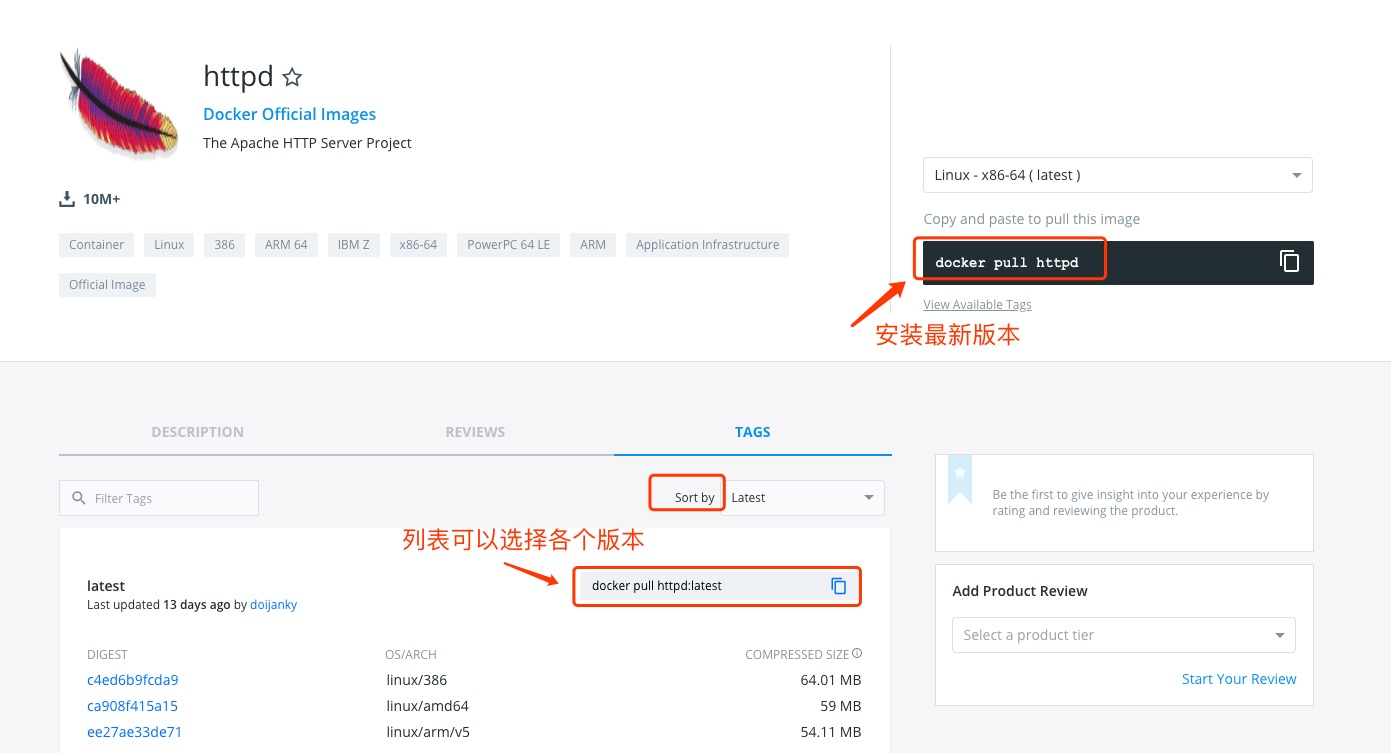
可以通过 Sort by 查看其他版本的 httpd,默认是最新版本 httpd:latest。
此外,我们还可以用 docker search httpd 命令来查看可用版本:
runoob@runoob:~/apache$ docker search httpd
NAME                           DESCRIPTION                  STARS  OFFICIAL AUTOMATED
httpd                          The Apache HTTP Server ..    524     [OK]
centos/httpd                                                7                [OK]
rgielen/httpd-image-php5       Docker image for Apache...   1                [OK]
microwebapps/httpd-frontend    Httpd frontend allowing...   1                [OK]
lolhens/httpd                  Apache httpd 2 Server        1                [OK]
publici/httpd                  httpd:latest                 0                [OK]
publicisworldwide/httpd        The Apache httpd webser...   0                [OK]
rgielen/httpd-image-simple     Docker image for simple...   0                [OK]
solsson/httpd                  Derivatives of the offi...   0                [OK]
rgielen/httpd-image-drush      Apache HTTPD + Drupal S...   0                [OK]
learninglayers/httpd                                        0                [OK]
sohrabkhan/httpd               Docker httpd + php5.6 (...   0                [OK]
aintohvri/docker-httpd         Apache HTTPD Docker ext...   0                [OK]
alizarion/httpd                httpd on centos with mo...   0                [OK]
...
这里我们拉取官方的镜像
runoob@runoob:~/apache$ docker pull httpd
等待下载完成后,我们就可以在本地镜像列表里查到REPOSITORY为httpd的镜像。
runoob@runoob:~/apache$ docker images httpd
REPOSITORY     TAG        IMAGE ID        CREATED           SIZE
httpd          latest     da1536b4ef14    23 seconds ago    195.1 MB
创建 Dockerfile
首先,创建目录apache,用于存放后面的相关东西。
runoob@runoob:~$ mkdir -p ~/apache/www ~/apache/logs ~/apache/conf
www 目录将映射为 apache 容器配置的应用程序目录。
logs 目录将映射为 apache 容器的日志目录。
conf 目录里的配置文件将映射为 apache 容器的配置文件。
进入创建的 apache 目录,创建 Dockerfile。
FROM debian:jessie

# add our user and group first to make sure their IDs get assigned consistently, regardless of whatever dependencies get added
#RUN groupadd -r www-data && useradd -r --create-home -g www-data www-data

ENV HTTPD_PREFIX /usr/local/apache2
ENV PATH $PATH:$HTTPD_PREFIX/bin
RUN mkdir -p "$HTTPD_PREFIX" \
    && chown www-data:www-data "$HTTPD_PREFIX"
WORKDIR $HTTPD_PREFIX

# install httpd runtime dependencies
# https://httpd.apache.org/docs/2.4/install.html#requirements
RUN apt-get update \
    && apt-get install -y --no-install-recommends \
        libapr1 \
        libaprutil1 \
        libaprutil1-ldap \
        libapr1-dev \
        libaprutil1-dev \
        libpcre++0 \
        libssl1.0.0 \
    && rm -r /var/lib/apt/lists/*

ENV HTTPD_VERSION 2.4.20
ENV HTTPD_BZ2_URL https://www.apache.org/dist/httpd/httpd-$HTTPD_VERSION.tar.bz2

RUN buildDeps=' \
        ca-certificates \
        curl \
        bzip2 \
        gcc \
        libpcre++-dev \
        libssl-dev \
        make \
    ' \
    set -x \
    && apt-get update \
    && apt-get install -y --no-install-recommends $buildDeps \
    && rm -r /var/lib/apt/lists/* \
    \
    && curl -fSL "$HTTPD_BZ2_URL" -o httpd.tar.bz2 \
    && curl -fSL "$HTTPD_BZ2_URL.asc" -o httpd.tar.bz2.asc \
# see https://httpd.apache.org/download.cgi#verify
    && export GNUPGHOME="$(mktemp -d)" \
    && gpg --keyserver ha.pool.sks-keyservers.net --recv-keys A93D62ECC3C8EA12DB220EC934EA76E6791485A8 \
    && gpg --batch --verify httpd.tar.bz2.asc httpd.tar.bz2 \
    && rm -r "$GNUPGHOME" httpd.tar.bz2.asc \
    \
    && mkdir -p src \
    && tar -xvf httpd.tar.bz2 -C src --strip-components=1 \
    && rm httpd.tar.bz2 \
    && cd src \
    \
    && ./configure \
        --prefix="$HTTPD_PREFIX" \
        --enable-mods-shared=reallyall \
    && make -j"$(nproc)" \
    && make install \
    \
    && cd .. \
    && rm -r src \
    \
    && sed -ri \
        -e 's!^(\s*CustomLog)\s+\S+!\1 /proc/self/fd/1!g' \
        -e 's!^(\s*ErrorLog)\s+\S+!\1 /proc/self/fd/2!g' \
        "$HTTPD_PREFIX/conf/httpd.conf" \
    \
    && apt-get purge -y --auto-remove $buildDeps

COPY httpd-foreground /usr/local/bin/

EXPOSE 80
CMD ["httpd-foreground"]
Dockerfile文件中 COPY httpd-foreground /usr/local/bin/ 是将当前目录下的httpd-foreground拷贝到镜像里,作为httpd服务的启动脚本,所以我们要在本地创建一个脚本文件httpd-foreground
#!/bin/bash
set -e

# Apache gets grumpy about PID files pre-existing
rm -f /usr/local/apache2/logs/httpd.pid

exec httpd -DFOREGROUND
赋予 httpd-foreground 文件可执行权限。
runoob@runoob:~/apache$ chmod +x httpd-foreground
通过 Dockerfile 创建一个镜像,替换成你自己的名字。
runoob@runoob:~/apache$ docker build -t httpd .
创建完成后,我们可以在本地的镜像列表里查找到刚刚创建的镜像。
runoob@runoob:~/apache$ docker images httpd
REPOSITORY     TAG        IMAGE ID        CREATED           SIZE
httpd          latest     da1536b4ef14    23 seconds ago    195.1 MB
docker run -p 80:80 -v $PWD/www/:/usr/local/apache2/htdocs/ -v $PWD/conf/httpd.conf:/usr/local/apache2/conf/httpd.conf -v $PWD/logs/:/usr/local/apache2/logs/ -d httpd
命令说明:
-p 80:80:第一个 80 端口为主机端口,后面一个是容器端口,效果为将容器的 80 端口映射到主机的 80 端口。
-v $PWD/www/:/usr/local/apache2/htdocs/: 将主机中当前目录下的 www 目录挂载到容器的 /usr/local/apache2/htdocs/。
-v $PWD/conf/httpd.conf:/usr/local/apache2/conf/httpd.conf: 将主机中当前目录下的 conf/httpd.conf 文件挂载到容器的 /usr/local/apache2/conf/httpd.conf。
-v $PWD/logs/:/usr/local/apache2/logs/: 将主机中当前目录下的 logs 目录挂载到容器的 /usr/local/apache2/logs/。
更详细的命令参考:Docker run 命令
查看容器启动情况:
runoob@runoob:~/apache$ docker ps
CONTAINER ID  IMAGE   COMMAND             ... PORTS               NAMES
79a97f2aac37  httpd   "httpd-foreground"  ... 0.0.0.0:80->80/tcp  sharp_swanson
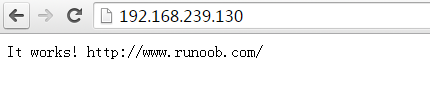
通过浏览器访问
我想为Heroku构建一个Rails3应用程序。他们使用Postgres作为他们的数据库,所以我通过MacPorts安装了postgres9.0。现在我需要一个postgresgem并且共识是出于性能原因你想要pggem。但是我对我得到的错误感到非常困惑当我尝试在rvm下通过geminstall安装pg时。我已经非常明确地指定了所有postgres目录的位置可以找到但仍然无法完成安装:$envARCHFLAGS='-archx86_64'geminstallpg--\--with-pg-config=/opt/local/var/db/postgresql90/defaultdb/po
我打算为ruby脚本创建一个安装程序,但我希望能够确保机器安装了RVM。有没有一种方法可以完全离线安装RVM并且不引人注目(通过不引人注目,就像创建一个可以做所有事情的脚本而不是要求用户向他们的bash_profile或bashrc添加一些东西)我不是要脚本本身,只是一个关于如何走这条路的快速指针(如果可能的话)。我们还研究了这个很有帮助的问题:RVM-isthereawayforsimpleofflineinstall?但有点误导,因为答案只向我们展示了如何离线在RVM中安装ruby。我们需要能够离线安装RVM本身,并查看脚本https://raw.github.com/wayn
我有一个奇怪的问题:我在rvm上安装了rubyonrails。一切正常,我可以创建项目。但是在我输入“railsnew”时重新启动后,我有“程序'rails'当前未安装。”。SystemUbuntu12.04ruby-v"1.9.3p194"gemlistactionmailer(3.2.5)actionpack(3.2.5)activemodel(3.2.5)activerecord(3.2.5)activeresource(3.2.5)activesupport(3.2.5)arel(3.0.2)builder(3.0.0)bundler(1.1.4)coffee-rails(
我刚刚为fedora安装了emacs。我想用emacs编写ruby。为ruby提供代码提示、代码完成类型功能所需的工具、扩展是什么? 最佳答案 ruby-mode已经包含在Emacs23之后的版本中。不过,它也可以通过ELPA获得。您可能感兴趣的其他一些事情是集成RVM、feature-mode(Cucumber)、rspec-mode、ruby-electric、inf-ruby、rinari(用于Rails)等。这是我当前用于Ruby开发的Emacs配置:https://github.com/citizen428/emacs
我正在尝试在我的centos服务器上安装therubyracer,但遇到了麻烦。$geminstalltherubyracerBuildingnativeextensions.Thiscouldtakeawhile...ERROR:Errorinstallingtherubyracer:ERROR:Failedtobuildgemnativeextension./usr/local/rvm/rubies/ruby-1.9.3-p125/bin/rubyextconf.rbcheckingformain()in-lpthread...yescheckingforv8.h...no***e
我的最终目标是安装当前版本的RubyonRails。我在OSXMountainLion上运行。到目前为止,这是我的过程:已安装的RVM$\curl-Lhttps://get.rvm.io|bash-sstable检查已知(我假设已批准)安装$rvmlistknown我看到当前的稳定版本可用[ruby-]2.0.0[-p247]输入命令安装$rvminstall2.0.0-p247注意:我也试过这些安装命令$rvminstallruby-2.0.0-p247$rvminstallruby=2.0.0-p247我很快就无处可去了。结果:$rvminstall2.0.0-p247Search
我实际上是在尝试使用RVM在我的OSX10.7.5上更新ruby,并在输入以下命令后:rvminstallruby我得到了以下回复:Searchingforbinaryrubies,thismighttakesometime.Checkingrequirementsforosx.Installingrequirementsforosx.Updatingsystem.......Errorrunning'requirements_osx_brew_update_systemruby-2.0.0-p247',pleaseread/Users/username/.rvm/log/138121
由于fast-stemmer的问题,我很难安装我想要的任何rubygem。我把我得到的错误放在下面。Buildingnativeextensions.Thiscouldtakeawhile...ERROR:Errorinstallingfast-stemmer:ERROR:Failedtobuildgemnativeextension./System/Library/Frameworks/Ruby.framework/Versions/2.0/usr/bin/rubyextconf.rbcreatingMakefilemake"DESTDIR="cleanmake"DESTDIR=
当我尝试安装Ruby时遇到此错误。我试过查看this和this但无济于事➜~brewinstallrubyWarning:YouareusingOSX10.12.Wedonotprovidesupportforthispre-releaseversion.Youmayencounterbuildfailuresorotherbreakages.Pleasecreatepull-requestsinsteadoffilingissues.==>Installingdependenciesforruby:readline,libyaml,makedepend==>Installingrub
当我执行>rvminstall1.9.2时一切顺利。然后我做>rvmuse1.9.2也很顺利。但是当涉及到ruby-v时..sam@sjones:~$rvminstall1.9.2/home/sam/.rvm/rubies/ruby-1.9.2-p136,thismaytakeawhiledependingonyourcpu(s)...ruby-1.9.2-p136-#fetchingruby-1.9.2-p136-#downloadingruby-1.9.2-p136,thismaytakeawhiledependingonyourconnection...%Total%Rece
