系统: Ubuntu 20.04
CPU: i5
GPU:Geforce 960M
使用glxinfo查看
https://dri.freedesktop.org/wiki/glxinfo/
$ glxinfo
Command 'glxinfo' not found, but can be installed with:
sudo apt install mesa-utils
需要安装mesa-utils
sudo apt install mesa-utils
查看gl相关命令
$ glxinfo | grep render
direct rendering: Yes
OpenGL renderer string: Mesa DRI Intel(R) HD Graphics 4600 (HSW GT2)
direct rendering: 返回yes则表示是采用直接渲染,对应no则为非直接渲染(这时渲染指令将发送到X-server中渲染)
OpenGL renderer string:诉你现在用的是什么driver, 能告诉你系统此时用的是software rendering还是hardware rendering
ps:拓展延伸其他情况
# 非直接+硬件渲染
direct rendering: No (LIBGL_ALWAYS_INDIRECT set)
OpenGL renderer string: Mesa DRI Intel(R) HD Graphics 4600 (HSW GT2)
这里 OpenGL通过设置环境变量,被强制使用indirect rendering,意味着所有的rendering commands都被发往 X server。但是 X server实际上用的是硬件加速渲染(hardware accelerated rendering
#直接+软件渲染
direct rendering: Yes
OpenGL renderer string: Software Rasterizer
这里OpenGL味着用的是software rendering,但是所有的software rendering是在client application里完成的,而不是发往 X server
查看OpenGL渲染信息
$ glxinfo | grep OpenGL # glxinfo | grep -i opengl #可忽略大小写
OpenGL vendor string: Intel Open Source Technology Center
OpenGL renderer string: Mesa DRI Intel(R) HD Graphics 4600 (HSW GT2)
OpenGL core profile version string: 4.5 (Core Profile) Mesa 21.2.6
OpenGL core profile shading language version string: 4.50
OpenGL core profile context flags: (none)
OpenGL core profile profile mask: core profile
OpenGL core profile extensions:
OpenGL version string: 3.0 Mesa 21.2.6
OpenGL shading language version string: 1.30
OpenGL context flags: (none)
OpenGL extensions:
OpenGL ES profile version string: OpenGL ES 3.1 Mesa 21.2.6
OpenGL ES profile shading language version string: OpenGL ES GLSL ES 3.10
OpenGL ES profile extensions:
注意第二行 OpenGL renderer string: Mesa DRI Intel(R) HD Graphics 4600 (HSW GT2) 显然OpenGL的渲染采用的核显(也是硬件渲染)
当然,我们可以有更简单的方式,点击桌面的又上角,选择Settings打开About如下图
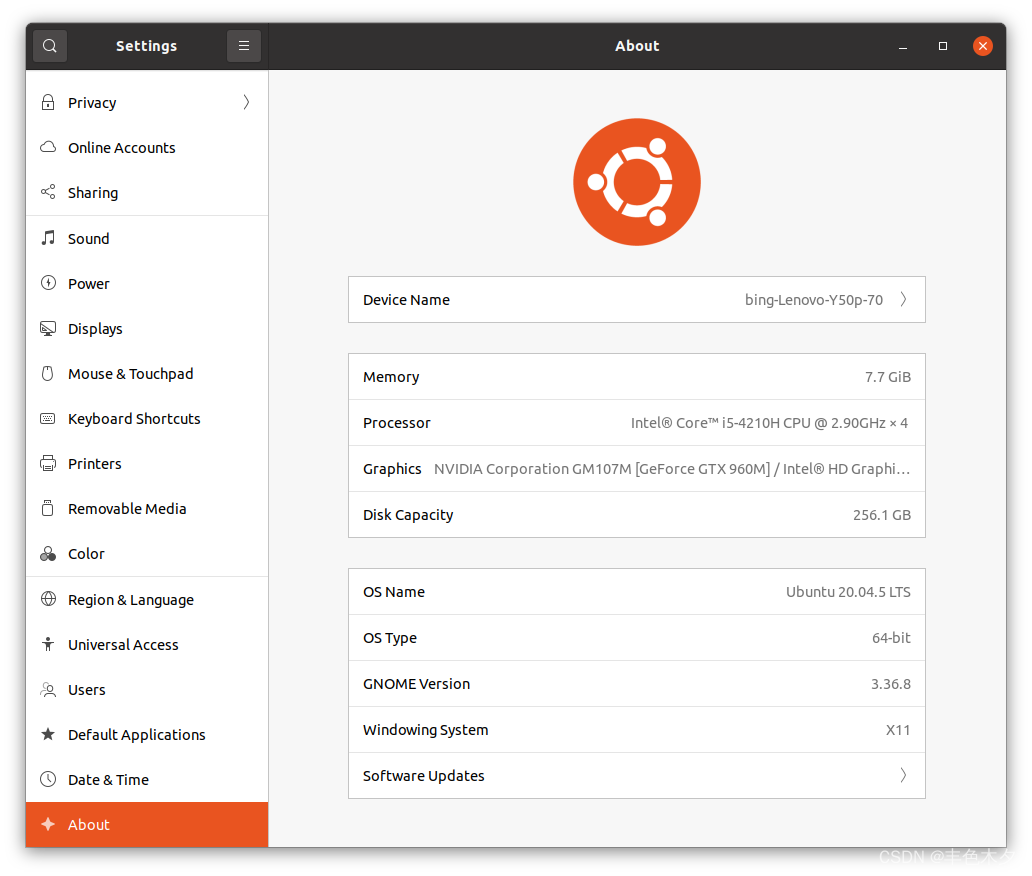
如果没有安装显卡,那么可以正式进入下面步骤了
ubuntu-drivers devices$ ubuntu-drivers devices
== /sys/devices/pci0000:00/0000:00:01.0/0000:01:00.0 ==
modalias : pci:v000010DEd0000139Bsv000017AAsd00003978bc03sc02i00
vendor : NVIDIA Corporation
model : GM107M [GeForce GTX 960M]
driver : nvidia-driver-390 - distro non-free
driver : nvidia-driver-450-server - distro non-free
driver : nvidia-driver-418-server - distro non-free
driver : nvidia-driver-525-server - distro non-free
driver : nvidia-driver-515 - distro non-free
driver : nvidia-driver-470-server - distro non-free
driver : nvidia-driver-510 - distro non-free
driver : nvidia-driver-515-server - distro non-free
driver : nvidia-driver-525 - distro non-free recommended
driver : nvidia-driver-470 - distro non-free
driver : xserver-xorg-video-nouveau - distro free builtin
选择后面有recommend 的驱动
# 安装显卡
sudo apt-get install nvidia-driver-525
或者Win+A打开 APP的Additional Driver
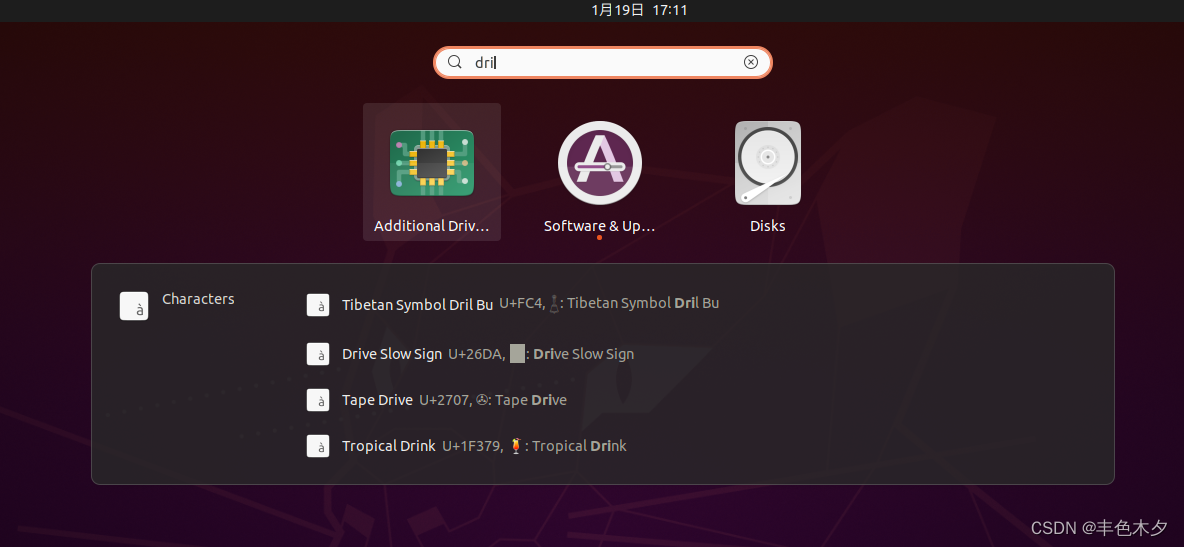 选择第一个推荐的
nvidia-driver-525,然后点击Applying Changes
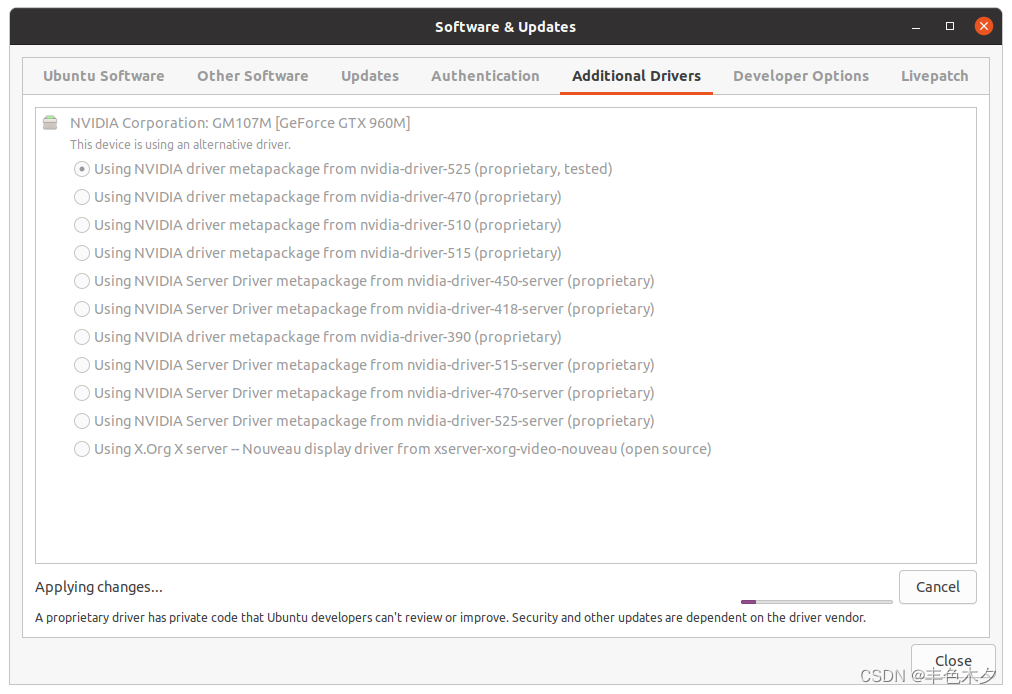 开始安装下载,安装完成后重启电脑
Nvidia官方地址 https://www.nvidia.cn/
使用nvidia-smi命令查看GPU情况
nvida-smi
# 更多 https://blog.csdn.net/youlinhuanyan/article/details/12873409
配置nvidia
# 启动nvida配置窗口
nvidia-settings
 可通过
可通过prime-select命令设置使用nvidia独显
sudo prime-select nvidia # 其他选项 nvidia | no-demand | intel
其他查看glxinfo
$ glxinfo -B
name of display: :1
display: :1  screen: 0
direct rendering: Yes
Extended renderer info (GLX_MESA_query_renderer):
    Vendor: Intel Open Source Technology Center (0x8086)
    Device: Mesa DRI Intel(R) HD Graphics 4600 (HSW GT2) (0x416)
    Version: 21.2.6
    Accelerated: yes
    Video memory: 1536MB
    Unified memory: yes
    Preferred profile: core (0x1)
    Max core profile version: 4.5
    Max compat profile version: 3.0
    Max GLES1 profile version: 1.1
    Max GLES[23] profile version: 3.1
OpenGL vendor string: Intel Open Source Technology Center
OpenGL renderer string: Mesa DRI Intel(R) HD Graphics 4600 (HSW GT2)
OpenGL core profile version string: 4.5 (Core Profile) Mesa 21.2.6
OpenGL core profile shading language version string: 4.50
OpenGL core profile context flags: (none)
OpenGL core profile profile mask: core profile

OpenGL version string: 3.0 Mesa 21.2.6
OpenGL shading language version string: 1.30
OpenGL context flags: (none)

OpenGL ES profile version string: OpenGL ES 3.1 Mesa 21.2.6
OpenGL ES profile shading language version string: OpenGL ES GLSL ES 3.10
(待续)
我想为Heroku构建一个Rails3应用程序。他们使用Postgres作为他们的数据库,所以我通过MacPorts安装了postgres9.0。现在我需要一个postgresgem并且共识是出于性能原因你想要pggem。但是我对我得到的错误感到非常困惑当我尝试在rvm下通过geminstall安装pg时。我已经非常明确地指定了所有postgres目录的位置可以找到但仍然无法完成安装:$envARCHFLAGS='-archx86_64'geminstallpg--\--with-pg-config=/opt/local/var/db/postgresql90/defaultdb/po
我打算为ruby脚本创建一个安装程序,但我希望能够确保机器安装了RVM。有没有一种方法可以完全离线安装RVM并且不引人注目(通过不引人注目,就像创建一个可以做所有事情的脚本而不是要求用户向他们的bash_profile或bashrc添加一些东西)我不是要脚本本身,只是一个关于如何走这条路的快速指针(如果可能的话)。我们还研究了这个很有帮助的问题:RVM-isthereawayforsimpleofflineinstall?但有点误导,因为答案只向我们展示了如何离线在RVM中安装ruby。我们需要能够离线安装RVM本身,并查看脚本https://raw.github.com/wayn
我有一个奇怪的问题:我在rvm上安装了rubyonrails。一切正常,我可以创建项目。但是在我输入“railsnew”时重新启动后,我有“程序'rails'当前未安装。”。SystemUbuntu12.04ruby-v"1.9.3p194"gemlistactionmailer(3.2.5)actionpack(3.2.5)activemodel(3.2.5)activerecord(3.2.5)activeresource(3.2.5)activesupport(3.2.5)arel(3.0.2)builder(3.0.0)bundler(1.1.4)coffee-rails(
我刚刚为fedora安装了emacs。我想用emacs编写ruby。为ruby提供代码提示、代码完成类型功能所需的工具、扩展是什么? 最佳答案 ruby-mode已经包含在Emacs23之后的版本中。不过,它也可以通过ELPA获得。您可能感兴趣的其他一些事情是集成RVM、feature-mode(Cucumber)、rspec-mode、ruby-electric、inf-ruby、rinari(用于Rails)等。这是我当前用于Ruby开发的Emacs配置:https://github.com/citizen428/emacs
我正在尝试在我的centos服务器上安装therubyracer,但遇到了麻烦。$geminstalltherubyracerBuildingnativeextensions.Thiscouldtakeawhile...ERROR:Errorinstallingtherubyracer:ERROR:Failedtobuildgemnativeextension./usr/local/rvm/rubies/ruby-1.9.3-p125/bin/rubyextconf.rbcheckingformain()in-lpthread...yescheckingforv8.h...no***e
我的最终目标是安装当前版本的RubyonRails。我在OSXMountainLion上运行。到目前为止,这是我的过程:已安装的RVM$\curl-Lhttps://get.rvm.io|bash-sstable检查已知(我假设已批准)安装$rvmlistknown我看到当前的稳定版本可用[ruby-]2.0.0[-p247]输入命令安装$rvminstall2.0.0-p247注意:我也试过这些安装命令$rvminstallruby-2.0.0-p247$rvminstallruby=2.0.0-p247我很快就无处可去了。结果:$rvminstall2.0.0-p247Search
我实际上是在尝试使用RVM在我的OSX10.7.5上更新ruby,并在输入以下命令后:rvminstallruby我得到了以下回复:Searchingforbinaryrubies,thismighttakesometime.Checkingrequirementsforosx.Installingrequirementsforosx.Updatingsystem.......Errorrunning'requirements_osx_brew_update_systemruby-2.0.0-p247',pleaseread/Users/username/.rvm/log/138121
由于fast-stemmer的问题,我很难安装我想要的任何rubygem。我把我得到的错误放在下面。Buildingnativeextensions.Thiscouldtakeawhile...ERROR:Errorinstallingfast-stemmer:ERROR:Failedtobuildgemnativeextension./System/Library/Frameworks/Ruby.framework/Versions/2.0/usr/bin/rubyextconf.rbcreatingMakefilemake"DESTDIR="cleanmake"DESTDIR=
当我尝试安装Ruby时遇到此错误。我试过查看this和this但无济于事➜~brewinstallrubyWarning:YouareusingOSX10.12.Wedonotprovidesupportforthispre-releaseversion.Youmayencounterbuildfailuresorotherbreakages.Pleasecreatepull-requestsinsteadoffilingissues.==>Installingdependenciesforruby:readline,libyaml,makedepend==>Installingrub
我试过重新启动apache,缓存的页面仍然出现,所以一定有一个文件夹在某个地方。我没有“公共(public)/缓存”,那么我还应该查看哪些其他地方?是否有一个URL标志也可以触发此效果? 最佳答案 您需要触摸一个文件才能清除phusion,例如:touch/webapps/mycook/tmp/restart.txt参见docs 关于ruby-如何在Ubuntu中清除RubyPhusionPassenger的缓存?,我们在StackOverflow上找到一个类似的问题:
