这两天根据需求写了一个比较好看的有动态效果的登录注册切换页面,这里我将源码资源分享给大家,大家可以直接免费下载使用哦,没有 vip 的小伙伴找我私聊发送"登录注册"即可我给你发文件,此登录注册框放在任何管理系统都是非常炫酷的点睛之笔!
登录页面:

注册页面:
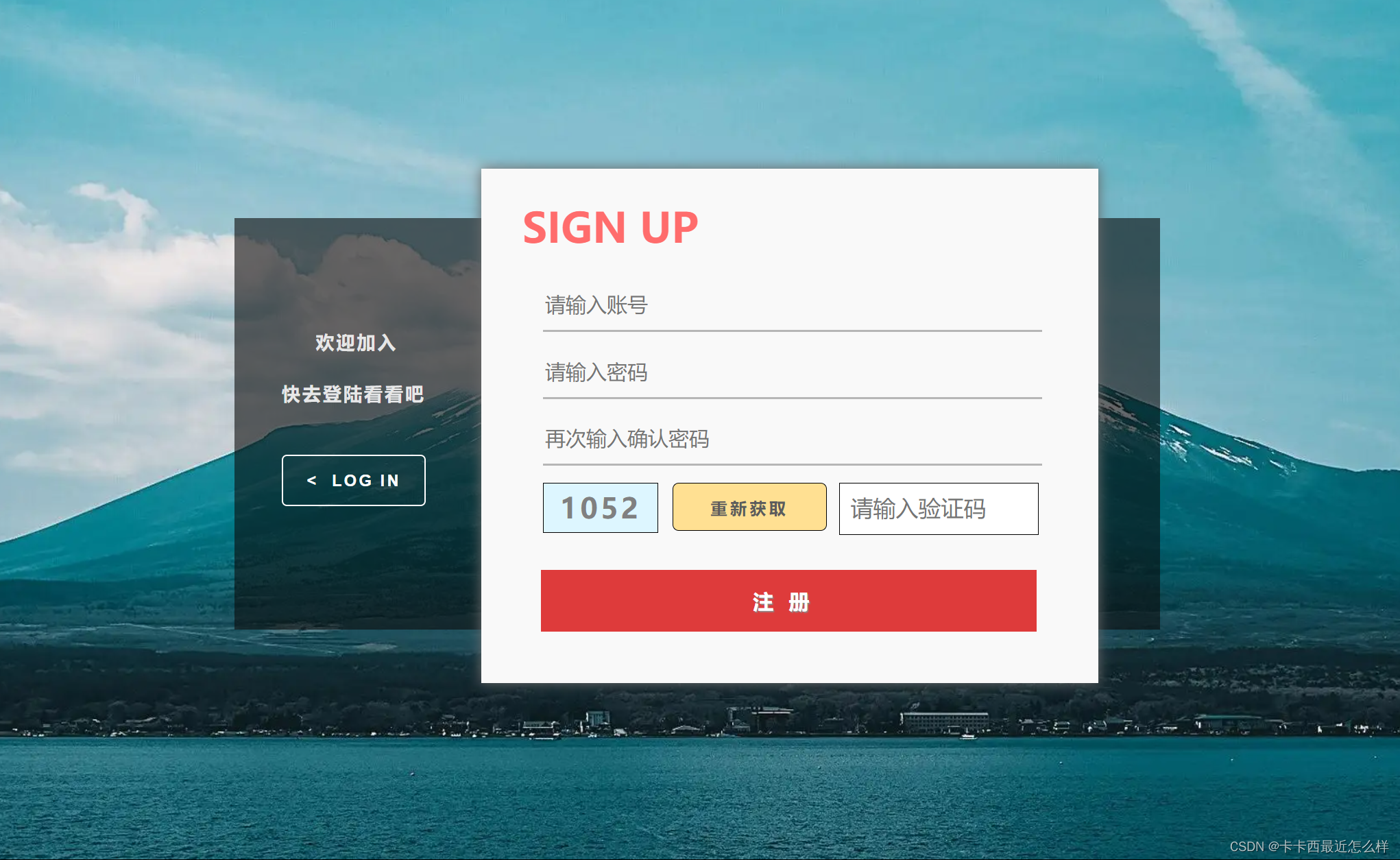
动态切换效果:切换时采用了一种滑动切换的效果

此效果动态的实现原理也是非常简单的,使用 jQuery 封装好的动画函数即可,以下是其功能实现的js代码,使用了 jQuery 封装好的 animate 动画函数,在点击切换注册或登录框时就会调用 animate,其内部回调函数内容为其登录和注册框哪个显示哪个不显示,从而完成一种视觉上的切换效果,其实归根到底还是 display 的显隐切换,有 jQuery 基础 小伙伴就不难理解。
- 在这里在带领大家复习一下 animate 动画函数
- animate ( params , speed , easing , fn ) params 为必写参数 !!!
参数 params speed easing fn 含义 写想要更改的样式属性,以对象形式传递,必写 速度参数,可写为 slow,nomarl, fast,也可以写成特定的毫秒数值 用来指定特定的过度效果,默认为 swing,可换为 linear 回调函数,在动画执行完后调用动画函数内的内容
- 注意以对象形式传入要改变的属性,并且设置动画函数的必须是元素,不能是文档,例如让整个页面移动时,不能给 $(document) 设置动画函数,而应该给 $('html') 设置动画函数,这点很重要!!!!!!!!!!
document.addEventListener('DOMContentLoaded',function(event){
    document.addEventListener('selectstart',function(event){
        event.preventDefault();
    })
    document.addEventListener('contextmenu',function(event){
        event.preventDefault();
    })
    var random_box=document.querySelector('.random');
    var btn=document.querySelector('.reset');
    var wirte=document.querySelector('.write');
    function random(min,max){
         return Math.floor(Math.random()*(max-min+1))+min;
    }
    btn.addEventListener('click',function(){
        btn.style.backgroundColor='#fff';
        window.setTimeout(function(event){
            btn.style.backgroundColor='rgb(255, 224, 146)';
        },50)
        var randoms=random(1000,9999);
        console.log(randoms);
        random_box.innerHTML=randoms;
    })
})
$(function(){
      $('.change-register-button').on('click',function(){
            $('.login').animate(
                {
                    'left':'240px'
                },400,function(){
                    $('.login').css({'display':'none',
                                          'left':'60px'})
                    $('.change-register-box').css('display','none')
                    $('.register').css('display','block')
                    $('.change-login-box').css('display','block')
                }
            )
      })
      $('.change-login-button').on('click',function(){
        $('.register').animate(
            {
                'right':'240px'
            },400,function(){
                $('.register').css({'display':'none',
                                            'right':'60px'})
                $('.change-login-box').css('display','none')
                $('.login').css('display','block')
                $('.change-register-box').css('display','block')
            }
        )
  })
})HTML 代码:
<!DOCTYPE html>
<html lang="en">
<head>
<meta charset="UTF-8">
<meta http-equiv="X-UA-Compatible" content="IE=edge">
<meta name="viewport" content="width=device-width, initial-scale=1.0">
<title>login</title>
<link rel="stylesheet" href="./login.css">
<script src="./jQuery.js"></script>
<script src="./login.js"></script>
</head>
<body>
<div class="background">
<!-- 登录 -->
<div class="login">
<p class="login-value">LOG IN</p>
<form action="">
<input type="text" class="login-num" placeholder="请输入账号">
<input type="password" class="login-pwd" placeholder="请输入密码">
<input type="button" value="忘记密码?" class="forget">
<input type="submit" value="登录" class="login-button">
</form>
</div>
<div class="change-register-box">
<p class="a">还没有账户?</p>
<p class="b">点击加入我们吧</p>
<button class="change-register-button">SIGN UP ></button>
</div>
<!-- 注册 -->
<div class="register">
<p class="signup-value">SIGN UP</p>
<button class="reset">重新获取</button>
<form action="">
<input type="text" class="signup-num" placeholder="请输入账号">
<input type="password" class="signup-pwd" placeholder="请输入密码">
<input type="password" class="signup-repwd" placeholder="再次输入确认密码">
<div class="random">????</div>
<input type="text" class="write" placeholder="请输入验证码">
<input type="submit" value="注册" class="signup-button">
</form>
</div>
<div class="change-login-box">
<p class="c">欢迎加入</p>
<p class="d">快去登陆看看吧</p>
<button class="change-login-button">< LOG IN</button>
</div>
</div>
</body>
</html>CSS代码:
body{
    background: url(./img/src=http___pic1.win4000.com_wallpaper_2020-10-12_5f83b7c13d0b9.jpg&refer=http___pic1.win4000.webp);
    background-size: 110% ,110%;
}
.background{
     width: 900px;
     height: 400px;
     position: absolute;
     left: 50%;
     top: 50%;
     transform: translate(-50%,-50%);
     background-color: rgba(10, 10, 10, 0.598);
}
/* 登录框 */
.login{
    position: absolute;
    top: -12%;
    left: 60px;
    width: 600px;
    height: 500px;
    background-color: rgb(249, 249, 249);
    z-index: 10;
    box-shadow: 0 0 12px 0.6px rgb(106, 106, 106);
    /* display: none; */
}
.login-value{
    width: 600px;
    font-size: 40px;
    font-weight: bold;
    color: rgb(255, 108, 108);
    padding-left: 60px;
    margin-top: 90px;
}
.login-num{
    width: 485px;
    height: 50px;
    outline: none;
    margin-top: -5px;
    margin-left: 60px;
    box-sizing: border-box;
    border-top: none;
    border-left: none;
    border-right: none;
    border-bottom: 2px solid rgb(182, 182, 182);
    background-color: transparent;
    font-size: 20px;
    color: grey;
}
.login-pwd{
    width: 485px;
    height: 50px;
    outline: none;
    margin-top: 30px;
    margin-left: 60px;
    box-sizing: border-box;
    border-top: none;
    border-left: none;
    border-right: none;
    border-bottom: 2px solid rgb(182, 182, 182);
    background-color: transparent;
    font-size: 20px;
    color: grey;
}
.forget{
    position: absolute;
    bottom: 90px;
    left: 60px;
     width: 220px;
     height: 60px;
     border: 1.5px solid rgb(151, 151, 151);
     background-color:transparent;
     font-size: 18px ;
     font-weight: bold;
     letter-spacing: 2px;
     color: rgb(113, 113, 113);
}
.forget:hover{
    background-color: rgb(235, 235, 235);
}
.login-button{
    position: absolute;
    bottom: 90px;
    right: 60px;
     width: 220px;
     height: 60px;
     border: none;
     background-color:  rgb(222, 59, 59);;
     font-size: 20px ;
     font-weight: bold;
     letter-spacing: 10px;
     color: rgb(255, 255, 255);
     text-shadow: 1px 1px 1px rgb(138, 138, 138);
}
.login-button:hover{
    background-color: rgb(199, 38, 38);
}
/* 切换注册框的盒子 */
.change-register-box{
    position: absolute;
    right: 0px;
    width: 240px;
    height: 400px;
    background-color: transparent;
    /* display: none; */
}
.a{
    position: absolute;
    top: 90px;
    left: 62px;
    font-size: 18px;
    font-weight: bold;
    color: rgba(255, 255, 255, 0.846);
    letter-spacing: 2px;
}
.b{
    position: absolute;
    top: 140px;
    left: 46px;
    font-size: 18px;
    font-weight: bold;
    color: rgba(255, 255, 255, 0.858);
    letter-spacing: 2px;
}
.change-register-button{
      position: absolute;
      left: 46px;
      bottom: 120px;
      width: 140px;
      height: 50px;
      border: 1.5px solid #fff;
      background-color: transparent;
      letter-spacing: 2px;
      color: #fff;
      font-size: 16px;
      font-weight: bold;
      border-radius: 5px;
}
.change-register-button:hover{
    border: 1.5px solid rgb(217, 217, 217);
    color: rgb(217, 217, 217);
}
/* 注册框 */
.register{
    position: absolute;
    top: -12%;
    right: 60px;
    width: 600px;
    height: 500px;
    background-color: rgb(249, 249, 249);
    display: none;
    z-index: 10;
    box-shadow: 0 0 12px 0.6px rgb(106, 106, 106);
}

.change-login-box{
    position: absolute;
    left: 0;
    width: 240px;
    height: 400px;
    background-color: transparent;
    display: none;
}
.signup-value{
    width: 600px;
    font-size: 40px;
    font-weight: bold;
    color: rgb(255, 108, 108);
    padding-left: 40px;
    margin-top: 30px;
}
.signup-num{
    width: 485px;
    height: 50px;
    outline: none;
    margin-top: -18px;
    margin-left: 60px;
    box-sizing: border-box;
    border-top: none;
    border-left: none;
    border-right: none;
    border-bottom: 2px solid rgb(182, 182, 182);
    background-color: transparent;
    font-size: 20px;
    color: grey;
}
.signup-pwd{
    width: 485px;
    height: 50px;
    outline: none;
    margin-top: 15px;
    margin-left: 60px;
    box-sizing: border-box;
    border-top: none;
    border-left: none;
    border-right: none;
    border-bottom: 2px solid rgb(182, 182, 182);
    background-color: transparent;
    font-size: 20px;
    color: grey;
}
.signup-repwd{
    width: 485px;
    height: 50px;
    outline: none;
    margin-top: 15px;
    margin-left: 60px;
    box-sizing: border-box;
    border-top: none;
    border-left: none;
    border-right: none;
    border-bottom: 2px solid rgb(182, 182, 182);
    background-color: transparent;
    font-size: 20px;
    color: grey;
}
.random{
    position: absolute;
    top: 305px;
    left: 60px;
    width: 110px;
    height: 47px;
    border: 1px solid black;
    line-height :47px;
    text-align: center;
    font-size: 27px;
    font-weight: bold;
    letter-spacing: 3px;
    background-color: rgb(221, 246, 255);
    color: grey;
}
.reset{
    position: absolute;
    top: 305px;
    left: 186px;
    width: 150px;
    height: 47px;
    border: 1px solid black;
    line-height :47px;
    text-align: center;
    font-size: 16px;
    font-weight:600;
    letter-spacing: 3px;
    background-color: rgb(255, 224, 146);
    border-radius: 6px;
    color: rgb(92, 92, 92);
    /* text-shadow: 2px 1px 1px grey; */
}
.write{
    position: absolute;
    top: 305px;
     right: 58px;
    width: 180px;
    height: 47px;
    border: 1px solid black;
    outline: none;
    font-size: 22px;
    padding-left: 10px;
}
.signup-button{
    position: absolute;
    bottom: 50px;
    right: 60px;
     width: 482px;
     height: 60px;
     border: none;
     background-color:  rgb(222, 59, 59);;
     font-size: 20px ;
     font-weight: bold;
     letter-spacing: 15px;
     color: rgb(255, 255, 255);
     text-shadow: 1px 1px 1px rgb(138, 138, 138);
}
.signup-button:hover{
    background-color: rgb(199, 38, 38);
}
.c{
    position: absolute;
    top: 90px;
    left: 79px;
    font-size: 18px;
    font-weight: bold;
    color: rgba(255, 255, 255, 0.846);
    letter-spacing: 2px;
}
.d{
    position: absolute;
    top: 140px;
    left: 46px;
    font-size: 18px;
    font-weight: bold;
    color: rgba(255, 255, 255, 0.858);
    letter-spacing: 2px;
}
.change-login-button{
      position: absolute;
      left: 46px;
      bottom: 120px;
      width: 140px;
      height: 50px;
      border: 1.5px solid #fff;
      background-color: transparent;
      letter-spacing: 2px;
      color: #fff;
      font-size: 16px;
      font-weight: bold;
      border-radius: 5px;
}
.change-login-button:hover{
    border: 1.5px solid rgb(217, 217, 217);
    color: rgb(217, 217, 217);
}
创作不易,你的支持就是我最大的动力!
我想将html转换为纯文本。不过,我不想只删除标签,我想智能地保留尽可能多的格式。为插入换行符标签,检测段落并格式化它们等。输入非常简单,通常是格式良好的html(不是整个文档,只是一堆内容,通常没有anchor或图像)。我可以将几个正则表达式放在一起,让我达到80%,但我认为可能有一些现有的解决方案更智能。 最佳答案 首先,不要尝试为此使用正则表达式。很有可能你会想出一个脆弱/脆弱的解决方案,它会随着HTML的变化而崩溃,或者很难管理和维护。您可以使用Nokogiri快速解析HTML并提取文本:require'nokogiri'h
我在MiniTest::Spec和Capybara中使用以下规范:find_field('Email').must_have_css('[autofocus]')检查名为“电子邮件”的字段是否具有autofocus属性。doc说如下:has_css?(path,options={})ChecksifagivenCSSselectorisonthepageorcurrentnode.据我了解,字段“Email”是一个节点,因此调用must_have_css绝对有效!我做错了什么? 最佳答案 通过JonasNicklas得到了答案:No
在我的Controller中,我通过以下方式在我的index方法中支持HTML和JSON:respond_todo|format|format.htmlformat.json{renderjson:@user}end在浏览器中拉起它时,它会自然地以HTML呈现。但是,当我对/user资源进行内容类型为application/json的curl调用时(因为它是索引方法),我仍然将HTML作为响应。如何获取JSON作为响应?我还需要说明什么? 最佳答案 您应该将.json附加到请求的url,提供的格式在routes.rb的路径中定义。这
所以我在关注Railscast,我注意到在html.erb文件中,ruby代码有一个微弱的背景高亮效果,以区别于其他代码HTML文档。我知道Ryan使用TextMate。我正在使用SublimeText3。我怎样才能达到同样的效果?谢谢! 最佳答案 为SublimeText安装ERB包。假设您安装了SublimeText包管理器*,只需点击cmd+shift+P即可获得命令菜单,然后键入installpackage并选择PackageControl:InstallPackage获取包管理器菜单。在该菜单中,键入ERB并在看到包时选择
我有一个用户工厂。我希望默认情况下确认用户。但是鉴于unconfirmed特征,我不希望它们被确认。虽然我有一个基于实现细节而不是抽象的工作实现,但我想知道如何正确地做到这一点。factory:userdoafter(:create)do|user,evaluator|#unwantedimplementationdetailshereunlessFactoryGirl.factories[:user].defined_traits.map(&:name).include?(:unconfirmed)user.confirm!endendtrait:unconfirmeddoenden
我正在使用Rails构建一个简单的聊天应用程序。当用户输入url时,我希望将其输出为html链接(即“url”)。我想知道在Ruby中是否有任何库或众所周知的方法可以做到这一点。如果没有,我有一些不错的正则表达式示例代码可以使用... 最佳答案 查看auto_linkRails提供的辅助方法。这会将所有URL和电子邮件地址变成可点击的链接(htmlanchor标记)。这是文档中的代码示例。auto_link("Gotohttp://www.rubyonrails.organdsayhellotodavid@loudthinking.
rails中是否有任何规定允许站点的所有AJAXPOST请求在没有authenticity_token的情况下通过?我有一个调用Controller方法的JqueryPOSTajax调用,但我没有在其中放置任何真实性代码,但调用成功。我的ApplicationController确实有'request_forgery_protection'并且我已经改变了config.action_controller.consider_all_requests_local在我的environments/development.rb中为false我还搜索了我的代码以确保我没有重载ajaxSend来发送
我正在学习http://ruby.railstutorial.org/chapters/static-pages上的RubyonRails教程并遇到以下错误StaticPagesHomepageshouldhavethecontent'SampleApp'Failure/Error:page.shouldhave_content('SampleApp')Capybara::ElementNotFound:Unabletofindxpath"/html"#(eval):2:in`text'#./spec/requests/static_pages_spec.rb:7:in`(root)'
我有一个div,它根据表单是否正确提交而改变。我想知道是否可以检查类的特定元素?开始元素看起来像这样。如果输入不正确,添加错误类。 最佳答案 试试这个:browser.div(:id=>"myerrortest").class_name更多信息:http://watir.github.com/watir-webdriver/doc/Watir/HTMLElement.html#class_name-instance_method另一种选择是只查看具有您期望的类的div是否存在browser.div((:id=>"myerrortes
华为OD机试题本篇题目:明明的随机数题目输入描述输出描述:示例1输入输出说明代码编写思路最近更新的博客华为od2023|什么是华为od,od薪资待遇,od机试题清单华为OD机试真题大全,用Python解华为机试题|机试宝典【华为OD机试】全流程解析+经验分享,题型分享,防作弊指南华为o
