Cypress命令行的运行基本语法格式如下所示:
cypress <command> [options]
command代表运行的命令,是必选参数。支持的命令有:open、run、install、verify、cache、version、help。options是代表各command支持的参数,是可选参数。
在日常项目,用得较多的是run和open两个命令。
cypress run 主要用于在命令行模式下运行测试用例,直到结束。默认情况下,cypress run 使用无头模式运行测试。其基本语法格式如下所示:
cypress run [options]
cypress run在运行时,可以指定多个参数,其指定的参数将应用于本次测试阶段且会覆盖cypress.json中相同的参数。常用的参数如下所示:
| 参数 | 功能描述 |
|---|---|
| --browser, -b | 配置运行浏览器 |
| --ci-build-id | 用于分组运行或并行运行 |
| --config, -c | 运行时的配置项 |
| --config-file, -C | 运行时所使用的配置文件 |
| --env, -e | 设置环境变量 |
| --key, -k | 指定录制视频的秘钥 |
| --headed | 使用有头模式运行测试 |
| --no-exit | 运行完成后不退出Test Runner |
| --parallel | 在多台机器上并行运行测试 |
| --port,-p | 指定运行时的端口 |
| --project, -P | 指定运行的项目 |
| --record | 在运行录制视频 |
| --reporter, -r | 使用Mocha样式的测试报告 |
| --reporter-options, -o | 指定Mocha报告的配置项 |
| --spec, -s | 指定本次要运行文件目录或文件 |
| --tag, -t | 给正在运行的测试程序打tag或tags,主要用于在Dashboard上产生标识 |
常见用法示例如下所示:
cypress run --browser chrome
// 或指定浏览器安装路径
cypress run --browser /usr/bin/chromium
可被指定的浏览器有chrome、chromium、edge、electron、firefox。
cypress run --config pageLoadTimeout=100000,watchForFileChanges=false
cypress run --config-file tests/cypress-config.json
cypress run --env host=test.surpass.com
// 多个环境变量,使用逗号隔开
cypress run --env host=test.surpass.com,port=20149
// 使用JSON字符串
cypress run --env flags={"host":"test.surpass.com","port":20149}
多个环境变量,使用逗号隔开或使用JSON字符串
cypress run --reporter json
cypress run --reporter junit --reporter-options mochaFile=result.xml,toConsole=true
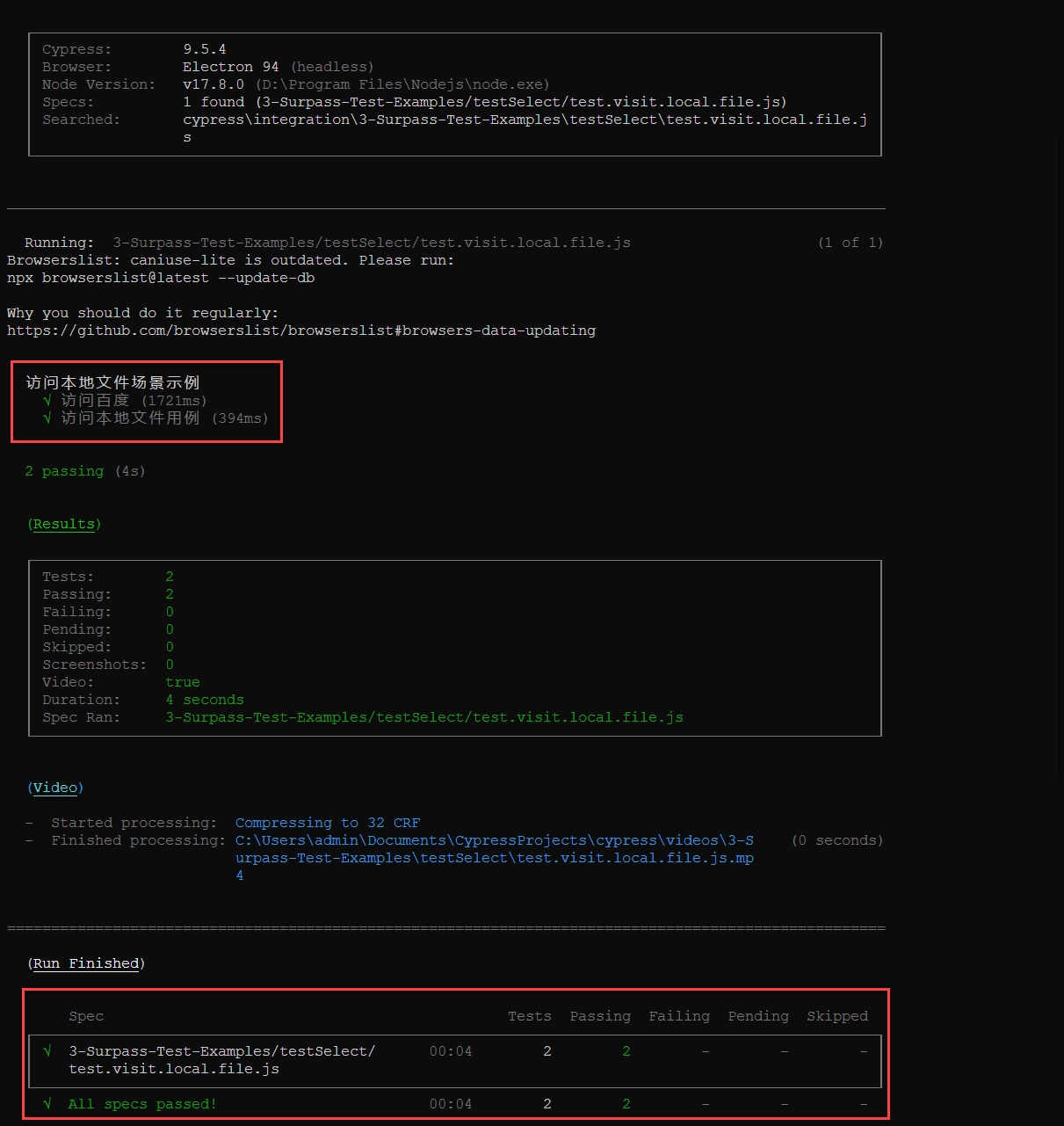
cypress run --spec "cypress\integration\3-Surpass-Test-Examples\testSelect\test.visit.local.file.js"
cypress run --spec "cypress\integration\3-Surpass-Test-Examples\testSelect\test.visit.local.file.js","cypress\integration\3-Surpass-Test-Examples\testPost\test.post.spec.js"
cypress run --spec "cypress\integration\3-Surpass-Test-Examples\testSelect\*.js"
cypress run --spec "cypress\integration\3-Surpass-Test-Examples\testSelect\*"
一次运行多个测试文件,使用逗号隔开
运行结果如下所示:
cypress open 主要用于打开交互式的Test Runner,其基本语法如下所示:
cypress open [options]
常用的参数如下所示:
| 参数 | 功能描述 |
|---|---|
| --browser, -b | 配置运行浏览器 |
| --config, -c | 运行时的配置项 |
| --config-file, -C | 运行时所使用的配置文件 |
| --env, -e | 设置环境变量 |
| --port,-p | 指定运行时的端口 |
| --project, -P | 指定运行的项目 |
cypress open用法同cypress run跳过。
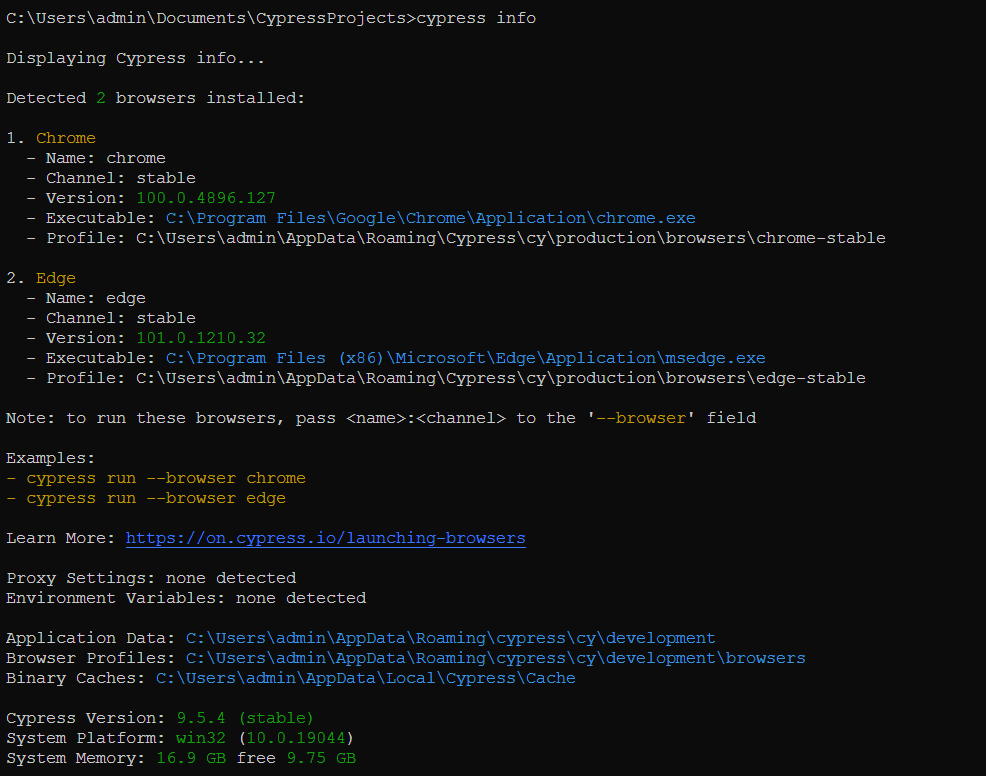
cypress info用于显示当前Cypress的运行环境,如下所示:
运行的结果如下图所示:
cypress verify主要用于验证Cypress是否正确安装且能运行。如下所示:
C:\Users\admin\Documents\CypressProjects>cypress verify

✔  Verified Cypress! C:\Users\admin\AppData\Local\Cypress\Cache\9.5.4\Cypress
cypress version主要用于查看安装的cypress版本信息。如下所示:
C:\Users\admin\Documents\CypressProjects>cypress verify

✔  Verified Cypress! C:\Users\admin\AppData\Local\Cypress\Cache\9.5.4\Cypress

C:\Users\admin\Documents\CypressProjects>cypress version
Cypress package version: 9.5.4
Cypress binary version: 9.5.4
Electron version: 15.3.5
Bundled Node version:
16.5.0
cypress help主要用于查看cypress提供的帮助信息,如下所示:
C:\Users\admin\Documents\CypressProjects>cypress help
Usage: cypress <command> [options]

Options:
  -v, --version      prints Cypress version
  -h, --help         display help for command

Commands:
  help               Shows CLI help and exits
  version            prints Cypress version
  open [options]     Opens Cypress in the interactive GUI.
  run [options]      Runs Cypress tests from the CLI without the GUI
  open-ct [options]  Opens Cypress component testing interactive mode.
  run-ct [options]   Runs all Cypress Component Testing suites
  install [options]  Installs the Cypress executable matching this package's version
  verify [options]   Verifies that Cypress is installed correctly and executable
  cache [options]    Manages the Cypress binary cache
  info [options]     Prints Cypress and system information
原文地址:https://www.jianshu.com/p/a727f3905b60
本文同步在微信订阅号上发布,如各位小伙伴们喜欢我的文章,也可以关注我的微信订阅号:woaitest,或扫描下面的二维码添加关注:

总的来说,我对ruby还比较陌生,我正在为我正在创建的对象编写一些rspec测试用例。许多测试用例都非常基础,我只是想确保正确填充和返回值。我想知道是否有办法使用循环结构来执行此操作。不必为我要测试的每个方法都设置一个assertEquals。例如:describeitem,"TestingtheItem"doit"willhaveanullvaluetostart"doitem=Item.new#HereIcoulddotheitem.name.shouldbe_nil#thenIcoulddoitem.category.shouldbe_nilendend但我想要一些方法来使用
很好奇,就使用rubyonrails自动化单元测试而言,你们正在做什么?您是否创建了一个脚本来在cron中运行rake作业并将结果邮寄给您?git中的预提交Hook?只是手动调用?我完全理解测试,但想知道在错误发生之前捕获错误的最佳实践是什么。让我们理所当然地认为测试本身是完美无缺的,并且可以正常工作。下一步是什么以确保他们在正确的时间将可能有害的结果传达给您? 最佳答案 不确定您到底想听什么,但是有几个级别的自动代码库控制:在处理某项功能时,您可以使用类似autotest的内容获得关于哪些有效,哪些无效的即时反馈。要确保您的提
我想用ruby编写一个小的命令行实用程序并将其作为gem分发。我知道安装后,Guard、Sass和Thor等某些gem可以从命令行自行运行。为了让gem像二进制文件一样可用,我需要在我的gemspec中指定什么。 最佳答案 Gem::Specification.newdo|s|...s.executable='name_of_executable'...endhttp://docs.rubygems.org/read/chapter/20 关于ruby-在Ruby中编写命令行实用程序
在选择我想要运行操作的频率时,唯一的选项是“每天”、“每小时”和“每10分钟”。谢谢!我想为我的Rails3.1应用程序运行调度程序。 最佳答案 这不是一个优雅的解决方案,但您可以安排它每天运行,并在实际开始工作之前检查日期是否为当月的第一天。 关于ruby-如何每月在Heroku运行一次Scheduler插件?,我们在StackOverflow上找到一个类似的问题: https://stackoverflow.com/questions/8692687/
exe应该在我打开页面时运行。异步进程需要运行。有什么方法可以在ruby中使用两个参数异步运行exe吗?我已经尝试过ruby命令-system()、exec()但它正在等待过程完成。我需要用参数启动exe,无需等待进程完成是否有任何rubygems会支持我的问题? 最佳答案 您可以使用Process.spawn和Process.wait2:pid=Process.spawn'your.exe','--option'#Later...pid,status=Process.wait2pid您的程序将作为解释器的子进程执行。除
我尝试运行2.x应用程序。我使用rvm并为此应用程序设置其他版本的ruby:$rvmuseree-1.8.7-head我尝试运行服务器,然后出现很多错误:$script/serverNOTE:Gem.source_indexisdeprecated,useSpecification.Itwillberemovedonorafter2011-11-01.Gem.source_indexcalledfrom/Users/serg/rails_projects_terminal/work_proj/spohelp/config/../vendor/rails/railties/lib/r
Sinatra新手;我正在运行一些rspec测试,但在日志中收到了一堆不需要的噪音。如何消除日志中过多的噪音?我仔细检查了环境是否设置为:test,这意味着记录器级别应设置为WARN而不是DEBUG。spec_helper:require"./app"require"sinatra"require"rspec"require"rack/test"require"database_cleaner"require"factory_girl"set:environment,:testFactoryGirl.definition_file_paths=%w{./factories./test/
我收到这个错误:RuntimeError(自动加载常量Apps时检测到循环依赖当我使用多线程时。下面是我的代码。为什么会这样?我尝试多线程的原因是因为我正在编写一个HTML抓取应用程序。对Nokogiri::HTML(open())的调用是一个同步阻塞调用,需要1秒才能返回,我有100,000多个页面要访问,所以我试图运行多个线程来解决这个问题。有更好的方法吗?classToolsController0)app.website=array.join(',')putsapp.websiteelseapp.website="NONE"endapp.saveapps=Apps.order("
GivenIamadumbprogrammerandIamusingrspecandIamusingsporkandIwanttodebug...mmm...let'ssaaay,aspecforPhone.那么,我应该把“require'ruby-debug'”行放在哪里,以便在phone_spec.rb的特定点停止处理?(我所要求的只是一个大而粗的箭头,即使是一个有挑战性的程序员也能看到:-3)我已经尝试了很多位置,除非我没有正确测试它们,否则会发生一些奇怪的事情:在spec_helper.rb中的以下位置:require'rubygems'require'spork'
是否有可能:before_filter:authenticate_user!||:authenticate_admin! 最佳答案 before_filter:do_authenticationdefdo_authenticationauthenticate_user!||authenticate_admin!end 关于ruby-on-rails-before_filter运行多个方法,我们在StackOverflow上找到一个类似的问题: https://
