事情是这样的,昨晚隔壁老王大晚上出去喝酒,把女友一个人丢在家里,半夜都还没回来。
然后我就听到隔壁来来回回,忙忙碌碌的声音。
像我这么心思细腻,体贴入微的Python小哥哥(还好我不姓王)

敏锐的感觉到,老王他女友肯定是失眠了…


好担心哦,我都睡不着了呢
辗转反侧
最后爬起来撸出了我的python代码

windows系统,python3.6+

安装游戏依赖模块

pip install pyqt5

pip install pygame
1、游戏目标
随机生成一张迷宫地图,将玩家设置在迷宫内部,通过光标 上 下 左 右,来移动玩家,按照迷宫地图的道路来走出迷宫。
2、先上游戏效果图

1、项目主结构
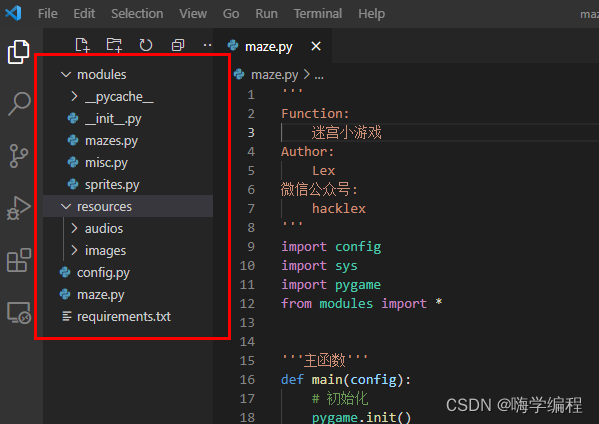
首先,先整理一下项目的主结构,其实看一下主结构,基本就清晰了
modules:存放自己写的python类
——mazes.py
——misc.py
——sprites.py

resources:存放引用到的图片、音频等等
——audios:音频资源
——images:图片资源

config.py:为主配置文件

maze.py:主程序文件

requirements.txt:需要引入的python依赖包
2、详细配置
配置文件中,需要引入os模块,并且配置打开游戏的屏幕大小,并将资源中引用到的图片、音频插入到合适的位置。
因为我们的迷宫游戏,需要划开模块。
'''配置文件'''
import os


'''屏幕大小'''
SCREENSIZE = (800, 625)
'''游戏素材'''
# 完整源码+Q裙:708525271
BGMPATH = os.path.join(os.getcwd(), 'resources/audios/bgm.mp3')
HEROPICPATH = os.path.join(os.getcwd(), 'resources/images/hero.png')
'''FPS'''
FPS = 20
'''块大小'''
BLOCKSIZE = 15
MAZESIZE = (35, 50) # num_rows * num_cols
BORDERSIZE = (25, 50) # 25 * 2 + 50 * 15 = 800, 50 * 2 + 35 * 15 = 625
3、随机生成迷宫地图
迷宫虽然是个小游戏,但是我们每次打开,进入 地图需要随机生成一个新地图。
定义randommaze 随机生成地图,并将地图投在主游戏屏幕上
import pygame
import random
from .misc import *


'''一个游戏地图块'''
# Python学习交流裙 708525271
class Block():
    def __init__(self, coordinate, block_size, border_size, **kwargs):
        # (col, row)
        self.coordinate = coordinate
        self.block_size = block_size
        self.border_size = border_size
        self.is_visited = False
        # 上下左右有没有墙
        self.has_walls = [True, True, True, True]
        self.color = (0, 0, 0)
    '''画到屏幕上'''
    def draw(self, screen):
        directions = ['top', 'bottom', 'left', 'right']
        for idx, direction in enumerate(directions):
            if self.has_walls[idx]:
                if direction == 'top':
                    x1 = self.coordinate[0] * self.block_size + self.border_size[0]
                    y1 = self.coordinate[1] * self.block_size + self.border_size[1]
                    x2 = (self.coordinate[0] + 1) * self.block_size + self.border_size[0]
                    y2 = self.coordinate[1] * self.block_size + self.border_size[1]
                    pygame.draw.line(screen, self.color, (x1, y1), (x2, y2))
                elif direction == 'bottom':
                    x1 = self.coordinate[0] * self.block_size + self.border_size[0]
                    y1 = (self.coordinate[1] + 1) * self.block_size + self.border_size[1]
                    x2 = (self.coordinate[0] + 1) * self.block_size + self.border_size[0]
                    y2 = (self.coordinate[1] + 1) * self.block_size + self.border_size[1]
                    pygame.draw.line(screen, self.color, (x1, y1), (x2, y2))
                elif direction == 'left':
                    x1 = self.coordinate[0] * self.block_size + self.border_size[0]
                    y1 = self.coordinate[1] * self.block_size + self.border_size[1]
                    x2 = self.coordinate[0] * self.block_size + self.border_size[0]
                    y2 = (self.coordinate[1] + 1) * self.block_size + self.border_size[1]
                    pygame.draw.line(screen, self.color, (x1, y1), (x2, y2))
                elif direction == 'right':
                    x1 = (self.coordinate[0] + 1) * self.block_size + self.border_size[0]
                    y1 = self.coordinate[1] * self.block_size + self.border_size[1]
                    x2 = (self.coordinate[0] + 1) * self.block_size + self.border_size[0]
                    y2 = (self.coordinate[1] + 1) * self.block_size + self.border_size[1]
                    pygame.draw.line(screen, self.color, (x1, y1), (x2, y2))
        return True


'''随机生成迷宫类'''
class RandomMaze():
    def __init__(self, maze_size, block_size, border_size, **kwargs):
        self.block_size = block_size
        self.border_size = border_size
        self.maze_size = maze_size
        self.blocks_list = RandomMaze.createMaze(maze_size, block_size, border_size)
        self.font = pygame.font.SysFont('Consolas', 15)
    '''画到屏幕上'''
    def draw(self, screen):
        for row in range(self.maze_size[0]):
            for col in range(self.maze_size[1]):
                self.blocks_list[row][col].draw(screen)
        # 起点和终点标志
        showText(screen, self.font, 'S', (255, 0, 0), (self.border_size[0]-10, self.border_size[1]))
        showText(screen, self.font, 'D', (255, 0, 0), (self.border_size[0]+(self.maze_size[1]-1)*self.block_size, self.border_size[1]+self.maze_size[0]*self.block_size+5))
    '''创建迷宫'''
    @staticmethod
    def createMaze(maze_size, block_size, border_size):
        def nextBlock(block_now, blocks_list):
            directions = ['top', 'bottom', 'left', 'right']
            blocks_around = dict(zip(directions, [None]*4))
            block_next = None
            count = 0
            # 查看上边block
            if block_now.coordinate[1]-1 >= 0:
                block_now_top = blocks_list[block_now.coordinate[1]-1][block_now.coordinate[0]]
                if not block_now_top.is_visited:
                    blocks_around['top'] = block_now_top
                    count += 1
            # 查看下边block
            if block_now.coordinate[1]+1 < maze_size[0]:
                block_now_bottom = blocks_list[block_now.coordinate[1]+1][block_now.coordinate[0]]
                if not block_now_bottom.is_visited:
                    blocks_around['bottom'] = block_now_bottom
                    count += 1
            # 查看左边block
            if block_now.coordinate[0]-1 >= 0:
                block_now_left = blocks_list[block_now.coordinate[1]][block_now.coordinate[0]-1]
                if not block_now_left.is_visited:
                    blocks_around['left'] = block_now_left
                    count += 1
            # 查看右边block
            if block_now.coordinate[0]+1 < maze_size[1]:
                block_now_right = blocks_list[block_now.coordinate[1]][block_now.coordinate[0]+1]
                if not block_now_right.is_visited:
                    blocks_around['right'] = block_now_right
                    count += 1
            if count > 0:
                while True:
                    direction = random.choice(directions)
                    if blocks_around.get(direction):
                        block_next = blocks_around.get(direction)
                        if direction == 'top':
                            block_next.has_walls[1] = False
                            block_now.has_walls[0] = False
                        elif direction == 'bottom':
                            block_next.has_walls[0] = False
                            block_now.has_walls[1] = False
                        elif direction == 'left':
                            block_next.has_walls[3] = False
                            block_now.has_walls[2] = False
                        elif direction == 'right':
                            block_next.has_walls[2] = False
                            block_now.has_walls[3] = False
                        break
            return block_next
        blocks_list = [[Block([col, row], block_size, border_size) for col in range(maze_size[1])] for row in range(maze_size[0])]
        block_now = blocks_list[0][0]
        records = []
        while True:
            if block_now:
                if not block_now.is_visited:
                    block_now.is_visited = True
                    records.append(block_now)
                block_now = nextBlock(block_now, blocks_list)
            else:
                block_now = records.pop()
                if len(records) == 0:
                    break
        return blocks_list
4、光标控制玩家
通过读取键盘的上下左右光标来移动我们的小可爱
'''
Function:
    定义其他必要模块
Author:
    lexsaints
'''
import sys
import pygame


'''在屏幕指定位置显示文字'''
def showText(screen, font, text, color, position):
    text_render = font.render(text, True, color)
    rect = text_render.get_rect()
    rect.left, rect.top = position
    screen.blit(text_render, rect)
    return rect.right


'''按钮'''
def Button(screen, position, text, font, buttoncolor=(120, 120, 120), linecolor=(20, 20, 20), textcolor=(255, 255, 255), bwidth=200, bheight=50):
    left, top = position
    pygame.draw.line(screen, linecolor, (left, top), (left+bwidth, top), 5)
    pygame.draw.line(screen, linecolor, (left, top-2), (left, top+bheight), 5)
    pygame.draw.line(screen, linecolor, (left, top+bheight), (left+bwidth, top+bheight), 5)
    pygame.draw.line(screen, linecolor, (left+bwidth, top+bheight), (left+bwidth, top), 5)
    pygame.draw.rect(screen, buttoncolor, (left, top, bwidth, bheight))
    text_render = font.render(text, 1, textcolor)
    rect = text_render.get_rect()
    rect.centerx, rect.centery = left + bwidth / 2, top + bheight / 2
    return screen.blit(text_render, rect)


'''游戏开始/关卡切换/游戏结束界面'''
def Interface(screen, config, mode='game_start'):
    pygame.display.set_mode(config.SCREENSIZE)
    font = pygame.font.SysFont('Consolas', 30)
    if mode == 'game_start':
        clock = pygame.time.Clock()
        while True:
            screen.fill((192, 192, 192))
            button_1 = Button(screen, ((config.SCREENSIZE[0]-200)//2, config.SCREENSIZE[1]//3), 'START', font)
            button_2 = Button(screen, ((config.SCREENSIZE[0]-200)//2, config.SCREENSIZE[1]//2), 'QUIT', font)
            for event in pygame.event.get():
                if event.type == pygame.QUIT:
                    pygame.quit()
                    sys.exit(-1)
                elif event.type == pygame.MOUSEBUTTONDOWN:
                    if button_1.collidepoint(pygame.mouse.get_pos()):
                        return True
                    elif button_2.collidepoint(pygame.mouse.get_pos()):
                        pygame.quit()
                        sys.exit(-1)
            pygame.display.update()
            clock.tick(config.FPS)
    elif mode == 'game_switch':
        clock = pygame.time.Clock()
        while True:
            screen.fill((192, 192, 192))
            button_1 = Button(screen, ((config.SCREENSIZE[0]-200)//2, config.SCREENSIZE[1]//3), 'NEXT', font)
            button_2 = Button(screen, ((config.SCREENSIZE[0]-200)//2, config.SCREENSIZE[1]//2), 'QUIT', font)
            for event in pygame.event.get():
                if event.type == pygame.QUIT:
                    pygame.quit()
                    sys.exit(-1)
                elif event.type == pygame.MOUSEBUTTONDOWN:
                    if button_1.collidepoint(pygame.mouse.get_pos()):
                        return True
                    elif button_2.collidepoint(pygame.mouse.get_pos()):
                        pygame.quit()
                        sys.exit(-1)
            pygame.display.update()
            clock.tick(config.FPS)
    elif mode == 'game_end':
        clock = pygame.time.Clock()
        while True:
            screen.fill((192, 192, 192))
            button_1 = Button(screen, ((config.SCREENSIZE[0]-200)//2, config.SCREENSIZE[1]//3), 'RESTART', font)
            button_2 = Button(screen, ((config.SCREENSIZE[0]-200)//2, config.SCREENSIZE[1]//2), 'QUIT', font)
            for event in pygame.event.get():
                if event.type == pygame.QUIT:
                    pygame.quit()
                    sys.exit(-1)
                elif event.type == pygame.MOUSEBUTTONDOWN:
                    if button_1.collidepoint(pygame.mouse.get_pos()):
                        return True
                    elif button_2.collidepoint(pygame.mouse.get_pos()):
                        pygame.quit()
                        sys.exit(-1)
            pygame.display.update()
            clock.tick(config.FPS)
    else:
        raise ValueError('Interface.mode unsupport %s...' % mode)
5、定义主玩家 绘制全图
绘制完整游戏,并定义主角,就叫hero吧
'''
Function:
    定义游戏精灵类
Author:
    lexsaints
'''
import pygame


'''定义hero'''
class Hero(pygame.sprite.Sprite):
    def __init__(self, imagepath, coordinate, block_size, border_size, **kwargs):
        pygame.sprite.Sprite.__init__(self)
        self.image = pygame.image.load(imagepath)
        self.image = pygame.transform.scale(self.image, (block_size, block_size))
        self.rect = self.image.get_rect()
        self.rect.left, self.rect.top = coordinate[0] * block_size + border_size[0], coordinate[1] * block_size + border_size[1]
        self.coordinate = coordinate
        self.block_size = block_size
        self.border_size = border_size
    '''移动'''
    def move(self, direction, maze):
        blocks_list = maze.blocks_list
        if direction == 'up':
            if blocks_list[self.coordinate[1]][self.coordinate[0]].has_walls[0]:
                return False
            else:
                self.coordinate[1] = self.coordinate[1] - 1
                return True
        elif direction == 'down':
            if blocks_list[self.coordinate[1]][self.coordinate[0]].has_walls[1]:
                return False
            else:
                self.coordinate[1] = self.coordinate[1] + 1
                return True
        elif direction == 'left':
            if blocks_list[self.coordinate[1]][self.coordinate[0]].has_walls[2]:
                return False
            else:
                self.coordinate[0] = self.coordinate[0] - 1
                return True
        elif direction == 'right':
            if blocks_list[self.coordinate[1]][self.coordinate[0]].has_walls[3]:
                return False
            else:
                self.coordinate[0] = self.coordinate[0] + 1
                return True
        else:
            raise ValueError('Unsupport direction %s in Hero.move...' % direction)
    '''绑定到屏幕'''
    def draw(self, screen):
        self.rect.left, self.rect.top = self.coordinate[0] * self.block_size + self.border_size[0], self.coordinate[1] * self.block_size + self.border_size[1]
        screen.blit(self.image, self.rect)
6、引入音频、图片
启动游戏主程序
在主程序中,通过读取配置文件,引入项目资源:包括图片、音频等,并通过定义类,加载游戏地图
import config
import sys
import pygame
from modules import *


'''主函数'''
def main(config):
    # 初始化
    pygame.init()
    pygame.mixer.init()
    pygame.font.init()
    pygame.mixer.music.load(config.BGMPATH)
    pygame.mixer.music.play(-1, 0.0)
    screen = pygame.display.set_mode(config.SCREENSIZE)
    pygame.display.set_caption('Python学习交流Q裙708525271')
    font = pygame.font.SysFont('Consolas', 15)
    # 开始界面
    Interface(screen, config, 'game_start')
    # 记录关卡数
    num_levels = 0
    # 记录最少用了多少步通关
    best_scores = 'None'
    # 关卡循环切换
    while True:
        num_levels += 1
        clock = pygame.time.Clock()
        screen = pygame.display.set_mode(config.SCREENSIZE)
        # --随机生成关卡地图
        maze_now = RandomMaze(config.MAZESIZE, config.BLOCKSIZE, config.BORDERSIZE)
        # --生成hero
        hero_now = Hero(config.HEROPICPATH, [0, 0], config.BLOCKSIZE, config.BORDERSIZE)
        # --统计步数
        num_steps = 0
        # --关卡内主循环
        while True:
            dt = clock.tick(config.FPS)
            screen.fill((255, 255, 255))
            is_move = False
            # ----↑↓←→控制hero
            for event in pygame.event.get():
                if event.type == pygame.QUIT:
                    pygame.quit()
                    sys.exit(-1)
                elif event.type == pygame.KEYDOWN:
                    if event.key == pygame.K_UP:
                        is_move = hero_now.move('up', maze_now)
                    elif event.key == pygame.K_DOWN:
                        is_move = hero_now.move('down', maze_now)
                    elif event.key == pygame.K_LEFT:
                        is_move = hero_now.move('left', maze_now)
                    elif event.key == pygame.K_RIGHT:
                        is_move = hero_now.move('right', maze_now)
            num_steps += int(is_move)
            hero_now.draw(screen)
            maze_now.draw(screen)
            # ----显示一些信息
            showText(screen, font, 'LEVELDONE: %d' % num_levels, (255, 0, 0), (10, 10))
            showText(screen, font, 'BESTSCORE: %s' % best_scores, (255, 0, 0), (210, 10))
            showText(screen, font, 'USEDSTEPS: %s' % num_steps, (255, 0, 0), (410, 10))
            showText(screen, font, 'S: your starting point    D: your destination', (255, 0, 0), (10, 600))
            # ----判断游戏是否胜利
            if (hero_now.coordinate[0] == config.MAZESIZE[1] - 1) and (hero_now.coordinate[1] == config.MAZESIZE[0] - 1):
                break
            pygame.display.update()
        # --更新最优成绩
        if best_scores == 'None':
            best_scores = num_steps
        else:
            if best_scores > num_steps:
                best_scores = num_steps
        # --关卡切换
        Interface(screen, config, mode='game_switch')


'''run'''
if __name__ == '__main__':
    main(config)
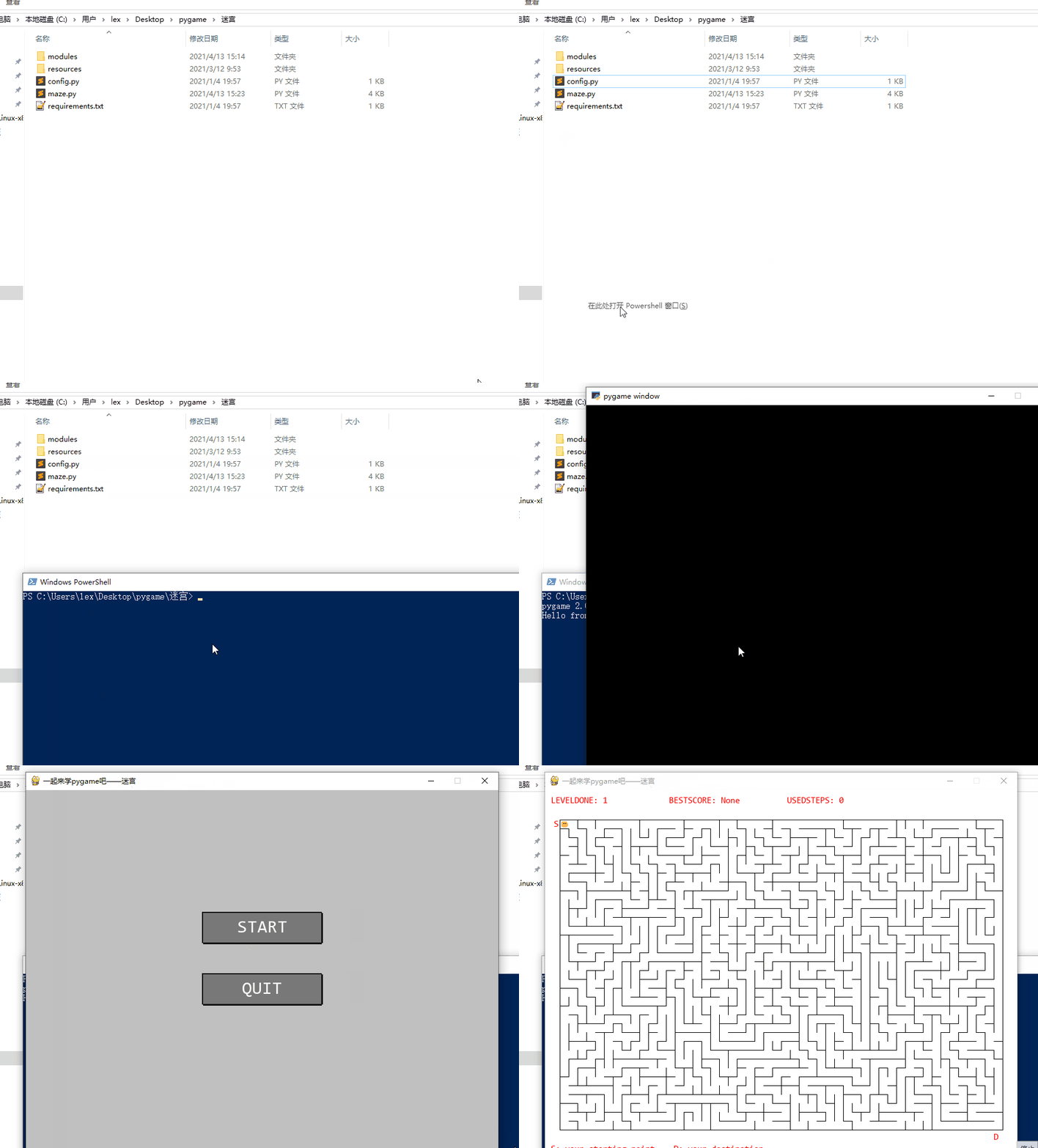
1、开发工具启动
如果你配置了开发工具的环境VScode、sublimeText、notepad+、pycharm什么的,可以直接在工具中,运行游戏。
如果没配置,可以使用命令启动。
2、命令行启动 gif
好了,今天的分享就到这结束了,我要继续去隔壁安慰老王女友了。
大家记得点赞收藏!
关闭。这个问题是opinion-based.它目前不接受答案。想要改进这个问题?更新问题,以便editingthispost可以用事实和引用来回答它.关闭4年前。Improvethisquestion我想在固定时间创建一系列低音和高音调的哔哔声。例如:在150毫秒时发出高音调的蜂鸣声在151毫秒时发出低音调的蜂鸣声200毫秒时发出低音调的蜂鸣声250毫秒的高音调蜂鸣声有没有办法在Ruby或Python中做到这一点?我真的不在乎输出编码是什么(.wav、.mp3、.ogg等等),但我确实想创建一个输出文件。
使用带有Rails插件的vim,您可以创建一个迁移文件,然后一次性打开该文件吗?textmate也可以这样吗? 最佳答案 你可以使用rails.vim然后做类似的事情::Rgeneratemigratonadd_foo_to_bar插件将打开迁移生成的文件,这正是您想要的。我不能代表textmate。 关于ruby-使用VimRails,您可以创建一个新的迁移文件并一次性打开它吗?,我们在StackOverflow上找到一个类似的问题: https://sta
我需要从一个View访问多个模型。以前,我的links_controller仅用于提供以不同方式排序的链接资源。现在我想包括一个部分(我假设)显示按分数排序的顶级用户(@users=User.all.sort_by(&:score))我知道我可以将此代码插入每个链接操作并从View访问它,但这似乎不是“ruby方式”,我将需要在不久的将来访问更多模型。这可能会变得很脏,是否有针对这种情况的任何技术?注意事项:我认为我的应用程序正朝着单一格式和动态页面内容的方向发展,本质上是一个典型的网络应用程序。我知道before_filter但考虑到我希望应用程序进入的方向,这似乎很麻烦。最终从任何
我想要做的是有2个不同的Controller,client和test_client。客户端Controller已经构建,我想创建一个test_clientController,我可以使用它来玩弄客户端的UI并根据需要进行调整。我主要是想绕过我在客户端中内置的验证及其对加载数据的管理Controller的依赖。所以我希望test_clientController加载示例数据集,然后呈现客户端Controller的索引View,以便我可以调整客户端UI。就是这样。我在test_clients索引方法中试过这个:classTestClientdefindexrender:template=>
如果您尝试在Ruby中的nil对象上调用方法,则会出现NoMethodError异常并显示消息:"undefinedmethod‘...’fornil:NilClass"然而,有一个tryRails中的方法,如果它被发送到一个nil对象,它只返回nil:require'rubygems'require'active_support/all'nil.try(:nonexisting_method)#noNoMethodErrorexceptionanymore那么try如何在内部工作以防止该异常? 最佳答案 像Ruby中的所有其他对象
关闭。这个问题需要detailsorclarity.它目前不接受答案。想改进这个问题吗?通过editingthispost添加细节并澄清问题.关闭8年前。Improvethisquestion为什么SecureRandom.uuid创建一个唯一的字符串?SecureRandom.uuid#=>"35cb4e30-54e1-49f9-b5ce-4134799eb2c0"SecureRandom.uuid方法创建的字符串从不重复?
我有一个正在构建的应用程序,我需要一个模型来创建另一个模型的实例。我希望每辆车都有4个轮胎。汽车模型classCar轮胎模型classTire但是,在make_tires内部有一个错误,如果我为Tire尝试它,则没有用于创建或新建的activerecord方法。当我检查轮胎时,它没有这些方法。我该如何补救?错误是这样的:未定义的方法'create'forActiveRecord::AttributeMethods::Serialization::Tire::Module我测试了两个环境:测试和开发,它们都因相同的错误而失败。 最佳答案
我想在Ruby中创建一个用于开发目的的极其简单的Web服务器(不,不想使用现成的解决方案)。代码如下:#!/usr/bin/rubyrequire'socket'server=TCPServer.new('127.0.0.1',8080)whileconnection=server.acceptheaders=[]length=0whileline=connection.getsheaders想法是从命令行运行这个脚本,提供另一个脚本,它将在其标准输入上获取请求,并在其标准输出上返回完整的响应。到目前为止一切顺利,但事实证明这真的很脆弱,因为它在第二个请求上中断并出现错误:/usr/b
我想让一个yaml对象引用另一个,如下所示:intro:"Hello,dearuser."registration:$introThanksforregistering!new_message:$introYouhaveanewmessage!上面的语法只是它如何工作的一个例子(这也是它在thiscpanmodule中的工作方式。)我正在使用标准的rubyyaml解析器。这可能吗? 最佳答案 一些yaml对象确实引用了其他对象:irb>require'yaml'#=>trueirb>str="hello"#=>"hello"ir
我的问题的一个例子是体育游戏。一场体育比赛有两支球队,一支主队和一支客队。我的事件记录模型如下:classTeam"Team"has_one:away_team,:class_name=>"Team"end我希望能够通过游戏访问一个团队,例如:Game.find(1).home_team但我收到一个单元化常量错误:Game::team。谁能告诉我我做错了什么?谢谢, 最佳答案 如果Gamehas_one:team那么Rails假设您的teams表有一个game_id列。不过,您想要的是games表有一个team_id列,在这种情况下
