啥是 pip ?
pip is the package installer for Python.
You can use it to install packages from the Python Package Index and other indexes.
pip 是 Python 包的安装程序。 您可以使用它从 Python 包索引和其他索引安装 Python 包。
官方提供两种安装 pip 的方式
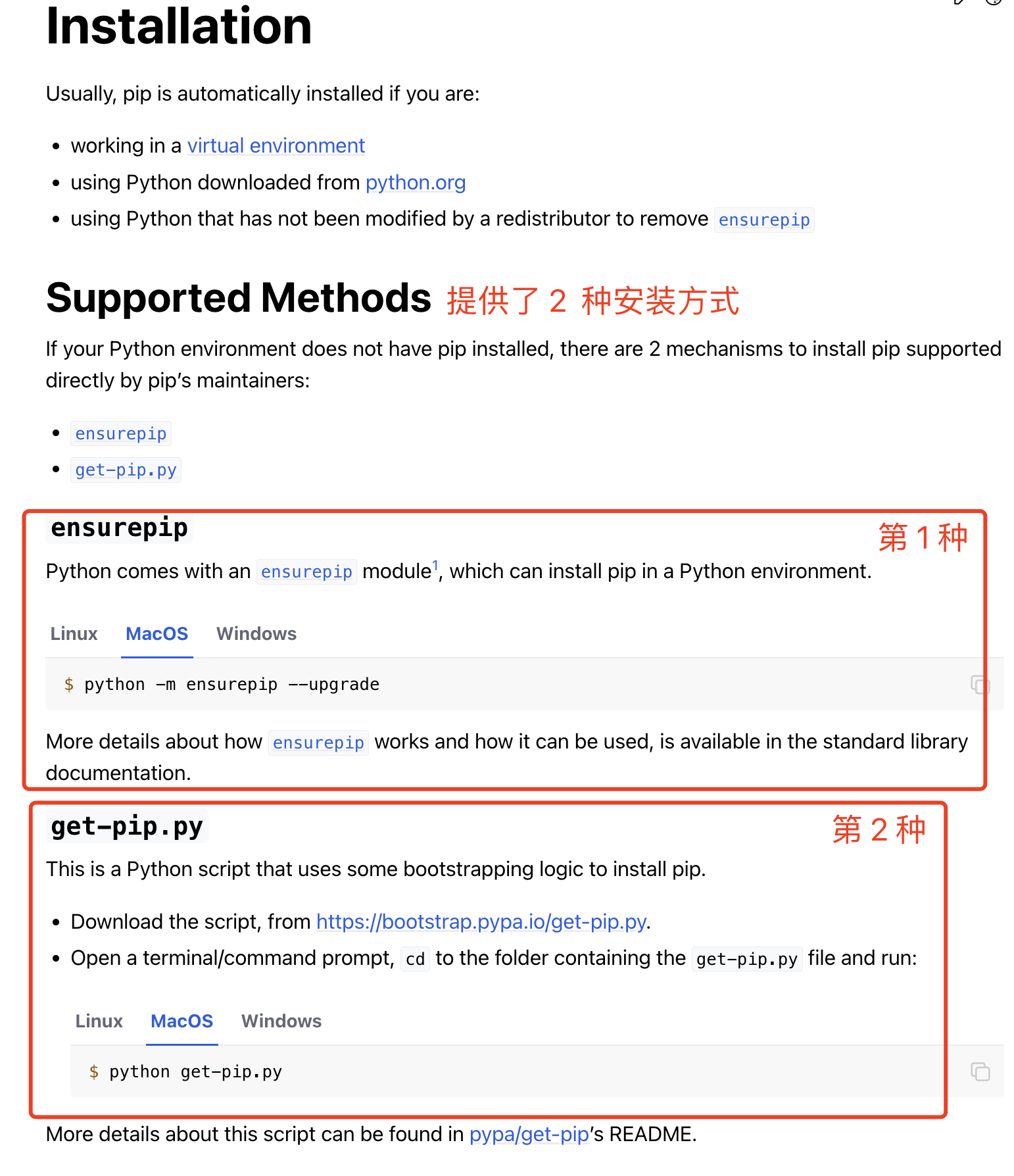
我这里采用方式一ensurepip的方式安装。
$ python -V
Python 2.7.18
$ python -m ensurepip --upgrade
DEPRECATION: Python 2.7 will reach the end of its life on January 1st, 2020. Please upgrade your Python as Python 2.7 won't be maintained after that date. A future version of pip will drop support for Python 2.7. More details about Python 2 support in pip, can be found at https://pip.pypa.io/en/latest/development/release-process/#python-2-support
Looking in links: /var/folders/hq/9rdkq_5j7cz_25s2lqntqhwr0000gn/T/tmpSjRLxi
Requirement already up-to-date: setuptools in /Library/Frameworks/Python.framework/Versions/2.7/lib/python2.7/site-packages (41.2.0)
Collecting pip
安装完 pip(pip2) 后重新打开一个终端
$ pip -V
pip 19.2.3 from /Library/Frameworks/Python.framework/Versions/2.7/lib/python2.7/site-packages/pip (python 2.7)
安装完 pip(pip2) 后重新打开一个终端
$ pip -h

Usage:
  pip <command> [options]

Commands:
  install                     Install packages.
  download                    Download packages.
  uninstall                   Uninstall packages.
  freeze                      Output installed packages in requirements format.
  list                        List installed packages.
  show                        Show information about installed packages.
  check                       Verify installed packages have compatible dependencies.
  config                      Manage local and global configuration.
  search                      Search PyPI for packages.
  wheel                       Build wheels from your requirements.
  hash                        Compute hashes of package archives.
  completion                  A helper command used for command completion.
  debug                       Show information useful for debugging.
  help                        Show help for commands.

General Options:
  -h, --help                  Show help.
  --isolated                  Run pip in an isolated mode, ignoring environment variables and user configuration.
  -v, --verbose               Give more output. Option is additive, and can be used up to 3 times.
  -V, --version               Show version and exit.
  -q, --quiet                 Give less output. Option is additive, and can be used up to 3 times (corresponding to WARNING, ERROR, and CRITICAL logging levels).
  --log <path>                Path to a verbose appending log.
  --proxy <proxy>             Specify a proxy in the form [user:passwd@]proxy.server:port.
  --retries <retries>         Maximum number of retries each connection should attempt (default 5 times).
  --timeout <sec>             Set the socket timeout (default 15 seconds).
  --exists-action <action>    Default action when a path already exists: (s)witch, (i)gnore, (w)ipe, (b)ackup, (a)bort.
  --trusted-host <hostname>   Mark this host as trusted, even though it does not have valid or any HTTPS.
  --cert <path>               Path to alternate CA bundle.
  --client-cert <path>        Path to SSL client certificate, a single file containing the private key and the certificate in PEM format.
  --cache-dir <dir>           Store the cache data in <dir>.
  --no-cache-dir              Disable the cache.
  --disable-pip-version-check
                              Don't periodically check PyPI to determine whether a new version of pip is available for download. Implied with --no-index.
  --no-color                  Suppress colored output
$ python3 -V
Python 3.6.8
$ python3 -m ensurepip --upgrade
Looking in links: /var/folders/hq/9rdkq_5j7cz_25s2lqntqhwr0000gn/T/tmp42dowxpt
Requirement already satisfied: setuptools in /Library/Frameworks/Python.framework/Versions/3.10/lib/python3.10/site-packages (63.2.0)
Processing /private/var/folders/hq/9rdkq_5j7cz_25s2lqntqhwr0000gn/T/tmp42dowxpt/pip-22.2.1-py3-none-any.whl
Installing collected packages: pip
Successfully installed pip-22.2.1
安装完 pip3 后重新打开一个终端
$ pip3 -V
pip 22.2.1 from /Library/Frameworks/Python.framework/Versions/3.10/lib/python3.10/site-packages/pip (python 3.10)
安装完 pip 后重新打开一个终端
$ pip3 -h

Usage:
  pip3 <command> [options]

Commands:
  install                     Install packages.
  download                    Download packages.
  uninstall                   Uninstall packages.
  freeze                      Output installed packages in requirements format.
  inspect                     Inspect the python environment.
  list                        List installed packages.
  show                        Show information about installed packages.
  check                       Verify installed packages have compatible dependencies.
  config                      Manage local and global configuration.
  search                      Search PyPI for packages.
  cache                       Inspect and manage pip's wheel cache.
  index                       Inspect information available from package indexes.
  wheel                       Build wheels from your requirements.
  hash                        Compute hashes of package archives.
  completion                  A helper command used for command completion.
  debug                       Show information useful for debugging.
  help                        Show help for commands.

General Options:
  -h, --help                  Show help.
  --debug                     Let unhandled exceptions propagate outside the main subroutine, instead of logging them to stderr.
  --isolated                  Run pip in an isolated mode, ignoring environment variables and user configuration.
  --require-virtualenv        Allow pip to only run in a virtual environment; exit with an error otherwise.
  -v, --verbose               Give more output. Option is additive, and can be used up to 3 times.
  -V, --version               Show version and exit.
  -q, --quiet                 Give less output. Option is additive, and can be used up to 3 times (corresponding to WARNING, ERROR, and CRITICAL logging levels).
  --log <path>                Path to a verbose appending log.
  --no-input                  Disable prompting for input.
  --proxy <proxy>             Specify a proxy in the form scheme://[user:passwd@]proxy.server:port.
  --retries <retries>         Maximum number of retries each connection should attempt (default 5 times).
  --timeout <sec>             Set the socket timeout (default 15 seconds).
  --exists-action <action>    Default action when a path already exists: (s)witch, (i)gnore, (w)ipe, (b)ackup, (a)bort.
  --trusted-host <hostname>   Mark this host or host:port pair as trusted, even though it does not have valid or any HTTPS.
  --cert <path>               Path to PEM-encoded CA certificate bundle. If provided, overrides the default. See 'SSL Certificate Verification' in pip documentation for more information.
  --client-cert <path>        Path to SSL client certificate, a single file containing the private key and the certificate in PEM format.
  --cache-dir <dir>           Store the cache data in <dir>.
  --no-cache-dir              Disable the cache.
  --disable-pip-version-check
                              Don't periodically check PyPI to determine whether a new version of pip is available for download. Implied with --no-index.
  --no-color                  Suppress colored output.
  --no-python-version-warning
                              Silence deprecation warnings for upcoming unsupported Pythons.
  --use-feature <feature>     Enable new functionality, that may be backward incompatible.
  --use-deprecated <feature>  Enable deprecated functionality, that will be removed in the future.
$ which pip
/Library/Frameworks/Python.framework/Versions/2.7/bin/pip

$ which pip2
/Library/Frameworks/Python.framework/Versions/2.7/bin/pip2

$ which pip2.7
/Library/Frameworks/Python.framework/Versions/2.7/bin/pip2.7

$ which pip3
/Library/Frameworks/Python.framework/Versions/3.10/bin/pip3

$ which pip3.10
/Library/Frameworks/Python.framework/Versions/3.10/bin/pip3.10
$ pip -V
pip 19.2.3 from /Library/Frameworks/Python.framework/Versions/2.7/lib/python2.7/site-packages/pip (python 2.7)

$ pip2 -V
pip 19.2.3 from /Library/Frameworks/Python.framework/Versions/2.7/lib/python2.7/site-packages/pip (python 2.7)

$ pip2.7 -V
pip 19.2.3 from /Library/Frameworks/Python.framework/Versions/2.7/lib/python2.7/site-packages/pip (python 2.7)

$ pip3 -V
pip 22.2.1 from /Library/Frameworks/Python.framework/Versions/3.10/lib/python3.10/site-packages/pip (python 3.10)

$ pip3.10 -V
pip 22.2.1 from /Library/Frameworks/Python.framework/Versions/3.10/lib/python3.10/site-packages/pip (python 3.10)
我想为Heroku构建一个Rails3应用程序。他们使用Postgres作为他们的数据库,所以我通过MacPorts安装了postgres9.0。现在我需要一个postgresgem并且共识是出于性能原因你想要pggem。但是我对我得到的错误感到非常困惑当我尝试在rvm下通过geminstall安装pg时。我已经非常明确地指定了所有postgres目录的位置可以找到但仍然无法完成安装:$envARCHFLAGS='-archx86_64'geminstallpg--\--with-pg-config=/opt/local/var/db/postgresql90/defaultdb/po
我打算为ruby脚本创建一个安装程序,但我希望能够确保机器安装了RVM。有没有一种方法可以完全离线安装RVM并且不引人注目(通过不引人注目,就像创建一个可以做所有事情的脚本而不是要求用户向他们的bash_profile或bashrc添加一些东西)我不是要脚本本身,只是一个关于如何走这条路的快速指针(如果可能的话)。我们还研究了这个很有帮助的问题:RVM-isthereawayforsimpleofflineinstall?但有点误导,因为答案只向我们展示了如何离线在RVM中安装ruby。我们需要能够离线安装RVM本身,并查看脚本https://raw.github.com/wayn
我有一个奇怪的问题:我在rvm上安装了rubyonrails。一切正常,我可以创建项目。但是在我输入“railsnew”时重新启动后,我有“程序'rails'当前未安装。”。SystemUbuntu12.04ruby-v"1.9.3p194"gemlistactionmailer(3.2.5)actionpack(3.2.5)activemodel(3.2.5)activerecord(3.2.5)activeresource(3.2.5)activesupport(3.2.5)arel(3.0.2)builder(3.0.0)bundler(1.1.4)coffee-rails(
我刚刚为fedora安装了emacs。我想用emacs编写ruby。为ruby提供代码提示、代码完成类型功能所需的工具、扩展是什么? 最佳答案 ruby-mode已经包含在Emacs23之后的版本中。不过,它也可以通过ELPA获得。您可能感兴趣的其他一些事情是集成RVM、feature-mode(Cucumber)、rspec-mode、ruby-electric、inf-ruby、rinari(用于Rails)等。这是我当前用于Ruby开发的Emacs配置:https://github.com/citizen428/emacs
我正在尝试在我的centos服务器上安装therubyracer,但遇到了麻烦。$geminstalltherubyracerBuildingnativeextensions.Thiscouldtakeawhile...ERROR:Errorinstallingtherubyracer:ERROR:Failedtobuildgemnativeextension./usr/local/rvm/rubies/ruby-1.9.3-p125/bin/rubyextconf.rbcheckingformain()in-lpthread...yescheckingforv8.h...no***e
我的最终目标是安装当前版本的RubyonRails。我在OSXMountainLion上运行。到目前为止,这是我的过程:已安装的RVM$\curl-Lhttps://get.rvm.io|bash-sstable检查已知(我假设已批准)安装$rvmlistknown我看到当前的稳定版本可用[ruby-]2.0.0[-p247]输入命令安装$rvminstall2.0.0-p247注意:我也试过这些安装命令$rvminstallruby-2.0.0-p247$rvminstallruby=2.0.0-p247我很快就无处可去了。结果:$rvminstall2.0.0-p247Search
我实际上是在尝试使用RVM在我的OSX10.7.5上更新ruby,并在输入以下命令后:rvminstallruby我得到了以下回复:Searchingforbinaryrubies,thismighttakesometime.Checkingrequirementsforosx.Installingrequirementsforosx.Updatingsystem.......Errorrunning'requirements_osx_brew_update_systemruby-2.0.0-p247',pleaseread/Users/username/.rvm/log/138121
由于fast-stemmer的问题,我很难安装我想要的任何rubygem。我把我得到的错误放在下面。Buildingnativeextensions.Thiscouldtakeawhile...ERROR:Errorinstallingfast-stemmer:ERROR:Failedtobuildgemnativeextension./System/Library/Frameworks/Ruby.framework/Versions/2.0/usr/bin/rubyextconf.rbcreatingMakefilemake"DESTDIR="cleanmake"DESTDIR=
当我尝试安装Ruby时遇到此错误。我试过查看this和this但无济于事➜~brewinstallrubyWarning:YouareusingOSX10.12.Wedonotprovidesupportforthispre-releaseversion.Youmayencounterbuildfailuresorotherbreakages.Pleasecreatepull-requestsinsteadoffilingissues.==>Installingdependenciesforruby:readline,libyaml,makedepend==>Installingrub
我想将我的MacSnowLeopardruby从1.8.7升级到1.9.1版本,有人知道轻松且最好的升级方法吗?因为我读了一些论坛/帖子/博客/讨论说覆盖苹果发布的ruby不好将Rails从版本2.2.2升级到2.3.8的最佳方法是什么?因为我找到的所有信息都仅适用于豹/老虎,而且很少有关于雪豹的复杂文章。他们还说覆盖apple提供的rails不好吗。谁能帮帮我?谢谢。 最佳答案 DanBenjamin有一些greatinstructionsforcompilingandinstallingRuby,RubyGemsandRai
