package com.Tang.gui;

import java.awt.*;

public class TestFrame1 {
    public static void main(String[] args) {
        MyFrame myFrame1 = new MyFrame(100, 100, 300, 200, Color.black);
        MyFrame myFrame2 = new MyFrame(400, 100, 300, 200, Color.blue);
        MyFrame myFrame3 = new MyFrame(100, 300, 300, 200, Color.cyan);
        MyFrame myFrame4 = new MyFrame(400, 300, 300, 200, Color.GREEN);
    }
}
//将一个窗口的属性封装起来
class MyFrame extends Frame {
    static int id =0;
    public MyFrame(int x,int y,int w,int h,Color color){
        //调用父类的有参构造
        super("Myframe"+(++id));
        //设置坐标位置以及窗口的宽和高
        setBounds(x,y,w,h);
        //设置窗口的背景颜色
        setBackground(color);
        ////设置窗口可见性
        setVisible(true);

    }
}
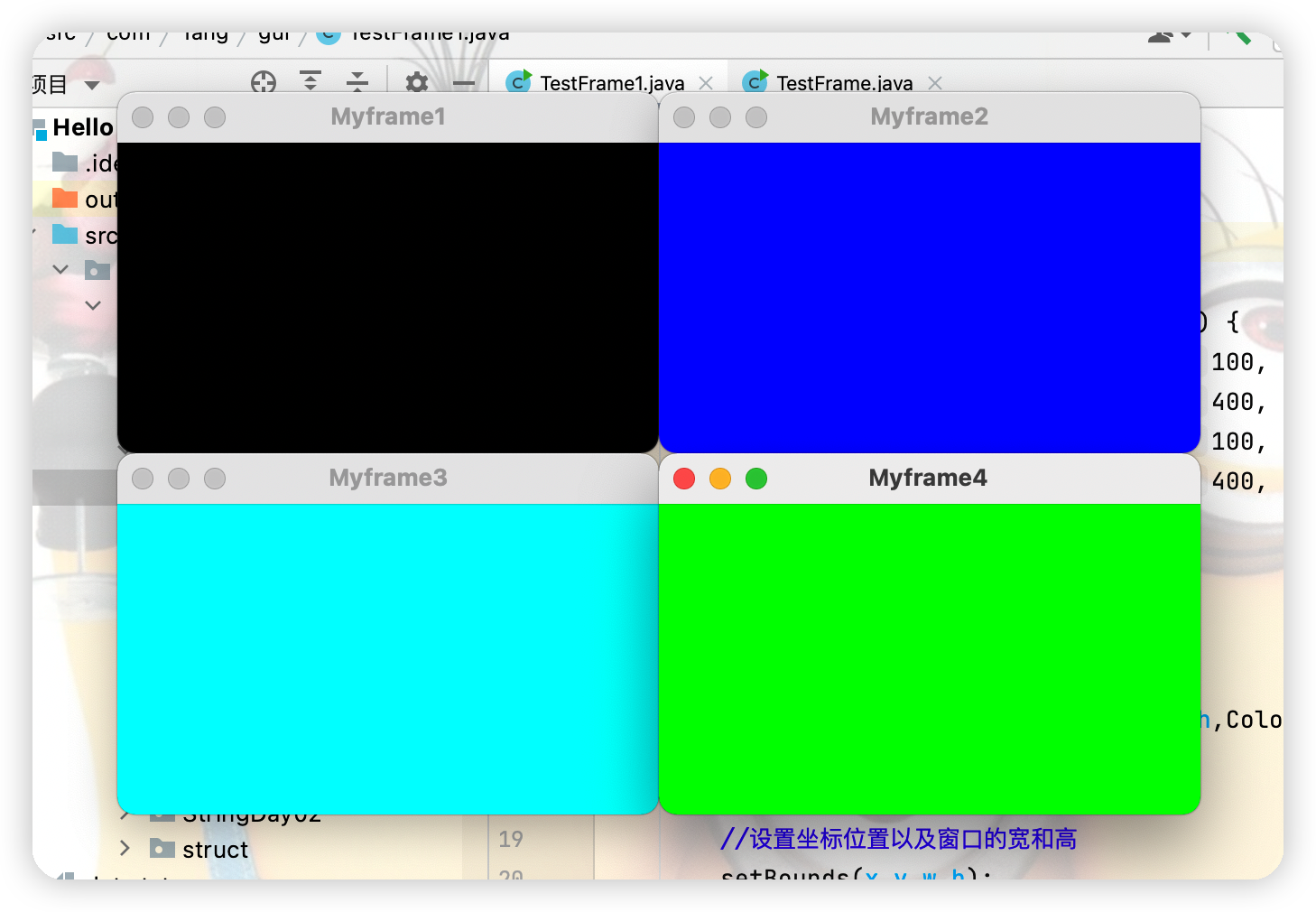
package com.Tang.gui;

import java.awt.*;
import java.awt.event.WindowAdapter;
import java.awt.event.WindowEvent;

//panel可以看成是一个空间,但是不能单独存在
public class PanelTest {
    public static void main(String[] args) {
        Frame frame = new Frame();
        Panel panel = new Panel();

        //设置布局
        frame.setLayout(null);

        //坐标
        frame.setBounds(300,300,500,500);
        frame.setBackground(new Color(0, 255, 0));
        //panel设置坐标,相对于frame而言
        panel.setBounds(50,50,400,400);
        panel.setBackground(new Color(211, 0, 255));
        //将面板放入窗口中
        frame.add(panel);
        frame.setVisible(true);
        //监听事件,监听窗口关闭事件,System.exit(0)
        //适配器模式:利用WindowAdapter重写自己需要的方法即可
        frame.addWindowListener(new WindowAdapter() {
            //窗口点击关闭的时候需要做的事情
            @Override
            public void windowClosing(WindowEvent e) {
                //结束程序
                System.exit(0);
            }
        });
    }
}
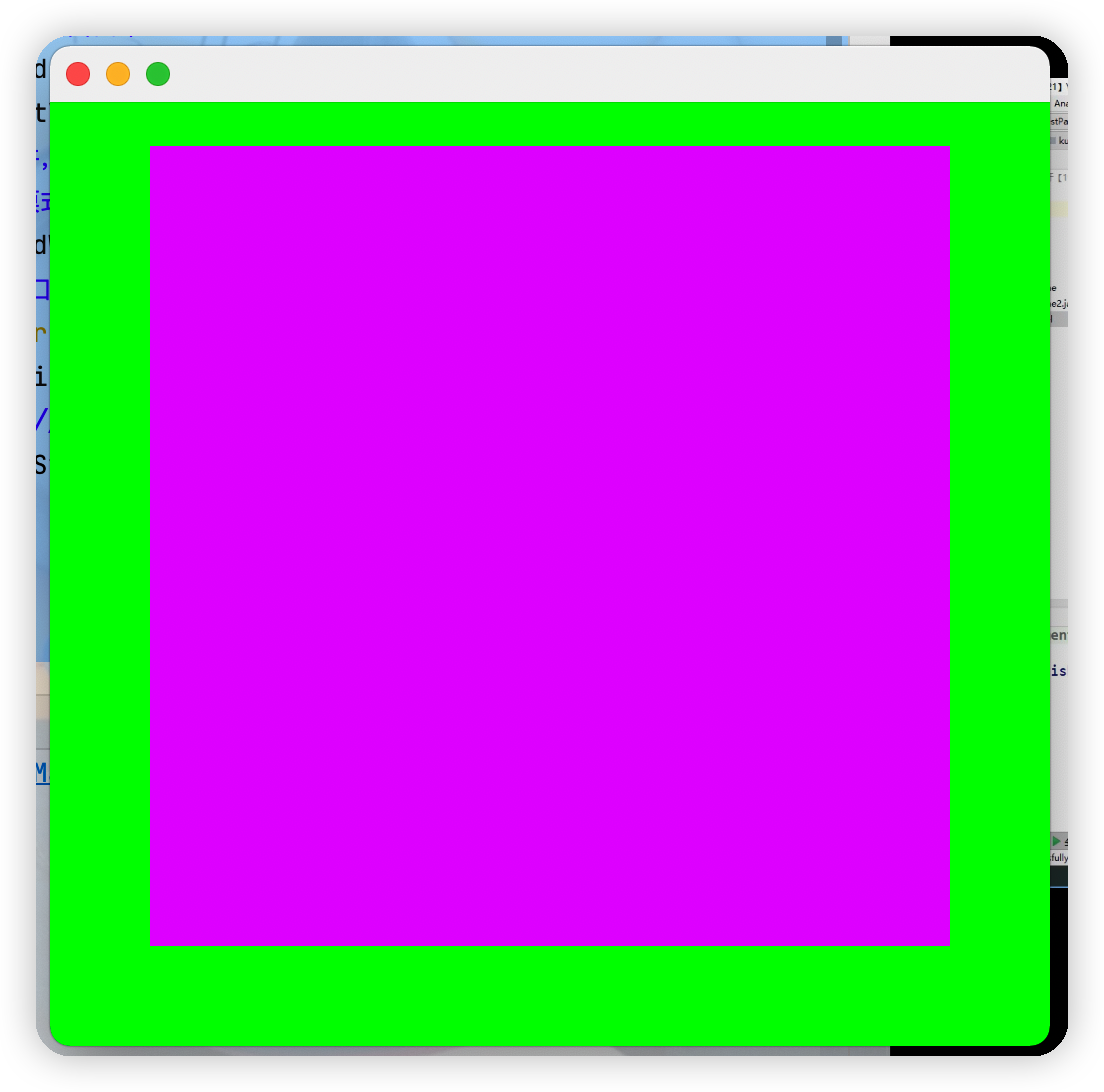
package com.Tang.gui;

import java.awt.*;
import java.awt.event.WindowAdapter;
import java.awt.event.WindowEvent;

public class FlowLayoutTest {
    public static void main(String[] args) {
        Frame frame = new Frame();
        frame.setSize(200,200);

        Button button1 = new Button("Button1");
        Button button2 = new Button("Button2");
        Button button3 = new Button("Button3");

        //设置布局,FlowLayout由源码可知无参默认是居中模式
//        frame.setLayout(new FlowLayout());
        //在窗口里的按钮统一靠左
        frame.setLayout(new FlowLayout(FlowLayout.LEFT));

        frame.add(button1);
        frame.add(button2);
        frame.add(button3);

        frame.setVisible(true);

        frame.addWindowListener(new WindowAdapter() {
            @Override
            public void windowClosing(WindowEvent e) {
                System.exit(0);
            }
        });
    }
}

package com.Tang.gui;

import java.awt.*;
import java.awt.event.WindowAdapter;
import java.awt.event.WindowEvent;

public class BorderLayoutTest {
    public static void main(String[] args) {
        Frame frame = new Frame("Twq");

        Button east = new Button("East");
        Button west = new Button("West");
        Button south = new Button("South");
        Button north = new Button("North");
        Button center = new Button("Center");

        frame.add(east, BorderLayout.EAST);
        frame.add(west,BorderLayout.WEST);
        frame.add(south,BorderLayout.SOUTH);
        frame.add(north,BorderLayout.NORTH);
        frame.add(center,BorderLayout.CENTER);

        frame.setSize(200,300);
        frame.setVisible(true);

        frame.addWindowListener(new WindowAdapter() {
            @Override
            public void windowClosing(WindowEvent e) {
                System.exit(0);
            }
        });
    }
}
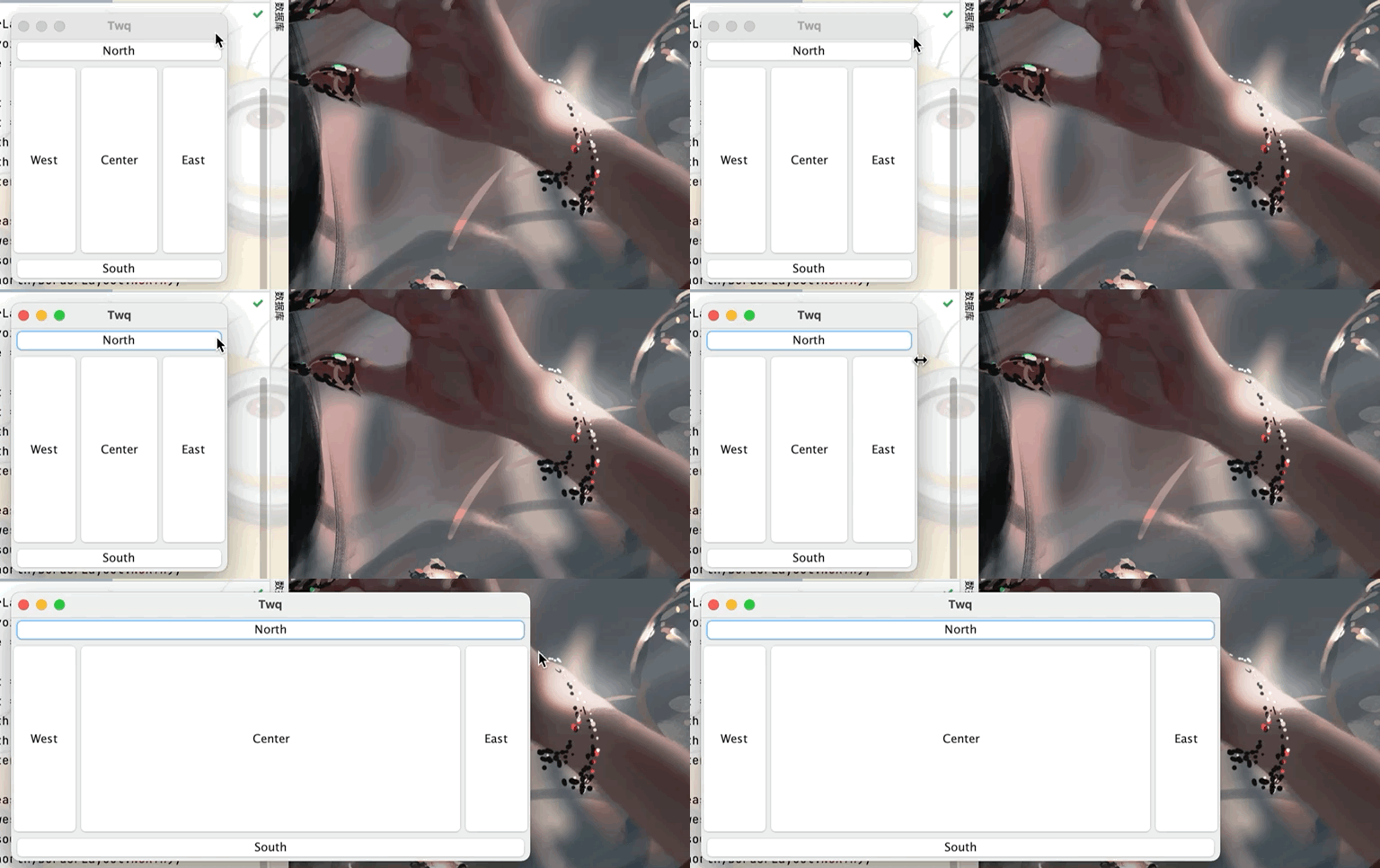
package com.Tang.gui;

import java.awt.*;
import java.awt.event.WindowAdapter;
import java.awt.event.WindowEvent;

public class GridLayoutTest {
    public static void main(String[] args) {
        Frame frame = new Frame("Twq");

        Button but1 = new Button("but1");
        Button but2 = new Button("but2");
        Button but3 = new Button("but3");
        Button but4 = new Button("but4");
        Button but5 = new Button("but5");
        Button but6 = new Button("but6");

        //设置表格布局为两行三列,还可在后面继续加参数即上下的间隔
       frame.setLayout(new GridLayout(2,3));

       frame.add(but1);
       frame.add(but2);
       frame.add(but3);
       frame.add(but4);
       frame.add(but5);
       frame.add(but6);

       //不用设置窗口的大小,窗口会根据所添加的东西自动分配空间大小
       frame.pack();
       frame.setVisible(true);

       frame.addWindowListener(new WindowAdapter() {
           @Override
           public void windowClosing(WindowEvent e) {
               System.exit(0);
           }
       });
    }
}
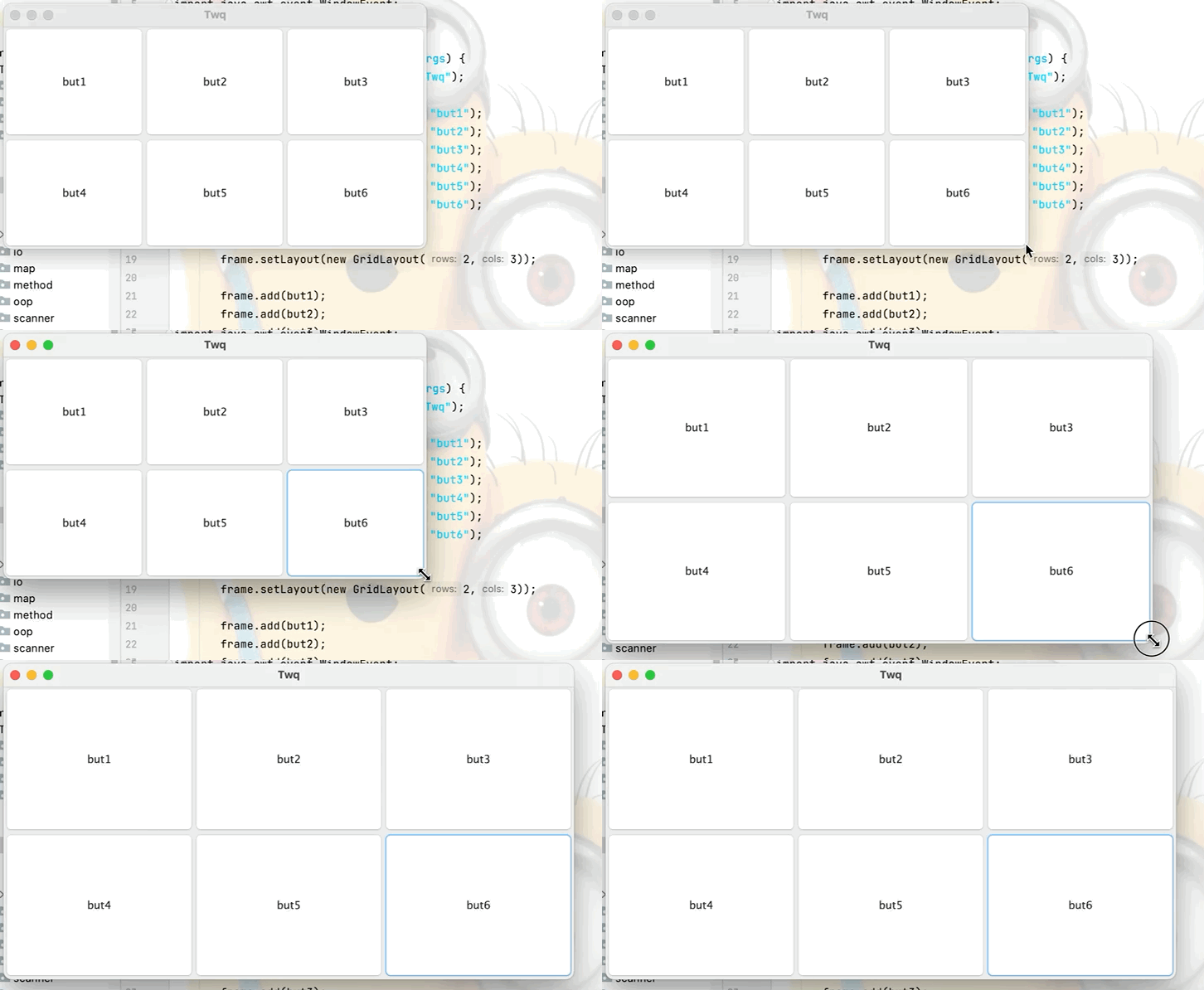
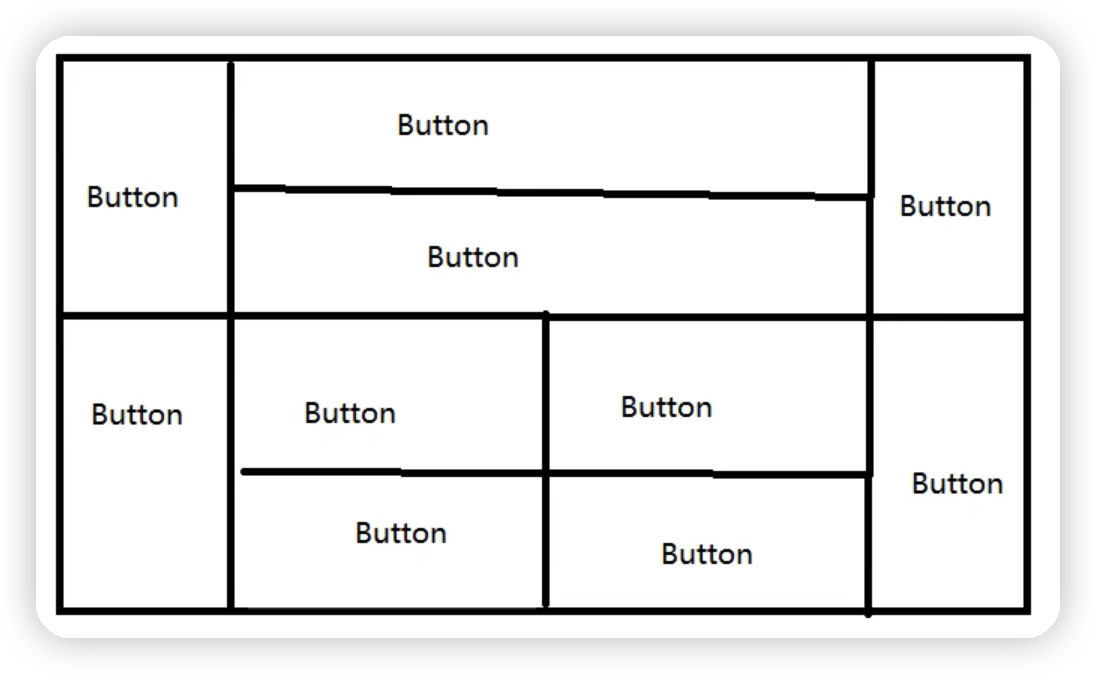
package com.Tang.gui;

import java.awt.*;
import java.awt.event.WindowAdapter;
import java.awt.event.WindowEvent;

public class ExDemo {

    public static void main(String[] args) {
        Frame frame = new Frame();

        Panel panel1 = new Panel();
        Panel panel2 = new Panel();
        //首先分为上下两个结构,分别用面板来放置下面的按钮
        frame.setLayout(new GridLayout(2,1));
        frame.add(panel1);
        frame.add(panel2);

        //对于上半部分,使用borderLayout布局,左右放button,中间放面板(以便在中间继续放置按钮)
        Button button1 = new Button("button1");
        Panel panel3 = new Panel();

        Button button4 = new Button("button4");
        panel1.add(button1,BorderLayout.WEST);
        panel1.add(panel3,BorderLayout.CENTER);
        panel1.add(button4,BorderLayout.EAST);

        //对于中间部分的panel3继续采用表格布局,上下方button
        panel3.setLayout(new GridLayout(2,1));
        Button button2 = new Button("button2");
        Button button3 = new Button("button3");
        panel3.add(button2);
        panel3.add(button3);

        //然后对于下半部分,同理左右放置button,中间放置面板
        Button button5 = new Button("button5");
        Panel panel4 = new Panel();
        Button button10 = new Button("button10");
        panel2.add(button5,BorderLayout.WEST);
        panel2.add(panel4,BorderLayout.CENTER);
        panel2.add(button10,BorderLayout.EAST);

        //对于中间部分的panel4继续采用表格布局2行2列
        panel4.setLayout(new GridLayout(2,2));
        Button button6 = new Button("button6");
        Button button7 = new Button("button7");
        Button button8 = new Button("button8");
        Button button9 = new Button("button9");

        panel4.add(button6);
        panel4.add(button7);
        panel4.add(button8);
        panel4.add(button9);

        frame.setSize(400,300);
        frame.setLocation(300,400);
        frame.setVisible(true);
        frame.addWindowListener(new WindowAdapter() {
            @Override
            public void windowClosing(WindowEvent e) {
                System.exit(0);
            }
        });
    }
}
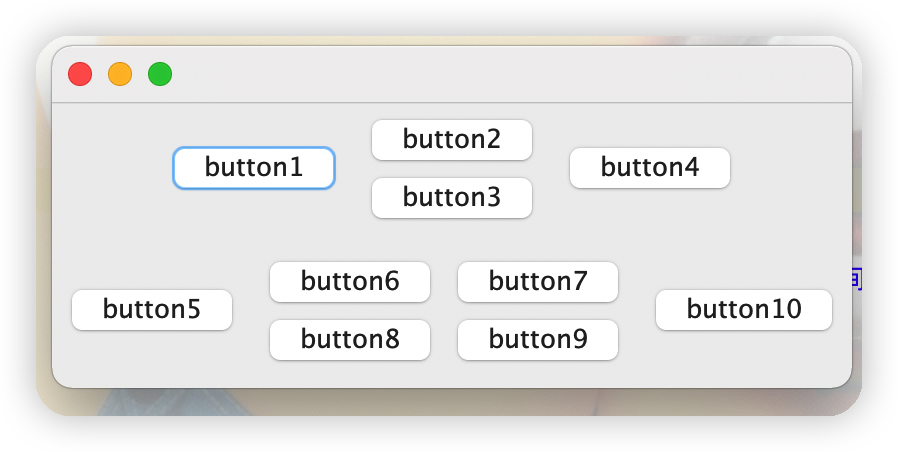
运行结果如下图
package com.Tang.gui;

import java.awt.*;
import java.awt.event.ActionEvent;
import java.awt.event.ActionListener;
import java.awt.event.WindowAdapter;
import java.awt.event.WindowEvent;

public class ActionEventTest {

    public static void main(String[] args) {
        //按下按钮,触发一些事件
        Frame frame = new Frame();
        Button button = new Button("Twq");
        //因为addActionListener需要一个ActionListener,所以,我们需要构造一个ActionListener
        //构造原则:是接口就实现其方法,是父类就继承
        MyActionListener myActionListener = new MyActionListener();
        button.addActionListener(myActionListener);
        frame.add(button);
        frame.setSize(300,200);
        frame.setVisible(true);

        frame.addWindowListener(new WindowAdapter() {
            @Override
            public void windowClosing(WindowEvent e) {
                System.exit(0);
            }
        });
    }
}
class MyActionListener implements ActionListener{

    @Override
    public void actionPerformed(ActionEvent e) {
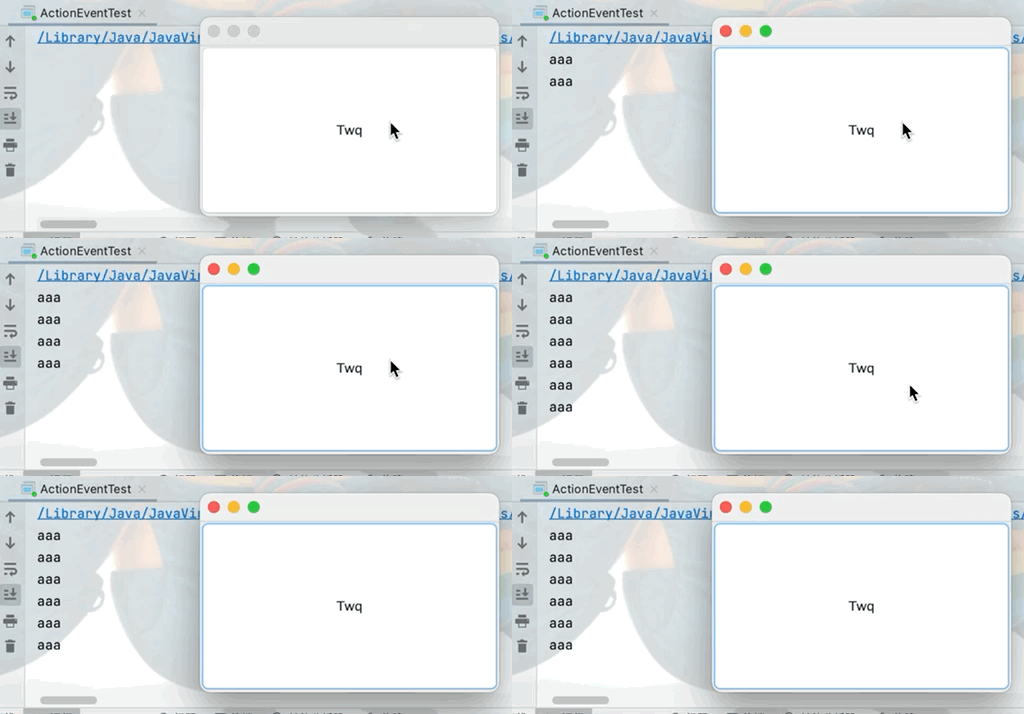
        System.out.println("aaa");
    }
}
package com.Tang.gui;

import java.awt.*;
import java.awt.event.ActionEvent;
import java.awt.event.ActionListener;
import java.awt.event.WindowAdapter;
import java.awt.event.WindowEvent;

public class ActionMonitorTest {
    public static void main(String[] args) {
        Frame frame = new Frame();

        Button button1 = new Button("start");
        Button button2 = new Button("stop");

        //如果不显示定义就会走默认的无参构造
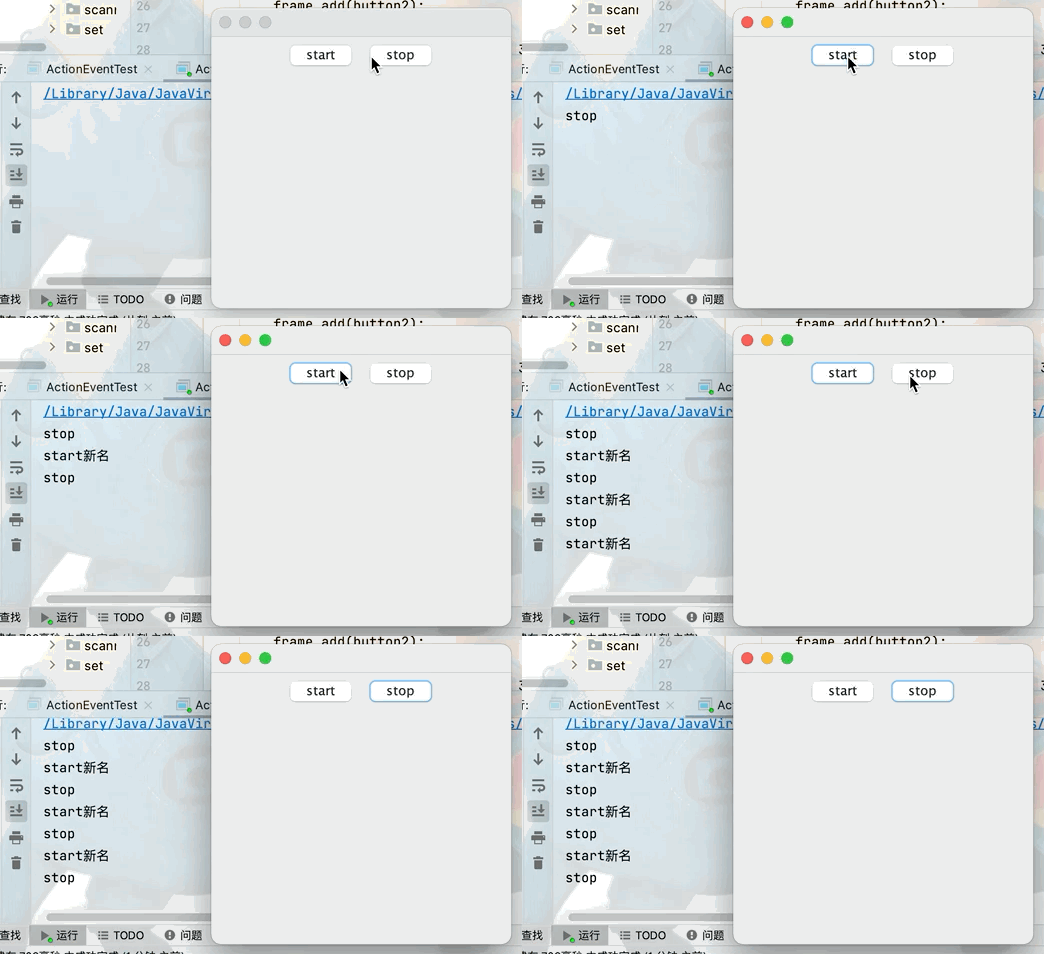
        button1.setActionCommand("start新名");

        MyMonitr myMonitr = new MyMonitr();
        button1.addActionListener(myMonitr);
        button2.addActionListener(myMonitr);

        frame.setLayout(new FlowLayout(FlowLayout.CENTER));

        frame.add(button1);
        frame.add(button2);

        frame.setSize(300,300);
        frame.setVisible(true);
        frame.addWindowListener(new WindowAdapter() {
            @Override
            public void windowClosing(WindowEvent e) {
                System.exit(0);
            }
        });
    }
}
class MyMonitr implements ActionListener{

    @Override
    public void actionPerformed(ActionEvent e) {
        //e.getActionCommand()获取按钮信息
        System.out.println(e.getActionCommand());
    }
}
package com.Tang.gui;

import java.awt.*;
import java.awt.event.ActionEvent;
import java.awt.event.ActionListener;
import java.awt.event.WindowAdapter;
import java.awt.event.WindowEvent;

public class ActionEventTest2 {
    public static void main(String[] args) {
        MyFrame1 myFrame1 = new MyFrame1();
        //关闭事件
        myFrame1.addWindowListener(new WindowAdapter() {
            @Override
            public void windowClosing(WindowEvent e) {
                System.exit(0);
            }
        });
    }
}

class MyFrame1 extends Frame {
    public MyFrame1(){
        TextField textField = new TextField();

        MyMoniter2 moniter2 = new MyMoniter2();
        //每次通过回车触发监视器
        textField.addActionListener(moniter2);

//        //在前台实现输入的内容为*,但是后台获取可以正常获取输入的数据
//        textField.setEchoChar('*');

        add(textField);
        pack();
        setVisible(true);

    }
}
class MyMoniter2 implements ActionListener{

    @Override
    public void actionPerformed(ActionEvent e) {
        Object source = e.getSource();
        TextField tf = (TextField)source;
        System.out.println(tf.getText());//获取文本框的输入的数据
        tf.setText("");//每次回车之后将文本框内容清空
    }
}
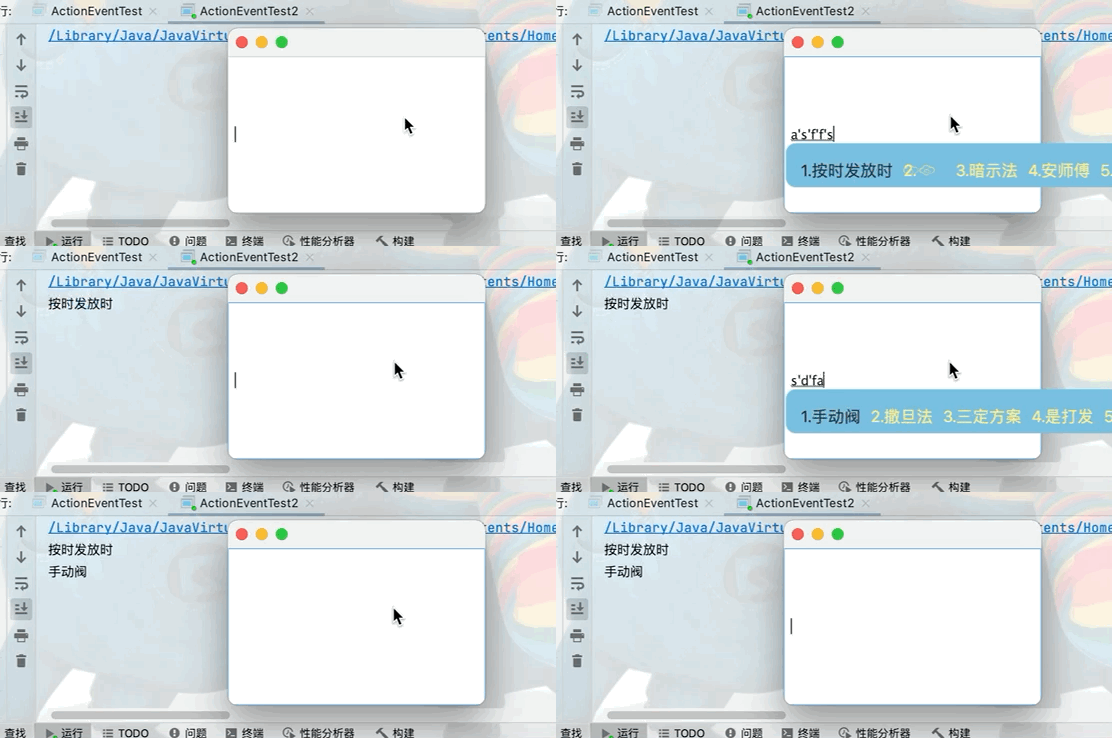
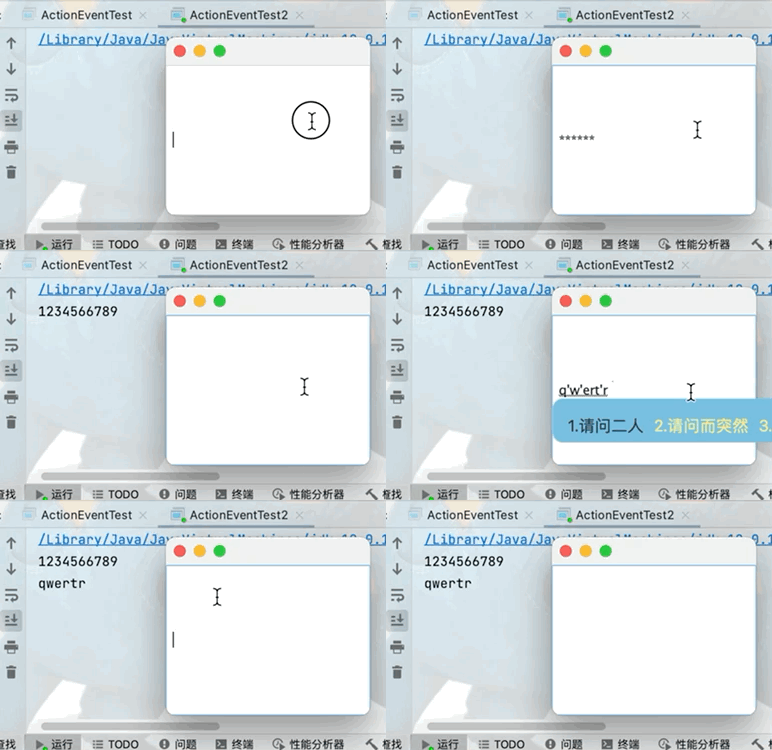
在前台输入框中不显示输入数据,但是在后台可以正常获取文本框中的数据

package com.Tang.gui;

import java.awt.*;
import java.awt.event.ActionEvent;
import java.awt.event.ActionListener;
import java.awt.event.WindowAdapter;
import java.awt.event.WindowEvent;

public class CalculateTest {
    public static void main(String[] args) {
        new MyFrame3();
    }
}
class MyFrame3 extends Frame {
    public MyFrame3(){
        //3个文本框
        TextField num1 = new TextField(10);
        TextField num2 = new TextField(10);
        TextField num3 = new TextField(20);

        //1个按钮
        Button button = new Button("=");

        //1个标签
        Label label = new Label("+");

        MyMoniter3 m = new MyMoniter3(num1,num2,num3);
        button.addActionListener(m);

        pack();
        add(num1);
        add(label);
        add(num2);
        add(button);
        add(num3);

        setLayout(new FlowLayout());
        setVisible(true);
        addWindowListener(new WindowAdapter() {
            @Override
            public void windowClosing(WindowEvent e) {
                System.exit(0);
            }
        });
    }
}
class MyMoniter3 implements ActionListener{
    //获取三个文本框的值
    private TextField num1,num2,num3;
    public MyMoniter3(TextField num1,TextField num2,TextField num3) {
        this.num1 = num1;
        this.num2 = num2;
        this.num3 = num3;
    }

    @Override
    public void actionPerformed(ActionEvent e) {
        //1.获得加数和被加数
        int i1 = Integer.parseInt(num1.getText());
        int i2 = Integer.parseInt(num2.getText());

        //2.将两个数相加之后的值放入第三个文本框
        num3.setText(""+(i1+i2));

        //3.清除前两个框
        num1.setText("");
        num2.setText("");
    }
}
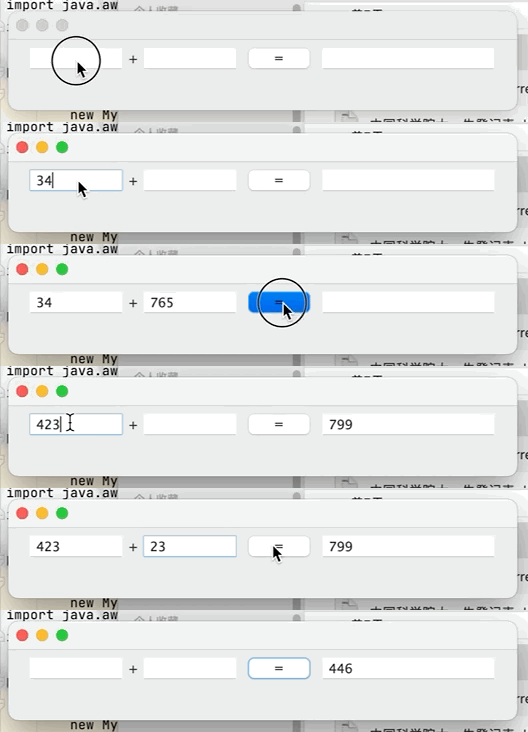
代码优化(转换为面向对像)
public class CalculateTest {
    public static void main(String[] args) {
        new Calculator().loadFrame();
    }
}
class Calculator extends Frame {
    //属性
    TextField num1,num2,num3;

    //方法
    public void loadFrame(){
        //3个文本框
        num1 = new TextField(10);
        num2 = new TextField(10);
        num3 = new TextField(20);

        //1个按钮
        Button button = new Button("=");

        //1个标签
        Label label = new Label("+");

        MyMoniter3 m = new MyMoniter3(this);
        button.addActionListener(m);

        pack();
        add(num1);
        add(label);
        add(num2);
        add(button);
        add(num3);

        setLayout(new FlowLayout());
        setVisible(true);
        addWindowListener(new WindowAdapter() {
            @Override
            public void windowClosing(WindowEvent e) {
                System.exit(0);
            }
        });
    }

}
class MyMoniter3 implements ActionListener{
    //获取计算器这个对象,在一个类中组合另一个类
    Calculator calculator;
    public MyMoniter3(Calculator calculator) {
        this.calculator = calculator;
    }

    @Override
    public void actionPerformed(ActionEvent e) {
        //1.获得加数和被加数
        int i1 = Integer.parseInt(calculator.num1.getText());
        int i2 = Integer.parseInt(calculator.num2.getText());

        //2.将两个数相加之后的值放入第三个文本框
        calculator.num3.setText(""+(i1+i2));

        //3.清除前两个输入框
        calculator.num1.setText("");
        calculator.num2.setText("");
    }
}
代码进一步优化(将监听器转换为内部类)
public class CalculateTest {
    public static void main(String[] args) {
        new Calculator().loadFrame();
    }
}
class Calculator extends Frame {
    //属性
    TextField num1,num2,num3;

    //方法
    public void loadFrame(){
        //3个文本框
        num1 = new TextField(10);
        num2 = new TextField(10);
        num3 = new TextField(20);

        //1个按钮
        Button button = new Button("=");

        //1个标签
        Label label = new Label("+");

        MyMoniter3 m = new MyMoniter3();
        button.addActionListener(m);

        pack();
        add(num1);
        add(label);
        add(num2);
        add(button);
        add(num3);

        setLayout(new FlowLayout());
        setVisible(true);
        addWindowListener(new WindowAdapter() {
            @Override
            public void windowClosing(WindowEvent e) {
                System.exit(0);
            }
        });
    }
//监听器类,内部类最大的好处就是可以畅通无阻的访问外部内的属性和方法
    class MyMoniter3 implements ActionListener{
        @Override
        public void actionPerformed(ActionEvent e) {
            //1.获得加数和被加数
            int i1 = Integer.parseInt(num1.getText());
            int i2 = Integer.parseInt(num2.getText());

            //2.将两个数相加之后的值放入第三个文本框
            num3.setText(""+(i1+i2));

            //3.清除前两个框
            num1.setText("");
            num2.setText("");
        }
    }
}
public class PaintTest {
    public static void main(String[] args) {
        new Mypaint().loadFrame();
    }
}
class Mypaint extends Frame {
    public void loadFrame(){
        setVisible(true);
        setBounds(200,200,400,400);
        addWindowListener(new WindowAdapter() {
            @Override
            public void windowClosing(WindowEvent e) {
                System.exit(0);
            }
        });
    }
    //重写画笔方法
    @Override
    public void paint(Graphics g) {
        //设置画笔颜色
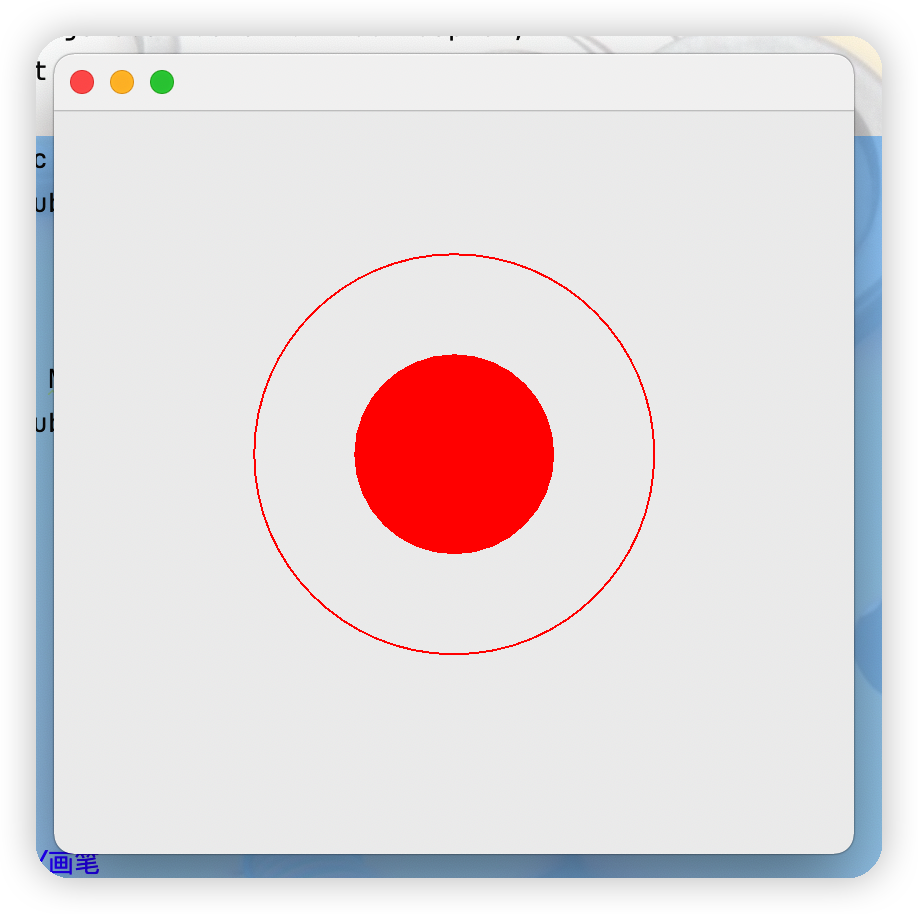
        g.setColor(Color.red);
        //画一个空心圆
        g.drawOval(100,100,200,200);
        //画一个实心圆
        g.fillOval(150,150,100,100);

        //养成喜欢:画笔用完,将它还原为最初的颜色
    }
}
package com.Tang.gui;

import java.awt.*;
import java.awt.event.MouseAdapter;
import java.awt.event.MouseEvent;
import java.awt.event.WindowAdapter;
import java.awt.event.WindowEvent;
import java.util.ArrayList;
import java.util.Iterator;

public class MouseistenerTest {
    public static void main(String[] args) {
        new MyFrame4("画图");
    }
}
class MyFrame4 extends Frame {
    //画画需要画笔,需要监听鼠标当前的位置
    //用集合数组存储鼠标当前点击的位置
    ArrayList points;
    public MyFrame4(String title){
        super(title);
        setBounds(100,100,300,300);
        points = new ArrayList();
        //针对窗口的鼠标的监听器
        addMouseListener(new MouseListenered());
        setVisible(true);
        setSize(300,300);
        addWindowListener(new WindowAdapter() {
            @Override
            public void windowClosing(WindowEvent e) {
                System.exit(0);
            }
        });
    }

    @Override
    public void paint(Graphics g) {
        //画画,监听鼠标的事件
        Iterator iterator = points.iterator();
        while(iterator.hasNext()){
            //将当前获取到的数组中的点转换为一个点类
            Point point = (Point)iterator.next();
            //设置鼠标点击点的颜色
            g.setColor(Color.CYAN);
            //让当前画笔获得鼠标点击的位置
            g.fillOval(point.x,point.y,10,10);
        }

    }
    //将获取到的鼠标的点存储到数组里
    public void addPaint(Point point){
        points.add(point);
    }
    //若采用实现MouseListener接口的话,就必须要重写其接口内的所有方法
    //所以可以采用适配器模式去重写自己需要的方法,
    class MouseListenered extends MouseAdapter {
        //鼠标有按下,弹起,按住不放
        @Override
        public void mousePressed(MouseEvent e) {
            //在窗口上获取当前鼠标的位置
            MyFrame4 frame =(MyFrame4) e.getSource();
            frame.addPaint(new Point(e.getX(),e.getY()));
            //每次点击鼠标都需要重新画一遍
            frame.repaint();//刷新
        }
    }
}
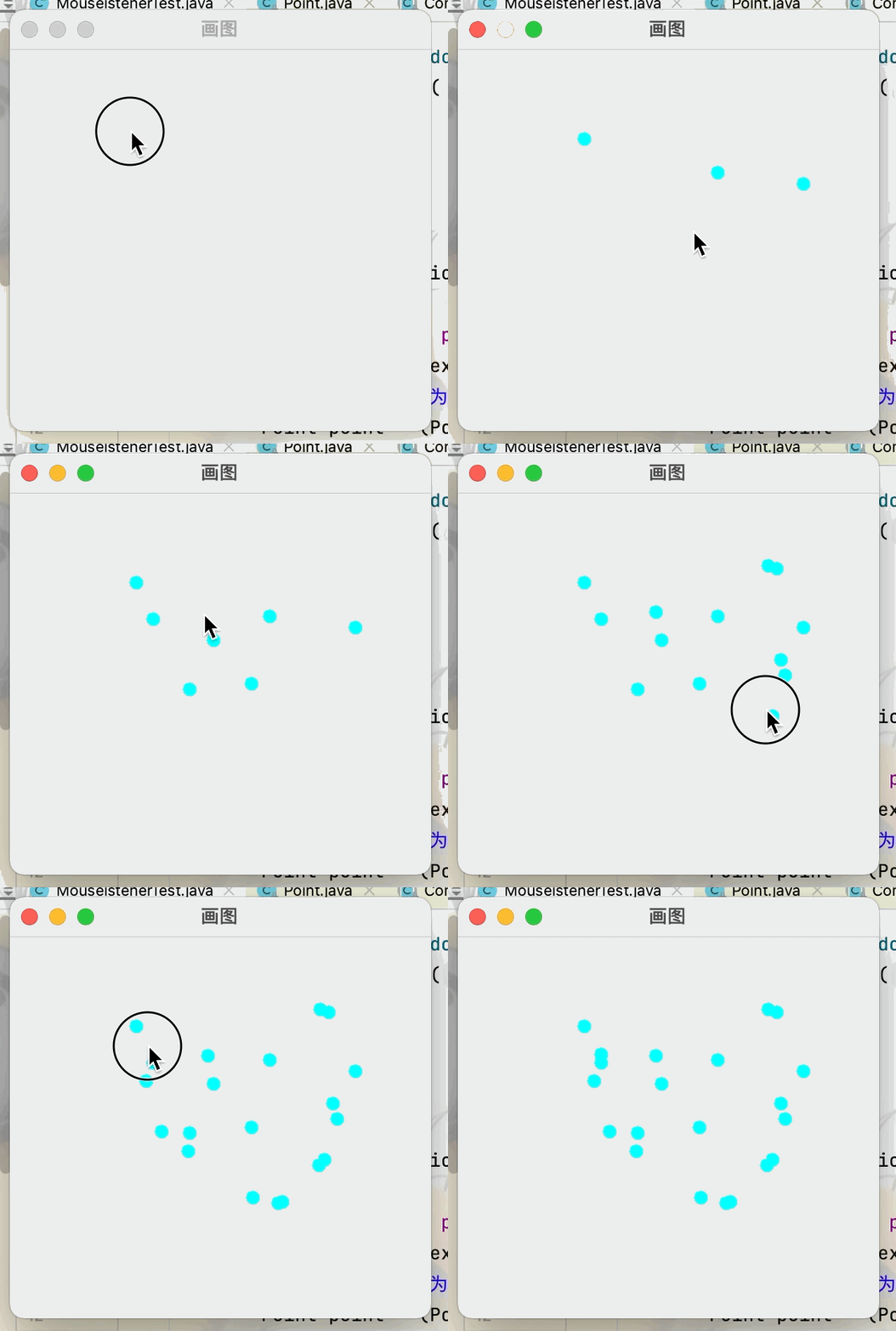
public class WindowListennerTest {
    public static void main(String[] args) {
        new MyWindowListener();
    }
}
class MyWindowListener extends Frame{
    public MyWindowListener(){
        setBounds(100,100,300,300);
        setVisible(true);
        addWindowListener(new WindowAdapter() {
            @Override
            public void windowClosing(WindowEvent e) {
                System.exit(0);
            }
            @Override
            public void windowDeactivated(WindowEvent e) {
                MyWindowListener mw =(MyWindowListener)e.getSource();
                mw.setTitle("人呢?快回来");
            }

            @Override
            public void windowActivated(WindowEvent e) {
                MyWindowListener mw =(MyWindowListener)e.getSource();
                mw.setTitle("欢迎回来");
            }

        });
    }
}
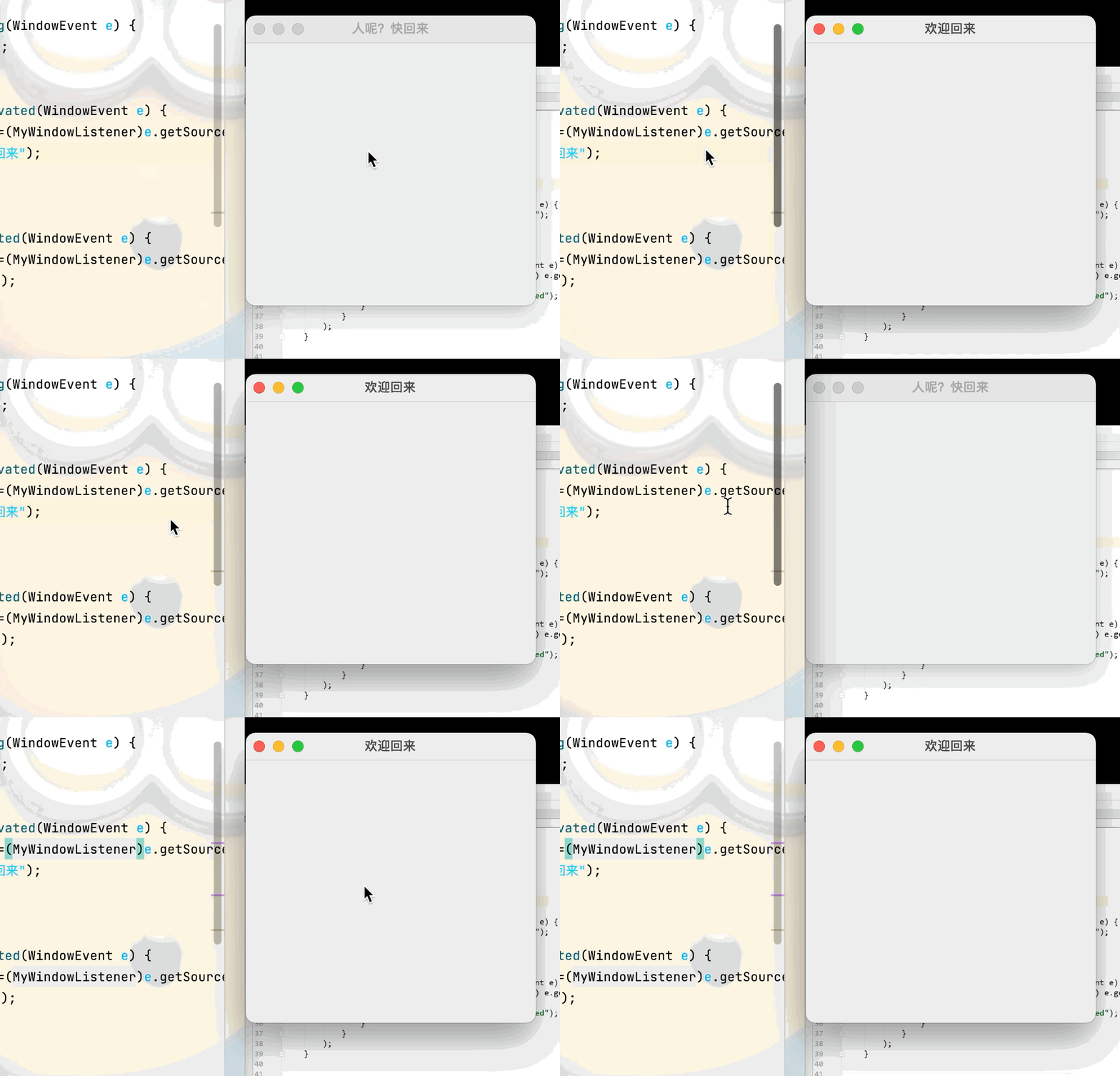
public class KeyListenerTest {
    public static void main(String[] args) {
        new KeyFrame();
    }
}
class KeyFrame extends Frame {
    public KeyFrame(){
        setVisible(true);
        setSize(300,300);
        addKeyListener(new KeyAdapter() {
            @Override
            public void keyPressed(KeyEvent e) {
                int keyCode = e.getKeyCode();
                if(keyCode == KeyEvent.VK_UP){
                    System.out.println("你按下了上键");
                }
            }
        });
    }
}
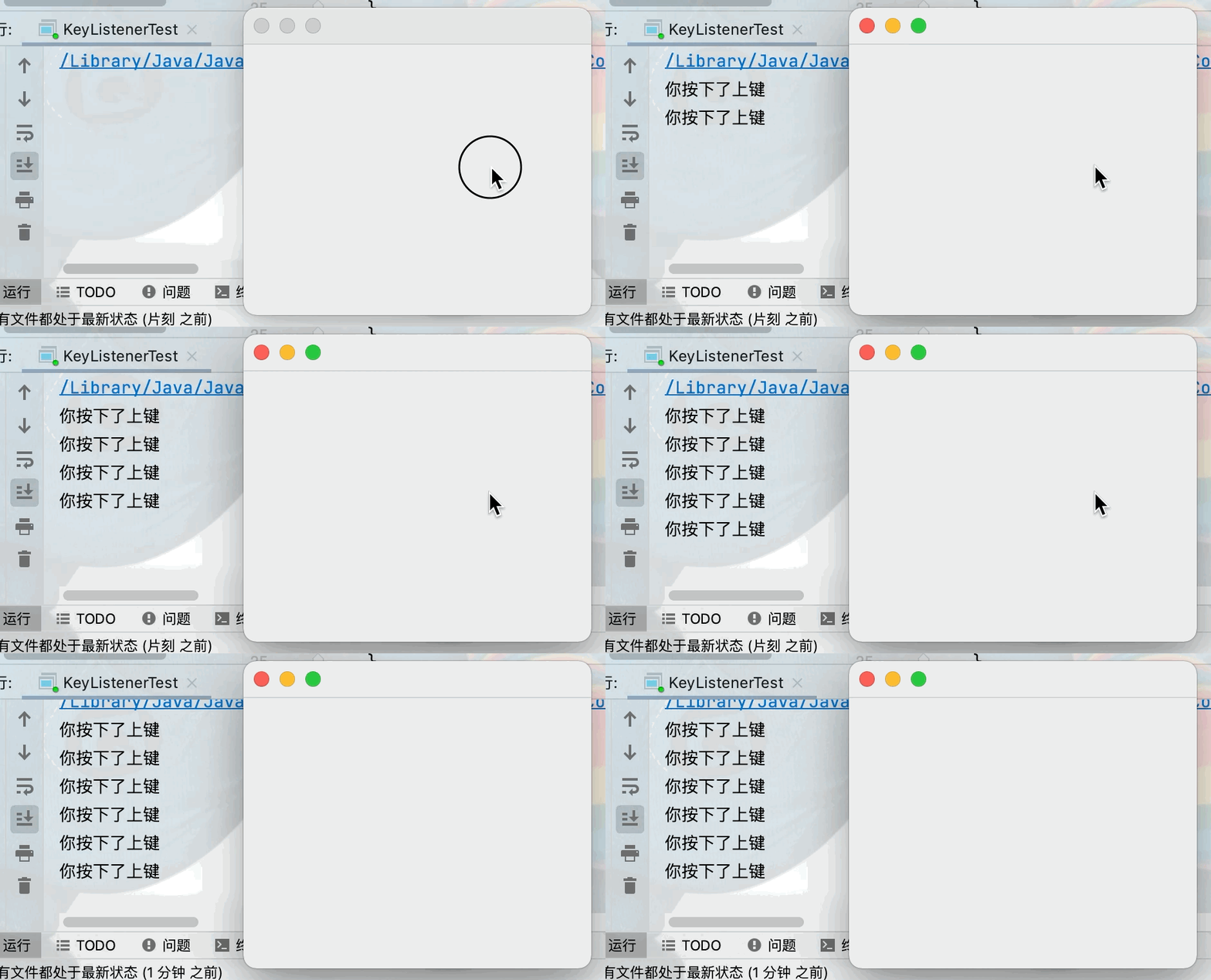
public class JFrameTest {
    //init()用于窗口的初始化操作
    public void init(){
        //顶级窗口
        JFrame jf = new JFrame("这是一个JFrame窗口");

        JLabel label = new JLabel("欢迎进入Twq的博客,欢迎点赞加关注");
        jf.add(label);
        //让标签居中显示
        label.setHorizontalAlignment(SwingConstants.CENTER);
        //由于JFrame设计到容器的概念,所有东西要放在容器里去实现
        //jf.setBackground(Color.gray);这样写并不能实现背景的设置
        jf.getContentPane().setBackground(Color.cyan);
        //窗口关闭
        jf.setDefaultCloseOperation(WindowConstants.DISPOSE_ON_CLOSE);

        jf.setBounds(100,100,300,300);
        jf.setVisible(true);
    }

    public static void main(String[] args) {
        new JFrameTest().init();
    }
}

//主窗口
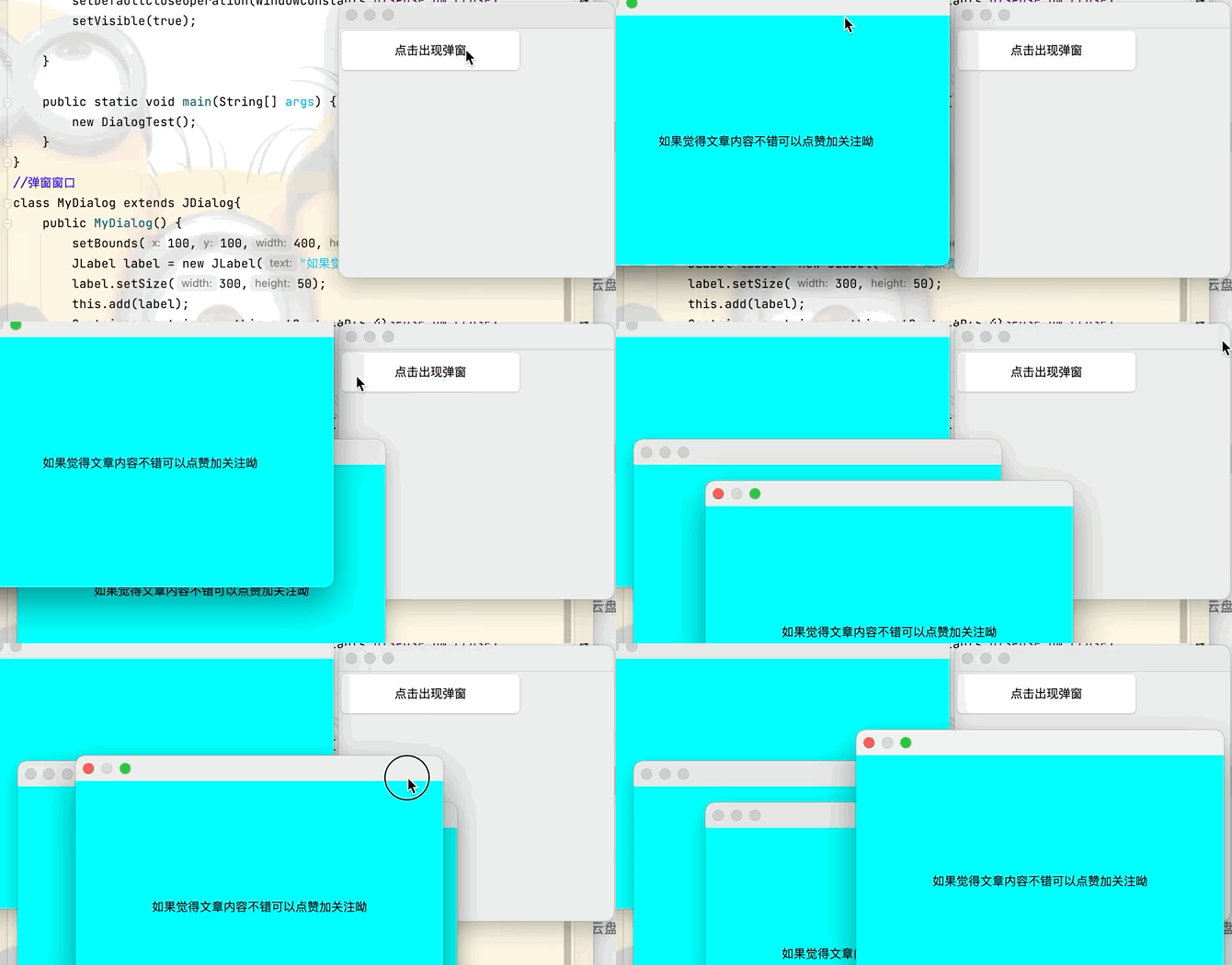
public class DialogTest extends JFrame{
    public DialogTest() {
        Container container = this.getContentPane();
        JButton button = new JButton("点击出现弹窗");
        button.setSize(200,50);
        add(button);
        //添加按钮监听事件
        button.addActionListener(new ActionListener() {
            @Override
            public void actionPerformed(ActionEvent e) {
                new MyDialog();//当按钮被点击后新建一个窗口
            }
        });
        setLayout(null);
        setBounds(80,80,300,300);
        setDefaultCloseOperation(WindowConstants.DISPOSE_ON_CLOSE);
        setVisible(true);

    }

    public static void main(String[] args) {
        new DialogTest();
    }
}
//弹窗窗口
class MyDialog extends JDialog{
    public MyDialog() {
        setBounds(100,100,400,300);
        JLabel label = new JLabel("如果觉得文章内容不错可以点赞加关注呦");
        label.setSize(300,50);
        this.add(label);
        Container container = this.getContentPane();
        label.setHorizontalAlignment(SwingConstants.CENTER);
        container.setBackground(Color.CYAN);
        //弹窗默认就可以进行关闭操作,不需要在进行关闭操作
        //setDefaultCloseOperation(WindowConstants.DISPOSE_ON_CLOSE);
        setVisible(true);
    }
}
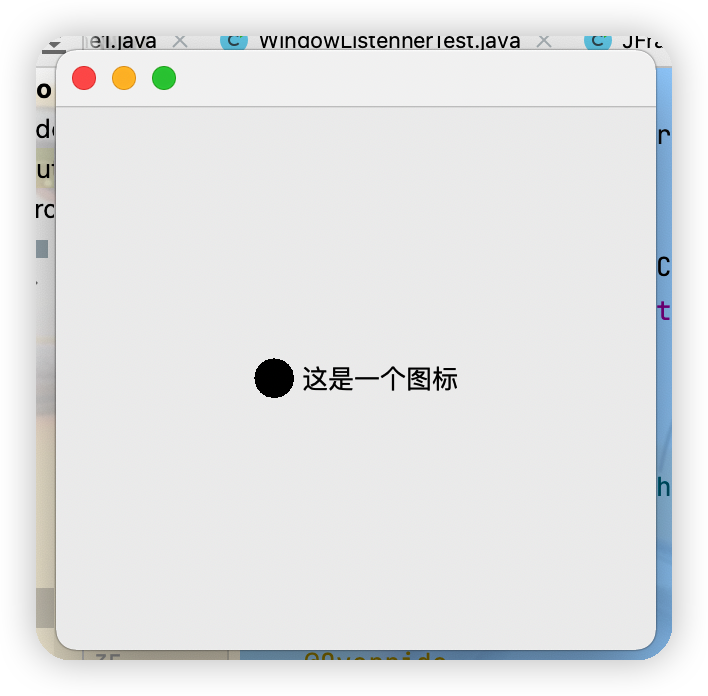
public class IconTest extends JFrame implements Icon {
    private int width,height;

    public IconTest() {
    }
    public IconTest(int width,int height) {
        this.width = width;
        this.height = height;
    }
    public void init(){
        IconTest iconTest = new IconTest(20,20);
        //图标放在标签上,也可以放在按钮上
        JLabel label = new JLabel("这是一个图标",iconTest,SwingConstants.CENTER);
        Container container = getContentPane();
        container.add(label);
        setBounds(100,100,300,300);
        setVisible(true);
        setDefaultCloseOperation(WindowConstants.DISPOSE_ON_CLOSE);
    }
    @Override
    public void paintIcon(Component c, Graphics g, int x, int y) {
        g.fillOval(x,y,width,height);
    }

    @Override
    public int getIconWidth() {
        return this.width;
    }

    @Override
    public int getIconHeight() {
        return this.height;
    }

    public static void main(String[] args) {
        new IconTest().init();
    }
}
(2)图片Icon
package com.Tang.gui.swing;

import javax.swing.*;
import java.awt.*;
import java.net.URL;

public class ImageIconTest extends JFrame {
    public ImageIconTest(){
        //获取图片地址
        URL url = ImageIconTest.class.getResource("tx的副本.jpg");
        JLabel label = new JLabel("这是一个图片图标");
        //图片图标获取图片的路径
        ImageIcon imageIcon = new ImageIcon(url);
        //将图片放入标签中
        label.setIcon(imageIcon);
        Container container = getContentPane();
        container.add(label);
        setBounds(100,100,300,200);
        setDefaultCloseOperation(WindowConstants.DISPOSE_ON_CLOSE);
        setVisible(true);
    }
    public static void main(String[] args) {
        new ImageIconTest();
    }
}

package com.Tang.gui.swing;

import javax.swing.*;
import java.awt.*;

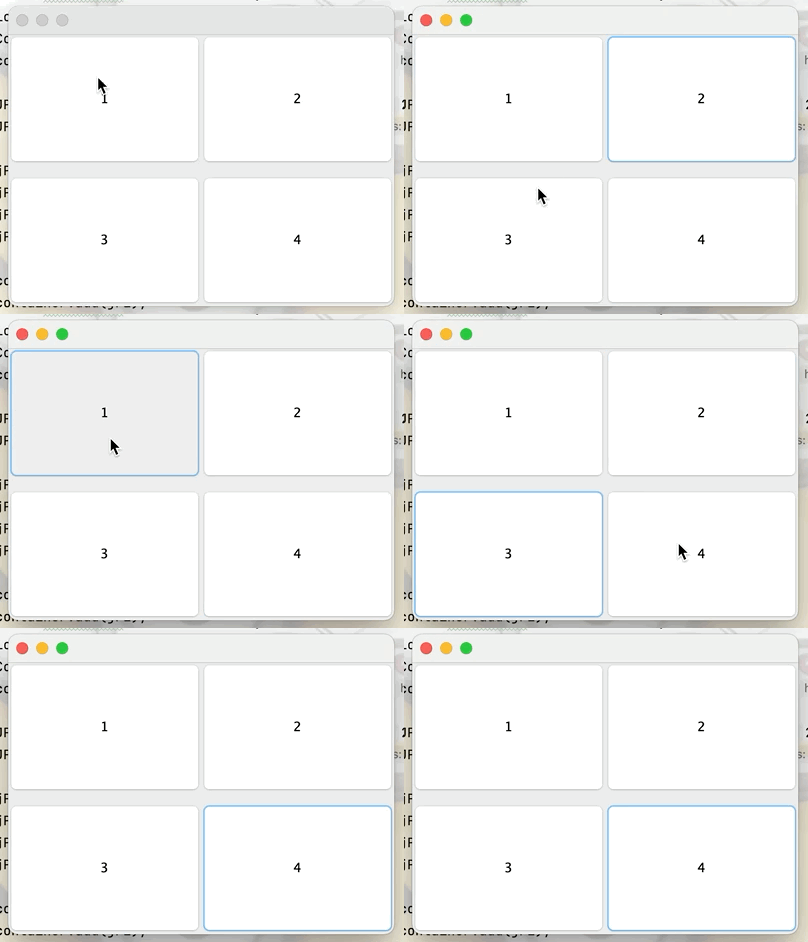
public class JPanneltest extends JFrame {
    public JPanneltest(){
        Container container = this.getContentPane();
        container.setLayout(new GridLayout(2,1,10,10));

        JPanel jP = new JPanel(new GridLayout(1,2));
        JPanel jP1 = new JPanel(new GridLayout(1,2));

        jP.add(new JButton("1"));
        jP.add(new JButton("2"));
        jP1.add(new JButton("3"));
        jP1.add(new JButton("4"));

        container.add(jP);
        container.add(jP1);
        this.setBounds(200,200,300,300);
        this.setVisible(true);
      //设置关闭窗口操作
        this.setDefaultCloseOperation(WindowConstants.DISPOSE_ON_CLOSE);
    }

    public static void main(String[] args) {
        new JPanneltest();
    }
}
public class ScrollPanelTest extends JFrame {
    public ScrollPanelTest() {
        Container container = this.getContentPane();

        //文本域:在文本框中输入的时候可以进行换行操作
        JTextArea textArea = new JTextArea();

        //设置滚动面板,并将文本域放到面板中
        JScrollPane scrollPane = new JScrollPane(textArea);

        //将滚动面板添加到窗口中
        container.add(scrollPane);

        //设置窗口的初始状态
        setVisible(true);
        setDefaultCloseOperation(WindowConstants.DISPOSE_ON_CLOSE);
        setBounds(200,200,300,300);
    }

    public static void main(String[] args) {
        new ScrollPanelTest();
    }
}

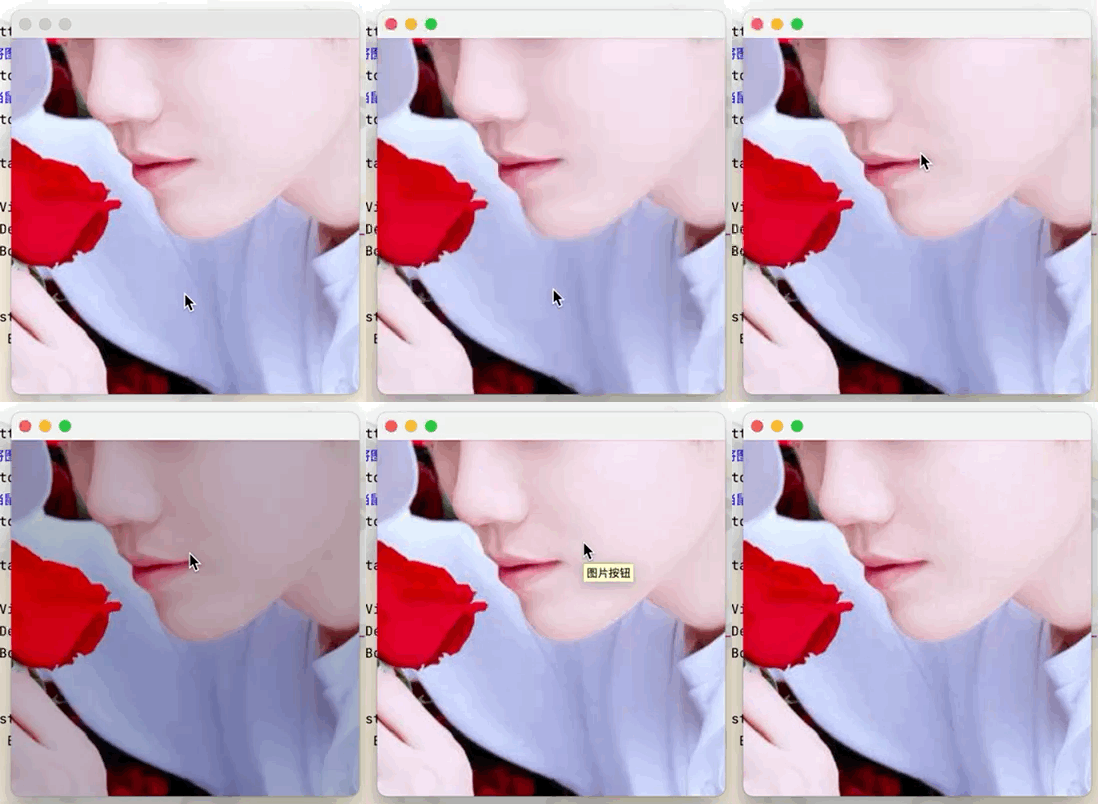
public class ButtonImageTest extends JFrame {
    public ButtonImageTest() {
        Container container = this.getContentPane();
        URL url = ButtonImageTest.class.getResource("tx的副本.jpg");
        Icon icon = new ImageIcon(url);

        JButton button = new JButton();
        //将图片放入按钮中
        button.setIcon(icon);
        //当鼠标在按钮上停留的时候就会显示下方设置的文字
        button.setToolTipText("图片按钮");

        container.add(button);

        setVisible(true);
        setDefaultCloseOperation(WindowConstants.DISPOSE_ON_CLOSE);
        setBounds(100,100,200,200);
    }

    public static void main(String[] args) {
        new ButtonImageTest();
    }
}
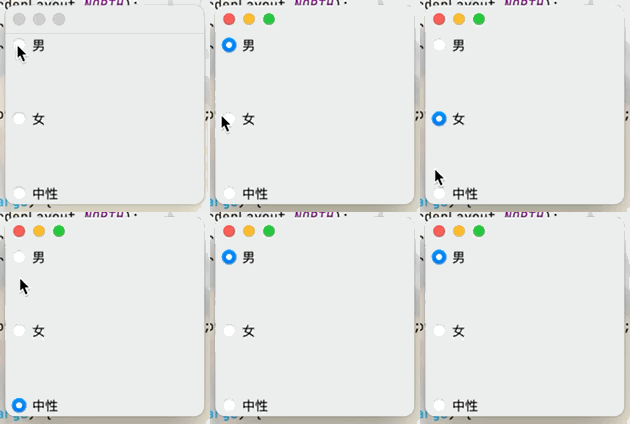
public class JButtonTest02 extends JFrame {
    public JButtonTest02() {
        Container container = getContentPane();

        JRadioButton radioButton1 = new JRadioButton("男");
        JRadioButton radioButton2 = new JRadioButton("女");
        JRadioButton radioButton3 = new JRadioButton("中性");
        //由于单选框只能选择一个,将三个按钮放入一个组中就可以实现只选一个
        ButtonGroup group = new ButtonGroup();

        //将三个按钮放入一个组中
        group.add(radioButton1);
        group.add(radioButton2);
        group.add(radioButton3);

        container.add(radioButton1,BorderLayout.NORTH);
        container.add(radioButton2,BorderLayout.CENTER);
        container.add(radioButton3,BorderLayout.SOUTH);

        setVisible(true);
        setDefaultCloseOperation(WindowConstants.EXIT_ON_CLOSE);
        setBounds(100,100,200,200);
    }

    public static void main(String[] args) {
        new JButtonTest02();
    }
}
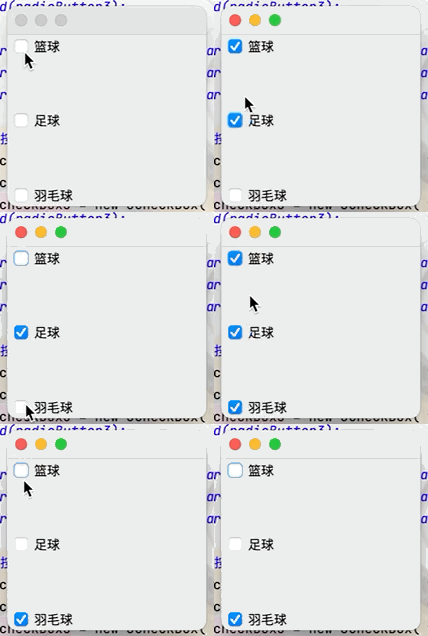
public class JButtonTest02 extends JFrame {
    public JButtonTest02() {
        Container container = getContentPane();

        JRadioButton radioButton1 = new JRadioButton("男");
        JRadioButton radioButton2 = new JRadioButton("女");
        JRadioButton radioButton3 = new JRadioButton("中性");

        //实现复选框按钮
        JCheckBox checkBox1 = new JCheckBox("篮球");
        JCheckBox checkBox2 = new JCheckBox("足球");
        JCheckBox checkBox3 = new JCheckBox("羽毛球");

        container.add(checkBox1,BorderLayout.NORTH);
        container.add(checkBox2,BorderLayout.CENTER);
        container.add(checkBox3,BorderLayout.SOUTH);

        setVisible(true);
        setDefaultCloseOperation(WindowConstants.EXIT_ON_CLOSE);
        setBounds(100,100,200,200);
    }

    public static void main(String[] args) {
        new JButtonTest02();
    }
}
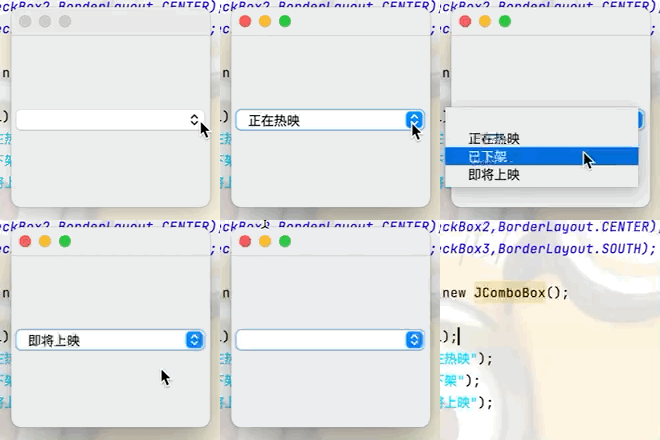
public class JButtonTest02 extends JFrame {
    public JButtonTest02() {
        Container container = getContentPane();

        //创建一个下拉框
        JComboBox statue = new JComboBox();
        //提供下拉选项
        statue.addItem(null);
        statue.addItem("正在热映");
        statue.addItem("已下架");
        statue.addItem("即将上映");

        container.add(statue);
        setVisible(true);
        setDefaultCloseOperation(WindowConstants.EXIT_ON_CLOSE);
        setBounds(100,100,200,200);
    }

    public static void main(String[] args) {
        new JButtonTest02();
    }
}
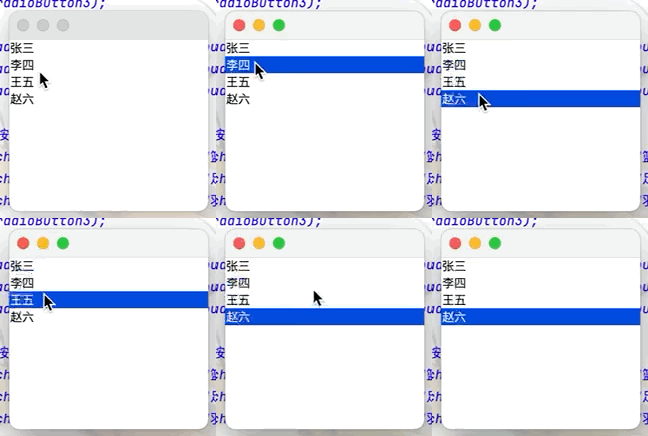
public class JButtonTest02 extends JFrame {
    public JButtonTest02() {
        Container container = getContentPane();

        //实现列表框
        Vector vector = new Vector();
        vector.add("张三");
        vector.add("李四");
        vector.add("王五");
        vector.add("赵六");
        //将vector集合中的内容放入列表框中
        JList jList = new JList(vector);
        container.add(jList);
        setVisible(true);
        setDefaultCloseOperation(WindowConstants.EXIT_ON_CLOSE);
        setBounds(100,100,200,200);
    }

    public static void main(String[] args) {
        new JButtonTest02();
    }
}
几个月前,我读了一篇关于rubygem的博客文章,它可以通过阅读代码本身来确定编程语言。对于我的生活,我不记得博客或gem的名称。谷歌搜索“ruby编程语言猜测”及其变体也无济于事。有人碰巧知道相关gem的名称吗? 最佳答案 是这个吗:http://github.com/chrislo/sourceclassifier/tree/master 关于ruby-寻找通过阅读代码确定编程语言的rubygem?,我们在StackOverflow上找到一个类似的问题:
网络编程套接字网络编程基础知识理解源`IP`地址和目的`IP`地址理解源MAC地址和目的MAC地址认识端口号理解端口号和进程ID理解源端口号和目的端口号认识`TCP`协议认识`UDP`协议网络字节序socket编程接口`sockaddr``UDP`网络程序服务器端代码逻辑:需要用到的接口服务器端代码`udp`客户端代码逻辑`udp`客户端代码`TCP`网络程序服务器代码逻辑多个版本服务器单进程版本多进程版本多线程版本线程池版本服务器端代码客户端代码逻辑客户端代码TCP协议通讯流程TCP协议的客户端/服务器程序流程三次握手(建立连接)数据传输四次挥手(断开连接)TCP和UDP对比网络编程基础知识
我完全不是程序员,正在学习使用Ruby和Rails框架进行编程。我目前正在使用Ruby1.8.7和Rails3.0.3,但我想知道我是否应该升级到Ruby1.9,因为我真的没有任何升级的“遗留”成本。缺点是什么?我是否会遇到与普通gem的兼容性问题,或者甚至其他我不太了解甚至无法预料的问题? 最佳答案 你应该升级。不要坚持从1.8.7开始。如果您发现不支持1.9.2的gem,请避免使用它们(因为它们很可能不被维护)。如果您对gem是否兼容1.9.2有任何疑问,您可以在以下位置查看:http://www.railsplugins.or
Ocra无法处理需要“tk”的应用程序require'tk'puts'nope'用奥克拉http://github.com/larsch/ocra不起作用(如链接中的一个问题所述)问题:https://github.com/larsch/ocra/issues/29(Ocra是1.9的"new"rubyscript2exe,本质上它用于将rb脚本部署为可执行文件)唯一的问题似乎是缺少tcl的DLL文件我不认为这是一个问题据我所知,问题是缺少tk的DLL文件如果它们是已知的,则可以在执行ocra时将它们包括在内有没有办法知道tk工作所需的DLL依赖项? 最佳答
我创建了一个由于“在运行时执行的单例元类定义”而无法编码的对象(这段代码的描述是否正确?)。这是通过以下代码执行的:#defineclassXthatmyusesingletonclassmetaprogrammingfeatures#throughcallofmethod:break_marshalling!classXdefbreak_marshalling!meta_class=class我该怎么做才能使对象编码正确?是否可以从对象instance_of_x的classX中“移除”单例组件?我真的需要一个建议,因为我们的一些对象需要通过Marshal.dump序列化机制进行缓存。
我正在查看Ruby日志记录库Logging.logger方法并从sourceatgithub提出问题与这段代码有关:logger=::Logging::Logger.new(name)logger.add_appendersappenderlogger.additive=falseclass我知道类 最佳答案 这实际上删除了方法(当它实际被执行时)。这是确保close不会被调用两次的保障措施。看起来好像有嵌套的“class 关于Ruby元编程问题,我们在StackOverflow上找到一
使用Paperclip,我想从这样的URL抓取图像:require'open-uri'user.photo=open(url)问题是我最后得到一个像“open-uri20110915-4852-1o7k5uw”这样的文件名。有什么方法可以更改user.photo上的文件名?作为一个额外的变化,Paperclip将我的文件存储在S3上,所以如果我可以在初始分配中设置我想要的文件名就更好了,这样图像就会上传到正确的S3key。像这样:user.photo=open(url),:filename=>URI.parse(url).path 最佳答案
我正在开发一个xcode自动构建系统。在执行一些预构建验证时,我想检查指定的证书文件是否已被撤销。我了解securityverify-cert验证其他证书属性但不验证吊销。我如何检查撤销?我正在用Ruby编写构建系统,但我对任何语言的想法都持开放态度。我阅读了这个答案(Openssl-Howtocheckifacertificateisrevokedornot),但指向底部的链接(DoesOpenSSLautomaticallyhandleCRLs(CertificateRevocationLists)now?)进入的Material对我的目的来说有点过于复杂(用户上传已撤销的证书是一
关闭。这个问题是off-topic.它目前不接受答案。想改进这个问题吗?Updatethequestion所以它是on-topic用于堆栈溢出。关闭11年前。Improvethisquestion我不经常使用ruby-通常它加起来相当于每两个月或更长时间编写一次脚本。我的大部分编程都是使用C++进行的,这与ruby有很大不同。由于我与ruby之间的差距如此之大,我总是忘记语言的基本方面(比如解析文本文件和其他简单的东西)。我想每天练习一些基本的东西,我想知道是否有一些我可以订阅的网站,并且会向我发送当天的Ruby问题或类似的东西。有人知道这样的站点/Internet服务吗?
我一直在寻找一种以编程方式或通过命令行将mp3转换为aac的方法,但没有成功。理想情况下,我有一段代码可以从我的Rails应用程序中调用,将mp3转换为aac。我安装了ffmpeg和libfaac,并能够使用以下命令创建aac文件:ffmpeg-itest.mp3-acodeclibfaac-ab163840dest.aac当我将输出文件的名称更改为dest.m4a时,它无法在iTunes中播放。谢谢! 最佳答案 FFmpeg提供AAC编码功能(如果您已编译它们)。如果您使用的是Windows,则可以从here获取完整的二进制文件。
