目录
当执行npm install 安装的时候可能会出现如下报错信息:
npm ERR! code 128
npm ERR! An unknown git error occurred
npm ERR! command git --no-replace-objects ls-remote ssh://git@github.com/nhn/raphael.git
npm ERR! git@github.com: Permission denied (publickey).
npm ERR!
npm ERR! Please make sure you have the correct access rights
npm ERR! and the repository exists.

npm ERR! A complete log of this run can be found in:
npm ERR!     C:\Users\XXXX\AppData\Local\npm-cache\_logs\2023-01-03T07_20_29_806Z-debug-0.log
错误日志中有如下关键信息:
Please make sure you have the correct access rights npm ERR! and the repository exists.
意思是我们对这个仓库没有操作权限,但是按说不可能哈,这是一个github 开源库,不应该需要权限哈。
仔细观察未登录github访问这个仓库发现:
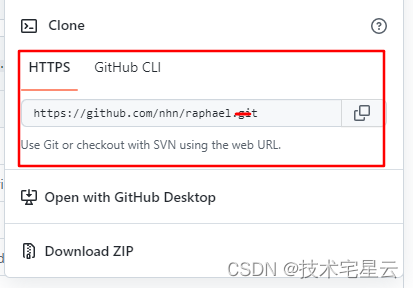
??? 压根没有ssh 下载选项
github 登陆后再看看发现有了。

顿时明了,由于这个前端开源框架很坑的下载第三方依赖用的是ssh ssh://git@github.com/nhn/raphael.git 方式下载,
而这种方式下载,必须配置了访问github 的ssh key 才可以。
配置访问github 的ssh key 即可。
如果有多个代码仓库,可以通过 .ssh/config 分别配置多个ssh key 即可。
示例如下:
# github
Host github.com
HostName github.com
PreferredAuthentications publickey
IdentityFile ~/.ssh/id_rsa

# aliyun code
Host git@code.aliyun.com
HostName git@code.aliyun.com
PreferredAuthentications publickey
IdentityFile ~/.ssh/id_rsa

# aliyun code up
Host git@codeup.aliyun.com
HostName git@codeup.aliyun.com
PreferredAuthentications publickey
IdentityFile ~/.ssh/id_rsa

# company gitlab
#Host git.xxxx.cn
#HostName git.xxx.cn
#PreferredAuthentications publickey
#IdentityFile ~/.ssh/company_id_rsa
具体生成ssh key 方法 参考 阿里云Code SSH KEY 代码入库
文章目录git常用命令(简介,详细参数往下看)Git提交代码步骤gitpullgitstatusgitaddgitcommitgitpushgit代码冲突合并问题方法一:放弃本地代码方法二:合并代码常用命令以及详细参数gitadd将文件添加到仓库:gitdiff比较文件异同gitlog查看历史记录gitreset代码回滚版本库相关操作远程仓库相关操作分支相关操作创建分支查看分支:gitbranch合并分支:gitmerge删除分支:gitbranch-ddev查看分支合并图:gitlog–graph–pretty=oneline–abbrev-commit撤消某次提交git用户名密码相关配置g
我使用Jekyll运行博客,并认为我会解决RedcarpetMarkdown解释器,因为它是developedandusedbyGitHub.好吧,我只是碰巧遇到了一个错误,去检查问题,然后foundthis.Maintainersays,"Asyouprobablyhavenoticed(harharharhar)Idon'thavetimetomaintainRedcarpetanymore.It'snotapriorityforme(IfindMarkdownthoroughlyboring)andit'snotapriorityforGitHub,becausewenolong
关于如何使用git设置类似Dropbox的服务,您有什么建议吗?您认为git是解决此问题的合适工具吗?我在考虑使用git+rush解决方案,你觉得怎么样? 最佳答案 检查这个开源项目:https://github.com/hbons/SparkleShare来自项目的自述文件:Howdoesitwork?SparkleSharecreatesaspecialfolderonyourcomputer.Youcanaddremotelyhostedfolders(or"projects")tothisfolder.Theseprojec
除了协议(protocol)定义中的斜杠('http[s]://'、'ftp://'等)之外,我想替换URL中的所有多个斜杠。我该怎么做?此代码无一异常(exception)地替换:url.gsub(/\/\/+/,'/') 最佳答案 您只需排除任何以:开头的匹配项url.gsub(/([^:])\/\//,'\1/') 关于ruby正则表达式:replacedoubleslashesinURL,我们在StackOverflow上找到一个类似的问题: http
我编写了一个非常简单的“部署”脚本,作为我的裸git存储库中的post-updateHook运行。变量如下livedomain=~/mydomain.comstagingdomain=~/stage.mydomain.comgitrepolocation=~/git.mydomain.com/thisrepo.git(bare)core=~/git.mydomain.com/thisrepo.gitcore==addedremoteintoeachlive&stagegitslive和stage都初始化了gitrepos(非裸),我已经将我的裸仓库作为远程添加到它们中的每一个(名为co
我正在安装gitlabhq,并且在Gemfile中有对某些资源的“git://...”的引用。但是,我在公司防火墙后面,所以我必须使用http://。我可以手动编辑Gemfile,但我想知道是否有另一种方法告诉bundler使用http://作为git存储库? 最佳答案 您可以通过运行gitconfig--globalurl."https://".insteadOfgit://或通过将以下内容添加到~/.gitconfig:[url"https://"]insteadOf=git://
我们正在使用Vagrant进行部署,我们最终希望将此集群部署在Rackspace上。vagrant-rackspace插件是一个自然的选择,但它有一些错误,这些错误未包含在最新的0.1.1版本中(notablythatvagrantprovisiondoesn'twork)。我已经在我的personalfork中解决了这个问题通过合并其他人的工作来对存储库进行改造。是否可以从github安装vagrant插件?显而易见的事情没有奏效:[unix]$vagrantplugininstallvagrant-rackspace--plugin-sourcehttps://github.com
Activeadmingem已添加到我的rails项目中,但每次我尝试安装railsgactive_admin:install时,我都会收到类似的错误git://github.com/activeadmin/activeadmin.git(atmaster)isnotyetcheckedout.Runbundleinstallfirst.我肯定在运行“railsgactive_admin:install”之前运行了bundle。运行“bundleshow”后,我看到我已将“*activeadmin(1.0.0.pre3f916d6)”添加到我的项目中,但不断收到此错误消息。我的gem文
我有一个使用Jekyll托管在GitHub上的静态网站。问题是,我真的不需要master分支,因为存储库唯一包含的是网站。这样我就必须gitcheckoutgh-pages,然后gitmergemaster,然后gitpushorigingh-pages。有什么简单的方法可以摆脱gh-pages分支并直接从master推送? 最佳答案 Theproblemis,Idon'treallyneedthemasterbranch,astheonlythingtherepositorycontainsisthewebsite.Isthere
我每次打开终端时都会收到这个错误:警告:PATH设置为RVMruby但未设置GEM_HOME和/或GEM_PATH,请参阅:https://github.com/wayneeseguin/rvm/issues/3212这是在我最近安装zsh(oh-my-zsh)后开始发生的我不知道如何设置GEM_HOME和/或GEM_PATH的路径。 最佳答案 我也面临同样的问题,更改.zshrc中的以下行,exportPATH="/usr/local/heroku/bin:.........."到exportPATH="$PATH:/usr/
