需要了解netty 基本知识原理,不了解的可以查看我之前的博客,以及网上的资料,这里不在过多撰述。
这里以对接硬件雷达水位计为例:

说一下思路, 这里场景各种设备连接DTU,然后通过DTU上报报文,和接收服务器下发的指令。
例如127.0.0.1:2233 就是你服务器的ip和端口,我们需要开发部署一个 JAVA 开发的Netty 服务器来监听 2233端口, 从机配置我们的服务器ip和端口连接到netty。
那么我们开发netty 的思路应该是什么样子的。
- netty 监听端口;
- netty 保存通道长链接;
- 将netty 的 里面的所有通过 存放到一个 ConcurrentHashMap 里面来进行管理;
- 通过 netty 监听 我们可以获取 从机上报到服务器的报文,我们进行业务处理;
- 通过Map 我们实现 定时下发报文,让从机回复响应;
springboot,依赖, 去掉tomcat ,我们这里只做服务器,并不需要tomcat,以及只用 starter
	<parent>
        <groupId>org.springframework.boot</groupId>
        <artifactId>spring-boot-starter-parent</artifactId>
        <version>2.1.3.RELEASE</version>
    </parent>

	<dependency>
            <groupId>org.springframework.boot</groupId>
            <artifactId>spring-boot-starter</artifactId>
            <exclusions>
                <exclusion>
                    <groupId>org.springframework.boot</groupId>
                    <artifactId>spring-boot-starter-tomcat</artifactId>
                </exclusion>
                <exclusion>
                    <groupId>org.slf4j</groupId>
                    <artifactId>slf4j-log4j12</artifactId>
                </exclusion>
            </exclusions>
    </dependency>
		<!-- netty架包 -->
        <dependency>
            <groupId>io.netty</groupId>
            <artifactId>netty-all</artifactId>
        </dependency>
		<dependency>
            <groupId>cn.hutool</groupId>
            <artifactId>hutool-all</artifactId>
            <version>4.6.1</version>
        </dependency>
其他相关依赖 不在撰写, 数据库依赖以及 工具类依赖 ,自己按需引用
不在过多解释代码,每行都有注释
package com.joygis.iot.netty.server;

import io.netty.bootstrap.ServerBootstrap;
import io.netty.channel.ChannelFuture;
import io.netty.channel.ChannelOption;
import io.netty.channel.EventLoopGroup;
import io.netty.channel.nio.NioEventLoopGroup;
import io.netty.channel.socket.nio.NioServerSocketChannel;
import lombok.extern.slf4j.Slf4j;
import org.springframework.stereotype.Component;

import java.net.InetSocketAddress;

/**
 * 功能描述: netty服务启动类
 *
 * @Author keLe
 * @Date 2022/8/26
 */
@Slf4j
@Component
public class NettyServer {
    public void start(InetSocketAddress address) {
        //配置服务端的NIO线程组
        EventLoopGroup bossGroup = new NioEventLoopGroup();
        EventLoopGroup workerGroup = new NioEventLoopGroup();
        try {
            // 绑定线程池,编码解码
            //服务端接受连接的队列长度,如果队列已满,客户端连接将被拒绝
            ServerBootstrap bootstrap = new ServerBootstrap()
                    .group(bossGroup, workerGroup)
                    // 指定Channel
                    .channel(NioServerSocketChannel.class)
                    //使用指定的端口设置套接字地址
                    .localAddress(address)
                    //使用自定义处理类
                    .childHandler(new NettyServerChannelInitializer())
                    //服务端可连接队列数,对应TCP/IP协议listen函数中backlog参数
                    .option(ChannelOption.SO_BACKLOG, 128)
                    //保持长连接,2小时无数据激活心跳机制
                    .childOption(ChannelOption.SO_KEEPALIVE, true)
                    //将小的数据包包装成更大的帧进行传送,提高网络的负载
                    .childOption(ChannelOption.TCP_NODELAY, true);
            // 绑定端口,开始接收进来的连接
            ChannelFuture future = bootstrap.bind(address).sync();
            if (future.isSuccess()) {
                log.info("netty服务器开始监听端口:{}",address.getPort());
            }
            //关闭channel和块,直到它被关闭
            future.channel().closeFuture().sync();
        } catch (Exception e) {
            e.printStackTrace();
            bossGroup.shutdownGracefully();
            workerGroup.shutdownGracefully();
        }
    }
}
package com.joygis.iot.netty.server;

import com.joygis.iot.netty.MyDecoder;
import com.joygis.iot.netty.MyEncoder;
import io.netty.channel.ChannelInitializer;
import io.netty.channel.ChannelPipeline;
import io.netty.channel.socket.SocketChannel;
import io.netty.handler.timeout.IdleStateHandler;

import java.util.concurrent.TimeUnit;

/**
 * 功能描述: 服务端初始化,客户端与服务器端连接一旦创建,这个类中方法就会被回调,设置出站编码器和入站解码器
 *
 * @Author keLe
 * @Date 2022/8/26
 */
public class NettyServerChannelInitializer extends ChannelInitializer<SocketChannel> {
    @Override
    protected void initChannel(SocketChannel socketChannel) throws Exception {
        ChannelPipeline pipeline = socketChannel.pipeline();
        //接收消息格式,使用自定义解析数据格式
        pipeline.addLast("decoder",new MyDecoder());
        //发送消息格式,使用自定义解析数据格式
        pipeline.addLast("encoder",new MyEncoder());

        //针对客户端,如果在1分钟时没有想服务端发送写心跳(ALL),则主动断开
        //如果是读空闲或者写空闲,不处理,这里根据自己业务考虑使用
        //pipeline.addLast(new IdleStateHandler(600,0,0, TimeUnit.SECONDS));
        //自定义的空闲检测
        pipeline.addLast(new NettyServerHandler());
    }
}
接收消息格式,使用自定义解析数据格式工具类
package com.joygis.iot.netty;

import io.netty.buffer.ByteBuf;
import io.netty.channel.ChannelHandlerContext;
import io.netty.handler.codec.ByteToMessageDecoder;

import java.util.List;

/**
 * 功能描述: 自定义接收消息格式
 *
 * @Author keLe
 * @Date 2022/8/26
 */
public class MyDecoder extends ByteToMessageDecoder {
    @Override
    protected void decode(ChannelHandlerContext channelHandlerContext, ByteBuf byteBuf, List<Object> list) throws Exception {
        //创建字节数组,buffer.readableBytes可读字节长度
        byte[] b = new byte[byteBuf.readableBytes()];
        //复制内容到字节数组b
        byteBuf.readBytes(b);
        //字节数组转字符串
        String str = new String(b);

        list.add(bytesToHexString(b));
    }

    public String bytesToHexString(byte[] bArray) {
        StringBuffer sb = new StringBuffer(bArray.length);
        String sTemp;
        for (int i = 0; i < bArray.length; i++) {
            sTemp = Integer.toHexString(0xFF & bArray[i]);
            if (sTemp.length() < 2) {
                sb.append(0);
            }
            sb.append(sTemp.toUpperCase());
        }
        return sb.toString();
    }

    public static String toHexString1(byte[] b) {
        StringBuffer buffer = new StringBuffer();
        for (int i = 0; i < b.length; ++i) {
            buffer.append(toHexString1(b[i]));
        }
        return buffer.toString();
    }

    public static String toHexString1(byte b) {
        String s = Integer.toHexString(b & 0xFF);
        if (s.length() == 1) {
            return "0" + s;
        } else {
            return s;
        }
    }

}
自定义发送消息格式,使用自定义解析数据格式工具类
/**
 * 功能描述: 自定义发送消息格式
 *
 * @Author keLe
 * @Date 2022/8/26
 */
public class MyEncoder extends MessageToByteEncoder<String> {

    @Override
    protected void encode(ChannelHandlerContext channelHandlerContext, String s, ByteBuf byteBuf) throws Exception {
        //将16进制字符串转为数组
        byteBuf.writeBytes(hexString2Bytes(s));
    }

    /**
     * 功能描述: 16进制字符串转字节数组
     * @Author keLe
     * @Date 2022/8/26
     * @param src 16进制字符串
     * @return byte[]
     */
    public static byte[] hexString2Bytes(String src) {
        int l = src.length() / 2;
        byte[] ret = new byte[l];
        for (int i = 0; i < l; i++) {
            ret[i] = (byte) Integer.valueOf(src.substring(i * 2, i * 2 + 2), 16).byteValue();
        }
        return ret;
    }
}
package com.joygis.iot.netty.server;

import com.joygis.iot.netty.ChannelMap;
import io.netty.channel.Channel;
import io.netty.channel.ChannelHandlerContext;
import io.netty.channel.ChannelId;
import io.netty.channel.ChannelInboundHandlerAdapter;
import io.netty.handler.timeout.IdleState;
import io.netty.handler.timeout.IdleStateEvent;
import lombok.extern.slf4j.Slf4j;

import java.net.InetSocketAddress;

/**
 * 功能描述: netty服务端处理类
 *
 * @Author keLe
 * @Date 2022/8/26
 */
@Slf4j
public class NettyServerHandler extends ChannelInboundHandlerAdapter {

    /**
     * 功能描述: 有客户端连接服务器会触发此函数
     * @Author keLe
     * @Date 2022/8/26
     * @param  ctx 通道
     * @return void
     */
    @Override
    public void channelActive(ChannelHandlerContext ctx) {
        InetSocketAddress insocket = (InetSocketAddress) ctx.channel().remoteAddress();
        String clientIp = insocket.getAddress().getHostAddress();
        int clientPort = insocket.getPort();
        //获取连接通道唯一标识
        ChannelId channelId = ctx.channel().id();
        //如果map中不包含此连接,就保存连接
        if (ChannelMap.getChannelMap().containsKey(channelId)) {
            log.info("客户端:{},是连接状态,连接通道数量:{} ",channelId,ChannelMap.getChannelMap().size());
        } else {
            //保存连接
            ChannelMap.addChannel(channelId, ctx.channel());
            log.info("客户端:{},连接netty服务器[IP:{}-->PORT:{}]",channelId, clientIp,clientPort);
            log.info("连接通道数量: {}",ChannelMap.getChannelMap().size());
        }
    }

    /**
     * 功能描述: 有客户端终止连接服务器会触发此函数
     * @Author keLe
     * @Date 2022/8/26
     * @param  ctx 通道处理程序上下文
     * @return void
     */
    @Override
    public void channelInactive(ChannelHandlerContext ctx) {
        InetSocketAddress inSocket = (InetSocketAddress) ctx.channel().remoteAddress();
        String clientIp = inSocket.getAddress().getHostAddress();
        ChannelId channelId = ctx.channel().id();
        //包含此客户端才去删除
        if (ChannelMap.getChannelMap().containsKey(channelId)) {
            //删除连接
            ChannelMap.getChannelMap().remove(channelId);
            log.info("客户端:{},连接netty服务器[IP:{}-->PORT:{}]",channelId, clientIp,inSocket.getPort());
            log.info("连接通道数量: " + ChannelMap.getChannelMap().size());
        }
    }

    /**
     * 功能描述: 有客户端发消息会触发此函数
     * @Author keLe
     * @Date 2022/8/26
     * @param  ctx 通道处理程序上下文
     * @param  msg 客户端发送的消息
     * @return void
     */
    @Override
    public void channelRead(ChannelHandlerContext ctx, Object msg) throws Exception {
        log.info("加载客户端报文,客户端id:{},客户端消息:{}",ctx.channel().id(), msg);
        String data = String.valueOf(msg);
        Integer water = Integer.parseInt(data.substring(6,10),16);
        log.info("当前水位:{}cm",water);
        //响应客户端
        //this.channelWrite(ctx.channel().id(), msg);
    }

   /* @Override
    public void channelReadComplete(ChannelHandlerContext ctx) throws Exception {
        String bytes = "01 03 00 02 00 01 25 CA";
        ctx.writeAndFlush(bytes);
    }*/

    /**
     * 功能描述: 服务端给客户端发送消息
     * @Author keLe
     * @Date 2022/8/26
     * @param  channelId 连接通道唯一id
     * @param  msg 需要发送的消息内容
     * @return void
     */
    public void channelWrite(ChannelId channelId, Object msg) throws Exception {
        Channel channel = ChannelMap.getChannelMap().get(channelId);
        if (channel == null) {
            log.info("通道:{},不存在",channelId);
            return;
        }
        if (msg == null || msg == "") {
            log.info("服务端响应空的消息");
            return;
        }
        //将客户端的信息直接返回写入ctx
        channel.write(msg);
        //刷新缓存区
        channel.flush();
    }

    @Override
    public void userEventTriggered(ChannelHandlerContext ctx, Object evt) throws Exception {
        String socketString = ctx.channel().remoteAddress().toString();
        if (evt instanceof IdleStateEvent) {
            IdleStateEvent event = (IdleStateEvent) evt;
            if (event.state() == IdleState.READER_IDLE) {
                log.info("Client:{},READER_IDLE 读超时",socketString);
                ctx.disconnect();
                Channel channel = ctx.channel();
                ChannelId id = channel.id();
                ChannelMap.removeChannelByName(id);
            } else if (event.state() == IdleState.WRITER_IDLE) {
                log.info("Client:{}, WRITER_IDLE 写超时",socketString);
                ctx.disconnect();
                Channel channel = ctx.channel();
                ChannelId id = channel.id();
                ChannelMap.removeChannelByName(id);
            } else if (event.state() == IdleState.ALL_IDLE) {
                log.info("Client:{},ALL_IDLE 总超时",socketString);
                ctx.disconnect();
                Channel channel = ctx.channel();
                ChannelId id = channel.id();
                ChannelMap.removeChannelByName(id);
            }
        }
    }

    /**
     * 功能描述: 发生异常会触发此函数
     * @Author keLe
     * @Date 2022/8/26
     * @param  ctx 通道处理程序上下文
     * @param  cause 异常
     * @return void
     */
    @Override
    public void exceptionCaught(ChannelHandlerContext ctx, Throwable cause) throws Exception {
        ctx.close();
        log.info("{}:发生了错误,此连接被关闭。此时连通数量:{}",ctx.channel().id(),ChannelMap.getChannelMap().size());
    }

}
package com.joygis.iot.netty;

import io.netty.channel.Channel;
import io.netty.channel.ChannelId;
import io.netty.handler.codec.http.websocketx.TextWebSocketFrame;
import org.springframework.util.CollectionUtils;

import java.util.concurrent.ConcurrentHashMap;

/**
 * 功能描述: 管理通道Map类
 *
 * @Author keLe
 * @Date 2022/8/26
 */
public class ChannelMap {

    /**
     * 管理一个全局map,保存连接进服务端的通道数量
     */
    private static final ConcurrentHashMap<ChannelId, Channel> CHANNEL_MAP = new ConcurrentHashMap<>(128);

    public static ConcurrentHashMap<ChannelId, Channel> getChannelMap() {
        return CHANNEL_MAP;
    }

    /**
     *  获取指定name的channel
     */
    public static Channel getChannelByName(ChannelId channelId){
        if(CollectionUtils.isEmpty(CHANNEL_MAP)){
            return null;
        }
        return CHANNEL_MAP.get(channelId);
    }

    /**
     *  将通道中的消息推送到每一个客户端
     */
    public static boolean pushNewsToAllClient(String obj){
        if(CollectionUtils.isEmpty(CHANNEL_MAP)){
            return false;
        }
        for(ChannelId channelId: CHANNEL_MAP.keySet()) {
            Channel channel = CHANNEL_MAP.get(channelId);
            channel.writeAndFlush(new TextWebSocketFrame(obj));
        }
        return true;
    }

    /**
     *  将channel和对应的name添加到ConcurrentHashMap
     */
    public static void addChannel(ChannelId channelId,Channel channel){
        CHANNEL_MAP.put(channelId,channel);
    }

    /**
     *  移除掉name对应的channel
     */
    public static boolean removeChannelByName(ChannelId channelId){
        if(CHANNEL_MAP.containsKey(channelId)){
            CHANNEL_MAP.remove(channelId);
            return true;
        }
        return false;
    }

}
package com.joygis.iot.netty;

import lombok.Getter;
import lombok.Setter;
import lombok.ToString;
import org.springframework.boot.context.properties.ConfigurationProperties;
import org.springframework.context.annotation.Configuration;
import org.springframework.context.annotation.PropertySource;
import org.springframework.stereotype.Component;

/**
 * 功能描述: 配置类
 *
 * @Author keLe
 * @Date 2022/8/26
 */
@Setter
@Getter
@ToString
@Component
@Configuration
@PropertySource("classpath:application.yml")
@ConfigurationProperties(prefix = "socket")
public class SocketProperties {
    private Integer port;
    private String host;

}
appliction.yml
spring:
  profiles:
    active: test
  resources:
    cache:
      period: 0
  application:
    name: iot-netty

socket:
  # 监听端口 8090
  port: 8090
  #ip地址
  host: 127.0.0.1
package com.joygis.iot.config;

import cn.hutool.cron.CronUtil;

import com.joygis.iot.netty.SocketProperties;
import com.joygis.iot.netty.server.NettyServer;
import lombok.extern.slf4j.Slf4j;
import org.springframework.boot.CommandLineRunner;
import org.springframework.stereotype.Component;

import javax.annotation.Resource;
import java.net.InetSocketAddress;

/**
 * 功能描述: 任务队列
 * @Author keLe
 * @Date 2022/7/20
 */
@Component
@Slf4j
public class LaunchRunner implements CommandLineRunner {

    @Resource
    private NettyServer nettyServer;

    @Resource
    private SocketProperties socketProperties;


    @Override
    public void run(String... args) throws Exception {
        TaskRunner();
        InetSocketAddress address = new InetSocketAddress(socketProperties.getHost(),socketProperties.getPort());
        log.info("netty服务器启动地址:"+socketProperties.getHost());
        nettyServer.start(address);
    }
    /**
     * 执行正在运行的任务
     */
    private  void TaskRunner() {
        /**
         * 任务队列启动
         */
        CronUtil.setMatchSecond(true);
        CronUtil.start();
        log.info("\n-----------------------任务服务启动------------------------\n\t" +
                        "当前正在启动的{}个任务"+
                        "\n-----------------------------------------------------------\n\t"
                , CronUtil.getScheduler().size()

        );
    }


}
两个定时器,一个定时下发报文,一个定时删除不活跃的连接
package com.joygis.iot.manage;

import com.joygis.iot.netty.ChannelMap;
import io.netty.buffer.ByteBuf;
import io.netty.buffer.Unpooled;
import io.netty.channel.Channel;
import io.netty.channel.ChannelFutureListener;
import io.netty.channel.ChannelId;
import lombok.extern.slf4j.Slf4j;
import org.springframework.stereotype.Component;
import org.springframework.util.CollectionUtils;

import javax.annotation.Resource;
import java.util.Arrays;
import java.util.Map;
import java.util.concurrent.ConcurrentHashMap;

/**
 * 功能描述: 定时发送Dtu报文
 *
 * @Author keLe
 * @Date 2022/8/29
 */
@Slf4j
@Component
public class DtuManage {


    public void sendMsg(){
        ConcurrentHashMap<ChannelId, Channel> channelMap = ChannelMap.getChannelMap();
        if(CollectionUtils.isEmpty(channelMap)){
            return;
        }
        ConcurrentHashMap.KeySetView<ChannelId, Channel> channelIds = channelMap.keySet();
        byte[] msgBytes = {0x01, 0x03, 0x00, 0x02, 0x00, 0x01, 0x25, (byte) 0xCA};
        for(ChannelId channelId : channelIds){
            Channel channel = ChannelMap.getChannelByName(channelId);
            // 判断是否活跃
            if(channel==null || !channel.isActive()){
                ChannelMap.getChannelMap().remove(channelId);
                log.info("客户端:{},连接已经中断",channelId);
                return ;
            }
            // 指令发送
            ByteBuf buffer = Unpooled.buffer();
            log.info("开始发送报文:{}",Arrays.toString(msgBytes));
            buffer.writeBytes(msgBytes);
            channel.writeAndFlush(buffer).addListener((ChannelFutureListener) future -> {
                if (future.isSuccess()) {
                    log.info("客户端:{},回写成功:{}",channelId,Arrays.toString(msgBytes));
                } else {
                    log.info("客户端:{},回写失败:{}",channelId,Arrays.toString(msgBytes));
                }
            });
        }
    }

    /**
     * 功能描述: 定时删除不活跃的连接
     * @Author keLe
     * @Date 2022/8/26
     * @return void
     */
    public void deleteInactiveConnections(){
        ConcurrentHashMap<ChannelId, Channel> channelMap = ChannelMap.getChannelMap();
        if(!CollectionUtils.isEmpty(channelMap)){
            for (Map.Entry<ChannelId, Channel> next : channelMap.entrySet()) {
                ChannelId channelId = next.getKey();
                Channel channel = next.getValue();
                if (!channel.isActive()) {
                    channelMap.remove(channelId);
                    log.info("客户端:{},连接已经中断",channelId);
                }
            }
        }
    }
}
使用网络助手进行调试
百度云盘下载地址:https://pan.baidu.com/s/1dcVk9MH88RMRF9dmR3mH5g
提取码:z7h0

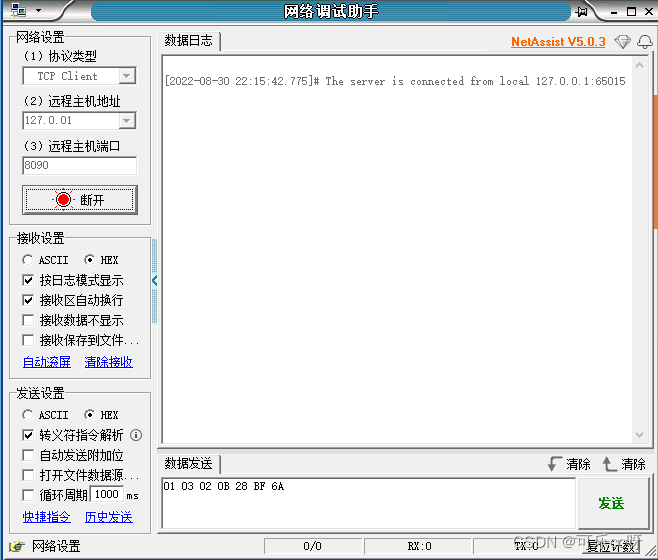

发送报文
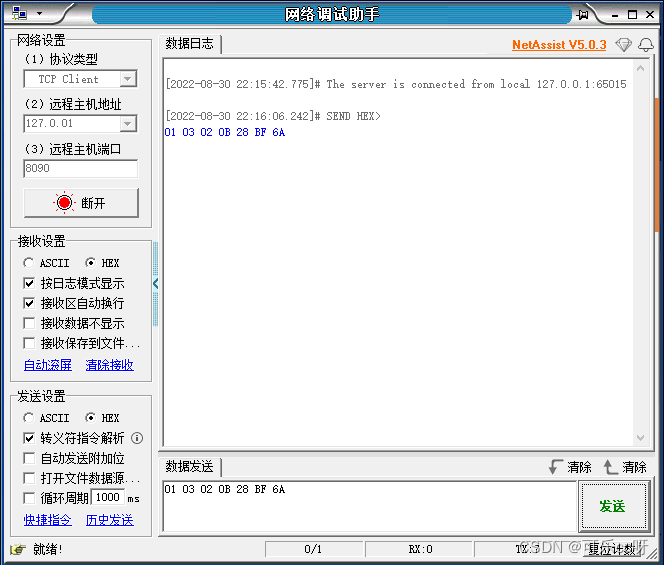

定时发送报文

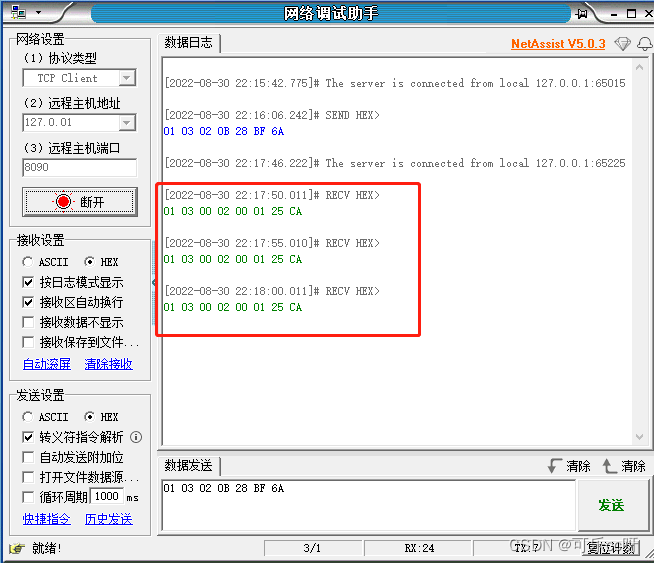
我们有了方向,才有了思路,就会有具体落地。
如果对netty还有不太明白的地方,可以看看我的后续博客,持续更新中。
我在开发的Rails3网站的一些搜索功能上遇到了一个小问题。我有一个简单的Post模型,如下所示:classPost我正在使用acts_as_taggable_on来更轻松地向我的帖子添加标签。当我有一个标记为“rails”的帖子并执行以下操作时,一切正常:@posts=Post.tagged_with("rails")问题是,我还想搜索帖子的标题。当我有一篇标题为“Helloworld”并标记为“rails”的帖子时,我希望能够通过搜索“hello”或“rails”来找到这篇帖子。因此,我希望标题列的LIKE语句与acts_as_taggable_on提供的tagged_with方法
很难说出这里要问什么。这个问题模棱两可、含糊不清、不完整、过于宽泛或夸夸其谈,无法以目前的形式得到合理的回答。如需帮助澄清此问题以便重新打开,visitthehelpcenter.关闭9年前。我需要从基于ruby的应用程序使用AmazonSimpleNotificationService,但不知道从哪里开始。您对从哪里开始有什么建议吗?
我有一个基本的Rails应用程序测试,其中包含一个用回形针处理的照片字段的用户模型。我创建了能够创建/编辑用户的View,并且照片上传工作正常。Editinguseruser_path(@user),:html=>{:method=>"put",:multipart=>true}do|f|%>|然后,我想将SWFUpload集成到我的应用程序中。我试着按照这个tutorial并运行testproject没有任何成功:浏览按钮不会打开文件对话框,并抛出错误#2176,这是关于selectFiles()方法的。首先,问题是Flashv.10与项目中包含的旧版本SWFUpload(2.1.0
我正在尝试使Authlogic和FacebookConnect(使用Facebook)发挥良好的作用,以便您可以通过正常注册方式或使用Facebookconnect创建帐户。我已经能够让连接以一种方式工作,但注销只会在facebook而不是我的网站上注销,我必须删除cookie才能使其正常工作。任何帮助都会很棒,谢谢! 最佳答案 这是我使用FacebookConnect扩展、authlogic和OpenID制作的示例应用程序。它仍然需要一些工作,但它确实起作用了。http://big-glow-mama.heroku.com/htt
如果您希望在Spring中启用定时任务功能,则需要在主类上添加 @EnableScheduling 注解。这样Spring才会扫描 @Scheduled 注解并执行定时任务。在大多数情况下,只需要在主类上添加 @EnableScheduling 注解即可,不需要在Service层或其他类中再次添加。以下是一个示例,演示如何在SpringBoot中启用定时任务功能:@SpringBootApplication@EnableSchedulingpublicclassApplication{publicstaticvoidmain(String[]args){SpringApplication.ru
TCP是面向连接的协议,连接的建立和释放是每一次面向连接的通信中必不可少的过程。TCP连接的管理就是使连接的建立和释放都能正常地进行。三次握手TCP连接的建立—三次握手建立TCP连接①若主机A中运行了一个客户进程,当它需要主机B的服务时,就发起TCP连接请求,并在所发送的分段中用SYN=1表示连接请求,并产生一个随机发送序号x,如果连接成功,A将以x作为其发送序号的初始值:seq=x。主机B收到A的连接请求报文,就完成了第一次握手。客户端发送SYN=1表示连接请求客户端发送一个随机发送序号x,如果连接成功,A将以x作为其发送序号的初始值:seq=x②主机B如果同意建立连接,则向主机A发送确认报
软件特点部署后能通过浏览器查看线上日志。支持Linux、Windows服务器。采用随机读取的方式,支持大文件的读取。支持实时打印新增的日志(类终端)。支持日志搜索。使用手册基本页面配置路径配置日志所在的目录,配置后按回车键生效,下拉框选择日志名称。选择日志后点击生效,即可加载日志。windows路径E:\java\project\log-view\logslinux路径/usr/local/XX历史模式历史模式下,不会读取新增的日志。针对历史文件可以分页读取,配置分页大小、跳转。历史模式下,支持根据关键词搜索。目前搜索引擎使用的是jdk自带类库,搜索速度相对较低,优点是比较简单。2G日志全文搜
1.依赖导入org.springframework.bootspring-boot-starter-weborg.springframework.bootspring-boot-starter-validation2.validation常用注解@Null被注释的元素必须为null@NotNull被注释的元素不能为null,可以为空字符串@AssertTrue被注释的元素必须为true@AssertFalse被注释的元素必须为false@Min(value)被注释的元素必须是一个数字,其值必须大于等于指定的最小值@Max(value)被注释的元素必须是一个数字,其值必须小于等于指定的最大值@D
Iparking停车收费管理系统-可商用介绍Iparking是一款基于springBoot的停车收费管理系统,支持封闭车场和路边车场,支持微信支付宝多种支付渠道,支持多种硬件,涵盖了停车场管理系统的所有基础功能。技术栈Springboot,MybatisPlus,Beetl,Mysql,Redis,RabbitMQ,UniApp功能云端功能序号模块功能描述1系统管理菜单管理配置系统菜单2系统管理组织管理管理组织机构3系统管理角色管理配置系统角色,包含数据权限和功能权限配置4系统管理用户管理管理后台用户5系统管理租户管理多租户管理6系统管理公众号配置租户公众号配置7系统管理操作日志审计日志8系统
亚马逊的documentation提供有关如何使用DynamoDBLocal的Java、.NET和PHP示例。你如何用AWSRubySDK做同样的事情??我的猜测是你在初始化时传入了一些参数,但我不知道它们是什么。dynamo_db=AWS::DynamoDB.new(:access_key_id=>'...',:secret_access_key=>'...') 最佳答案 您使用的是SDK的v1还是v2?您需要找出答案;从上面的简短片段来看,它看起来像v2。为了以防万一,我已经包含了这两个答案。v1答案:AWS.config(us
