什么是API限流:
API 限流是限制用户在一定时间内 API 请求数量的过程。应用程序编程接口 (API) 充当用户和软件应用程序之间的网关。例如,当用户单击社交媒体上的发布按钮时,点击该按钮会触发 API 调用。此 API 与社交媒体应用程序的网络服务器进行交互,并执行发布操作。此用户可以是人,也可以是其他软件应用程序。
为什么要限流:
API 是组织最大的资产之一。API 可帮助网站或移动应用程序的用户完成任务。随着用户数量的增加,网站或移动应用程序开始出现性能下降的迹象。因此,拥有更好连接或更快界面的用户可能会获得比其他用户更好的体验。API 限流是一种巧妙的解决方案,可帮助组织确保其 API 的合理使用。
API 限流还有助于抵御拒绝服务 (DoS) 攻击,在 DoS 攻击中,恶意用户发送大量请求以使网站或移动应用程序崩溃。随着在线用户数量的增加,企业需要实施 API 限流机制,以确保公平使用、数据安全并防止恶意攻击。
API限流的原理:
虽然 API 限流有多种算法,但以下是所有 API 限流算法的基本步骤:
1.客户端/用户调用与网络服务或应用程序交互的 API。
2.API 限流逻辑会检查当前请求是否超过允许的 API 调用次数。
3.如果请求在限制范围内,API 将照常执行并完成用户的任务。
4.如果请求超出限制,API 会向用户返回错误响应。
5.用户必须等待预先约定的时间段,或者付费才能进行更多的 API 调用。
这里有篇文章介绍很全面,可以看一看《API 限流技术探索与实践》
这个限流方案也是在百度收集整理而来,我这里采取的是滑动算法:
我们需要准备几个类:
1.ApiAuthorize类
ApiAuthorize继承于IAuthorizationFilter(授权过滤器),和IAuthorizationFilter相同的还有其他三种过滤器,合起来称为四大过滤器,
另外三个分别是IResourceFilter资源过滤器(缓存接口的数据),IActionFilter动作过滤器(记录操作日志),IExceptionFilter(错误过滤器)
IAuthorizationFilter
public class CtmAuthorizationFilterAttribute : Attribute, IAuthorizationFilter
{
     public void OnAuthorization(AuthorizationFilterContext context)
     {
         // context.HttpContext.User.Claims
         context.HttpContext.Items["User"] = "HuangMing";
         System.Console.WriteLine("OnAuthorization");
     }
}IResourceFilter
//Program.cs中注册缓存:
builder.Services.AddSingleton<IMemoryCache,MemoryCache>();
builder.Services.AddSingleton<IDistributedCache, MemoryDistributedCache>();
var app = builder.Build();


public class CtmResourceFilterAttribute : Attribute, IResourceFilter
{
    private readonly IMemoryCache _cache;

    public CtmResourceFilterAttribute(IMemoryCache cache)
    {
        this._cache = cache;
    }

    public void OnResourceExecuted(ResourceExecutedContext context)
    {
        var path = context.HttpContext.Request.Path.ToString();
        if (context.Result != null)
        {
            var value =  (context.Result as ObjectResult).Value.ToString();
            _cache.Set(path, value,TimeSpan.FromHours(1));
        }
    }

    public void OnResourceExecuting(ResourceExecutingContext context)
    {
        var path = context.HttpContext.Request.Path.ToString();
        var hasValue = _cache.TryGetValue(path, out object value);
        if (hasValue)
        {
            context.Result = new ContentResult
            {
                Content = value.ToString()
            };
        }
    }
}IActionFilter
public class CtmActionFilterAttribute : Attribute, IActionFilter
{
    public void OnActionExecuted(ActionExecutedContext context)
    {
    }

    public void OnActionExecuting(ActionExecutingContext context)
    {
        //从serviceProvider中获取Logger服务
        var logger =  context.HttpContext.RequestServices.GetService<ILogger<CtmActionFilterAttribute>>();
        //获取路由地址
        var path = context.HttpContext.Request.Path;
        //从RouteData字典中获取控制器名称
        var controller = context.RouteData.Values["controller"];
        //从RouteData字典中获取动作名称
        var action = context.RouteData.Values["action"];
        //从ActionArguments中获取接口参数
        var arguments = string.Join(",", context.ActionArguments);
        logger.LogInformation($"访问的路由:{path},控制器是{controller},行为是{action},参数是{arguments}");
    }
}

//当过滤器中需要使用依赖注入时,在使用属性标注时,需要使用如下方式:
1.属性标注
[TypeFilter(typeof(CtmActionFilterAttribute))]

2.从容器中获取服务
var logger = context.HttpContext.RequestServices.GetService<ILogger<CtmActionFilterAttribute>>();IActionFilter
public class CtmExceptionFilterAttribute : Attribute, IExceptionFilter
{
    public void OnException(ExceptionContext context)
    {
        context.Result = new ContentResult{
            Content =context.Exception.Message
        };
    }
}现在编写自己的项目代码
ApiAuthorize
public class ApiAuthorize : IAuthorizationFilter
    {
        public async void OnAuthorization(AuthorizationFilterContext context)
         {
            if (context.Filters.Contains(new MyNoAuthentication()))
            {
                return;
            }


            #region 用户请求限流
            {
                string ip = context.HttpContext.Connection.RemoteIpAddress.ToString();
                var cotrollaction = context.ActionDescriptor;
                string action = cotrollaction.RouteValues["action"].ToString();
                string controller = cotrollaction.RouteValues["controller"].ToString();
                if (string.IsNullOrWhiteSpace(ip) || string.IsNullOrWhiteSpace(controller) || string.IsNullOrWhiteSpace(action))
                {
                    context.Result = new JsonResult("系统正忙,请稍微再试!");
                    return;
                }
                ip = ip + ":" + controller + ":" + action;
                IPCacheInfoModel ipModel = IPCacheHelper.GetIPLimitInfo(ip);
                if (!ipModel.IsVisit)
                {
                    context.Result = new JsonResult("系统正忙,请稍微再试!");
                    return;
                }
                string ACting = controller + ":" + action;
                IPCacheInfoModel ipModel2 = IPCacheHelper.GetIPLimitInfo(ACting);


            }
            #endregion


            #endregion
        }

}然后编写 MyAuthentication类
MyAuthentication
/// <summary>
/// 构造引用
/// </summary>
    public class MyAuthentication : Attribute, IFilterMetadata
    {
    }
    public class MyNoAuthentication : Attribute, IFilterMetadata
    {
}以上两个可以做限流也能做鉴权,数据签名认证等
如果需要限流,我们还需要三个类:
IPActionFilterAttribute 信息返回类
using System;
using System.Collections.Generic;
using System.Net;
using System.Net.Http;
using System.Threading.Tasks;
using System.Web.Http.Controllers;
using System.Web.Http.Filters;

namespace EvaluationSystem.XLAction
{
    /// <summary>
    /// 限制单个IP短时间内访问次数
    /// </summary>
    [AttributeUsage(AttributeTargets.Class | AttributeTargets.Method, AllowMultiple = false)]
    public class IPActionFilterAttribute : ActionFilterAttribute
    {
        /// <summary>
        /// 限制单个IP短时间内访问次数
        /// </summary>
        /// <param name="actionContext"></param>
        public override void OnActionExecuting(HttpActionContext actionContext)
        {
            string ip = actionContext.Request.ToString();
            IPCacheInfoModel ipModel = IPCacheHelper.GetIPLimitInfo(ip);
            if (!ipModel.IsVisit)
            {
                // Logger.Warn(string.Format("IP【{0}】被限制了【{1}】次数", ipModel.IP, ipModel.Limit));
                actionContext.Response = actionContext.Request.CreateResponse(HttpStatusCode.BadRequest, "系统正忙,请稍微再试。");
                return;
            }
            base.OnActionExecuting(actionContext);
        }

    }
}IPCacheHelper 请求记录类
using EvaluationSystem.HelpTool;
using EvaluationSystem.HelpTool.GetSYSValue;
using System;
using System.Collections.Generic;

namespace EvaluationSystem.XLAction
{
    /// <summary>
    /// 限制单个IP访问次数
    /// </summary>
    public class IPCacheHelper
    {
        /// <summary>
        /// IP缓存集合
        /// </summary>
        private static List<IPCacheInfoModel> dataList = new List<IPCacheInfoModel>();

        private static object lockObj = new object();
        //SQLHelp ht = new SQLHelp();
        public static string  maxTimes1 = GetConfig.GetConfiguration("XLAction:maxTimes");
        public static string partSecond1 = GetConfig.GetConfiguration("XLAction:partSecond");

        /// <summary>
        /// 一段时间内,最大请求次数,必须大于等于1
        ///</summary>
        private static int maxTimes = Convert.ToInt32(string.IsNullOrWhiteSpace(maxTimes1)? "0":maxTimes1);

        /// <summary>
        /// 一段时间长度(单位秒),必须大于等于1
        /// </summary>
        private static int partSecond = Convert.ToInt32(string.IsNullOrWhiteSpace(partSecond1) ? "0" : partSecond1);

        /// <summary>
        /// 请求被拒绝是否加入请求次数
        /// </summary>
        private static bool isFailAddIn = false;

        static IPCacheHelper()
        {

        }
        /// <summary>
        /// 设置时间,默认maxTimes=3, partSecond=30
        /// </summary>
        /// <param name="_maxTimes">最大请求次数</param>
        /// <param name="_partSecond">请求单位时间</param>
        public static void SetTime(int _maxTimes, int _partSecond)
        {
            maxTimes = _maxTimes;
            partSecond = _partSecond;
        }

        /// <summary>
        /// 检测一段时间内,IP的请求次数是否可以继续请求和使用
        /// </summary>
        /// <param name="ip">ip</param>
        /// <returns></returns>
        public static bool CheckIsAble(string ip)
        {
            lock (lockObj)
            {
                var item = dataList.Find(p => p.IP == ip);
                if (item == null)
                {
                    item = new IPCacheInfoModel();
                    item.IP = ip;
                    item.ReqTime.Add(DateTime.Now);
                    dataList.Add(item);
                    return true;
                }
                else
                {
                    if (item.ReqTime.Count > maxTimes)
                    {
                        item.ReqTime.RemoveAt(0);
                    }
                    var nowTime = DateTime.Now;
                    if (isFailAddIn)
                    {
                        #region 请求被拒绝也需要加入当次请求
                        item.ReqTime.Add(nowTime);
                        if (item.ReqTime.Count >= maxTimes)
                        {
                            if (item.ReqTime[0].AddSeconds(partSecond) > nowTime)
                            {
                                return false;
                            }
                            else
                            {
                                return true;
                            }
                        }
                        else
                        {
                            return true;
                        }
                        #endregion
                    }
                    else
                    {
                        #region 请求被拒绝就不需要加入当次请求了
                        if (item.ReqTime.Count >= maxTimes)
                        {
                            if (item.ReqTime[0].AddSeconds(partSecond) > nowTime)
                            {
                                return false;
                            }
                            else
                            {
                                item.ReqTime.Add(nowTime);
                                return true;
                            }
                        }
                        else
                        {
                            item.ReqTime.Add(nowTime);
                            return true;
                        }
                        #endregion
                    }
                }
            }
        }


        /// <summary>
        /// 检测一段时间内,IP的请求次数是否可以继续请求和使用
        /// </summary>
        /// <param name="ip">ip</param>
        /// <returns></returns>
        public static IPCacheInfoModel GetIPLimitInfo(string ip)
        {
            lock (lockObj)
            {
                var item = dataList.Find(p => p.IP == ip);
                if (item == null) //IP开始访问
                {
                    item = new IPCacheInfoModel();
                    item.IP = ip;
                    item.ReqTime.Add(DateTime.Now);
                    dataList.Add(item);
                    item.IsVisit = true; //可以继续访问

                    return item;
                }
                else
                {
                    if (item.ReqTime.Count > maxTimes)
                    {
                        item.ReqTime.RemoveAt(0);
                    }
                    var nowTime = DateTime.Now;
                    if (isFailAddIn)
                    {
                        #region 请求被拒绝也需要加入当次请求
                        item.ReqTime.Add(nowTime);

                        if (item.ReqTime.Count >= maxTimes)
                        {
                            if (item.ReqTime[0].AddSeconds(partSecond) > nowTime)
                            {
                                item.Limit++; //限制次数+1
                                item.IsVisit = false;//不能继续访问
                                return item;
                            }
                            else
                            {
                                item.IsVisit = true; //可以继续访问
                                return item; //单个IP30秒内 没有多次访问
                            }
                        }
                        else
                        {
                            item.IsVisit = true; //可以继续访问
                            return item; //单个IP访问次数没有达到max次数
                        }
                        #endregion
                    }
                    else
                    {
                        #region 请求被拒绝就不需要加入当次请求了
                        if (item.ReqTime.Count >= maxTimes)
                        {
                            if (item.ReqTime[0].AddSeconds(partSecond) > nowTime)
                            {
                                item.Limit++; //限制次数+1
                                item.IsVisit = false;//不能继续访问

                                return item;
                            }
                            else
                            {
                                item.ReqTime.Add(nowTime);

                                item.IsVisit = true; //可以继续访问
                                return item;
                            }
                        }
                        else
                        {
                            item.ReqTime.Add(nowTime);
                            item.IsVisit = true; //可以继续访问

                            return item;
                        }
                        #endregion
                    }
                }
            }
        }
    }
}IPCacheInfoModel 实体类
using System;
using System.Collections.Generic;

namespace EvaluationSystem.XLAction
{
    public class IPCacheInfoModel
    {
        /// <summary>
        /// IP
        /// </summary>
        public string IP { get; set; }

        /// <summary>
        /// 限制次数
        /// </summary>
        public int Limit { get; set; }

        /// <summary>
        /// 是否可以访问
        /// </summary>
        public bool IsVisit { get; set; }

        /// <summary>
        /// 访问时间
        /// </summary>
        private List<DateTime> reqTime = new List<DateTime>();

        /// <summary>
        /// 访问时间
        /// </summary>
        public List<DateTime> ReqTime
        {
            get { return this.reqTime; }
            set { this.reqTime = value; }
        }
    }
}时间按秒算
private static int maxTimes ;
请求次数
private static int partSecond ;
为了方便控制,不去修改我们的API程序,可以将这两个信息配置进appsettings.json文件里面
"XLAction": {//请求限流 秒钟一次
"maxTimes": "1",
"partSecond": "1"
}
为了获取appsettings.json来买你的信息,我们需要一个方法拿到json里面的信息
GetConfiguration
    public class GetConfig
    {
        public static string GetConfiguration(string configKey)
        {
            var builder = new ConfigurationBuilder()
                .SetBasePath(Directory.GetCurrentDirectory())
                .AddJsonFile("appsettings.json");
            var config = builder.Build();
            if (configKey.Contains(":"))
            {
                return config.GetSection(configKey).Value;//获取分级参数值
            }
            else
            {
                return config[configKey];//获取直级参数值
            }
            //youdianwenti w xiangxiang
        }
}以上工作准备完全后,在我们的Startup里面修改加入以下代码
如果有ConfigureServices类,添加如下
//注册guolv
services.AddControllers(o =>
{
o.Filters.Add<ApiAuthorize>();
o.Filters.Add<MyAuthentication>();
//o.Filters.Add(typeof(BasicAuthAttribute));
//services.AddJwtEx();//这里就是注入JWT
});
如果不是 如下添加
builder.Services.AddMvc(options => options.Filters.Add(new AuthorizeFilter()));
//注册guolv
builder.Services.AddControllers(o =>
{
o.Filters.Add<ApiAuthorize>();
o.Filters.Add<MyAuthentication>();
});
然后就大功告成
现在直接看结果
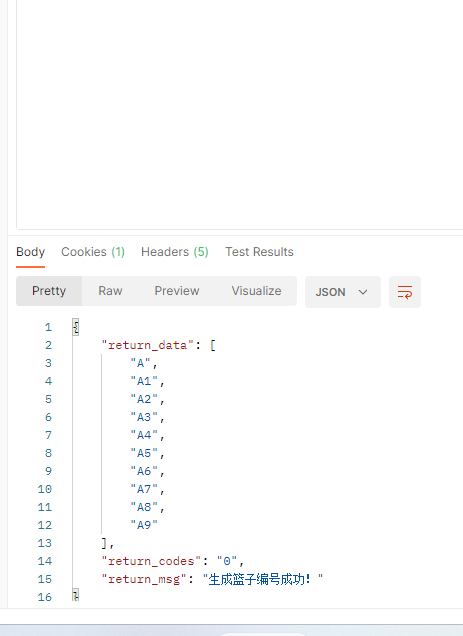
接着频繁操作
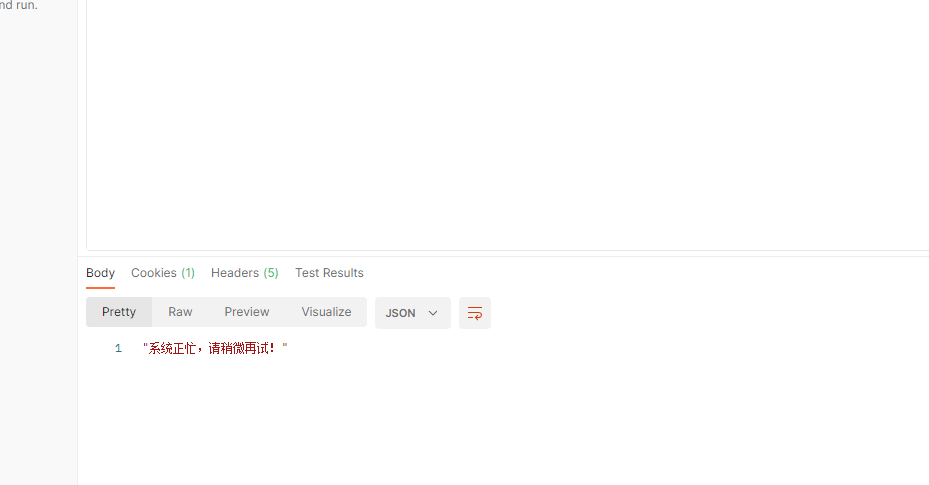
该方案来自网络加以修改,如有侵权,请联系删除
使用带有Rails插件的vim,您可以创建一个迁移文件,然后一次性打开该文件吗?textmate也可以这样吗? 最佳答案 你可以使用rails.vim然后做类似的事情::Rgeneratemigratonadd_foo_to_bar插件将打开迁移生成的文件,这正是您想要的。我不能代表textmate。 关于ruby-使用VimRails,您可以创建一个新的迁移文件并一次性打开它吗?,我们在StackOverflow上找到一个类似的问题: https://sta
我需要从一个View访问多个模型。以前,我的links_controller仅用于提供以不同方式排序的链接资源。现在我想包括一个部分(我假设)显示按分数排序的顶级用户(@users=User.all.sort_by(&:score))我知道我可以将此代码插入每个链接操作并从View访问它,但这似乎不是“ruby方式”,我将需要在不久的将来访问更多模型。这可能会变得很脏,是否有针对这种情况的任何技术?注意事项:我认为我的应用程序正朝着单一格式和动态页面内容的方向发展,本质上是一个典型的网络应用程序。我知道before_filter但考虑到我希望应用程序进入的方向,这似乎很麻烦。最终从任何
我想要做的是有2个不同的Controller,client和test_client。客户端Controller已经构建,我想创建一个test_clientController,我可以使用它来玩弄客户端的UI并根据需要进行调整。我主要是想绕过我在客户端中内置的验证及其对加载数据的管理Controller的依赖。所以我希望test_clientController加载示例数据集,然后呈现客户端Controller的索引View,以便我可以调整客户端UI。就是这样。我在test_clients索引方法中试过这个:classTestClientdefindexrender:template=>
在MRIRuby中我可以这样做:deftransferinternal_server=self.init_serverpid=forkdointernal_server.runend#Maketheserverprocessrunindependently.Process.detach(pid)internal_client=self.init_client#Dootherstuffwithconnectingtointernal_server...internal_client.post('somedata')ensure#KillserverProcess.kill('KILL',
如果您尝试在Ruby中的nil对象上调用方法,则会出现NoMethodError异常并显示消息:"undefinedmethod‘...’fornil:NilClass"然而,有一个tryRails中的方法,如果它被发送到一个nil对象,它只返回nil:require'rubygems'require'active_support/all'nil.try(:nonexisting_method)#noNoMethodErrorexceptionanymore那么try如何在内部工作以防止该异常? 最佳答案 像Ruby中的所有其他对象
关闭。这个问题需要detailsorclarity.它目前不接受答案。想改进这个问题吗?通过editingthispost添加细节并澄清问题.关闭8年前。Improvethisquestion为什么SecureRandom.uuid创建一个唯一的字符串?SecureRandom.uuid#=>"35cb4e30-54e1-49f9-b5ce-4134799eb2c0"SecureRandom.uuid方法创建的字符串从不重复?
我有一个正在构建的应用程序,我需要一个模型来创建另一个模型的实例。我希望每辆车都有4个轮胎。汽车模型classCar轮胎模型classTire但是,在make_tires内部有一个错误,如果我为Tire尝试它,则没有用于创建或新建的activerecord方法。当我检查轮胎时,它没有这些方法。我该如何补救?错误是这样的:未定义的方法'create'forActiveRecord::AttributeMethods::Serialization::Tire::Module我测试了两个环境:测试和开发,它们都因相同的错误而失败。 最佳答案
我想在Ruby中创建一个用于开发目的的极其简单的Web服务器(不,不想使用现成的解决方案)。代码如下:#!/usr/bin/rubyrequire'socket'server=TCPServer.new('127.0.0.1',8080)whileconnection=server.acceptheaders=[]length=0whileline=connection.getsheaders想法是从命令行运行这个脚本,提供另一个脚本,它将在其标准输入上获取请求,并在其标准输出上返回完整的响应。到目前为止一切顺利,但事实证明这真的很脆弱,因为它在第二个请求上中断并出现错误:/usr/b
我想让一个yaml对象引用另一个,如下所示:intro:"Hello,dearuser."registration:$introThanksforregistering!new_message:$introYouhaveanewmessage!上面的语法只是它如何工作的一个例子(这也是它在thiscpanmodule中的工作方式。)我正在使用标准的rubyyaml解析器。这可能吗? 最佳答案 一些yaml对象确实引用了其他对象:irb>require'yaml'#=>trueirb>str="hello"#=>"hello"ir
我的问题的一个例子是体育游戏。一场体育比赛有两支球队,一支主队和一支客队。我的事件记录模型如下:classTeam"Team"has_one:away_team,:class_name=>"Team"end我希望能够通过游戏访问一个团队,例如:Game.find(1).home_team但我收到一个单元化常量错误:Game::team。谁能告诉我我做错了什么?谢谢, 最佳答案 如果Gamehas_one:team那么Rails假设您的teams表有一个game_id列。不过,您想要的是games表有一个team_id列,在这种情况下
