目录
HikariCP: https://github.com/brettwooldridge/HikariCP
	<bean id="hikariConfig" class="com.zaxxer.hikari.HikariConfig">

		<property name="driverClassName" value="${db.driverClassName}" />
		<property name="jdbcUrl" value="${db.url}" />
		<property name="username" value="${db.username}" />
		<property name="password" value="${db.password}" />
		<property name="connectionTimeout" value="${db.connectionTimeout}" />
		<property name="readOnly" value="${db.readOnly}" />
		<property name="maxLifetime" value="${db.maxLifetime}" />
		<property name="maximumPoolSize" value="${db.maximumPoolSize}" />
		<property name="idleTimeout" value="${db.idleTimeout}" />
		<property name="poolName" value="${db.poolName}" />
		<property name="connectionTestQuery" value="${db.connectionTestQuery}" />


		<property name="dataSourceProperties">
			<props>
				<prop key="cachePrepStmts">${db.cachePrepStmts}</prop>
				<prop key="prepStmtCacheSize">${db.prepStmtCacheSize}</prop>
				<prop key="prepStmtCacheSqlLimit">${db.prepStmtCacheSqlLimit}</prop>
				<prop key="useServerPrepStmts">${db.useServerPrepStmts}</prop>
				<prop key="useLocalSessionState">${db.useLocalSessionState}</prop>
				<prop key="useLocalTransactionState">${db.useLocalTransactionState}</prop>
				<prop key="rewriteBatchedStatements">${db.rewriteBatchedStatements}</prop>
				<prop key="cacheResultSetMetadata">${db.cacheResultSetMetadata}</prop>
				<prop key="cacheServerConfiguration">${db.cacheServerConfiguration}</prop>
				<prop key="elideSetAutoCommits">${db.elideSetAutoCommits}</prop>
				<prop key="maintainTimeStats">${db.maintainTimeStats}</prop>
			</props>
		</property>
	</bean>
https://github.com/brettwooldridge/HikariCP/wiki/About-Pool-Sizing
Configuring a connection pool is something that developers often get wrong. There are several, possibly counter-intuitive for some, principles that need to be understood when configuring the pool.

10,000 Simultaneous Front-End Users
Imagine that you have a website that while maybe not Facebook-scale still often has 10,000 users making database requests simultaneously -- accounting for some 20,000 transactions per second. How big should your connection pool be? You might be surprised that the question is not how big but rather how small!

Watch this short video from the Oracle Real-World Performance group for an eye-opening demonstration (~10 min.):


{Spoiler Alert} if you didn't watch the video. Oh come on! Watch it then come back here.

You can see from the video that reducing the connection pool size alone, in the absence of any other change, decreased the response times of the application from ~100ms to ~2ms -- over 50x improvement.

But why?
We seem to have understood in other parts of computing recently that less is more. Why is it that with only 4-threads an nginx web-server can substantially out-perform an Apache web-server with 100 processes? Isn't it obvious if you think back to Computer Science 101?

Even a computer with one CPU core can "simultaneously" support dozens or hundreds of threads. But we all [should] know that this is merely a trick by the operating system though the magic of time-slicing. In reality, that single core can only execute one thread at a time; then the OS switches contexts and that core executes code for another thread, and so on. It is a basic Law of Computing that given a single CPU resource, executing A and B sequentially will always be faster than executing A and B "simultaneously" through time-slicing. Once the number of threads exceeds the number of CPU cores, you're going slower by adding more threads, not faster.

That is almost true...

Limited Resources
It is not quite as simple as stated above, but it's close. There are a few other factors at play. When we look at what the major bottlenecks for a database are, they can be summarized as three basic categories: CPU, Disk, Network. We could add Memory in there, but compared to Disk and Network there are several orders of magnitude difference in bandwidth.

If we ignored Disk and Network it would be simple. On a server with 8 computing cores, setting the number of connections to 8 would provide optimal performance, and anything beyond this would start slowing down due to the overhead of context switching. But we cannot ignore Disk and Network. Databases typically store data on a Disk, which traditionally is comprised of spinning plates of metal with read/write heads mounted on a stepper-motor driven arm. The read/write heads can only be in one place at a time (reading/writing data for a single query) and must "seek" to a new location to read/write data for a different query. So there is a seek-time cost, and also a rotational cost whereby the disk has to wait for the data to "come around again" on the platter to be read/written. Caching of course helps here, but the principle still applies.

During this time ("I/O wait"), the connection/query/thread is simply "blocked" waiting for the disk. And it is during this time that the OS could put that CPU resource to better use by executing some more code for another thread. So, because threads become blocked on I/O, we can actually get more work done by having a number of connections/threads that is greater than the number of physical computing cores.

How many more? We shall see. The question of how many more also depends on the disk subsystem, because newer SSD drives do not have a "seek time" cost or rotational factors to deal with. Don't be tricked into thinking, "SSDs are faster and therefore I can have more threads". That is exactly 180 degrees backwards. Faster, no seeks, no rotational delays means less blocking and therefore fewer threads [closer to core count] will perform better than more threads. More threads only perform better when blocking creates opportunities for executing.

Network is similar to disk. Writing data out over the wire, through the ethernet interface, can also introduce blocking when the send/receive buffers fill up and stall. A 10-Gig interface is going to stall less than Gigabit ethernet, which will stall less than a 100-megabit. But network is a 3rd place runner in terms of resource blocking and some people often omit it from their calculations.

Here's another chart to break up the wall of text.
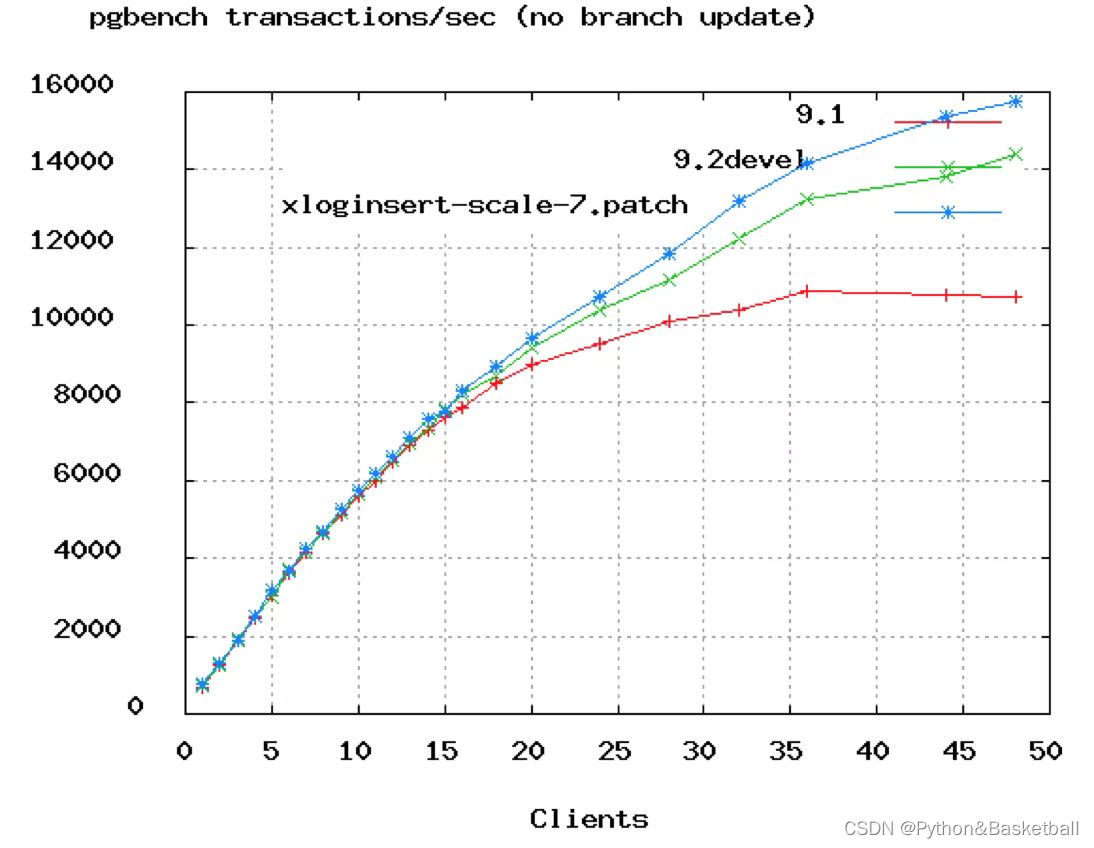
You can see in the above PostgreSQL benchmark that TPS rates start to flatten out at around 50 connections. And in Oracle's video above they showed dropping the connections from 2048 down to just 96. We would say that even 96 is probably too high, unless you're looking at a 16 or 32-core box.

The Formula
The formula below is provided by the PostgreSQL project as a starting point, but we believe it will be largely applicable across databases. You should test your application, i.e. simulate expected load, and try different pool settings around this starting point:

connections = ((core_count * 2) + effective_spindle_count)
A formula which has held up pretty well across a lot of benchmarks for years is
that for optimal throughput the number of active connections should be somewhere
near ((core_count * 2) + effective_spindle_count). Core count should not include
HT threads, even if hyperthreading is enabled. Effective spindle count is zero if
the active data set is fully cached, and approaches the actual number of spindles
as the cache hit rate falls. ... There hasn't been any analysis so far regarding
how well the formula works with SSDs.
Guess what that means? Your little 4-Core i7 server with one hard disk should be running a connection pool of: 9 = ((4 * 2) + 1). Call it 10 as a nice round number. Seem low? Give it a try, we'd wager that you could easily handle 3000 front-end users running simple queries at 6000 TPS on such a setup. If you run load tests, you will probably see TPS rates starting to fall, and front-end response times starting to climb, as you push the connection pool much past 10 (on that given hardware).

Axiom: You want a small pool, saturated with threads waiting for connections.
If you have 10,000 front-end users, having a connection pool of 10,000 would be shear insanity. 1000 still horrible. Even 100 connections, overkill. You want a small pool of a few dozen connections at most, and you want the rest of the application threads blocked on the pool awaiting connections. If the pool is properly tuned it is set right at the limit of the number of queries the database is capable of processing simultaneously -- which is rarely much more than (CPU cores * 2) as noted above.

We never cease to amaze at the in-house web applications we've encountered, with a few dozen front-end users performing periodic activity, and a connection pool of 100 connections. Don't over-provision your database.

"Pool-locking"
The prospect of "pool-locking" has been raised with respect to single actors that acquire many connections. This is largely an application-level issue. Yes, increasing the pool size can alleviate lockups in these scenarios, but we would urge you to examine first what can be done at the application level before enlarging the pool.

The calculation of pool size in order to avoid deadlock is a fairly simple resource allocation formula:

   pool size = Tn x (Cm - 1) + 1

Where Tn is the maximum number of threads, and Cm is the maximum number of simultaneous connections held by a single thread.

For example, imagine three threads (Tn=3), each of which requires four connections to perform some task (Cm=4). The pool size required to ensure that deadlock is never possible is:

   pool size = 3 x (4 - 1) + 1 = 10

Another example, you have a maximum of eight threads (Tn=8), each of which requires three connections to perform some task (Cm=3). The pool size required to ensure that deadlock is never possible is:

   pool size = 8 x (3 - 1) + 1 = 17

👉 This is not necessarily the optimal pool size, but the minimum required to avoid deadlock.

👉 In some environments, using a JTA (Java Transaction Manager) can dramatically reduce the number of connections required by returning the same Connection from getConnection() to a thread that is already holding a Connection in the current transaction.
这个就不翻译了,大家应该能看懂,其实不需要很大的链接数
<bean id="dataSource" class="com.zaxxer.hikari.HikariDataSource" destroy-method="close">
    <constructor-arg ref="hikariConfig" />
</bean>
HikariCP配置数据库信息
<bean class="org.springframework.beans.factory.config.PropertyPlaceholderConfigurer">
    <property name="locations">
        <list>
            <value>classpath:hibernate.properties</value>
        </list>
    </property>
</bean>
配套软件版本:
Obs.: the versions are
log4j: 1.2.16
springframework: 3.1.4.RELEASE
HikariCP: 1.4.0
Properties file (hibernate.properties):
hibernate.dataSourceClassName=oracle.jdbc.pool.OracleDataSource
hibernate.hikari.maximumPoolSize=10
hibernate.hikari.idleTimeout=30000
dataSource.url=jdbc:oracle:thin:@localhost:1521:xe
dataSource.username=admin
dataSource.password=
参照:https://stackoverflow.com/questions/23172643/how-to-set-up-datasource-with-spring-for-hikaricp
我有一个在Linux服务器上运行的ruby脚本。它不使用rails或任何东西。它基本上是一个命令行ruby脚本,可以像这样传递参数:./ruby_script.rbarg1arg2如何将参数抽象到配置文件(例如yaml文件或其他文件)中?您能否举例说明如何做到这一点?提前谢谢你。 最佳答案 首先,您可以运行一个写入YAML配置文件的独立脚本:require"yaml"File.write("path_to_yaml_file",[arg1,arg2].to_yaml)然后,在您的应用中阅读它:require"yaml"arg
我正在使用Ruby2.1.1和Rails4.1.0.rc1。当执行railsc时,它被锁定了。使用Ctrl-C停止,我得到以下错误日志:~/.rvm/gems/ruby-2.1.1/gems/spring-1.1.2/lib/spring/client/run.rb:47:in`gets':Interruptfrom~/.rvm/gems/ruby-2.1.1/gems/spring-1.1.2/lib/spring/client/run.rb:47:in`verify_server_version'from~/.rvm/gems/ruby-2.1.1/gems/spring-1.1.
我已经在Sinatra上创建了应用程序,它代表了一个简单的API。我想在生产和开发上进行部署。我想在部署时选择,是开发还是生产,一些方法的逻辑应该改变,这取决于部署类型。是否有任何想法,如何完成以及解决此问题的一些示例。例子:我有代码get'/api/test'doreturn"Itisdev"end但是在部署到生产环境之后我想在运行/api/test之后看到ItisPROD如何实现? 最佳答案 根据SinatraDocumentation:EnvironmentscanbesetthroughtheRACK_ENVenvironm
之前在培训新生的时候,windows环境下配置opencv环境一直教的都是网上主流的vsstudio配置属性表,但是这个似乎对新生来说难度略高(虽然个人觉得完全是他们自己的问题),加之暑假之后对cmake实在是爱不释手,且这样配置确实十分简单(其实都不需要配置),故斗胆妄言vscode下配置CV之法。其实极为简单,图比较多所以很长。如果你看此文还配不好,你应该思考一下是不是自己的问题。闲话少说,直接开始。0.CMkae简介有的人到大二了都不知道cmake是什么,我不说是谁。CMake是一个开源免费并且跨平台的构建工具,可以用简单的语句来描述所有平台的编译过程。它能够根据当前所在平台输出对应的m
注意:本文主要掌握DCN自研无线产品的基本配置方法和注意事项,能够进行一般的项目实施、调试与运维AP基本配置命令AP登录用户名和密码均为:adminAP默认IP地址为:192.168.1.10AP默认情况下DHCP开启AP静态地址配置:setmanagementstatic-ip192.168.10.1AP开启/关闭DHCP功能:setmanagementdhcp-statusup/downAP设置默认网关:setstatic-ip-routegeteway192.168.10.254查看AP基本信息:getsystemgetmanagementgetmanaged-apgetrouteAP配
1.1.1 YARN的介绍 为克服Hadoop1.0中HDFS和MapReduce存在的各种问题⽽提出的,针对Hadoop1.0中的MapReduce在扩展性和多框架⽀持⽅⾯的不⾜,提出了全新的资源管理框架YARN. ApacheYARN(YetanotherResourceNegotiator的缩写)是Hadoop集群的资源管理系统,负责为计算程序提供服务器计算资源,相当于⼀个分布式的操作系统平台,⽽MapReduce等计算程序则相当于运⾏于操作系统之上的应⽤程序。 YARN被引⼊Hadoop2,最初是为了改善MapReduce的实现,但是因为具有⾜够的通⽤性,同样可以⽀持其他的分布式计算模
转自:spring.profiles.active和spring.profiles.include的使用及区别说明下文笔者讲述spring.profiles.active和spring.profiles.include的区别简介说明,如下所示我们都知道,在日常开发中,开发|测试|生产环境都拥有不同的配置信息如:jdbc地址、ip、端口等此时为了避免每次都修改全部信息,我们则可以采用以上的属性处理此类异常spring.profiles.active属性例:配置文件,可使用以下方式定义application-${profile}.properties开发环境配置文件:application-dev
我是ruby的新手,正在配置IRB。我喜欢pretty-print(需要'pp'),但总是输入pp来漂亮地打印它似乎很麻烦。我想做的是默认情况下让它漂亮地打印出来,所以如果我有一个var,比如说,'myvar',然后键入myvar,它会自动调用pretty_inspect而不是常规检查。我从哪里开始?理想情况下,我将能够向我的.irbrc文件添加一个自动调用的方法。有什么想法吗?谢谢! 最佳答案 irb中默认pretty-print对象正是hirb被迫去做。Theseposts解释hirb如何将几乎所有内容转换为ascii表。虽
我想在IRB中浏览文件系统并让提示更改以反射(reflect)当前工作目录,但我不知道如何在每个命令后进行提示更新。最终,我想在日常工作中更多地使用IRB,让bash溜走。我在我的.irbrc中试过这个:require'fileutils'includeFileUtilsIRB.conf[:PROMPT][:CUSTOM]={:PROMPT_N=>"\e[1m:\e[m",:PROMPT_I=>"\e[1m#{pwd}>\e[m",:PROMPT_S=>"FOO",:PROMPT_C=>"\e[1m#{pwd}>\e[m",:RETURN=>""}IRB.conf[:PROMPT_MO
我正在使用Ruby/Mechanize编写一个“自动填写表格”应用程序。它几乎可以工作。我可以使用精彩CharlesWeb代理以查看服务器和我的Firefox浏览器之间的交换。现在我想使用Charles查看服务器和我的应用程序之间的交换。Charles在端口8888上代理。假设服务器位于https://my.host.com。.一件不起作用的事情是:@agent||=Mechanize.newdo|agent|agent.set_proxy("my.host.com",8888)end这会导致Net::HTTP::Persistent::Error:...lib/net/http/pe
