目录
在之前的博文中,简单介绍了如何扩展Ruoyi的大附件上传及统一管理一篇,原文地址:基于Ruoyi和WebUploader的统一附件管理扩展(上)。之前的博文主要集中在前台的讲解,前台主要是围绕WebUploader组件来说明,对应的后台处理没有仔细讲解。本文作为下篇,主要围绕大附件上传的后台设计及实现,通过相关的UML建模,具体阐述后台是如何进行对应的处理。包括断点续传,文件重复判断等特殊功能的实例讲解。希望对你在项目中的使用有所启发。
定义数据实体的目的是为了可以在各业务中通用,提供统一的组件及封装,同时为了可以在文件处理时满足实时对文件是否重复上传做校验,因此有必要采用数据库的方式进行存储。当然,这里的数据存储未必要使用关系型数据库,使用非关系型数据库,比如MongoDB也是可以的。只需要达到我们的目的即可。
设计统一附件管理模块,不仅要统一文件上传的操作界面,同时要提供统一的API可以对附件进行检索,因而要将一个业务表的表名传递到附件表中。同时为了,防止一张业务表在不同状态下也可以拥有不同的附件,额外增加一个业务类型的字段。比如一个流程审核的业务,在流程新建阶段关联的附件和审批中关联的附件可以是不一样的。由此字段可以区分开,为了在文件上传过程中加速,也避免减少同一份文件反复上传到磁盘中,造成不必要的资源浪费,因此非常有必要对资源进行判重。关于文件判重,可以参考之前的博文:java文件上传判重姿势浅谈,这里有比较详细的说明。根据上述的需求,可以得到一个数据库物理表的表结构:
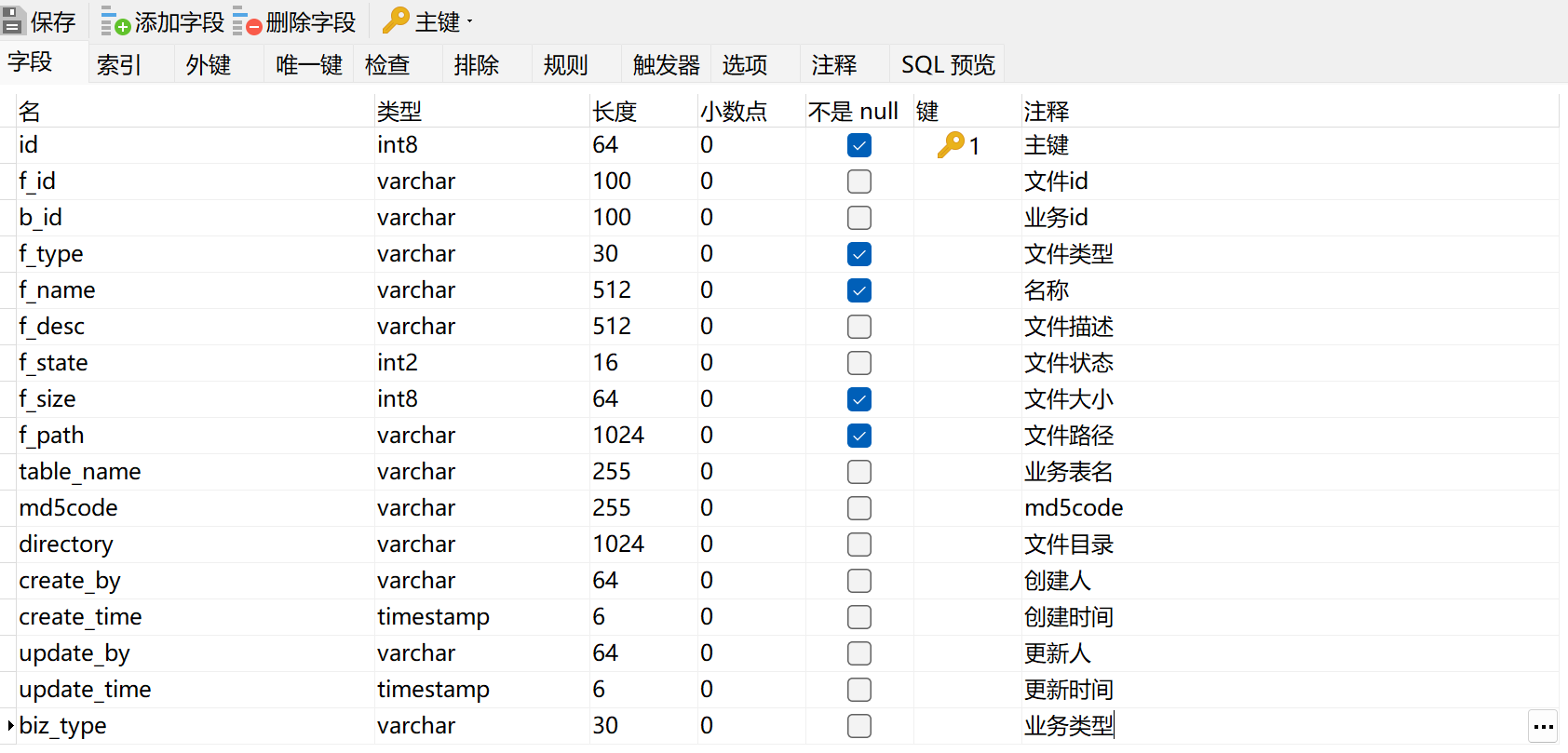
这是一份基于postgresql数据库的表结构,同理在mysql或者其它的数据库下,是一样的,只是数据类型需要稍微修改一下而已。这里将表结构对应的sql文件分享一下:
-- ----------------------------
-- Table structure for biz_file
-- ----------------------------
DROP TABLE IF EXISTS "biz_file";
CREATE TABLE "biz_file" (
  "id" int8 NOT NULL,
  "f_id" varchar(100)  ,
  "b_id" varchar(100)  ,
  "f_type" varchar(30)  NOT NULL,
  "f_name" varchar(512)  NOT NULL,
  "f_desc" varchar(512) ,
  "f_state" int2,
  "f_size" int8 NOT NULL,
  "f_path" varchar(1024)  NOT NULL,
  "table_name" varchar(255) ,
  "md5code" varchar(255) ,
  "directory" varchar(1024) ,
  "create_by" varchar(64) ,
  "create_time" timestamp(6),
  "update_by" varchar(64) ,
  "update_time" timestamp(6),
  "biz_type" varchar(30)
)
;
COMMENT ON COLUMN "biz_file"."id" IS '主键';
COMMENT ON COLUMN "biz_file"."f_id" IS '文件id';
COMMENT ON COLUMN "biz_file"."b_id" IS '业务id';
COMMENT ON COLUMN "biz_file"."f_type" IS '文件类型';
COMMENT ON COLUMN "biz_file"."f_name" IS '名称';
COMMENT ON COLUMN "biz_file"."f_desc" IS '文件描述';
COMMENT ON COLUMN "biz_file"."f_state" IS '文件状态';
COMMENT ON COLUMN "biz_file"."f_size" IS '文件大小';
COMMENT ON COLUMN "biz_file"."f_path" IS '文件路径';
COMMENT ON COLUMN "biz_file"."table_name" IS '业务表名';
COMMENT ON COLUMN "biz_file"."md5code" IS 'md5code';
COMMENT ON COLUMN "biz_file"."directory" IS '文件目录';
COMMENT ON COLUMN "biz_file"."create_by" IS '创建人';
COMMENT ON COLUMN "biz_file"."create_time" IS '创建时间';
COMMENT ON COLUMN "biz_file"."update_by" IS '更新人';
COMMENT ON COLUMN "biz_file"."update_time" IS '更新时间';
COMMENT ON COLUMN "biz_file"."biz_type" IS '业务类型';
COMMENT ON TABLE "biz_file" IS '系统附件信息表,用于保存文件上传信息';

-- ----------------------------
-- Primary Key structure for table biz_file
-- ----------------------------
ALTER TABLE "biz_file" ADD CONSTRAINT "pk_biz_file" PRIMARY KEY ("id");实体类主要用于定义跟数据库表相互映射的对象信息,使用sql语句来操作数据库信息。示例中的代码均需要配置lombok来简化相关类的开发工作量。
package com.hngtghy.project.webupload.domain;

import com.baomidou.mybatisplus.annotation.TableField;
import com.baomidou.mybatisplus.annotation.TableName;
import com.hngtghy.framework.web.domain.BaseEntity;

import lombok.AllArgsConstructor;
import lombok.Getter;
import lombok.NoArgsConstructor;
import lombok.Setter;
import lombok.ToString;

@TableName("biz_file")
@NoArgsConstructor
@AllArgsConstructor
@Setter
@Getter
@ToString
public class FileEntity extends BaseEntity {

	private static final long serialVersionUID = 1L;

	private Long id;

	@TableField(value = "f_id")
	private String fid;

	@TableField(value = "b_id")
	private String bid;

	@TableField(value = "f_type")
	private String type;

	@TableField(value = "f_name")
	private String name;

	@TableField(value = "f_desc")
	private String desc;

	@TableField(value = "f_state")
	private Integer state;

	@TableField(value = "f_size")
	private Long size;

	@TableField(value = "f_path")
	private String path;

	@TableField(value = "table_name")
	private String tablename = "temp_table";

	private String md5code;

	private String directory;

	@TableField(value = "biz_type")
	private String bizType;

}数据服务,主要基于mybatis-plus来进行增删改查操作,而业务层包含了基础的业务封装,除了调用数据服务外,还有一些额外的业务处理操作。
package com.hngtghy.project.webupload.mapper;

import com.baomidou.mybatisplus.core.mapper.BaseMapper;
import com.hngtghy.project.webupload.domain.FileEntity;

public interface FileMapper extends BaseMapper<FileEntity> {

}
在服务层中定义了对附件对象的删除、查询、修改、保存的功能方法,以接口的形式进行定义。
package com.hngtghy.project.webupload.service;

import java.util.List;

import com.baomidou.mybatisplus.core.conditions.query.QueryWrapper;
import com.baomidou.mybatisplus.extension.service.IService;
import com.hngtghy.project.system.user.domain.User;
import com.hngtghy.project.webupload.domain.FileEntity;

public interface IFileService extends IService<FileEntity>{

	int saveEntity(FileEntity entity) throws Exception;

	int updateEntity(FileEntity entity) throws Exception;

	int removeByIds(Long [] ids) throws Exception;

	int removeByBids(List<String> bids) throws Exception;

	FileEntity getOneByFid(String fid) throws Exception;

	int removeByFid(String fid) throws Exception;

	void deleteErrorFile(User user);

    Long findFileSizeByWrapper(QueryWrapper<FileEntity> queryWrapper);

    List<FileEntity> findListByQueryWrapper(QueryWrapper<FileEntity> queryWrapper);

    FileEntity findByMd5Code(String md5Code) throws Exception;
}
其具体的实现类如下,这里主要针对在接口定义的方法进行重写,以满足新的业务需求,比较重要的方法是findByMd5Code,通过这个方法到数据库中查询是否有重复的文件,当有重复文件后,将不再重复上传,关键代码如下:
package com.hngtghy.project.webupload.service;

import java.io.File;
import java.io.FileFilter;
import java.sql.PreparedStatement;
import java.util.Arrays;
import java.util.Date;
import java.util.List;

import org.springframework.stereotype.Service;
import org.springframework.transaction.annotation.Propagation;
import org.springframework.transaction.annotation.Transactional;

import com.baomidou.mybatisplus.core.conditions.query.QueryWrapper;
import com.baomidou.mybatisplus.extension.service.impl.ServiceImpl;
import com.hngtghy.common.utils.StringUtils;
import com.hngtghy.common.utils.security.ShiroUtils;
import com.hngtghy.framework.aspectj.lang.annotation.DataSource;
import com.hngtghy.framework.config.HngtghyConfig;
import com.hngtghy.project.system.user.domain.User;
import com.hngtghy.project.webupload.domain.FileEntity;
import com.hngtghy.project.webupload.mapper.FileMapper;

@Service
public class FileServiceImpl extends ServiceImpl<FileMapper, FileEntity> implements IFileService {


	@Override
	@Transactional(propagation = Propagation.REQUIRED, rollbackFor = Exception.class)
	public int saveEntity(FileEntity entity) throws Exception {
		entity.setCreateBy(ShiroUtils.getLoginName());
		entity.setCreateTime(new Date());
		int result = this.save(entity) ? 1 : 0;
		return result;
	}

	@Override
	@Transactional(propagation = Propagation.REQUIRED, rollbackFor = Exception.class)
	public int updateEntity(FileEntity entity) throws Exception {
		int result = this.updateById(entity) ? 1 : 0;
		return result;
	}

	@Override
	@Transactional(propagation = Propagation.REQUIRED, rollbackFor = Exception.class)
	public int removeByIds(Long[] ids) throws Exception {
		List<Long> removeList = Arrays.asList(ids);
		for (Long id : ids) {
			deleteFileOnDiskById(id);
		}
		int result = this.removeByIds(removeList) ? 1 : 0;
		return result;
	}

	@Override
	@Transactional(propagation = Propagation.REQUIRED, rollbackFor = Exception.class)
	public FileEntity getOneByFid(String fid) throws Exception {
		QueryWrapper<FileEntity> queryWrapper = new QueryWrapper<FileEntity>();
		queryWrapper.eq("f_id", fid);
		FileEntity file = this.getOne(queryWrapper);
		return file;
	}

	@Override
	public int removeByFid(String fid) throws Exception {
		QueryWrapper<FileEntity> queryWrapper = new QueryWrapper<FileEntity>();
		queryWrapper.eq("f_id", fid);
		deleteFileOnDiskByFid(fid);
		int result = this.remove(queryWrapper) ? 1 : 0;
		return result;
	}

	private void deleteFileOnDiskByFid(String fid) throws Exception {
		FileEntity file = this.getOneByFid(fid);
		String file_path = file.getPath();
		if(!sharedFile(file_path)){
			this.deleteFileOnDisk(file_path);
		}
	}

	private void deleteFileOnDiskById(Long id) throws Exception {
		FileEntity file = this.getById(id);
		String file_path = file.getPath();
		if(!sharedFile(file_path)){
			this.deleteFileOnDisk(file.getPath());
		}
	}

	private boolean sharedFile(String path){
		QueryWrapper<FileEntity> queryWrapper = new QueryWrapper<FileEntity>();
		queryWrapper.eq("f_path", path);
		queryWrapper.eq("f_state", 1);
		List<FileEntity> files = this.list(queryWrapper);
		if (files != null && files.size() > 1) {
			return  true;
		}
		return false;
	}

	private void deleteFileOnDisk(String path) throws Exception {
		File file = new File(HngtghyConfig.getProfile() + "/" + path);
		file.deleteOnExit();
		if (file.isFile() && file.exists()) {
			file.delete();
		}
	}

	/**
	 * 删除失败文件、未绑定文件
	 * @author
	 * @date
	 */
	public void deleteErrorFile(User user){
		try{
			String path = HngtghyConfig.getProfile() + "/";
			QueryWrapper<FileEntity> queryWrapper = new QueryWrapper<FileEntity>();
			queryWrapper.eq("f_state", 0);
			queryWrapper.lt("create_time", "now() - INTERVAL '3 days'");//三天前的失败文件
			List<FileEntity> files = this.list(queryWrapper);
			if (files != null && files.size() > 0) {
				this.remove(queryWrapper);
				for(FileEntity file:files){
					deleteFileOnDiskById(file.getId());
				}
			}
			queryWrapper = new QueryWrapper<FileEntity>();
			queryWrapper.eq("linked", 0);
			queryWrapper.lt("create_time", "now() - INTERVAL '3 days'");
			files = this.list(queryWrapper);
			if (files != null && files.size() > 0) {
				this.remove(queryWrapper);
				for(FileEntity file:files){
					deleteFileOnDiskById(file.getId());
				}
			}

			//三天前的分片临时目录
			String save_path = path + (user != null ? user.getUserId() : "unkown");
			File directory = new File(save_path);
			File[] fileArray = directory.listFiles(new FileFilter() {
				@Override
				public boolean accept(File pathname) {
					long last = pathname.lastModified();
					long diff = System.currentTimeMillis() - last;
					boolean del = (diff - 24 * 60 * 60 * 1000) > 0;
					if (pathname.isDirectory() && del) {
						return true;
					}
					return false;
				}
			});
			for(File dir : fileArray){
				dir.delete();
			}
		}catch(Exception e){
			//无需处理该异常
		}
	}

	@Override
	public Long findFileSizeByWrapper(QueryWrapper<FileEntity> queryWrapper) {
		Long result = this.count(queryWrapper);
		return result;
	}

	@Override
	public List<FileEntity> findListByQueryWrapper(QueryWrapper<FileEntity> queryWrapper) {
		List<FileEntity> result = this.list(queryWrapper);
		return result;
	}

	/**
	 * @Title: removeByBids
	 * @Description: 根据bid删除附件
	 * @param bids
	 * @return
	 * @throws Exception
	 */
	@Override
	public int removeByBids(List<String> bids) throws Exception {
		QueryWrapper<FileEntity> paramWrapper = new QueryWrapper<>();
		paramWrapper.in("b_id", bids);
		List<FileEntity> files = this.list(paramWrapper);
		int ret = this.remove(paramWrapper)?1:0;
		if(files == null || files.size() == 0)
			return 0;
		for(FileEntity file:files){
			String file_path = file.getPath();
			if(!sharedFile(file_path)){
				this.deleteFileOnDisk(file_path);
			}
		}
		return ret;
	}

	@Override
	public FileEntity findByMd5Code(String md5Code) throws Exception {
		QueryWrapper<FileEntity> queryWrapper = new QueryWrapper<FileEntity>();
		queryWrapper.eq("md5code", md5Code);
		List<FileEntity> list = this.list(queryWrapper);
		return StringUtils.isEmpty(list) ? null : list.get(0);
	}

}
控制层主要用于接收前端WebUploader提交过来的请求,同时调用相应的服务后进行响应。关键如下面所示:
package com.hngtghy.project.webupload.controller;

import java.io.File;
import java.io.FileFilter;
import java.io.FileInputStream;
import java.io.FileOutputStream;
import java.io.IOException;
import java.io.InputStream;
import java.io.OutputStream;
import java.nio.channels.FileChannel;
import java.util.ArrayList;
import java.util.Arrays;
import java.util.Collections;
import java.util.Comparator;
import java.util.HashSet;
import java.util.List;
import java.util.Set;
import java.util.UUID;

import javax.servlet.http.HttpServletResponse;

import org.springframework.beans.factory.annotation.Autowired;
import org.springframework.context.ApplicationContext;
import org.springframework.stereotype.Controller;
import org.springframework.ui.ModelMap;
import org.springframework.web.bind.annotation.GetMapping;
import org.springframework.web.bind.annotation.PostMapping;
import org.springframework.web.bind.annotation.RequestMapping;
import org.springframework.web.bind.annotation.RequestParam;
import org.springframework.web.bind.annotation.ResponseBody;
import org.springframework.web.multipart.MultipartFile;

import com.baomidou.mybatisplus.core.conditions.query.QueryWrapper;
import com.hngtghy.common.utils.StringUtils;
import com.hngtghy.common.utils.file.FileTypeUtils;
import com.hngtghy.framework.config.HngtghyConfig;
import com.hngtghy.framework.event.FileUploadEvent;
import com.hngtghy.framework.web.controller.BaseController;
import com.hngtghy.framework.web.domain.AjaxResult;
import com.hngtghy.framework.web.page.LayerTableDataInfo;
import com.hngtghy.project.system.user.domain.User;
import com.hngtghy.project.webupload.domain.FileEntity;
import com.hngtghy.project.webupload.service.IFileService;
import com.github.pagehelper.util.StringUtil;

/**
 * 文件上传相关
 * @author wuzuhu
 */
@Controller
@RequestMapping("/uploadfile")
public class UploadFileController extends BaseController {

	private String prefix = "upload/";

	@Autowired
	private IFileService fileService;

	private final int block_size = 5*1024*1024;

	@Autowired
	private ApplicationContext applicationContext;

	/**
	 * 文件列表页面
	 */
	@GetMapping("/main")
	public String main(ModelMap mmap,String bid,String tablename,String bizType,String multipleMode) {
		mmap.put("bid", bid);//业务表id
		mmap.put("temp_b_id", UUID.randomUUID().toString());
		mmap.put("tablename", tablename);//业务表名
		mmap.put("bizType", bizType);//业务类型
		mmap.put("multipleMode", multipleMode);//文件多选模式,默认为多选,为空即可。单选需要设置为:single
		return prefix + "fileTablePage";
	}

	/**
	 * 文件上传进度页面
	 */
	@GetMapping("/process")
	public String upload(ModelMap mmap) {
		return prefix + "uploadProcessModal";
	}

	/**
	 * 文件上传进度页面
	 */
	@GetMapping("/view")
	public String view(ModelMap mmap) {
		return prefix + "viewFile";
	}

	@ResponseBody
	@PostMapping("/bigUploader")
	public AjaxResult bigUploader(String chunk,String chunks,String fid,
			@RequestParam("file") MultipartFile multipartFile) {
		String path = HngtghyConfig.getProfile() + "/";
		try {
			FileEntity db_file = fileService.getOneByFid(fid);
			if (db_file == null) {
				return AjaxResult.error(AjaxResult.Type.WEBUPLOADERROR.value(),"没找到数据库记录");
			}
		    if(db_file.getState() == 1){
		    	return AjaxResult.success();
            }
		    User user = getSysUser();
			String save_dir = path + (user != null ? user.getUserId() : "unkown") ;
			String chunk_dir = save_dir + "/" + fid ;
			boolean sign = chunks != null && Integer.parseInt(chunks) > 0;
			String tempmlDir = sign ? chunk_dir : save_dir;
			String chunkFilePath = sign ? chunk_dir + "/" + chunk : chunk_dir + "." + db_file.getType();
			if(!sign) {
				db_file.setState(1);
				fileService.updateById(db_file);
			}
			File tempml = new File(tempmlDir);
			if (!tempml.exists()) {
				tempml.mkdirs();
			}
			File chunkFile = new File(chunkFilePath);
			multipartFile.transferTo(chunkFile);
			return AjaxResult.success();
		} catch (Exception e) {
			return AjaxResult.error(AjaxResult.Type.WEBUPLOADERROR.value(),"服务端异常");
		}
	}

	@ResponseBody
	@PostMapping("/merge")
	public AjaxResult merge(String action,String chunks,String chunk,String chunkSize,String temp_b_id,FileEntity fileObj) {
		try {
			User user = getSysUser();
			String fid = fileObj.getFid();
			//公共目录
			String commonDir = user != null ? String.valueOf(user.getUserId()) : "unkown";
			FileEntity db_file = fileService.getOneByFid(fid);
			String type = FileTypeUtils.getFileType(fileObj.getName());

			String path = HngtghyConfig.getProfile() + "/";
			String chunk_dir = path + commonDir + "/" + fid;

			//数据库保存目录考虑可迁移 add by wuzuhu on 2022-07-18
			String dbPath = commonDir + "/" + fid + "." + type;

			if (action.equals("mergeChunks")) {
				return mergeChunks(db_file,chunk_dir,chunks,path + dbPath);
			}
			if (action.equals("checkChunk")) {
				String chunkfile_dir = chunk_dir + "/" + chunk;
				return checkChunk(chunkfile_dir,chunkSize);
			}
			if (action.equals("exSendFile")) {
				FileEntity md5File = fileService.findByMd5Code(fileObj.getMd5code());
				if(null != md5File) {
					dbPath = md5File.getPath();
					fileObj.setName(md5File.getName());
				}
				fileObj.setPath(dbPath);
				fileObj.setType(type);
				fileObj.setBid(temp_b_id);
				fileObj.setState(0);
				return exSendFile(db_file,path + dbPath,fileObj);
			}
		} catch (Exception e) {
			return AjaxResult.error();
		}
		return AjaxResult.success();
	}

	private AjaxResult checkChunk(String chunkfile_dir,String chunkSize) {
		File checkFile = new File(chunkfile_dir);
		if (checkFile.exists() && checkFile.length() == Integer.parseInt(chunkSize)) {
			return AjaxResult.error(2,"文件已存在");
		} else {
			return AjaxResult.success();
		}
	}

	@SuppressWarnings("resource")
	private AjaxResult mergeChunks(FileEntity db_file,String chunk_dir,String chunks,String f_path) throws IOException {
		if (db_file == null) {
			return AjaxResult.error(AjaxResult.Type.WEBUPLOADERROR.value(), "找不到数据");
		}
		if (db_file.getState() == 1) {
			//未分片文件上传成功合并成功后发布相应事件,各监听器自由监听并执行
			applicationContext.publishEvent(new FileUploadEvent(this, db_file));
			return AjaxResult.success();
        }
		if(db_file.getSize() > block_size){
			File f = new File(chunk_dir);
			File[] fileArray = f.listFiles(new FileFilter() {
				@Override
				public boolean accept(File pathname) {
					if (pathname.isDirectory()) {
						return false;
					}
					return true;
				}
			});
			if (fileArray == null || fileArray.length == 0) {
				return AjaxResult.error(AjaxResult.Type.WEBUPLOADERROR.value(), "找不到分片文件");
			}
			if (StringUtil.isNotEmpty(chunks) && fileArray.length != Integer.parseInt(chunks)) {
				return AjaxResult.error(AjaxResult.Type.WEBUPLOADERROR.value(), "分片文件数量错误");
			}
			List<File> fileList = new ArrayList<File>(Arrays.asList(fileArray));
			Collections.sort(fileList, new Comparator<File>() {
				@Override
				public int compare(File o1, File o2) {
					if (Integer.parseInt(o1.getName()) < Integer.parseInt(o2.getName())) {
						return -1;
					}
					return 1;
				}
			});
			File outputFile = new File(f_path);
			outputFile.createNewFile();
			FileChannel outChnnel = new FileOutputStream(outputFile).getChannel();
			FileChannel inChannel;
			for (File file : fileList) {
				inChannel = new FileInputStream(file).getChannel();
				inChannel.transferTo(0, inChannel.size(), outChnnel);
				inChannel.close();
				file.delete();
			}
			outChnnel.close();
			db_file.setState(1);
			fileService.updateById(db_file);
			File tempFile = new File(chunk_dir);
			if (tempFile.isDirectory() && tempFile.exists()) {
				tempFile.delete();
			}
			//分片文件上传成功合并成功后发布相应事件,各监听器自由监听并执行
			applicationContext.publishEvent(new FileUploadEvent(this, db_file));
		}
		return AjaxResult.success();
	}

	private AjaxResult exSendFile(FileEntity db_file,String f_path,FileEntity fileObj) throws Exception {
		if (db_file != null) {
			return AjaxResult.success();
		}
		System.out.println("md5code==>" + fileObj.getMd5code() + "\t f_path=="+ f_path);
		System.out.println("fileObj id ==>" + fileObj.getId() + "\t fid===>" + fileObj.getFid());

		fileObj.setState(0);
		fileService.saveEntity(fileObj);
		//执行插入
		File file_indisk = new File(f_path);
		if (file_indisk.exists() && file_indisk.length() == fileObj.getSize()) {
			fileObj.setState(1);
			fileService.updateById(fileObj);
			//已上传文件上传成功合并成功后发布相应事件,各监听器自由监听并执行
			applicationContext.publishEvent(new FileUploadEvent(this, fileObj));
			return AjaxResult.error(2,"文件已存在");
		} else {
			return AjaxResult.success();
		}
	}

	/**
	 * 删除文件
	 * @param fid
	 */
	@ResponseBody
	@RequestMapping("/delete")
	public AjaxResult delete(@RequestParam("ids[]") Long[] ids) throws Exception {
		fileService.deleteErrorFile(getSysUser());
		int result = fileService.removeByIds(ids);
		return result > 0 ? AjaxResult.success() : AjaxResult.error();
	}

	/**
	 * 删除文件
	 * @param fid
	 */
	@ResponseBody
	@RequestMapping("/deleteByFid")
	public AjaxResult deleteByFid(String fid) throws Exception{
		fileService.deleteErrorFile(getSysUser());
		int result = fileService.removeByFid(fid);
		return result > 0 ? AjaxResult.success() : AjaxResult.error();
	}


	/**
	 * 查询文件列表
	 * @author zlz
	 * @date 2019年3月19日 下午3:16:32
	 */
	@ResponseBody
	@RequestMapping("/list")
	public LayerTableDataInfo list(String b_id, String b_ids, String f_id,String name,String tablename,String bizType) throws Exception{
		startLayerPage();
		QueryWrapper<FileEntity> queryWrapper = new QueryWrapper<FileEntity>();
		queryWrapper.eq("f_state", 1);
        if(StringUtils.isNotBlank(b_id)){
        	queryWrapper.eq("b_id", b_id);
        }
        if(StringUtils.isNotBlank(b_ids)){
        	queryWrapper.in("b_id", splitIds(b_ids));
        }
        if(StringUtils.isNotBlank(f_id)){
        	queryWrapper.eq("f_id", f_id);
        }
        if(StringUtils.isNotBlank(name)){
        	queryWrapper.like("f_name", name);
        }
        if(StringUtils.isNotBlank(tablename)) {
        	queryWrapper.eq("table_name", tablename);
        }
        if(StringUtils.isNotBlank(bizType)){
        	queryWrapper.eq("biz_type", bizType);
        }
        List<FileEntity> list = fileService.findListByQueryWrapper(queryWrapper);
		return getLayerDataTable(list);
	}

	/**
	 * 将 *,*,*,*,*, 样的ID放入Set中
	 * @return 包含对应各id的数值的列表, 不包含重复id
	 */
	private static final Set<String> splitIds(String ids){
		Set<String> idsSet = new HashSet<String>();
		if(ids != null && !ids.isEmpty()){
			String[] data = ids.split(",");
			if(data != null){
				for(String d : data){
					idsSet.add(d);
				}
			}
		}
		return idsSet;
	}

	/**
	 * 下载文件
	 * @param fid
	 * @param response
	 */
	@RequestMapping("/download")
	public void download(String fid, HttpServletResponse response) throws Exception{
		FileEntity file = fileService.getOneByFid(fid);
		if (file == null) {
			return;
		}
		OutputStream to = null;
		try {
			String filename = file.getName();
			response.setContentType("text/html");
			response.setHeader("Content-Disposition","attachment;filename=\"" + new String(filename.getBytes(), "ISO-8859-1") + "\"");
			to = response.getOutputStream();
			this.getFileInfo(to, file);
		} catch (Exception e) {
			e.printStackTrace();
		} finally {
			if (to != null) {
				try {
					to.flush();
					to.close();
				} catch (IOException e) {
				}
			}
		}
	}

	private void getFileInfo(OutputStream to,FileEntity file) throws Exception{
		InputStream in = null;
		try{
			File file_download = new File(HngtghyConfig.getProfile() + "/" + file.getPath());
			in = new FileInputStream(file_download);
			byte[] buffer = new byte[1024];
			int got = -1;
			while ((got = in.read(buffer)) != -1){
				to.write(buffer,0,got);
			}
		}catch(Exception e){
			throw e;
		}finally{
			if(in != null){
				try {
					in.close();
				} catch (IOException e) {

				}
			}
		}
	}

}
其类图如下所示:
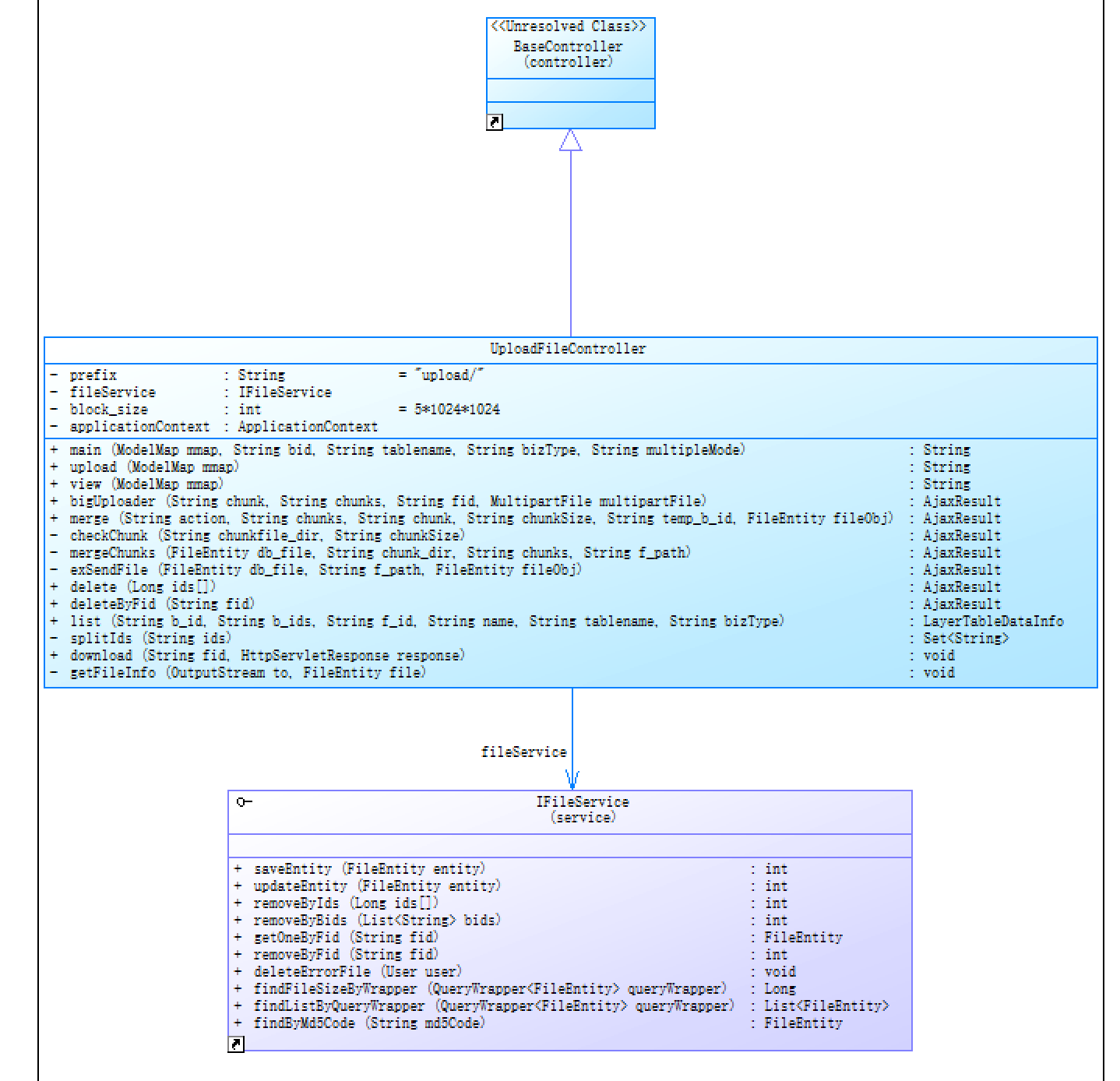

以上就是完整的后端接收处理逻辑,使用java代码进行开发,这里使用了本地磁盘的方式进行存储,你可以自己扩展一下,比如可以集成分布式存储,都是可以的,这样改造后可以当成企业统一的服务。
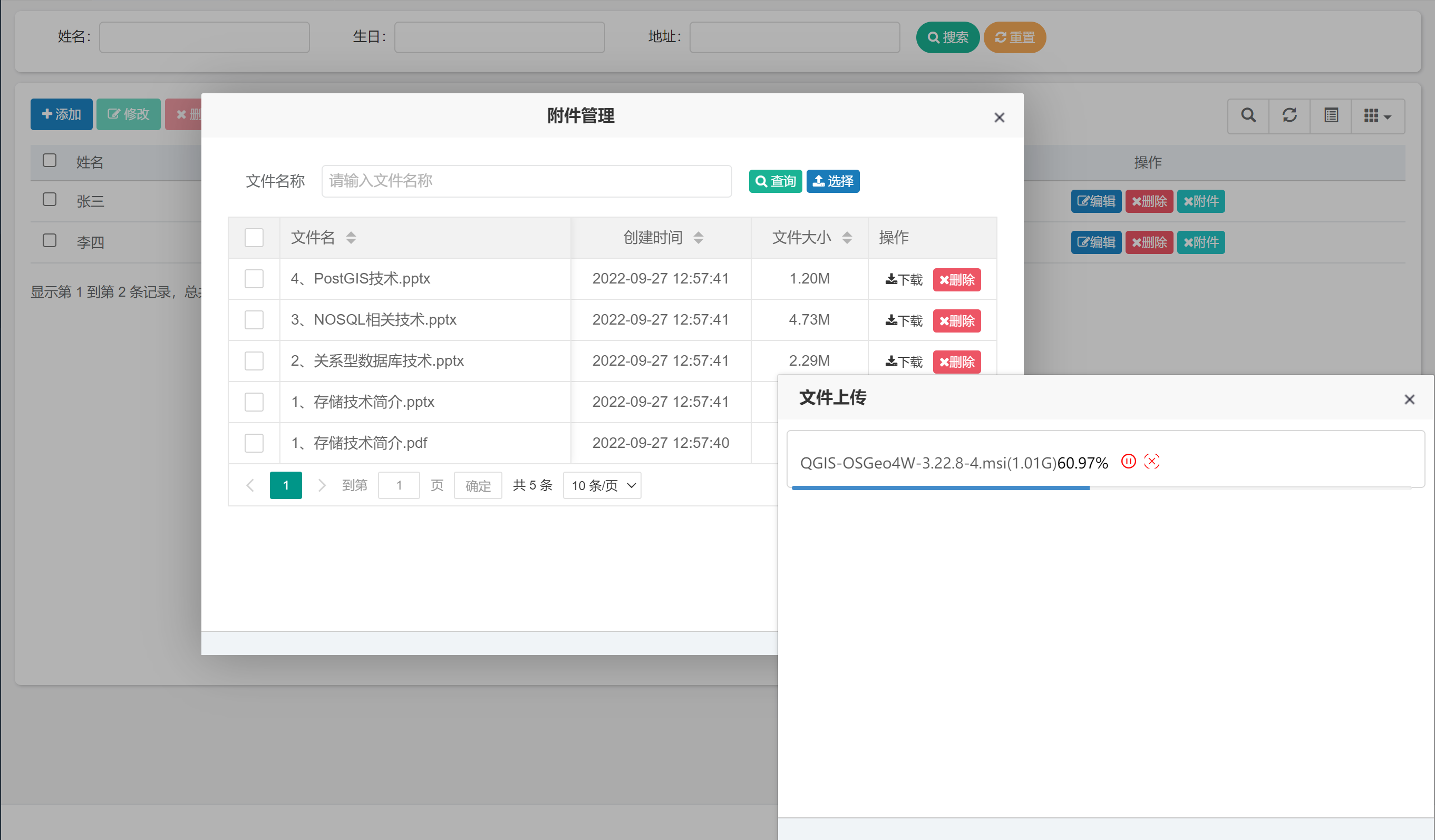
以上就是本文的主要内容,介绍统一附件管理服务的后台开发逻辑。简单介绍了后台附件表的设计,以后围绕附件管理的相关实体定义、服务层、控制层定义。通过给出相关类的类图,便于大家对整体的代码层次有一个比较全面的认识。
我正在使用i18n从头开始构建一个多语言网络应用程序,虽然我自己可以处理一大堆yml文件,但我说的语言(非常)有限,最终我想寻求外部帮助帮助。我想知道这里是否有人在使用UI插件/gem(与django上的django-rosetta不同)来处理多个翻译器,其中一些翻译器不愿意或无法处理存储库中的100多个文件,处理语言数据。谢谢&问候,安德拉斯(如果您已经在rubyonrails-talk上遇到了这个问题,我们深表歉意) 最佳答案 有一个rails3branchofthetolkgem在github上。您可以通过在Gemfi
我主要使用Ruby来执行此操作,但到目前为止我的攻击计划如下:使用gemsrdf、rdf-rdfa和rdf-microdata或mida来解析给定任何URI的数据。我认为最好映射到像schema.org这样的统一模式,例如使用这个yaml文件,它试图描述数据词汇表和opengraph到schema.org之间的转换:#SchemaXtoschema.orgconversion#data-vocabularyDV:name:namestreet-address:streetAddressregion:addressRegionlocality:addressLocalityphoto:i
我正在编写一个包含C扩展的gem。通常当我写一个gem时,我会遵循TDD的过程,我会写一个失败的规范,然后处理代码直到它通过,等等......在“ext/mygem/mygem.c”中我的C扩展和在gemspec的“扩展”中配置的有效extconf.rb,如何运行我的规范并仍然加载我的C扩展?当我更改C代码时,我需要采取哪些步骤来重新编译代码?这可能是个愚蠢的问题,但是从我的gem的开发源代码树中输入“bundleinstall”不会构建任何native扩展。当我手动运行rubyext/mygem/extconf.rb时,我确实得到了一个Makefile(在整个项目的根目录中),然后当
我安装了ruby版本管理器,并将RVM安装的ruby实现设置为默认值,这样'哪个ruby'显示'~/.rvm/ruby-1.8.6-p383/bin/ruby'但是当我在emacs中打开inf-ruby缓冲区时,它使用安装在/usr/bin中的ruby。有没有办法让emacs像shell一样尊重ruby的路径?谢谢! 最佳答案 我创建了一个emacs扩展来将rvm集成到emacs中。如果您有兴趣,可以在这里获取:http://github.com/senny/rvm.el
我想这样组织C源代码:+/||___+ext||||___+native_extension||||___+lib||||||___(Sourcefilesarekeptinhere-maycontainsub-folders)||||___native_extension.c||___native_extension.h||___extconf.rb||___+lib||||___(Rubysourcecode)||___Rakefile我无法使此设置与mkmf一起正常工作。native_extension/lib中的文件(包含在native_extension.c中)将被完全忽略。
是否有简单的方法来更改默认ISO格式(yyyy-mm-dd)的ActiveAdmin日期过滤器显示格式? 最佳答案 您可以像这样为日期选择器提供额外的选项,而不是覆盖js:=f.input:my_date,as::datepicker,datepicker_options:{dateFormat:"mm/dd/yy"} 关于ruby-on-rails-事件管理员日期过滤器日期格式自定义,我们在StackOverflow上找到一个类似的问题: https://s
导读:随着叮咚买菜业务的发展,不同的业务场景对数据分析提出了不同的需求,他们希望引入一款实时OLAP数据库,构建一个灵活的多维实时查询和分析的平台,统一数据的接入和查询方案,解决各业务线对数据高效实时查询和精细化运营的需求。经过调研选型,最终引入ApacheDoris作为最终的OLAP分析引擎,Doris作为核心的OLAP引擎支持复杂地分析操作、提供多维的数据视图,在叮咚买菜数十个业务场景中广泛应用。作者|叮咚买菜资深数据工程师韩青叮咚买菜创立于2017年5月,是一家专注美好食物的创业公司。叮咚买菜专注吃的事业,为满足更多人“想吃什么”而努力,通过美好食材的供应、美好滋味的开发以及美食品牌的孵
C#实现简易绘图工具一.引言实验目的:通过制作窗体应用程序(C#画图软件),熟悉基本的窗体设计过程以及控件设计,事件处理等,熟悉使用C#的winform窗体进行绘图的基本步骤,对于面向对象编程有更加深刻的体会.Tutorial任务设计一个具有基本功能的画图软件**·包括简单的新建文件,保存,重新绘图等功能**·实现一些基本图形的绘制,包括铅笔和基本形状等,学习橡皮工具的创建**·设计一个合理舒适的UI界面**注明:你可能需要先了解一些关于winform窗体应用程序绘图的基本知识,以及关于GDI+类和结构的知识二.实验环境Windows系统下的visualstudio2017C#窗体应用程序三.
需求:要创建虚拟机,就需要给他提供一个虚拟的磁盘,我们就在/opt目录下创建一个10G大小的raw格式的虚拟磁盘CentOS-7-x86_64.raw命令格式:qemu-imgcreate-f磁盘格式磁盘名称磁盘大小qemu-imgcreate-f磁盘格式-o?1.创建磁盘qemu-imgcreate-fraw/opt/CentOS-7-x86_64.raw10G执行效果#ls/opt/CentOS-7-x86_64.raw2.安装虚拟机使用virt-install命令,基于我们提供的系统镜像和虚拟磁盘来创建一个虚拟机,另外在创建虚拟机之前,提前打开vnc客户端,在创建虚拟机的时候,通过vnc
我想用这两种语言中的任何一种(最好是ruby)制作一个窗口管理器。老实说,除了我需要加载某种X模块外,我不知道从哪里开始。因此,如果有人有线索,如果您能指出正确的方向,那就太好了。谢谢 最佳答案 XCB,X的下一代API使用XML格式定义X协议(protocol),并使用脚本生成特定语言绑定(bind)。它在概念上与SWIG类似,只是它描述的不是CAPI,而是X协议(protocol)。目前,C和Python存在绑定(bind)。理论上,Ruby端口只是编写一个从XML协议(protocol)定义语言到Ruby的翻译器的问题。生
