2023-01-08
建筑物是primitives,两个娃娃是entity
加载娃娃代码:
      //粉色
    var entity6 = viewer.entities.add({
      id:6,
      position:new Cesium.Cartesian3.fromDegrees(103.8603, 30.7049,490),
      //设置朝向和翻滚角度
      orientation:orientation,
      model:{
        uri:"../../../static/3DModel/higokumaru__honkai_impact_3rd/scene.gltf",
        show:true,
        scale: 5.0 ,
        silhouetteColor : Cesium.Color.YELLOW,
        silhouetteSize : 0,
        colorBlendMode:Cesium.ColorBlendMode.MIX,
        colorBlendAmount: 0
      }
    })
    entityCollection.add(entity6)

    //小恶魔
    var entity7 = viewer.entities.add({
      id:7,
      position:new Cesium.Cartesian3.fromDegrees(103.8611, 30.7055,490),
      //设置朝向和翻滚角度
      orientation:orientation,
      model:{
        uri:"../../../static/3DModel/lilit_endora/scene.gltf",
        show:true,
        scale: 0.1 ,
        silhouetteColor : Cesium.Color.YELLOW,
        silhouetteSize : 0,
        colorBlendMode:Cesium.ColorBlendMode.MIX,
        colorBlendAmount: 0
      }


    })
加载建筑物代码:
    var tileset = new Cesium.Cesium3DTileset({
      url: "../../../static/3DModel/sicauOSM/tileset.json",
    });
    viewer.scene.primitives.add(tileset);
    console.log(tileset);

绑定左键点击事件:
    //鼠标单击左键事件
    viewer.screenSpaceEventHandler.setInputAction(function onMouseClick( click ) {
      var nowIsEntity = false;

      //pickedFeature 是 primitive
      var pickedFeature = viewer.scene.pick(click.position);
      //pickedEntity 是 entity
      var pickedEntity = null;
      if(Cesium.defined(pickedFeature)){
        console.log(pickedFeature);

        //如果是entity
        if(typeof(pickedFeature.id) !== "undefined"){
          pickedEntity = entityCollection.getById(pickedFeature.id.id);
          pickedEntity.model.color = Cesium.Color.RED;
          pickedEntity.model.colorBlendAmount = 0.5;
          nowIsEntity = true;
        }
        //如果是primitive
        else if(typeof(pickedFeature.id) == "undefined"){
          that.lastPrimitiveColor = pickedFeature.color;
          console.log(`that.lastPrimitiveColor为:${that.lastPrimitiveColor}`);
          pickedFeature.color = Cesium.Color.RED;
          console.log(pickedFeature.getProperty("name"));
        }

        //第一次点击,则只需要记住当前物体,以便点击其他物体时候恢复改物体颜色
        if(that.pickedEntity === null && nowIsEntity){
            that.pickedEntity = pickedEntity;
            that.lastIsEntity = true;
            return;
        }else if(that.lastFeature === null && !nowIsEntity){
            that.lastFeature = pickedFeature;
            that.lastIsEntity = false;
            return;
        }

        //不是第一次点击,则需将上一次点击的物体恢复原本的颜色
        if(nowIsEntity){
            that.pickedEntity.model.colorBlendAmount = 0;//设置模型颜色与透明度
            that.pickedEntity=pickedEntity;
            that.lastIsEntity = true;
            return;
        }else if(!nowIsEntity){
            that.lastFeature.color = that.lastPrimitiveColor;
            console.log(`that.lastFeature.tileset.color为:${that.lastFeature.tileset.color}`);
            that.lastFeature=pickedFeature;
            that.lastIsEntity = false;
            return;
        }

      }
      console.log(pickedFeature);
      console.log(pickedEntity);


    },Cesium.ScreenSpaceEventType.LEFT_CLICK);
恢复entity的颜色使用的方法是将上一个entity的colorBlendAmount改为0
恢复primitives颜色是使用一个全局变量lastPrimitiveColor记住上一个primitives的颜色,
其不能和entity一样使用colorBlendAmount的原因是:选中的建筑物类型是Cesium3DTileFeature,他的colorBlendAmount属性在tileset中,也就是说改变colorBlendAmount之后变化的是所有建筑的colorBlendAmount而不是单个建筑的colorBlendAmount
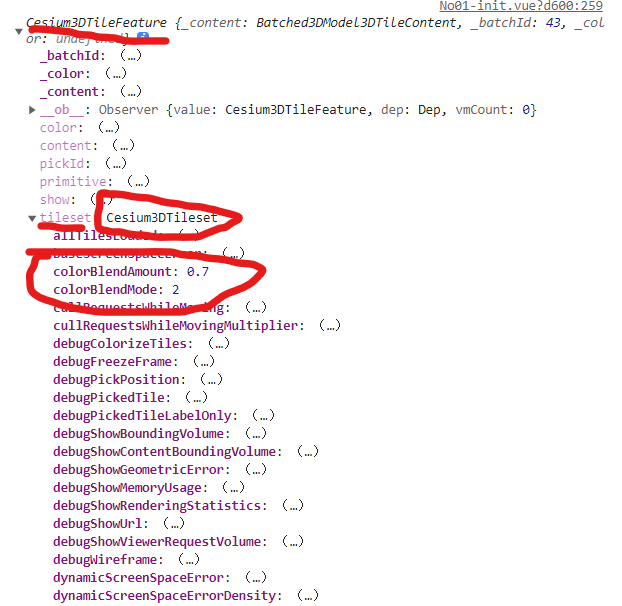
这里区别了primitives和entity,两者分别可以有一个被选中,要是想全局只能有一个模型是选中状态的话可以自己改一下代码逻辑。
调整建筑的colorBlendMode使颜色更加合理
    //定义用于在目标颜色和图元的源颜色之间混合的不同模式
    //HIGHLIGHT将源颜色乘以目标颜色
    //REPLACE将源颜色替换为目标颜色
    //MIX将源颜色和目标颜色混合在一起。
    tileset.colorBlendMode = Cesium.Cesium3DTileColorBlendMode.MIX;
    tileset.colorBlendAmount = 0.7;
我想在一个没有Sass引擎的类中使用Sass颜色函数。我已经在项目中使用了sassgem,所以我认为搭载会像以下一样简单:classRectangleincludeSass::Script::FunctionsdefcolorSass::Script::Color.new([0x82,0x39,0x06])enddefrender#hamlengineexecutedwithcontextofself#sothatwithintemlateicouldcall#%stop{offset:'0%',stop:{color:lighten(color)}}endend更新:参见上面的#re
如何使用Ruby的默认Curses库获取颜色?所以像这样:puts"\e[0m\e[30;47mtest\e[0m"效果很好。在浅灰色背景上呈现漂亮的黑色。但是这个:#!/usr/bin/envrubyrequire'curses'Curses.noecho#donotshowtypedkeysCurses.init_screenCurses.stdscr.keypad(true)#enablearrowkeys(forpageup/down)Curses.stdscr.nodelay=1Curses.clearCurses.setpos(0,0)Curses.addstr"Hello
状态:我正在构建一个应用程序,其中需要一个可供用户选择颜色的字段,该字段将包含RGB颜色代码字符串。我已经测试了一个看起来很漂亮但效果不佳的。它是“挑剔的颜色”,并托管在此存储库中:https://github.com/Astorsoft/picky-color.在这里我打开一个关于它的一些问题的问题。问题:请建议我在Rails3应用程序中使用一些颜色选择器。 最佳答案 也许页面上的列表jQueryUIDevelopment:ColorPicker为您提供开箱即用的产品。原因是jQuery现在包含在Rails3应用程序中,因此使用基
我有以下内容:text.gsub(/(lower)(upper)/,'\1\2')我可以将\2替换为大写吗?类似于:sed-e's/\(abc\)/\U\1/'这在Ruby中可行吗? 最佳答案 查看gsub文档:str.gsub(模式){|匹配|block}→new_str在block形式中,当前匹配字符串作为参数传入,$1、$2、$`、$&、$'等变量将被适当设置。block返回的值将替换为每次调用的匹配项。"alowerupperb".gsub(/(lower)(upper)/){|s|$1+""+$2.upcase}
我想在每次访问url/code时运行一个脚本(code.rb)。如何运行脚本?require'sinatra'get'/'do#runthescriptend 最佳答案 要么fork另一个进程:system('rubycode.rb')...或者简单地将脚本加载到当前上下文中:load'code.rb'#*not*require 关于ruby-Sinatra:点击URL时运行ruby代码,我们在StackOverflow上找到一个类似的问题: https:
我想要像“嘿那里”这样的东西变成,例如,#316583。我希望将任意长度的字符串“归结”为十六进制颜色。我不知道从哪里开始。我在想,每个字符串的MD5散列都是不同的-但如何将该散列转换为十六进制颜色数字? 最佳答案 你可以只取几位前几位:require'digest/md5'color=Digest::MD5.hexdigest('Mytext')[0..5] 关于ruby-如何使用Ruby基于字母数字字符串生成颜色?,我们在StackOverflow上找到一个类似的问题:
也许我做错了,或者还有另一种更有效的方法。这是我的问题:我首先使用nokogiri打开一个html文档并使用其css遍历该文档,直到找到我需要单击的链接。现在我有了链接后,如何使用Mechanize来点击它?根据文档,Mechanize.new返回的对象是字符串或Mechanize::Page::Link对象。我不能使用字符串-因为可能有100个相同的链接-我只想Mechanize点击nokogiri遍历的链接。有什么想法吗? 最佳答案 找到所需的链接节点后,您可以手动创建Mechanize::Page::Link对象,然后单击它:
我是Ruby和Watir-Webdriver的新手。我有一套用VBScript编写的站点自动化程序,我想将其转换为Ruby/Watir,因为我现在必须支持Firefox。我发现我真的很喜欢Ruby,而且我正在研究Watir,但我已经花了一周时间试图让Webdriver显示我的登录屏幕。该站点以带有“我同意”区域的“警告屏幕”开头。用户点击我同意并显示登录屏幕。我需要单击该区域以显示登录屏幕(这是同一页面,实际上是一个表单,只是隐藏了)。我整天都在用VBScript这样做:objExplorer.Document.GetElementsByTagName("area")(0).click
为什么我可以这样改变“self”:self.map!{|x|x*2}或者这样:self.replace(self.map{|x|x*2})但不是这样:self=self.map{|x|x*2}为什么Ruby不允许我更改“self”变量指向的对象,但允许我更改对象的属性? 最佳答案 不是答案,只是一个线索。a=[1,2]=>[1,2]a.object_id=>2938a.map!{|x|x*2}=>[2,4]a.object_id#differentdatabutstillthesameobject=>2938a.replace(a.
为什么下面的表达式会这样解析?括号的优先级应该高于换行符,不是吗?3-(1+1)#=>13-(1+1)#=>2省略加号也会让表达式计算为2:3-(11)#=>2如果我声明为连续的换行符(转义)或将加号移动到第一行,则会实现所需的行为:3-(1\+1)#=>13-(1+1)#=>1 最佳答案 这是因为Ruby将新行识别为表达式的结尾,除非表达式不完整。例如,(1+1)与相同(1;+1)这与+1相同,因为返回了括号内的最后一个表达式。这进一步与1相同。如果行尾有+,则表达式不完整,因此会继续到下一行。这使得:3-(1+1)被解释为3-(
