目录
<dependency>
    <groupId>com.github.oshi</groupId>
    <artifactId>oshi-core</artifactId>
    <version>3.12.2</version>
    </dependency>
<dependency>
    <groupId>net.java.dev.jna</groupId>
    <artifactId>jna</artifactId>
    <version>5.2.0</version>
</dependency>
<dependency>
    <groupId>net.java.dev.jna</groupId>
    <artifactId>jna-platform</artifactId>
    <version>5.2.0</version>
</dependency>

// 当期最新版本,最新版本与上面版本方法有所区别
<dependency>
	<groupId>com.github.oshi</groupId>
	<artifactId>oshi-core</artifactId>
	<version>6.3.2</version>
</dependency>
<dependency>
	<groupId>net.java.dev.jna</groupId>
	<artifactId>jna</artifactId>
	<version>5.12.1</version>
</dependency>
<dependency>
	<groupId>net.java.dev.jna</groupId>
	<artifactId>jna-platform</artifactId>
	<version>5.12.1</version>
</dependency>private static void systemParamsNameAndValue() {
Properties properties = System.getProperties();
Set<Map.Entry<Object, Object>> params = properties.entrySet();
for (Iterator<Map.Entry<Object, Object>> iterator = params.iterator(); iterator.hasNext();) {
Map.Entry<Object, Object> systemParam = iterator.next();
Object key = systemParam.getKey();
Object value = systemParam.getValue();
System.out.println("系统属性名: [" + key + "] ---------系统属性名字对应值: " + value);
}
}RESULT:
系统属性名: [java.runtime.name]  ---------系统属性名字对应值: Java(TM) SE Runtime Environment
系统属性名: [sun.boot.library.path]  ---------系统属性名字对应值: F:\jdk\jre\bin
系统属性名: [java.vm.version]  ---------系统属性名字对应值: 25.291-b10
系统属性名: [java.vm.vendor]  ---------系统属性名字对应值: Oracle Corporation
系统属性名: [java.vendor.url]  ---------系统属性名字对应值: http://java.oracle.com/
系统属性名: [path.separator]  ---------系统属性名字对应值: ;
系统属性名: [java.vm.name]  ---------系统属性名字对应值: Java HotSpot(TM) 64-Bit Server VM
系统属性名: [file.encoding.pkg]  ---------系统属性名字对应值: sun.io
系统属性名: [user.country]  ---------系统属性名字对应值: CN
系统属性名: [user.script]  ---------系统属性名字对应值:
系统属性名: [sun.java.launcher]  ---------系统属性名字对应值: SUN_STANDARD
系统属性名: [sun.os.patch.level]  ---------系统属性名字对应值:
系统属性名: [java.vm.specification.name]  ---------系统属性名字对应值: Java Virtual Machine Specification
系统属性名: [user.dir]  ---------系统属性名字对应值: F:\idea\workspace\
系统属性名: [java.runtime.version]  ---------系统属性名字对应值: 1.8.0_291-b10
系统属性名: [java.awt.graphicsenv]  ---------系统属性名字对应值: sun.awt.Win32GraphicsEnvironment
系统属性名: [java.endorsed.dirs]  ---------系统属性名字对应值:
系统属性名: [os.arch]  ---------系统属性名字对应值: amd64
系统属性名: [java.io.tmpdir]  ---------系统属性名字对应值: C:\Users\ADMINI~1\AppData\Local\Temp\
系统属性名: [line.separator]  ---------系统属性名字对应值:

系统属性名: [java.vm.specification.vendor]  ---------系统属性名字对应值: Oracle Corporation
系统属性名: [user.variant]  ---------系统属性名字对应值:
系统属性名: [os.name]  ---------系统属性名字对应值: Windows 7
系统属性名: [sun.jnu.encoding]  ---------系统属性名字对应值: GBK
系统属性名: [java.library.path]  ---------系统属性名字对应值:
系统属性名: [java.specification.name]  ---------系统属性名字对应值: Java Platform API Specification
系统属性名: [java.class.version]  ---------系统属性名字对应值: 5.0
系统属性名: [sun.management.compiler]  ---------系统属性名字对应值: HotSpot 64-Bit Tiered Compilers
系统属性名: [os.version]  ---------系统属性名字对应值: 10.0
系统属性名: [user.home]  ---------系统属性名字对应值: C:\Users\Administrator
系统属性名: [user.timezone]  ---------系统属性名字对应值:
系统属性名: [java.awt.printerjob]  ---------系统属性名字对应值: sun.awt.windows.WPrinterJob
系统属性名: [file.encoding]  ---------系统属性名字对应值: UTF-8
系统属性名: [java.specification.version]  ---------系统属性名字对应值: 1.8
系统属性名: [java.class.path]  ---------系统属性名字对应值:
系统属性名: [user.name]  ---------系统属性名字对应值: Administrator
系统属性名: [java.vm.specification.version]  ---------系统属性名字对应值: 1.8
系统属性名: [sun.java.command]  ---------系统属性名字对应值:
系统属性名: [java.home]  ---------系统属性名字对应值: D:\jdk\jre
系统属性名: [sun.arch.data.model]  ---------系统属性名字对应值: 64
系统属性名: [user.language]  ---------系统属性名字对应值: zh
系统属性名: [java.specification.vendor]  ---------系统属性名字对应值: Oracle Corporation
系统属性名: [awt.toolkit]  ---------系统属性名字对应值: sun.awt.windows.WToolkit
系统属性名: [java.vm.info]  ---------系统属性名字对应值: mixed mode
系统属性名: [java.version]  ---------系统属性名字对应值: 1.8.0_291
系统属性名: [java.ext.dirs]  ---------系统属性名字对应值:
系统属性名: [sun.boot.class.path]  ---------系统属性名字对应值:
系统属性名: [java.vendor]  ---------系统属性名字对应值: Oracle Corporation
系统属性名: [file.separator]  ---------系统属性名字对应值: \
系统属性名: [java.vendor.url.bug]  ---------系统属性名字对应值: http://bugreport.sun.com/bugreort/
系统属性名: [sun.io.unicode.encoding]  ---------系统属性名字对应值: UnicodeLittle
系统属性名: [sun.cpu.endian]  ---------系统属性名字对应值: little
系统属性名: [sun.desktop]  ---------系统属性名字对应值: windows
系统属性名: [sun.cpu.isalist] ---------系统属性名字对应值: amd64// 正确包
import com.sun.management.OperatingSystemMXBean;
/// 错误包
//import java.lang.management.OperatingSystemMXBean;
import oshi.SystemInfo;
import oshi.hardware.CentralProcessor;
import java.io.File;
import java.lang.management.ManagementFactory;
import java.lang.management.MemoryMXBean;
import java.lang.management.MemoryUsage;
import java.text.DecimalFormat;
import java.text.SimpleDateFormat;
import java.util.*;
import java.util.concurrent.Executors;
import java.util.concurrent.TimeUnit; /***
* @author Benjamin
* @date 2022/12/8 10:02:50
* @version 1.0.0
* @description 获取系统详细参数信息
* @param
* @return void
*/
public static void initSystemInfo() {
Executors.newSingleThreadScheduledExecutor().scheduleAtFixedRate(() -> {
try {
SystemInfo systemInfo = new SystemInfo();
OperatingSystemMXBean osmxb = (OperatingSystemMXBean) ManagementFactory.getOperatingSystemMXBean();
MemoryMXBean memoryMXBean = ManagementFactory.getMemoryMXBean();
// 椎内存使用情况
MemoryUsage memoryUsage = memoryMXBean.getHeapMemoryUsage();
// 初始的总内存
long initTotalMemorySize = memoryUsage.getInit();
// 最大可用内存
long maxMemorySize = memoryUsage.getMax();
// 已使用的内存
long usedMemorySize = memoryUsage.getUsed();
// 操作系统
String osName = System.getProperty("os.name");
// 总的物理内存
String totalMemorySize = new DecimalFormat("#.##").format(osmxb.getTotalPhysicalMemorySize() / 1024.0 / 1024 / 1024) + "G";
// 剩余的物理内存
String freePhysicalMemorySize = new DecimalFormat("#.##").format(osmxb.getFreePhysicalMemorySize() / 1024.0 / 1024 / 1024) + "G";
// 已使用的物理内存
String usedMemory = new DecimalFormat("#.##").format((osmxb.getTotalPhysicalMemorySize() - osmxb.getFreePhysicalMemorySize()) / 1024.0 / 1024 / 1024) + "G";
// 获得线程总数
ThreadGroup parentThread;
for (parentThread = Thread.currentThread().getThreadGroup(); parentThread
.getParent() != null; parentThread = parentThread.getParent()) {
}
int totalThread = parentThread.activeCount();
// 磁盘使用情况
File[] files = File.listRoots();
for (File file : files) {
String total = new DecimalFormat("#.#").format(file.getTotalSpace() * 1.0 / 1024 / 1024 / 1024) + "G";
String free = new DecimalFormat("#.#").format(file.getFreeSpace() * 1.0 / 1024 / 1024 / 1024) + "G";
String un = new DecimalFormat("#.#").format(file.getUsableSpace() * 1.0 / 1024 / 1024 / 1024) + "G";
String path = file.getPath();
System.err.println(path + "总:" + total + ",可用空间:" + un + ",空闲空间:" + free);
System.err.println("=============================================");
}
System.err.println("操作系统:" + osName);
System.err.println("程序启动时间:" + new SimpleDateFormat("yyyy-MM-dd HH:mm:ss").format(new Date(ManagementFactory.getRuntimeMXBean().getStartTime())));
/// System.err.println("pid:" + System.getProperty("PID"));
System.err.println("pid:" + getPID());
System.err.println("cpu核数:" + Runtime.getRuntime().availableProcessors());
printlnCpuInfo(systemInfo);
System.err.println("JAVA_HOME:" + System.getProperty("java.home"));
System.err.println("JAVA_VERSION:" + System.getProperty("java.version"));
System.err.println("USER_HOME:" + System.getProperty("user.home"));
System.err.println("USER_NAME:" + System.getProperty("user.name"));
System.err.println("初始的总内存(JVM):" + new DecimalFormat("#.#").format(initTotalMemorySize * 1.0 / 1024 / 1024) + "M");
System.err.println("最大可用内存(JVM):" + new DecimalFormat("#.#").format(maxMemorySize * 1.0 / 1024 / 1024) + "M");
System.err.println("已使用的内存(JVM):" + new DecimalFormat("#.#").format(usedMemorySize * 1.0 / 1024 / 1024) + "M");
System.err.println("总的物理内存:" + totalMemorySize);
System.err.println("总的物理内存:" + new DecimalFormat("#.##").format(systemInfo.getHardware().getMemory().getTotal() * 1.0 / 1024 / 1024 / 1024) + "M");
System.err.println("剩余的物理内存:" + freePhysicalMemorySize);
System.err.println("剩余的物理内存:" + new DecimalFormat("#.##").format(systemInfo.getHardware().getMemory().getAvailable() * 1.0 / 1024 / 1024 / 1024) + "M");
System.err.println("已使用的物理内存:" + usedMemory);
System.err.println("已使用的物理内存:" + new DecimalFormat("#.##").format((systemInfo.getHardware().getMemory().getTotal() - systemInfo.getHardware().getMemory().getAvailable()) * 1.0 / 1024 / 1024 / 1024) + "M");
System.err.println("总线程数:" + totalThread);
System.err.println("===========================");
} catch (Exception e) {
e.printStackTrace();
}
}, 0, 60, TimeUnit.SECONDS);
}
/**
* 打印 CPU 信息
* @param systemInfo
*/
private static void printlnCpuInfo(SystemInfo systemInfo) throws InterruptedException {
// todo 解决 Why does OSHI's System and Processor CPU usage differ from the Windows Task Manager?
GlobalConfig.set(GlobalConfig.OSHI_OS_WINDOWS_CPU_UTILITY, true);
CentralProcessor processor = systemInfo.getHardware().getProcessor();
long[] prevTicks = processor.getSystemCpuLoadTicks();
// 睡眠1s
TimeUnit.SECONDS.sleep(1);
long[] ticks = processor.getSystemCpuLoadTicks();
long nice = ticks[CentralProcessor.TickType.NICE.getIndex()] - prevTicks[CentralProcessor.TickType.NICE.getIndex()];
long irq = ticks[CentralProcessor.TickType.IRQ.getIndex()] - prevTicks[CentralProcessor.TickType.IRQ.getIndex()];
long softirq = ticks[CentralProcessor.TickType.SOFTIRQ.getIndex()] - prevTicks[CentralProcessor.TickType.SOFTIRQ.getIndex()];
long steal = ticks[CentralProcessor.TickType.STEAL.getIndex()] - prevTicks[CentralProcessor.TickType.STEAL.getIndex()];
long cSys = ticks[CentralProcessor.TickType.SYSTEM.getIndex()] - prevTicks[CentralProcessor.TickType.SYSTEM.getIndex()];
long user = ticks[CentralProcessor.TickType.USER.getIndex()] - prevTicks[CentralProcessor.TickType.USER.getIndex()];
long iowait = ticks[CentralProcessor.TickType.IOWAIT.getIndex()] - prevTicks[CentralProcessor.TickType.IOWAIT.getIndex()];
long idle = ticks[CentralProcessor.TickType.IDLE.getIndex()] - prevTicks[CentralProcessor.TickType.IDLE.getIndex()];
long totalCpu = user + nice + cSys + idle + iowait + irq + softirq + steal;
System.err.println("cpu核数:" + processor.getLogicalProcessorCount());
System.err.println("cpu系统使用率:" + new DecimalFormat("#.##%").format(cSys * 1.0 / totalCpu));
System.err.println("cpu用户使用率:" + new DecimalFormat("#.##%").format(user * 1.0 / totalCpu));
System.err.println("cpu当前等待率:" + new DecimalFormat("#.##%").format(iowait * 1.0 / totalCpu));
System.err.println("cpu当前空闲率:" + new DecimalFormat("#.##%").format(idle * 1.0 / totalCpu));
// todo cup利用
// user + system + nice + iowait + irq + softirq + steal
long cpuUtilization = user + nice + cSys + iowait + irq + softirq + steal;
System.err.println("cpu利用率:" + new DecimalFormat("#.##%").format(cpuUtilization * 1.0 / totalCpu));
// hutool工具,底层用的也是oshi
/*
GlobalConfig.set(GlobalConfig.OSHI_OS_WINDOWS_CPU_UTILITY, true);
cn.hutool.system.oshi.CpuInfo cpuInfo = OshiUtil.getCpuInfo();
double free = cpuInfo.getFree();
DecimalFormat format = new DecimalFormat("#.00");
System.out.println("cpu利用率:" + Double.parseDouble(format.format(100.0D - free)));
*/
/// 低版本这两个方法是无参方法,高版本中是需要有参数的
//System.err.format("CPU load: %.1f%% (counting ticks)%n", processor.getSystemCpuLoadBetweenTicks(ticksArray) * 100);
//System.err.format("CPU load: %.1f%% (OS MXBean)%n", processor.getSystemCpuLoad(1L) * 100);
long[] ticksArray = {1,2,3,4,5,6,7,8};
System.err.format("CPU load: %.1f%% (counting ticks)%n", processor.getSystemCpuLoadBetweenTicks(ticksArray) * 100);
System.err.format("CPU load: %.1f%% (OS MXBean)%n", processor.getSystemCpuLoad(1L) * 100);
ProcessorIdentifierInfo(processor);
}
/**
* 获取进程id
* @return
*/
public static String getPID() {
String name = ManagementFactory.getRuntimeMXBean().getName();
return name.split("@")[0];
}
public static void ProcessorIdentifierInfo(CentralProcessor processor) {
CentralProcessor.ProcessorIdentifier processorIdentifier = processor.getProcessorIdentifier();
String vendor = processorIdentifier.getVendor();
String name = processorIdentifier.getName();
String family = processorIdentifier.getFamily();
String model = processorIdentifier.getModel();
String stepping = processorIdentifier.getStepping();
String processorID = processorIdentifier.getProcessorID();
// cpu64bit ? "Intel64" : "x86"
// Intel64 Family 6 Model 142 Stepping 12
String identifier = processorIdentifier.getIdentifier();
long vendorFreq = processorIdentifier.getVendorFreq();
System.out.println("vendor: " + vendor);
// 处理器名字
System.out.println("name: " + name);
System.out.println("family: " + family);
System.out.println("model: " + model);
System.out.println("stepping: " + stepping);
System.out.println("processorID: " + processorID);
System.out.println("identifier: " + identifier);
System.out.println("vendorFreq: " + vendorFreq);
}RESULT:
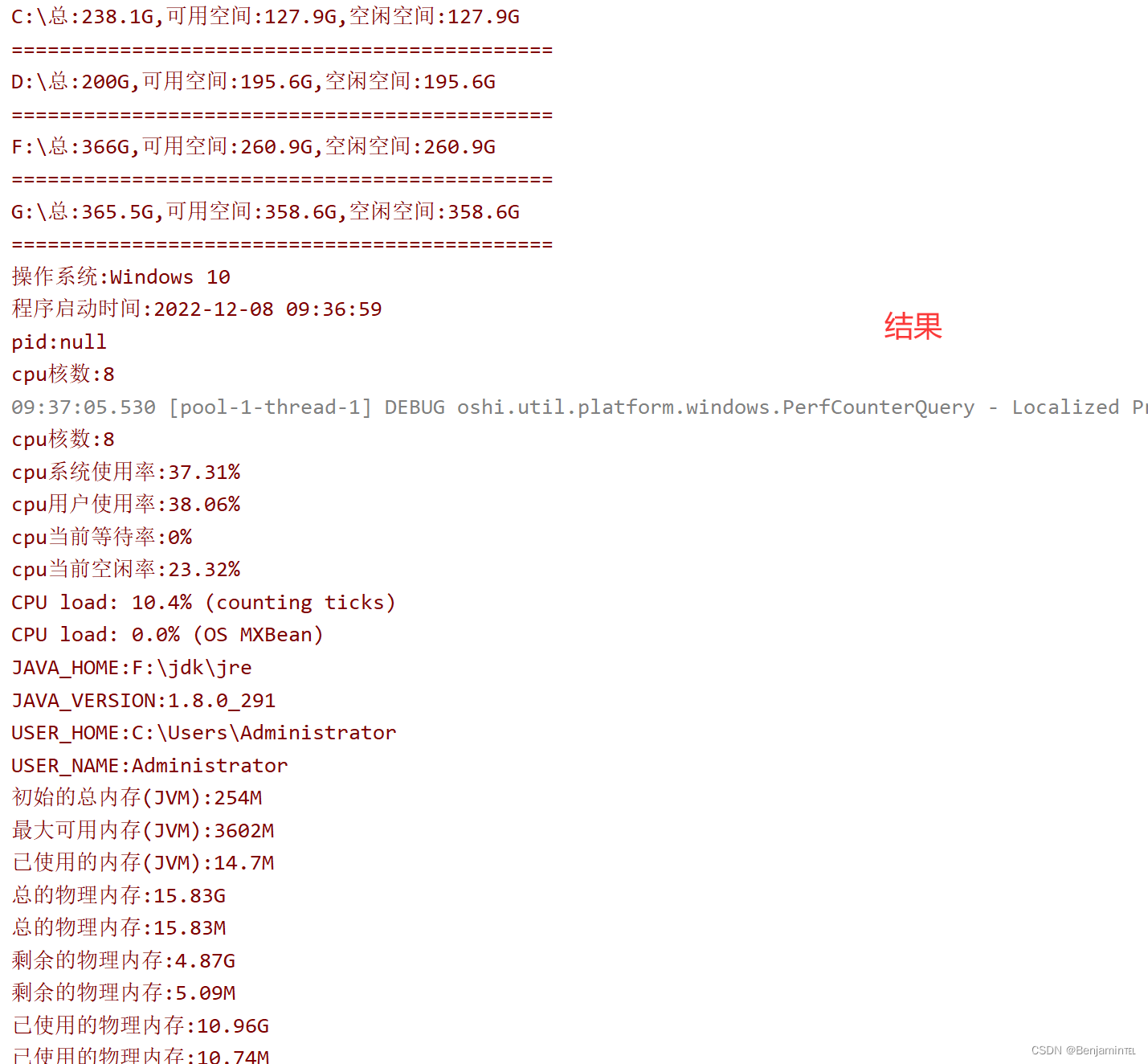
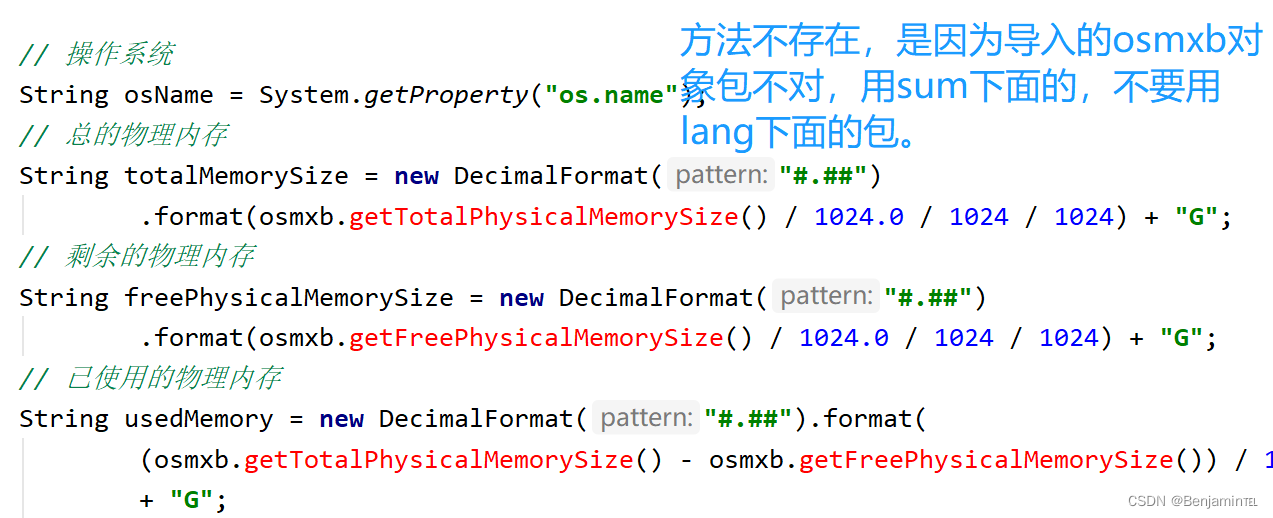
需要引入下面的包:
// 正确包
import com.sun.management.OperatingSystemMXBean;
/// 错误包
//import java.lang.management.OperatingSystemMXBean;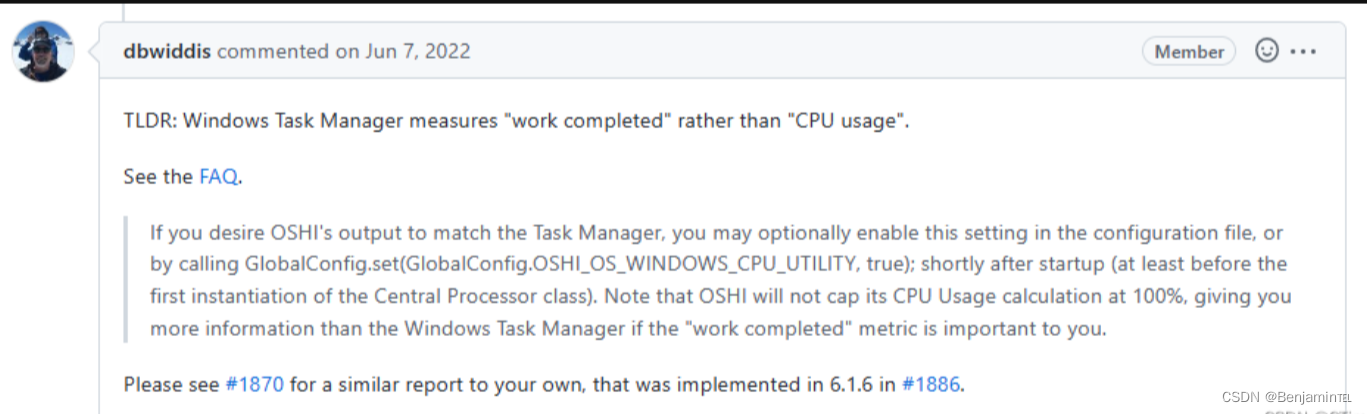
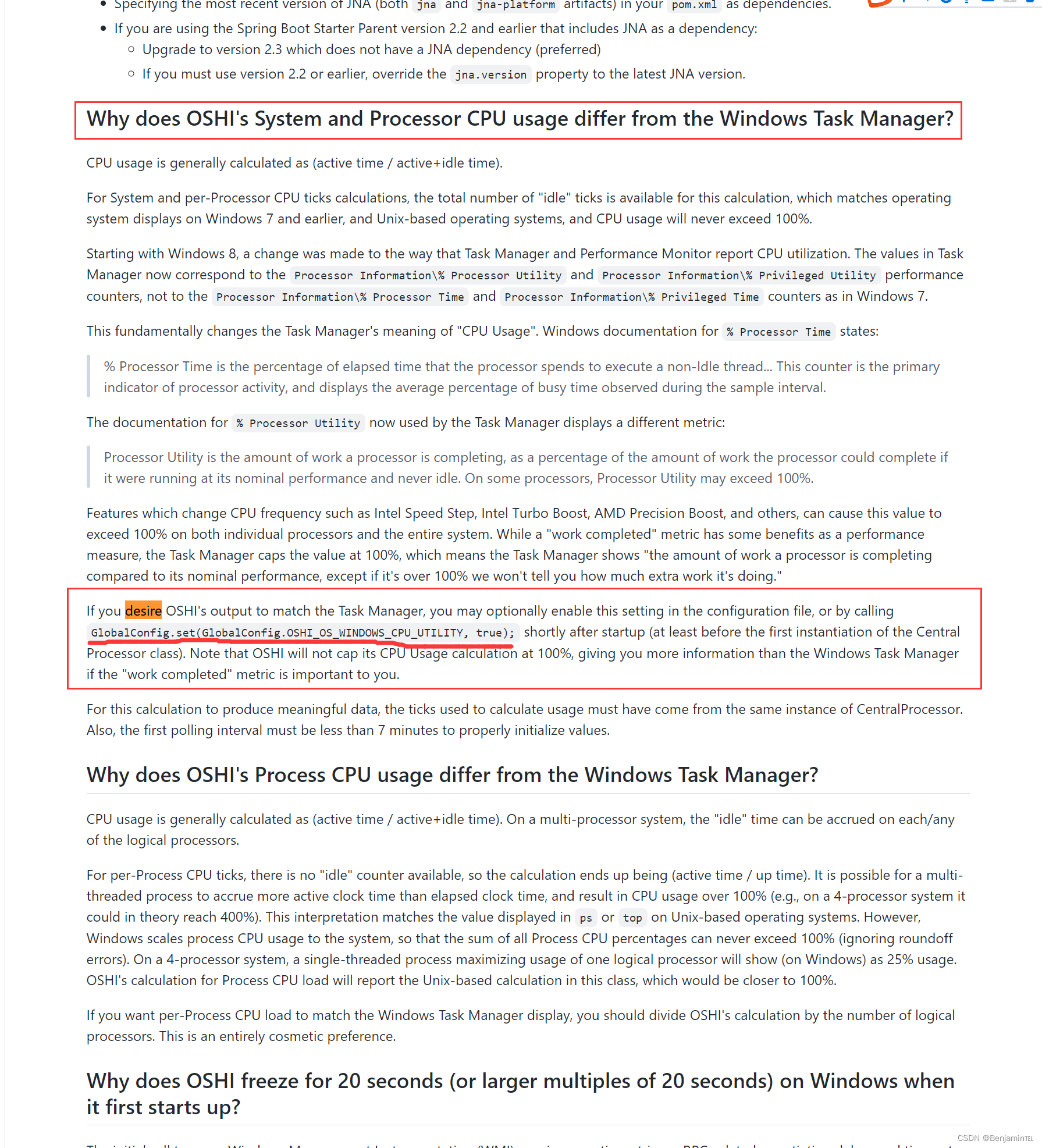
就是需要配置在CentralProcessor实例化之前:配置上也会有差距,相对准确率高一些。
GlobalConfig.set(GlobalConfig.OSHI_OS_WINDOWS_CPU_UTILITY, true);具体可以看 Lead delveloper of Oshi Daniel Widdis github:
oshi/FAQ.md at master · oshi/oshi · GitHubNative Operating System and Hardware Information. Contribute to oshi/oshi development by creating an account on GitHub. https://github.com/oshi/oshi/blob/master/src/site/markdown/FAQ.md参考博客:解决Oshi获取CPU使用率与Windows任务管理器显示不匹配的问题_CTimet的博客-CSDN博客
作为我的Rails应用程序的一部分,我编写了一个小导入程序,它从我们的LDAP系统中吸取数据并将其塞入一个用户表中。不幸的是,与LDAP相关的代码在遍历我们的32K用户时泄漏了大量内存,我一直无法弄清楚如何解决这个问题。这个问题似乎在某种程度上与LDAP库有关,因为当我删除对LDAP内容的调用时,内存使用情况会很好地稳定下来。此外,不断增加的对象是Net::BER::BerIdentifiedString和Net::BER::BerIdentifiedArray,它们都是LDAP库的一部分。当我运行导入时,内存使用量最终达到超过1GB的峰值。如果问题存在,我需要找到一些方法来更正我的代
我正在尝试使用ruby和Savon来使用网络服务。测试服务为http://www.webservicex.net/WS/WSDetails.aspx?WSID=9&CATID=2require'rubygems'require'savon'client=Savon::Client.new"http://www.webservicex.net/stockquote.asmx?WSDL"client.get_quotedo|soap|soap.body={:symbol=>"AAPL"}end返回SOAP异常。检查soap信封,在我看来soap请求没有正确的命名空间。任何人都可以建议我
我想安装一个带有一些身份验证的私有(private)Rubygem服务器。我希望能够使用公共(public)Ubuntu服务器托管内部gem。我读到了http://docs.rubygems.org/read/chapter/18.但是那个没有身份验证-如我所见。然后我读到了https://github.com/cwninja/geminabox.但是当我使用基本身份验证(他们在他们的Wiki中有)时,它会提示从我的服务器获取源。所以。如何制作带有身份验证的私有(private)Rubygem服务器?这是不可能的吗?谢谢。编辑:Geminabox问题。我尝试“捆绑”以安装新的gem..
大约一年前,我决定确保每个包含非唯一文本的Flash通知都将从模块中的方法中获取文本。我这样做的最初原因是为了避免一遍又一遍地输入相同的字符串。如果我想更改措辞,我可以在一个地方轻松完成,而且一遍又一遍地重复同一件事而出现拼写错误的可能性也会降低。我最终得到的是这样的:moduleMessagesdefformat_error_messages(errors)errors.map{|attribute,message|"Error:#{attribute.to_s.titleize}#{message}."}enddeferror_message_could_not_find(obje
我主要使用Ruby来执行此操作,但到目前为止我的攻击计划如下:使用gemsrdf、rdf-rdfa和rdf-microdata或mida来解析给定任何URI的数据。我认为最好映射到像schema.org这样的统一模式,例如使用这个yaml文件,它试图描述数据词汇表和opengraph到schema.org之间的转换:#SchemaXtoschema.orgconversion#data-vocabularyDV:name:namestreet-address:streetAddressregion:addressRegionlocality:addressLocalityphoto:i
我真的很习惯使用Ruby编写以下代码:my_hash={}my_hash['test']=1Java中对应的数据结构是什么? 最佳答案 HashMapmap=newHashMap();map.put("test",1);我假设? 关于java-等价于Java中的RubyHash,我们在StackOverflow上找到一个类似的问题: https://stackoverflow.com/questions/22737685/
最近,当我启动我的Rails服务器时,我收到了一长串警告。虽然它不影响我的应用程序,但我想知道如何解决这些警告。我的估计是imagemagick以某种方式被调用了两次?当我在警告前后检查我的git日志时。我想知道如何解决这个问题。-bcrypt-ruby(3.1.2)-better_errors(1.0.1)+bcrypt(3.1.7)+bcrypt-ruby(3.1.5)-bcrypt(>=3.1.3)+better_errors(1.1.0)bcrypt和imagemagick有关系吗?/Users/rbchris/.rbenv/versions/2.0.0-p247/lib/ru
在Rails4.0.2中,我使用s3_direct_upload和aws-sdkgems直接为s3存储桶上传文件。在开发环境中它工作正常,但在生产环境中它会抛出如下错误,ActionView::Template::Error(noimplicitconversionofnilintoString)在View中,create_cv_url,:id=>"s3_uploader",:key=>"cv_uploads/{unique_id}/${filename}",:key_starts_with=>"cv_uploads/",:callback_param=>"cv[direct_uplo
有没有办法在这个简单的get方法中添加超时选项?我正在使用法拉第3.3。Faraday.get(url)四处寻找,我只能先发起连接后应用超时选项,然后应用超时选项。或者有什么简单的方法?这就是我现在正在做的:conn=Faraday.newresponse=conn.getdo|req|req.urlurlreq.options.timeout=2#2secondsend 最佳答案 试试这个:conn=Faraday.newdo|conn|conn.options.timeout=20endresponse=conn.get(url
ruby如何管理内存。例如:如果我们在执行过程中采用C程序,则以下是内存模型。类似于这个ruby如何处理内存。C:__________________|||stack|||------------------||||------------------|||||Heap|||||__________________|||data|__________________|text|__________________Ruby:? 最佳答案 Ruby中没有“内存”这样的东西。Class#allocate分配一个对象并返回该对象。这就是程序
