【视频资源】:https://raw.githubusercontent.com/rishabhp/bideo.js/master/night.mp4
先看下面例子:
<!DOCTYPE html>
<html lang="en">
    <head>
        <meta charset="UTF-8" />
        <meta http-equiv="X-UA-Compatible" content="IE=edge" />
        <meta name="viewport" content="width=device-width, initial-scale=1.0" />
        <title>全屏HTML5网页背景视频</title>
        <style>
            html,
            body {
                margin: 0;
                padding: 0;
            }
            #container {
                overflow: hidden;
                position: absolute;
                top: 0;
                left: 0;
                right: 0;
                bottom: 0;
                text-align: center;
            }
            #main {
                display: inline-block;
                position: relative;
                top: 50%;
                transform: translateY(-50%);
                color: #fff;
            }
            #video {
                width: 100%;
                height: 100%;
                position: absolute;
                top: 0;
                left: 0;
                z-index: -1;
                object-fit: fill;
            }
        </style>
    </head>
    <body>
        <div id="container">
            <!-- 内容 -->
            <section id="main">
                <div id="head">
                    <h1>Bideo.js</h1>
                    <p class="sub_head">A JS library that makes it super easy to add fullscreen background videos.</p>
                </div>
            </section>
            <!-- 视频背景 -->
            <video id="video" src="/night.mp4" autoplay loop muted></video>
        </div>
    </body>
</html>
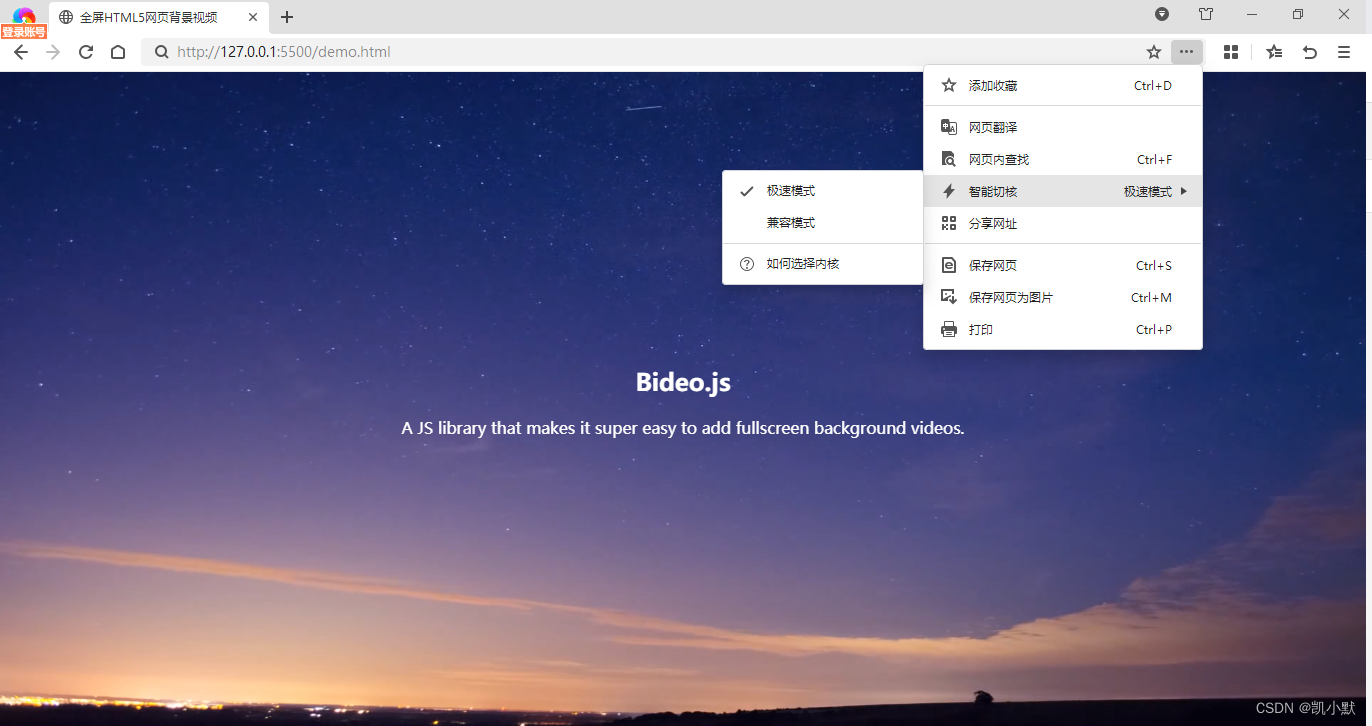
使用 360 极速浏览器的极速模式效果如下:
使用 360 极速浏览器的 ie 兼容模式效果如下:
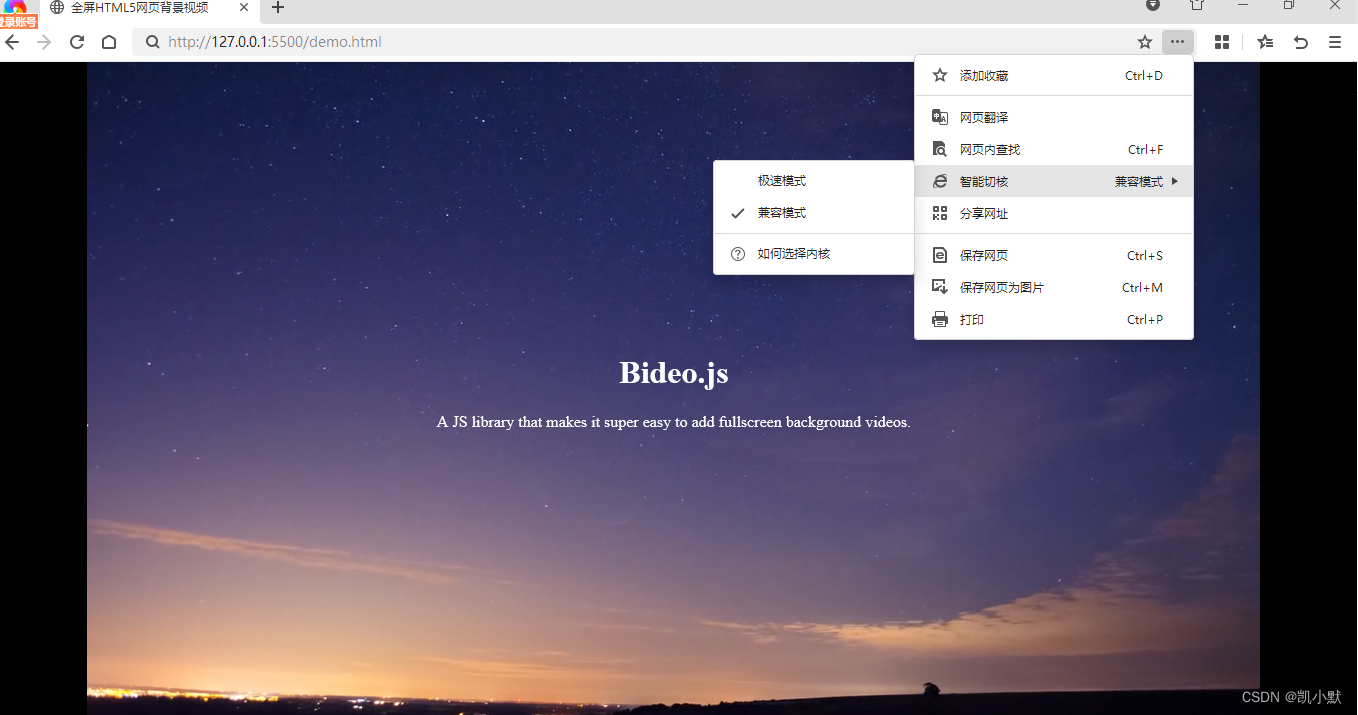
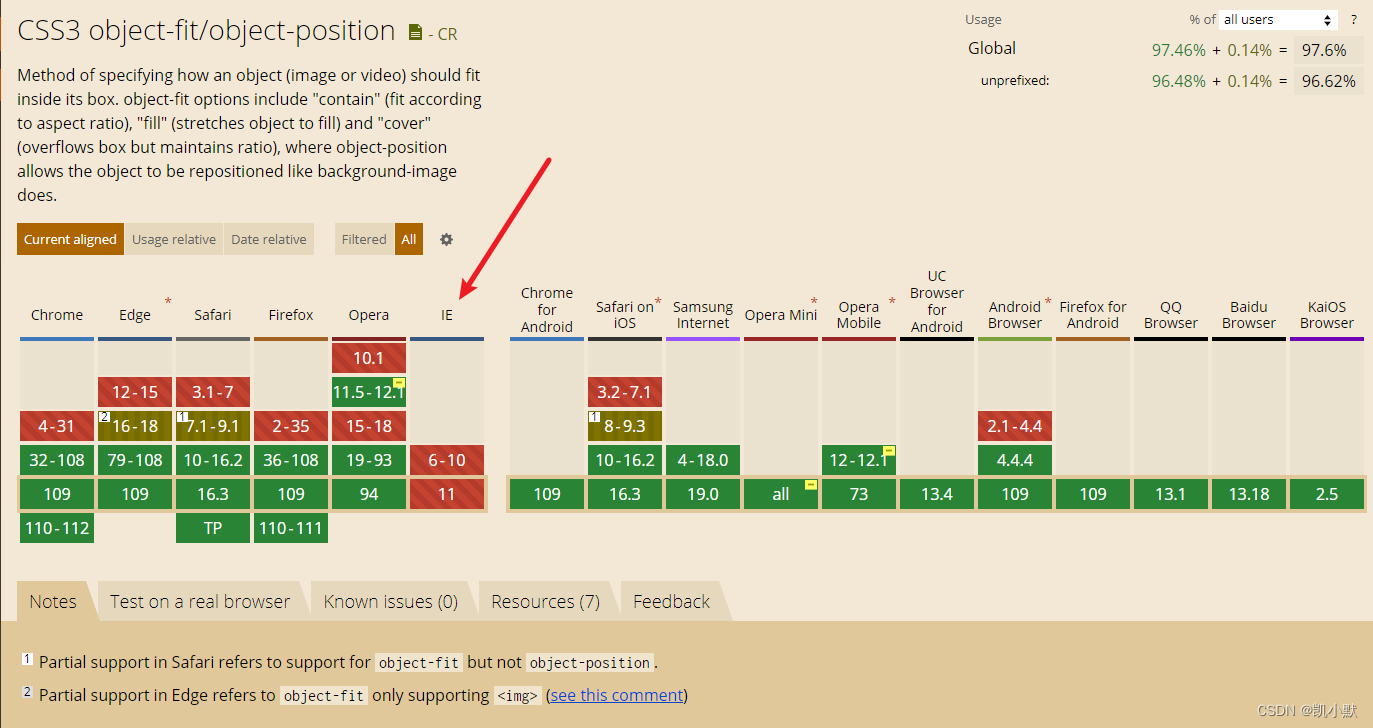
原因是我们在 css 代码里面使用了 object-fit: fill;,而 object-fit 在 ie 模式下是不兼容的。
https://caniuse.com/?search=object-fit
为了解决上面 object-fit 在 ie 模式下不兼容的问题,这里我们使用 bideo.js,它能实现全屏HTML5网页背景视频。
GitHub地址:https://github.com/rishabhp/bideo.js
Fullscreen HTML5 Background Video for the Web.
/**
 * Full Background Video
 *
 * More info on Audio/Video Media Events/Attributes/Methods
 * - https://developer.mozilla.org/en-US/docs/Web/Guide/Events/Media_events
 * - http://www.w3schools.com/tags/ref_av_dom.asp
 */

(function (global) {

  // Define Bideo constructor on the global object
  global.Bideo = function () {

    // Plugin options
    this.opt = null;
    // The Video element
    this.videoEl = null;

    // Approximate Loading Rate
    //
    // The value will be a number like 0.8
    // which means to load 4 seconds of the video
    // it takes 5 seconds. If the number is super low
    // like 0.2 (regular 3g connections) then you can
    // decide whether to play the video or not.
    // This behaviour will be controller with
    // the `acceptableLoadingRate` option.
    this.approxLoadingRate = null;

    // Methods to which `this` will be bound
    this._resize = null;
    this._progress = null;

    // Time at which video is initialized
    this.startTime = null;

    this.onLoadCalled = false;

    // Initialize and setup the video in DOM`
    this.init = function (opt) {
      // If not set then set to an empty object
      this.opt = opt = opt || {};

      var self = this;

      self._resize = self.resize.bind(this);

      // Video element
      self.videoEl = opt.videoEl;

      // Meta data event
      self.videoEl.addEventListener('loadedmetadata', self._resize, false);

      // Fired when enough has been buffered to begin the video
      // self.videoEl.readyState === 4 (HAVE_ENOUGH_DATA)
      self.videoEl.addEventListener('canplay', function () {
        // Play the video when enough has been buffered
        if (!self.opt.isMobile) {
          self.opt.onLoad && self.opt.onLoad();
          if (self.opt.autoplay !== false) self.videoEl.play();
        }
      });

      // If resizing is required (resize video as window/container resizes)
      if (self.opt.resize) {
        global.addEventListener('resize', self._resize, false);
      }

      // Start time of video initialization
      this.startTime = (new Date()).getTime();

      // Create `source` for video
      this.opt.src.forEach(function (srcOb, i, arr) {
        var key
          , val
          , source = document.createElement('source');

        // Set all the attribute key=val supplied in `src` option
        for (key in srcOb) {
          if (srcOb.hasOwnProperty(key)) {
            val = srcOb[key];

            source.setAttribute(key, val);
          }
        }

        self.videoEl.appendChild(source);
      });

      if (self.opt.isMobile) {
        if (self.opt.playButton) {
          self.opt.videoEl.addEventListener('timeupdate', function () {
            if (!self.onLoadCalled) {
              self.opt.onLoad && self.opt.onLoad();
              self.onLoadCalled = true;
            }
          });


          self.opt.playButton.addEventListener('click', function () {
            self.opt.pauseButton.style.display = 'inline-block';
            this.style.display = 'none';

            self.videoEl.play();
          }, false);

          self.opt.pauseButton.addEventListener('click', function () {
            this.style.display = 'none';
            self.opt.playButton.style.display = 'inline-block';

            self.videoEl.pause();
          }, false);
        }
      }

      return;
    }

    // Called once video metadata is available
    //
    // Also called when window/container is resized
    this.resize = function () {
      // IE/Edge still don't support object-fit: cover
      if ('object-fit' in document.body.style) return;

      // Video's intrinsic dimensions
      var w = this.videoEl.videoWidth
        , h = this.videoEl.videoHeight;

      // Intrinsic ratio
      // Will be more than 1 if W > H and less if H > W
      var videoRatio = (w / h).toFixed(2);

      // Get the container DOM element and its styles
      //
      // Also calculate the min dimensions required (this will be
      // the container dimentions)
      var container = this.opt.container
        , containerStyles = global.getComputedStyle(container)
        , minW = parseInt( containerStyles.getPropertyValue('width') )
        , minH = parseInt( containerStyles.getPropertyValue('height') );

      // If !border-box then add paddings to width and height
      if (containerStyles.getPropertyValue('box-sizing') !== 'border-box') {
        var paddingTop = containerStyles.getPropertyValue('padding-top')
          , paddingBottom = containerStyles.getPropertyValue('padding-bottom')
          , paddingLeft = containerStyles.getPropertyValue('padding-left')
          , paddingRight = containerStyles.getPropertyValue('padding-right');

        paddingTop = parseInt(paddingTop);
        paddingBottom = parseInt(paddingBottom);
        paddingLeft = parseInt(paddingLeft);
        paddingRight = parseInt(paddingRight);

        minW += paddingLeft + paddingRight;
        minH += paddingTop + paddingBottom;
      }

      // What's the min:intrinsic dimensions
      //
      // The idea is to get which of the container dimension
      // has a higher value when compared with the equivalents
      // of the video. Imagine a 1200x700 container and
      // 1000x500 video. Then in order to find the right balance
      // and do minimum scaling, we have to find the dimension
      // with higher ratio.
      //
      // Ex: 1200/1000 = 1.2 and 700/500 = 1.4 - So it is best to
      // scale 500 to 700 and then calculate what should be the
      // right width. If we scale 1000 to 1200 then the height
      // will become 600 proportionately.
      var widthRatio = minW / w;
      var heightRatio = minH / h;

      // Whichever ratio is more, the scaling
      // has to be done over that dimension
      if (widthRatio > heightRatio) {
        var new_width = minW;
        var new_height = Math.ceil( new_width / videoRatio );
      }
      else {
        var new_height = minH;
        var new_width = Math.ceil( new_height * videoRatio );
      }

      this.videoEl.style.width = new_width + 'px';
      this.videoEl.style.height = new_height + 'px';
    };

  };

}(window));
<!DOCTYPE html>
<html lang="en">
    <head>
        <meta charset="UTF-8" />
        <meta http-equiv="X-UA-Compatible" content="IE=edge" />
        <meta name="viewport" content="width=device-width, initial-scale=1.0" />
        <title>全屏HTML5网页背景视频</title>
        <style>
            html,
            body {
                margin: 0;
                padding: 0;
            }
            #container {
                overflow: hidden;
                position: absolute;
                top: 0;
                left: 0;
                right: 0;
                bottom: 0;
                text-align: center;
            }
            #main {
                display: inline-block;
                position: relative;
                top: 50%;
                transform: translateY(-50%);
                color: #fff;
            }
            #video {
                width: 100%;
                height: 100%;
                position: absolute;
                top: 0;
                left: 0;
                z-index: -1;
                object-fit: fill;
            }
        </style>
        <script src="./bideo.js"></script>
    </head>
    <body>
        <div id="container">
            <!-- 内容 -->
            <section id="main">
                <div id="head">
                    <h1>Bideo.js</h1>
                    <p class="sub_head">A JS library that makes it super easy to add fullscreen background videos.</p>
                </div>
            </section>
            <!-- 视频背景 -->
            <video id="video" src="/night.mp4" autoplay loop muted></video>
        </div>
        <script>
            window.onload = function() {
                (function () {
                    let bv = new Bideo();
                    bv.init({
                        // Video element
                        videoEl: document.querySelector("#video"),
                        // Container element
                        container: document.querySelector("body"),
                        // Resize
                        resize: true,
                        // Array of objects containing the src and type
                        // of different video formats to add
                        src: [],
                        // What to do once video loads (initial frame)
                        onLoad: function () {}
                    });
                })();
            }
        </script>
    </body>
</html>
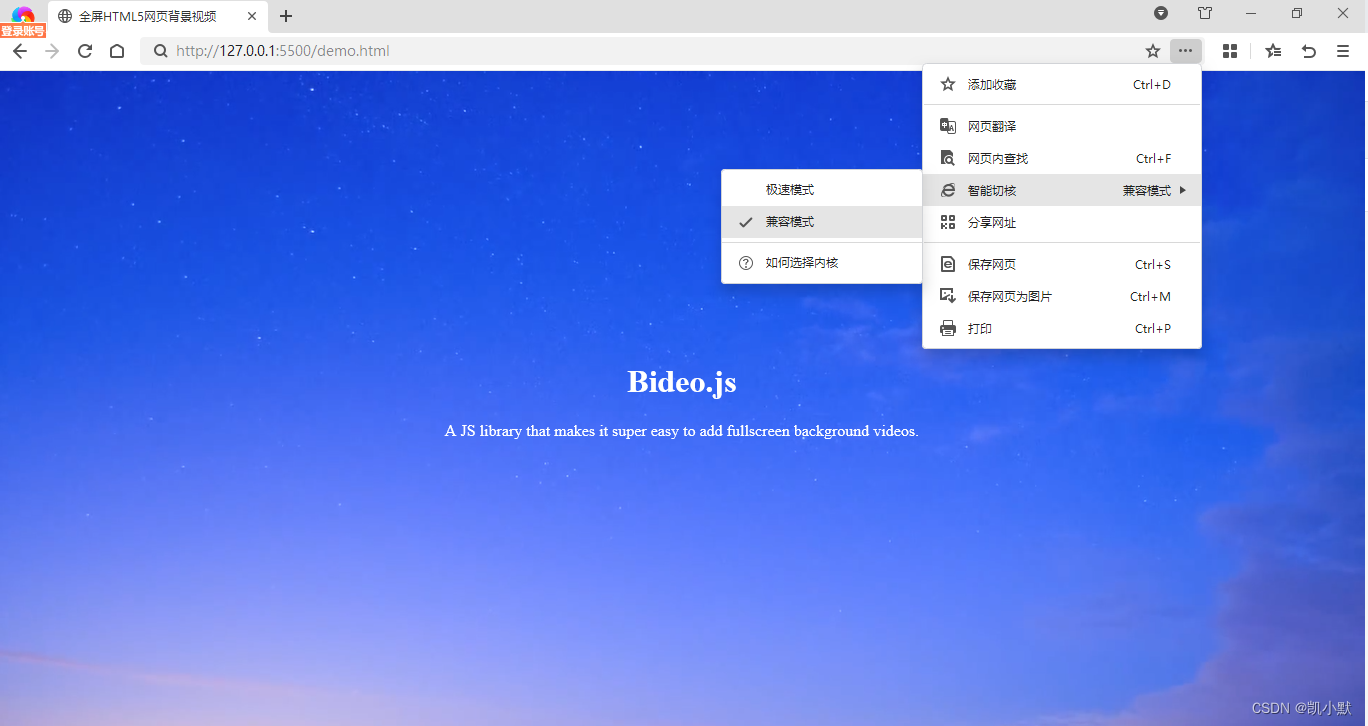
用 bideo.js 之后,360 极速浏览器的 ie 兼容模式效果如下:
类classAprivatedeffooputs:fooendpublicdefbarputs:barendprivatedefzimputs:zimendprotecteddefdibputs:dibendendA的实例a=A.new测试a.foorescueputs:faila.barrescueputs:faila.zimrescueputs:faila.dibrescueputs:faila.gazrescueputs:fail测试输出failbarfailfailfail.发送测试[:foo,:bar,:zim,:dib,:gaz].each{|m|a.send(m)resc
我想为Heroku构建一个Rails3应用程序。他们使用Postgres作为他们的数据库,所以我通过MacPorts安装了postgres9.0。现在我需要一个postgresgem并且共识是出于性能原因你想要pggem。但是我对我得到的错误感到非常困惑当我尝试在rvm下通过geminstall安装pg时。我已经非常明确地指定了所有postgres目录的位置可以找到但仍然无法完成安装:$envARCHFLAGS='-archx86_64'geminstallpg--\--with-pg-config=/opt/local/var/db/postgresql90/defaultdb/po
尝试通过RVM将RubyGems升级到版本1.8.10并出现此错误:$rvmrubygemslatestRemovingoldRubygemsfiles...Installingrubygems-1.8.10forruby-1.9.2-p180...ERROR:Errorrunning'GEM_PATH="/Users/foo/.rvm/gems/ruby-1.9.2-p180:/Users/foo/.rvm/gems/ruby-1.9.2-p180@global:/Users/foo/.rvm/gems/ruby-1.9.2-p180:/Users/foo/.rvm/gems/rub
我已经从我的命令行中获得了一切,所以我可以运行rubymyfile并且它可以正常工作。但是当我尝试从sublime中运行它时,我得到了undefinedmethod`require_relative'formain:Object有人知道我的sublime设置中缺少什么吗?我正在使用OSX并安装了rvm。 最佳答案 或者,您可以只使用“require”,它应该可以正常工作。我认为“require_relative”仅适用于ruby1.9+ 关于ruby-主要:Objectwhenrun
我的最终目标是安装当前版本的RubyonRails。我在OSXMountainLion上运行。到目前为止,这是我的过程:已安装的RVM$\curl-Lhttps://get.rvm.io|bash-sstable检查已知(我假设已批准)安装$rvmlistknown我看到当前的稳定版本可用[ruby-]2.0.0[-p247]输入命令安装$rvminstall2.0.0-p247注意:我也试过这些安装命令$rvminstallruby-2.0.0-p247$rvminstallruby=2.0.0-p247我很快就无处可去了。结果:$rvminstall2.0.0-p247Search
如果您尝试在Ruby中的nil对象上调用方法,则会出现NoMethodError异常并显示消息:"undefinedmethod‘...’fornil:NilClass"然而,有一个tryRails中的方法,如果它被发送到一个nil对象,它只返回nil:require'rubygems'require'active_support/all'nil.try(:nonexisting_method)#noNoMethodErrorexceptionanymore那么try如何在内部工作以防止该异常? 最佳答案 像Ruby中的所有其他对象
由于fast-stemmer的问题,我很难安装我想要的任何rubygem。我把我得到的错误放在下面。Buildingnativeextensions.Thiscouldtakeawhile...ERROR:Errorinstallingfast-stemmer:ERROR:Failedtobuildgemnativeextension./System/Library/Frameworks/Ruby.framework/Versions/2.0/usr/bin/rubyextconf.rbcreatingMakefilemake"DESTDIR="cleanmake"DESTDIR=
我正在尝试在Ruby中制作一个cli应用程序,它接受一个给定的数组,然后将其显示为一个列表,我可以使用箭头键浏览它。我觉得我已经在Ruby中看到一个库已经这样做了,但我记不起它的名字了。我正在尝试对soundcloud2000中的代码进行逆向工程做类似的事情,但他的代码与SoundcloudAPI的使用紧密耦合。我知道cursesgem,我正在考虑更抽象的东西。广告有没有人见过可以做到这一点的库或一些概念证明的Ruby代码可以做到这一点? 最佳答案 我不知道这是否是您正在寻找的,但也许您可以使用我的想法。由于我没有关于您要完成的工作
我的主要目标是能够完全理解我正在使用的库/gem。我尝试在Github上从头到尾阅读源代码,但这真的很难。我认为更有趣、更温和的踏脚石就是在使用时阅读每个库/gem方法的源代码。例如,我想知道RubyonRails中的redirect_to方法是如何工作的:如何查找redirect_to方法的源代码?我知道在pry中我可以执行类似show-methodmethod的操作,但我如何才能对Rails框架中的方法执行此操作?您对我如何更好地理解Gem及其API有什么建议吗?仅仅阅读源代码似乎真的很难,尤其是对于框架。谢谢! 最佳答案 Ru
当我尝试安装Ruby时遇到此错误。我试过查看this和this但无济于事➜~brewinstallrubyWarning:YouareusingOSX10.12.Wedonotprovidesupportforthispre-releaseversion.Youmayencounterbuildfailuresorotherbreakages.Pleasecreatepull-requestsinsteadoffilingissues.==>Installingdependenciesforruby:readline,libyaml,makedepend==>Installingrub
