本文基于viper实现了apollo多实例快速接入,授人以渔,带着大家读源码,详解实现思路,封装成自己的工具类并且开源。
viper是适用于go应用程序的配置解决方案,这款配置管理神器,支持多种类型、开箱即用、极易上手。
本地配置文件的接入能很快速的完成,那么对于远程apollo配置中心的接入,是否也能很快速完成呢?如果有多个apollo实例都需要接入,是否能支持呢?以及apollo远程配置变更后,是否能支持热加载,实时更新呢?
带着上面的这些问题,结合实际商业项目的实践,已经有较成熟的解决方案。本着分享的原则,现已将xconfig包脱敏开源:github地址,欢迎体验和star。
下面快速介绍下xconfig包的使用与能力,然后针对包的封装实践做个讲解
go get -u github.com/jinzaigo/xconfig
指定配置文件路径完成初始化,即可通过xconfig.GetLocalIns().xxx()链式操作,读取配置
package main

import (
    "fmt"
    "github.com/jinzaigo/xconfig"
)

func main() {
    if xconfig.IsLocalLoaded() {
        fmt.Println("local config is loaded")
        return
    }
    //初始化
    configIns := xconfig.New(xconfig.WithFile("example/config.yml"))
    xconfig.InitLocalIns(configIns)

    //读取配置
    fmt.Println(xconfig.GetLocalIns().GetString("appId"))
    fmt.Println(xconfig.GetLocalIns().GetString("env"))
    fmt.Println(xconfig.GetLocalIns().GetString("apollo.one.endpoint"))
}
xxx支持的操作方法:
指定配置类型与apollo信息完成初始化,即可通过xconfig.GetRemoteIns(key).xxx()链式操作,读取配置
单实例场景
//初始化
configIns := xconfig.New(xconfig.WithConfigType("properties"))
err := configIns.AddApolloRemoteConfig(endpoint, appId, namespace, backupFile)
if err != nil {
    ...handler
}
xconfig.AddRemoteIns("ApplicationConfig", configIns)

//读取配置
fmt.Println(xconfig.GetRemoteIns("ApplicationConfig").AllSettings())
多实例场景
在本地配置文件config.yaml维护apollo配置信息,然后批量完成多个实例的初始化,即可通过xconfig.GetRemoteIns(key).xxx()链式操作,读取配置
#apollo配置,支持多实例多namespace
apollo:
  one:
    endpoint: xxx
    appId: xxx
    namespaces:
      one:
        key: ApplicationConfig   #用于读取配置,保证全局唯一,避免相互覆盖
        name: application        #注意:name不要带类型(例如application.properties),这里name和type分开配置
        type: properties
      two:
        key: cipherConfig
        name: cipher
        type: properties
    backupFile: /tmp/xconfig/apollo_bak/test.agollo #每个appId使用不同的备份文件名,避免相互覆盖
package main

import (
    "fmt"
    "github.com/jinzaigo/xconfig"
)

type ApolloConfig struct {
    Endpoint   string                     `json:"endpoint"`
    AppId      string                     `json:"appId"`
    Namespaces map[string]ApolloNameSpace `json:"namespaces"`
    BackupFile string                     `json:"backupFile"`
}

type ApolloNameSpace struct {
    Key  string `json:"key"`
    Name string `json:"name"`
    Type string `json:"type"`
}

func main() {
    //本地配置初始化
    xconfig.InitLocalIns(xconfig.New(xconfig.WithFile("example/config.yml")))
    if !xconfig.GetLocalIns().IsSet("apollo") {
        fmt.Println("without apollo key")
        return
    }

    apolloConfigs := make(map[string]ApolloConfig, 0)
    err := xconfig.GetLocalIns().SubAndUnmarshal("apollo", &apolloConfigs)
    if err != nil {
        fmt.Println(apolloConfigs)
        fmt.Println("SubAndUnmarshal error:", err.Error())
        return
    }

    //多实例初始化
    for _, apolloConfig := range apolloConfigs {
        for _, namespaceConf := range apolloConfig.Namespaces {
            configIns := xconfig.New(xconfig.WithConfigType(namespaceConf.Type))
            err = configIns.AddApolloRemoteConfig(apolloConfig.Endpoint, apolloConfig.AppId, namespaceConf.Name, apolloConfig.BackupFile)
            if err != nil {
                fmt.Println("AddApolloRemoteConfig error:" + err.Error())
            }
            xconfig.AddRemoteIns(namespaceConf.Key, configIns)
        }
    }

    //读取
    fmt.Println(xconfig.GetRemoteIns("ApplicationConfig").AllSettings())
}
欢迎大家关注我们,拥抱开源:加入我和劲仔的交流群
学会使用xconfig包后,能快速的实现本地配置文件和远程apollo配置中心多实例的接入。再进一步了解这个包在封装过程都中遇到过哪些问题,以及对应的解决方案,能更深入的理解与使用这个包,同时也有助于增加读者自己在封装新包时的实践理论基础。
查看viper的使用文档,会发现viper是支持远程K/V存储连接的,所以一开始我尝试着连接apollo
v := viper.New()
v.SetConfigType("properties")
err := v.AddRemoteProvider("apollo", "http://endpoint", "application")
if err != nil {
    panic(fmt.Errorf("AddRemoteProvider error: %s", err))
}
fmt.Println("AddRemoteProvider success")
//执行结果:
//panic: AddRemoteProvider error: Unsupported Remote Provider Type "apollo"
执行后发现,并不支持apollo,随即查看viper源码,发现只支持以下3个provider
// SupportedRemoteProviders are universally supported remote providers.
var SupportedRemoteProviders = []string{"etcd", "consul", "firestore"}
解决方案:
安装shima-park/agollo包: go get -u github.com/shima-park/agollo
安装成功后,只需要在上面代码基础上,最前面加上 remote.SetAppID("appId") 即可连接成功
import (
  "fmt"
  remote "github.com/shima-park/agollo/viper-remote"
  "github.com/spf13/viper"
)

remote.SetAppID("appId")
v := viper.New()
v.SetConfigType("properties")
err := v.AddRemoteProvider("apollo", "http://endpoint", "application")
if err != nil {
    panic(fmt.Errorf("AddRemoteProvider error: %s", err))
}
fmt.Println("AddRemoteProvider success")
//执行结果:
//AddRemoteProvider success
不难发现,在执行 remote.SetAppID("appId") 之前,remote.go 中init方法,会往viper.SupportedRemoteProviders中append一个"apollo",其实就是让viper认识一下这个provider,随后将viper.RemoteConfig 做重新赋值,并重新实现了viper中的Get Watch WatchChannel这3个方法,里边就会做apollo连接的适配。
//github.com/shima-park/agollo/viper-remote/remote.go 278-284行
func init() {
  viper.SupportedRemoteProviders = append(
    viper.SupportedRemoteProviders,
    "apollo",
  )
  viper.RemoteConfig = &configProvider{}
}

//github.com/spf13/viper/viper.go 113-120行
type remoteConfigFactory interface {
  Get(rp RemoteProvider) (io.Reader, error)
  Watch(rp RemoteProvider) (io.Reader, error)
  WatchChannel(rp RemoteProvider) (<-chan *RemoteResponse, chan bool)
}

// RemoteConfig is optional, see the remote package
var RemoteConfig remoteConfigFactory
执行remote.SetAppID("appId")之后,这个appId是往全局变量appID里写入的,并且在初始化时也是读取的这个全局变量。带来的问题就是不支持apollo多实例,那么解决呢
//github.com/shima-park/agollo/viper-remote/remote.go 26行
var (
  // apollod的appid
  appID string
  ...
)
func SetAppID(appid string) {
  appID = appid
}

//github.com/shima-park/agollo/viper-remote/remote.go 252行
switch rp.Provider() {
...
case "apollo":
    return newApolloConfigManager(appID, rp.Endpoint(), defaultAgolloOptions)
}
解决方案:
既然agollo包能让viper支持apollo连接,那么为什么我们自己的包不能让viper也支持apollo连接呢?并且我们还可以定制化的扩展成多实例连接。实现步骤如下:
"providers sync.Map",实现AddProviders()方法,将多个appId往里边写入,里边带上agollo.Option相关配置;同时关键操作要将新的provider往viper.SupportedRemoteProviders append,让viper认识这个新类型核心代码 查看GitHub即可:
//github.com/jinzaigo/xconfig/remote/remote.go
var (
  ...
  providers sync.Map
)

func init() {
  viper.RemoteConfig = &configProvider{} //目的:重写viper.RemoteConfig的相关方法
}

type conf struct {
  appId string
  opts  []agollo.Option
}

//【重要】这里是实现支持多个appId的核心操作
func AddProviders(appId string, opts ...agollo.Option) string {
    provider := "apollo:" + appId
    _, loaded := providers.LoadOrStore(provider, conf{
        appId: appId,
        opts:  opts,
    })

    //之前未存储过,则向viper新增一个provider,让viper认识这个新提供器
    if !loaded {
        viper.SupportedRemoteProviders = append(
            viper.SupportedRemoteProviders,
            provider,
        )
    }

    return provider
}

//使用的地方
func newApolloConfigManager(rp viper.RemoteProvider) (*apolloConfigManager, error) {
  //读取provider相关配置
  providerConf, ok := providers.Load(rp.Provider())
  if !ok {
    return nil, ErrUnsupportedProvider
  }

  p := providerConf.(conf)
  if p.appId == "" {
    return nil, errors.New("The appid is not set")
  }
  ...
}
首先 viper的使用文档,也说明了这个并发读写不安全问题,建议使用sync包避免panic

然后本地通过-race试验,也发现会有这个竞态问题
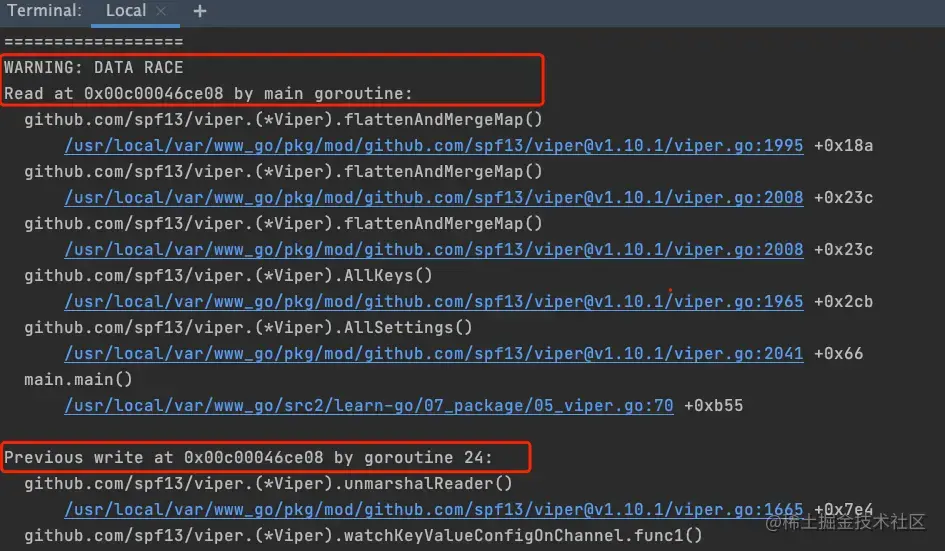
进一步分析viper实现热加载的源代码:其实是通过协程实时更新kvstrore这个map,读取数据的时候也是从kvstore读取,并没有加锁,所以会有并发读写不安全问题
// 在github.com/spf13/viper/viper.go 1909行
// Retrieve the first found remote configuration.
func (v *Viper) watchKeyValueConfigOnChannel() error {
  if len(v.remoteProviders) == 0 {
    return RemoteConfigError("No Remote Providers")
  }

  for _, rp := range v.remoteProviders {
    respc, _ := RemoteConfig.WatchChannel(rp)
    // Todo: Add quit channel
    go func(rc <-chan *RemoteResponse) {
      for {
        b := <-rc
        reader := bytes.NewReader(b.Value)
        v.unmarshalReader(reader, v.kvstore)
      }
    }(respc)
    return nil
  }
  return RemoteConfigError("No Files Found")
}
解决方案:
写:不使用viper自带热加载方法,而是采用重写,也是使用协程实时更新,但会加读写锁。
读:也加读写锁
//github.com/jinzaigo/xconfig/config.go
type Config struct {
    configType string
    viper      *viper.Viper
    viperLock  sync.RWMutex
}

//写
//_ = c.viper.WatchRemoteConfigOnChannel()
respc, _ := viper.RemoteConfig.WatchChannel(remote.NewProviderSt(provider, endpoint, namespace, ""))
go func(rc <-chan *viper.RemoteResponse) {
    for {
        <-rc
        c.viperLock.Lock()
        err = c.viper.ReadRemoteConfig()
        c.viperLock.Unlock()
    }
}(respc)

//读
func (c *Config) Get(key string) interface{} {
    c.viperLock.RLock()
    defer c.viperLock.RUnlock()
    return c.viper.Get(key)
}
调用agollo包中的相关方法,输入namespace=application.properties(带类型),发现主动拉取数据成功,远程变更通知后数据拉取失败;输入namespace=application(不带类型),发现主动拉取数据成功,远程变更通知后数据拉取也能成功。两者输入差异就在于是否带类型
查看Apollo官方接口文档,配置更新推送接口notifications/v2 notifications字段说明,一目了然。

基于上述说明,我们在代码里做了兼容处理,并且配置文件也加上了使用说明
//github.com/jinzaigo/xconfig/config.go 72行
func (c *Config) AddApolloRemoteConfig(endpoint, appId, namespace, backupFile string) error {
    ...
    //namespace默认类型不用加后缀,非默认类型需要加后缀(备注:这里会涉及到apollo变更通知后的热加载操作 Start->longPoll)
    if c.configType != "properties" {
        namespace = namespace + "." + c.configType
    }
    ...
}

//config.yml配置说明
namespaces:
    one:
        key: ApplicationConfig   #用于读取配置,保证全局唯一,避免相互覆盖
        name: application        #注意:name不要带类型(例如application.properties),这里name和type分开配置
        type: properties
基于实际商业项目实践,提升配置管理组件能力,实现了本地配置文件与远程apollo配置中心多实例快速接入;
从xconfig包的快速上手的使用说明到封装实践难点痛点的解析,双管齐下,让你更深入的理解,希望对你有所帮助与收获。
开源项目xconfig,github地址。欢迎体验与star。
欢迎在CSDN私信我,也欢迎 加我好友 一起学习。
我正在学习如何使用Nokogiri,根据这段代码我遇到了一些问题:require'rubygems'require'mechanize'post_agent=WWW::Mechanize.newpost_page=post_agent.get('http://www.vbulletin.org/forum/showthread.php?t=230708')puts"\nabsolutepathwithtbodygivesnil"putspost_page.parser.xpath('/html/body/div/div/div/div/div/table/tbody/tr/td/div
总的来说,我对ruby还比较陌生,我正在为我正在创建的对象编写一些rspec测试用例。许多测试用例都非常基础,我只是想确保正确填充和返回值。我想知道是否有办法使用循环结构来执行此操作。不必为我要测试的每个方法都设置一个assertEquals。例如:describeitem,"TestingtheItem"doit"willhaveanullvaluetostart"doitem=Item.new#HereIcoulddotheitem.name.shouldbe_nil#thenIcoulddoitem.category.shouldbe_nilendend但我想要一些方法来使用
关闭。这个问题是opinion-based.它目前不接受答案。想要改进这个问题?更新问题,以便editingthispost可以用事实和引用来回答它.关闭4年前。Improvethisquestion我想在固定时间创建一系列低音和高音调的哔哔声。例如:在150毫秒时发出高音调的蜂鸣声在151毫秒时发出低音调的蜂鸣声200毫秒时发出低音调的蜂鸣声250毫秒的高音调蜂鸣声有没有办法在Ruby或Python中做到这一点?我真的不在乎输出编码是什么(.wav、.mp3、.ogg等等),但我确实想创建一个输出文件。
Rails2.3可以选择随时使用RouteSet#add_configuration_file添加更多路由。是否可以在Rails3项目中做同样的事情? 最佳答案 在config/application.rb中:config.paths.config.routes在Rails3.2(也可能是Rails3.1)中,使用:config.paths["config/routes"] 关于ruby-on-rails-Rails3中的多个路由文件,我们在StackOverflow上找到一个类似的问题
给定这段代码defcreate@upgrades=User.update_all(["role=?","upgraded"],:id=>params[:upgrade])redirect_toadmin_upgrades_path,:notice=>"Successfullyupgradeduser."end我如何在该操作中实际验证它们是否已保存或未重定向到适当的页面和消息? 最佳答案 在Rails3中,update_all不返回任何有意义的信息,除了已更新的记录数(这可能取决于您的DBMS是否返回该信息)。http://ar.ru
我在我的项目目录中完成了compasscreate.和compassinitrails。几个问题:我已将我的.sass文件放在public/stylesheets中。这是放置它们的正确位置吗?当我运行compasswatch时,它不会自动编译这些.sass文件。我必须手动指定文件:compasswatchpublic/stylesheets/myfile.sass等。如何让它自动运行?文件ie.css、print.css和screen.css已放在stylesheets/compiled。如何在编译后不让它们重新出现的情况下删除它们?我自己编译的.sass文件编译成compiled/t
我有多个ActiveRecord子类Item的实例数组,我需要根据最早的事件循环打印。在这种情况下,我需要打印付款和维护日期,如下所示:ItemAmaintenancerequiredin5daysItemBpaymentrequiredin6daysItemApaymentrequiredin7daysItemBmaintenancerequiredin8days我目前有两个查询,用于查找maintenance和payment项目(非排他性查询),并输出如下内容:paymentrequiredin...maintenancerequiredin...有什么方法可以改善上述(丑陋的)代
我正在寻找执行以下操作的正确语法(在Perl、Shell或Ruby中):#variabletoaccessthedatalinesappendedasafileEND_OF_SCRIPT_MARKERrawdatastartshereanditcontinues. 最佳答案 Perl用__DATA__做这个:#!/usr/bin/perlusestrict;usewarnings;while(){print;}__DATA__Texttoprintgoeshere 关于ruby-如何将脚
Rackup通过Rack的默认处理程序成功运行任何Rack应用程序。例如:classRackAppdefcall(environment)['200',{'Content-Type'=>'text/html'},["Helloworld"]]endendrunRackApp.new但是当最后一行更改为使用Rack的内置CGI处理程序时,rackup给出“NoMethodErrorat/undefinedmethod`call'fornil:NilClass”:Rack::Handler::CGI.runRackApp.newRack的其他内置处理程序也提出了同样的反对意见。例如Rack
我需要从一个View访问多个模型。以前,我的links_controller仅用于提供以不同方式排序的链接资源。现在我想包括一个部分(我假设)显示按分数排序的顶级用户(@users=User.all.sort_by(&:score))我知道我可以将此代码插入每个链接操作并从View访问它,但这似乎不是“ruby方式”,我将需要在不久的将来访问更多模型。这可能会变得很脏,是否有针对这种情况的任何技术?注意事项:我认为我的应用程序正朝着单一格式和动态页面内容的方向发展,本质上是一个典型的网络应用程序。我知道before_filter但考虑到我希望应用程序进入的方向,这似乎很麻烦。最终从任何
