前文:随着前端大屏页面的逐渐壮大,客户的需求也越来越多,大屏上面展示的事物也越来越丰 富。其中实时播放监控的需求逐步增加,视频流格式也是有很多种,用到最多的.flv、.m3u8。
一、 JessibucaPlayer插件用来播放flv流
1.首先是先把文件放在vue项目的public下面
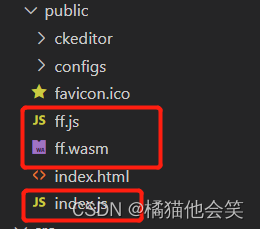
2.在index.html文件里面引入 index.js文件(直接引入即可)

3.把封装好的JessibucaPlayer组件放到公共components
<template>
  <div class="jessibuca-player" style="width: 100%; height: 100%">
    <div class="container" :id="id" ref="container"></div>
  </div>
</template>

<script>
export default {
  name: "JessibucaPlayer",
  props: {
    videoUrl: {
      type: String,
      default: ""
    },
    id: {
      type: Number,
      required: true
    }
  },
  data() {
    return {
      jessibuca: null // jessibuca 实例化对象
    };
  },
  methods: {
    init() {
      this.jessibuca = new window.Jessibuca({
        container: document.getElementById(this.id), // 播放器容器,若为 string ,则底层调用的是 document.getElementById('id')
        videoBuffer: 0.2, // 设置最大缓冲时长,单位毫秒,播放器会自动消除延迟。
        forceNoOffscreen: true, // 是否不使用离屏模式(提升渲染能力)
        hasAudio: false, // 是否有音频
        rotate: 0, // 设置旋转角度,只支持,0(默认) ,180,270 三个值
        isResize: false, // 1.当为true的时候:视频画面做等比缩放后,高或宽对齐canvas区域,画面不被拉伸,但有黑边;2.当为false的时候:视频画面完全填充canvas区域,画面会被拉伸
        isFullSize: true, // 当为true的时候:视频画面做等比缩放后,完全填充canvas区域,画面不被拉伸,没有黑边,但画面显示不全
        debug: false, // 是否开启控制台调试打印
        timeout: 30, // 设置超时时长, 单位秒,在连接成功之前和播放中途,如果超过设定时长无数据返回,则回调timeout事件
        supportDblclickFullscreen: true, // 是否支持屏幕的双击事件,触发全屏,取消全屏事件。
        showBandwidth: false, // 是否显示网速
        operateBtns: {
          // 配置功能
          fullscreen: false, // 是否显示全屏按钮
          screenshot: false, // 是否显示截图按钮
          play: false, // 是否显示播放暂停按钮
          audio: false // 是否显示声音按钮
        },
        keepScreenOn: false, // 开启屏幕常亮,在手机浏览器上, canvas标签渲染视频并不会像video标签那样保持屏幕常亮。
        isNotMute: false, // 是否开启声音,默认是关闭声音播放的。
        loadingText: "加载中...", // 加载过程中文案。
        background: "" // 背景图片。
      });
      // 事件:
      this.jessibuca_load()
      // 1. 监听 jessibuca 初始化事件。
      this.jessibuca.on("load", () => {
        this.jessibuca_load()});
      // 2. 信息,包含错误信息
      this.jessibuca.on("log", data => this.jessibuca_log(data));
      // 3. 触发暂停事件
      this.jessibuca.on("pause", this.jessibuca_pause);
      // 4. 触发播放事件
      this.jessibuca.on("play", this.jessibuca_play);
      // 5. 当前是否全屏
      this.jessibuca.on("fullscreen", this.jessibuca_fullscreen);
      // 6. 触发声音事件,返回boolean值
      this.jessibuca.on("mute", this.jessibuca_mute);
      // 7. 当解析出音频信息时回调
      this.jessibuca.on("audioInfo", this.jessibuca_audioInfo);
      // 8. 当解析出视频信息时回调
      this.jessibuca.on("videoInfo", this.jessibuca_videoInfo);
      // 9. 错误信息
      this.jessibuca.on("error", this.jessibuca_error);
      // 10. 当设定的超时时间内无数据返回,则回调
      this.jessibuca.on("timeout", this.jessibuca_timeout);
      // 11. 流状态统计,流开始播放后回调,每秒1次
      this.jessibuca.on("start", this.jessibuca_start);
      // 12. 渲染性能统计,流开始播放后回调,每秒1次
      this.jessibuca.on("performance", this.jessibuca_performance);
      // 13. 当前网速, 单位KB 每秒1次,
      this.jessibuca.on("kBps", this.jessibuca_kBps);
    },
    // 事件:
    jessibuca_load() {
      // 监听 jessibuca 初始化事件。
      console.log("on load");
      console.log("module", this.videoUrl);
      this.methods_play(this.videoUrl);
    },
    jessibuca_log(data) {
      // 信息,包含错误信息
      console.log("on log", data);
    },
    jessibuca_pause(flag) {
      // 触发暂停事件
      console.log("on pause", flag);
    },
    jessibuca_play(flag) {
      // 触发播放事件
      console.log("on play", flag);
    },
    jessibuca_fullscreen(flag) {
      // 当前是否全屏
      console.log("on fullscreen", flag);
      if (flag) {
        let myEvent = new Event("resize");
        setTimeout(() => {
          window.dispatchEvent(myEvent);
        }, 100);
      }
    },
    jessibuca_mute(flag) {
      // 触发声音事件
      console.log("on mute", flag);
    },
    jessibuca_audioInfo(data) {
      // 当解析出音频信息时回调,2个回调参数
      // 1. numOfChannels:声频通道
      // 2. sampleRate 采样率
      console.log("audioInfo", data);
    },
    jessibuca_videoInfo(data) {
      // 当解析出视频信息时回调
      // 1. w:视频宽
      // 2. h:视频高
      console.log("videoInfo", data);
    },
    jessibuca_error(error) {
      // 错误信息
      console.log("error:", error);
    },
    jessibuca_timeout() {
      // 当设定的超时时间内无数据返回,则回调
      console.log("timeout");
    },
    jessibuca_start(s) {
      // 流状态统计,流开始播放后回调,每秒1次
      // 1. buf: 当前缓冲区时长,单位毫秒
      // 2. fps: 当前视频帧率,
      // 3. abps: 当前音频码率,单位bit,
      // 4. vbps: 当前视频码率,单位bit,
      // 5. ts:当前视频帧pts,单位毫秒
      // console.log('stats is', s);
    },
    jessibuca_performance(performance) {
      // 渲染性能统计,流开始播放后回调,每秒1次。
      // 0: 表示卡顿、1: 表示流畅、2: 表示非常流程
      // console.log('performance', performance);
    },
    jessibuca_kBps(kBps) {
      // 当前网速, 单位KB 每秒1次,
      // console.log('kBps', kBps);
    },
    // 方法:
    methods_play(url) {
      // 播放
      if (this.jessibuca.hasLoaded()) {
        this.jessibuca.play(url);
      } else {
        console.error("视频数据未加载完毕,请稍后操作");
      }
    },
    methods_mute() {
      // 静音
      this.jessibuca.mute();
    },
    methods_cancelMute() {
      // 取消静音
      this.jessibuca.cancelMute();
    },
    methods_pause() {
      // 暂停
      this.jessibuca.pause();
    },
    methods_setVolume(volume) {
      // 设置音量
      this.jessibuca.setVolume(volume);
    },
    methods_setRotate(rotate) {
      // 设置旋转角度 0\180\270
      this.jessibuca.setRotate(rotate);
    },
    methods_destroy() {
      // 关闭视频,释放底层资源
      if (this.jessibuca) {
        this.jessibuca.destroy();
      }
    },
    methods_fullscreen(flag) {
      // 全屏(取消全屏)播放视频
      this.jessibuca.setFullscreen(flag);
    },
    methods_screenShot() {
      // 截图
      // 1. screenshot(filename, format, quality)
      // 2. {string} filename、 {string} format、{number} quality
      // 3.filename: 保存的文件名, 默认 时间戳、format : 截图的格式,可选png或jpeg或者webp ,默认 png、quality: 可选参数,当格式是jpeg或者webp时,压缩质量,取值0 ~ 1 ,默认 0.92
      this.jessibuca.screenshot();
    },
    methods_setBufferTime(time) {
      // 设置最大缓冲时长,单位秒,播放器会自动消除延迟。
      // {number} time
      this.jessibuca.setBufferTime(Number(time));
    },
    methods_setScaleMode(mode) {
      // 设置播放器填充
      // 1. 0 视频画面完全填充canvas区域,画面会被拉伸 等同于参数 isResize 为false
      // 2. 1 视频画面做等比缩放后,高或宽对齐canvas区域,画面不被拉伸,但有黑边 等同于参数 isResize 为true
      // 3. 2 视频画面做等比缩放后,完全填充canvas区域,画面不被拉伸,没有黑边,但画面显示不全 等同于参数 isFullSize 为true
      this.jessibuca.setScaleMode(Number(mode));
    },
    restartPlay() {
      // 重新加载
      this.methods_destroy();
      this.methods_play(this.videoUrl);
    }
  },
  mounted() {
    this.init();
    window.onerror = msg => (this.err = msg);
  },
  beforeDestroy() {
    if (this.jessibuca) this.jessibuca.destroy();
  }
};
</script>

<style>
@import url("./JessibucaPlayer.css");
</style>
4.最后再自己用到的文件里面 引入组件即可

如有想要文件的请私聊
二、easyplayer插件播放m3u8流
教程:
1.首先npm安装EasyPlayer、copy-webpack-plugin
ps:copy-webpack-plugin版本一定一定一定不能大于6.0,否则会报错。
 npm install @easydarwin/easyplayer --save
 npm install copy-webpack-plugin@5.1.2 --save-dev
2.最重要的地方 一定要把这个地方弄好 那就是在vue.config.js里面
const CopyWebpackPlugin = require('copy-webpack-plugin')
configureWebpack: {
  plugins:[
        new CopyWebpackPlugin([
          {
            from: 'node_modules/@easydarwin/easyplayer/dist/component/EasyPlayer.swf',
            to: './libs/EasyPlayer/'
          },
          {
            from: 'node_modules/@easydarwin/easyplayer/dist/component/crossdomain.xml',
            to: './libs/EasyPlayer/'
          },
          {
            from: 'node_modules/@easydarwin/easyplayer/dist/component/EasyPlayer-lib.min.js',
            to: './libs/EasyPlayer/'
          }
        ])
  ]
}
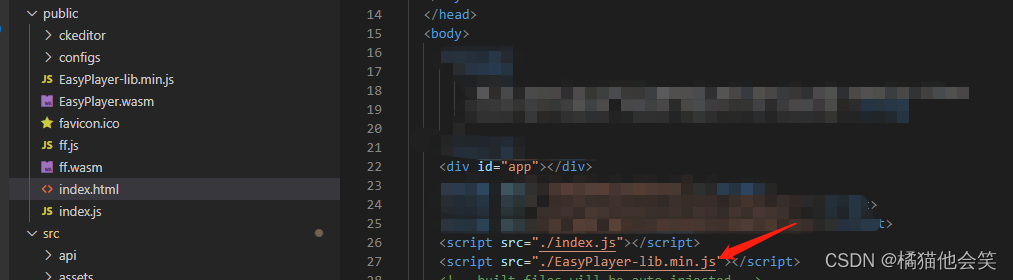
3.还需要在public/index.html 引入EasyPlayer-lib.min.js,可以直接在node_modules里找到@easydarwin下的dist/compent/EasyPlayer-lib.min.js复制到pubilc目录下,还有需要EasyPlayer.wasm同样放到public目录下
4.引入组件使用

最后效果

项目介绍随着我国经济迅速发展,人们对手机的需求越来越大,各种手机软件也都在被广泛应用,但是对于手机进行数据信息管理,对于手机的各种软件也是备受用户的喜爱小学生兴趣延时班预约小程序的设计与开发被用户普遍使用,为方便用户能够可以随时进行小学生兴趣延时班预约小程序的设计与开发的数据信息管理,特开发了小程序的设计与开发的管理系统。小学生兴趣延时班预约小程序的设计与开发的开发利用现有的成熟技术参考,以源代码为模板,分析功能调整与小学生兴趣延时班预约小程序的设计与开发的实际需求相结合,讨论了小学生兴趣延时班预约小程序的设计与开发的使用。开发环境开发说明:前端使用微信微信小程序开发工具:后端使用ssm:VU
我在我的rails应用程序中安装了来自github.com的acts_as_versioned插件,但有一段代码我不完全理解,我希望有人能帮我解决这个问题class_eval我知道block内的方法(或任何它是什么)被定义为类内的实例方法,但我在插件的任何地方都找不到定义为常量的CLASS_METHODS,而且我也不确定是什么here,并且有问题的代码从lib/acts_as_versioned.rb的第199行开始。如果有人愿意告诉我这里的内幕,我将不胜感激。谢谢-C 最佳答案 这是一个异端。http://en.wikipedia
按照目前的情况,这个问题不适合我们的问答形式。我们希望答案得到事实、引用或专业知识的支持,但这个问题可能会引发辩论、争论、投票或扩展讨论。如果您觉得这个问题可以改进并可能重新打开,visitthehelpcenter指导。关闭9年前。我最近开始学习Ruby,这是我的第一门编程语言。我对语法感到满意,并且我已经完成了许多只教授相同基础知识的教程。我已经写了一些小程序(包括我自己的数组排序方法,在有人告诉我谷歌“冒泡排序”之前我认为它非常聪明),但我觉得我需要尝试更大更难的东西来理解更多关于Ruby.关于如何执行此操作的任何想法?
我在Ruby中遇到了一个关于Dir[]和File.join()的简单程序,blobs_dir='/path/to/dir'Dir[File.join(blobs_dir,"**","*")].eachdo|file|FileUtils.rm_rf(file)ifFile.symlink?(file)我有两个困惑:首先,File.join(@blobs_dir,"**","*")中的第二个和第三个参数是什么意思?其次,Dir[]在Ruby中有什么用?我只知道它等价于Dir.glob(),但是,我对Dir.glob()确实不是很清楚。 最佳答案
1.回顾.TransportServicepublicclassTransportServiceextendsAbstractLifecycleComponentTransportService:方法:1publicfinalTextendsTransportResponse>voidsendRequest(finalTransport.Connectionconnection,finalStringaction,finalTransportRequestrequest,finalTransportRequestOptionsoptions,TransportResponseHandlerT>
参考文章搭建文章gitte源码在线体验可以注册两个号来测试演示图:一.整体介绍 介绍SignalR一种通讯模型Hub(中心模型,或者叫集线器模型),调用这个模型写好的方法,去发送消息。 内容有: ①:Hub模型的方法介绍 ②:服务器端代码介绍 ③:前端vue3安装并调用后端方法 ④:聊天室样例整体流程:1、进入网站->调用连接SignalR的方法2、与好友发送消息->调用SignalR的自定义方法 前端通过,signalR内置方法.invoke() 去请求接口3、监听接受方法(渲染消息)通过new signalR.HubConnectionBuilder().on
目录一.大致如下常见问题:(1)找不到程序所依赖的Qt库version`Qt_5'notfound(requiredby(2)CouldnotLoadtheQtplatformplugin"xcb"in""eventhoughitwasfound(3)打包到在不同的linux系统下,或者打包到高版本的相同系统下,运行程序时,直接提示段错误即segmentationfault,或者Illegalinstruction(coredumped)非法指令(4)ldd应用程序或者库,查看运行所依赖的库时,直接报段错误二.问题逐个分析,得出解决方法:(1)找不到程序所依赖的Qt库version`Qt_5'
我是Ruby的新手,但过去两周我一直在对Chef测试进行大量研究。该测试使用ChefSpec和Fauxhai,但它看起来不是很“像ruby”,我希望社区能给我一些编码风格的建议。有没有更好的方法来编写这样的嵌套循环?Recipe/foo/recipes/default.rbpackage"foo"doaction:installendRecipe/foo/spec/default_spec.rbrequire'chefspec'describe'foo::default'doplatforms={"debian"=>['6.0.5'],"ubuntu"=>['12.04','10.04
假设一个使用类变量的简单ruby程序,classHolder@@var=99defHolder.var=(val)@@var=valenddefvar@@varendend@@var="toplevelvariable"a=Holder.newputsa.var我猜结果应该是99,但输出不是99。我想知道为什么。由于类变量的范围是类,我假设@@var="toplevelvariable"行不会影响类中的变量。 最佳答案 @@var是Holder的类变量。而顶层的@@var不是Holder的同名类变量@@var,是你在创建类Obj
一文解决关于VLAN所有的疑惑VLAN基本概念为什么需要VLAN?怎么在交换机上划分VLAN,VLAN的工作原理有了子网,已经隔离了广播,还需要VLAN干啥?只进行子网划分,不进行VLAN划分VLAN划分与子网划分附加VLAN信息的方法VLAN划分交换机的端口类型(Access和Trunk)一、访问链接二、汇聚链接汇聚链接VLAN间通信为什么要进行VLAN间通信?路由器实现VLAN间通信路由器和交换机的连接方式通信细节三层交换机实现VLAN间通信加速VLAN间通信三层交换机与路由器三层交换机路由器路由器和交换机配合构建LAN的实例使用VLAN设计局域网的特点VLAN增加网络的灵活性不使用VLA
