1、Hadoop是一个由Apache基金会所开发的分布式系统基础架构。
2、主要解决:海量数据的存储和海量数据的分析计算问题。
若未完成,请点击集群化环境前置准备
Hadoop生态体系中总共会出现如下进程角色:
1、Hadoop HDFS的管理角色:Namenode进程(仅需一个即可(管理者一个就够))
2、Hadoop HDFS的工作角色:Datanode进程(需要多个(工人,越多越好,一个机器启动一个))
3、Hadoop YARN的管理角色:ResourceManager进程(仅需1个即可(管理者一个就够))
4、Hadoop HDFS的工作角色:NodeManager进程(需要多个(工人,越多越好,一个机器启动一个))
5、Hadoop历史记录服务器角色:HistoryServer进程(仅需1个即可(功能进程无需太多,1个足够))
6、Hadoop代理服务器角色:WebProxyServer进程(仅需1个即可(功能进程无需太多,1个足够))
7、ZooKeeper的进程:QuorumPeerMain进程(仅需1个即可(zookeeper的工作者,越多越好))
角色分配如下:
1、node1:Namenode、Datanode、ResourceManager、NodeManager、HistoryServer、WebProxyServer、QuorumPeerMain
2、node2:Datanode、NodeManager、QuorumPeerMain
3、node3:Datanode、NodeManager、QuorumPeerMain
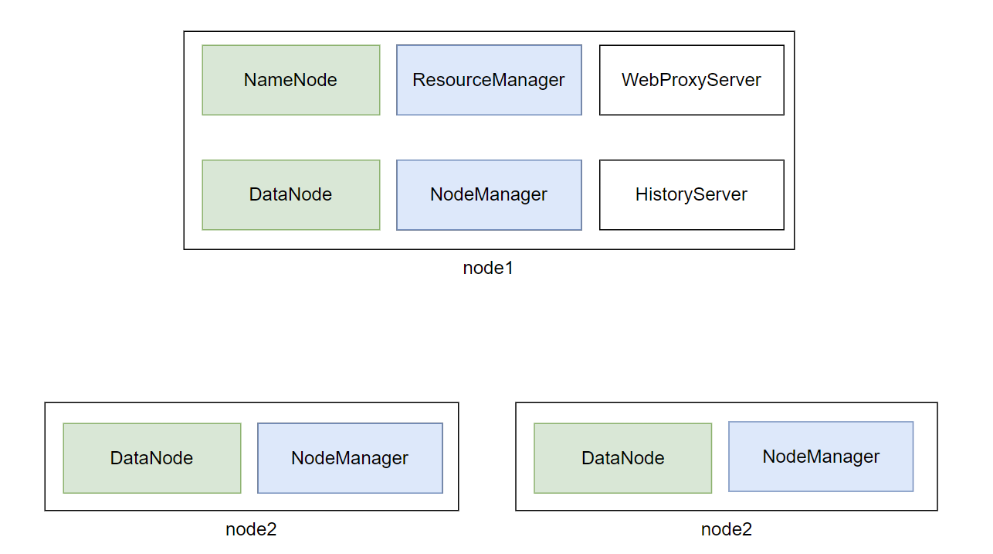
如上图,可以看出node1承载了太多的压力。同时node2和node3也同时运行了不少程序。
为了确保集群的稳定,需要对虚拟机进行内存设置。
请在VMware中,对:
node1设置4GB或以上内存
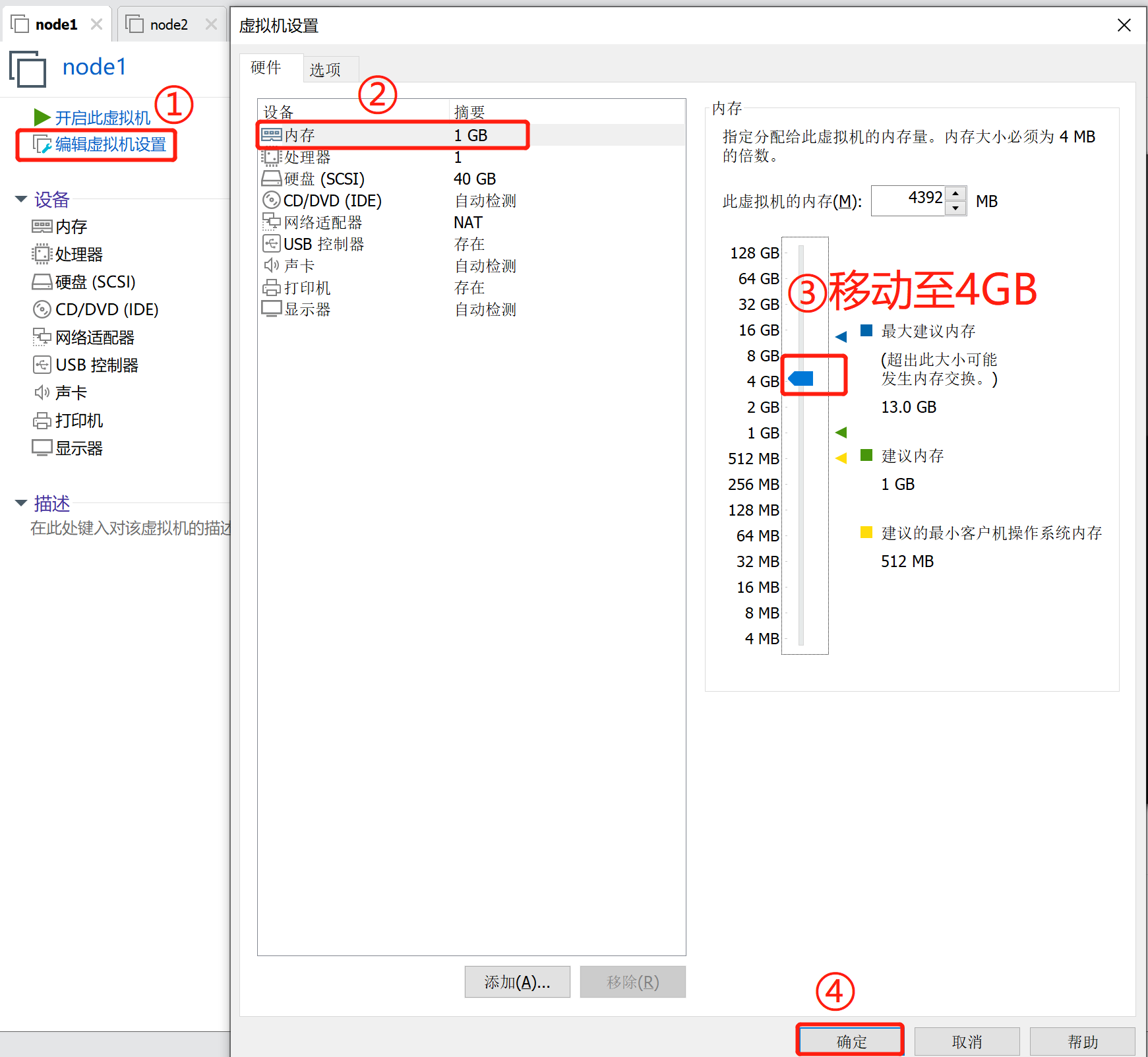
node2和node3设置2GB或以上内存
大数据的软件本身就是集群化(一堆服务器)一起运行的。
现在我们在一台电脑中以多台虚拟机来模拟集群,确实会有很大的内存压力哦。
1、【在node1操作】下载Hadoop安装包、解压、配置软链接
# 1. 下载
wget http://archive.apache.org/dist/hadoop/common/hadoop-3.3.0/hadoop-3.3.0.tar.gz

# 2. 解压
# 请确保目录/export/server存在
tar -zxvf hadoop-3.3.0.tar.gz -C /export/server/

# 3. 构建软链接
ln -s /export/server/hadoop-3.3.0 /export/server/hadoop
2、【在node1操作】修改配置文件:hadoop-env.sh
Hadoop的配置文件要修改的地方很多,请细心
cd 进入到/export/server/hadoop/etc/hadoop文件夹中,配置文件都在这里
cd /export/server/hadoop/etc/hadoop
修改hadoop-env.sh文件
vim hadoop-env.sh
此文件是配置一些Hadoop用到的环境变量
这些是临时变量,在Hadoop运行时有用
如果要永久生效,需要写到/etc/profile中
# 在文件开头加入:

# 配置Java安装路径
export JAVA_HOME=/export/server/jdk
# 配置Hadoop安装路径
export HADOOP_HOME=/export/server/hadoop
# Hadoop hdfs配置文件路径
export HADOOP_CONF_DIR=$HADOOP_HOME/etc/hadoop
# Hadoop YARN配置文件路径
export YARN_CONF_DIR=$HADOOP_HOME/etc/hadoop
# Hadoop YARN 日志文件夹
export YARN_LOG_DIR=$HADOOP_HOME/logs/yarn
# Hadoop hdfs 日志文件夹
export HADOOP_LOG_DIR=$HADOOP_HOME/logs/hdfs

# Hadoop的使用启动用户配置
export HDFS_NAMENODE_USER=root
export HDFS_DATANODE_USER=root
export HDFS_SECONDARYNAMENODE_USER=root
export YARN_RESOURCEMANAGER_USER=root
export YARN_NODEMANAGER_USER=root
export YARN_PROXYSERVER_USER=root
3、【在node1操作】修改配置文件:core-site.xml
vim core-site.xml
如下,清空文件,填入如下内容
<?xml version="1.0" encoding="UTF-8"?>
<?xml-stylesheet type="text/xsl" href="configuration.xsl"?>
<!--
  Licensed under the Apache License, Version 2.0 (the "License");
  you may not use this file except in compliance with the License.
  You may obtain a copy of the License at

    http://www.apache.org/licenses/LICENSE-2.0

  Unless required by applicable law or agreed to in writing, software
  distributed under the License is distributed on an "AS IS" BASIS,
  WITHOUT WARRANTIES OR CONDITIONS OF ANY KIND, either express or implied.
  See the License for the specific language governing permissions and
  limitations under the License. See accompanying LICENSE file.
-->

<!-- Put site-specific property overrides in this file. -->
<configuration>
  <property>
    <name>fs.defaultFS</name>
    <value>hdfs://node1:8020</value>
    <description></description>
  </property>

  <property>
    <name>io.file.buffer.size</name>
    <value>131072</value>
    <description></description>
  </property>
</configuration>
为了能够上述内容全部粘贴至配置文件,请在文件处于可写入内容的状态下进行粘贴。
4、【在node1操作】配置:hdfs-site.xml文件
<?xml version="1.0" encoding="UTF-8"?>
<?xml-stylesheet type="text/xsl" href="configuration.xsl"?>
<!--
  Licensed under the Apache License, Version 2.0 (the "License");
  you may not use this file except in compliance with the License.
  You may obtain a copy of the License at

    http://www.apache.org/licenses/LICENSE-2.0

  Unless required by applicable law or agreed to in writing, software
  distributed under the License is distributed on an "AS IS" BASIS,
  WITHOUT WARRANTIES OR CONDITIONS OF ANY KIND, either express or implied.
  See the License for the specific language governing permissions and
  limitations under the License. See accompanying LICENSE file.
-->

<!-- Put site-specific property overrides in this file. -->

<configuration>
    <property>
        <name>dfs.datanode.data.dir.perm</name>
        <value>700</value>
    </property>

  <property>
    <name>dfs.namenode.name.dir</name>
    <value>/data/nn</value>
    <description>Path on the local filesystem where the NameNode stores the namespace and transactions logs persistently.</description>
  </property>

  <property>
    <name>dfs.namenode.hosts</name>
    <value>node1,node2,node3</value>
    <description>List of permitted DataNodes.</description>
  </property>

  <property>
    <name>dfs.blocksize</name>
    <value>268435456</value>
    <description></description>
  </property>


  <property>
    <name>dfs.namenode.handler.count</name>
    <value>100</value>
    <description></description>
  </property>

  <property>
    <name>dfs.datanode.data.dir</name>
    <value>/data/dn</value>
  </property>
</configuration>
5、【在node1操作】配置:mapred-env.sh文件
# 在文件的开头加入如下环境变量设置
export JAVA_HOME=/export/server/jdk
export HADOOP_JOB_HISTORYSERVER_HEAPSIZE=1000
export HADOOP_MAPRED_ROOT_LOGGER=INFO,RFA
6、【在node1操作】配置:mapred-site.xml文件
<?xml version="1.0"?>
<?xml-stylesheet type="text/xsl" href="configuration.xsl"?>
<!--
  Licensed under the Apache License, Version 2.0 (the "License");
  you may not use this file except in compliance with the License.
  You may obtain a copy of the License at

    http://www.apache.org/licenses/LICENSE-2.0

  Unless required by applicable law or agreed to in writing, software
  distributed under the License is distributed on an "AS IS" BASIS,
  WITHOUT WARRANTIES OR CONDITIONS OF ANY KIND, either express or implied.
  See the License for the specific language governing permissions and
  limitations under the License. See accompanying LICENSE file.
-->

<!-- Put site-specific property overrides in this file. -->

<configuration>
  <property>
    <name>mapreduce.framework.name</name>
    <value>yarn</value>
    <description></description>
  </property>

  <property>
    <name>mapreduce.jobhistory.address</name>
    <value>node1:10020</value>
    <description></description>
  </property>


  <property>
    <name>mapreduce.jobhistory.webapp.address</name>
    <value>node1:19888</value>
    <description></description>
  </property>


  <property>
    <name>mapreduce.jobhistory.intermediate-done-dir</name>
    <value>/data/mr-history/tmp</value>
    <description></description>
  </property>


  <property>
    <name>mapreduce.jobhistory.done-dir</name>
    <value>/data/mr-history/done</value>
    <description></description>
  </property>
<property>
  <name>yarn.app.mapreduce.am.env</name>
  <value>HADOOP_MAPRED_HOME=$HADOOP_HOME</value>
</property>
<property>
  <name>mapreduce.map.env</name>
  <value>HADOOP_MAPRED_HOME=$HADOOP_HOME</value>
</property>
<property>
  <name>mapreduce.reduce.env</name>
  <value>HADOOP_MAPRED_HOME=$HADOOP_HOME</value>
</property>
</configuration>
7、【在node1操作】配置:yarn-env.sh文件
# 在文件的开头加入如下环境变量设置
export JAVA_HOME=/export/server/jdk
export HADOOP_HOME=/export/server/hadoop
export HADOOP_CONF_DIR=$HADOOP_HOME/etc/hadoop
export YARN_CONF_DIR=$HADOOP_HOME/etc/hadoop
export YARN_LOG_DIR=$HADOOP_HOME/logs/yarn
export HADOOP_LOG_DIR=$HADOOP_HOME/logs/hdfs
8、【在node1操作】配置:yarn-site.xml文件
<?xml version="1.0"?>
<!--
  Licensed under the Apache License, Version 2.0 (the "License");
  you may not use this file except in compliance with the License.
  You may obtain a copy of the License at

    http://www.apache.org/licenses/LICENSE-2.0

  Unless required by applicable law or agreed to in writing, software
  distributed under the License is distributed on an "AS IS" BASIS,
  WITHOUT WARRANTIES OR CONDITIONS OF ANY KIND, either express or implied.
  See the License for the specific language governing permissions and
  limitations under the License. See accompanying LICENSE file.
-->
<configuration>

<!-- Site specific YARN configuration properties -->
<property>
    <name>yarn.log.server.url</name>
    <value>http://node1:19888/jobhistory/logs</value>
    <description></description>
</property>

  <property>
    <name>yarn.web-proxy.address</name>
    <value>node1:8089</value>
    <description>proxy server hostname and port</description>
  </property>


  <property>
    <name>yarn.log-aggregation-enable</name>
    <value>true</value>
    <description>Configuration to enable or disable log aggregation</description>
  </property>

  <property>
    <name>yarn.nodemanager.remote-app-log-dir</name>
    <value>/tmp/logs</value>
    <description>Configuration to enable or disable log aggregation</description>
  </property>


<!-- Site specific YARN configuration properties -->
  <property>
    <name>yarn.resourcemanager.hostname</name>
    <value>node1</value>
    <description></description>
  </property>

  <property>
    <name>yarn.resourcemanager.scheduler.class</name>
    <value>org.apache.hadoop.yarn.server.resourcemanager.scheduler.fair.FairScheduler</value>
    <description></description>
  </property>

  <property>
    <name>yarn.nodemanager.local-dirs</name>
    <value>/data/nm-local</value>
    <description>Comma-separated list of paths on the local filesystem where intermediate data is written.</description>
  </property>


  <property>
    <name>yarn.nodemanager.log-dirs</name>
    <value>/data/nm-log</value>
    <description>Comma-separated list of paths on the local filesystem where logs are written.</description>
  </property>


  <property>
    <name>yarn.nodemanager.log.retain-seconds</name>
    <value>10800</value>
    <description>Default time (in seconds) to retain log files on the NodeManager Only applicable if log-aggregation is disabled.</description>
  </property>


  <property>
    <name>yarn.nodemanager.aux-services</name>
    <value>mapreduce_shuffle</value>
    <description>Shuffle service that needs to be set for Map Reduce applications.</description>
  </property>
</configuration>
9、【在node1操作】修改workers文件
# 全部内容如下
node1
node2
node3
10、【在node1操作】分发hadoop到其它机器
# 在node1执行
cd /export/server

# 将hadoop-3.3.0分发到node2、node3
scp -r hadoop-3.3.0 node2:`pwd`/
scp -r hadoop-3.3.0 node3:`pwd`/
11、【在node2、node3执行】
# 创建软链接
ln -s /export/server/hadoop-3.3.0 /export/server/hadoop
12、创建所需目录
在node1执行:
mkdir -p /data/nn
mkdir -p /data/dn
mkdir -p /data/nm-log
mkdir -p /data/nm-local
在node2执行:
mkdir -p /data/dn
mkdir -p /data/nm-log
mkdir -p /data/nm-local
在node3执行:
mkdir -p /data/dn
mkdir -p /data/nm-log
mkdir -p /data/nm-local
13、配置环境变量
在node1、node2、node3修改/etc/profile
# 编辑/etc/profile
vim /etc/profile

# 在文件末尾添加如下内容
export HADOOP_HOME=/export/server/hadoop
export PATH=$PATH:$HADOOP_HOME/bin:$HADOOP_HOME/sbin
执行source /etc/profile生效
source /etc/profile
14、【在node1操作】格式化NameNode
hadoop namenode -format
hadoop这个命令来自于:$HADOOP_HOME/bin中的程序
由于配置了环境变量PATH,所以可以在任意位置执行hadoop命令哦
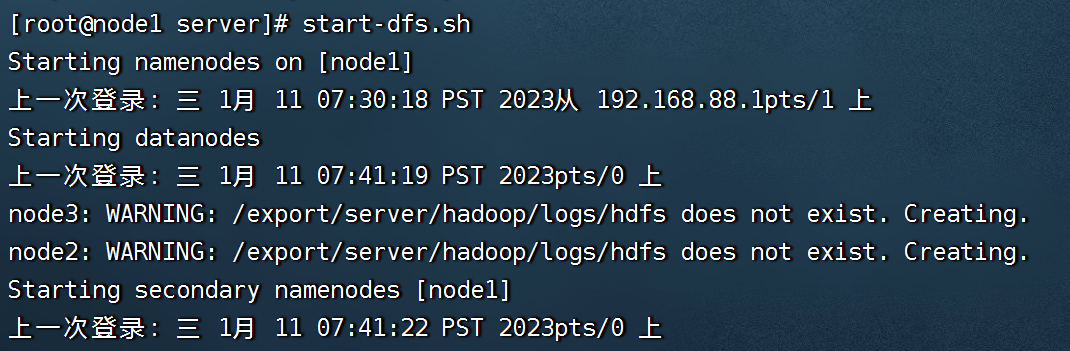
15、【在node1操作】启动hadoop的hdfs集群,在node1执行即可
start-dfs.sh

# 如需停止可以执行
stop-dfs.sh
start-dfs.sh这个命令来自于:$HADOOP_HOME/sbin中的程序
由于配置了环境变量PATH,所以可以在任意位置执行start-dfs.sh命令哦
16、【在node1操作】启动hadoop的yarn集群,在node1执行即可
start-yarn.sh

# 如需停止可以执行
stop-yarn.sh
17、启动历史服务器
mapred --daemon start historyserver

# 如需停止将start更换为stop
18、启动web代理服务器
yarn-daemon.sh start proxyserver

# 如需停止将start更换为stop
yarn-daemon.sh stop proxyserver
1、在node1、node2、node3上通过jps验证进程是否都启动成功
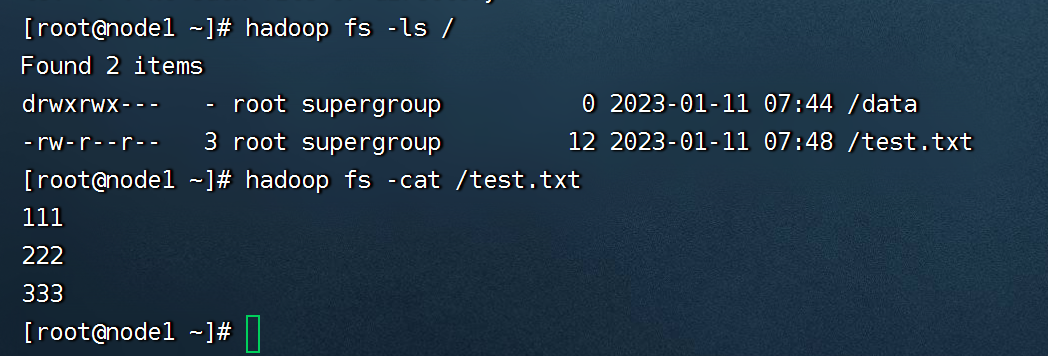
2、验证HDFS,浏览器打开:http://node1:9870
创建文件test.txt,随意填入内容,并执行:
hadoop fs -put test.txt /test.txt

hadoop fs -cat /test.txt
3、验证YARN,浏览器打开:http://node1:8088
执行:
# 创建文件words.txt,填入如下内容
itheima itcast hadoop
itheima hadoop hadoop
itheima itcast

# 将文件上传到HDFS中
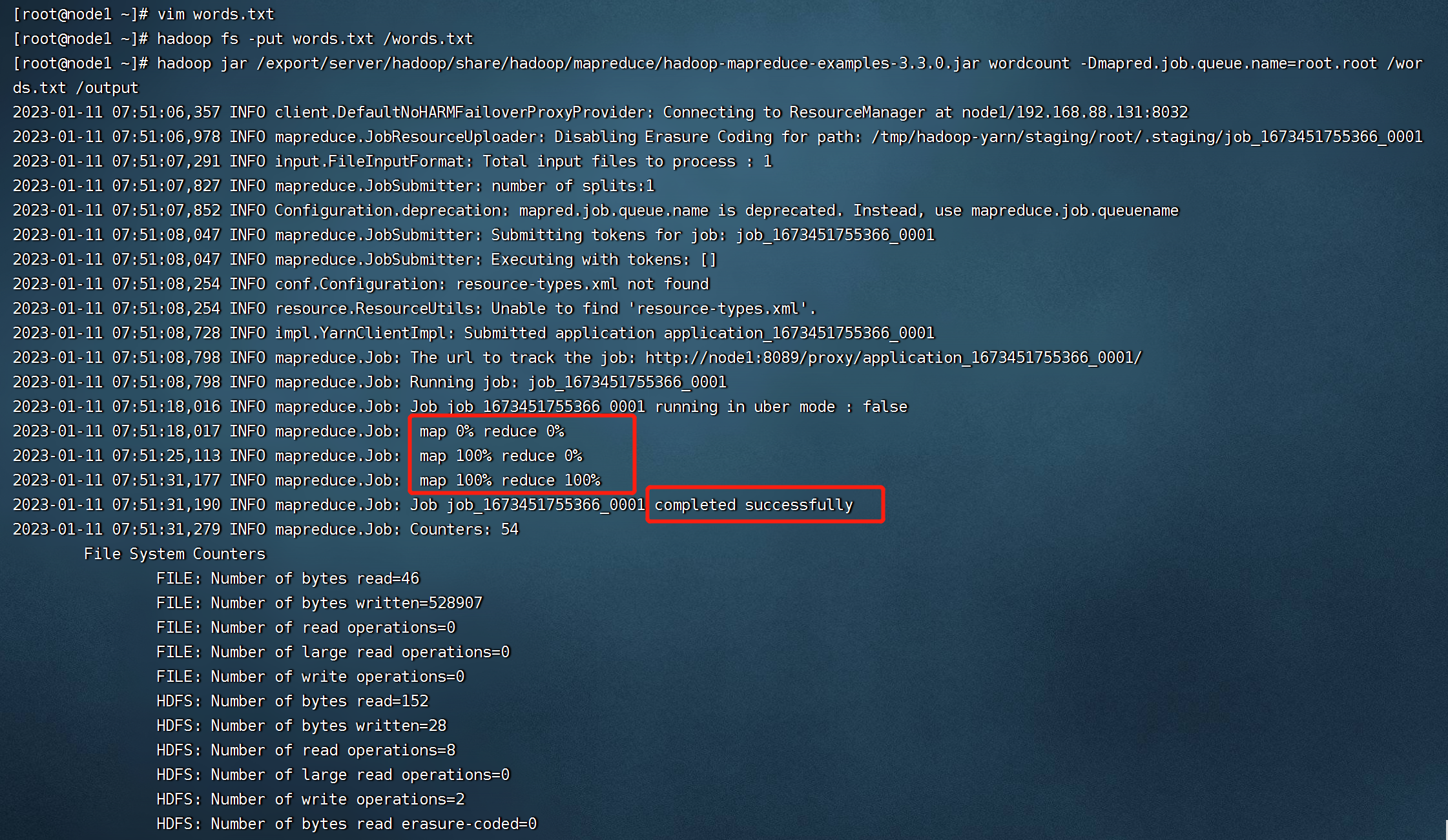
hadoop fs -put words.txt /words.txt

# 执行如下命令验证YARN是否正常
hadoop jar /export/server/hadoop/share/hadoop/mapreduce/hadoop-mapreduce-examples-3.3.0.jar wordcount -Dmapred.job.queue.name=root.root /words.txt /output
我想为Heroku构建一个Rails3应用程序。他们使用Postgres作为他们的数据库,所以我通过MacPorts安装了postgres9.0。现在我需要一个postgresgem并且共识是出于性能原因你想要pggem。但是我对我得到的错误感到非常困惑当我尝试在rvm下通过geminstall安装pg时。我已经非常明确地指定了所有postgres目录的位置可以找到但仍然无法完成安装:$envARCHFLAGS='-archx86_64'geminstallpg--\--with-pg-config=/opt/local/var/db/postgresql90/defaultdb/po
我打算为ruby脚本创建一个安装程序,但我希望能够确保机器安装了RVM。有没有一种方法可以完全离线安装RVM并且不引人注目(通过不引人注目,就像创建一个可以做所有事情的脚本而不是要求用户向他们的bash_profile或bashrc添加一些东西)我不是要脚本本身,只是一个关于如何走这条路的快速指针(如果可能的话)。我们还研究了这个很有帮助的问题:RVM-isthereawayforsimpleofflineinstall?但有点误导,因为答案只向我们展示了如何离线在RVM中安装ruby。我们需要能够离线安装RVM本身,并查看脚本https://raw.github.com/wayn
我有一个奇怪的问题:我在rvm上安装了rubyonrails。一切正常,我可以创建项目。但是在我输入“railsnew”时重新启动后,我有“程序'rails'当前未安装。”。SystemUbuntu12.04ruby-v"1.9.3p194"gemlistactionmailer(3.2.5)actionpack(3.2.5)activemodel(3.2.5)activerecord(3.2.5)activeresource(3.2.5)activesupport(3.2.5)arel(3.0.2)builder(3.0.0)bundler(1.1.4)coffee-rails(
我刚刚为fedora安装了emacs。我想用emacs编写ruby。为ruby提供代码提示、代码完成类型功能所需的工具、扩展是什么? 最佳答案 ruby-mode已经包含在Emacs23之后的版本中。不过,它也可以通过ELPA获得。您可能感兴趣的其他一些事情是集成RVM、feature-mode(Cucumber)、rspec-mode、ruby-electric、inf-ruby、rinari(用于Rails)等。这是我当前用于Ruby开发的Emacs配置:https://github.com/citizen428/emacs
我正在尝试在我的centos服务器上安装therubyracer,但遇到了麻烦。$geminstalltherubyracerBuildingnativeextensions.Thiscouldtakeawhile...ERROR:Errorinstallingtherubyracer:ERROR:Failedtobuildgemnativeextension./usr/local/rvm/rubies/ruby-1.9.3-p125/bin/rubyextconf.rbcheckingformain()in-lpthread...yescheckingforv8.h...no***e
我的最终目标是安装当前版本的RubyonRails。我在OSXMountainLion上运行。到目前为止,这是我的过程:已安装的RVM$\curl-Lhttps://get.rvm.io|bash-sstable检查已知(我假设已批准)安装$rvmlistknown我看到当前的稳定版本可用[ruby-]2.0.0[-p247]输入命令安装$rvminstall2.0.0-p247注意:我也试过这些安装命令$rvminstallruby-2.0.0-p247$rvminstallruby=2.0.0-p247我很快就无处可去了。结果:$rvminstall2.0.0-p247Search
我实际上是在尝试使用RVM在我的OSX10.7.5上更新ruby,并在输入以下命令后:rvminstallruby我得到了以下回复:Searchingforbinaryrubies,thismighttakesometime.Checkingrequirementsforosx.Installingrequirementsforosx.Updatingsystem.......Errorrunning'requirements_osx_brew_update_systemruby-2.0.0-p247',pleaseread/Users/username/.rvm/log/138121
由于fast-stemmer的问题,我很难安装我想要的任何rubygem。我把我得到的错误放在下面。Buildingnativeextensions.Thiscouldtakeawhile...ERROR:Errorinstallingfast-stemmer:ERROR:Failedtobuildgemnativeextension./System/Library/Frameworks/Ruby.framework/Versions/2.0/usr/bin/rubyextconf.rbcreatingMakefilemake"DESTDIR="cleanmake"DESTDIR=
我是Google云的新手,我正在尝试对其进行首次部署。我的第一个部署是RubyonRails项目。我基本上是在关注thisguideinthegoogleclouddocumentation.唯一的区别是我使用的是我自己的项目,而不是他们提供的“helloworld”项目。这是我的app.yaml文件runtime:customvm:trueentrypoint:bundleexecrackup-p8080-Eproductionconfig.ruresources:cpu:0.5memory_gb:1.3disk_size_gb:10当我转到我的项目目录并运行gcloudprevie
当我尝试安装Ruby时遇到此错误。我试过查看this和this但无济于事➜~brewinstallrubyWarning:YouareusingOSX10.12.Wedonotprovidesupportforthispre-releaseversion.Youmayencounterbuildfailuresorotherbreakages.Pleasecreatepull-requestsinsteadoffilingissues.==>Installingdependenciesforruby:readline,libyaml,makedepend==>Installingrub
