(1)将Hadoop-2.9.2安装包解压到非中文路径(例如:E:\hadoop-2.9.2)
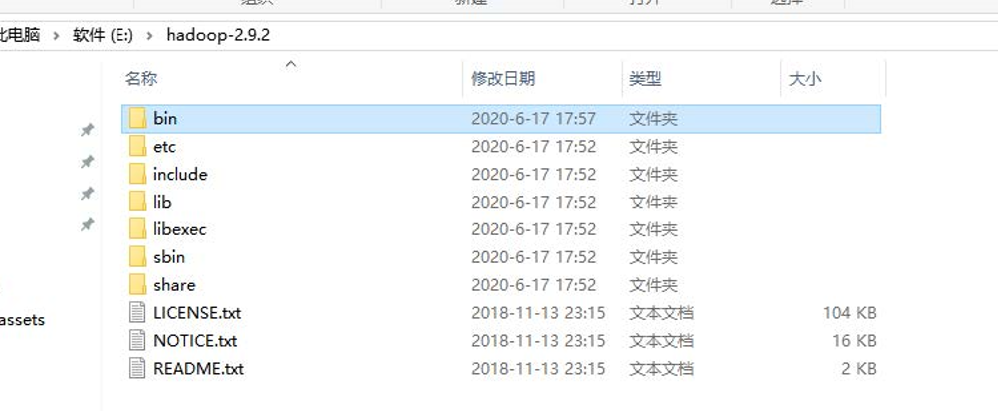
(2) 配置HADOOP_HOME环境变量

(3) 配置Path环境变量。
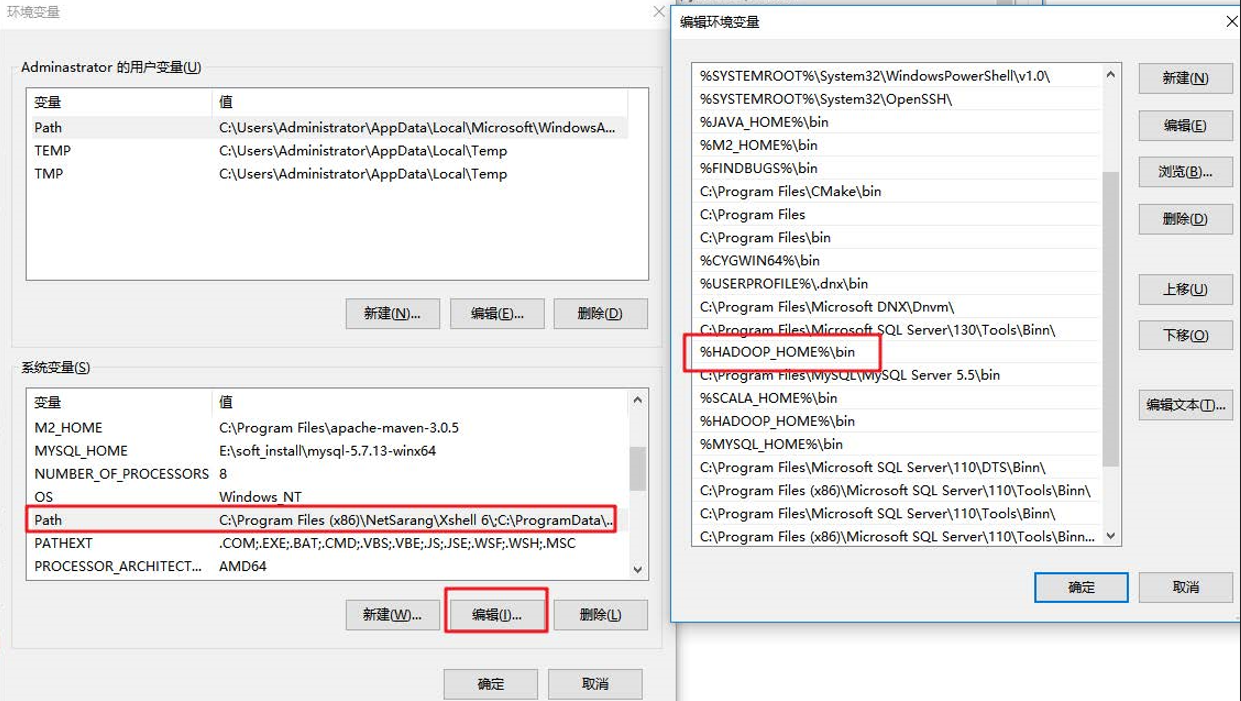
(4) 创建一个Maven工程ClientDemo
(5)导入相应的依赖坐标+日志配置文件
<?xml version="1.0" encoding="UTF-8"?>
<project xmlns="http://maven.apache.org/POM/4.0.0"
         xmlns:xsi="http://www.w3.org/2001/XMLSchema-instance"
         xsi:schemaLocation="http://maven.apache.org/POM/4.0.0 http://maven.apache.org/xsd/maven-4.0.0.xsd">
    <modelVersion>4.0.0</modelVersion>

    <groupId>com.lagou.hdfs</groupId>
    <artifactId>client_demo</artifactId>
    <version>1.0-SNAPSHOT</version>

    <dependencies>
        <dependency>
            <groupId>junit</groupId>
            <artifactId>junit</artifactId>
            <version>RELEASE</version>
        </dependency>
        <dependency>
            <groupId>org.apache.logging.log4j</groupId>
            <artifactId>log4j-core</artifactId>
            <version>2.8.2</version>
        </dependency>
        <dependency>
            <groupId>org.apache.hadoop</groupId>
            <artifactId>hadoop-common</artifactId>
            <version>2.9.2</version>
        </dependency>
        <!-- https://mvnrepository.com/artifact/org.apache.hadoop/hadoop-client -->
        <dependency>
            <groupId>org.apache.hadoop</groupId>
            <artifactId>hadoop-client</artifactId>
            <version>2.9.2</version>
        </dependency>
        <!-- https://mvnrepository.com/artifact/org.apache.hadoop/hadoop-hdfs -->
        <dependency>
            <groupId>org.apache.hadoop</groupId>
            <artifactId>hadoop-hdfs</artifactId>
            <version>2.9.2</version>
        </dependency>
    </dependencies>

    <build>
        <plugins>
            <plugin>
                <groupId>org.apache.maven.plugins</groupId>
                <artifactId>maven-compiler-plugin</artifactId>
                <version>3.5.1</version>
                <configuration>
                    <source>1.8</source>
                    <target>1.8</target>
                </configuration>
            </plugin>
        </plugins>
    </build>

</project>
为了便于控制程序运行打印的日志数量,需要在项目的src/main/resources目录下,新建一个文件,命名为“log4j.properties”,文件内容:
log4j.rootLogger=INFO, stdout
log4j.appender.stdout=org.apache.log4j.ConsoleAppender
log4j.appender.stdout.layout=org.apache.log4j.PatternLayout
log4j.appender.stdout.layout.ConversionPattern=%d %p [%c] - %m%n
log4j.appender.logfile=org.apache.log4j.FileAppender
log4j.appender.logfile.File=target/spring.log
log4j.appender.logfile.layout=org.apache.log4j.PatternLayout
log4j.appender.logfile.layout.ConversionPattern=%d %p [%c] - %m%n
(6)创建包名:com.lagou.hdfs
(7)创建HdfsClient类
public class HdfsClientDemo {
  @Test
    public void testMkdirs() throws Exception {
        // 1、获取Hadoop 集群的configuration对象
        Configuration configuration = new Configuration();
        configuration.set("fs.defaultFS", "hdfs://hadoop1:9000"); // 设置这个属性以后,获取FileSystem对象时,就不在需要创建URI连接对象了。使用这种方式,不能指定对象,可能会引发权限不足问题,解决办法参考下面文章


        // 2、根据configuration获取FileSystem对象
        // FileSystem fileSystem = FileSystem.get(new URI("hdfs://hadoop1:9000"), configuration, "root");
        FileSystem fileSystem = FileSystem.get(configuration);

        // 3、使用FileSystem对象创建一个测试目录
        fileSystem.mkdirs(new Path("/api_test11"));

        // 4、释放FileSystem对象(类似数据库连接)
        fileSystem.close();
    }
}
注意:
(1)windows解压安装Hadoop后,在调用相关API操作HDFS集群时可能会报错,这是由于Hadoop安装缺少windows操作系统相关文件所致,如下图:

解决方案:
从资料文件夹中找到winutils.exe拷贝放到windows系统Hadoop安装目录的bin目录下即可!!
链接:文件地址
(2)HDFS文件系统权限问题
如果不指定操作HDFS集群的用户信息,默认是获取当前操作系统的用户信息,出现权限被拒绝的问题,报错如下:

解决方案:
vim hdfs-site.xml
#添加如下属性
<property>
    <name>dfs.permissions</name>
    <value>true</value>
</property>
修改完成之后要分发到其它节点,同时要重启HDFS集群
hadoop fs -chmod -R 777 /
注:为了后续的使用方便,我对代码进行了改造,将创建Configuration以及FileSystem对象的代码移到了了@Before注解上,关闭流的操作移到了@After注解上,使我们后续的操作重点关注于HDFS api 的使用上。
import org.apache.hadoop.conf.Configuration;
import org.apache.hadoop.fs.*;
import org.apache.hadoop.fs.permission.FsPermission;
import org.apache.hadoop.io.IOUtils;
import org.junit.After;
import org.junit.Before;
import org.junit.Test;

import java.io.File;
import java.io.FileInputStream;
import java.io.FileOutputStream;
import java.io.IOException;
import java.net.URI;
import java.net.URISyntaxException;

public class HdfsClientDemo {

    FileSystem fileSystem = null;

    @Before
    public void init() throws Exception {
        Configuration configuration = new Configuration();
        configuration.set("fs.defaultFS", "hdfs://hadoop1:9000");
        // configuration.set("dfs.replication","2");
        fileSystem = FileSystem.get(configuration);
    }

// 现在就只写我们使用FileSystem操作api了

 @After
    public void destroy() throws Exception {
        fileSystem.close();
    }

} // 上传文件
@Test
public void copyFromLocalToHdfs() throws Exception {
/**
* src:源文件目录,本地路径
* dst:目标文件目录,hdfs路径
*/
fileSystem.copyFromLocalFile(new Path("C:/Users/小不点/Desktop/VPN.txt"), new Path("/VPN.txt"));
// 上传文件到hdfs默认的是3个副本
/*
*如何改变上传文件的副本数量
* 1、configuration对象中指定新的副本数量,就是@Before注解下面代码块,注释掉的那一行代码
* 2、创建xml文件,在里面添加属性
*/
}将hdfs-site.xml拷贝到项目的根目录下
<?xml version="1.0" encoding="UTF-8"?>
<?xml-stylesheet type="text/xsl" href="configuration.xsl"?>
<configuration>
    <property>
        <name>dfs.replication</name>
        <value>1</value>
    </property>
</configuration>参数优先级排序:(1)代码中设置的值 >(2)用户自定义配置文件 >(3)服务器的默认配置
   // 下载文件
    @Test
    public void copyFromHdfsToLocal() throws Exception {

        /**
         * 三个参数
         * boolean:是否删除源文件
         * src:源文件目录,hdfs路径
         * dst:目标文件目录,本地路径
         */
        fileSystem.copyToLocalFile(true, new Path("/VPN.txt"), new Path("D:/下载/VPN.txt"));

      //  四个参数
        // boolean delSrc 指是否将原文件删除
        // Path src 指要下载的文件路径
        // Path dst 指将文件下载到的路径
        // boolean useRawLocalFileSystem 是否开启文件校验
} // 删除文件或文件夹
@Test
public void deleteFile() throws IOException {
// boolean值代表是否递归删除文件
fileSystem.delete(new Path("/api_test11"), true);
} // 遍历hdfs的根目录得到文件夹以及文件夹的信息:名称、权限、大小
@Test
public void listFiles() throws Exception {
// 得到一个迭代器:装有指定目录下所有的文件信息
RemoteIterator<LocatedFileStatus> remoteIterator = fileSystem.listFiles(new Path("/"), true);
// 遍历迭代器
while (remoteIterator.hasNext()) {
LocatedFileStatus fileStatus = remoteIterator.next();
// 文件名称
String fileName = fileStatus.getPath().getName();
// 长度
long len = fileStatus.getLen();
// 权限
FsPermission permission = fileStatus.getPermission();
// 所属组
String group = fileStatus.getGroup();
// 所属用户
String owner = fileStatus.getOwner();
System.out.println(fileName + "\t" + len + "\t" + permission + "\t" + group + "\t" + owner);
System.out.println("================================");
// 块信息
BlockLocation[] blockLocations = fileStatus.getBlockLocations();
for (BlockLocation blockLocation : blockLocations) {
String[] hosts = blockLocation.getHosts();
for (String host : hosts) {
System.out.println("主机名称:" + host);
}
}
}
}// 文件夹的判断
@Test
public void isFile() throws Exception {
FileStatus[] fileStatuses = fileSystem.listStatus(new Path("/"));
for (FileStatus fileStatus : fileStatuses) {
boolean flag = fileStatus.isFile();
if (flag) {
System.out.println("文件:" + fileStatus.getPath().getName());
} else {
System.out.println("文件夹:" + fileStatus.getPath().getName());
}
}
}以上我们使用的API操作都是HDFS系统框架封装好的。我们自己也可以采用IO流的方式实现文件的上传和下载。
// 使用IO流操作HDFS
// 上传文件:准备输入流读取本地文件,使用hdfs的输出流写数据到hdfs
@Test
public void uploadFileIO() throws Exception {
// 读取本地文件的输入流
FileInputStream inputStream = new FileInputStream(new File("C:/Users/小不点/Desktop/test.txt"));
// 准备写数据到hdfs的输出流
FSDataOutputStream outputStream = fileSystem.create(new Path("/Java.txt"));
// 输入流数据拷贝到输出流
IOUtils.copyBytes(inputStream, outputStream, 4096, true); // 最后一个参数代表是否关闭流,true为关闭
}
// 下载文件
@Test
public void downloadFile() throws Exception {
// 读取hdfs文件的输入流
FSDataInputStream inputStream = fileSystem.open(new Path("/lagou.txt"));
// 准备写数据到本地的输出流
FileOutputStream outputStream = new FileOutputStream("C:/Users/小不点/Desktop/张三.txt");
// 输入流数据拷贝到输出流
IOUtils.copyBytes(inputStream, outputStream, 4096, true); // 最后一个参数代表是否关闭流,true为关闭
} // seek定位读取hdfs文件:使用IO流读取/lagopu.txt文件内容输出两次,本质就是读取文件内容两次并输出
@Test
public void seekReadFile() throws Exception {
// 创建读取hdfs文件的输入流
FSDataInputStream inputStream = fileSystem.open(new Path("/Java.txt"));
// 控制台输出System.out
// 实现流拷贝
IOUtils.copyBytes(inputStream, System.out, 4096, false);
// 再次读取文件
inputStream.seek(0);// 定位从0偏移量(文件头部)再次读取
IOUtils.copyBytes(inputStream, System.out, 4096, false); // false代表不关闭流
// 关闭输入流
IOUtils.closeStream(inputStream);
}
全部完整代码
package com.lagou.hdfs;
import org.apache.hadoop.conf.Configuration;
import org.apache.hadoop.fs.*;
import org.apache.hadoop.fs.permission.FsPermission;
import org.apache.hadoop.io.IOUtils;
import org.junit.After;
import org.junit.Before;
import org.junit.Test;
import java.io.File;
import java.io.FileInputStream;
import java.io.FileOutputStream;
import java.io.IOException;
import java.net.URI;
import java.net.URISyntaxException;
public class HdfsClientDemo {
FileSystem fileSystem = null;
@Before
public void init() throws Exception {
Configuration configuration = new Configuration();
configuration.set("fs.defaultFS", "hdfs://hadoop1:9000");
// configuration.set("dfs.replication","2");
fileSystem = FileSystem.get(configuration);
}
@Test
public void testMkdirs() throws Exception {
// 1、获取Hadoop 集群的configuration对象
Configuration configuration = new Configuration();
configuration.set("fs.defaultFS", "hdfs://hadoop1:9000"); // 设置这个属性以后,获取FileSystem对象时,就不在需要创建URI连接对象了
// 2、根据configuration获取FileSystem对象
// FileSystem fileSystem = FileSystem.get(new URI("hdfs://hadoop1:9000"), configuration, "root");
FileSystem fileSystem = FileSystem.get(configuration);
// 3、使用FileSystem对象创建一个测试目录
fileSystem.mkdirs(new Path("/api_test11"));
// 4、释放FileSystem对象(类似数据库连接)
fileSystem.close();
}
@After
public void destroy() throws Exception {
fileSystem.close();
}
// 上传文件
@Test
public void copyFromLocalToHdfs() throws Exception {
/**
* src:源文件目录,本地路径
* dst:目标文件目录,hdfs路径
*/
fileSystem.copyFromLocalFile(new Path("C:/Users/小不点/Desktop/VPN.txt"), new Path("/VPN.txt"));
// 上传文件到hdfs默认的是3个副本
/*
*如何改变上传文件的副本数量
* 1、configuration对象中指定新的副本数量
* 2、创建xml文件,在里面添加属性
*/
}
// 下载文件
@Test
public void copyFromHdfsToLocal() throws Exception {
/**
* boolean:是否删除源文件
* src:源文件目录,hdfs路径
* dst:目标文件目录,本地路径
*/
fileSystem.copyToLocalFile(true, new Path("/VPN.txt"), new Path("D:/下载/VPN.txt"));
}
 // 删除文件或文件夹
    @Test
    public void deleteFile() throws IOException {
        // boolean值代表是否递归删除文件
        fileSystem.delete(new Path("/api_test11"), true);
    }
  // 遍历hdfs的根目录得到文件夹以及文件夹的信息:名称、权限、大小
    @Test
    public void listFiles() throws Exception {
        // 得到一个迭代器:装有指定目录下所有的文件信息
        RemoteIterator<LocatedFileStatus> remoteIterator = fileSystem.listFiles(new Path("/"), true);
        // 遍历迭代器
        while (remoteIterator.hasNext()) {
            LocatedFileStatus fileStatus = remoteIterator.next();
            // 文件名称
            String fileName = fileStatus.getPath().getName();
            // 长度
            long len = fileStatus.getLen();
            // 权限
            FsPermission permission = fileStatus.getPermission();
            // 所属组
            String group = fileStatus.getGroup();
            // 所属用户
            String owner = fileStatus.getOwner();
            System.out.println(fileName + "\t" + len + "\t" + permission + "\t" + group + "\t" + owner);
            System.out.println("================================");

            // 块信息
            BlockLocation[] blockLocations = fileStatus.getBlockLocations();
            for (BlockLocation blockLocation : blockLocations) {
                String[] hosts = blockLocation.getHosts();
                for (String host : hosts) {
                    System.out.println("主机名称:" + host);
                }
            }
        }
    }
// 文件夹的判断
    @Test
    public void isFile() throws Exception {
        FileStatus[] fileStatuses = fileSystem.listStatus(new Path("/"));
        for (FileStatus fileStatus : fileStatuses) {
            boolean flag = fileStatus.isFile();
            if (flag) {
                System.out.println("文件:" + fileStatus.getPath().getName());
            } else {
                System.out.println("文件夹:" + fileStatus.getPath().getName());
            }
        }
    }
// 使用IO流操作HDFS
// 上传文件:准备输入流读取本地文件,使用hdfs的输出流写数据到hdfs
@Test
public void uploadFileIO() throws Exception {
// 读取本地文件的输入流
FileInputStream inputStream = new FileInputStream(new File("C:/Users/小不点/Desktop/test.txt"));
// 准备写数据到hdfs的输出流
FSDataOutputStream outputStream = fileSystem.create(new Path("/Java.txt"));
// 输入流数据拷贝到输出流
IOUtils.copyBytes(inputStream, outputStream, 4096, true);
}
// 下载文件
@Test
public void downloadFile() throws Exception {
// 读取hdfs文件的输入流
FSDataInputStream inputStream = fileSystem.open(new Path("/lagou.txt"));
// 准备写数据到本地的输出流
FileOutputStream outputStream = new FileOutputStream("C:/Users/小不点/Desktop/张三.txt");
// 输入流数据拷贝到输出流
IOUtils.copyBytes(inputStream, outputStream, 4096, true);
}
// seek定位读取hdfs文件:使用IO流读取/lagopu.txt文件内容输出两次,本质就是读取文件内容两次并输出
@Test
public void seekReadFile() throws Exception {
// 创建读取hdfs文件的输入流
FSDataInputStream inputStream = fileSystem.open(new Path("/Java.txt"));
// 控制台输出System.out
// 实现流拷贝
IOUtils.copyBytes(inputStream, System.out, 4096, false);
// 再次读取文件
inputStream.seek(0);// 定位从0偏移量(文件头部)再次读取
IOUtils.copyBytes(inputStream, System.out, 4096, false);
// 关闭输入流
IOUtils.closeStream(inputStream);
}
}
如何在buildr项目中使用Ruby?我在很多不同的项目中使用过Ruby、JRuby、Java和Clojure。我目前正在使用我的标准Ruby开发一个模拟应用程序,我想尝试使用Clojure后端(我确实喜欢功能代码)以及JRubygui和测试套件。我还可以看到在未来的不同项目中使用Scala作为后端。我想我要为我的项目尝试一下buildr(http://buildr.apache.org/),但我注意到buildr似乎没有设置为在项目中使用JRuby代码本身!这看起来有点傻,因为该工具旨在统一通用的JVM语言并且是在ruby中构建的。除了将输出的jar包含在一个独特的、仅限ruby
在rails源中:https://github.com/rails/rails/blob/master/activesupport/lib/active_support/lazy_load_hooks.rb可以看到以下内容@load_hooks=Hash.new{|h,k|h[k]=[]}在IRB中,它只是初始化一个空哈希。和做有什么区别@load_hooks=Hash.new 最佳答案 查看rubydocumentationforHashnew→new_hashclicktotogglesourcenew(obj)→new_has
我真的很习惯使用Ruby编写以下代码:my_hash={}my_hash['test']=1Java中对应的数据结构是什么? 最佳答案 HashMapmap=newHashMap();map.put("test",1);我假设? 关于java-等价于Java中的RubyHash,我们在StackOverflow上找到一个类似的问题: https://stackoverflow.com/questions/22737685/
我的主要目标是能够完全理解我正在使用的库/gem。我尝试在Github上从头到尾阅读源代码,但这真的很难。我认为更有趣、更温和的踏脚石就是在使用时阅读每个库/gem方法的源代码。例如,我想知道RubyonRails中的redirect_to方法是如何工作的:如何查找redirect_to方法的源代码?我知道在pry中我可以执行类似show-methodmethod的操作,但我如何才能对Rails框架中的方法执行此操作?您对我如何更好地理解Gem及其API有什么建议吗?仅仅阅读源代码似乎真的很难,尤其是对于框架。谢谢! 最佳答案 Ru
我的假设是moduleAmoduleBendend和moduleA::Bend是一样的。我能够从thisblog找到解决方案,thisSOthread和andthisSOthread.为什么以及什么时候应该更喜欢紧凑语法A::B而不是另一个,因为它显然有一个缺点?我有一种直觉,它可能与性能有关,因为在更多命名空间中查找常量需要更多计算。但是我无法通过对普通类进行基准测试来验证这一点。 最佳答案 这两种写作方法经常被混淆。首先要说的是,据我所知,没有可衡量的性能差异。(在下面的书面示例中不断查找)最明显的区别,可能也是最著名的,是你的
几个月前,我读了一篇关于rubygem的博客文章,它可以通过阅读代码本身来确定编程语言。对于我的生活,我不记得博客或gem的名称。谷歌搜索“ruby编程语言猜测”及其变体也无济于事。有人碰巧知道相关gem的名称吗? 最佳答案 是这个吗:http://github.com/chrislo/sourceclassifier/tree/master 关于ruby-寻找通过阅读代码确定编程语言的rubygem?,我们在StackOverflow上找到一个类似的问题:
我正在尝试使用boilerpipe来自JRuby。我看过guide从JRuby调用Java,并成功地将它与另一个Java包一起使用,但无法弄清楚为什么同样的东西不能用于boilerpipe。我正在尝试基本上从JRuby中执行与此Java等效的操作:URLurl=newURL("http://www.example.com/some-location/index.html");Stringtext=ArticleExtractor.INSTANCE.getText(url);在JRuby中试过这个:require'java'url=java.net.URL.new("http://www
我目前正在使用以下方法获取页面的源代码:Net::HTTP.get(URI.parse(page.url))我还想获取HTTP状态,而无需发出第二个请求。有没有办法用另一种方法做到这一点?我一直在查看文档,但似乎找不到我要找的东西。 最佳答案 在我看来,除非您需要一些真正的低级访问或控制,否则最好使用Ruby的内置Open::URI模块:require'open-uri'io=open('http://www.example.org/')#=>#body=io.read[0,50]#=>"["200","OK"]io.base_ur
我只想对我一直在思考的这个问题有其他意见,例如我有classuser_controller和classuserclassUserattr_accessor:name,:usernameendclassUserController//dosomethingaboutanythingaboutusersend问题是我的User类中是否应该有逻辑user=User.newuser.do_something(user1)oritshouldbeuser_controller=UserController.newuser_controller.do_something(user1,user2)我
什么是ruby的rack或python的Java的wsgi?还有一个路由库。 最佳答案 来自Python标准PEP333:Bycontrast,althoughJavahasjustasmanywebapplicationframeworksavailable,Java's"servlet"APImakesitpossibleforapplicationswrittenwithanyJavawebapplicationframeworktoruninanywebserverthatsupportstheservletAPI.ht
