目录
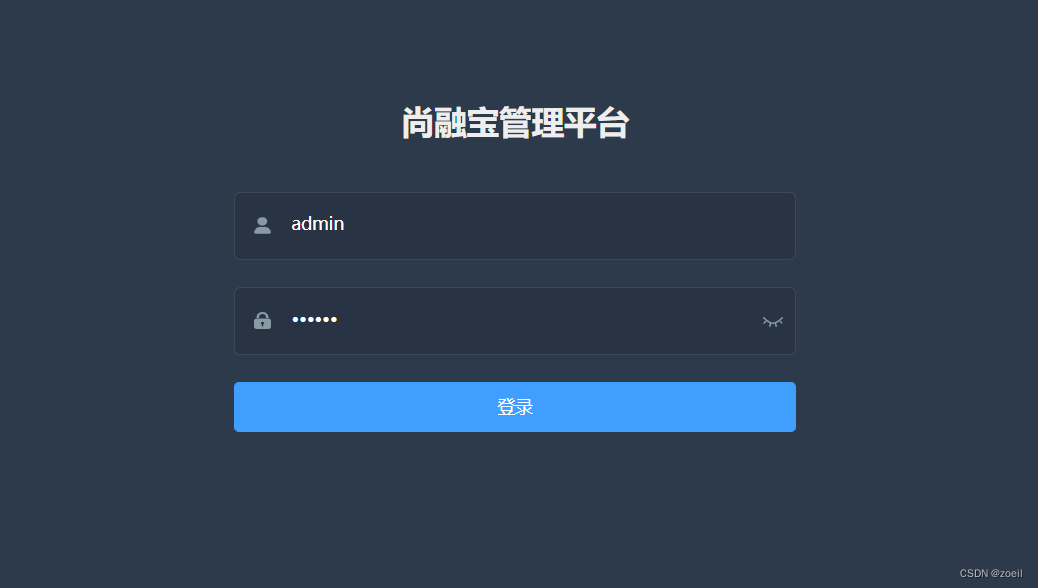
查看源代码

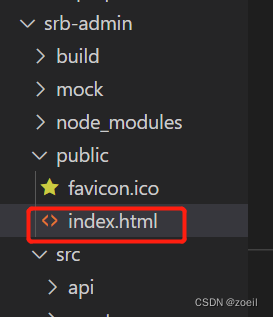
这正是srb-admin/public/index.html
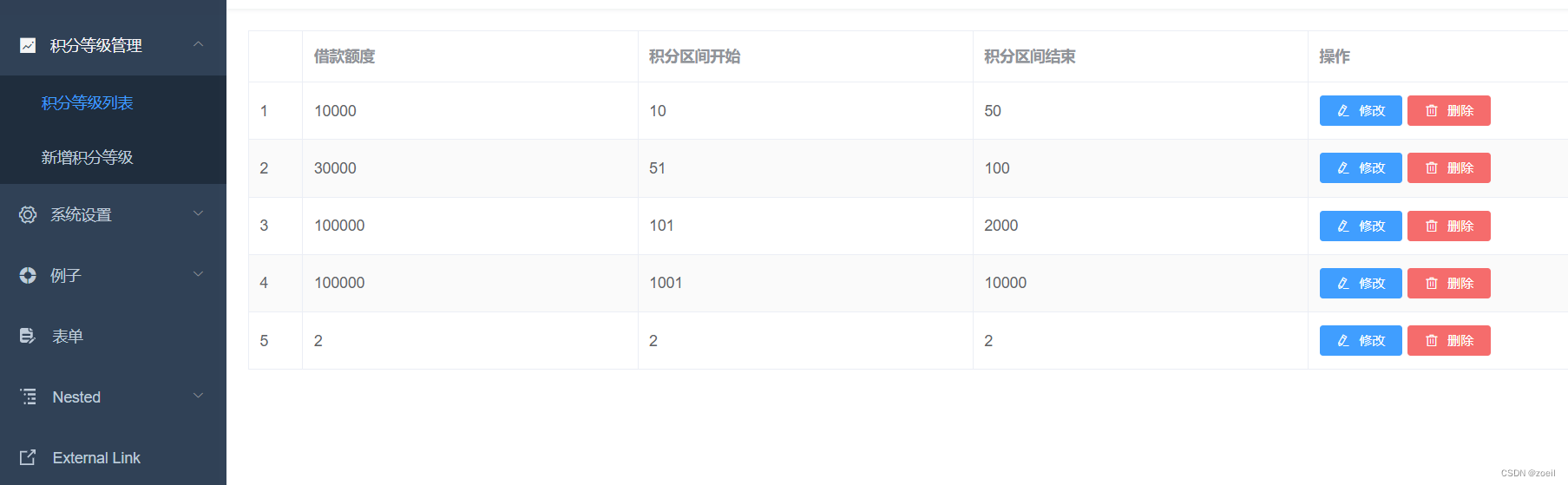
我们进入积分等级列表,查看源代码会发现仍然是index.html中的代码
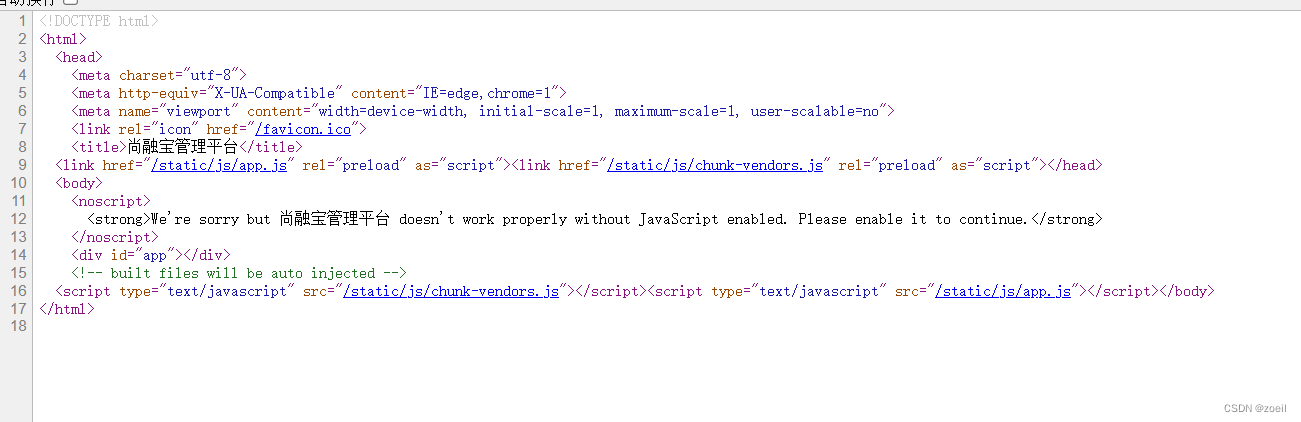 那么它是怎么实现页面的不同加载的呢?答案:通过脚本
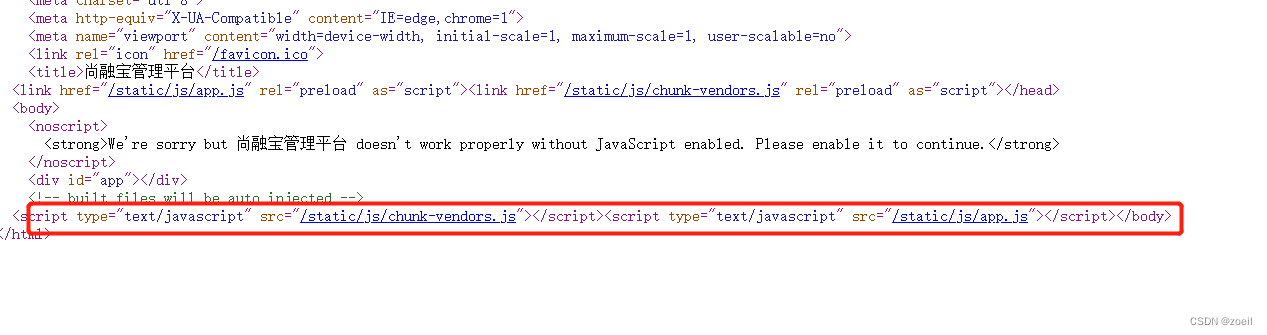
上面的脚本中的路径/static/js/app.js我们在文件目录中找不到,因为它是根据我们的vue文件、html文件、js文件等动态生成的,真正的文件是src/main.js
查看代码我们发现其导入了很多模块,就像我们后端创建springboot项目,使用某些功能需要导入对于的starter一样,即导入依赖
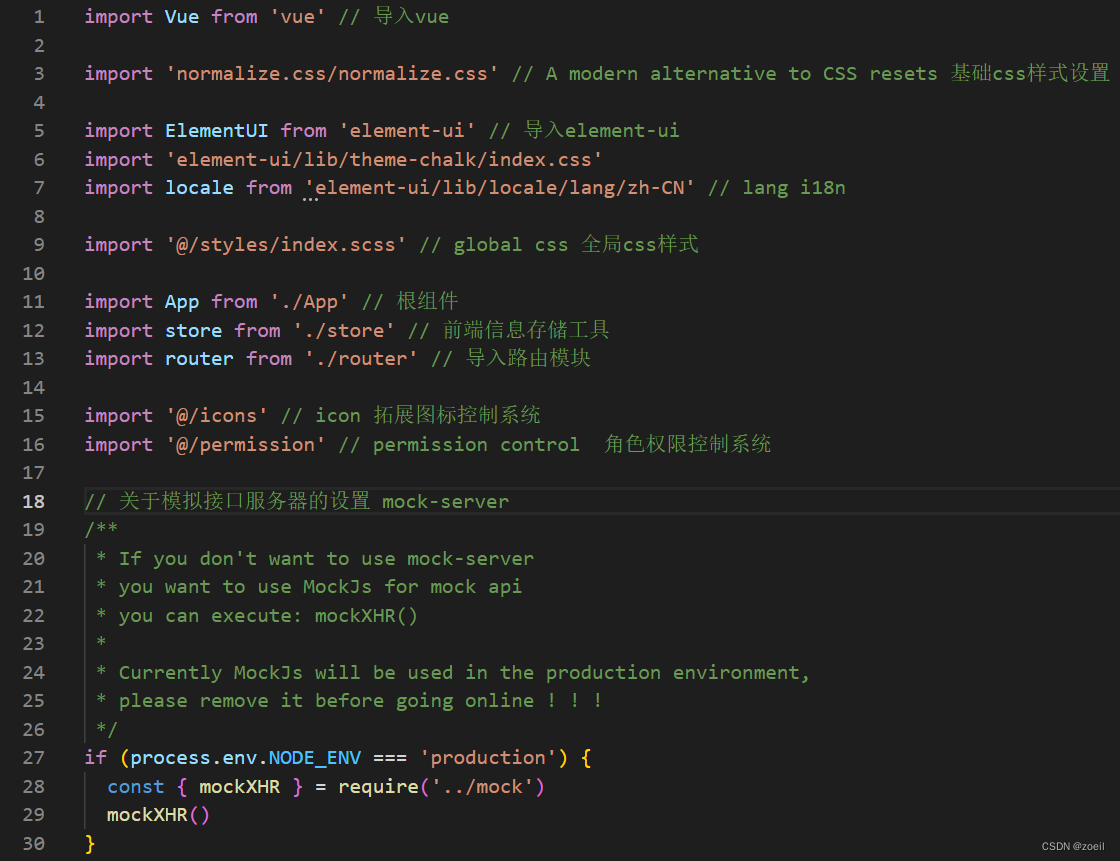
这里挂载element-ui可以像我们前面做例子那样直接使用<script src="https://unpkg.com/element-ui/lib/index.js"></script>导入,但是这样只能使用简单的template定义

而无法使用vue文件式的template定义
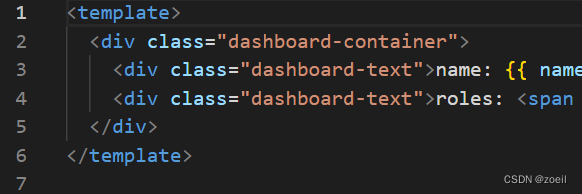
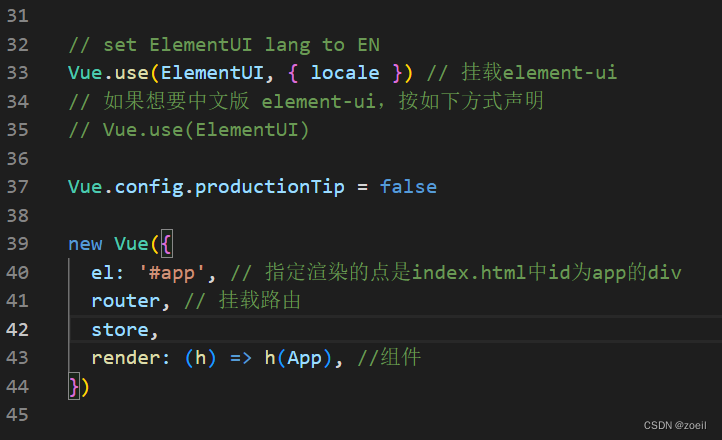
创建Vue对象,指定渲染的是入口index.html中id为app的div
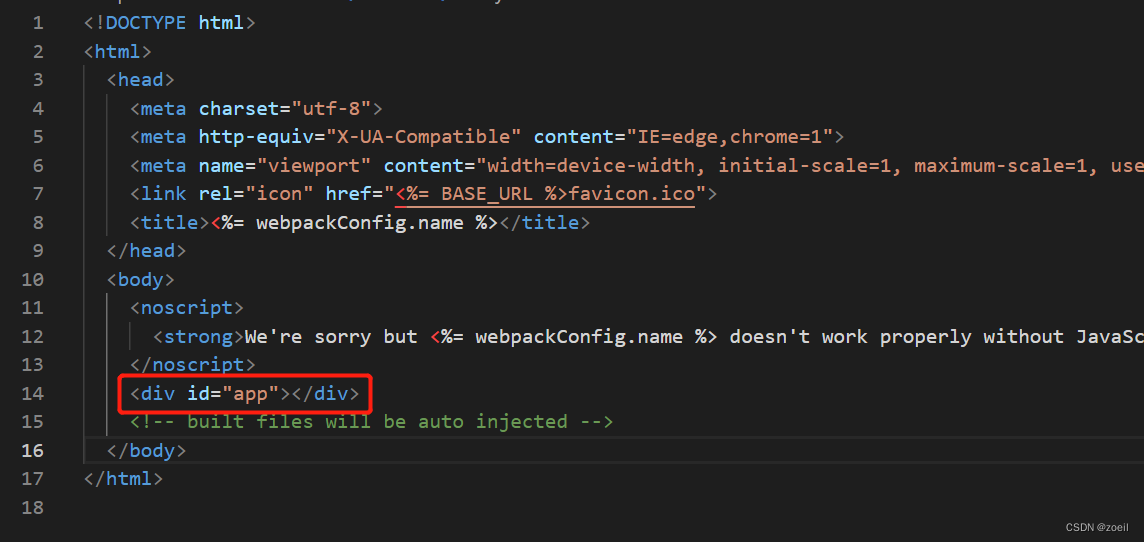
既然创建的Vue对象将我们的app组件进行渲染,我们就去看一下App.vue
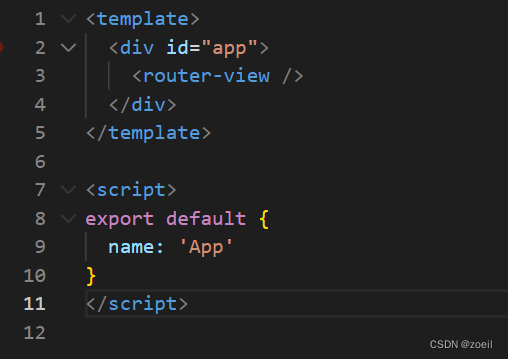
有一个router-view路由出口,是进行模板template展示的 ,在router/index.js中定义了大量的路由,当我们访问对应path就会跳到对应的组件同时显示到id为app的div中
import Vue from 'vue'
import Router from 'vue-router'

Vue.use(Router)

/* Layout */
import Layout from '@/layout'

/**
 * Note: sub-menu only appear when route children.length >= 1
 * Detail see: https://panjiachen.github.io/vue-element-admin-site/guide/essentials/router-and-nav.html
 *
 * hidden: true                   if set true, item will not show in the sidebar(default is false)
 * alwaysShow: true               if set true, will always show the root menu
 *                                if not set alwaysShow, when item has more than one children route,
 *                                it will becomes nested mode, otherwise not show the root menu
 * redirect: noRedirect           if set noRedirect will no redirect in the breadcrumb
 * name:'router-name'             the name is used by <keep-alive> (must set!!!)
 * meta : {
    roles: ['admin','editor']    control the page roles (you can set multiple roles)
    title: 'title'               the name show in sidebar and breadcrumb (recommend set)
    icon: 'svg-name'/'el-icon-x' the icon show in the sidebar
    breadcrumb: false            if set false, the item will hidden in breadcrumb(default is true)
    activeMenu: '/example/list'  if set path, the sidebar will highlight the path you set
  }
 */

/**
 * constantRoutes
 * a base page that does not have permission requirements
 * all roles can be accessed
 */
export const constantRoutes = [
  // 路由列表
  {
    //
    path: '/login',
    component: () => import('@/views/login/index'),
    hidden: true,
  },

  {
    path: '/404',
    component: () => import('@/views/404'),
    hidden: true,
  },

  {
    path: '/',
    component: Layout,
    redirect: '/dashboard',
    children: [
      {
        path: 'dashboard',
        name: 'Dashboard',
        component: () => import('@/views/dashboard/index'),
        meta: { title: '首页', icon: 'dashboard' },
      },
    ],
  },

  {
    path: '/core/integral-grade',
    component: Layout,
    redirect: '/core/integral-grade/list',
    name: 'coreIntegralGrade',
    meta: { title: '积分等级管理', icon: 'el-icon-s-marketing' },
    //false(默认):当父节点下只有一个子节点时,不显示父节点,直接显示子节点
    //true:任何时候都显示父节点和子节点
    alwaysShow: true,
    children: [
      {
        path: 'list',
        name: 'coreIntegralGradeList', // 每个路由的name不能相同
        component: () => import('@/views/core/integral-grade/list'), // 指向的template模板
        meta: { title: '积分等级列表' }, // 定义导航的标题
      },
      {
        path: 'create',
        name: 'coreIntegralGradeCreate',
        component: () => import('@/views/core/integral-grade/form'),
        meta: { title: '新增积分等级' },
      },
      {
        path: 'edit/:id', // :id表示一个占位符,表示这一部分url会是任何一个id,是动态的
        name: 'coreIntegralGradeEdit',
        component: () => import('@/views/core/integral-grade/form'),
        meta: { title: '编辑积分等级' },
        hidden: true,
      },
    ],
  },

  {
    path: '/core',
    component: Layout,
    redirect: '/core/dict/list',
    name: 'coreDict',
    meta: { title: '系统设置', icon: 'el-icon-setting' },
    alwaysShow: true,
    children: [
      {
        path: 'dict/list',
        name: '数据字典',
        component: () => import('@/views/core/dict/list'),
        meta: { title: '数据字典' },
      },
    ],
  },

  {
    path: '/example',
    component: Layout,
    redirect: '/example/table',
    name: 'Example',
    meta: { title: '例子', icon: 'el-icon-s-help' },
    children: [
      {
        path: 'table',
        name: 'Table',
        component: () => import('@/views/table/index'),
        meta: { title: '表格', icon: 'table' },
      },
      {
        path: 'tree',
        name: 'Tree',
        component: () => import('@/views/tree/index'),
        meta: { title: '树', icon: 'tree' },
      },
    ],
  },

  {
    path: '/form',
    component: Layout,
    children: [
      {
        path: 'index',
        name: 'Form',
        component: () => import('@/views/form/index'),
        meta: { title: '表单', icon: 'form' },
      },
    ],
  },
]

/**
 * asyncRoutes
 * the routes that need to be dynamically loaded based on user roles
 */
export const asyncRoutes = [
  {
    path: '/nested',
    component: Layout,
    redirect: '/nested/menu1',
    name: 'Nested',
    meta: {
      title: 'Nested',
      icon: 'nested',
    },
    children: [
      {
        path: 'menu1',
        component: () => import('@/views/nested/menu1/index'), // Parent router-view
        name: 'Menu1',
        meta: { title: 'Menu1' },
        children: [
          {
            path: 'menu1-1',
            component: () => import('@/views/nested/menu1/menu1-1'),
            name: 'Menu1-1',
            meta: { title: 'Menu1-1' },
          },
          {
            path: 'menu1-2',
            component: () => import('@/views/nested/menu1/menu1-2'),
            name: 'Menu1-2',
            meta: { title: 'Menu1-2' },
            children: [
              {
                path: 'menu1-2-1',
                component: () =>
                  import('@/views/nested/menu1/menu1-2/menu1-2-1'),
                name: 'Menu1-2-1',
                meta: { title: 'Menu1-2-1' },
              },
              {
                path: 'menu1-2-2',
                component: () =>
                  import('@/views/nested/menu1/menu1-2/menu1-2-2'),
                name: 'Menu1-2-2',
                meta: { title: 'Menu1-2-2' },
              },
            ],
          },
          {
            path: 'menu1-3',
            component: () => import('@/views/nested/menu1/menu1-3'),
            name: 'Menu1-3',
            meta: { title: 'Menu1-3' },
          },
        ],
      },
      {
        path: 'menu2',
        component: () => import('@/views/nested/menu2/index'),
        meta: { title: 'menu2' },
      },
    ],
  },

  {
    path: 'external-link',
    component: Layout,
    children: [
      {
        path: 'https://panjiachen.github.io/vue-element-admin-site/#/',
        meta: { title: 'External Link', icon: 'link' },
      },
    ],
  },

  // 404 page must be placed at the end !!!
  { path: '*', redirect: '/404', hidden: true },
]

const createRouter = () =>
  new Router({
    // mode: 'history', // require service support
    scrollBehavior: () => ({ y: 0 }),
    routes: constantRoutes,
  })

const router = createRouter()

// Detail see: https://github.com/vuejs/vue-router/issues/1234#issuecomment-357941465
export function resetRouter() {
  const newRouter = createRouter()
  router.matcher = newRouter.matcher // reset router
}

export default router
以下面为例, 当我们访问http://localhost:9528/login,会找到/views/login/index.vue页面进行展示
  // 路由列表
  {
    //
    path: '/login',
    component: () => import('@/views/login/index'),
    hidden: true,
  },
梳理到这里,我们可以知道最外层组件是App,在App中嵌套了其他组件,当我们访问不同页面,App中的组件会变换,比如我们在登录页面,App下是login组件

那么这些 侧边栏、导航栏和主页面是如何组成的呢?
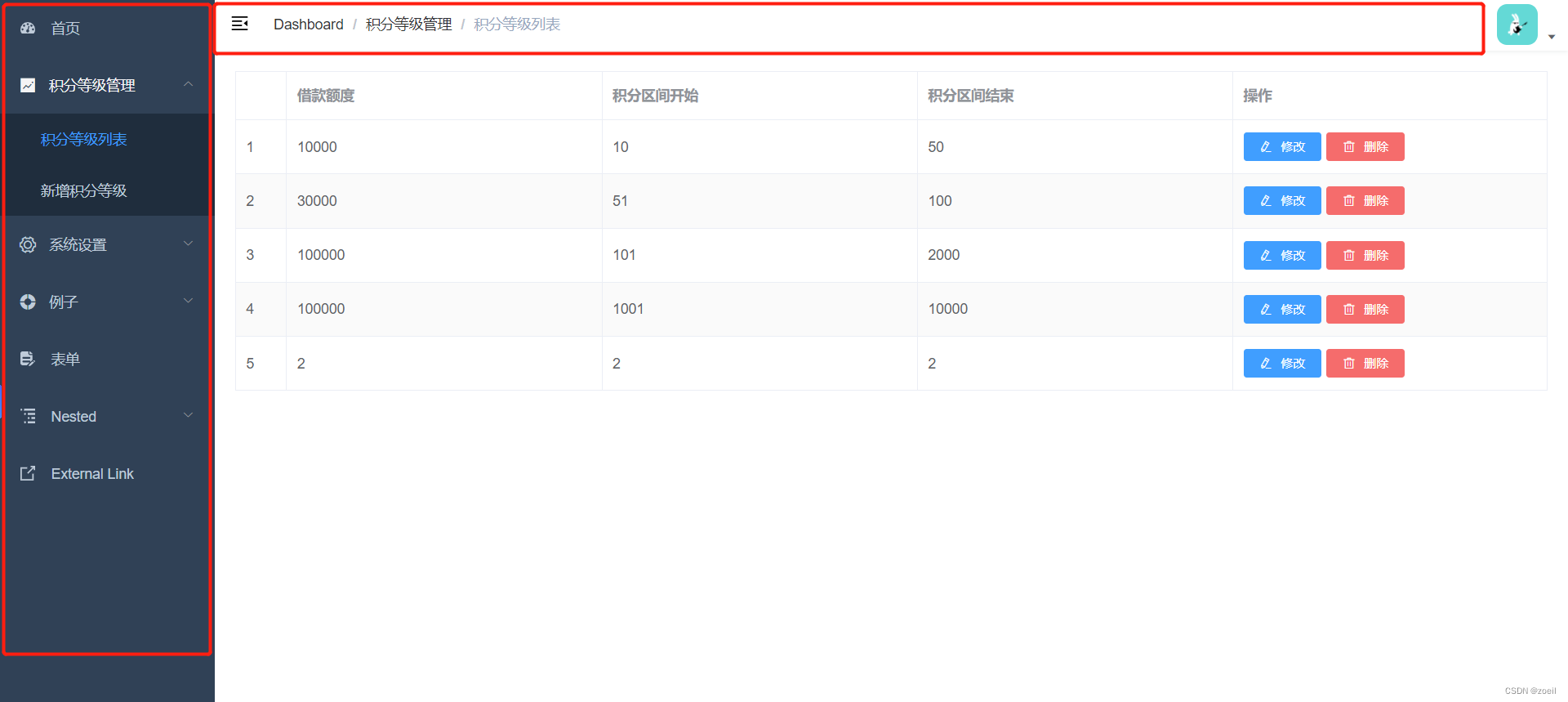
查看src/layout/index.vue我们可以发现是在这里组装起来的
<template>
  <div :class="classObj" class="app-wrapper">
    <div
      v-if="device === 'mobile' && sidebar.opened"
      class="drawer-bg"
      @click="handleClickOutside"
    />
    <!--侧边栏-->
    <sidebar class="sidebar-container" />
    <!-- <Sidebar/> 同理 -->
    <div class="main-container">
      <div :class="{ 'fixed-header': fixedHeader }">
        <!--导航栏-->
        <navbar />
        <!-- <Navbar />  实际上是这样写,直接使用组件,但是小写也支持,所以写成上一行的写法 -->
      </div>
      <!--主内容区-->
      <app-main />
      <!-- <AppMain/> 同理 -->
    </div>
  </div>
</template>

<script>
// 导入子组件
import { Navbar, Sidebar, AppMain } from './components'
import ResizeMixin from './mixin/ResizeHandler'

export default {
  name: 'Layout',
  components: {
    //注册子组件
    Navbar,
    Sidebar,
    AppMain,
  },
  mixins: [ResizeMixin],
  computed: {
    sidebar() {
      return this.$store.state.app.sidebar
    },
    device() {
      return this.$store.state.app.device
    },
    fixedHeader() {
      return this.$store.state.settings.fixedHeader
    },
    classObj() {
      return {
        hideSidebar: !this.sidebar.opened,
        openSidebar: this.sidebar.opened,
        withoutAnimation: this.sidebar.withoutAnimation,
        mobile: this.device === 'mobile',
      }
    },
  },
  methods: {
    handleClickOutside() {
      this.$store.dispatch('app/closeSideBar', { withoutAnimation: false })
    },
  },
}
</script>

<style lang="scss" scoped>
@import '~@/styles/mixin.scss';
@import '~@/styles/variables.scss';

.app-wrapper {
  @include clearfix;
  position: relative;
  height: 100%;
  width: 100%;
  &.mobile.openSidebar {
    position: fixed;
    top: 0;
  }
}
.drawer-bg {
  background: #000;
  opacity: 0.3;
  width: 100%;
  top: 0;
  height: 100%;
  position: absolute;
  z-index: 999;
}

.fixed-header {
  position: fixed;
  top: 0;
  right: 0;
  z-index: 9;
  width: calc(100% - #{$sideBarWidth});
  transition: width 0.28s;
}

.hideSidebar .fixed-header {
  width: calc(100% - 54px);
}

.mobile .fixed-header {
  width: 100%;
}
</style>
总结:App组件下面有layout组件、layout组件下有Sidebar、Navbar、AppMain组件
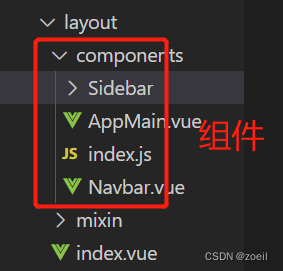
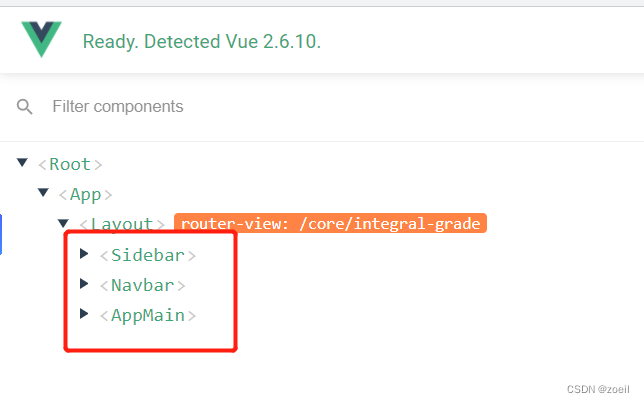
Appmain是怎么实现内容的变换的,又是一个子路由

总结:入口index.html中有一个id为app的div,App.vue里导入需要的模块,创建一个根组件App,App中有一个路由出口,根据router/index.html中定义的路由进行跳转。在主页面也就是layout/index.html中将侧边栏Sidebar,导航栏Navbar和主内容区AppMain结合,这三个也是组件,AppMain中有子路由出口,对应router中index.html中的children。
我正在使用i18n从头开始构建一个多语言网络应用程序,虽然我自己可以处理一大堆yml文件,但我说的语言(非常)有限,最终我想寻求外部帮助帮助。我想知道这里是否有人在使用UI插件/gem(与django上的django-rosetta不同)来处理多个翻译器,其中一些翻译器不愿意或无法处理存储库中的100多个文件,处理语言数据。谢谢&问候,安德拉斯(如果您已经在rubyonrails-talk上遇到了这个问题,我们深表歉意) 最佳答案 有一个rails3branchofthetolkgem在github上。您可以通过在Gemfi
我安装了ruby版本管理器,并将RVM安装的ruby实现设置为默认值,这样'哪个ruby'显示'~/.rvm/ruby-1.8.6-p383/bin/ruby'但是当我在emacs中打开inf-ruby缓冲区时,它使用安装在/usr/bin中的ruby。有没有办法让emacs像shell一样尊重ruby的路径?谢谢! 最佳答案 我创建了一个emacs扩展来将rvm集成到emacs中。如果您有兴趣,可以在这里获取:http://github.com/senny/rvm.el
是否有简单的方法来更改默认ISO格式(yyyy-mm-dd)的ActiveAdmin日期过滤器显示格式? 最佳答案 您可以像这样为日期选择器提供额外的选项,而不是覆盖js:=f.input:my_date,as::datepicker,datepicker_options:{dateFormat:"mm/dd/yy"} 关于ruby-on-rails-事件管理员日期过滤器日期格式自定义,我们在StackOverflow上找到一个类似的问题: https://s
电脑0x0000001A蓝屏错误怎么U盘重装系统教学分享。有用户电脑开机之后遇到了系统蓝屏的情况。系统蓝屏问题很多时候都是系统bug,只有通过重装系统来进行解决。那么蓝屏问题如何通过U盘重装新系统来解决呢?来看看以下的详细操作方法教学吧。 准备工作: 1、U盘一个(尽量使用8G以上的U盘)。 2、一台正常联网可使用的电脑。 3、ghost或ISO系统镜像文件(Win10系统下载_Win10专业版_windows10正式版下载-系统之家)。 4、在本页面下载U盘启动盘制作工具:系统之家U盘启动工具。 U盘启动盘制作步骤: 注意:制作期间,U盘会被格式化,因此U盘中的重要文件请注
在应用开发中,有时候我们需要获取系统的设备信息,用于数据上报和行为分析。那在鸿蒙系统中,我们应该怎么去获取设备的系统信息呢,比如说获取手机的系统版本号、手机的制造商、手机型号等数据。1、获取方式这里分为两种情况,一种是设备信息的获取,一种是系统信息的获取。1.1、获取设备信息获取设备信息,鸿蒙的SDK包为我们提供了DeviceInfo类,通过该类的一些静态方法,可以获取设备信息,DeviceInfo类的包路径为:ohos.system.DeviceInfo.具体的方法如下:ModifierandTypeMethodDescriptionstatic StringgetAbiList()Obt
运行bundleinstall后出现此错误:Gem::Package::FormatError:nometadatafoundin/Users/jeanosorio/.rvm/gems/ruby-1.9.3-p286/cache/libv8-3.11.8.13-x86_64-darwin-12.gemAnerroroccurredwhileinstallinglibv8(3.11.8.13),andBundlercannotcontinue.Makesurethat`geminstalllibv8-v'3.11.8.13'`succeedsbeforebundling.我试试gemin
需求:要创建虚拟机,就需要给他提供一个虚拟的磁盘,我们就在/opt目录下创建一个10G大小的raw格式的虚拟磁盘CentOS-7-x86_64.raw命令格式:qemu-imgcreate-f磁盘格式磁盘名称磁盘大小qemu-imgcreate-f磁盘格式-o?1.创建磁盘qemu-imgcreate-fraw/opt/CentOS-7-x86_64.raw10G执行效果#ls/opt/CentOS-7-x86_64.raw2.安装虚拟机使用virt-install命令,基于我们提供的系统镜像和虚拟磁盘来创建一个虚拟机,另外在创建虚拟机之前,提前打开vnc客户端,在创建虚拟机的时候,通过vnc
我是ruby的新手,我认为重新构建一个我用C#编写的简单聊天程序是个好主意。我正在使用Ruby2.0.0MRI(Matz的Ruby实现)。问题是我想在服务器运行时为简单的服务器命令提供I/O。这是从示例中获取的服务器。我添加了使用gets()获取输入的命令方法。我希望此方法在后台作为线程运行,但该线程正在阻塞另一个线程。require'socket'#Getsocketsfromstdlibserver=TCPServer.open(2000)#Sockettolistenonport2000defcommandsx=1whilex==1exitProgram=gets.chomp
我想用这两种语言中的任何一种(最好是ruby)制作一个窗口管理器。老实说,除了我需要加载某种X模块外,我不知道从哪里开始。因此,如果有人有线索,如果您能指出正确的方向,那就太好了。谢谢 最佳答案 XCB,X的下一代API使用XML格式定义X协议(protocol),并使用脚本生成特定语言绑定(bind)。它在概念上与SWIG类似,只是它描述的不是CAPI,而是X协议(protocol)。目前,C和Python存在绑定(bind)。理论上,Ruby端口只是编写一个从XML协议(protocol)定义语言到Ruby的翻译器的问题。生
因为我现在正在做一些时间测量,我想知道是否可以在不使用Benchmark类或命令行实用程序time的情况下测量用户时间或系统时间。使用Time类只显示挂钟时间,而不显示系统和用户时间,但是我正在寻找具有相同灵active的解决方案,例如time=TimeUtility.now#somecodeuser,system,real=TimeUtility.now-time原因是我有点不喜欢Benchmark,因为它不能只返回数字(编辑:我错了-它可以。请参阅下面的答案。)。当然,我可以解析输出,但感觉不对。*NIX系统的time实用程序也应该可以解决我的问题,但我想知道是否已经在Ruby中实
