这里记录登录页面验证码的做法,采取的是前后端分离的做法,前端用Vue,后端用Flask
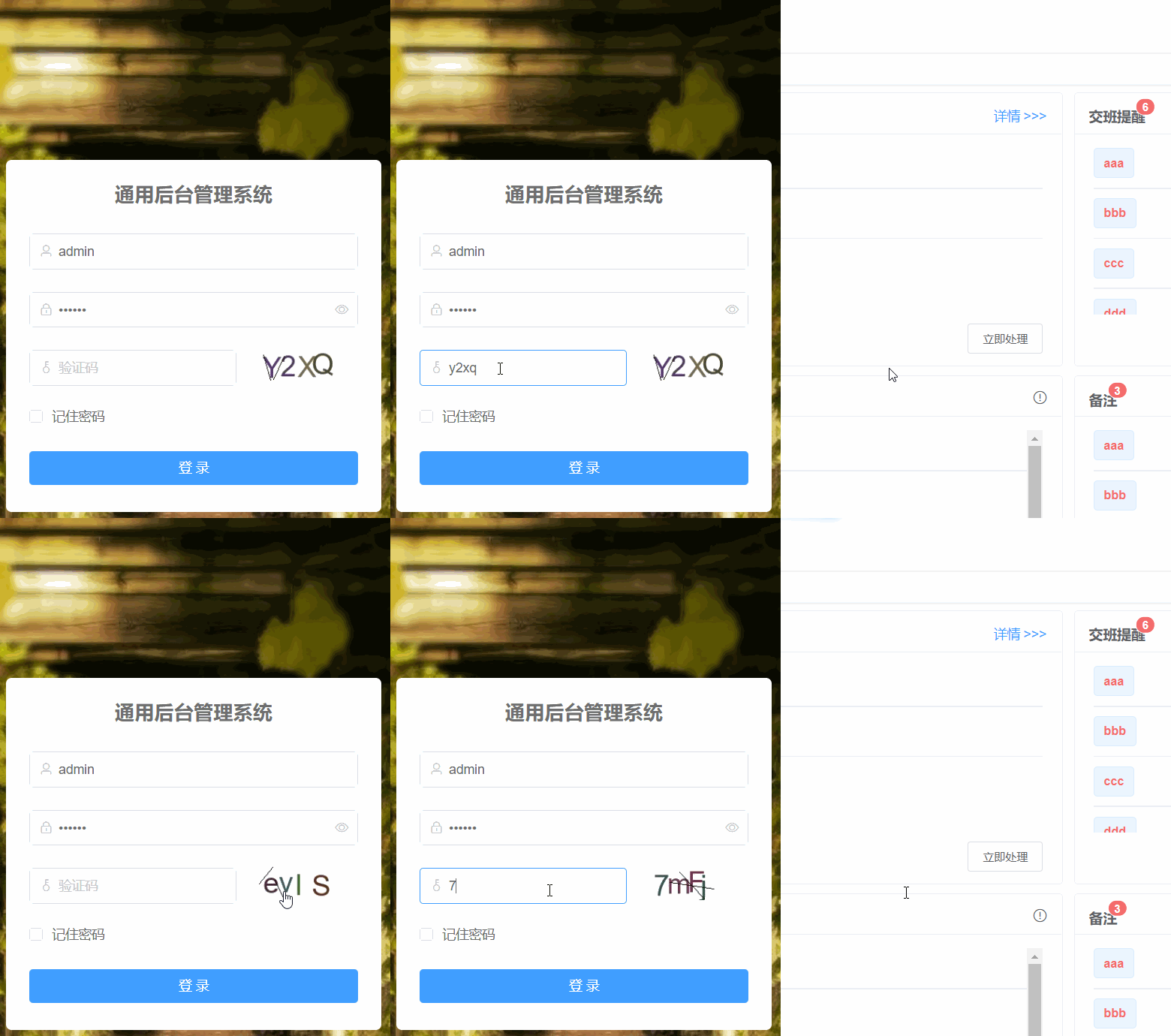

<template>
  <div class="login">
    <el-form
      ref="loginForm"
      :model="loginForm"
      :rules="loginRules"
      class="login-form"
    >
      <h3 class="title">通用后台管理系统</h3>
      <el-form-item prop="username">
        <el-input
          v-model="loginForm.username"
          type="text"
          auto-complete="off"
          placeholder="账号"
          prefix-icon="el-icon-user"
        >
        </el-input>
      </el-form-item>
      <el-form-item prop="password">
        <el-input
          v-model="loginForm.password"
          type="password"
          auto-complete="off"
          placeholder="密码"
          @keyup.enter.native="handleLogin"
          prefix-icon="el-icon-lock"
          show-password
        >
        </el-input>
      </el-form-item>
      <el-form-item prop="code" v-if="captchaOnOff">
        <el-input
          v-model="loginForm.code"
          auto-complete="off"
          placeholder="验证码"
          style="width: 63%"
          @keyup.enter.native="handleLogin"
          prefix-icon="el-icon-key"
        >
        </el-input>
        <div class="login-code">
          <img :src="codeUrl" @click="getCode" class="login-code-img" />
        </div>
      </el-form-item>
      <el-checkbox
        v-model="loginForm.rememberMe"
        style="margin: 0px 0px 25px 0px"
        >记住密码</el-checkbox>
      <el-form-item style="width: 100%">
        <el-button
          :loading="loading"
          size="medium"
          type="primary"
          style="width: 100%"
          @click.native.prevent="handleLogin"
        >
          <span v-if="!loading">登 录</span>
          <span v-else>登 录 中...</span>
        </el-button>
        <div style="float: right" v-if="register">
          <router-link class="link-type" :to="'/register'"
            >立即注册</router-link
          >
        </div>
      </el-form-item>
    </el-form>
    <!--  底部  -->
    <div class="el-login-footer">
      <span>Copyright © 2021-2022 VIP.vip All Rights Reserved.</span>
    </div>
  </div>
</template>1) Axios请求配置。
function get(url, params, response_type) {
    let newAxios = axios.create()
    let promise;
    // 请求超时时间
    newAxios.defaults.timeout = 10000;
    return new Promise((resolve, reject) => {
        promise = newAxios.get(url, {
            params: params,
            responseType: response_type
        });
        promise.then((response) => {
            resolve(response);
        }).catch(error => {
            reject(error);
        })
    })
}
Vue.prototype.get = get
2) toLogin登录方法。
export function toLogin(data) {
	return this.get('/login/toLogin', [data])
}
3) 其他js代码,其中setToken,setUserInfo,setInstId,removeAll方法不重要,这些方法是登录后保存一些用户信息用的,因此读者可自行忽略掉。
<script>
import { toLogin } from "@/api/login.js";
import {
  setToken,
  setUserInfo,
  setInstId,
  removeAll,
} from "../../utils/permission";
export default {
  name: "Login",
  data() {
    return {
      codeUrl: "",
      loginForm: {
        username: "admin",
        password: "123456",
        rememberMe: false,
        code: "",
        uuid: "",
      },
      loginRules: {
        username: [
          { required: true, trigger: "blur", message: "请输入您的账号" },
        ],
        password: [
          { required: true, trigger: "blur", message: "请输入您的密码" },
        ],
        code: [{ required: true, trigger: "change", message: "请输入验证码" }],
      },
      loading: false,
      // 验证码开关
      captchaOnOff: true,
      // 注册开关
      register: false,
      redirect: undefined,
    };
  },
  watch: {
    $route: {
      handler: function (route) {
        this.redirect = route.query && route.query.redirect;
      },
      immediate: true,
    },
  },
  created() {
    this.getCode();
  },
  methods: {
    getCode() {
      this.get("/getImgCode").then((res) => {
        this.codeUrl = res.data.img;
      });
    },
    // 登录请求
    handleLogin() {
      this.$refs.loginForm.validate((valid) => {
        if (valid) {
          let _this = this;
          toLogin(_this.loginForm)
            .then((res) => {
              removeAll(); //清除所有本地缓存
              if (res.status === 200) {
                this.$store.commit("getUserId", res.data.userInfo.ID);
                setToken(res.data.token);
                let fixedUserInfo = res.data.userInfo;
                this.get(
                  "/myinfo_img_download",
                  [fixedUserInfo.img, fixedUserInfo.ID, "login"],
                  ""
                ).then((res) => {
                  if (res.data.code != 200) {
                    _this.$message.error(res.data.msg);
                    fixedUserInfo.img = res.data.imgs;
                    setUserInfo(JSON.stringify(fixedUserInfo));
                    _this.$router.push("/");
                  } else {
                    fixedUserInfo.img = res.data.imgs;
                    setUserInfo(JSON.stringify(fixedUserInfo));
                    _this.$router.push("/");
                  }
                });
                setInstId(res.data.inst_id);
                _this.showMsg(res.data.userInfo.nickname);
              } else if (res.status === 201) {
                _this.$message({
                  message: "该用户已被停用!",
                  type: "warning",
                });
              } else if (res.status === 304) {
                _this.$message({
                  message: "验证码错误!",
                  type: "error",
                });
              } else if (res.status === 500) {
                _this.$message({
                  message: "密码错误!",
                  type: "error",
                });
              } else {
                _this.$message({
                  message: "用户名不存在!",
                  type: "error",
                });
              }
            })
            .catch((err) => {
              console.log(err);
            });
        }
      });
    },
    // 消息通知
    showMsg(realName) {
      this.$notify({
        title: "提示",
        dangerouslyUseHTMLString: true,
        message: "尊敬的<strong>" + realName + "</strong>,欢迎回来。",
        type: "success",
        duration: 2000,
      });
    },
  },
};
</script>4) CSS代码,注意background-image中的图片要自己准备。
<style rel="stylesheet/scss" lang="scss">
.login {
  display: flex;
  justify-content: center;
  align-items: center;
  height: 100%;
  background-image: url("../../assets/images/login-background.jpg");
  background-size: cover;
}
.title {
  margin: 0px auto 30px auto;
  text-align: center;
  color: #707070;
  font-weight: 600;
  font-size: 21px;
}

.login-form {
  border-radius: 6px;
  background: #ffffff;
  width: 400px;
  padding: 25px 25px 5px 25px;
  .el-input {
    height: 38px;
    input {
      height: 38px;
    }
  }
  .input-icon {
    height: 39px;
    width: 14px;
    margin-left: 2px;
  }
}
.login-tip {
  font-size: 13px;
  text-align: center;
  color: #bfbfbf;
}
.login-code {
  width: 33%;
  height: 38px;
  float: right;
  display: flex;

  img {
    margin-left: 10px;
    position: relative;
    top: -3px;
    cursor: pointer;
    vertical-align: middle;
  }
}
.el-login-footer {
  height: 40px;
  line-height: 40px;
  position: fixed;
  bottom: 0;
  width: 100%;
  text-align: center;
  color: #fff;
  font-family: Arial;
  font-size: 12px;
  letter-spacing: 1px;
}
.login-code-img {
  height: 38px;
}
</style>
login-backg.jpg

from flask import Flask, render_template,\
    request, jsonify, make_response, Response, send_file,session,send_from_directory
from flask_cors import CORS
import json
import base64

app = Flask(__name__)
''' 解决后端跨域问题,不然会在前端网页控制台显示“ccess to XMLHttpRequest at 'http://localhost:8080/api/login' from origin 'null' has been blocked” '''
CORS(app, supports_credentials=True)
# 存储验证码
session = {}

# 前端Login界面调取验证码图片,返回JSON字符串,非blob数据类型
@app.route('/getImgCode', methods=["GET", "POST"])
def imgCode():
  res = imageCode().getImgCode()
  return jsonify({"img":res})

# -------------------------------- #
# from io import BytesIO
import random
import string
from PIL import Image, ImageFont, ImageDraw, ImageFilter
# 生成验证码
class imageCode():
    '''验证码处理'''
    def rndColor(self):
        '''随机颜色'''
        return (random.randint(32, 127), random.randint(32, 127), random.randint(32, 127))
    def geneText(self):
        '''生成4位验证码'''
        # ascii_letters是生成所有字母 digits是生成所有数字0-9
        imgCode = ''.join(random.sample(string.ascii_letters + string.digits, 4))
        return imgCode
    def drawLines(self, draw, num, width, height):
        '''划线'''
        for num in range(num):
          x1 = random.randint(0, width / 2)
          y1 = random.randint(0, height / 2)
          x2 = random.randint(0, width)
          y2 = random.randint(height / 2, height)
          draw.line(((x1, y1), (x2, y2)), fill='black', width=1)
    def getVerifyCode(self):
        '''生成验证码图形'''
        code = self.geneText()
        # 图片大小120×50
        width, height = 120, 50
        # 新图片对象
        im = Image.new('RGB', (width, height), 'white')
        # 字体
        font = ImageFont.truetype('app/static/arial.ttf', 40)
        # draw对象
        draw = ImageDraw.Draw(im)
        # 绘制字符串
        for item in range(4):
            draw.text((5 + random.randint(-3, 3) + 23 * item, 5 + random.randint(-3, 3)),
               text=code[item], fill=self.rndColor(), font=font)
        # 划线,参数1为画板,参数2为线条数量,参数3为宽度,参数4为高度
        self.drawLines(draw, 2, width, height)
        return im, code
    def getImgCode(self):
        image, code = self.getVerifyCode()
        session['imageCode'] = code
        file_path =r"./upload/loginPic.jpg"
        image.save(file_path)
        # 把验证码图片的base64字段作为response返回前端,类型是string
        with open(file_path, 'rb') as img_f:
            img_stream = img_f.read()
            img_stream = base64.b64encode(img_stream)
            base64_string = img_stream.decode('utf-8')
            base64_string = "data:image/png;base64," + base64_string
            return base64_string

if __name__ == '__main__':
    # 0.0.0.0 表示同一个局域网均可访问,也可以替换成本机地址:通过命令行命令:ipcofig 获取
    app.run(host='0.0.0.0', port='5000', debug=True)
上面geneText是生产随机字母和数字结合的验证码内容的方法,此步比较关键
然后是PIL(Pillow)库画图的方法了:
ImageDraw.Draw.text()是在给定位置绘制字符串,生成图片返回Web端使用。ImageDraw.Draw.text(xy, text, fill=None, font=None, anchor=None, spacing=0, align=”left”)
ImageDraw.Draw.line()是在给定xy的数组,fill的填充颜色,线的宽度情况下划线ImageDraw.Draw.line(xy, fill=None, width=0)
最后以返回图片的base64字符串给前端即可
我正在使用i18n从头开始构建一个多语言网络应用程序,虽然我自己可以处理一大堆yml文件,但我说的语言(非常)有限,最终我想寻求外部帮助帮助。我想知道这里是否有人在使用UI插件/gem(与django上的django-rosetta不同)来处理多个翻译器,其中一些翻译器不愿意或无法处理存储库中的100多个文件,处理语言数据。谢谢&问候,安德拉斯(如果您已经在rubyonrails-talk上遇到了这个问题,我们深表歉意) 最佳答案 有一个rails3branchofthetolkgem在github上。您可以通过在Gemfi
按照目前的情况,这个问题不适合我们的问答形式。我们希望答案得到事实、引用或专业知识的支持,但这个问题可能会引发辩论、争论、投票或扩展讨论。如果您觉得这个问题可以改进并可能重新打开,visitthehelpcenter指导。关闭10年前。问题1)我想知道rubyonrails是否有功能类似于primefaces的gem。我问的原因是如果您使用primefaces(http://www.primefaces.org/showcase-labs/ui/home.jsf),开发人员无需担心javascript或jquery的东西。据我所知,JSF是一个规范,基于规范的各种可用实现,prim
我需要从站点抓取数据,但它需要我先登录。我一直在使用hpricot成功地抓取其他网站,但我是使用mechanize的新手,我真的对如何使用它感到困惑。我看到这个例子经常被引用:require'rubygems'require'mechanize'a=Mechanize.newa.get('http://rubyforge.org/')do|page|#Clicktheloginlinklogin_page=a.click(page.link_with(:text=>/LogIn/))#Submittheloginformmy_page=login_page.form_with(:act
按照目前的情况,这个问题不适合我们的问答形式。我们希望答案得到事实、引用或专业知识的支持,但这个问题可能会引发辩论、争论、投票或扩展讨论。如果您觉得这个问题可以改进并可能重新打开,visitthehelpcenter指导。关闭9年前。我是rubyonrails菜鸟。相比之下,我的HTMLCSSjavascript和jQuery相当不错。最近我使用MichaelHartl的教程进入了RubyonRails:http://ruby.railstutorial.org/ruby-on-rails-tutorial-book.但是,唉,我正在尝试构建自己的项目并使用gemdevise作为进
我为Devise用户和管理员提供了不同的模型。我也在使用Basecamp风格的子域。除了我需要能够以用户或管理员身份进行身份验证的一些Controller和操作外,一切都运行良好。目前我有authenticate_user!在我的application_controller.rb中设置,对于那些只有管理员才能访问的Controller和操作,我使用skip_before_filter跳过它。不幸的是,我不能简单地指定每个Controller的身份验证要求,因为我仍然需要一些Controller和操作才能被用户或管理员访问。我尝试了一些方法都无济于事。看来,如果我移动authentica
我在下面定义了api端点:paramsdorequires:ids,type:Array,desc:'Arrayofgroupids'end我无法从Swagger生成的UI传递数组。如果我输入[1,2,3,4]或ids%5b%5d=1&ids%5b%5d=2&ids%5b%5d=3然后两者都无效.如果我使用数组调用spec中的api,它就可以工作。我的客户想尝试Swagger的整个api,所以我想要一个适用于SwaggerUI的解决方案。 最佳答案 我对所有情况的解决方案:paramsdorequires:ids,type:Arra
我想用一个(自己的)omniauth提供商来衡量每秒可以登录多少次。我需要了解此omniauth/oauth请求的性能如何,以及此身份验证是否具有可扩展性?到目前为止我得到了什么:defperformance_auth(user_count=10)bm=Benchmark.realtimedouser_count.timesdo|n|forkdoclick_on'Logout'omniauth_config_mock(:provider=>"foo",:uid=>n,:email=>"foo#{n}@example.net")visit"/account/auth/foo/"enden
在Rails3.x应用程序中,我正在使用net::ssh并向远程pc运行一些命令。我想向用户的浏览器显示实时日志。比如,如果两个命令在net中运行::ssh执行即echo"Hello",echo"Bye"被传递然后"Hello"应该在执行后立即显示在浏览器中。这是代码我在rubyonrails应用程序中使用ssh连接和运行命令Net::SSH.start(@servers['local'],@machine_name,:password=>@machine_pwd,:timeout=>30)do|ssh|ssh.open_channeldo|channel|channel.requ
我正在使用Ruby和Eventmachine库编写一个应用程序。我真的很喜欢非阻塞I/O和事件驱动系统的想法,我遇到的问题是日志记录。我正在使用Ruby的标准记录器库。并不是说日志记录需要永远,但它似乎不应该阻塞,但它确实阻塞了。是否有某个库将Ruby的标准记录器实现扩展为非阻塞的,或者我应该只调用EM::defer进行日志记录调用?有没有办法让eventmachine已经为我做这件事? 最佳答案 我最终将记录器包装在一个启动线程并具有FIFO队列的单例类中。日志记录会将日志信息转储到队列中,线程只是循环,从队列中拉出内容并使用真正
我正在为Jekyll编写一个转换器插件,需要访问一些页眉(YAML前端)属性。只有内容被传递给主要的转换器方法,似乎无法访问上下文。例子:moduleJekyllclassUpcaseConverter关于如何在转换器插件中访问页眉数据有什么想法吗? 最佳答案 基于Jekyll源代码,无法在转换器中检索YAML前端内容。根据您的情况,我看到了两种可行的解决方案。您的文件扩展名可以具有足够的描述性,以提供您本应包含在前言中的信息。看起来Converter插件的设计就是这么基本的。如果修改Jekyll是一个选项,您可以更改Convert

 https://www.qb5200.com/article/361920.html