我们知道SpringBoot就是框架的框架,它解决了Spring在开发过程中繁琐的配置问题。例如在引入web、aop、data、cache等等场景,以往我们使用Spring时,会需要向容器中手动配置DispatchServlet、 AspectJAutoProxyingConfiguration等等配置类,而使用SpringBoot框架后,只需要引入spring-boot-starter-xxx的jar包,即可自动完成相关场景的配置。
这项技术SpringBoot是如何帮助我们实现的呢?本篇文章就来详细聊聊其中的技术细节。
首先我们通过一小段代码来了解一下使用SpringBoot完成自动装配的过程。
@SpringBootApplication
public class SpringbootAutoconfigureApplication {

    public static void main(String[] args) {
        SpringApplication.run(SpringbootAutoconfigureApplication.class, args);
    }

}
 <dependencies>
<!--    web自动装配 -->
    <dependency>
        <groupId>org.springframework.boot</groupId>
        <artifactId>spring-boot-starter-web</artifactId>
    </dependency>
<!--    自动重启 -->
    <dependency>
        <groupId>org.springframework.boot</groupId>
        <artifactId>spring-boot-devtools</artifactId>
        <scope>runtime</scope>
        <optional>true</optional>
    </dependency>
<!--    yml配置提示 -->
    <dependency>
        <groupId>org.springframework.boot</groupId>
        <artifactId>spring-boot-configuration-processor</artifactId>
        <optional>true</optional>
    </dependency>
<!--    lombok -->
    <dependency>
        <groupId>org.projectlombok</groupId>
        <artifactId>lombok</artifactId>
        <optional>true</optional>
    </dependency>
<!--    单元测试 -->
    <dependency>
        <groupId>org.springframework.boot</groupId>
        <artifactId>spring-boot-starter-test</artifactId>
        <scope>test</scope>
    </dependency>
</dependencies>
我们创建一个SpringBoot项目,然后引入spring-boot-starter-web jar包,有关于web相关的配置类SpringBoot就会自动帮助我们配置好,我们通过启动类的代码来验证一下:
@SpringBootApplication
public class SpringbootAutoconfigureApplication {

    public static void main(String[] args) {
        ConfigurableApplicationContext context = SpringApplication.run(SpringbootAutoconfigureApplication.class, args);

        String[] beanDefinitionNames = context.getBeanDefinitionNames();
        for (String beanDefinitionName : beanDefinitionNames) {
            System.out.println(beanDefinitionName);
        }
    }
}
...
// 请求处理的bean
dispatcherServlet
// 视图解析器
viewResolver
// 文件上传
multipartResolver
// 字符编码 防止乱码
characterEncodingFilter
...
// 还有很多配置的类,这里就略过了
通过上面一小段的demo,我们可以认知到自动装配就是无需我们在手动配置Bean到Spring容器中,这部分工作由框架给实现了。
如果要了解SpringBoot为我们提供了哪些自动装配,我们可以通过两种途径去了解:
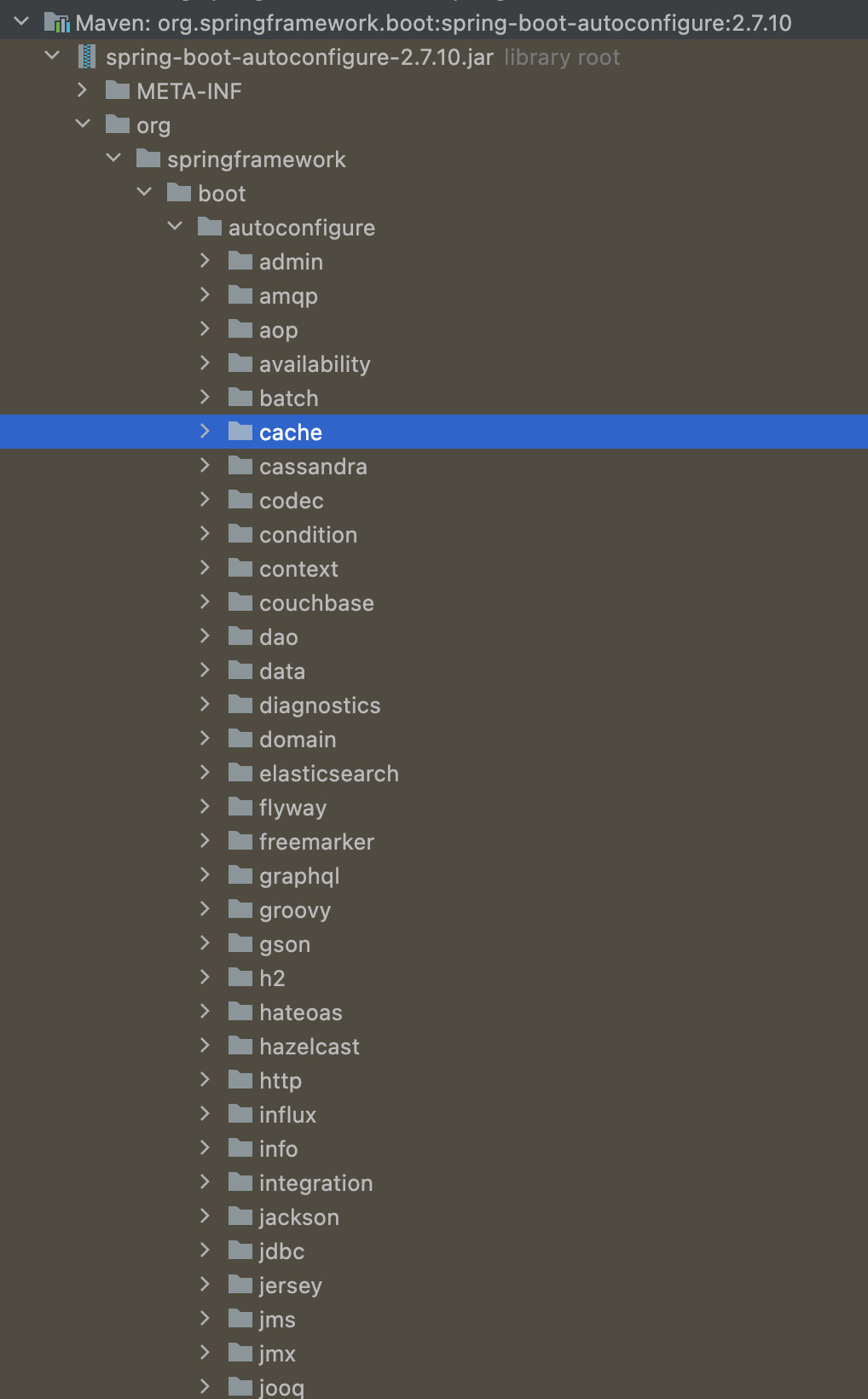
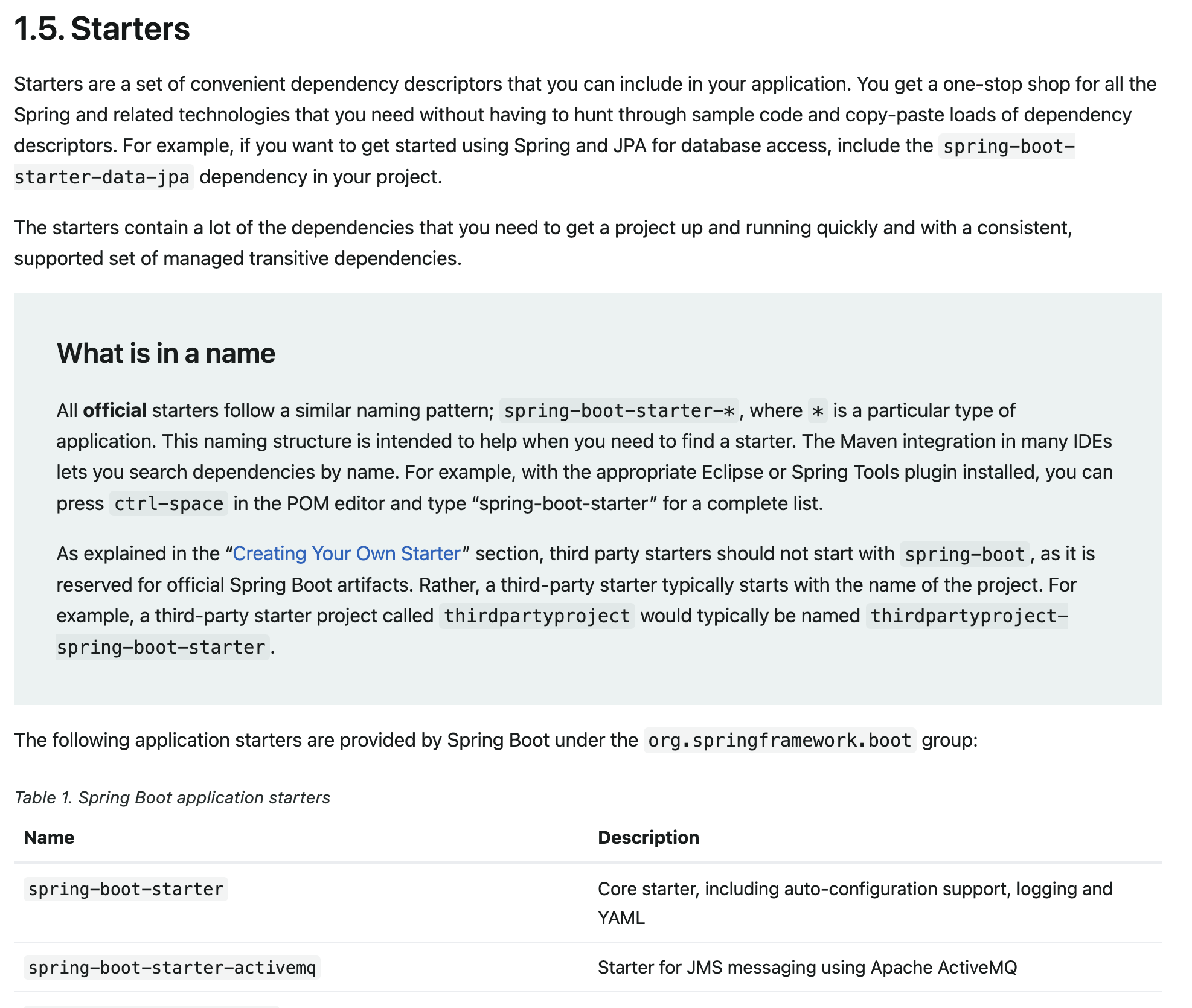
了解有哪些自动装配后,也需要了解需要配置的相关信息,例如配置DataSource数据源时,虽然框架替我们配置Bean,但是Bean的一些必要信息也是需要我们提供的,配置哪些信息以及如何配置我们也有两种方式来了解:
SpringBoot提供的自动装配已经满足我们绝大部分业务场景,如果还需要一些自定义内容,我们可以自己定义自动装配jar包,然后在项目中引用,至于怎么操作,我们通过下面章节的学习后即可学会如何定义开发。
在了解自动装配的原理前,我们需要了解学习一些底层的注解。

往Spring容器中添加组件的注解。
每个注解的共同作用都是向容器中注册Bean,但又区分不同意义的Bean,所以这些注解也有一个特殊的名字-模式注解。
与yml、properties文件的一些配置绑定的Bean
我们可以通过@ConfigurationProperties 与 @Component 组合达到配置绑定的目的;也可以通过@EnableConfigurationProperties与@ConfigurationProperties/进行配置绑定。
下面我们来看下demo:
@Data
@ToString
@Component
@ConfigurationProperties(prefix = "person")
public class Person {
    private String username;
    private String password;
}
@Configuration
@EnableConfigurationProperties(UserProperties.class)
public class AppConfiguration {
}
@ConfigurationProperties(prefix = "user")
@Data
@ToString
public class UserProperties {
    private String username;
    private String password;
}
测试一下:

我们通过spring-boot-autoconfigure jar包可以看到springboot帮助我们设置了了非常多的自动装配类,但是这些配置中并不是我们所有的都需要,只有在需要时才会被注册进Spring容器中。对于这部分的实现,SpringBoot是使用条件注解进行按需加载。例如AOP的自动配置类:
@AutoConfiguration
@ConditionalOnProperty(prefix = "spring.aop", name = "auto", havingValue = "true", matchIfMissing = true)
public class AopAutoConfiguration {

	@Configuration(proxyBeanMethods = false)
	@ConditionalOnClass(Advice.class)
	static class AspectJAutoProxyingConfiguration {

		@Configuration(proxyBeanMethods = false)
		@EnableAspectJAutoProxy(proxyTargetClass = false)
		@ConditionalOnProperty(prefix = "spring.aop", name = "proxy-target-class", havingValue = "false")
		static class JdkDynamicAutoProxyConfiguration {

		}

		@Configuration(proxyBeanMethods = false)
		@EnableAspectJAutoProxy(proxyTargetClass = true)
		@ConditionalOnProperty(prefix = "spring.aop", name = "proxy-target-class", havingValue = "true",
				matchIfMissing = true)
		static class CglibAutoProxyConfiguration {

		}

	}

	@Configuration(proxyBeanMethods = false)
	@ConditionalOnMissingClass("org.aspectj.weaver.Advice")
	@ConditionalOnProperty(prefix = "spring.aop", name = "proxy-target-class", havingValue = "true",
			matchIfMissing = true)
	static class ClassProxyingConfiguration {

		@Bean
		static BeanFactoryPostProcessor forceAutoProxyCreatorToUseClassProxying() {
			return (beanFactory) -> {
				if (beanFactory instanceof BeanDefinitionRegistry) {
					BeanDefinitionRegistry registry = (BeanDefinitionRegistry) beanFactory;
					AopConfigUtils.registerAutoProxyCreatorIfNecessary(registry);
					AopConfigUtils.forceAutoProxyCreatorToUseClassProxying(registry);
				}
			};
		}

	}

}
下面介绍下出现在本配置类的注解以及没在本类出现其他常用条件注解:
| 注解 | 注解意义 |
|---|---|
| @AutoConfiguration | 它是一个组合注解,表明这是一个自动配置类,需要注册进IoC容器中,并在此基础上还可以指定在某个配置类注册前或者后进行注册。 |
| @Configuration | 表明该类是一个配置类,它有一个参数proxyBeanMethods比较重要:当它为true时,它内部所有的bean注册方法在被任何地方调用的时候都是单例的;当它为false时,它内部的bean注册方法没被调用一次,都会产生一个新的对象。当明确该配置类的配置无依赖关系的时候,可以采用false,减少判断,加速容器的启动。 |
| @ConditionalOnProperty | 条件注解,判断当spring的属性配置中有prefix配置,以及该配置中有name指定的配置,并且值为havingValue时,条件通过,当然也可以指定默认配置matchIfMissing |
| @ConditionalOnExpression | 条件注解,符合SpEL表达式时条件通过 |
| @ConditionalOnJava | 条件注解,比指定Java版本 高、相等、低 通过条件判断,高、相等、低也是通过配置 |
| @ConditionalOnClass | 条件注解,当类路径中存在某个类文件时,条件通过 |
| @ConditionalOnMissingClass | 条件注解,当类路径中不存在某个类文件时,条件通过 |
| @Profile | 条件注解的一种,指定应用所处的环境可以注册当前Bean,例如dev、test、staging、prod |
| @ConditionalOnWebApplication | 条件注解,指定Web应用为某一类型时进行注册,类型包括ANY、SERVLET、REACTIVE |
| @ConditionalOnResource | 条件注解,指定类路径下有某一资源文件时,条件判断通过 |
| @ConditionalOnMissingBean | 条件注解,指定容器中不包含有某一Bean实例时才会通过 |
| @ConditionalOnBean | 条件注解,指定容器中包含某一Bean实例时才会通过 |
上述的注解对于我们了解自动装配的原理足够了。也正是通过上述的配置,SpringBoot实现了按需加载配置Bean的功能。
通过上面章节的叙述,我们大概知道自动装配的原理是通过spring-boot-autoconfigure进行的注册(框架帮助我我们配置)以及按需加载的原理是通过条件注解实现的。
下面我们也手动定义一个jar包,开发一些功能,然后接入SpringBoot,框架帮我们自动注册。
假设有这样一个需求,在web开发中,对某些接口进行白名单准入,我们可以通过自定义组件注册到容器当中对目标方法进行拦截,注册的动作通过SpringBoot进行自动装配而无需我们配置。
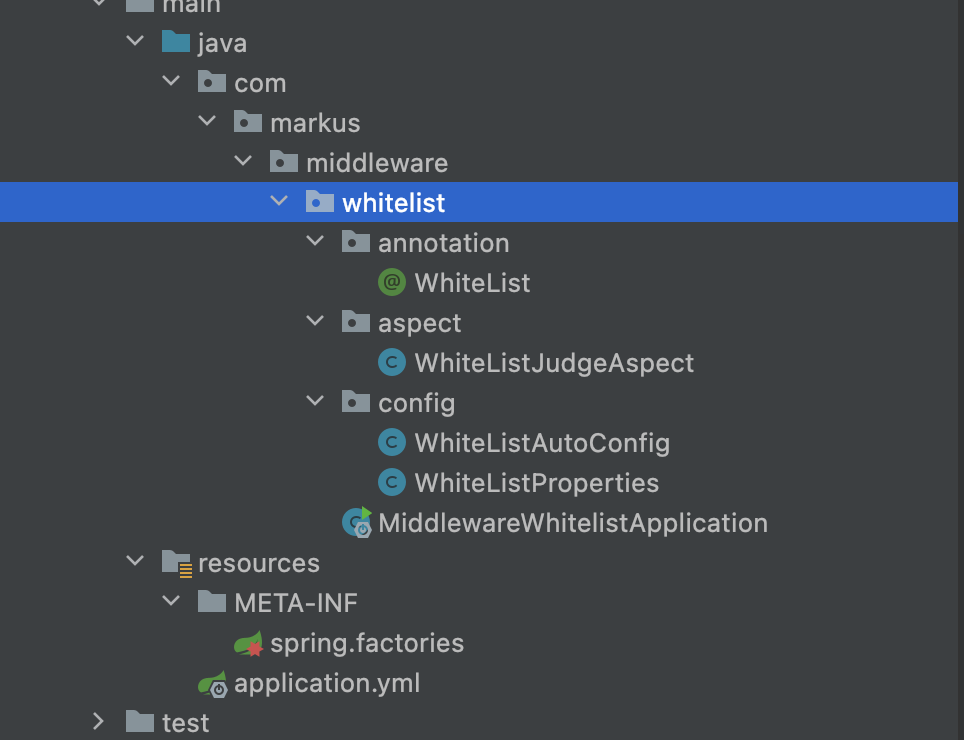
目录结构如下图所示:
package com.markus.middleware.whitelist.annotation;

import java.lang.annotation.*;

/**
 * @author: markus
 * @date: 2023/4/9 2:59 PM
 * @Description: 白名单注解
 * @Blog: https://markuszhang.com
 * It's my honor to share what I've learned with you!
 */
@Target(ElementType.METHOD)
@Retention(RetentionPolicy.RUNTIME)
@Documented
public @interface WhiteList {
    /**
     * 白名单命中时,是否通过此方法,如果不准入,则返回responseJson 否则正常执行目标方法
     *
     * @return
     */
    boolean passAfterHit() default true;

    /**
     * 不执行目标方法时返回的内容
     *
     * @return
     */
    String responseJson() default "";
}
package com.markus.middleware.whitelist.aspect;

import com.markus.middleware.whitelist.annotation.WhiteList;
import com.markus.middleware.whitelist.config.WhiteListProperties;
import org.aspectj.lang.ProceedingJoinPoint;
import org.aspectj.lang.Signature;
import org.aspectj.lang.annotation.Around;
import org.aspectj.lang.annotation.Aspect;
import org.aspectj.lang.annotation.Pointcut;
import org.aspectj.lang.reflect.MethodSignature;
import org.springframework.beans.factory.annotation.Autowired;
import org.springframework.stereotype.Component;

import javax.annotation.Resource;
import java.lang.annotation.Annotation;
import java.lang.reflect.Method;
import java.util.List;

/**
 * @author: markus
 * @date: 2023/4/9 3:03 PM
 * @Description:
 * @Blog: https://markuszhang.com
 * It's my honor to share what I've learned with you!
 */
@Aspect
@Component
public class WhiteListJudgeAspect {

    @Resource
    private List<String> whitelist;

    @Pointcut("@annotation(com.markus.middleware.whitelist.annotation.WhiteList)")
    public void pointcut() {

    }

    // 逻辑写的非常简单,实际并不是这样
    @Around(value = "pointcut()")
    public Object proceed(ProceedingJoinPoint pjp) throws Throwable {
        MethodSignature signature = (MethodSignature) pjp.getSignature();
        Method method = pjp.getTarget().getClass().getMethod(signature.getName(), signature.getParameterTypes());

        WhiteList whiteList = method.getAnnotation(WhiteList.class);
        if (whiteList == null) {
            return pjp.proceed();
        }

        Object[] args = pjp.getArgs();
        if (args.length == 0) {
            return pjp.proceed();
        }

        // 我们假定选择第一个参数就是用户名
        if (whitelist.contains(args[0])) {
            // 放行
            return pjp.proceed();
        } else {
            return whiteList.responseJson();
        }
    }
}
也就是接入方需要在自己的项目中需要配置的内容:
package com.markus.middleware.whitelist.config;

import lombok.Data;
import org.springframework.boot.context.properties.ConfigurationProperties;

import java.util.List;

/**
 * @author: markus
 * @date: 2023/4/9 3:08 PM
 * @Description: 白名单配置绑定
 * @Blog: https://markuszhang.com
 * It's my honor to share what I've learned with you!
 */
@ConfigurationProperties(prefix = "whitelist")
@Data
public class WhiteListProperties {
    private List<String> users;
}
package com.markus.middleware.whitelist.config;

import com.markus.middleware.whitelist.aspect.WhiteListJudgeAspect;
import org.springframework.boot.autoconfigure.AutoConfiguration;
import org.springframework.boot.autoconfigure.condition.ConditionalOnClass;
import org.springframework.boot.autoconfigure.condition.ConditionalOnMissingBean;
import org.springframework.boot.context.properties.EnableConfigurationProperties;
import org.springframework.context.annotation.Bean;
import org.springframework.context.annotation.Configuration;

import java.util.List;

/**
 * @author: markus
 * @date: 2023/4/9 3:04 PM
 * @Description: 白名单自动配置
 * @Blog: https://markuszhang.com
 * It's my honor to share what I've learned with you!
 */
@Configuration
@EnableConfigurationProperties(WhiteListProperties.class)
@ConditionalOnClass(WhiteListProperties.class)
public class WhiteListAutoConfig {

    @Bean("whitelist")
    @ConditionalOnMissingBean
    public List<String> whitelist(WhiteListProperties whiteListProperties) {
        return whiteListProperties.getUsers();
    }
}
org.springframework.boot.autoconfigure.EnableAutoConfiguration=com.markus.middleware.whitelist.config.WhiteListAutoConfig
<dependency>
    <groupId>com.markus</groupId>
    <artifactId>middleware-whitelist</artifactId>
    <version>0.0.1-SNAPSHOT</version>
</dependency>
whitelist:
  users:
    - markuszhang
    - luna
package com.example.springboot.autoconfigure.controller;

import com.example.springboot.autoconfigure.properties.Person;
import com.example.springboot.autoconfigure.properties.UserProperties;
import com.markus.middleware.whitelist.annotation.WhiteList;
import org.springframework.beans.factory.annotation.Autowired;
import org.springframework.web.bind.annotation.RequestMapping;
import org.springframework.web.bind.annotation.RequestParam;
import org.springframework.web.bind.annotation.RestController;

/**
 * @author: markus
 * @date: 2023/4/8 10:26 PM
 * @Description:
 * @Blog: https://markuszhang.com
 * It's my honor to share what I've learned with you!
 */
@RestController
public class HelloController {

    @RequestMapping("/properties")
    public String properties() {
        return "use @EnableConfigurationProperties " + userProperties + " and use @Component " + person;
    }

    @WhiteList(responseJson = "{\n" +
            "    \"code\":\"500\",\n" +
            "    \"msg\":\"非白名单可访问用户拦截\",\n" +
            "    \"data\":\"null\"\n" +
            "}")
    @RequestMapping("/whitelist/test")
    public String whitelist(@RequestParam String userId) {
        return "Hello SpringBoot User " + userId;
    }

}
属于白名单配置的用户:


不属于白名单配置的用户:

通过本文的叙述,我们掌握了如下内容:
很好奇,就使用rubyonrails自动化单元测试而言,你们正在做什么?您是否创建了一个脚本来在cron中运行rake作业并将结果邮寄给您?git中的预提交Hook?只是手动调用?我完全理解测试,但想知道在错误发生之前捕获错误的最佳实践是什么。让我们理所当然地认为测试本身是完美无缺的,并且可以正常工作。下一步是什么以确保他们在正确的时间将可能有害的结果传达给您? 最佳答案 不确定您到底想听什么,但是有几个级别的自动代码库控制:在处理某项功能时,您可以使用类似autotest的内容获得关于哪些有效,哪些无效的即时反馈。要确保您的提
我收到这个错误:RuntimeError(自动加载常量Apps时检测到循环依赖当我使用多线程时。下面是我的代码。为什么会这样?我尝试多线程的原因是因为我正在编写一个HTML抓取应用程序。对Nokogiri::HTML(open())的调用是一个同步阻塞调用,需要1秒才能返回,我有100,000多个页面要访问,所以我试图运行多个线程来解决这个问题。有更好的方法吗?classToolsController0)app.website=array.join(',')putsapp.websiteelseapp.website="NONE"endapp.saveapps=Apps.order("
我们目前正在为ROR3.2开发自定义cms引擎。在这个过程中,我们希望成为我们的rails应用程序中的一等公民的几个类类型起源,这意味着它们应该驻留在应用程序的app文件夹下,它是插件。目前我们有以下类型:数据源数据类型查看我在app文件夹下创建了多个目录来保存这些:应用/数据源应用/数据类型应用/View更多类型将随之而来,我有点担心应用程序文件夹被这么多目录污染。因此,我想将它们移动到一个子目录/模块中,该子目录/模块包含cms定义的所有类型。所有类都应位于MyCms命名空间内,目录布局应如下所示:应用程序/my_cms/data_source应用程序/my_cms/data_ty
目录前言滤波电路科普主要分类实际情况单位的概念常用评价参数函数型滤波器简单分析滤波电路构成低通滤波器RC低通滤波器RL低通滤波器高通滤波器RC高通滤波器RL高通滤波器部分摘自《LC滤波器设计与制作》,侵权删。前言最近需要学习放大电路和滤波电路,但是由于只在之前做音乐频谱分析仪的时候简单了解过一点点运放,所以也是相当从零开始学习了。滤波电路科普主要分类滤波器:主要是从不同频率的成分中提取出特定频率的信号。有源滤波器:由RC元件与运算放大器组成的滤波器。可滤除某一次或多次谐波,最普通易于采用的无源滤波器结构是将电感与电容串联,可对主要次谐波(3、5、7)构成低阻抗旁路。无源滤波器:无源滤波器,又称
最近在学习CAN,记录一下,也供大家参考交流。推荐几个我觉得很好的CAN学习,本文也是在看了他们的好文之后做的笔记首先是瑞萨的CAN入门,真的通透;秀!靠这篇我竟然2天理解了CAN协议!实战STM32F4CAN!原文链接:https://blog.csdn.net/XiaoXiaoPengBo/article/details/116206252CAN详解(小白教程)原文链接:https://blog.csdn.net/xwwwj/article/details/105372234一篇易懂的CAN通讯协议指南1一篇易懂的CAN通讯协议指南1-知乎(zhihu.com)视频推荐CAN总线个人知识总
深度学习部署:Windows安装pycocotools报错解决方法1.pycocotools库的简介2.pycocotools安装的坑3.解决办法更多Ai资讯:公主号AiCharm本系列是作者在跑一些深度学习实例时,遇到的各种各样的问题及解决办法,希望能够帮助到大家。ERROR:Commanderroredoutwithexitstatus1:'D:\Anaconda3\python.exe'-u-c'importsys,setuptools,tokenize;sys.argv[0]='"'"'C:\\Users\\46653\\AppData\\Local\\Temp\\pip-instal
@作者:SYFStrive @博客首页:HomePage📜:微信小程序📌:个人社区(欢迎大佬们加入)👉:社区链接🔗📌:觉得文章不错可以点点关注👉:专栏连接🔗💃:感谢支持,学累了可以先看小段由小胖给大家带来的街舞👉微信小程序(🔥)目录自定义组件-behaviors 1、什么是behaviors 2、behaviors的工作方式 3、创建behavior 4、导入并使用behavior 5、behavior中所有可用的节点 6、同名字段的覆盖和组合规则总结最后自定义组件-behaviors 1、什么是behaviorsbehaviors是小程序中,用于实现
我最喜欢的Google文档功能之一是它会在我工作时不断自动保存我的文档版本。这意味着即使我在进行关键更改之前忘记在某个点进行保存,也很有可能会自动创建一个保存点。至少,我可以将文档恢复到错误更改之前的状态,并从该点继续工作。对于在MacOS(或UNIX)上运行的Ruby编码器,是否有具有等效功能的工具?例如,一个工具会每隔几分钟自动将Gitcheckin我的本地存储库以获取我正在处理的文件。也许我有点偏执,但这点小保险可以让我在日常工作中安心。 最佳答案 虚拟机有些人可能讨厌我对此的回应,但我在编码时经常使用VIM,它具有自动保存功
我完全不是程序员,正在学习使用Ruby和Rails框架进行编程。我目前正在使用Ruby1.8.7和Rails3.0.3,但我想知道我是否应该升级到Ruby1.9,因为我真的没有任何升级的“遗留”成本。缺点是什么?我是否会遇到与普通gem的兼容性问题,或者甚至其他我不太了解甚至无法预料的问题? 最佳答案 你应该升级。不要坚持从1.8.7开始。如果您发现不支持1.9.2的gem,请避免使用它们(因为它们很可能不被维护)。如果您对gem是否兼容1.9.2有任何疑问,您可以在以下位置查看:http://www.railsplugins.or
我想知道是否可以通过自动创建数组来插入数组,如果数组不存在的话,就像在PHP中一样:$toto[]='titi';如果尚未定义$toto,它将创建数组并将“titi”压入。如果已经存在,它只会推送。在Ruby中我必须这样做:toto||=[]toto.push('titi')可以一行完成吗?因为如果我有一个循环,它会测试“||=”,除了第一次:Person.all.eachdo|person|toto||=[]#with1billionofperson,thislineisuseless999999999times...toto.push(person.name)你有更好的解决方案吗?
