文章目录
Elasticsearch是一个基于Apache Lucene的搜索服务器,适用于所有类型的数据,包括文本、数字、地理空间、结构化和非结构化数据,是是ELK的一个组成部分(ELK代表的是:E就是ElasticSearch,L就是Logstach,K就是kibana)。
它提供了分布式可扩展的实时搜索和分析引擎,它以其简单的 REST 风格 API、分布式特性、速度和可扩展性而闻名,是一个非常强大的搜索引擎全文检索。
Elasticsearch 是由Elastic公司创建并开源维护的,该 公司也拥有 Logstash 及 Kibana 开源项目。
三个开源项目共同形成了一个强大的生态圈。简单地说,Logstash 负责数据的采集,处理(丰富数据,数据转型等),Kibana 负责数据展示,分析及管理。Elasticsearch 处于最核心的位置,它可以帮我们对数据进行快速地搜索及分析。
在安装之前,提前了解本地PC的java版本,因为java版本和的elasticsearch,kibana的对应关系是有严格要求的
我本地Mac使用的是:
java version “1.8.0_121”
elasticsearch-6.8.2 下载地址:https://www.elastic.co/cn/downloads/elasticsearch
kibana-6.8.23 下载地址:https://www.elastic.co/cn/downloads/kibana
下载完成之后,在Mac上找个目录解压以上两个压缩包
然后进入各自的bin目录下
elasticsearch的启动命令:
./elasticsearch
kibana的启动命令:
./kibana
输出日志运行完毕后,分别访问 http://localhost:9200(返回json格式的数据)和http://localhost:5601(返回一个页面),若两个页面都显示正常,则运行成功
注意:kibana启动花费时间较长,当执行命令后没有立即看到日志输出为正常情况
在Mac上运行成功后,同一网段的Windows访问不了时,到Mac上安装目录下的config/elasticsearch.yml下,添加或修改一行
network.bind_host: 0.0.0.0
重新启动,验证
http://xx.xx.xx.xx:9200
同上,到安装目录下的config/kibana.yml下,添加或修改两行
server.port: 5602
server.host: 0.0.0.0
重新启动,验证
http://xx.xx.xx.xx:5601
首先,在使用命令之前,需要知道以下的命令可以在哪里运行
打开kibana的首页,点击左边栏的【Dev Tools】,右边栏下面的【Console】分为左右两栏,在左边栏输入命令,然后点击三角形绿色按钮,就可以在右边栏呈现结果,如下所示:
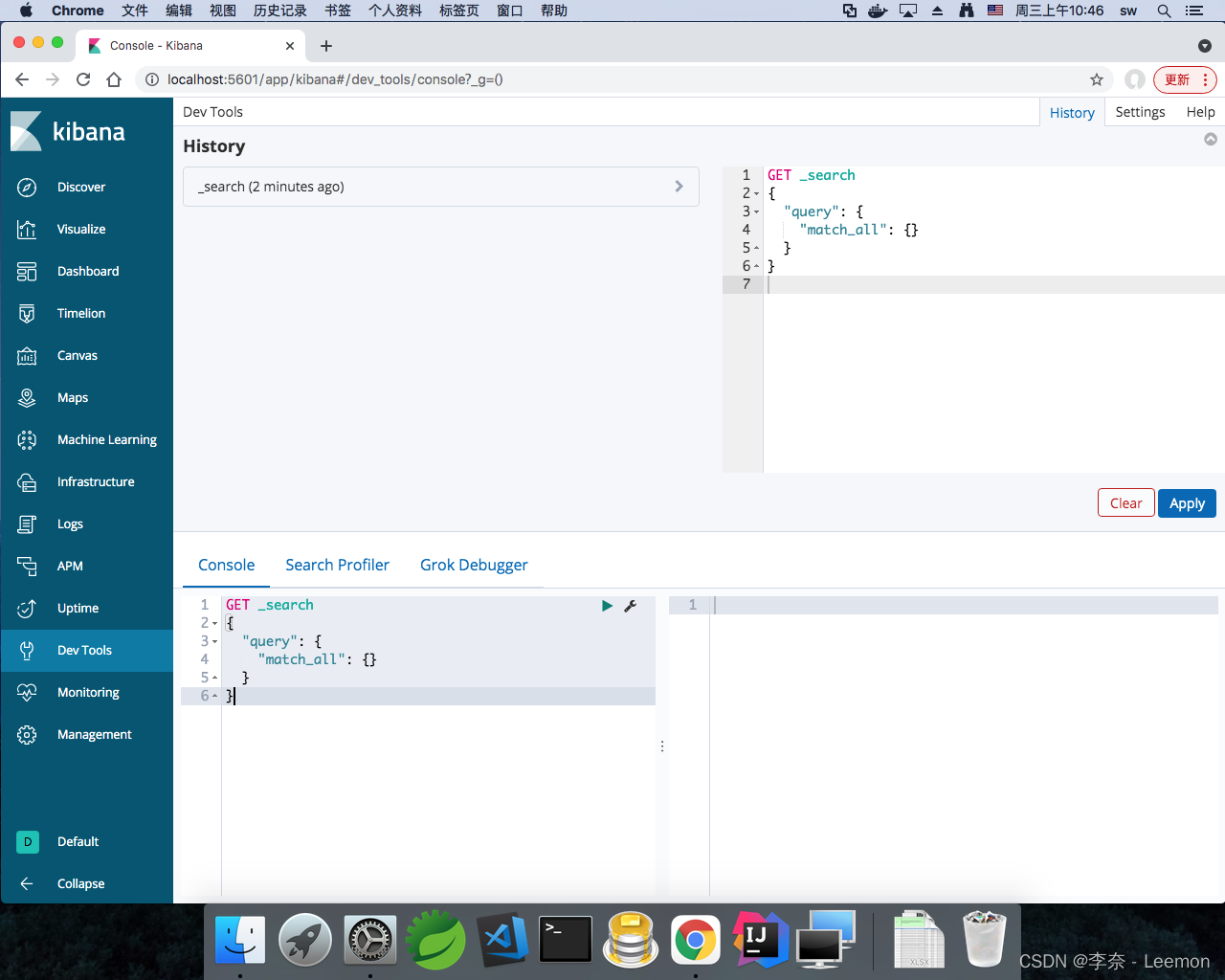
GET _cat/health
================================ 结果 ================================
1673923769 02:49:29 elasticsearch yellow 1 1 7 7 0 0 5 0 - 58.3%
若想知道每个值的含义
GET _cat/health?v
================================ 结果 ================================
epoch      timestamp cluster       status node.total node.data shards pri relo init unassign pending_tasks max_task_wait_time active_shards_percent
1673923848 02:50:48  elasticsearch yellow          1         1      7   7    0    0        5             0                  -                 58.3%
常见属性解读:
获取更加详细的内容
GET _all
================================ 结果 ================================
#! Deprecation: [types removal] The parameter include_type_name should be explicitly specified in get indices requests to prepare for 7.0. In 7.0 include_type_name will default to 'false', which means responses will omit the type name in mapping definitions.
{
  ".kibana_1" : {
    "aliases" : {
      ".kibana" : { }
    },
    "mappings" : {
      "doc" : {
        "dynamic" : "strict",
        "properties" : {
        ......
GET _cat/indices
================================ 结果 ================================
yellow open human_index          Mf-9YNYrSdyiLZFgZCP7ow 5 1 4 0 22.6kb 22.6kb
green  open .kibana_task_manager J9YFrgfOS1W2N3dvqXwxOg 1 0 2 0 12.5kb 12.5kb
green  open .kibana_1            hgDx6B-6QmC0KjWLWB3wgQ 1 0 5 1 26.5kb 26.5kb
若想知道每个值的含义
GET _cat/indices?v
================================ 结果 ================================
health status index                uuid                   pri rep docs.count docs.deleted store.size pri.store.size
yellow open   human_index          Mf-9YNYrSdyiLZFgZCP7ow   5   1          4            0     22.6kb         22.6kb
green  open   .kibana_task_manager J9YFrgfOS1W2N3dvqXwxOg   1   0          2            0     12.5kb         12.5kb
green  open   .kibana_1            hgDx6B-6QmC0KjWLWB3wgQ   1   0          5            1     26.5kb         26.5kb
常见属性解读:
PUT /human_index1
================================ 结果 ================================
#! Deprecation: the default number of shards will change from [5] to [1] in 7.0.0; if you wish to continue using the default of [5] shards, you must manage this on the create index request or with an index template
{
  "acknowledged" : true,
  "shards_acknowledged" : true,
  "index" : "human_index1"
}
GET /human_index1
================================ 结果 ================================
#! Deprecation: [types removal] The parameter include_type_name should be explicitly specified in get indices requests to prepare for 7.0. In 7.0 include_type_name will default to 'false', which means responses will omit the type name in mapping definitions.
{
  "human_index1" : {
    "aliases" : { },
    "mappings" : { },
    "settings" : {
      "index" : {
        "creation_date" : "1673926295232",
        "number_of_shards" : "5",
        "number_of_replicas" : "1",
        "uuid" : "i9ESnW6ETN2n5C6V5PLZ8Q",
        "version" : {
          "created" : "6082399"
        },
        "provided_name" : "human_index1"
      }
    }
  }
}
DELETE /human_index1
================================ 结果 ================================
{
  "acknowledged" : true
}
GET _cat/nodes
================================ 结果 ================================
10.197.29.203 21 45 9 2.11   mdi * 2FgJQbJ
或
GET _cat/nodes?v
================================ 结果 ================================
ip            heap.percent ram.percent cpu load_1m load_5m load_15m node.role master name
10.197.29.203           23          45   9    1.99                  mdi       *      2FgJQbJ
常见属性解读:
put /human_index/user/1
{
  "name": "hh",
  "desc": "my name is hh",
  "age": 25,
  "country": "China GuangDong",
  "sex": "female"
}
================================ 结果 ================================
{
  "_index" : "human_index",
  "_type" : "user",
  "_id" : "1",
  "_version" : 1,
  "result" : "created",
  "_shards" : {
    "total" : 2,
    "successful" : 1,
    "failed" : 0
  },
  "created": true,
  "_seq_no" : 1,
  "_primary_term" : 2
}
在以上的新增方式中,已经指定了该文档的id(1),如果不需要自定义id的话,可以使用以下方式:
POST /human_index/user
{
  "name": "id_test",
  "desc": "test no id"
}
================================ 结果 ================================
{
  "_index" : "human_index",
  "_type" : "user",
  "_id" : "MnS2woUBq_u6VYKKJjno",
  "_version" : 1,
  "result" : "created",
  "_shards" : {
    "total" : 2,
    "successful" : 1,
    "failed" : 0
  },
  "_seq_no" : 10,
  "_primary_term" : 3
}
可以看到,默认随机生成的id为MnS2woUBq_u6VYKKJjno
在创建document的时候,如果命令行的索引index(human_index)和类型type(user)不存在,默认会自动创建。
get /human_index/user/1
================================ 结果 ================================
{
  "_index" : "human_index",
  "_type" : "user",
  "_id" : "1",
  "_version" : 1,
  "_seq_no" : 1,
  "_primary_term" : 2,
  "found" : true,
  "_source" : {
    "name" : "hh",
    "desc" : "my name is hh",
    "age" : 25,
    "country" : "China GuangDong",
    "sex" : "female"
  }
}
get /human_index/user/_search
================================ 结果 ================================
{
  "took" : 1,
  "timed_out" : false,
  "_shards" : {
    "total" : 5,
    "successful" : 5,
    "skipped" : 0,
    "failed" : 0
  },
  "hits" : {
    "total" : 4,
    "max_score" : 1.0,
    "hits" : [
      {
        "_index" : "human_index",
        "_type" : "user",
        "_id" : "2",
        "_score" : 1.0,
        "_source" : {
          "name" : "sb",
          "desc" : "my name is sb",
          "age" : 25,
          "country" : "China GuangDong Jieyang",
          "sex" : "female"
        }
      },
      {
        "_index" : "human_index",
        "_type" : "user",
        "_id" : "4",
        "_score" : 1.0,
        "_source" : {
          "doc" : {
            "name" : "lmc hh",
            "country" : "China GuangDong Jieyang",
            "sex" : "male",
            "desc" : "my name is leemon",
            "age" : 11
          }
        }
      },
      {
        "_index" : "human_index",
        "_type" : "user",
        "_id" : "1",
        "_score" : 1.0,
        "_source" : {
          "name" : "hh",
          "desc" : "my name is hh",
          "age" : 25,
          "country" : "China GuangDong",
          "sex" : "female"
        }
      },
      {
        "_index" : "human_index",
        "_type" : "user",
        "_id" : "3",
        "_score" : 1.0,
        "_source" : {
          "age" : 24,
          "country" : "China GuangDong Shenzhen",
          "sex" : "male",
          "name" : "ln",
          "desc" : "my name is lee nai"
        }
      }
    ]
  }
}
或
get /human_index/user/_search
{
  "query":{
    "match_all": {}
  }
}
由于我是把流程走过一遍了,因此存在多条记录
字段解释:
修改可以通过POST和PUT来处理,但两者有区别
使用put时,如果原document已存在,则会直接替换成新的
put /human_index/user/1
{
  "sex": "female"
}
================================ 结果 ================================
{
  "_index" : "human_index",
  "_type" : "user",
  "_id" : "1",
  "_version" : 3,
  "result" : "updated",
  "_shards" : {
    "total" : 2,
    "successful" : 1,
    "failed" : 0
  },
  "_seq_no" : 2,
  "_primary_term" : 2
}
再继续查看:
get /human_index/user/1
================================ 结果 ================================
{
  "_index" : "human_index",
  "_type" : "user",
  "_id" : "1",
  "_version" : 3,
  "_seq_no" : 2,
  "_primary_term" : 2,
  "found" : true,
  "_source" : {
    "sex" : "female"
  }
}
可以发现,除了sex字段外,其他都不见了
将该文档重新还原
put /human_index/user/1
{
  "name": "hh",
  "desc": "my name is hh",
  "age": 25,
  "country": "China GuangDong",
  "sex": "female"
}
然后通过POST进行修改
post /human_index/user/1/_update
{
  "doc": {
    "sex": "male"
  }
}
================================ 结果 ================================
{
  "_index" : "human_index",
  "_type" : "user",
  "_id" : "1",
  "_version" : 7,
  "result" : "updated",
  "_shards" : {
    "total" : 2,
    "successful" : 1,
    "failed" : 0
  },
  "_seq_no" : 6,
  "_primary_term" : 2
}
再重新查看
get /human_index/user/1
================================ 结果 ================================
{
  "_index" : "human_index",
  "_type" : "user",
  "_id" : "1",
  "_version" : 7,
  "_seq_no" : 6,
  "_primary_term" : 2,
  "found" : true,
  "_source" : {
    "name" : "hh",
    "desc" : "my name is hh",
    "age" : 25,
    "country" : "China GuangDong",
    "sex" : "male"
  }
}
这个时候,除了sex的其他属性都在存在,为局部修改
DELETE /human_index/user/1
================================ 结果 ================================
{
  "_index" : "human_index",
  "_type" : "user",
  "_id" : "1",
  "_version" : 8,
  "result" : "deleted",
  "_shards" : {
    "total" : 2,
    "successful" : 1,
    "failed" : 0
  },
  "_seq_no" : 7,
  "_primary_term" : 2
}
再继续查看
get /human_index/user/1
================================ 结果 ================================
{
  "_index" : "human_index",
  "_type" : "user",
  "_id" : "1",
  "found" : false
}
已经删除成功
再进行查询之前,该索引类型user下的所有记录如下所示
{
  "took" : 2,
  "timed_out" : false,
  "_shards" : {
    "total" : 5,
    "successful" : 5,
    "skipped" : 0,
    "failed" : 0
  },
  "hits" : {
    "total" : 6,
    "max_score" : 1.0,
    "hits" : [
      {
        "_index" : "human_index",
        "_type" : "user",
        "_id" : "5",
        "_score" : 1.0,
        "_source" : {
          "name" : "ln-1",
          "country" : "China GuangDong Jieyang",
          "sex" : "male",
          "desc" : "my name is leemon-1",
          "age" : 21
        }
      },
      {
        "_index" : "human_index",
        "_type" : "user",
        "_id" : "2",
        "_score" : 1.0,
        "_source" : {
          "name" : "sb",
          "desc" : "my name is sb",
          "age" : 25,
          "country" : "China GuangDong Jieyang",
          "sex" : "female"
        }
      },
      {
        "_index" : "human_index",
        "_type" : "user",
        "_id" : "4",
        "_score" : 1.0,
        "_source" : {
          "doc" : {
            "name" : "lmc hh",
            "country" : "China GuangDong Jieyang",
            "sex" : "male",
            "desc" : "my name is leemon",
            "age" : 11
          }
        }
      },
      {
        "_index" : "human_index",
        "_type" : "user",
        "_id" : "6",
        "_score" : 1.0,
        "_source" : {
          "name" : "ln sb",
          "country" : "China GuangDong Jieyang",
          "sex" : "male",
          "desc" : "my name is sb leemon",
          "age" : 27
        }
      },
      {
        "_index" : "human_index",
        "_type" : "user",
        "_id" : "1",
        "_score" : 1.0,
        "_source" : {
          "name" : "hh",
          "desc" : "my name is hh",
          "age" : 25,
          "country" : "China GuangDong",
          "sex" : "female"
        }
      },
      {
        "_index" : "human_index",
        "_type" : "user",
        "_id" : "3",
        "_score" : 1.0,
        "_source" : {
          "age" : 24,
          "country" : "China GuangDong Shenzhen",
          "sex" : "male",
          "name" : "ln",
          "desc" : "my name is lee nai"
        }
      }
    ]
  }
}
详见2.4.2
get /human_index/user/_search
{
  "query": {
    "match": {
      "name": "ln"
    }
  }
}
结果会查出三条记录(省略部分结果)
{
    "_index" : "human_index",
    "_type" : "user",
    "_id" : "6",
    "_score" : 0.6099695,
    "_source" : {
        "name" : "ln sb",
        "country" : "China GuangDong Jieyang",
        "sex" : "male",
        "desc" : "my name is sb leemon",
        "age" : 27
    }
},
{
    "_index" : "human_index",
    "_type" : "user",
    "_id" : "5",
    "_score" : 0.2876821,
    "_source" : {
        "name" : "ln-1",
        "country" : "China GuangDong Jieyang",
        "sex" : "male",
        "desc" : "my name is leemon-1",
        "age" : 21
    }
},
{
    "_index" : "human_index",
    "_type" : "user",
    "_id" : "3",
    "_score" : 0.2876821,
    "_source" : {
        "age" : 24,
        "country" : "China GuangDong Shenzhen",
        "sex" : "male",
        "name" : "ln",
        "desc" : "my name is lee nai"
    }
}
可以看到,通过match查询时,当从文档中的name属性值中出现ln时,满足条件
get /human_index/user/_search
{
  "query": {
    "match": {
      "doc.name": "hh"
    }
  }
}
结果查出一条记录
{
    "_index" : "human_index",
    "_type" : "user",
    "_id" : "4",
    "_score" : 0.2876821,
    "_source" : {
        "doc" : {
            "name" : "lmc hh",
            "country" : "China GuangDong Jieyang",
            "sex" : "male",
            "desc" : "my name is leemon",
            "age" : 11
        }
    }
}
前面的是对单个词进行查询,短句指的是多个词组合形成的句子
get /human_index/user/_search
{
  "query": {
    "match_phrase": {
      "country": "GuangDong Jieyang"
    }
  }
}
结果查出3条记录,id分别为:2,5,6
如果将match_phrase改成match,相当于只要country中出现GuangDong或者Jieyang,都会被查出来,相当于查询条件会先被分词,然后返回分词后查询的并集
这里的模糊查询跟关系型数据库的模糊查询有较大的差异,关系型的模糊查询与上面的分词,短句查询类似,Elasticsearch的模糊查询是指查询出参数内容和实际内容的编辑距离在2以内的文档
get /human_index/user/_search
{
  "query": {
    "fuzzy": {
      "country": "Jieyank"
    }
  }
}
或
get /human_index/user/_search
{
  "query": {
    "fuzzy": {
      "country": "Jieyamg"
    }
  }
}
等等。
由于Jieyang跟Jieyank和Jieyamg的编辑距离都在2以内,因此能够通过模糊查询得到。结果查出的记录id分别为:2,5,6
get /human_index/user/_search
{
  "query": {
    "match": {
      "country": "Jieyang"
    }
  },
  "sort":[
    {
      "_id":{
        "order": "desc"
      }
    }
  ]
}
查询出来的文档数量和2.5.5一样,只不过根据id进行降序排序
get /human_index/user/_search
{
  "query": {
    "match_all": {}
  },
  "sort":[
    {

      "age": {
        "order": "asc"
      }
    }
  ],
  "from": 0,
  "size": 3
}
查找age最小的三个文档记录,返回结果的记录id按顺序为:5,3,2
get /human_index/user/_search
{
  "query": {
    "match": {
      "country": "Jieyang"
    }
  },
  "_source": ["name"]
}
查询结果如下所示:
{
  "took" : 1,
  "timed_out" : false,
  "_shards" : {
    "total" : 5,
    "successful" : 5,
    "skipped" : 0,
    "failed" : 0
  },
  "hits" : {
    "total" : 3,
    "max_score" : 0.2876821,
    "hits" : [
      {
        "_index" : "human_index",
        "_type" : "user",
        "_id" : "5",
        "_score" : 0.2876821,
        "_source" : {
          "name" : "ln-1"
        }
      },
      {
        "_index" : "human_index",
        "_type" : "user",
        "_id" : "2",
        "_score" : 0.18232156,
        "_source" : {
          "name" : "sb"
        }
      },
      {
        "_index" : "human_index",
        "_type" : "user",
        "_id" : "6",
        "_score" : 0.18232156,
        "_source" : {
          "name" : "ln sb"
        }
      }
    ]
  }
}
如果需要多个查询条件拼接在一起就需要使用bool
bool 过滤可以用来合并多个过滤条件查询结果的布尔逻辑,它包含以下操作符:
查找country出现Jieyang,name出现sb,age在24-26中的文档
get /human_index/user/_search
{
  "query": {
    "bool": {
      "must": [
        {
          "match": {
            "country": "Jieyang"
          }
        },
        {
          "match": {
            "name": "sb"
          }
        }
      ],
      "filter": {
        "range": {
          "age": {
            "gte": 24,
            "lte": 26
          }
        }
      }
    }
  }
}
结果只查出id为2的文档
关于范围查询:
查找country出现Jieyang或name出现sb,并且age在24-26中的文档
get /human_index/user/_search
{
  "query": {
    "bool": {
      "should": [
        {
          "match": {
            "country": "Jieyang"
          }
        },
        {
          "match": {
            "name": "sb"
          }
        }
      ],
      "filter": {
        "range": {
          "age": {
            "gte": 24,
            "lte": 26
          }
        }
      }
    }
  }
}
结果查出id为1,2,3的文档
查询返回结果的时候,将查询条件的内容高亮显示
get /human_index/user/_search
{
  "query": {
    "bool": {
      "must": [
        {
          "match": {
            "country": "Jieyang"
          }
        },
        {
          "match": {
            "name": "sb"
          }
        }
      ],
      "filter": {
        "range": {
          "age": {
            "gte": 24,
            "lte": 26
          }
        }
      }
    }
  },
  "highlight": {
    "fields": {
      "country": {}
    }
  }
}
返回结果
{
  "took" : 3,
  "timed_out" : false,
  "_shards" : {
    "total" : 5,
    "successful" : 5,
    "skipped" : 0,
    "failed" : 0
  },
  "hits" : {
    "total" : 1,
    "max_score" : 0.39343074,
    "hits" : [
      {
        "_index" : "human_index",
        "_type" : "user",
        "_id" : "2",
        "_score" : 0.39343074,
        "_source" : {
          "name" : "sb",
          "desc" : "my name is sb",
          "age" : 25,
          "country" : "China GuangDong Jieyang",
          "sex" : "female"
        },
        "highlight" : {
          "country" : [
            "China GuangDong <em>Jieyang</em>"
          ]
        }
      }
    ]
  }
}
对country的每个词进行分组,统计出现的文档数量(用户user数量)
get /human_index/user/_search
{
  "aggs": {
    "group_by_tag": {
      "terms": {
        "field": "country"

      }
    }
  }
}
返回结果
{
  "error": {
    "root_cause": [
      {
        "type": "illegal_argument_exception",
        "reason": "Fielddata is disabled on text fields by default. Set fielddata=true on [country] in order to load fielddata in memory by uninverting the inverted index. Note that this can however use significant memory. Alternatively use a keyword field instead."
      }
    ],
    "type": "search_phase_execution_exception",
    "reason": "all shards failed",
    "phase": "query",
    "grouped": true,
    "failed_shards": [
      {
        "shard": 0,
        "index": "human_index",
        "node": "2FgJQbJ5QhWVXfvoaI2kqQ",
        "reason": {
          "type": "illegal_argument_exception",
          "reason": "Fielddata is disabled on text fields by default. Set fielddata=true on [country] in order to load fielddata in memory by uninverting the inverted index. Note that this can however use significant memory. Alternatively use a keyword field instead."
        }
      }
    ],
    "caused_by": {
      "type": "illegal_argument_exception",
      "reason": "Fielddata is disabled on text fields by default. Set fielddata=true on [country] in order to load fielddata in memory by uninverting the inverted index. Note that this can however use significant memory. Alternatively use a keyword field instead.",
      "caused_by": {
        "type": "illegal_argument_exception",
        "reason": "Fielddata is disabled on text fields by default. Set fielddata=true on [country] in order to load fielddata in memory by uninverting the inverted index. Note that this can however use significant memory. Alternatively use a keyword field instead."
      }
    }
  },
  "status": 400
}
这里发现报错了,但是原因不是执行命令的问题,是因为elasticsearch默认fielddata的值为false,此时先要对分组的字段进行处理,将fielddata值修改为true
get /human_index/_mapping/user
{
  "properties": {
    "country": {
      "type": "text",
      "fielddata": true
    }
  }
}
================================ 结果 ================================
{
  "acknowledged" : true
}
再重新执行一遍统计命令,得到结果:
{
  "took" : 4,
  "timed_out" : false,
  "_shards" : {
    "total" : 5,
    "successful" : 5,
    "skipped" : 0,
    "failed" : 0
  },
  "hits" : {
    "total" : 6,
    "max_score" : 1.0,
    "hits" : [
      {
        "_index" : "human_index",
        "_type" : "user",
        "_id" : "5",
        "_score" : 1.0,
        "_source" : {
          "name" : "ln-1",
          "country" : "China GuangDong Jieyang",
          "sex" : "male",
          "desc" : "my name is leemon-1",
          "age" : 21
        }
      },
      {
        "_index" : "human_index",
        "_type" : "user",
        "_id" : "2",
        "_score" : 1.0,
        "_source" : {
          "name" : "sb",
          "desc" : "my name is sb",
          "age" : 25,
          "country" : "China GuangDong Jieyang",
          "sex" : "female"
        }
      },
      {
        "_index" : "human_index",
        "_type" : "user",
        "_id" : "4",
        "_score" : 1.0,
        "_source" : {
          "doc" : {
            "name" : "lmc hh",
            "country" : "China GuangDong Jieyang",
            "sex" : "male",
            "desc" : "my name is leemon",
            "age" : 11
          }
        }
      },
      {
        "_index" : "human_index",
        "_type" : "user",
        "_id" : "6",
        "_score" : 1.0,
        "_source" : {
          "name" : "ln sb",
          "country" : "China GuangDong Jieyang",
          "sex" : "male",
          "desc" : "my name is sb leemon",
          "age" : 27
        }
      },
      {
        "_index" : "human_index",
        "_type" : "user",
        "_id" : "1",
        "_score" : 1.0,
        "_source" : {
          "name" : "hh",
          "desc" : "my name is hh",
          "age" : 25,
          "country" : "China GuangDong",
          "sex" : "female"
        }
      },
      {
        "_index" : "human_index",
        "_type" : "user",
        "_id" : "3",
        "_score" : 1.0,
        "_source" : {
          "age" : 24,
          "country" : "China GuangDong Shenzhen",
          "sex" : "male",
          "name" : "ln",
          "desc" : "my name is lee nai"
        }
      }
    ]
  },
  "aggregations" : {
    "group_by_tag" : {
      "doc_count_error_upper_bound" : 0,
      "sum_other_doc_count" : 0,
      "buckets" : [
        {
          "key" : "china",
          "doc_count" : 5
        },
        {
          "key" : "guangdong",
          "doc_count" : 5
        },
        {
          "key" : "jieyang",
          "doc_count" : 3
        },
        {
          "key" : "shenzhen",
          "doc_count" : 1
        }
      ]
    }
  }
}
可以看到aggregations中,对country每个词出现的文档数量
对sex进行分组,计算每个分组的平均age,再按照平均age降序排序。在查询之前,记得先对sex的fielddata进行设置
get /human_index/user/_search
{
  "aggs": {
    "group_by_tag": {
      "terms": {
        "field": "sex",
        "order": {
          "avg_age": "desc"
        }
      },
      "aggs": {
        "avg_age": {
          "avg": {
            "field": "age"
          }
        }
      }
    }
  }
}
结果如下所示:
{
  "took" : 4,
  "timed_out" : false,
  "_shards" : {
    "total" : 5,
    "successful" : 5,
    "skipped" : 0,
    "failed" : 0
  },
  "hits" : {
    "total" : 6,
    "max_score" : 1.0,
    "hits" : [
      {
        "_index" : "human_index",
        "_type" : "user",
        "_id" : "5",
        "_score" : 1.0,
        "_source" : {
          "name" : "ln-1",
          "country" : "China GuangDong Jieyang",
          "sex" : "male",
          "desc" : "my name is leemon-1",
          "age" : 21
        }
      },
      {
        "_index" : "human_index",
        "_type" : "user",
        "_id" : "2",
        "_score" : 1.0,
        "_source" : {
          "name" : "sb",
          "desc" : "my name is sb",
          "age" : 25,
          "country" : "China GuangDong Jieyang",
          "sex" : "female"
        }
      },
      {
        "_index" : "human_index",
        "_type" : "user",
        "_id" : "4",
        "_score" : 1.0,
        "_source" : {
          "doc" : {
            "name" : "lmc hh",
            "country" : "China GuangDong Jieyang",
            "sex" : "male",
            "desc" : "my name is leemon",
            "age" : 11
          }
        }
      },
      {
        "_index" : "human_index",
        "_type" : "user",
        "_id" : "6",
        "_score" : 1.0,
        "_source" : {
          "name" : "ln sb",
          "country" : "China GuangDong Jieyang",
          "sex" : "male",
          "desc" : "my name is sb leemon",
          "age" : 27
        }
      },
      {
        "_index" : "human_index",
        "_type" : "user",
        "_id" : "1",
        "_score" : 1.0,
        "_source" : {
          "name" : "hh",
          "desc" : "my name is hh",
          "age" : 25,
          "country" : "China GuangDong",
          "sex" : "female"
        }
      },
      {
        "_index" : "human_index",
        "_type" : "user",
        "_id" : "3",
        "_score" : 1.0,
        "_source" : {
          "age" : 24,
          "country" : "China GuangDong Shenzhen",
          "sex" : "male",
          "name" : "ln",
          "desc" : "my name is lee nai"
        }
      }
    ]
  },
  "aggregations" : {
    "group_by_tag" : {
      "doc_count_error_upper_bound" : 0,
      "sum_other_doc_count" : 0,
      "buckets" : [
        {
          "key" : "female",
          "doc_count" : 2,
          "avg_age" : {
            "value" : 25.0
          }
        },
        {
          "key" : "male",
          "doc_count" : 3,
          "avg_age" : {
            "value" : 24.0
          }
        }
      ]
    }
  }
}
划分age范围区间,按照年龄区间进行分组,在每个分组内再按照sex进行分组,然后计算每个分组的平均年龄,降序排序
get /human_index/user/_search
{
  "aggs": {
    "group_age_range": {
      "range": {
        "field": "age",
        "ranges": [
            {
              "from": 0,
              "to": 10
            },{
              "from": 11,
              "to": 20
            },{
              "from": 21,
              "to": 25
            },{
              "from": 25,
              "to": 30
            }
          ]
      },
      "aggs": {
        "group_by_sex": {
          "terms": {
            "field": "sex",
            "order": {
              "avg_age": "desc"
            }
          },
          "aggs": {
            "avg_age": {
              "avg": {
                "field": "age"
              }
            }
          }
        }
      }
    }
  }
}
输出结果的aggregations如下所示:
{
    "group_age_range" : {
        "buckets" : [
            {
                "key" : "0.0-10.0",
                "from" : 0.0,
                "to" : 10.0,
                "doc_count" : 0,
                "group_by_sex" : {
                    "doc_count_error_upper_bound" : 0,
                    "sum_other_doc_count" : 0,
                    "buckets" : [ ]
                }
            },
            {
                "key" : "11.0-20.0",
                "from" : 11.0,
                "to" : 20.0,
                "doc_count" : 0,
                "group_by_sex" : {
                    "doc_count_error_upper_bound" : 0,
                    "sum_other_doc_count" : 0,
                    "buckets" : [ ]
                }
            },
            {
                "key" : "21.0-25.0",
                "from" : 21.0,
                "to" : 25.0,
                "doc_count" : 2,
                "group_by_sex" : {
                    "doc_count_error_upper_bound" : 0,
                    "sum_other_doc_count" : 0,
                    "buckets" : [
                        {
                            "key" : "male",
                            "doc_count" : 2,
                            "avg_age" : {
                                "value" : 22.5
                            }
                        }
                    ]
                }
            },
            {
                "key" : "25.0-30.0",
                "from" : 25.0,
                "to" : 30.0,
                "doc_count" : 3,
                "group_by_sex" : {
                    "doc_count_error_upper_bound" : 0,
                    "sum_other_doc_count" : 0,
                    "buckets" : [
                        {
                            "key" : "male",
                            "doc_count" : 1,
                            "avg_age" : {
                                "value" : 27.0
                            }
                        },
                        {
                            "key" : "female",
                            "doc_count" : 2,
                            "avg_age" : {
                                "value" : 25.0
                            }
                        }
                    ]
                }
            }
        ]
    }
}
通过_mapping可以设置和查看每个类型每个字段的数据类型等等
get /human_index/_mapping
================================ 结果 ================================
#! Deprecation: [types removal] The parameter include_type_name should be explicitly specified in get mapping requests to prepare for 7.0. In 7.0 include_type_name will default to 'false', which means responses will omit the type name in mapping definitions.
{
  "human_index" : {
    "mappings" : {
      "user" : {
        "properties" : {
          "age" : {
            "type" : "long"
          },
          "country" : {
            "type" : "text",
            "fields" : {
              "keyword" : {
                "type" : "keyword",
                "ignore_above" : 256
              }
            },
            "fielddata" : true
          },
          "desc" : {
            "type" : "text",
            "fields" : {
              "keyword" : {
                "type" : "keyword",
                "ignore_above" : 256
              }
            }
          },
          "doc" : {
            "properties" : {
              "age" : {
                "type" : "long"
              },
              "country" : {
                "type" : "text",
                "fields" : {
                  "keyword" : {
                    "type" : "keyword",
                    "ignore_above" : 256
                  }
                }
              },
              "desc" : {
                "type" : "text",
                "fields" : {
                  "keyword" : {
                    "type" : "keyword",
                    "ignore_above" : 256
                  }
                }
              },
              "name" : {
                "type" : "text",
                "fields" : {
                  "keyword" : {
                    "type" : "keyword",
                    "ignore_above" : 256
                  }
                }
              },
              "sex" : {
                "type" : "text",
                "fields" : {
                  "keyword" : {
                    "type" : "keyword",
                    "ignore_above" : 256
                  }
                }
              }
            }
          },
          "name" : {
            "type" : "text",
            "fields" : {
              "keyword" : {
                "type" : "keyword",
                "ignore_above" : 256
              }
            }
          },
          "sex" : {
            "type" : "text",
            "fields" : {
              "keyword" : {
                "type" : "keyword",
                "ignore_above" : 256
              }
            },
            "fielddata" : true
          },
          "tags" : {
            "type" : "text",
            "fielddata" : true
          }
        }
      }
    }
  }
}
get /human_index/_mapping/user
由于当前只有一个索引human_index,且索引下只有一个类型user,因此结果与2.7.1基本一致
参考2.6.1的修改fielddata属性
我正在学习如何使用Nokogiri,根据这段代码我遇到了一些问题:require'rubygems'require'mechanize'post_agent=WWW::Mechanize.newpost_page=post_agent.get('http://www.vbulletin.org/forum/showthread.php?t=230708')puts"\nabsolutepathwithtbodygivesnil"putspost_page.parser.xpath('/html/body/div/div/div/div/div/table/tbody/tr/td/div
总的来说,我对ruby还比较陌生,我正在为我正在创建的对象编写一些rspec测试用例。许多测试用例都非常基础,我只是想确保正确填充和返回值。我想知道是否有办法使用循环结构来执行此操作。不必为我要测试的每个方法都设置一个assertEquals。例如:describeitem,"TestingtheItem"doit"willhaveanullvaluetostart"doitem=Item.new#HereIcoulddotheitem.name.shouldbe_nil#thenIcoulddoitem.category.shouldbe_nilendend但我想要一些方法来使用
我有一个Ruby程序,它使用rubyzip压缩XML文件的目录树。gem。我的问题是文件开始变得很重,我想提高压缩级别,因为压缩时间不是问题。我在rubyzipdocumentation中找不到一种为创建的ZIP文件指定压缩级别的方法。有人知道如何更改此设置吗?是否有另一个允许指定压缩级别的Ruby库? 最佳答案 这是我通过查看rubyzip内部创建的代码。level=Zlib::BEST_COMPRESSIONZip::ZipOutputStream.open(zip_file)do|zip|Dir.glob("**/*")d
类classAprivatedeffooputs:fooendpublicdefbarputs:barendprivatedefzimputs:zimendprotecteddefdibputs:dibendendA的实例a=A.new测试a.foorescueputs:faila.barrescueputs:faila.zimrescueputs:faila.dibrescueputs:faila.gazrescueputs:fail测试输出failbarfailfailfail.发送测试[:foo,:bar,:zim,:dib,:gaz].each{|m|a.send(m)resc
很好奇,就使用rubyonrails自动化单元测试而言,你们正在做什么?您是否创建了一个脚本来在cron中运行rake作业并将结果邮寄给您?git中的预提交Hook?只是手动调用?我完全理解测试,但想知道在错误发生之前捕获错误的最佳实践是什么。让我们理所当然地认为测试本身是完美无缺的,并且可以正常工作。下一步是什么以确保他们在正确的时间将可能有害的结果传达给您? 最佳答案 不确定您到底想听什么,但是有几个级别的自动代码库控制:在处理某项功能时,您可以使用类似autotest的内容获得关于哪些有效,哪些无效的即时反馈。要确保您的提
假设我做了一个模块如下:m=Module.newdoclassCendend三个问题:除了对m的引用之外,还有什么方法可以访问C和m中的其他内容?我可以在创建匿名模块后为其命名吗(就像我输入“module...”一样)?如何在使用完匿名模块后将其删除,使其定义的常量不再存在? 最佳答案 三个答案:是的,使用ObjectSpace.此代码使c引用你的类(class)C不引用m:c=nilObjectSpace.each_object{|obj|c=objif(Class===objandobj.name=~/::C$/)}当然这取决于
我正在尝试使用ruby和Savon来使用网络服务。测试服务为http://www.webservicex.net/WS/WSDetails.aspx?WSID=9&CATID=2require'rubygems'require'savon'client=Savon::Client.new"http://www.webservicex.net/stockquote.asmx?WSDL"client.get_quotedo|soap|soap.body={:symbol=>"AAPL"}end返回SOAP异常。检查soap信封,在我看来soap请求没有正确的命名空间。任何人都可以建议我
关闭。这个问题是opinion-based.它目前不接受答案。想要改进这个问题?更新问题,以便editingthispost可以用事实和引用来回答它.关闭4年前。Improvethisquestion我想在固定时间创建一系列低音和高音调的哔哔声。例如:在150毫秒时发出高音调的蜂鸣声在151毫秒时发出低音调的蜂鸣声200毫秒时发出低音调的蜂鸣声250毫秒的高音调蜂鸣声有没有办法在Ruby或Python中做到这一点?我真的不在乎输出编码是什么(.wav、.mp3、.ogg等等),但我确实想创建一个输出文件。
我在我的项目目录中完成了compasscreate.和compassinitrails。几个问题:我已将我的.sass文件放在public/stylesheets中。这是放置它们的正确位置吗?当我运行compasswatch时,它不会自动编译这些.sass文件。我必须手动指定文件:compasswatchpublic/stylesheets/myfile.sass等。如何让它自动运行?文件ie.css、print.css和screen.css已放在stylesheets/compiled。如何在编译后不让它们重新出现的情况下删除它们?我自己编译的.sass文件编译成compiled/t
我想将html转换为纯文本。不过,我不想只删除标签,我想智能地保留尽可能多的格式。为插入换行符标签,检测段落并格式化它们等。输入非常简单,通常是格式良好的html(不是整个文档,只是一堆内容,通常没有anchor或图像)。我可以将几个正则表达式放在一起,让我达到80%,但我认为可能有一些现有的解决方案更智能。 最佳答案 首先,不要尝试为此使用正则表达式。很有可能你会想出一个脆弱/脆弱的解决方案,它会随着HTML的变化而崩溃,或者很难管理和维护。您可以使用Nokogiri快速解析HTML并提取文本:require'nokogiri'h
