String对象的不可变原因,String对象的内存布局,及String对象之间的执行==,equals,+运算时的分析。
Author: Msuenb
Date: 2023-02-16
java.lang.String类代表字符串。String 对象用于保存字符串,也就是一组字符序列。字符串是常量,它们的值在创建后不能更改。
String 是 final 类,不能被其他的类继承
String 类实现了 Comparable 接口,String 对象可以比较大小
String 对象内部是用字符数组保存字符串内容的
JDK9之前是
private final char value[]数组,JDK9之后是 byte[] 数组
"hello"等效于char[] value = {'h', 'e', 'l', 'l', 'o'}
String 对象是不可变对象,一旦进行修改,就会产生新对象
注意:
- String 类的 char[] value 数组是 final 修饰的,说明 value 数组地址不可变,不是数组元素不可变
- 由于 value 数组是 private 的,所以在 String 类外无法直接修改 value 数组的元素值(除非用反射)
- String 类中的方法涉及到 value 数组长度变化,或修改元素值,都是用用新对象来表示修改后内容
final char[] value = {'h', 'e', 'l', 'l', 'o'};
// value = new char[5];    // value 的地址不可修改
value[0] = 'H'; // 可以修改 value 元素值

String str = "hello";
str = "world";
// 不会修改 "hello", 会在池中创建一个新的String对象接受 "world"  str指向这个新对象 共会创建两个对象
String 对象不可变,可以共享(节省内存)。Java 中把需要共享的字符串常量对象存放在常量池中。
String s1 = "hello";
String s2 = "hello";
System.out.println(s1 == s2);   // true
// 内存中只有一个 "hello" 对象被创建,同时被s1和s2共享
总的来说,String 对象的创建方式有两种:直接赋值 和 使用构造器,这两种方式的机制是不一样的
String str1 = "hello";
String str2 = new String("hello")
char[] value属性。针对下面两行代码分析 String 对象的创建过程和内存布局
String str1 = "hello";
String str2 = new String("hello");
String 内存布局:
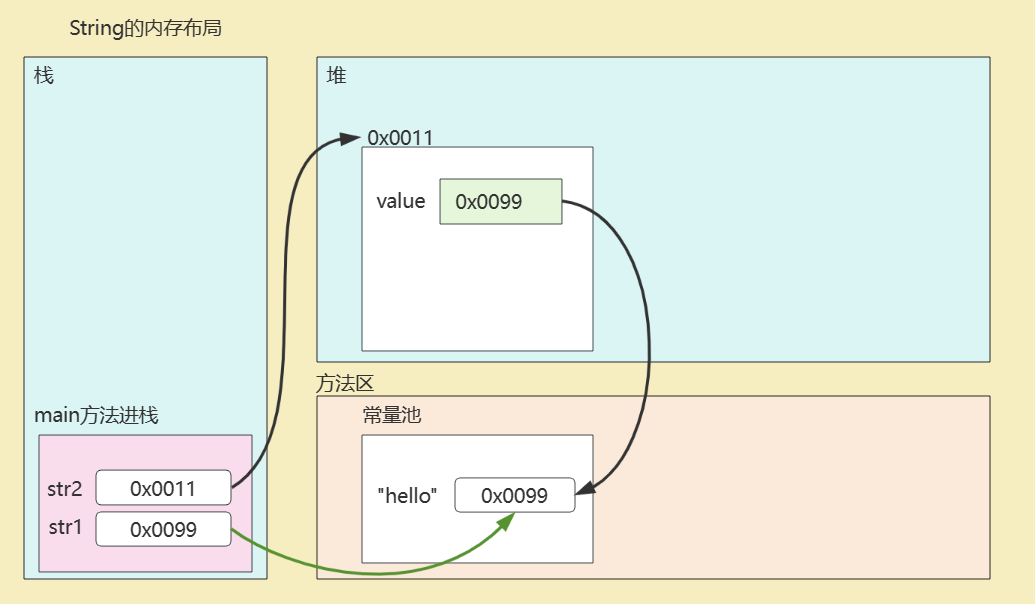 <="" div="">
String 对象创建过程:
String str1 = "hello";
String str2 = new String("hello");哪些字符串对象地址放入字符串常量池:
需要共享的字符串地址记录到字符串常量池的table表中,不需要共享的字符串对象其地址值不需要记录到字符串常量池的table表中。
除了以下2种,其他的都不放入字符串常量池:
1. "..." 字符串字面量
2. 字符串对象.intern()的结果

其他:
1. 直接new
2. valueOf,copyValueOf等
3. 字符串对象拼接:concat拼接 以及 +左右两边出现  非字符串字面量拼接
4. toUpperCase,toLowerCase,substring,repalce等各种String方法得到的字符串
其实下面这些方式,本质都是新new的,其地址都是指向堆空间。
String对象的创建方式有两种,使用其它形式生成String对象,像valueOf()或toString(),它们在底层也是调用String的构造方法
直接赋值
String str = "hello";
构造方法
用于创建 String 对象的构造方法有很多,比较常用的有以下几个:
public String() :其表示创建空字符序列。 String(String original):其表示创建一个与参数相同的字符序列;也即新创建的字符串是该参数字符串的副本。public String(char[] value) :通过当前参数中的字符数组来构造新的String。public String(byte[] bytes) :通过使用默认字符集解码当前参数中的字节数组来构造新的String。也可以指定字符集String str1 = new String(); // 创建一个空字符串
String str2 = new String("hello");
System.out.println(str1.equals("")); // true
char[] value = {'h', 'e', 'l', 'l', 'o'}; // 字符数组
String str3 = new String(value);
byte[] bytes = {104, 101, 108, 108, 111}; // 字节数组
String str5 = new String(bytes); // hello
valueOf和copyValueOf方法:
static String copyValueOf(char[] data): 返回指定数组中表示该字符序列的 String
static String valueOf(char[] data) : 返回指定数组中表示该字符序列的 String
static String valueOf(xx value):xx支持各种数据类型,返回各种数据类型的value参数的字符串表示形式。
char[] data = {'h','e','l','l','o','j','a','v','a'};
String s1 = String.copyValueOf(data);
String s2 = String.copyValueOf(data, 0, 5);	// hello
String s3 = String.valueOf(237);	// 237
连接运算 +
任意数据类型与"字符串"进行拼接,结果都是字符串类型
int num = 123456;
String s = num + "";

Student stu = new Student();
String s2 = stu + "";	// 自动调用对象的toString(),然后与 "" 进行拼接
toString方法
Object 类中声明了 toString() 方法,因此任意对象都可以调用 toString 方法,转为字符串类型。
LocalDate today = LocalDate.now();
String str = today.toString();
System.out.println(str);
==:比较的是两个字符串对象的地址boolean equals(Object obj)方法:比较是两个字符串对象的内容(String 类重写了 equals 方法)String str1 = "hello";
String str2 = "hello";
String str3 = new String("hello");
String str4 = new String("hello");1
System.out.println(str1 == str2); // true str1 和 str2 都指向池中 "hello" 数据空间
System.out.println(str1 == str3); // false str3 指向堆中
System.out.println(str1.equals(str3)); // true str1 与 str3 内容都是 "hello"
System.out.println(str3 == str4); // false str3 与 str3 指向堆中不同的内存空间
System.out.println(str3.equals(str4)); // true
System.out.println(str1 == str3.intern()); // true
System.out.println(str3 == str3.intern()); // false
// 常量池中存在 "hello" 数据空间 str2.intern() 返回 "hello" 的引用 与str1相同
intern() 方法说明:执行
str2.intern()时,会返回常量池中与 str2 内容相同的字符串常量的地址;若池中没有,则将 str2 添加到池中,并返回 str2 的引用
内存布局分析:
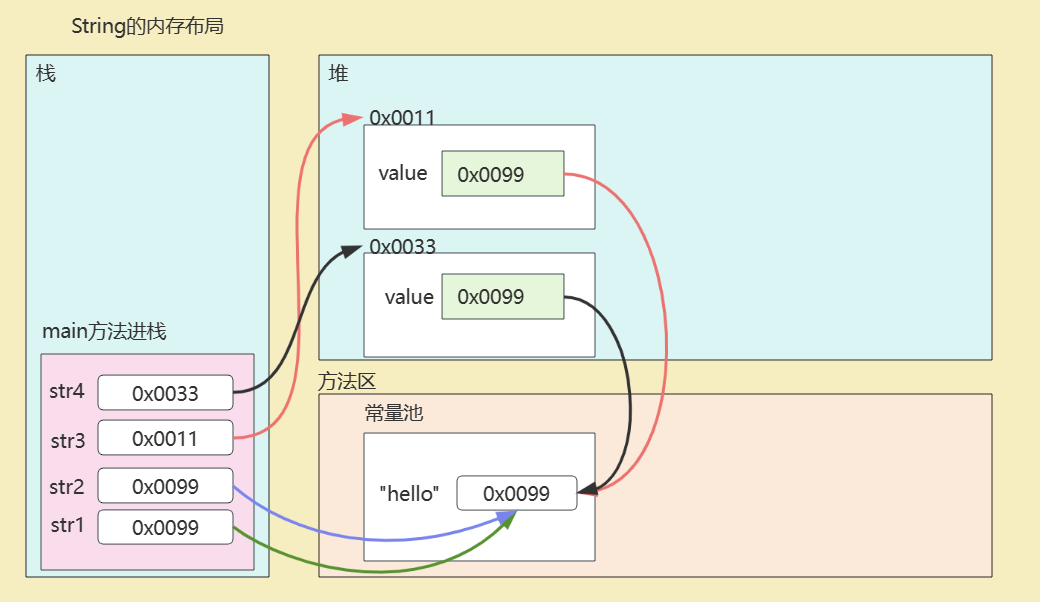 <="" div="">
str1 和 str2 中的 value 都指向常量池中的 "hello" 数据空间,str1.value == str2.value。
int compareTo(String str)方法:String 类型实现了 Comparable 接口, 重写了 compareTo 方法,即 String 对象支持自然排序。
int compareTo(String str) 方法按照字符的 Unicode 编码值进行比较大小的
@Test
public void test07() {
    String[] arr = {"java","linux","hadoop","hive","shell","flink","spark"};

    Arrays.sort(arr);
    System.out.println(Arrays.toString(arr));
}
拼接两个字符串的方式有两种:连接运算符+ 和concat()方法
String str1 = "hello,";
String str2 = "world";

String str3 = str1 + str2;
String str4 = str1.concat(str2);

System.out.println(str3);   // helloworld
System.out.println(str4);   // helloworld
str1 + str2:
"..."字符串字面量拼接,编译器直接优化为拼接后的字符串常量值。如,"abc" + "def" 优化等价于 "abcdef""..."字符串字面量拼接,编译器优化为 StringBuilder 的 append 方法,然后再把结果 toString。String str1 = "hello";
String str2 = "world";
String str3 = "helloworld";
String str4 = str1 + str2; // 非 "..." 字符串字面量拼接
String str5 = str1 + "world"; // 非 "..." 字符串字面量拼接
String str6 = "hello" + "world"; // "..." 字符串字面量拼接 等价于: String str6 = "helloworld";
System.out.println(str3 == str4); // false
System.out.println(str3 == str5); // false
System.out.println(str3 == str6); // true
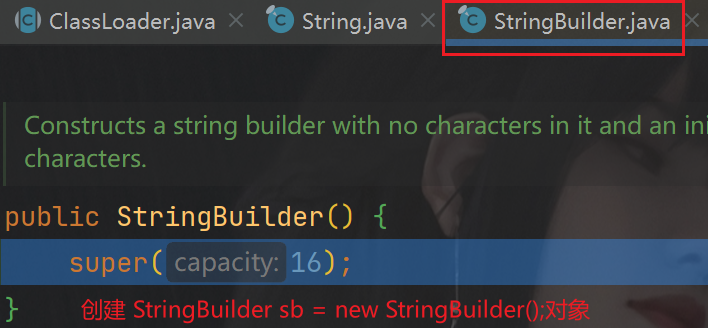
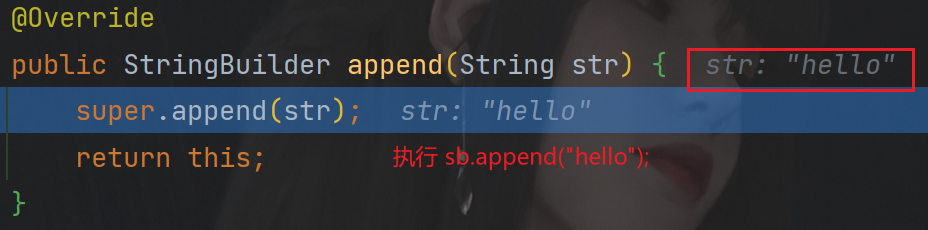
现在使用debug方式追一下String str5 = str1 + "world";的执行过程,如下:
先创建一个 StringBuilder 对象 sb,容量为16,初始为空。
 <="" div="">
执行 sb.append("hello");
 <="" div="">
执行 sb.append("world");
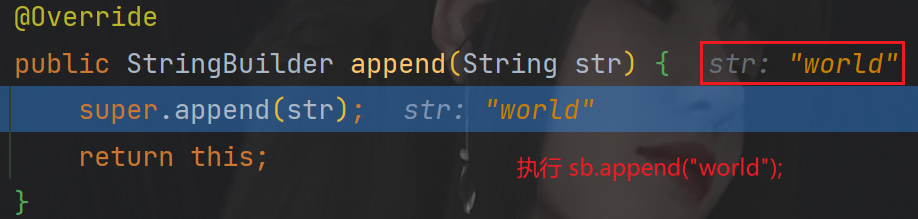 <="" div="">
调用 sb.toString();方法,返回 String 对象
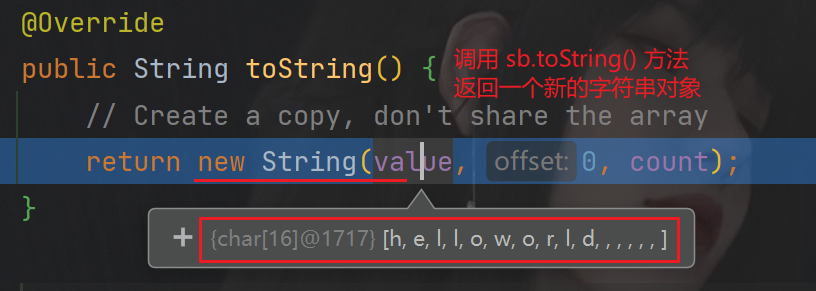 <="" div="">
最后 str5 会指向堆中的 String 对象,value[] 指向常量池中的 "helloworld" 数据空间。
注意:final String str1 = "hello"; // 此时 str1 完全等价于"hello"
final String s1 = "hello";//此时s1完全等价于"hello"
final String s2 = "world";//此时s2完全等价于"world"
String s3 = "helloworld";
String s4 = s1 + s2;
String s5 = s1 + "world";
String s6 = "hello" + "world";

System.out.println(s3 == s4);//true
System.out.println(s3 == s5);//true
System.out.println(s3 == s6);//true
str1.concat(str2):只要拼接的不是空字符串,每次都 new 一个 String
String str1 = "hello";
String str2 = "world";
String str3 = "helloworld";
String str4 = str1.concat(str2);	// str2 不是空串 创建一个新对象接受连接后的内容
String str5 = str1.concat("world");
String str6 = "hello".concat("world");

System.out.println(str3 == str4);   // false
System.out.println(str3 == str5);   // false
System.out.println(str3 == str6);   // false
concat(String)方法源码:
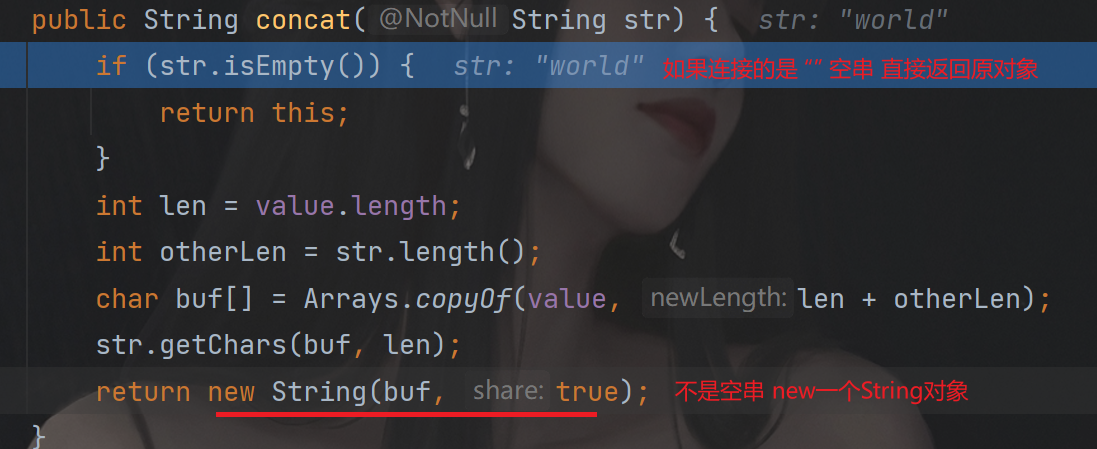 <="" div="">
因为 String 对象是不可变对象,虽然可以共享常量对象,但是对于频繁字符串的修改和拼接操作,效率极低。因此 Java 提供了可变字符序列 StringBuilder 和 StringBuffer 类型。
StringBuffer:线程安全的(方法有 synchronized 修饰)
StringBuilder:线程不安全的
StringBuffer 与 StringBuilder 最大区别就是在于 StringBuffer 是线程安全的,支持多线程访问;StringBuilder是线程不安全的,在单线程下使用。
StringBuilder 的效率要高于 StringBuffer,通常情况先建议使用 StringBuilder,但在要求线程安全的情况下需要使用String Buffer。
其他方面 StringBuffer 与 StringBuilder 相似:
StringBuffer 和 StringBuilder 都是 final 类,不能被继承
StringBuffer 和 StringBuilder 都继承自 AbstractStringBuilder,有属性 char[] value,用于存放字符串内容,
由于 value 不是 final 类型,因此 value 数组里的内容存放在堆空间,而不是常量池。
StringBuffer 和 StringBuilder 都不用每次都需要创建新对象,所有效高于 String
StringBuffer 和 StringBuilder 有相同扩容机制:初始容量默认capacity = str.length + 16,每次扩容为capacity = 2 * capacity + 2
常用的API,StringBuilder、StringBuffer是完全一致的:
StringBuffer append(xx):拼接,追加
StringBuffer insert(int index, xx):在 [index] 位置插入 xx
StringBuffer deleteCharAt(int index):删除[index]位置字符
void setCharAt(int index, xx):替换[index]位置字符
StringBuffer reverse():反转
int indexOf(String str):在当前字符序列中查询str的第一次出现下标
@Test
public void test1(){
    StringBuilder s = new StringBuilder();
    s.append("hello").append(true).append('a').append(12).append("world");
    System.out.println(s);
    System.out.println(s.length());
}
@Test
public void test2(){
    StringBuilder s = new StringBuilder("helloworld");
    s.insert(5, "java");
    System.out.println(s);
}
@Test
public void test3(){
    StringBuilder s = new StringBuilder("helloworld");
    s.deleteCharAt(4);
    System.out.println(s);
}
@Test
public void test4(){
    StringBuilder s = new StringBuilder("helloworld");
    s.reverse();
    System.out.println(s);
}
@Test
public void test5(){
    StringBuilder s = new StringBuilder("helloworld");
    s.setCharAt(2, 'a');
    System.out.println(s);
}
@Test
public void test6(){
    StringBuilder s = new StringBuilder("helloworld");
    int index = s.indexOf("owo");
    System.out.println(index);
}
import org.junit.jupiter.api.Test;

public class EfficiencyTest {
    @Test
    public void test() {
        long start = System.currentTimeMillis();

        stringTest();
        // stringBufferTest();
        // stringBuilderTest();

        long end = System.currentTimeMillis();
        long memory = Runtime.getRuntime().totalMemory() - Runtime.getRuntime().freeMemory();

        System.out.println("String拼接+用时:" + (end - start));
        System.out.println("String拼接+占用内存: " + memory);
        //          String      StringBuffer    StringBuilder
        // time     5986        5               3
        // memory   57263088    43127632        43127912
    }

    public void stringTest() {
        String str = new String("0");
        for (int i = 0; i < 50000; i++) {
            str += i;
        }
    }

    public void stringBufferTest() {
        StringBuffer sb = new StringBuffer("0");
        for (int i = 0; i < 50000; i++) {
            sb.append(i);
        }
    }

    public void stringBuilderTest() {
        StringBuilder sb = new StringBuilder("0");
        for (int i = 0; i < 50000; i++) {
            sb.append(i);
        }
    }
}
对于作为String#tr参数的单引号字符串文字中反斜杠的转义状态,我觉得有些神秘。你能解释一下下面三个例子之间的对比吗?我特别不明白第二个。为了避免复杂化,我在这里使用了'd',在双引号中转义时不会改变含义("\d"="d")。'\\'.tr('\\','x')#=>"x"'\\'.tr('\\d','x')#=>"\\"'\\'.tr('\\\d','x')#=>"x" 最佳答案 在tr中转义tr的第一个参数非常类似于正则表达式中的括号字符分组。您可以在表达式的开头使用^来否定匹配(替换任何不匹配的内容)并使用例如a-f来匹配一
在Ruby1.9.3(可能还有更早的版本,不确定)中,我试图弄清楚为什么Ruby的String#split方法会给我某些结果。我得到的结果似乎与我的预期相反。这是一个例子:"abcabc".split("b")#=>["a","ca","c"]"abcabc".split("a")#=>["","bc","bc"]"abcabc".split("c")#=>["ab","ab"]在这里,第一个示例返回的正是我所期望的。但在第二个示例中,我很困惑为什么#split返回零长度字符串作为返回数组的第一个值。这是什么原因呢?这是我所期望的:"abcabc".split("a")#=>["bc"
玩转ruby,我已经:#!/usr/bin/ruby-w#WorldweatheronlineAPIurlformat:http://api.worldweatheronline.com/free/v1/weather.ashx?q={location}&format=json&num_of_days=1&date=today&key={api_key}require'net/http'require'json'@api_key='xxx'@location='city'@url="http://api.worldweatheronline.com/free/v1/weather.
我有代码:classScenedefinitialize(number)@number=numberendattr_reader:numberendscenes=[Scene.new("one"),Scene.new("one"),Scene.new("two"),Scene.new("one")]groups=scenes.inject({})do|new_hash,scene|new_hash[scene.number]=[]ifnew_hash[scene.number].nil?new_hash[scene.number]当我启动它时出现错误:freq.rb:11:in`[]'
我的Ruby代码中有一个看起来有点像这样的结构Parameter=Struct.new(:name,:id,:default_value,:minimum,:maximum)稍后,我使用创建了这个结构的一个实例freq=Parameter.new('frequency',15,1000.0,20.0,20000.0)在某些时候,我需要这个结构的精确副本,所以我调用newFreq=freq.clone然后,我更改newFreq的名称newFreq.name.sub!('f','newF')奇迹般地,它也改变了freq.name!像newFreq.name='newFrequency'这样
一、什么是MQTT协议MessageQueuingTelemetryTransport:消息队列遥测传输协议。是一种基于客户端-服务端的发布/订阅模式。与HTTP一样,基于TCP/IP协议之上的通讯协议,提供有序、无损、双向连接,由IBM(蓝色巨人)发布。原理:(1)MQTT协议身份和消息格式有三种身份:发布者(Publish)、代理(Broker)(服务器)、订阅者(Subscribe)。其中,消息的发布者和订阅者都是客户端,消息代理是服务器,消息发布者可以同时是订阅者。MQTT传输的消息分为:主题(Topic)和负载(payload)两部分Topic,可以理解为消息的类型,订阅者订阅(Su
TCL脚本语言简介•TCL(ToolCommandLanguage)是一种解释执行的脚本语言(ScriptingLanguage),它提供了通用的编程能力:支持变量、过程和控制结构;同时TCL还拥有一个功能强大的固有的核心命令集。TCL经常被用于快速原型开发,脚本编程,GUI和测试等方面。•实际上包含了两个部分:一个语言和一个库。首先,Tcl是一种简单的脚本语言,主要使用于发布命令给一些互交程序如文本编辑器、调试器和shell。由于TCL的解释器是用C\C++语言的过程库实现的,因此在某种意义上我们又可以把TCL看作C库,这个库中有丰富的用于扩展TCL命令的C\C++过程和函数,所以,Tcl是
我正在重构一个西洋跳棋程序,我正在尝试将玩家移动请求(例如以“3、3、5、5”的形式)处理到一个int数组中。我有以下方法,但感觉不像我所知道的那样像Ruby:deftranslate_move_request_to_coordinates(move_request)return_array=[]coords_array=move_request.chomp.split(',')coords_array.each_with_indexdo|i,x|return_array[x]=i.to_iendreturn_arrayend我用它进行了以下RSpec测试。it"translatesa
每当我尝试运行该程序时,都会弹出一条错误消息“条件字符串文字(第10行)”。我做错了什么?puts"Welcometothebestcalculatorthereis.Wouldyouliketo(a)calculatetheareaofageometricshapeor(b)calculatetheequationofaparabola?Pleaseenteran'a'ora'b'togetstarted."response=gets.chompifresponse=="a"or"A"puts"ok."elsifresponse=="b"or"B"puts"awesome."else
我用这个错误搜索了jekyll。jekyll处理页面时似乎出现了ruby错误,但我根本不了解ruby。杰基尔版本1.3.1我什至重新安装了ruby和jekyll,但结果没有改变。更新:在我将jekyll从1.31降级到1.20后,这个错误消失了注意:我的网站是用jekyll1.20创建的,所以它不能用1.3.1构建?这是核心问题吗?E:\GitHub\sample>jekyll服务--trace:Configurationfile:E:/GitHub/sample/_config.ymlSource:E:/GitHub/sampleDestination:E:/GitHub
