业务需求:上传头像,上传完毕后拿到头像的url,把头像展示在页面中,最终把头像url和其他用户信息一起发送给服务器
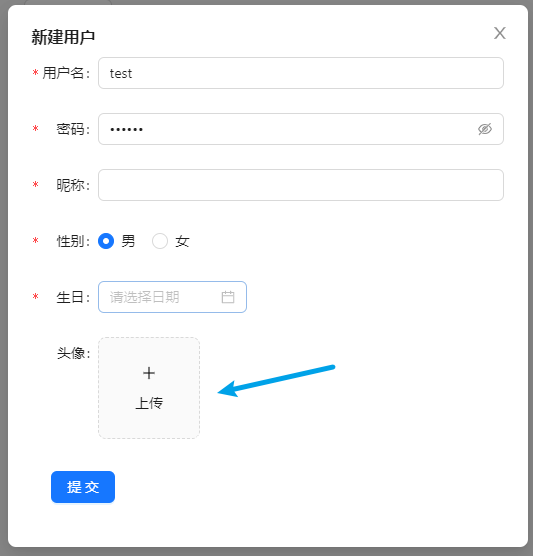
上传头像流程

导入 Upload 组件和图标(一个加号,一个加载中)
import { Upload } from 'antd';
import { PlusOutlined, LoadingOutlined } from '@ant-design/icons';
定义状态
const index = memo(() => {
  // 用于上传前和上传时切换
  const [loading, setLoading] = useState(false);

  // 用于保存服务端返回的头像url
  const [imageUrl, setImageUrl] = useState();
}
定义一个上传状态组件,上传前显示 + 号,上传时显示loading
const index = memo(() => {
  const uploadButton = (
    <div>
      {loading ? <LoadingOutlined /> : <PlusOutlined />}
      <div
        style={{
          marginTop: 8,
        }}
      >
        上传
      </div>
    </div>
  );
}
组件代码(省略其他...)
const index = memo(() => {
  return (
    <Upload
      listType="picture-card" // 上传列表的内建样式
      showUploadList={false} // 是否展示文件列表
      action="" // 这里填写上传的地址
      beforeUpload={beforeUpload} // 上传前执行的操作
      onChange={handleChange} // 上传中、完成、失败都会调用这个函数。
      name='avatar' // 传递给后端的字段
    >
      {imageUrl ? (
        <img
          src={imageUrl}
          alt="avatar"
          style={{
            width: '100%',
          }}
        />
      ) :  (uploadButton)}
    </Upload>
  )
})
定义头像上传前执行的钩子函数
const index = memo(() => {
  // 该函数会在上传前执行,会把file对象传过来,可以对上传的文件类型判断,限制大小等
  const beforeUpload = (file) => {
    const isJpgOrPng = file.type === 'image/jpeg' || file.type === 'image/png';
    if (!isJpgOrPng) {
      message.error('只能上传 JPG/PNG 文件!');
    }
    const isLt1M = file.size / 1024 / 1024 < 1;
    if (!isLt1M) {
      message.error('图片不能超过1MB!');
    }
    return isJpgOrPng && isLt1M;
  };
})
定义头像上传后执行的钩子函数
const index = memo(() => {
  const handleChange = (info) => {
      if (info.file.status === 'uploading') {
        setLoading(true);
        return;
      }
      // 当上传完毕
      if (info.file.status === 'done') {
          setLoading(false);
        // 判断是否上传成功
        if (info.file.response.code === 200) {
          // 把返回的图像地址设置给 imageUrl
          setImageUrl(info.file.response.data.imageUrl) // 取决于服务端返回的字段名
        }
      }
    };
})
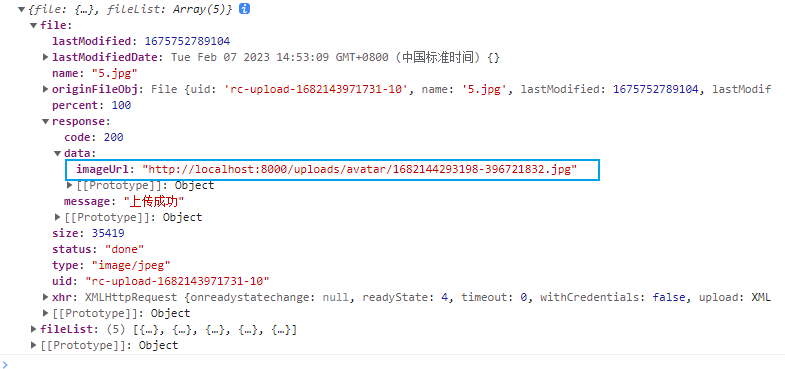
以下是在控制台输出 info 对象
完整demo
import React, { memo, useState } from 'react'
import { UserWrapper } from './style'

import { Upload } from 'antd';
import { PlusOutlined, LoadingOutlined } from '@ant-design/icons';

const index = memo(() => {

  const [loading, setLoading] = useState(false);
  const [imageUrl, setImageUrl] = useState();

  const beforeUpload = (file) => {
    const isJpgOrPng = file.type === 'image/jpeg' || file.type === 'image/png';
    if (!isJpgOrPng) {
      message.error('只能上传 JPG/PNG 文件!');
    }
    const isLt1M = file.size / 1024 / 1024 < 1;
    if (!isLt1M) {
      message.error('图片不能超过1MB!');
    }
    return isJpgOrPng && isLt1M;
  };

  const handleChange = (info) => {
    if (info.file.status === 'uploading') {
      setLoading(true);
      return;
    }
    if (info.file.status === 'done') {
      if (info.file.response.code === 200) {
        setLoading(false);
        setImageUrl(info.file.response.data.imageUrl)
      }
    }
  };

  const uploadButton = (
    <div>
      {loading ? <LoadingOutlined /> : <PlusOutlined />}
      <div
        style={{
          marginTop: 8,
        }}
      >
        上传
      </div>
    </div>
  );

  return (
    <Upload
      listType="picture-card"
      className="avatar-uploader"
      showUploadList={false}
      action="上传的地址"
      beforeUpload={beforeUpload}
      onChange={handleChange}
      name='avatar'
    >
      {imageUrl ? (
        <img
          src={imageUrl}
          alt="avatar"
          style={{
            width: '100%',
          }}
        />
      ) : (
        uploadButton
      )}
    </Upload>
  )
})

export default index我正在使用i18n从头开始构建一个多语言网络应用程序,虽然我自己可以处理一大堆yml文件,但我说的语言(非常)有限,最终我想寻求外部帮助帮助。我想知道这里是否有人在使用UI插件/gem(与django上的django-rosetta不同)来处理多个翻译器,其中一些翻译器不愿意或无法处理存储库中的100多个文件,处理语言数据。谢谢&问候,安德拉斯(如果您已经在rubyonrails-talk上遇到了这个问题,我们深表歉意) 最佳答案 有一个rails3branchofthetolkgem在github上。您可以通过在Gemfi
我想安装一个带有一些身份验证的私有(private)Rubygem服务器。我希望能够使用公共(public)Ubuntu服务器托管内部gem。我读到了http://docs.rubygems.org/read/chapter/18.但是那个没有身份验证-如我所见。然后我读到了https://github.com/cwninja/geminabox.但是当我使用基本身份验证(他们在他们的Wiki中有)时,它会提示从我的服务器获取源。所以。如何制作带有身份验证的私有(private)Rubygem服务器?这是不可能的吗?谢谢。编辑:Geminabox问题。我尝试“捆绑”以安装新的gem..
我看到这个错误:translationmissing:da.datetime.distance_in_words.about_x_hours我的语言环境文件:http://pastie.org/2944890我的看法:我已将其添加到我的application.rb中:config.i18n.load_path+=Dir[Rails.root.join('my','locales','*.{rb,yml}').to_s]config.i18n.default_locale=:da如果我删除I18配置,帮助程序会处理英语。更新:我在config/enviorments/devolpment
从给定URL下载文件并立即将其上传到AmazonS3的更直接的方法是什么(+将有关文件的一些信息保存到数据库中,例如名称、大小等)?现在,我既不使用Paperclip,也不使用Carrierwave。谢谢 最佳答案 简单明了:require'open-uri'require's3'amazon=S3::Service.new(access_key_id:'KEY',secret_access_key:'KEY')bucket=amazon.buckets.find('image_storage')url='http://www.ex
我正在编写一个小脚本来定位aws存储桶中的特定文件,并创建一个临时验证的url以发送给同事。(理想情况下,这将创建类似于在控制台上右键单击存储桶中的文件并复制链接地址的结果)。我研究过回形针,它似乎不符合这个标准,但我可能只是不知道它的全部功能。我尝试了以下方法:defauthenticated_url(file_name,bucket)AWS::S3::S3Object.url_for(file_name,bucket,:secure=>true,:expires=>20*60)end产生这种类型的结果:...-1.amazonaws.com/file_path/file.zip.A
我发现ActiveRecord::Base.transaction在复杂方法中非常有效。我想知道是否可以在如下事务中从AWSS3上传/删除文件:S3Object.transactiondo#writeintofiles#raiseanexceptionend引发异常后,每个操作都应在S3上回滚。S3Object这可能吗?? 最佳答案 虽然S3API具有批量删除功能,但它不支持事务,因为每个删除操作都可以独立于其他操作成功/失败。该API不提供任何批量上传功能(通过PUT或POST),因此每个上传操作都是通过一个独立的API调用完成的
最近,当我启动我的Rails服务器时,我收到了一长串警告。虽然它不影响我的应用程序,但我想知道如何解决这些警告。我的估计是imagemagick以某种方式被调用了两次?当我在警告前后检查我的git日志时。我想知道如何解决这个问题。-bcrypt-ruby(3.1.2)-better_errors(1.0.1)+bcrypt(3.1.7)+bcrypt-ruby(3.1.5)-bcrypt(>=3.1.3)+better_errors(1.1.0)bcrypt和imagemagick有关系吗?/Users/rbchris/.rbenv/versions/2.0.0-p247/lib/ru
在Rails4.0.2中,我使用s3_direct_upload和aws-sdkgems直接为s3存储桶上传文件。在开发环境中它工作正常,但在生产环境中它会抛出如下错误,ActionView::Template::Error(noimplicitconversionofnilintoString)在View中,create_cv_url,:id=>"s3_uploader",:key=>"cv_uploads/{unique_id}/${filename}",:key_starts_with=>"cv_uploads/",:callback_param=>"cv[direct_uplo
我正在尝试编写一个将文件上传到AWS并公开该文件的Ruby脚本。我做了以下事情:s3=Aws::S3::Resource.new(credentials:Aws::Credentials.new(KEY,SECRET),region:'us-west-2')obj=s3.bucket('stg-db').object('key')obj.upload_file(filename)这似乎工作正常,除了该文件不是公开可用的,而且我无法获得它的公共(public)URL。但是当我登录到S3时,我可以正常查看我的文件。为了使其公开可用,我将最后一行更改为obj.upload_file(file
如果我使用ruby版本2.5.1和Rails版本2.3.18会怎样?我有基于rails2.3.18和ruby1.9.2p320构建的rails应用程序,我只想升级ruby的版本,而不是rails,这可能吗?我必须面对哪些挑战? 最佳答案 GitHub维护apublicfork它有针对旧Rails版本的分支,有各种变化,它们一直在运行。有一段时间,他们在较新的Ruby版本上运行较旧的Rails版本,而不是最初支持的版本,因此您可能会发现一些关于需要向后移植的有用提示。不过,他们现在已经有几年没有使用2.3了,所以充其量只能让更
