大致了解了Blazor和MAUI之后,尝试创建一个.NET MAUI Blazor应用。
需要注意的是: 虽然都叫MAUI,但.NET MAUI与.NET MAUI Blazor 并不相同,MAUI还是以xaml为主,而MAUI Blazor则是以razor为主。
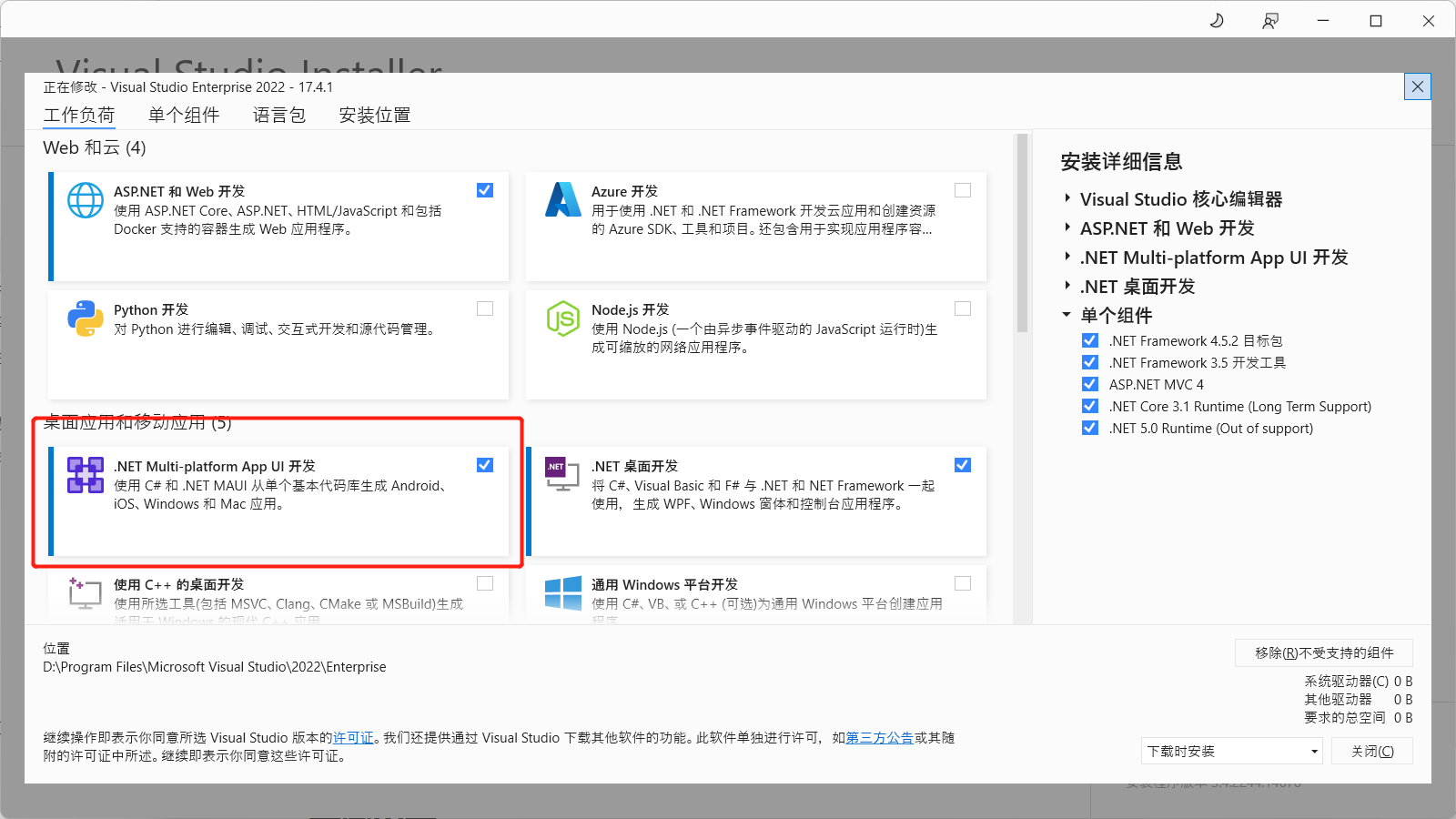
这个系列还是以MAUI Blazor为主,要创建一个MAUI Blazor应用,需要安装Visual Studio 2022 17.3 或更高版本,并在安装程序上,勾选.NET Multi-platform App UI 开发!最好是升级到最新的.NET 7。
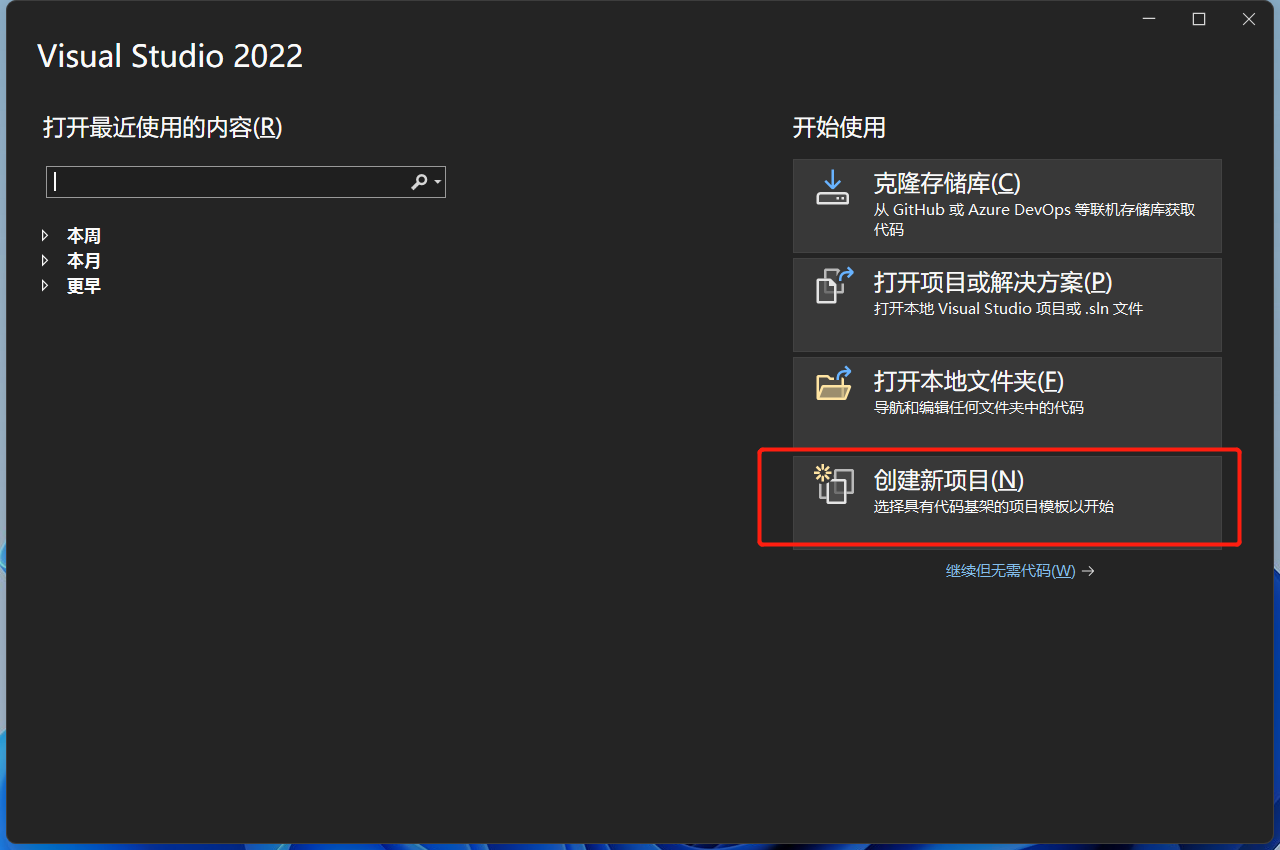
打开Visual Studio 2022,选择创建新项目
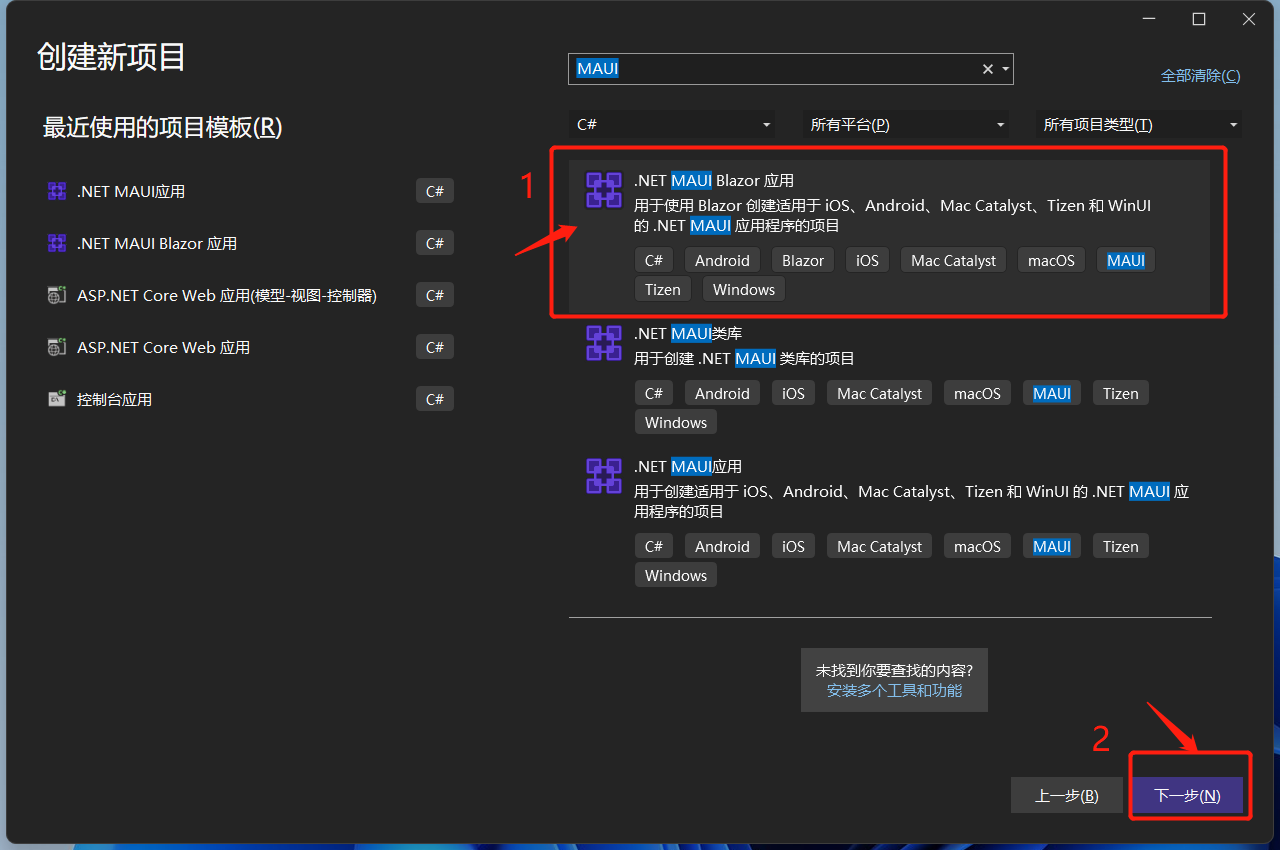
在搜索框输入MAUI,选择.NET MAUI Blazor应用,点下一步!
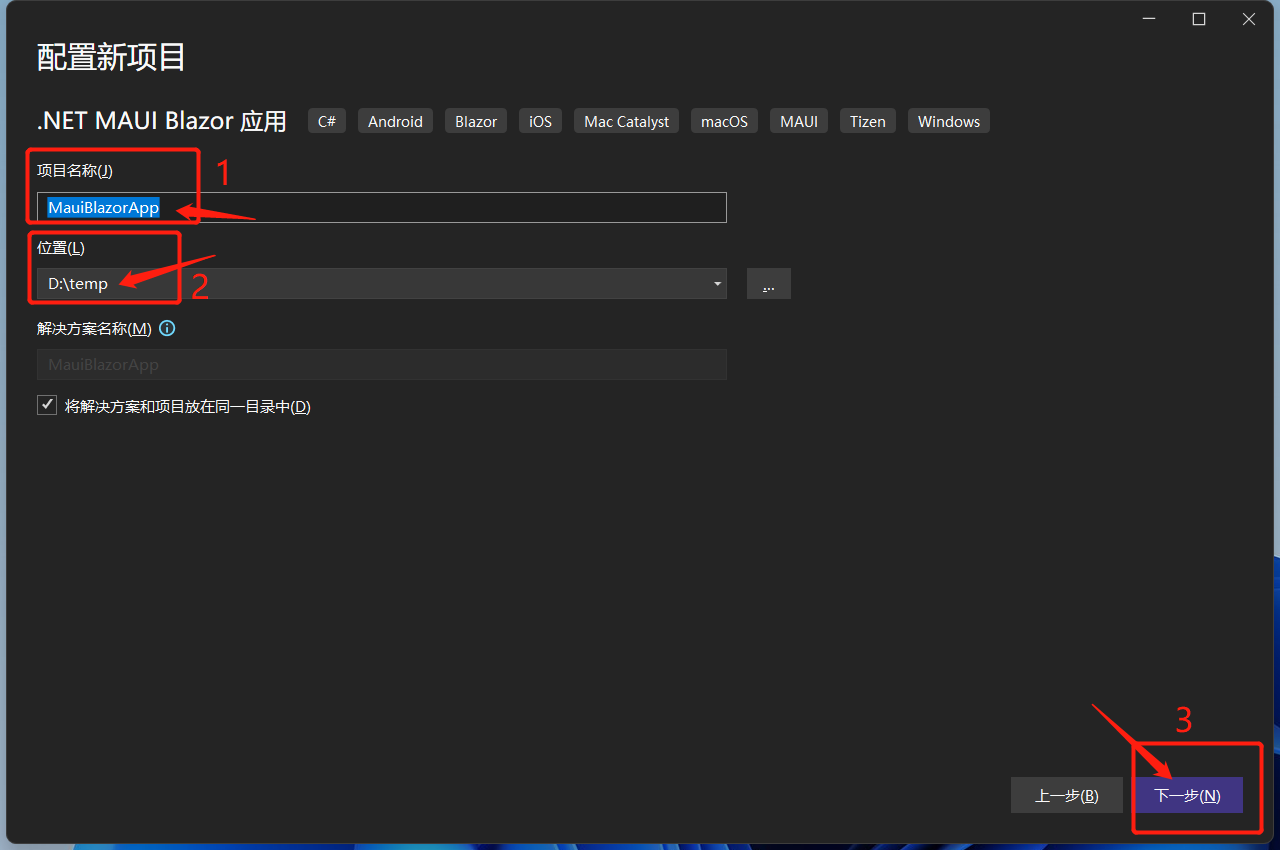
给项目起一个好听的名字,选择项目存在的位置,点下一步!
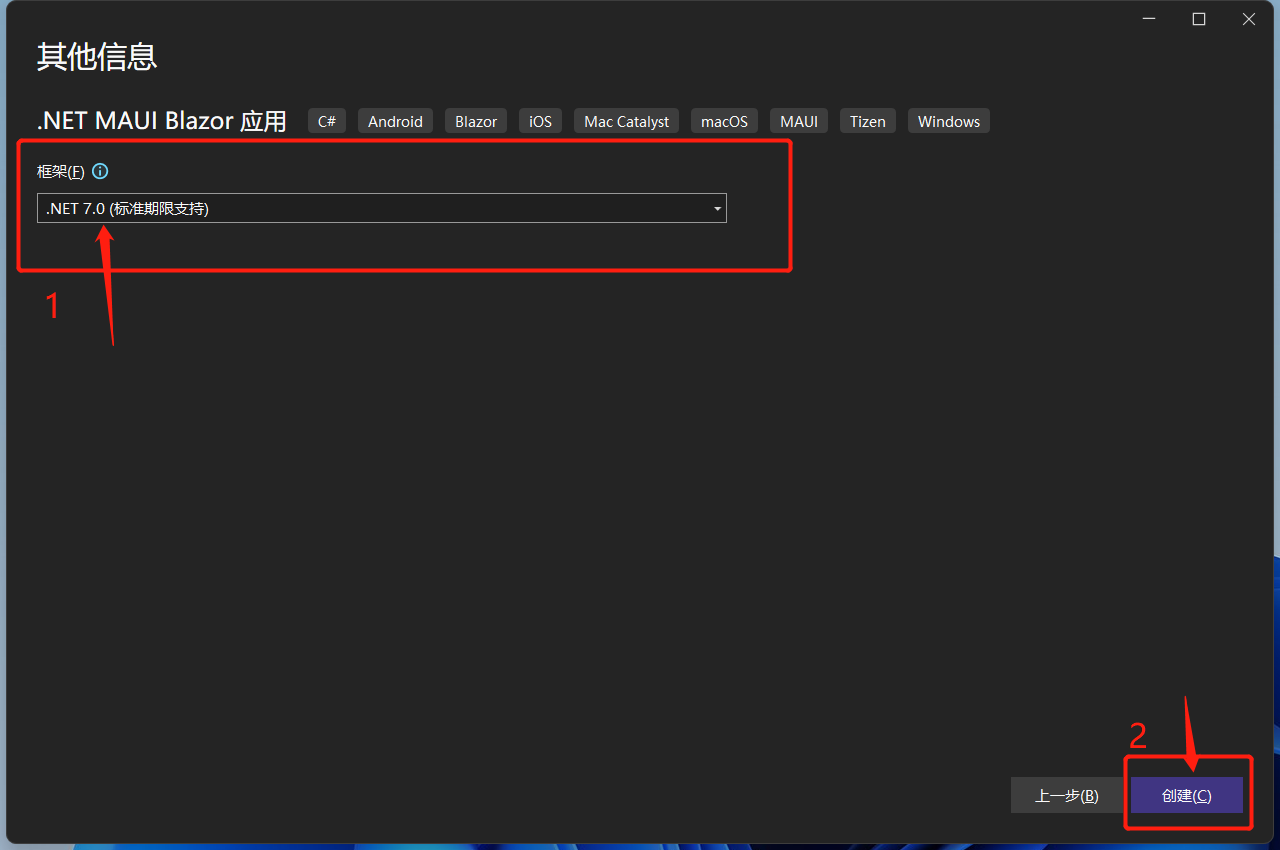
选择目标框架,这里选择的是.NET 7,点击创建。
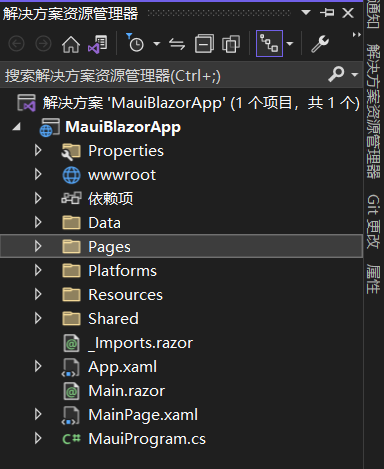
等待创建项目及其依赖项还原。完成后的目录结构如下:
.NET MAUI Blazor 运行在WebView2上,WebView2是微软推出的新一代用于桌面端混合开发的解决方案。它可以让本地应用程序(WinForm、WPF、WinUI、Win32)、移动应用程序(MAUI)轻松嵌入Web技术。WebView2 控件使用 Microsoft Edge 作为呈现引擎在客户端应用程序及App中显示 Web 内容。使用 WebView2 可以将 Web 代码嵌入到客户端应用程序及App中的不同部分,或在单个 WebView 实例中构建所有本机应用程序。
可以这么看MAUI Blazor, .NET MAUI 包含 BlazorWebView 控件,该控件运行将 Razor 组件呈现到嵌入式 Web View 中。 通过结合使用 .NET MAUI 和 Blazor,可以跨移动设备、桌面设备和 Web 重复使用一组 Web UI 组件。
说人话就是,它就是一个Hybrid App(混合应用) !
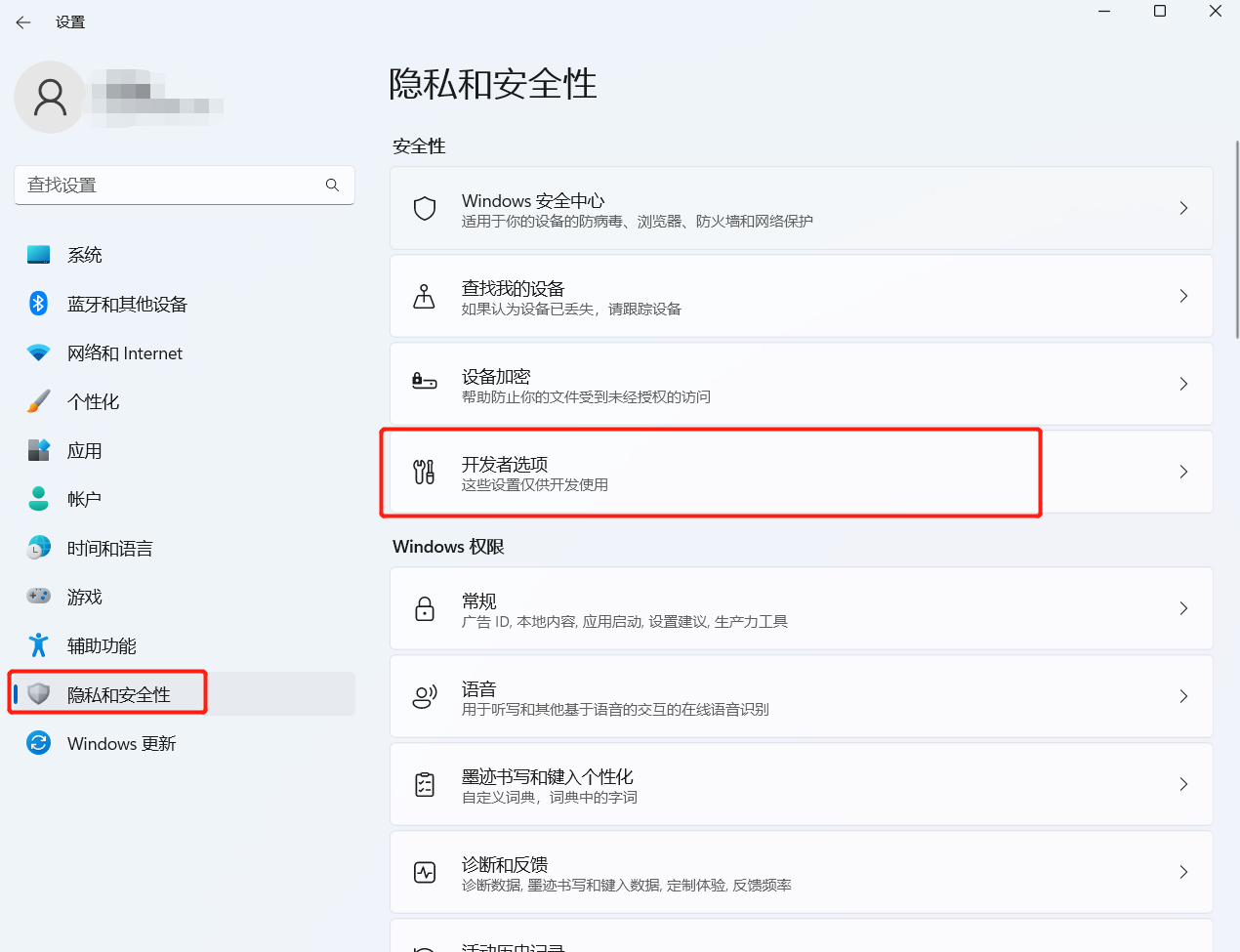
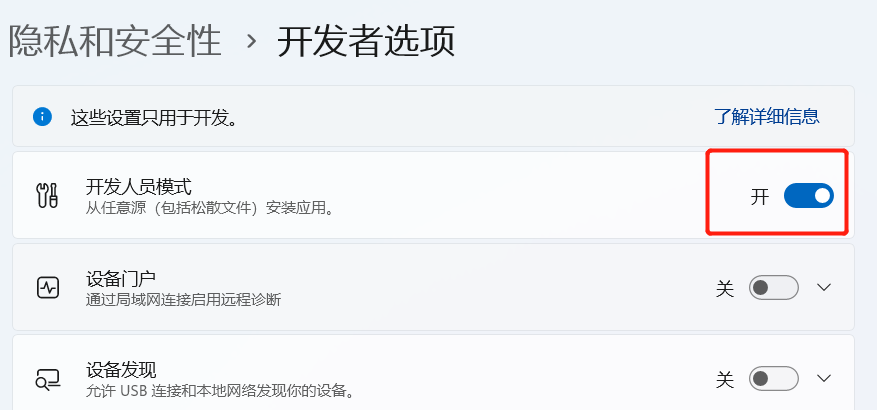
在windows上调试 MAUI Blazor应用,需要Windows 10 1809及更高版本上,并打开开发者模式。
windows 11上,位于设置->隐私和安全性->开发者选项->开发人员模式
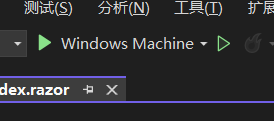
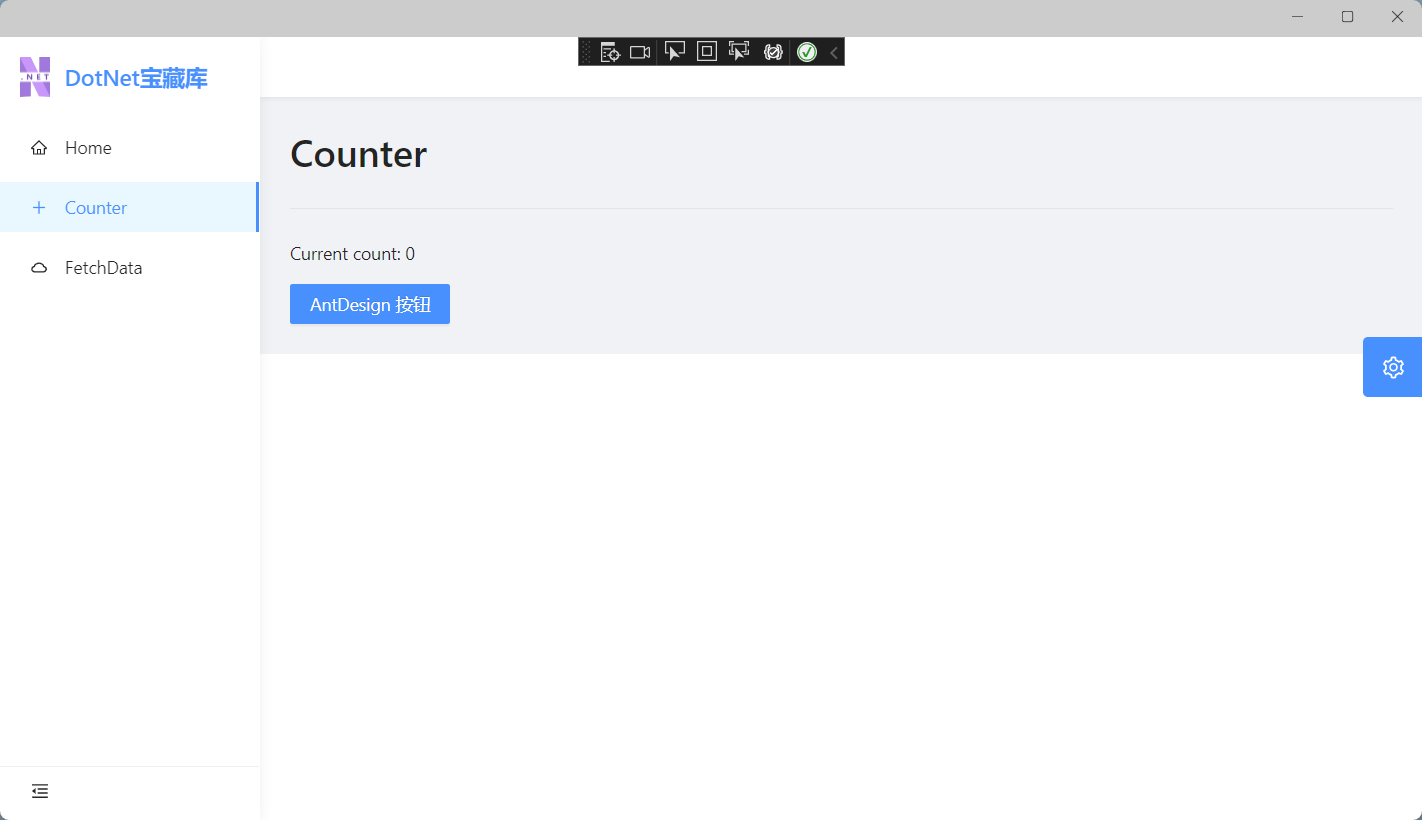
点击Windows Machine,运行程序!
如无意外,运行成功!
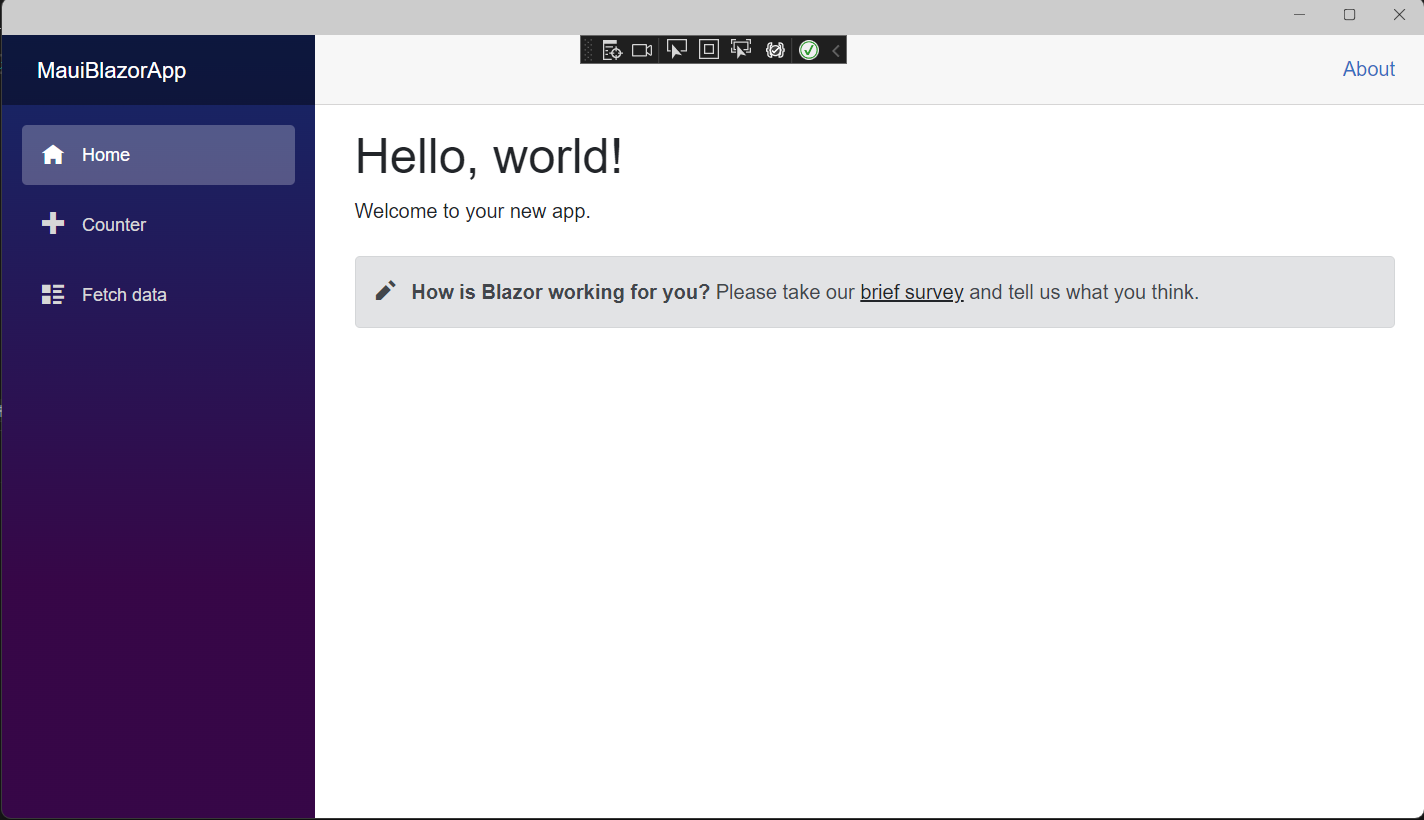
这时,MAUI Blazor使用的是bootstrap样式以及open-iconic图标。
在wwwroot/index.html中也可以看到
<link rel="stylesheet" href="css/bootstrap/bootstrap.min.css" />
现在已经有个很多基于Blazor的组件库,所以暂时把默认的bootstrap替换成第三方组件库,这里使用的是AntDesignBlazor。
PM> NuGet\Install-Package AntDesign.ProLayout -Version 0.13.1
在MauiProgram.cs注入AntDesign 服务与设置基本配置,完整的MauiProgram.cs代码
using Microsoft.Extensions.Logging;
using MauiBlazorApp.Data;

namespace MauiBlazorApp;

public static class MauiProgram
{
	public static MauiApp CreateMauiApp()
	{
		var builder = MauiApp.CreateBuilder();
		builder
			.UseMauiApp<App>()
			.ConfigureFonts(fonts =>
			{
				fonts.AddFont("OpenSans-Regular.ttf", "OpenSansRegular");
			});

		builder.Services.AddMauiBlazorWebView();

#if DEBUG
		builder.Services.AddBlazorWebViewDeveloperTools();
		builder.Logging.AddDebug();
#endif

		builder.Services.AddSingleton<WeatherForecastService>();
        //注入AntDesign
        builder.Services.AddAntDesign();
		//基本配置
		builder.Services.Configure<ProSettings>(settings =>
		{
            settings.NavTheme = "light";
            settings.Layout = "side";
            settings.ContentWidth = "Fluid";
			settings.FixedHeader = false;
			settings.FixSiderbar = true;
            settings.Title = "DotNet宝藏库";
			settings.PrimaryColor = "daybreak";
			settings.ColorWeak = false;
			settings.SplitMenus= false;
			settings.HeaderRender= true;
			settings.FooterRender= false;
			settings.MenuRender= true;
			settings.MenuHeaderRender= true;
			settings.HeaderHeight = 48;

		});
		return builder.Build();
	}
}
配置项都写上了。参数含义从表达的意思就能看出来,不做注释了!
打开wwwroot/index.html。由于我们使用的是AntDesign,所以需要改造下index.html,修改后内容如下:
<!DOCTYPE html>
<html lang="en">
<head>
    <meta charset="utf-8" />
    <meta name="viewport" content="width=device-width, initial-scale=1.0, maximum-scale=1.0, user-scalable=no, viewport-fit=cover" />
    <title>DotNet宝藏库</title>
    <base href="/" />

    <link href="_content/AntDesign/css/ant-design-blazor.css" rel="stylesheet" />
    <link rel="stylesheet" href="_content/AntDesign.ProLayout/css/ant-design-pro-layout-blazor.css" />
</head>

<body>

    <div class="status-bar-safe-area"></div>

    <div id="app">
        <style>
            html,
            body,
            #app {
                height: 100%;
                margin: 0;
                padding: 0;
            }

            #app {
                background-repeat: no-repeat;
                background-size: 100% auto;
            }

            .page-loading-warp {
                padding: 98px;
                display: flex;
                justify-content: center;
                align-items: center;
            }

            .ant-spin {
                -webkit-box-sizing: border-box;
                box-sizing: border-box;
                margin: 0;
                padding: 0;
                color: rgba(0, 0, 0, 0.65);
                font-size: 14px;
                font-variant: tabular-nums;
                line-height: 1.5;
                list-style: none;
                -webkit-font-feature-settings: 'tnum';
                font-feature-settings: 'tnum';
                position: absolute;
                display: none;
                color: #1890ff;
                text-align: center;
                vertical-align: middle;
                opacity: 0;
                -webkit-transition: -webkit-transform 0.3s cubic-bezier(0.78, 0.14, 0.15, 0.86);
                transition: -webkit-transform 0.3s cubic-bezier(0.78, 0.14, 0.15, 0.86);
                transition: transform 0.3s cubic-bezier(0.78, 0.14, 0.15, 0.86);
                transition: transform 0.3s cubic-bezier(0.78, 0.14, 0.15, 0.86), -webkit-transform 0.3s cubic-bezier(0.78, 0.14, 0.15, 0.86);
            }

            .ant-spin-spinning {
                position: static;
                display: inline-block;
                opacity: 1;
            }

            .ant-spin-dot {
                position: relative;
                display: inline-block;
                font-size: 20px;
                width: 20px;
                height: 20px;
            }

            .ant-spin-dot-item {
                position: absolute;
                display: block;
                width: 9px;
                height: 9px;
                background-color: #1890ff;
                border-radius: 100%;
                -webkit-transform: scale(0.75);
                -ms-transform: scale(0.75);
                transform: scale(0.75);
                -webkit-transform-origin: 50% 50%;
                -ms-transform-origin: 50% 50%;
                transform-origin: 50% 50%;
                opacity: 0.3;
                -webkit-animation: antSpinMove 1s infinite linear alternate;
                animation: antSpinMove 1s infinite linear alternate;
            }

            .ant-spin-dot-item:nth-child(1) {
                top: 0;
                left: 0;
            }

            .ant-spin-dot-item:nth-child(2) {
                top: 0;
                right: 0;
                -webkit-animation-delay: 0.4s;
                animation-delay: 0.4s;
            }

            .ant-spin-dot-item:nth-child(3) {
                right: 0;
                bottom: 0;
                -webkit-animation-delay: 0.8s;
                animation-delay: 0.8s;
            }

            .ant-spin-dot-item:nth-child(4) {
                bottom: 0;
                left: 0;
                -webkit-animation-delay: 1.2s;
                animation-delay: 1.2s;
            }

            .ant-spin-dot-spin {
                -webkit-transform: rotate(45deg);
                -ms-transform: rotate(45deg);
                transform: rotate(45deg);
                -webkit-animation: antRotate 1.2s infinite linear;
                animation: antRotate 1.2s infinite linear;
            }

            .ant-spin-lg .ant-spin-dot {
                font-size: 32px;
                width: 32px;
                height: 32px;
            }

            .ant-spin-lg .ant-spin-dot i {
                width: 14px;
                height: 14px;
            }
            .status-bar-safe-area {
                display: none;
            }

            @supports (-webkit-touch-callout: none) {
                .status-bar-safe-area {
                    display: flex;
                    position: sticky;
                    top: 0;
                    height: env(safe-area-inset-top);
                    background-color: #f7f7f7;
                    width: 100%;
                    z-index: 1;
                }

                .flex-column, .navbar-brand {
                    padding-left: env(safe-area-inset-left);
                }
            }
            @media all and (-ms-high-contrast: none), (-ms-high-contrast: active) {
                .ant-spin-blur {
                    background: #fff;
                    opacity: 0.5;
                }
            }

            @-webkit-keyframes antSpinMove {
                to {
                    opacity: 1;
                }
            }

            @keyframes antSpinMove {
                to {
                    opacity: 1;
                }
            }

            @-webkit-keyframes antRotate {
                to {
                    -webkit-transform: rotate(405deg);
                    transform: rotate(405deg);
                }
            }

            @keyframes antRotate {
                to {
                    -webkit-transform: rotate(405deg);
                    transform: rotate(405deg);
                }
            }
        </style>
        <div style="
          display: flex;
          justify-content: center;
          align-items: center;
          flex-direction: column;
          min-height: 420px;
          height: 100%;
        ">
            <div class="page-loading-warp">
                <div class="ant-spin ant-spin-lg ant-spin-spinning">
                    <span class="ant-spin-dot ant-spin-dot-spin">
                        <i class="ant-spin-dot-item"></i><i class="ant-spin-dot-item"></i><i class="ant-spin-dot-item"></i><i class="ant-spin-dot-item"></i>
                    </span>
                </div>
            </div>
            <div style="display: flex; justify-content: center; align-items: center;">
                 <div class="loading-progress-text"></div>
            </div>
        </div>
    </div>


    <script src="_framework/blazor.webview.js" autostart="false"></script>
    <script src="_content/AntDesign/js/ant-design-blazor.js"></script>
</body>

</html>
在_Imports.razor添加AntDesign命名空间:
@using System.Net.Http
@using Microsoft.AspNetCore.Components.Forms
@using Microsoft.AspNetCore.Components.Routing
@using Microsoft.AspNetCore.Components.Web
@using Microsoft.AspNetCore.Components.Web.Virtualization
@using Microsoft.JSInterop
@using MauiBlazorApp
@using MauiBlazorApp.Shared
//引入AntDesign
@using AntDesign
在Main.razor中加入<AntContainer />
<Router AppAssembly="@typeof(Main).Assembly">
    <Found Context="routeData">
        <RouteView RouteData="@routeData" DefaultLayout="@typeof(MainLayout)" />
        <FocusOnNavigate RouteData="@routeData" Selector="h1" />
    </Found>
    <NotFound>
        <LayoutView Layout="@typeof(MainLayout)">
            <p role="alert">Sorry, there's nothing at this address.</p>
        </LayoutView>
    </NotFound>
</Router>
<!--设置容器-->
<AntContainer />
MainLayout.razor。MainLayout.razor中默认布局删除AntDesign.ProLayoutAntDesign.ProLayoutimages,把提前准备好的logo放进去完整代码如下:
@using AntDesign.ProLayout
@inherits LayoutComponentBase

<AntDesign.ProLayout.BasicLayout
    Logo="@("images/logo.png")"
    MenuData="MenuData">
    <ChildContent>
        @Body
    </ChildContent>
    <FooterRender>
        <FooterView Copyright="MauiBlazorApp" Links="Links"></FooterView>
    </FooterRender>
</AntDesign.ProLayout.BasicLayout>
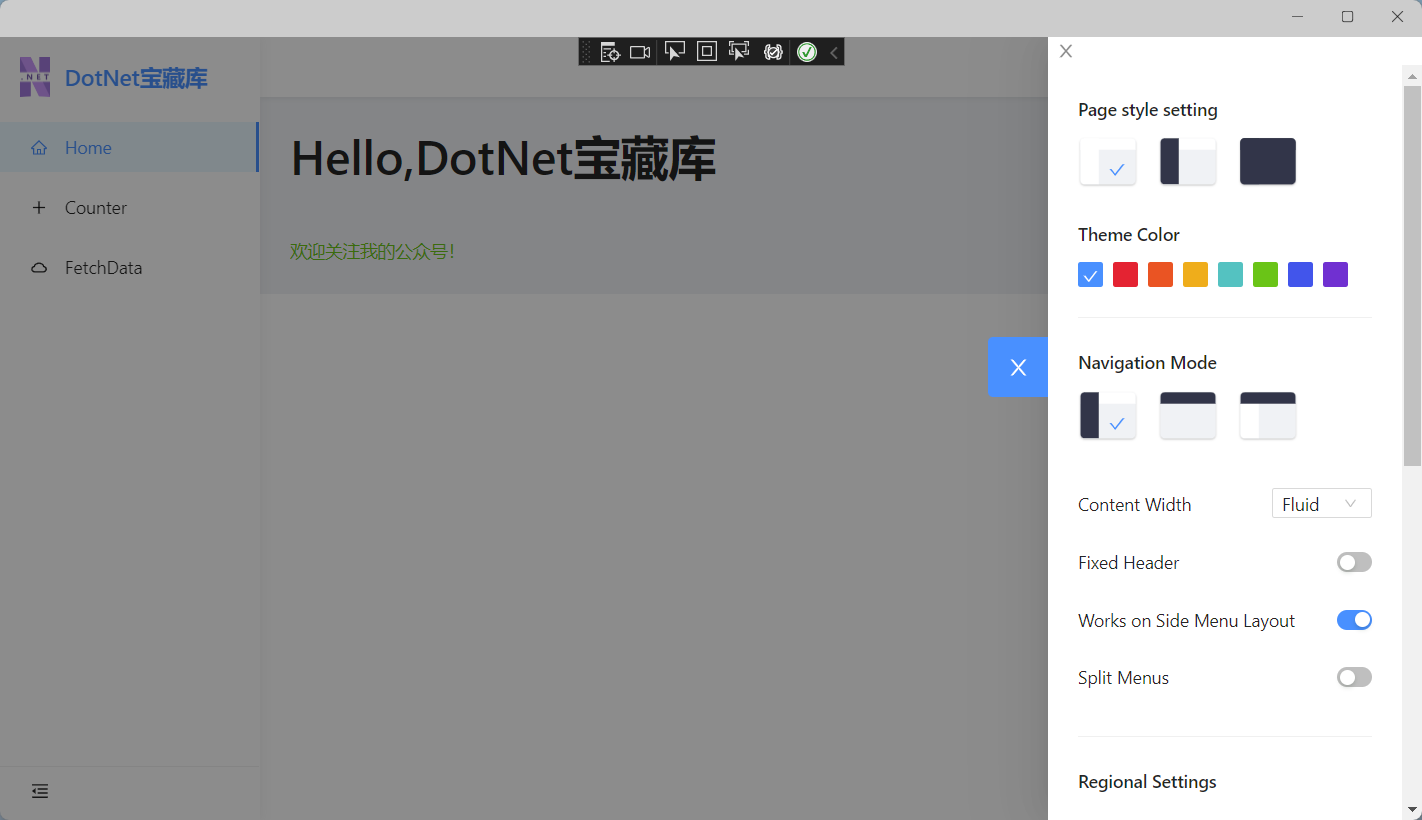
<SettingDrawer />

@code
{
    private readonly MenuDataItem[] MenuData =
        {
        new MenuDataItem
        {
            Path = "/",
            Name = "Home",
            Key = "Home",
            Icon = "home"
        },
        new MenuDataItem
        {
            Path = "/Counter",
            Name = "Counter",
            Key = "Counter",
            Icon = "plus"
        },
        new MenuDataItem
        {
            Path = "/FetchData",
            Name = "FetchData",
            Key = "FetchData",
            Icon = "cloud"
        }
    };
    private readonly LinkItem[] Links =
    {
        new LinkItem
        {
            Key = "DotNet宝藏库",
            Title = "基于Ant Design Blazor",
            Href = "https://antblazor.com",
            BlankTarget = true
        }
    };
}
这时可以把项目中无用的内容删除掉了,如Shared/NavMenu.razor、wwwroot/css文件。
由于删除掉了css文件夹,页面元素肯定没有样式了。那么就简单的改造下默认的几个页面!
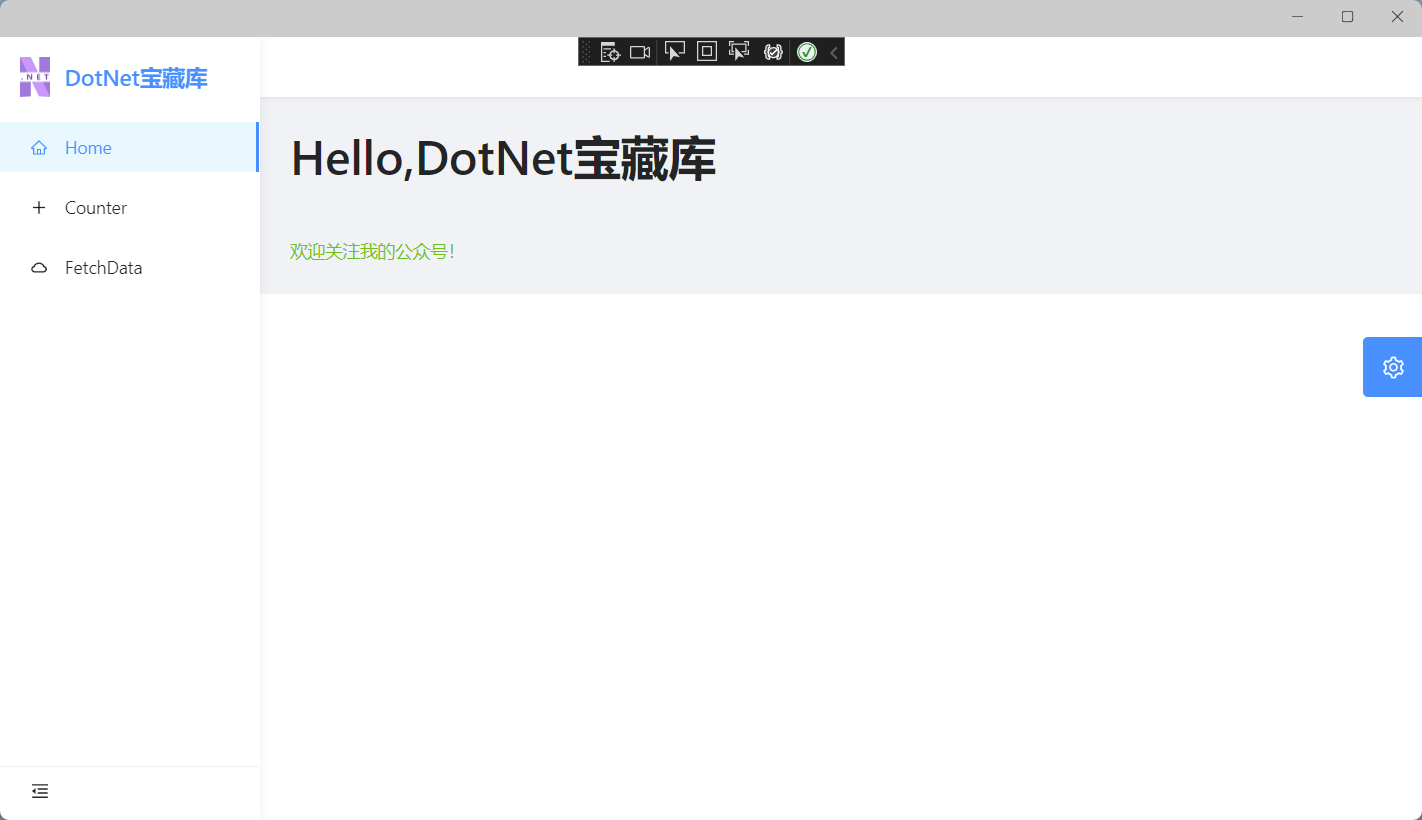
打开Pages/Index.razor,将演示组件SurveyPrompt 删掉。顺便把Shared/SurveyPrompt.razor也删除掉。将<h1>Hello, world!</h1>
替换为Ant Design组件。
@page "/"

<Title Level="1">Hello,DotNet宝藏库</Title>

<br />
<Text Type="success">欢迎关注我的公众号!</Text>
打开 Pages/Counter.razor,将代码改为如下:
@page "/counter"

<Title Level="2">HCounter</Title>
<Divider />
<p role="status">Current count: @currentCount</p>

<Button @onclick="IncrementCount" Type="primary">AntDesign 按钮</Button>
@code {
    private int currentCount = 0;

    private void IncrementCount()
    {
        currentCount++;
    }
}
打开Pages/FetchData.razor,将数据表格替换为Ant Design,删除页面所有代码,替换为Ant Design的示例!
@page "/fetchdata"
@using System.ComponentModel
@using AntDesign.TableModels
@using System.Text.Json

@using MauiBlazorApp.Data
@inject WeatherForecastService ForecastService

<Table @ref="table"
       TItem="WeatherForecast"
       DataSource="@forecasts"
       Total="_total"
       @bind-PageIndex="_pageIndex"
       @bind-PageSize="_pageSize"
       @bind-SelectedRows="selectedRows"
       OnChange="OnChange">
    <Selection Key="@(context.Id.ToString())" />
    <PropertyColumn Property="c=>c.Id" Sortable />
    <PropertyColumn Property="c=>c.Date" Format="yyyy-MM-dd" Sortable />
    <PropertyColumn Property="c=>c.TemperatureC" Sortable />
    <PropertyColumn Title="Temp. (F)" Property="c=>c.TemperatureF" />
    <PropertyColumn Title="Hot" Property="c=>c.Hot">
        <Switch @bind-Value="@context.Hot"></Switch>
    </PropertyColumn>
    <PropertyColumn Property="c=>c.Summary" Sortable />
    <ActionColumn>
        <Space>
            <SpaceItem><Button Danger OnClick="()=>Delete(context.Id)">Delete</Button></SpaceItem>
        </Space>
    </ActionColumn>
</Table>
<br />
<p>PageIndex: @_pageIndex | PageSize: @_pageSize | Total: @_total</p>

<br />
<h5>selections:</h5>
@if (selectedRows != null && selectedRows.Any())
{
    <Button Danger Size="small" OnClick="@(e => { selectedRows = null; })">Clear</Button>

    @foreach (var selected in selectedRows)
    {
        <Tag @key="selected.Id" Closable OnClose="e=>RemoveSelection(selected.Id)">@selected.Id - @selected.Summary</Tag>
    }
}

<Button Type="@ButtonType.Primary" OnClick="()=> { _pageIndex--; }">Previous page</Button>
<Button Type="@ButtonType.Primary" OnClick="()=> { _pageIndex++; }">Next Page</Button>

@code {
    private WeatherForecast[] forecasts;
    IEnumerable<WeatherForecast> selectedRows;
    ITable table;
    int _pageIndex = 1;
    int _pageSize = 10;
    int _total = 0;

    protected override async Task OnInitializedAsync()
    {
        forecasts = await GetForecastAsync(1, 50);
        _total = 50;
    }
    public class WeatherForecast
    {
        public int Id { get; set; }

        [DisplayName("Date")]
        public DateTime? Date { get; set; }

        [DisplayName("Temp. (C)")]
        public int TemperatureC { get; set; }

        [DisplayName("Summary")]
        public string Summary { get; set; }

        public int TemperatureF => 32 + (int)(TemperatureC / 0.5556);

        public bool Hot { get; set; }
    }
    private static readonly string[] Summaries = new[]
    {
        "Freezing", "Bracing", "Chilly", "Cool", "Mild", "Warm", "Balmy", "Hot", "Sweltering", "Scorching"
    };
    public void OnChange(QueryModel<WeatherForecast> queryModel)
    {
        Console.WriteLine(JsonSerializer.Serialize(queryModel));
    }
    public Task<WeatherForecast[]> GetForecastAsync(int pageIndex, int pageSize)
    {
        var rng = new Random();
        return Task.FromResult(Enumerable.Range((pageIndex - 1) * pageSize + 1, pageSize).Select(index =>
        {
            var temperatureC = rng.Next(-20, 55);
            return new WeatherForecast
                {
                    Id = index,
                    Date = DateTime.Now.AddDays(index),
                    TemperatureC = temperatureC,
                    Summary = Summaries[rng.Next(Summaries.Length)],
                    Hot = temperatureC > 30,
                };
        }).ToArray());
    }
    public void RemoveSelection(int id)
    {
        var selected = selectedRows.Where(x => x.Id != id);
        selectedRows = selected;
    }

    private void Delete(int id)
    {
        forecasts = forecasts.Where(x => x.Id != id).ToArray();
        _total = forecasts.Length;
    }
}

暂无,下次再会

我正在学习如何使用Nokogiri,根据这段代码我遇到了一些问题:require'rubygems'require'mechanize'post_agent=WWW::Mechanize.newpost_page=post_agent.get('http://www.vbulletin.org/forum/showthread.php?t=230708')puts"\nabsolutepathwithtbodygivesnil"putspost_page.parser.xpath('/html/body/div/div/div/div/div/table/tbody/tr/td/div
我有一个Ruby程序,它使用rubyzip压缩XML文件的目录树。gem。我的问题是文件开始变得很重,我想提高压缩级别,因为压缩时间不是问题。我在rubyzipdocumentation中找不到一种为创建的ZIP文件指定压缩级别的方法。有人知道如何更改此设置吗?是否有另一个允许指定压缩级别的Ruby库? 最佳答案 这是我通过查看rubyzip内部创建的代码。level=Zlib::BEST_COMPRESSIONZip::ZipOutputStream.open(zip_file)do|zip|Dir.glob("**/*")d
类classAprivatedeffooputs:fooendpublicdefbarputs:barendprivatedefzimputs:zimendprotecteddefdibputs:dibendendA的实例a=A.new测试a.foorescueputs:faila.barrescueputs:faila.zimrescueputs:faila.dibrescueputs:faila.gazrescueputs:fail测试输出failbarfailfailfail.发送测试[:foo,:bar,:zim,:dib,:gaz].each{|m|a.send(m)resc
很好奇,就使用rubyonrails自动化单元测试而言,你们正在做什么?您是否创建了一个脚本来在cron中运行rake作业并将结果邮寄给您?git中的预提交Hook?只是手动调用?我完全理解测试,但想知道在错误发生之前捕获错误的最佳实践是什么。让我们理所当然地认为测试本身是完美无缺的,并且可以正常工作。下一步是什么以确保他们在正确的时间将可能有害的结果传达给您? 最佳答案 不确定您到底想听什么,但是有几个级别的自动代码库控制:在处理某项功能时,您可以使用类似autotest的内容获得关于哪些有效,哪些无效的即时反馈。要确保您的提
假设我做了一个模块如下:m=Module.newdoclassCendend三个问题:除了对m的引用之外,还有什么方法可以访问C和m中的其他内容?我可以在创建匿名模块后为其命名吗(就像我输入“module...”一样)?如何在使用完匿名模块后将其删除,使其定义的常量不再存在? 最佳答案 三个答案:是的,使用ObjectSpace.此代码使c引用你的类(class)C不引用m:c=nilObjectSpace.each_object{|obj|c=objif(Class===objandobj.name=~/::C$/)}当然这取决于
出于纯粹的兴趣,我很好奇如何按顺序创建PI,而不是在过程结果之后生成数字,而是让数字在过程本身生成时显示。如果是这种情况,那么数字可以自行产生,我可以对以前看到的数字实现垃圾收集,从而创建一个无限系列。结果只是在Pi系列之后每秒生成一个数字。这是我通过互联网筛选的结果:这是流行的计算机友好算法,类机器算法:defarccot(x,unity)xpow=unity/xn=1sign=1sum=0loopdoterm=xpow/nbreakifterm==0sum+=sign*(xpow/n)xpow/=x*xn+=2sign=-signendsumenddefcalc_pi(digits
我正在尝试使用ruby和Savon来使用网络服务。测试服务为http://www.webservicex.net/WS/WSDetails.aspx?WSID=9&CATID=2require'rubygems'require'savon'client=Savon::Client.new"http://www.webservicex.net/stockquote.asmx?WSDL"client.get_quotedo|soap|soap.body={:symbol=>"AAPL"}end返回SOAP异常。检查soap信封,在我看来soap请求没有正确的命名空间。任何人都可以建议我
关闭。这个问题是opinion-based.它目前不接受答案。想要改进这个问题?更新问题,以便editingthispost可以用事实和引用来回答它.关闭4年前。Improvethisquestion我想在固定时间创建一系列低音和高音调的哔哔声。例如:在150毫秒时发出高音调的蜂鸣声在151毫秒时发出低音调的蜂鸣声200毫秒时发出低音调的蜂鸣声250毫秒的高音调蜂鸣声有没有办法在Ruby或Python中做到这一点?我真的不在乎输出编码是什么(.wav、.mp3、.ogg等等),但我确实想创建一个输出文件。
我在我的项目目录中完成了compasscreate.和compassinitrails。几个问题:我已将我的.sass文件放在public/stylesheets中。这是放置它们的正确位置吗?当我运行compasswatch时,它不会自动编译这些.sass文件。我必须手动指定文件:compasswatchpublic/stylesheets/myfile.sass等。如何让它自动运行?文件ie.css、print.css和screen.css已放在stylesheets/compiled。如何在编译后不让它们重新出现的情况下删除它们?我自己编译的.sass文件编译成compiled/t
对于具有离线功能的智能手机应用程序,我正在为Xml文件创建单向文本同步。我希望我的服务器将增量/差异(例如GNU差异补丁)发送到目标设备。这是计划:Time=0Server:hasversion_1ofXmlfile(~800kiB)Client:hasversion_1ofXmlfile(~800kiB)Time=1Server:hasversion_1andversion_2ofXmlfile(each~800kiB)computesdeltaoftheseversions(=patch)(~10kiB)sendspatchtoClient(~10kiBtransferred)Cl
