后端架构token授权认证机制:spring security JSON Web Token(JWT)简例
在基于token的客户端-服务器端认证授权以前,前端到服务器端的认证-授权通常是基于session,自从token机制出现并流行起来后,基于token的客户端-服务器端认证-授权访问机制变得越来越主要,token机制从某种意义上讲是过去传统session会话机制的另外一种解决方案,并尤其适用于当前的大规模微服务、分布式体系架构。
客户端(浏览器web前端、app移动端等)与后端服务基于token的认证-授权访问流程一般情况是这样的:
(1)用户侧发送用户名和密码到服务器端。
(2)服务器端收到用户名后验证用户有效性。
(3)服务器端验证通过后,发送给用户一个token。
(4)客户端存储token,并在每次请求服务器端时附带上这个token。
(5)后续,每一层客户端的请求到达服务器端后,服务器验证token的有效性(合法性),若通过验证,返回客户端所需数据。
JWT可以认为是一种特殊编码格式的token。普通oauth2颁发是一串随机hash字符串,本身无意义,而JWT的token有特定含义,分为三部分:
(1)头部Header
(2)载荷Payload
(3)签名Signature
每一部分用 . 分隔开。
典型的应用场景是api鉴权。比如移动应用的app开发,用api,从远程服务器端拉取数据,每次的http访问,均带上token。
JWT-token此类鉴权认证机制不太适用的场景:
(1)传统session的会话保持业务逻辑。因为token无状态、分布式,在token有效期内,原则上只要使用这个token,仍然可以访问系统。
(2)token续签。围绕token续签设计系统架构会增加额外的复杂度。可以用redis记录token状态,在用户访问后更新状态,但这就是token机制用“歪”了,JWT-token的无状态此时变成有状态了,而这恰恰就是传统session+cookie机制可以覆盖住的业务场景。考虑系统的拓展和高可用,可以考虑使用成熟的spring session框架(B/S应用场景)。
现在写一个例子,代码如下:

其中最关键的有三个类,JwtAuthenticationController,JwtRequestFilter,JwtWebSecurityConfigurerAdapter
这三个类涉及到spring boot对于token生成和验证的逻辑流程。结合上面的逻辑代码,简单总结一下spring+jwt这种组合框架是如何验证-生成授权token。
如果不使用spring security,那么spring里面实现接口访问即是常规的框架编程。引入spring security后,并在spring security中实现基于JWT的token授权-验证,那么首先需要对于访问用户发放token。所以在JwtAuthenticationController的createAuthenticationToken实现对于用户token的生成和返回。
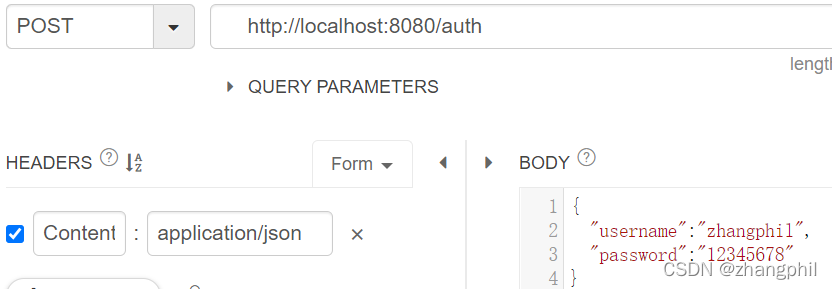
当用户访问localhost:8080/auth后(注意是POST方法,需要写入用户名和密码),JwtAuthenticationController在createAuthenticationToken里面提取用户名和密码,构造UsernamePasswordAuthenticationToken,并将UsernamePasswordAuthenticationToken记入到上下文中的authenticationManager,如果用户名和密码均正确,spring security就“记忆”当前访问的用户,并通过jwtInMemoryUserDetailsService加载用户信息,然后jwtTokenUtil生成token返回给用户。
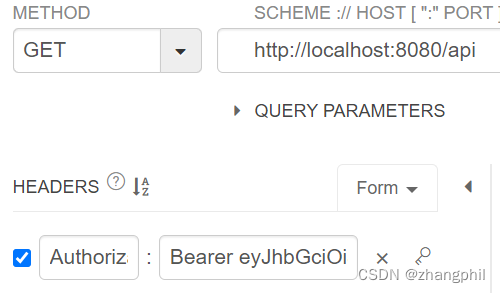
此后,客户端用户每一次访问受保护的资源时候,加入token。token是写到header里面的,token的key为Authorization,value按照协议规范,需要以字符串Bearer 开头,注意Bearer后面要带上空格。
JwtRequestFilter类目的是配置spring的http请求,把JwtRequestFilter写完后,加入到JwtWebSecurityConfigurerAdapter类的configure(HttpSecurity http)函数的http里面:
http.addFilterBefore(jwtRequestFilter, UsernamePasswordAuthenticationFilter.class);
加入后,spring接受的http请求,会被JwtRequestFilter过滤一次,JwtRequestFilter的过滤核心是doFilterInternal函数。doFilterInternal对于每一次的http请求,均会提取http头部header字段里面的key为Authorization对应的值,如果对应的值非空,且以Bearer 开头,则意味是token认证,那么就走token认证逻辑。代码将会根据传入的token逆向的通过工具类jwtTokenUtil反向找出用户名,然后根据用户名判断当前用户是否已被授权,如果没有被授权,jwtTokenUtil验证客户端传入的token和后端系统的token信息是否一致,一致则把具有该token的客户端记录进spring security授权记录中,从此,凡是具有该token的访问,均放行通过。
import org.springframework.beans.factory.annotation.Autowired;
import org.springframework.http.ResponseEntity;
import org.springframework.security.authentication.AuthenticationManager;
import org.springframework.security.authentication.UsernamePasswordAuthenticationToken;
import org.springframework.security.core.userdetails.UserDetails;
import org.springframework.web.bind.annotation.RequestBody;
import org.springframework.web.bind.annotation.RequestMapping;
import org.springframework.web.bind.annotation.RequestMethod;
import org.springframework.web.bind.annotation.RestController;

import java.util.HashMap;
import java.util.Map;


@RestController
public class JwtAuthenticationController {
    @Autowired
    private AuthenticationManager authenticationManager;

    @Autowired
    private JwtTokenUtil jwtTokenUtil;

    @Autowired
    private JwtUserDetailsService jwtInMemoryUserDetailsService;

    /**
     * 验证用户名和密码。
     * 如果验证通过,创建token并将其返回给客户端
     *
     * @param request
     * @return
     */
    @RequestMapping(value = "/auth", method = RequestMethod.POST)
    public ResponseEntity<?> createAuthenticationToken(@RequestBody JwtRequest request) {
        String username = request.getUsername();
        String password = request.getPassword();
        System.out.println("用户名:" + username);
        System.out.println("密码:" + password);

        UsernamePasswordAuthenticationToken authentication=new UsernamePasswordAuthenticationToken(username, password);
        authenticationManager.authenticate(authentication);

        UserDetails userDetails = jwtInMemoryUserDetailsService.loadUserByUsername(request.getUsername());
        String token = jwtTokenUtil.generateToken(userDetails);
        return ResponseEntity.ok(new JwtResponse(token));
    }

    @RequestMapping(value="/api")
    public Map<String, String> api() {
        Map<String,String> map=new HashMap<String,String>();
        map.put("page", "api");
        return map;
    }

    @RequestMapping(value="/index")
    public Map<String, String> index() {
        Map<String,String> map=new HashMap<String,String>();
        map.put("page", "index");
        return map;
    }

    @RequestMapping(value="/home")
    public Map<String, String> home() {
        Map<String,String> map=new HashMap<String,String>();
        map.put("page", "home");
        return map;
    }
}
import org.springframework.security.core.AuthenticationException;
import org.springframework.security.web.AuthenticationEntryPoint;
import org.springframework.stereotype.Component;

import javax.servlet.ServletException;
import javax.servlet.http.HttpServletRequest;
import javax.servlet.http.HttpServletResponse;
import java.io.IOException;

/**
 * 拒绝每个没有通过身份验证的请求并发送错误代码401。
 */
@Component
public class JwtAuthenticationEntryPoint implements AuthenticationEntryPoint {
    @Override
    public void commence(HttpServletRequest request, HttpServletResponse response, AuthenticationException authException) throws IOException, ServletException {
        System.out.println("未获得授权");
        response.sendError(HttpServletResponse.SC_UNAUTHORIZED, "Unauthorized");
    }
}
import org.springframework.security.crypto.bcrypt.BCryptPasswordEncoder;
import org.springframework.stereotype.Component;


/**
 * 注意,此处是明文,实际场景时候要加密
 */
@Component
public class JwtPasswordEncoder extends BCryptPasswordEncoder {
    @Override
    public String encode(CharSequence rawPassword) {
        return rawPassword.toString();
    }

    @Override
    public boolean matches(CharSequence rawPassword, String encodedPassword) {
        if (rawPassword == null) {
            throw new IllegalArgumentException("rawPassword为空!");
        }

        if (encodedPassword == null || encodedPassword.length() == 0) {
            throw new IllegalArgumentException("encodedPassword为空");
        }

        return encodedPassword.equals(rawPassword);
    }
}
import java.io.Serializable;

public class JwtRequest implements Serializable {
    private String username;
    private String password;

    //JSON Parsing
    public JwtRequest() {

    }

    public JwtRequest(String username, String password) {
        this.setUsername(username);
        this.setPassword(password);
    }

    public String getUsername() {
        return this.username;
    }

    public void setUsername(String username) {
        this.username = username;
    }

    public String getPassword() {
        return this.password;
    }

    public void setPassword(String password) {
        this.password = password;
    }
}
import org.springframework.beans.factory.annotation.Autowired;
import org.springframework.security.authentication.UsernamePasswordAuthenticationToken;
import org.springframework.security.core.context.SecurityContextHolder;
import org.springframework.security.core.userdetails.UserDetails;
import org.springframework.security.web.authentication.WebAuthenticationDetailsSource;
import org.springframework.stereotype.Component;
import org.springframework.web.filter.OncePerRequestFilter;

import javax.servlet.FilterChain;
import javax.servlet.ServletException;
import javax.servlet.http.HttpServletRequest;
import javax.servlet.http.HttpServletResponse;
import java.io.IOException;


/**
 * 对于任何一个传入的请求,都会执行doFilterInternal。
 * 检查请求是否具有有效的token。
 * 如果token有效,在上下文中设置Authentication,
 * 表明当前用户通过身份验证。
 */
@Component
public class JwtRequestFilter extends OncePerRequestFilter {
    @Autowired
    private JwtUserDetailsService jwtUserDetailsService;

    @Autowired
    private JwtTokenUtil jwtTokenUtil;

    @Override
    protected void doFilterInternal(HttpServletRequest request, HttpServletResponse response, FilterChain filterChain) throws ServletException, IOException {
        String header = request.getHeader("Authorization");
        String username = null;
        String token = null;

        // token一般又称之为"Bearer token",以Bearer开头
        // 截取纯粹的token
        String BEARER = "Bearer ";
        if (header != null && header.startsWith(BEARER)) {
            token = header.substring(BEARER.length());//从Bearer 之后开始截取
            username = jwtTokenUtil.getUsernameFromToken(token);
            System.out.println(username + " token:" + token);
        }

        //拿到token后验证
        if (username != null && SecurityContextHolder.getContext().getAuthentication() == null) {
            UserDetails userDetails = jwtUserDetailsService.loadUserByUsername(username);

            // 如果token有效,配置Spring Security授权
            if (jwtTokenUtil.validateToken(token, userDetails)) {
                System.out.println(username + " token验证通过");
                UsernamePasswordAuthenticationToken authToken = new UsernamePasswordAuthenticationToken(userDetails, null, userDetails.getAuthorities());
                authToken.setDetails(new WebAuthenticationDetailsSource().buildDetails(request));
                //当前用户已经授权,授权认证信息传递给Spring Security配置.
                SecurityContextHolder.getContext().setAuthentication(authToken);
            }
        }

        if (SecurityContextHolder.getContext().getAuthentication() != null) {
            System.out.println(username + " 已授权");
        }

        filterChain.doFilter(request, response);
    }
}
public class JwtResponse {
    private String token;

    public JwtResponse(String token) {
        this.token = token;
    }

    public String getToken() {
        return token;
    }
}
import io.jsonwebtoken.Claims;
import io.jsonwebtoken.Jwts;
import io.jsonwebtoken.SignatureAlgorithm;
import org.springframework.security.core.userdetails.UserDetails;
import org.springframework.stereotype.Component;

import java.io.Serializable;
import java.util.Date;
import java.util.HashMap;
import java.util.Map;
import java.util.function.Function;

@Component
public class JwtTokenUtil implements Serializable {
    public static final long TOKEN_VALIDITY = 60 * 60 * 5; //token有效期
    private String secret = "zhangphil_secret";

    public String getUsernameFromToken(String token) {
        return getClaimFromToken(token, Claims::getSubject);
    }

    public Date getIssuedAtDateFromToken(String token) {
        return getClaimFromToken(token, Claims::getIssuedAt);
    }

    public Date getExpirationDateFromToken(String token) {
        return getClaimFromToken(token, Claims::getExpiration);
    }

    public <T> T getClaimFromToken(String token, Function<Claims, T> claimsResolver) {
        final Claims claims = getAllClaimsFromToken(token);
        return claimsResolver.apply(claims);
    }

    private Claims getAllClaimsFromToken(String token) {
        return Jwts.parser().setSigningKey(secret).parseClaimsJws(token).getBody();
    }

    private Boolean isTokenExpired(String token) {
        final Date expiration = getExpirationDateFromToken(token);
        return expiration.before(new Date());
    }

    private Boolean ignoreTokenExpiration(String token) {
        return false;
    }

    public String generateToken(UserDetails userDetails) {
        Map<String, Object> claims = new HashMap<>();
        return doGenerateToken(claims, userDetails.getUsername());
    }

    private String doGenerateToken(Map<String, Object> claims, String subject) {
        return Jwts.builder().setClaims(claims).setSubject(subject).setIssuedAt(new Date(System.currentTimeMillis()))
                .setExpiration(new Date(System.currentTimeMillis() + TOKEN_VALIDITY * 1000)).signWith(SignatureAlgorithm.HS512, secret).compact();
    }

    public Boolean canTokenBeRefreshed(String token) {
        return (!isTokenExpired(token) || ignoreTokenExpiration(token));
    }

    public Boolean validateToken(String token, UserDetails userDetails) {
        final String username = getUsernameFromToken(token);
        return (username.equals(userDetails.getUsername()) && !isTokenExpired(token));
    }
}
import org.springframework.security.core.userdetails.User;
import org.springframework.security.core.userdetails.UserDetails;
import org.springframework.security.core.userdetails.UserDetailsService;
import org.springframework.security.core.userdetails.UsernameNotFoundException;
import org.springframework.stereotype.Service;

import java.util.ArrayList;

@Service
public class JwtUserDetailsService implements UserDetailsService {
    //正常情况下,当loadUserByUsername传入用户名后,
    //应该连接数据库从数据库中根据用户名把该用户的信息取出来,
    //本例出于简单演示的目的,不再额外的引入数据库,
    //假设已经知道用户名和密码,硬编码写死了用户名和密码
    public static final String USER_NAME = "zhangphil";
    public static final String USER_PASSWORD = "12345678";

    @Override
    public UserDetails loadUserByUsername(String username) throws UsernameNotFoundException {
        System.out.println(username + " 加载信息");
        if (USER_NAME.equals(username)) {
            return new User(USER_NAME, USER_PASSWORD, new ArrayList<>());
        } else {
            throw new UsernameNotFoundException("用户不存在:" + username);
        }
    }
}
import org.springframework.beans.factory.annotation.Autowired;
import org.springframework.context.annotation.Bean;
import org.springframework.context.annotation.Configuration;
import org.springframework.security.authentication.AuthenticationManager;
import org.springframework.security.config.annotation.authentication.builders.AuthenticationManagerBuilder;
import org.springframework.security.config.annotation.method.configuration.EnableGlobalMethodSecurity;
import org.springframework.security.config.annotation.web.builders.HttpSecurity;
import org.springframework.security.config.annotation.web.builders.WebSecurity;
import org.springframework.security.config.annotation.web.configuration.EnableWebSecurity;
import org.springframework.security.config.annotation.web.configuration.WebSecurityConfigurerAdapter;
import org.springframework.security.config.http.SessionCreationPolicy;
import org.springframework.security.web.authentication.UsernamePasswordAuthenticationFilter;


@Configuration
@EnableWebSecurity
@EnableGlobalMethodSecurity(prePostEnabled = true)
public class JwtWebSecurityConfigurerAdapter extends WebSecurityConfigurerAdapter {
    /**
     * 密码管理
     */
    @Autowired
    private JwtPasswordEncoder jwtPasswordEncoder;

    @Autowired
    private JwtUserDetailsService jwtUserDetailsService;

    @Autowired
    private JwtAuthenticationEntryPoint jwtAuthenticationEntryPoint;

    @Autowired
    private JwtRequestFilter jwtRequestFilter;

    @Override
    protected void configure(HttpSecurity http) throws Exception {
        // 本例不需要CSRF
        http.csrf().disable()
                // 排除/auth。
                // 对于请求授权的/auth不需要授权,放行。
                .authorizeRequests()
                .antMatchers("/auth").permitAll()
                //其余的所有请求均需要认证授权
                .anyRequest().authenticated()
                .and()
                .exceptionHandling()//错误处理
                .authenticationEntryPoint(jwtAuthenticationEntryPoint)
                .and()
                //本例不需要维护有状态的session
                .sessionManagement()
                .sessionCreationPolicy(SessionCreationPolicy.STATELESS);

        // 对于任何一个传入的请求加入一个token过滤器,验证。
        http.addFilterBefore(jwtRequestFilter, UsernamePasswordAuthenticationFilter.class);
    }

    /**
     * 配置AuthenticationManager使其知道从那里加载用户认证信息
     */
    @Override
    public void configure(AuthenticationManagerBuilder auth) {
        try {
            auth.userDetailsService(jwtUserDetailsService)
                    .passwordEncoder(jwtPasswordEncoder);
        } catch (Exception e) {
            e.printStackTrace();
        }
    }

    /**
     * 假设这一部分接口是公开开放的,不需要token即可访问。
     * 这部分客户端http请求不拦截
     * 排除。
     */
    @Override
    public void configure(WebSecurity web) {
        web.ignoring()
                .antMatchers(
                        "/index**",
                        "/home/**");
    }

    @Bean
    @Override
    public AuthenticationManager authenticationManagerBean() throws Exception {
        return super.authenticationManagerBean();
    }
}
import org.springframework.boot.SpringApplication;
import org.springframework.boot.autoconfigure.SpringBootApplication;

@SpringBootApplication
public class SpringJwtApplication {
    public static void main(String[] args) {
        SpringApplication.run(SpringJwtApplication.class, args);
    }
}
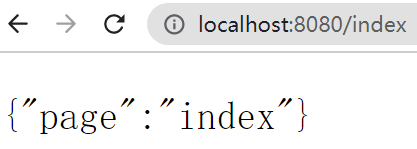
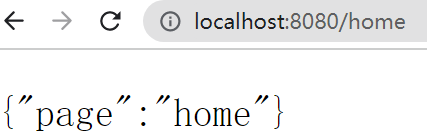
系统启动后,当访问/index或者/home页面时候,不需要token,均正常打开:
当直接访问localhost:8080/api时候,页面返回HTTP ERROR 401错误,此时,需要post用户名和密码:
然后后台返回token:

把token复制出来,在get请求时候,加入token,访问/api接口,注意,需要为token加上头Bearer ,加到header里面,key是Authorization:
后台系统返回正确结果:
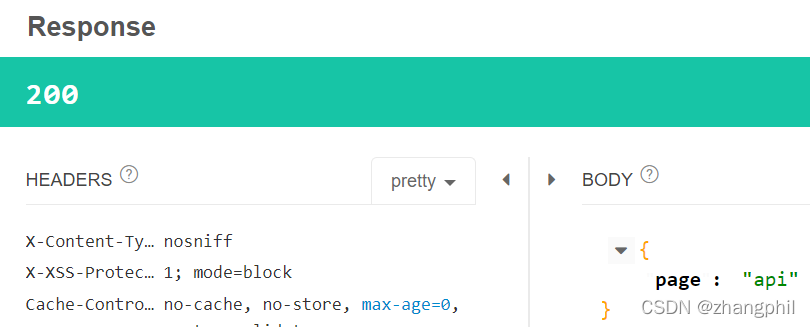
与此同时,系统的后台日志输出为:
未获得授权
用户名:zhangphil
密码:12345678
zhangphil 加载信息
zhangphil 加载信息
zhangphil token:eyJhbGciOiJIUzUxMiJ9.eyJzdWIiOiJ6aGFuZ3BoaWwiLCJleHAiOjE2NDQ1MDc3OTcsImlhdCI6MTY0NDQ4OTc5N30.90WpWZ4MBk1bsEd8r7Vmz7MHQ350q_DEISC7mvHmamgU1YNM_ppfyYweUsb0MxRD-qPFdHF7fNBbf-4H0u6wyw
zhangphil 加载信息
zhangphil token验证通过
zhangphil 已授权
如果在授权认证时候,传入错误的密码,比如密码错误的是1234,那么系统认证失败,后台日志输出:
用户名:zhangphil
密码:1234
zhangphil 加载信息
未获得授权
似乎无法为此找到有效的答案。我正在阅读Rails教程的第10章第10.1.2节,但似乎无法使邮件程序预览正常工作。我发现处理错误的所有答案都与教程的不同部分相关,我假设我犯的错误正盯着我的脸。我已经完成并将教程中的代码复制/粘贴到相关文件中,但到目前为止,我还看不出我输入的内容与教程中的内容有什么区别。到目前为止,建议是在函数定义中添加或删除参数user,但这并没有解决问题。触发错误的url是http://localhost:3000/rails/mailers/user_mailer/account_activation.http://localhost:3000/rails/mai
rails中是否有任何规定允许站点的所有AJAXPOST请求在没有authenticity_token的情况下通过?我有一个调用Controller方法的JqueryPOSTajax调用,但我没有在其中放置任何真实性代码,但调用成功。我的ApplicationController确实有'request_forgery_protection'并且我已经改变了config.action_controller.consider_all_requests_local在我的environments/development.rb中为false我还搜索了我的代码以确保我没有重载ajaxSend来发送
我试图在我的网站上实现使用Facebook登录功能,但在尝试从Facebook取回访问token时遇到障碍。这是我的代码:ifparams[:error_reason]=="user_denied"thenflash[:error]="TologinwithFacebook,youmustclick'Allow'toletthesiteaccessyourinformation"redirect_to:loginelsifparams[:code]thentoken_uri=URI.parse("https://graph.facebook.com/oauth/access_token
我是一名决定学习Ruby和RubyonRails的ASP.NETMVC开发人员。我已经有所了解并在RoR上创建了一个网站。在ASP.NETMVC上开发,我一直使用三层架构:数据层、业务层和UI(或表示)层。尝试在RubyonRails应用程序中使用这种方法,我发现没有关于它的信息(或者也许我只是找不到它?)。也许有人可以建议我如何在RubyonRails上创建或使用三层架构?附言我使用ruby1.9.3和RubyonRails3.2.3。 最佳答案 我建议在制作RoR应用程序时遵循RubyonRails(RoR)风格。Rails
我正在尝试创建密码规则来设计可恢复的密码更改。我通过passwords_controller.rb做了一个父类(superclass),但我需要在应用规则之前检查用户角色,但我所拥有的只是reset_password_token。 最佳答案 假设您的模型是用户:User.with_reset_password_token(your_token_here)Source 关于ruby-on-rails-设计通过reset_password_token获取用户,我们在StackOverflow
简单代码require'net/http'url=URI.parse('getjson/otherdatahere[link]')req=Net::HTTP::Get.new(url.to_s)res=Net::HTTP.start(url.host,url.port){|http|http.request(req)}putsres.body只是想知道如何在phpcURL中放置身份验证token,我是这样做的 curl_setopt($ch,CURLOPT_HTTPHEADER,array('Authorization:Bearerxxx'));//Bearertokenfora
谁能提供一个使用HTTParty和digestauth的例子?我在网上找不到例子,希望有人能提供一些帮助。谢谢。 最佳答案 您可以在定义类时使用digest_auth方法设置用户名和密码classFooincludeHTTPartydigest_auth'username','password'end 关于ruby-HTTParty摘要认证,我们在StackOverflow上找到一个类似的问题: https://stackoverflow.com/questi
Doorkeeper中Token和Grant的区别我搞不清楚。Doorkeeper在哪个时刻创建访问授权,何时创建访问token?文档似乎对此什么也没说,现在我正在阅读代码,但不是十几行。 最佳答案 我还建议阅读documentationofoauth2据我了解,Doorkeeper也是基于该文档中描述的协议(protocol)。在doorkeeper中,你会先获得accessgrant,然后是accesstoken。访问授权通常只存在很短的时间(doorkeeper中的默认值为10分钟)。您将通过向api-url/oauth/au
我正在尝试为自己创建一个直接连接到我的日历的应用程序……但我从不想参与重新验证。我只想编写一次身份验证代码并完成它。授权码如下:key=Google::APIClient::PKCS12.load_key(SERVICE_ACCOUNT_PKCS12_FILE_PATH,PASSWORD)asserter=Google::APIClient::JWTAsserter.new(SERVICE_ACCOUNT_EMAIL,'https://www.googleapis.com/auth/calendar',key)@client=Google::APIClient.new@client.a
我正在使用Omniauth请求用户gmail凭据,因此我可以稍后请求用户friend/联系人。现在,我正在使用身份验证请求为我生成的访问token,在OmniauthCallbacksController中获取好友列表。像这样classUsers::OmniauthCallbacksController如何使用存储在数据库中的凭据创建新的访问token,以便从不同的Controller调用googleAPI? 最佳答案 从here获取您的client_id和client_secret|.这是一个粗略的脚本,可以很好地工作。根据您的需
