centos7
7.13.4
| 集群 | 节点名称 | 内网IP | Kibana |
|---|---|---|---|
| cfg-cluster-1 | node-01 | 192.168.30.13 | http://localhost:5602 |
| node-02 | 192.168.30.14 | ||
| node-03 | 192.168.30.15 |
集群快照存储路径: /elastic/backup
仓库名:my_backup
快照名:snapshot_1
快照含索引: snapshot_index_1、snapshot_index_2
path.repo: "/elastic/backup"
参照另一篇 Centos7 NFS共享目录(单机版)
PUT /_snapshot/my_backup
{
  "type": "fs",
  "settings": {
    "location": "/elastic/backup"
  }
}
location配置的路径 ,必须和集群 elasticsearh.yml 中配置path.repo保持一致
创建测试索引数据
PUT snapshot_index_1/_doc/1
{
  "title":"index_1"
}
PUT snapshot_index_2/_doc/1
{
  "title":"index_2"
}
创建快照
PUT /_snapshot/my_backup/snapshot_1?wait_for_completion=true
{
  "indices": "snapshot_index_1,snapshot_index_2",
  "ignore_unavailable": true,
  "include_global_state": false
}
POST /_snapshot/my_backup/snapshot_1/_mount?wait_for_completion=true
{
  "index": "snapshot_index_1",
  "renamed_index": "renamed_snapshot_index_1",
  "index_settings": {
    "index.number_of_replicas": 0
  },
  "ignore_index_settings": [ "index.refresh_interval" ]
}
验证
# 通过可搜索快照挂载 索引名查询,可查到索引数据
GET renamed_snapshot_index_1/_search
结果 仅body体
{
  "_index" : "renamed_snapshot_index_1",
  "_type" : "_doc",
  "_id" : "1",
  "_score" : 1.0,
  "_source" : {
    "title" : "index_1"
  }
}
POST /_snapshot/my_backup/snapshot_1/_restore
{
  "indices": "snapshot_index_1,snapshot_index_2",
  "ignore_unavailable": true,
  "include_aliases": false
}
DELETE /_snapshot/my_backup/snapshot_1
uncaught exception in thread [main]
java.lang.IllegalStateException: Unable to access 'path.repo' (/elastic/backup)
Likely root cause: java.nio.file.AccessDeniedException: /elastic
	at sun.nio.fs.UnixException.translateToIOException(UnixException.java:84)
	at sun.nio.fs.UnixException.rethrowAsIOException(UnixException.java:102)
	at sun.nio.fs.UnixException.rethrowAsIOException(UnixException.java:107)
	at sun.nio.fs.UnixFileSystemProvider.createDirectory(UnixFileSystemProvider.java:384)
	at java.nio.file.Files.createDirectory(Files.java:674)
	at java.nio.file.Files.createAndCheckIsDirectory(Files.java:781)
	at java.nio.file.Files.createDirectories(Files.java:767)
	at org.elasticsearch.bootstrap.Security.ensureDirectoryExists(Security.java:299)
	at org.elasticsearch.bootstrap.FilePermissionUtils.addDirectoryPath(FilePermissionUtils.java:59)
	at org.elasticsearch.bootstrap.Security.addFilePermissions(Security.java:223)
	at org.elasticsearch.bootstrap.Security.createPermissions(Security.java:154)
	at org.elasticsearch.bootstrap.Security.configure(Security.java:104)
	at org.elasticsearch.bootstrap.Bootstrap.setup(Bootstrap.java:212)
	at org.elasticsearch.bootstrap.Bootstrap.init(Bootstrap.java:397)
	at org.elasticsearch.bootstrap.Elasticsearch.init(Elasticsearch.java:159)
	at org.elasticsearch.bootstrap.Elasticsearch.execute(Elasticsearch.java:150)
	at org.elasticsearch.cli.EnvironmentAwareCommand.execute(EnvironmentAwareCommand.java:75)
	at org.elasticsearch.cli.Command.mainWithoutErrorHandling(Command.java:116)
	at org.elasticsearch.cli.Command.main(Command.java:79)
	at org.elasticsearch.bootstrap.Elasticsearch.main(Elasticsearch.java:115)
	at org.elasticsearch.bootstrap.Elasticsearch.main(Elasticsearch.java:81)
For complete error details, refer to the log at /usr/local/elasticsearch-7.13.4/logs/cfg-cluster-1.log
原因:
yml配置了 path.repo,但是服务器上该目录不存在 /elastic/backup
解决:
创建目录并赋权 :
 mkdir -p  /elastic/backup
 chmod 777 -R /elastic
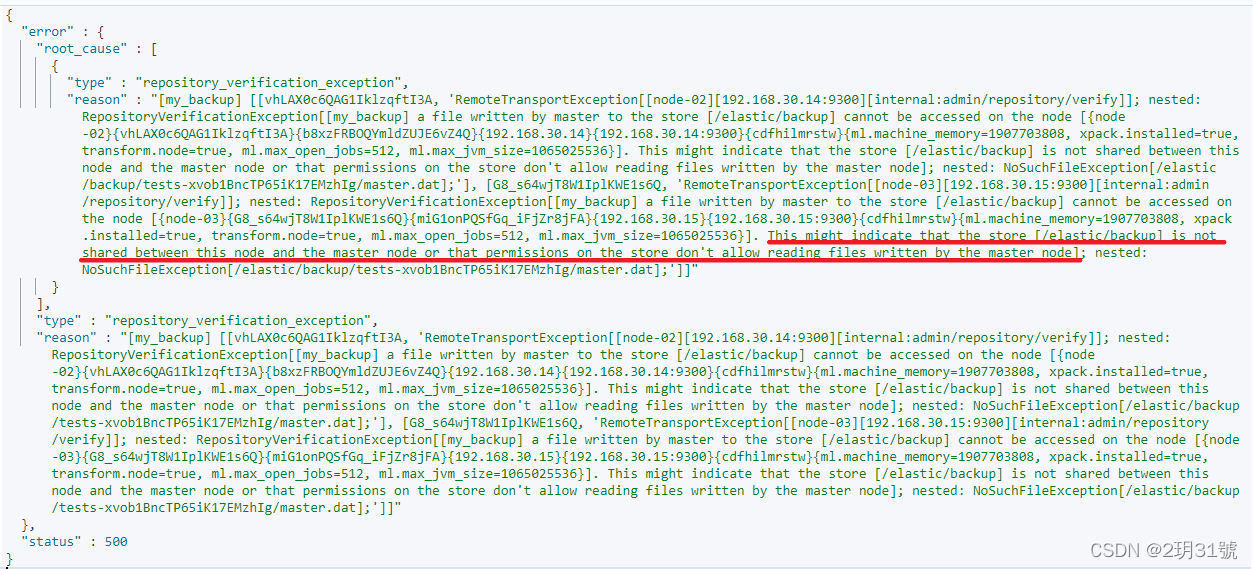
This might indicate that the store [/elastic/backup] is not shared between this node and the master node or that permissions on the store don't allow reading files written by the master node];
原因:
elastic用户没权限访问master的存储: /elastic/backup,即该目录没做集群共享,从节点无法访问主节点的 /elastic/backup 目录
解决:
参照上文 二、配置 > 2.配置集群共享目录 即: Centos7 NFS共享目录(单机版)
{
  "error" : {
    "root_cause" : [
      {
        "type" : "snapshot_restore_exception",
        "reason" : "[my_backup:snapshot_1/w-dkxwRWRky8SBceJpomnw] cannot restore index [snapshot_index_1] because an open index with same name already exists in the cluster. Either close or delete the existing index or restore the index under a different name by providing a rename pattern and replacement name"
      }
    ],
    "type" : "snapshot_restore_exception",
    "reason" : "[my_backup:snapshot_1/w-dkxwRWRky8SBceJpomnw] cannot restore index [snapshot_index_1] because an open index with same name already exists in the cluster. Either close or delete the existing index or restore the index under a different name by providing a rename pattern and replacement name"
  },
  "status" : 500
}
原因: 集群中已存在和要还原索引同名的索引
解决:
删除已存在同名索引在还原
还原索引时重命名,例如 snapshot_index_1 还原成 snapshot_index_1
POST /_snapshot/my_backup/snapshot_1/_restore
{
  "indices": "snapshot_index_1",
  "ignore_unavailable": true,
  "include_global_state": false,
  "rename_pattern": "snapshot_index_(.+)",
  "rename_replacement": "restored_index_$1",
  "include_aliases": false
}
验证:
# 查询新索引
GET snapshot_restored_index_1/_search

# 结果 仅body体
{
    "_index" : "snapshot_restored_index_1",
    "_type" : "_doc",
    "_id" : "1",
    "_score" : 1.0,
    "_source" : {
    	"title" : "index_1"
    }
}
{
  "error" : {
    "root_cause" : [
      {
        "type" : "security_exception",
        "reason" : "current license is non-compliant for [searchable-snapshots]",
        "license.expired.feature" : "searchable-snapshots"
      }
    ],
    "type" : "security_exception",
    "reason" : "current license is non-compliant for [searchable-snapshots]",
    "license.expired.feature" : "searchable-snapshots"
  },
  "status" : 403
}
原因:
可搜索快照/跨集群复制 都是收费功能,需要开启kibana试用功能
见官网: https://www.elastic.co/cn/pricing/
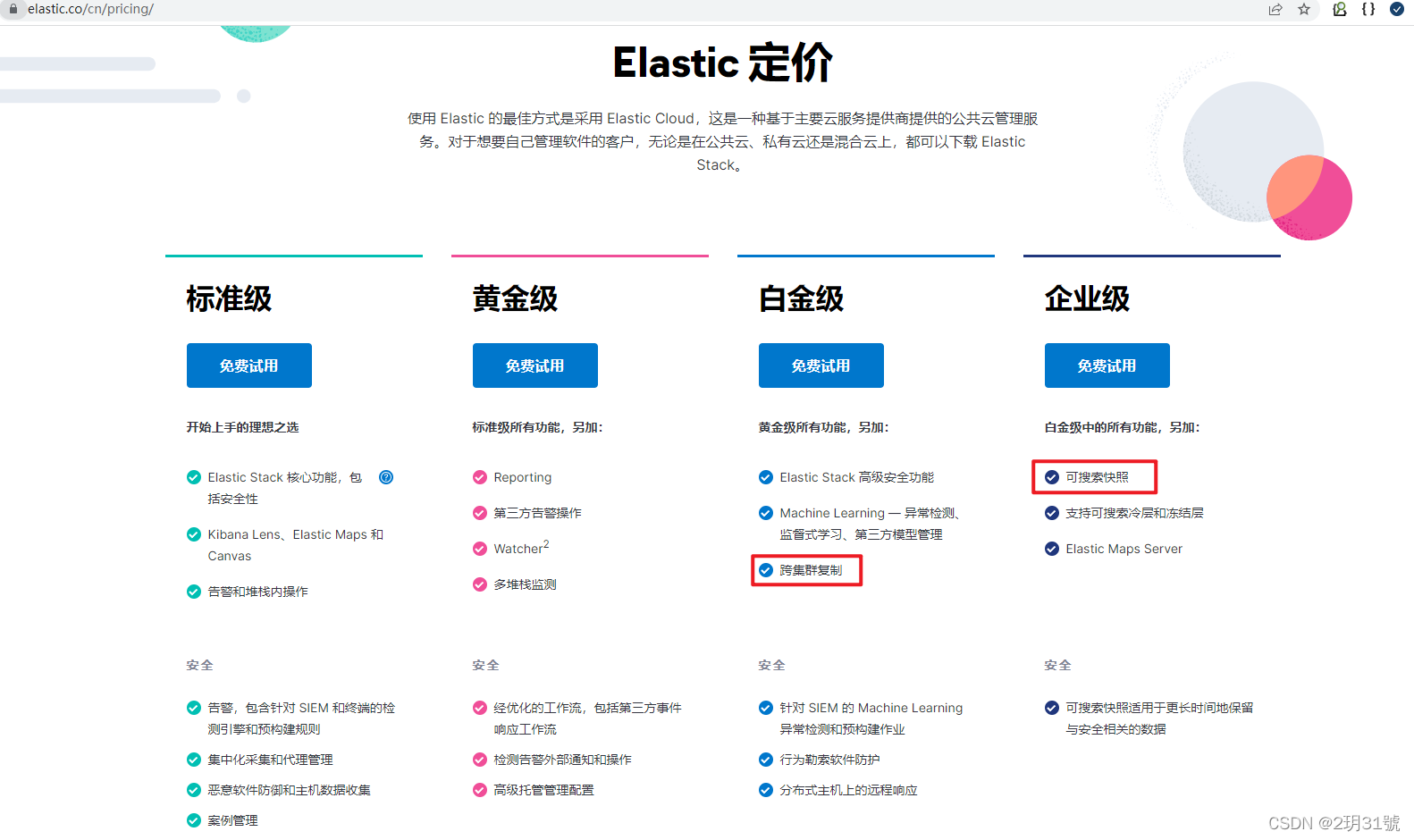
解决:
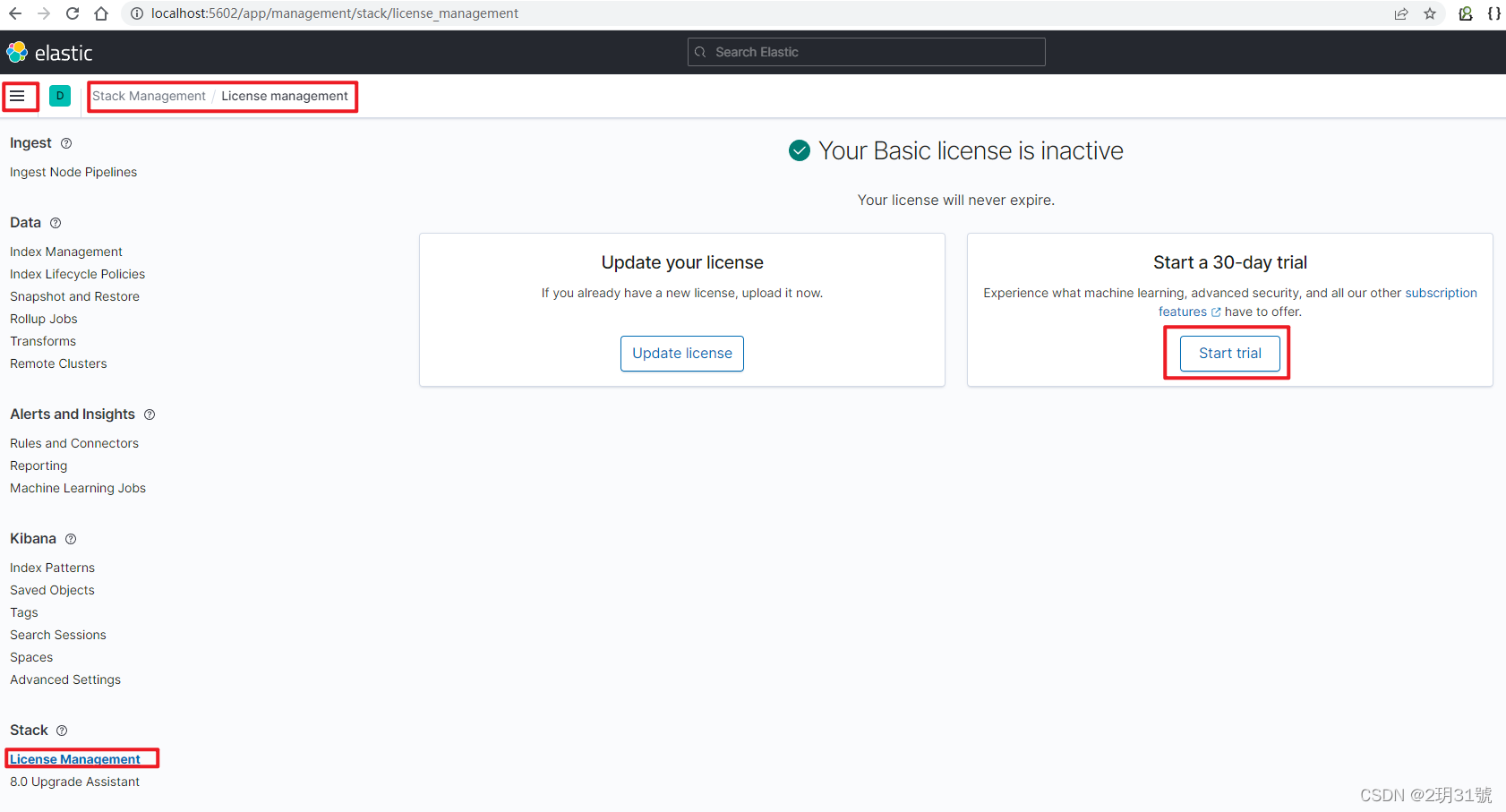
kibana中,点击 左上角 三横 的菜单,滑到最下面面,Stack Management -> 最左下角菜单 License management -> 正文中 Start a 30-day trial,点击 Start trial开启试用
删除 data 目录后会重置,所以每次删除data后都需要重新开启试用
此项官方文档有说明版本兼容性问题,未做验证
elasticsearch官方文档:
https://www.elastic.co/guide/en/elasticsearch/reference/7.13/snapshot-restore.html
1.postman介绍Postman一款非常流行的API调试工具。其实,开发人员用的更多。因为测试人员做接口测试会有更多选择,例如Jmeter、soapUI等。不过,对于开发过程中去调试接口,Postman确实足够的简单方便,而且功能强大。2.下载安装官网地址:https://www.postman.com/下载完成后双击安装吧,安装过程极其简单,无需任何操作3.使用教程这里以百度为例,工具使用简单,填写URL地址即可发送请求,在下方查看响应结果和响应状态码常用方法都有支持请求方法:getpostputdeleteGet、Post、Put与Delete的作用get:请求方法一般是用于数据查询,
目录前言滤波电路科普主要分类实际情况单位的概念常用评价参数函数型滤波器简单分析滤波电路构成低通滤波器RC低通滤波器RL低通滤波器高通滤波器RC高通滤波器RL高通滤波器部分摘自《LC滤波器设计与制作》,侵权删。前言最近需要学习放大电路和滤波电路,但是由于只在之前做音乐频谱分析仪的时候简单了解过一点点运放,所以也是相当从零开始学习了。滤波电路科普主要分类滤波器:主要是从不同频率的成分中提取出特定频率的信号。有源滤波器:由RC元件与运算放大器组成的滤波器。可滤除某一次或多次谐波,最普通易于采用的无源滤波器结构是将电感与电容串联,可对主要次谐波(3、5、7)构成低阻抗旁路。无源滤波器:无源滤波器,又称
在VMware16.2.4安装Ubuntu一、安装VMware1.打开VMwareWorkstationPro官网,点击即可进入。2.进入后向下滑动找到Workstation16ProforWindows,点击立即下载。3.下载完成,文件大小615MB,如下图:4.鼠标右击,以管理员身份运行。5.点击下一步6.勾选条款,点击下一步7.先勾选,再点击下一步8.去掉勾选,点击下一步9.点击下一步10.点击安装11.点击许可证12.在百度上搜索VM16许可证,复制填入,然后点击输入即可,亲测有效。13.点击完成14.重启系统,点击是15.双击VMwareWorkstationPro图标,进入虚拟机主
@作者:SYFStrive @博客首页:HomePage📜:微信小程序📌:个人社区(欢迎大佬们加入)👉:社区链接🔗📌:觉得文章不错可以点点关注👉:专栏连接🔗💃:感谢支持,学累了可以先看小段由小胖给大家带来的街舞👉微信小程序(🔥)目录自定义组件-behaviors 1、什么是behaviors 2、behaviors的工作方式 3、创建behavior 4、导入并使用behavior 5、behavior中所有可用的节点 6、同名字段的覆盖和组合规则总结最后自定义组件-behaviors 1、什么是behaviorsbehaviors是小程序中,用于实现
遍历文件夹我们通常是使用递归进行操作,这种方式比较简单,也比较容易理解。本文为大家介绍另一种不使用递归的方式,由于没有使用递归,只用到了循环和集合,所以效率更高一些!一、使用递归遍历文件夹整体思路1、使用File封装初始目录,2、打印这个目录3、获取这个目录下所有的子文件和子目录的数组。4、遍历这个数组,取出每个File对象4-1、如果File是否是一个文件,打印4-2、否则就是一个目录,递归调用代码实现publicclassSearchFile{publicstaticvoidmain(String[]args){//初始目录Filedir=newFile("d:/Dev");Datebeg
1.1.1 YARN的介绍 为克服Hadoop1.0中HDFS和MapReduce存在的各种问题⽽提出的,针对Hadoop1.0中的MapReduce在扩展性和多框架⽀持⽅⾯的不⾜,提出了全新的资源管理框架YARN. ApacheYARN(YetanotherResourceNegotiator的缩写)是Hadoop集群的资源管理系统,负责为计算程序提供服务器计算资源,相当于⼀个分布式的操作系统平台,⽽MapReduce等计算程序则相当于运⾏于操作系统之上的应⽤程序。 YARN被引⼊Hadoop2,最初是为了改善MapReduce的实现,但是因为具有⾜够的通⽤性,同样可以⽀持其他的分布式计算模
ES一、简介1、ElasticStackES技术栈:ElasticSearch:存数据+搜索;QL;Kibana:Web可视化平台,分析。LogStash:日志收集,Log4j:产生日志;log.info(xxx)。。。。使用场景:metrics:指标监控…2、基本概念Index(索引)动词:保存(插入)名词:类似MySQL数据库,给数据Type(类型)已废弃,以前类似MySQL的表现在用索引对数据分类Document(文档)真正要保存的一个JSON数据{name:"tcx"}二、入门实战{"name":"DESKTOP-1TSVGKG","cluster_name":"elasticsear
我是Ruby新手,并被要求在我们的新项目中使用它。我们还被要求使用Padrino(Sinatra)作为后端/框架。我们被要求使用Rspec进行测试。我一直在寻找可以指导在Padrino上使用RspecforRuby的教程。我得到的主要是引用RoR。但是,我需要RubyonPadrino。请在任何入门/指南/引用/讨论等方面指导我。如有不妥之处请指正。可能是我没有针对我的问题搜索正确的词/短语组合。我正在使用Ruby1.9.3和Padrinov.0.10.6。注意:我还提到了SOquestion,但它没有帮助。 最佳答案 我没用过Pa
不知何故,我似乎无法获得包含我的聚合的响应...使用curl它按预期工作:HBZUMB01$curl-XPOST"http://localhost:9200/contents/_search"-d'{"size":0,"aggs":{"sport_count":{"value_count":{"field":"dwid"}}}}'我收到回复:{"took":4,"timed_out":false,"_shards":{"total":5,"successful":5,"failed":0},"hits":{"total":90,"max_score":0.0,"hits":[]},"a
文章目录1.任务背景2.任务目标3.相关知识点4.任务实操4.1安装配置JDK4.2启动FISCOBCOS4.3下载解压WeBASE-Front4.4拷贝sdk证书文件4.5启动节点4.6访问节点4.7检查运行状态5.任务总结1.任务背景FISCOBCOS其实是有控制台管理工具,用来对区块链系统进行各种管理操作。但是对于初学者来说,还是可视化界面更友好,本节就来介绍WeBASE管理平台,这是一款微众银行开源的自研区块链中间件平台,可以降低区块链使用的门槛,大幅提高区块链应用的开发效率。微众银行是腾讯牵头设立的民营银行,在国内民营银行里还是比较出名的。微众银行参与FISCOBCOS生态建设,一定

