之前分享过一期关于DrawingVisual来绘制高性能曲线的博客,今天再分享一篇通过另一种方式来绘制高性能曲线的方法,也就是通过WriteableBitmap的方式;具体的一些细节这里就不啰嗦了,同样是局部绘制的思想,滚动条拖动到哪里,就只绘制那一部分的曲线,直接贴代码;(该程序在英特尔11代CPU的电脑可能会遇到拖动滚动条曲线图卡住不动的情况,这个是显卡驱动的问题,官方已经修复了,遇到这问题的记得更新一下驱动)
1、新建一个类,继承FrameworkElement,然后在里面实现一下绘图的逻辑;
using System;
using System.Collections.Generic;
using System.Drawing;
using System.Drawing.Drawing2D;
using System.Drawing.Text;
using System.IO;
using System.Windows;
using System.Windows.Media;
using System.Windows.Media.Imaging;
using System.Windows.Resources;
using _Font = System.Drawing.Font;
using GDI = System.Drawing;

namespace WriteableBitmapDemo.Controls
{
    public class CruveWriteableBitmap : FrameworkElement
    {
        private static PrivateFontCollection pfc = new PrivateFontCollection();
        private WriteableBitmap bitmap;

        private int bitmap_width = 0;
        private int bitmap_height = 0;

        private static _Font font = null;
        private static _Font time_font = null;

        private PointF[][] horizontals = null;
        private PointF[][] horizontals_thin = null;
        private PointF[][] verticals = null;
        private PointF[][] verticals_thin = null;

        private List<PointF> top_points1;
        private List<PointF> top_points2;
        private List<PointF> top_points3;
        private List<PointF> bottom_points;

        private List<PointF> labelPosition_up;
        private List<string> labelText_up;
        private List<PointF> labelPosition_down;
        private List<string> labelText_down;

        private List<PointF> timePosition;
        private List<string> timeText;

        private GDI.Pen blackPen = new GDI.Pen(GDI.Color.Black, 1.5f);
        private GDI.Pen grayPen = new GDI.Pen(GDI.Color.Gray, 1f);

        private GDI.Pen top_pen1 = new GDI.Pen(GDI.Color.Black, 2);
        private GDI.Pen top_pen2 = new GDI.Pen(GDI.Color.Orange, 2);
        private GDI.Pen top_pen3 = new GDI.Pen(GDI.Color.Purple, 2);public float scaleX { get; set; } = 1f;
        private float _ScaleY { get; set; } = 1f;
        public float ScaleY
        {
            get { return _ScaleY; }
            set
            {
                _ScaleY = value;
            }
        }

        static CruveWriteableBitmap()
        {
            var appRootDataDir = Path.Combine(AppDomain.CurrentDomain.BaseDirectory, "msyh.ttf");
            if (!File.Exists(appRootDataDir))
            {
                var key = $"/CurveChartDemo;component/Fonts/msyh.ttf";
                StreamResourceInfo info = Application.GetResourceStream(new Uri(key, UriKind.Relative));
                using (var stream = info.Stream)
                {
                    byte[] bytes = new byte[stream.Length];
                    int len = stream.Read(bytes, 0, bytes.Length);
                    File.WriteAllBytes(appRootDataDir, bytes);
                }
            }
            pfc.AddFontFile(appRootDataDir);
        }

        public CruveWriteableBitmap()
        {
            time_font = new _Font(pfc.Families[0], 10);
            font = new _Font(pfc.Families[0], 8);
        }

        public void DrawPoints()
        {
            //InitBitmap();
            if (this.bitmap == null)
            {
                return;
            }

            this.bitmap.Lock();
            using (Bitmap backBufferBitmap = new Bitmap(this.bitmap_width, this.bitmap_height,
                this.bitmap.BackBufferStride, GDI.Imaging.PixelFormat.Format24bppRgb,
                this.bitmap.BackBuffer))
            {
                using (Graphics backBufferGraphics = Graphics.FromImage(backBufferBitmap))
                {
                    backBufferGraphics.SmoothingMode = SmoothingMode.AntiAlias;
                    backBufferGraphics.CompositingQuality = CompositingQuality.HighSpeed;

                    backBufferGraphics.Clear(GDI.Color.White);

                    //粗横线
                    if (this.horizontals != null)
                    {
                        foreach (var horizontal in this.horizontals)
                        {
                            backBufferGraphics.DrawLine(blackPen, horizontal[0], horizontal[1]);
                        }
                    }
                    //细横线
                    if (this.horizontals_thin != null)
                    {
                        foreach (var horizontal in this.horizontals_thin)
                        {
                            backBufferGraphics.DrawLine(grayPen, horizontal[0], horizontal[1]);
                        }
                    }
                    //粗竖线
                    if (this.verticals != null)
                    {
                        foreach (var vertical in this.verticals)
                        {
                            backBufferGraphics.DrawLine(blackPen, vertical[0], vertical[1]);
                        }
                    }
                    //细竖线
                    if (this.verticals_thin != null)
                    {
                        foreach (var vertical in this.verticals_thin)
                        {
                            backBufferGraphics.DrawLine(grayPen, vertical[0], vertical[1]);
                        }
                    }
                    //上图曲线1
                    if (this.top_points1 != null && this.top_points1.Count > 0)
                    {
                        backBufferGraphics.DrawLines(top_pen1, top_points1.ToArray());
                    }
                    //上图曲线2
                    if (this.top_points2 != null && this.top_points2.Count > 0)
                    {
                        backBufferGraphics.DrawLines(top_pen2, this.top_points2.ToArray());
                    }
                    //上图曲线3
                    if (this.top_points3 != null && this.top_points3.Count > 0)
                    {
                        backBufferGraphics.DrawLines(top_pen3, this.top_points3.ToArray());
                    }
                    //下图曲线
                    if (this.bottom_points != null && this.bottom_points.Count > 0)
                    {
                        backBufferGraphics.DrawLines(top_pen1, this.bottom_points.ToArray());
                    }

                    //文本
                    if (labelPosition_up != null && labelPosition_up.Count > 0)
                    {
                        SizeF fontSize = backBufferGraphics.MeasureString(labelText_up[0], font);
                        for (int i = 0; i < labelPosition_up.Count; ++i)
                        {
                            backBufferGraphics.DrawString(labelText_up[i], font, GDI.Brushes.Black, labelPosition_up[i].X, labelPosition_up[i].Y - fontSize.Height);
                        }
                    }
                    if (labelPosition_down != null && labelPosition_down.Count > 0)
                    {
                        for (int i = 0; i < labelPosition_down.Count; ++i)
                        {
                            backBufferGraphics.DrawString(labelText_down[i], font, GDI.Brushes.Black, labelPosition_down[i].X, labelPosition_down[i].Y);
                        }
                    }
                    if (timePosition != null && timePosition.Count > 0)
                    {
                        for (int i = 0; i < timePosition.Count; ++i)
                        {
                            if (i == 0)
                                backBufferGraphics.DrawString(timeText[i], time_font, GDI.Brushes.Black, timePosition[i].X, timePosition[i].Y);
                            else
                            {
                                SizeF fontSize = backBufferGraphics.MeasureString(timeText[i], time_font);
                                backBufferGraphics.DrawString(timeText[i], time_font, GDI.Brushes.Black, timePosition[i].X - fontSize.Width / 2, timePosition[i].Y);
                            }

                        }
                    }

                    backBufferGraphics.Flush();
                }
            }
            this.bitmap.AddDirtyRect(new Int32Rect(0, 0, this.bitmap_width, this.bitmap_height));
            this.bitmap.Unlock();
        }public void UpdateTimeLabel(List<PointF> timePosition, List<string> timeText)
        {
            this.timePosition = timePosition;
            this.timeText = timeText;
        }
        public void UpdatePosition(List<PointF> fhr1_points, List<PointF> fhr2_points, List<PointF> fhr3_points, List<PointF> toco_points)
        {
            this.top_points1 = fhr1_points;
            this.top_points2 = fhr2_points;
            this.top_points3 = fhr3_points;
            this.bottom_points = toco_points;
        }

        public void UpdateLabelPosition(List<PointF> labelPosition_up, List<string> labelText_up, List<PointF> labelPosition_down, List<string> labelText_down)
        {
            this.labelPosition_up = labelPosition_up;
            this.labelText_up = labelText_up;
            this.labelPosition_down = labelPosition_down;
            this.labelText_down = labelText_down;
        }

        public void UpdateHorizontalLine(PointF[][] horizontals, PointF[][] horizontals_thin)
        {
            this.horizontals = horizontals;
            this.horizontals_thin = horizontals_thin;
        }

        public void UpdateVerticalLine(PointF[][] verticals, PointF[][] verticals_thin)
        {
            this.verticals = verticals;
            this.verticals_thin = verticals_thin;
        }

        protected override void OnRender(DrawingContext dc)
        {
            InitBitmap();
            if (this.bitmap != null)
            {
                dc.DrawImage(bitmap, new Rect(0, 0, RenderSize.Width, RenderSize.Height));
            }
            base.OnRender(dc);
        }

        private void InitBitmap()
        {
            if (bitmap == null || this.bitmap.Width != (int)this.ActualWidth || this.bitmap.Height != (int)this.ActualHeight)
            {
                if ((int)this.ActualWidth > 0 && (int)this.ActualHeight > 0)
                {
                    this.bitmap_width = (int)this.ActualWidth;
                    this.bitmap_height = (int)this.ActualHeight;
                    this.bitmap = new WriteableBitmap(bitmap_width, bitmap_height, 96, 96, PixelFormats.Bgr24, null);
                    this.bitmap.Lock();
                    using (Bitmap backBufferBitmap = new Bitmap(bitmap_width, bitmap_height,
                        this.bitmap.BackBufferStride, GDI.Imaging.PixelFormat.Format24bppRgb,
                        this.bitmap.BackBuffer))
                    {
                        using (Graphics backBufferGraphics = Graphics.FromImage(backBufferBitmap))
                        {
                            backBufferGraphics.SmoothingMode = SmoothingMode.HighSpeed;
                            backBufferGraphics.CompositingQuality = CompositingQuality.HighSpeed;
                            backBufferGraphics.Clear(GDI.Color.White);
                            backBufferGraphics.Flush();
                        }
                    }
                    this.bitmap.AddDirtyRect(new Int32Rect(0, 0, bitmap_width, bitmap_height));
                    this.bitmap.Unlock();
                }
            }
        }
    }
}
2、主窗口添加该控件,并添加滚动条那些
<Window
    x:Class="WriteableBitmapDemo.MainWindow"
    xmlns="http://schemas.microsoft.com/winfx/2006/xaml/presentation"
    xmlns:x="http://schemas.microsoft.com/winfx/2006/xaml"
    xmlns:ct="clr-namespace:WriteableBitmapDemo.Controls"
    xmlns:d="http://schemas.microsoft.com/expression/blend/2008"
    xmlns:local="clr-namespace:WriteableBitmapDemo"
    xmlns:mc="http://schemas.openxmlformats.org/markup-compatibility/2006"
    Title="MainWindow"
    Width="1500"
    Height="450"
    Loaded="Window_Loaded"
    mc:Ignorable="d">
    <Grid>
        <ct:CruveWriteableBitmap x:Name="curve" Margin="0,0,0,20" />
        <ScrollViewer
            Name="scroll"
            HorizontalScrollBarVisibility="Auto"
            ScrollChanged="ScrollViewer_ScrollChanged"
            VerticalScrollBarVisibility="Disabled">
            <Canvas x:Name="canvas" Height="1" />
        </ScrollViewer>
        <Canvas
            x:Name="CanvasPanel"
            Margin="0,0,0,20"
            Background="Transparent" />
    </Grid>
</Window>
3、主窗口后台添加曲线数值生成方法和更新视图数据方法
using System.Collections.Generic;
using System.Drawing;
using System.Windows;
using System.Windows.Controls;
using System.Windows.Input;

namespace WriteableBitmapDemo
{
    /// <summary>
    /// MainWindow.xaml 的交互逻辑
    /// </summary>
    public partial class MainWindow : Window
    {
        private bool isAdd = true;

        private Dictionary<int, int> dicTopPoints = new Dictionary<int, int>();
        private Dictionary<int, int> dicBottomPoints = new Dictionary<int, int>();

        private float y_scale;

        private static int Top_Val_Max = 240;
        private static int Top_Val_Min = 30;
        private static int Top_X_Sex = 20;
        private static int Bottom = 100;
        private static int Center = 25;
        private static int BottomOffset = 0;

        private double offset = -1;

        public MainWindow()
        {
            InitializeComponent();

            CanvasPanel.MouseMove += delegate (object sender, MouseEventArgs e)
            {
                if (e.LeftButton == MouseButtonState.Pressed)
                {
                    if (Mouse.Captured == null) Mouse.Capture(CanvasPanel);

                    if (offset >= 0 && offset <= CanvasPanel.ActualWidth)
                    {
                        scroll.ScrollToHorizontalOffset(scroll.HorizontalOffset - (e.GetPosition(this).X - offset));
                    }
                    offset = e.GetPosition(this).X;
                }
                else
                {
                    offset = -1;
                    Mouse.Capture(null); // 释放鼠标捕获
                }
            };
        }

        private void Window_Loaded(object sender, RoutedEventArgs e)
        {
            //生成曲线数据
            int temp = 50;
            for (int i = 0; i < 24 * 60 * 60 * 4; i++)
            {
                if (isAdd)
                {
                    dicTopPoints.Add(i, temp);
                    temp += 2;
                }
                else
                {
                    dicTopPoints.Add(i, temp);
                    temp -= 2;
                }

                if (temp == 210) isAdd = false;
                if (temp == 50) isAdd = true;
            }
            temp = 0;
            for (int i = 0; i < 24 * 60 * 60 * 4; i++)
            {
                if (isAdd)
                {
                    dicBottomPoints.Add(i, temp);
                    temp += 2;
                }
                else
                {
                    dicBottomPoints.Add(i, temp);
                    temp -= 2;
                }

                if (temp == 100) isAdd = false;
                if (temp == 0) isAdd = true;
            }
            //初始化滚动条和触发曲线绘制
            canvas.Width = dicTopPoints.Count;
            scroll.ScrollToLeftEnd();
        }

        private void ScrollViewer_ScrollChanged(object sender, ScrollChangedEventArgs e)
        {
            InitChartData((float)scroll.HorizontalOffset);
        }

        /// <summary>
        /// 根据滚动条偏移量更新需要绘制的数据
        /// </summary>
        /// <param name="offset"></param>
        private void InitChartData(float offset)
        {
            y_scale = (float)((curve.ActualHeight - Center) / (Top_Val_Max - Top_Val_Min + Bottom));

            //上图横线
            List<PointF[]> horizontalList = new List<PointF[]>();
            List<PointF[]> horizontalList_thin = new List<PointF[]>();
            for (int y = 0; y <= Top_Val_Max - Top_Val_Min; y += 10)
            {
                float currentHeight = (float)(curve.ActualHeight - (y + Bottom) * y_scale - Center);
                PointF point1 = new PointF(0, currentHeight);
                PointF point2 = new PointF((float)curve.ActualWidth, currentHeight);
                if (y % 30 == 0)
                    horizontalList.Add(new PointF[] { point1, point2 });
                else
                    horizontalList_thin.Add(new PointF[] { point1, point2 });
            }
            for (int y = 0; y <= Bottom; y += 10)
            {
                float currentHeight = (float)(curve.ActualHeight - y * y_scale - BottomOffset);
                PointF point1 = new PointF(0, currentHeight);
                PointF point2 = new PointF((float)curve.ActualWidth, currentHeight);
                if (y % 20 == 0)
                    horizontalList.Add(new PointF[] { point1, point2 });
                else
                    horizontalList_thin.Add(new PointF[] { point1, point2 });
            }

            //竖线与文字
            List<PointF[]> verticals = new List<PointF[]>();
            List<PointF[]> verticals_thin = new List<PointF[]>();

            List<PointF> timePosition = new List<PointF>();
            List<string> timeText = new List<string>();

            List<PointF> labelPosition_up = new List<PointF>();
            List<string> labelText_up = new List<string>();

            List<PointF> labelPosition_down = new List<PointF>();
            List<string> labelText_down = new List<string>();

            for (int i = 0; i < offset + curve.ActualWidth; i += Top_X_Sex * 2)
            {
                if (i < offset) continue;
                //下竖线
                PointF point1 = new PointF(i - offset, (float)(curve.ActualHeight - BottomOffset));
                PointF point2 = new PointF(i - offset, (float)(curve.ActualHeight - Bottom * y_scale - BottomOffset));
                //上竖线
                PointF point3 = new PointF(i - offset, 0);
                PointF point4 = new PointF(i - offset, (float)(curve.ActualHeight - Bottom * y_scale - Center));

                if ((i + (60 * 2)) % (60 * 2) == 0)
                {
                    verticals.Add(new PointF[] { point1, point2 });
                    verticals.Add(new PointF[] { point3, point4 });
                }
                else
                {
                    verticals_thin.Add(new PointF[] { point1, point2 });
                    verticals_thin.Add(new PointF[] { point3, point4 });
                }

                if (i % 240 == 0)
                {
                    timeText.Add(i + "");
                    timePosition.Add(new PointF(i - offset, (float)(curve.ActualHeight - Bottom * y_scale - Center)));
                }

                if ((i + (60 * 2)) % (120 * 2) == 0)
                {
                    for (int y = Top_Val_Min; y <= Top_Val_Max; y += 10)
                    {
                        if (y % 30 == 0)
                        {
                            labelText_up.Add(y + "");
                            labelPosition_up.Add(new PointF(i - offset, (float)(curve.ActualHeight - (Bottom + y - Top_Val_Min) * y_scale - Center)));
                        }
                    }
                    for (int y = 20; y <= 100; y += 10)
                    {
                        if (y % 20 == 0)
                        {
                            labelText_down.Add(y + "");
                            labelPosition_down.Add(new PointF(i - offset, (float)(curve.ActualHeight - y * y_scale)));
                        }
                    }
                }
            }

            List<PointF> top_points1 = new List<PointF>();
            for (int i = (int)offset, j = 0; i < dicTopPoints.Count && j < curve.ActualWidth; i++, j++)
            {
                top_points1.Add(new PointF(j, (float)(curve.ActualHeight - (dicTopPoints[i] + 100 - Top_Val_Min) * y_scale) - Center));
            }

            List<PointF> top_points2 = new List<PointF>();
            for (int i = (int)offset, j = 0; i < dicTopPoints.Count && j < curve.ActualWidth; i++, j++)
            {
                top_points2.Add(new PointF(j, (float)(curve.ActualHeight - (dicTopPoints[i] + 20 + 100 - Top_Val_Min) * y_scale) - Center));
            }

            List<PointF> top_points3 = new List<PointF>();
            for (int i = (int)offset, j = 0; i < dicTopPoints.Count && j < curve.ActualWidth; i++, j++)
            {
                top_points3.Add(new PointF(j, (float)(curve.ActualHeight - (dicTopPoints[i] - 20 + 100 - Top_Val_Min) * y_scale) - Center));
            }

            List<PointF> bottom_points = new List<PointF>();
            for (int i = (int)offset, j = 0; i < dicBottomPoints.Count && j < curve.ActualWidth; i++, j++)
            {
                bottom_points.Add(new PointF(j, (float)(curve.ActualHeight - dicBottomPoints[i] * y_scale - BottomOffset)));
            }

            curve.UpdateHorizontalLine(horizontalList.ToArray(), horizontalList_thin.ToArray());
            curve.UpdateVerticalLine(verticals.ToArray(), verticals_thin.ToArray());
            curve.UpdatePosition(top_points1, top_points2, top_points3, bottom_points);
            curve.UpdateTimeLabel(timePosition, timeText);
            curve.UpdateLabelPosition(labelPosition_up, labelText_up, labelPosition_down, labelText_down);
            curve.DrawPoints();
        }
    }
}
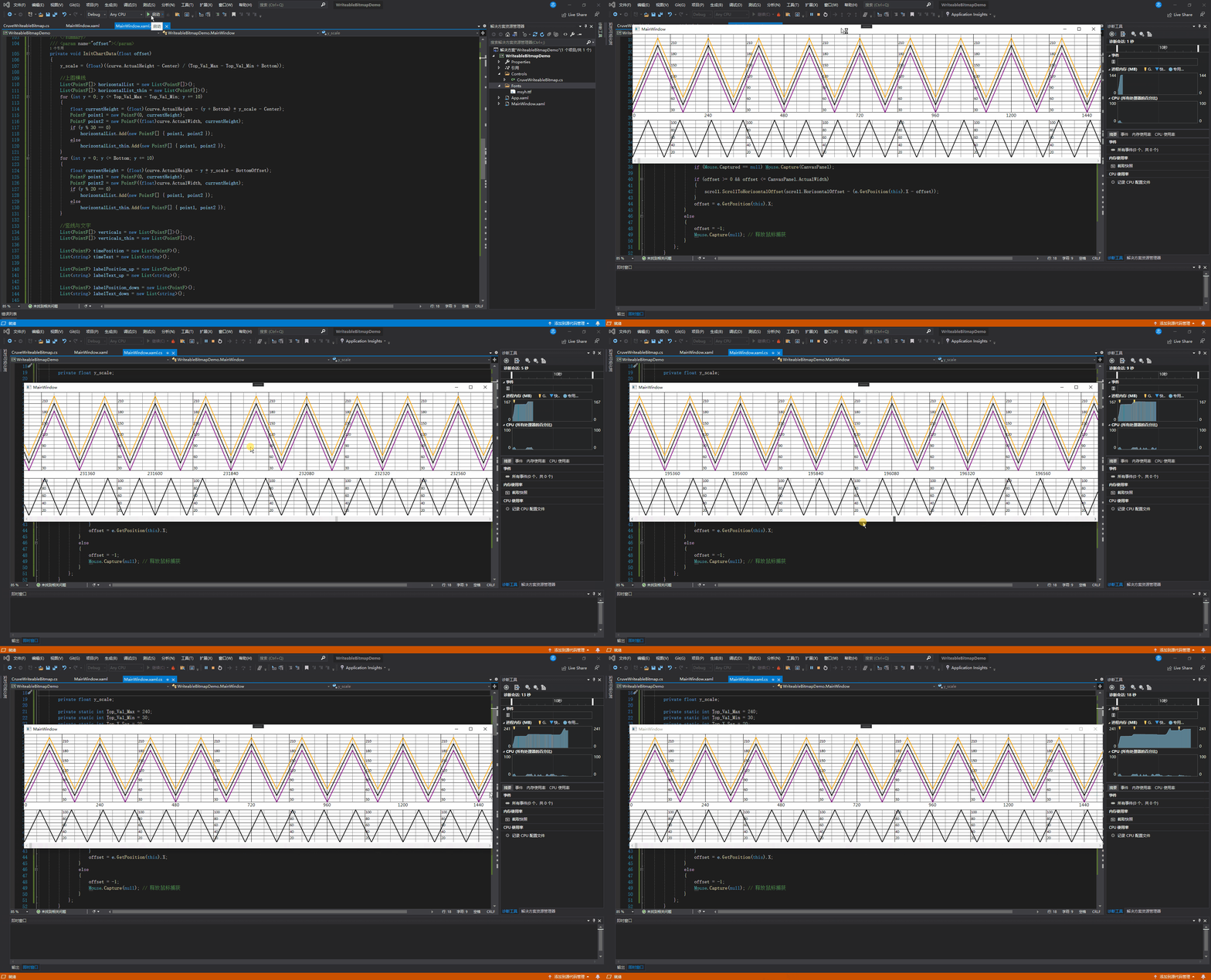
4、运行效果如下,欢迎各位大佬指点
我正在编写一个包含C扩展的gem。通常当我写一个gem时,我会遵循TDD的过程,我会写一个失败的规范,然后处理代码直到它通过,等等......在“ext/mygem/mygem.c”中我的C扩展和在gemspec的“扩展”中配置的有效extconf.rb,如何运行我的规范并仍然加载我的C扩展?当我更改C代码时,我需要采取哪些步骤来重新编译代码?这可能是个愚蠢的问题,但是从我的gem的开发源代码树中输入“bundleinstall”不会构建任何native扩展。当我手动运行rubyext/mygem/extconf.rb时,我确实得到了一个Makefile(在整个项目的根目录中),然后当
我已经在Sinatra上创建了应用程序,它代表了一个简单的API。我想在生产和开发上进行部署。我想在部署时选择,是开发还是生产,一些方法的逻辑应该改变,这取决于部署类型。是否有任何想法,如何完成以及解决此问题的一些示例。例子:我有代码get'/api/test'doreturn"Itisdev"end但是在部署到生产环境之后我想在运行/api/test之后看到ItisPROD如何实现? 最佳答案 根据SinatraDocumentation:EnvironmentscanbesetthroughtheRACK_ENVenvironm
我们的git存储库中目前有一个Gemfile。但是,有一个gem我只在我的环境中本地使用(我的团队不使用它)。为了使用它,我必须将它添加到我们的Gemfile中,但每次我checkout到我们的master/dev主分支时,由于与跟踪的gemfile冲突,我必须删除它。我想要的是类似Gemfile.local的东西,它将继承从Gemfile导入的gems,但也允许在那里导入新的gems以供使用只有我的机器。此文件将在.gitignore中被忽略。这可能吗? 最佳答案 设置BUNDLE_GEMFILE环境变量:BUNDLE_GEMFI
这似乎非常适得其反,因为太多的gem会在window上破裂。我一直在处理很多mysql和ruby-mysqlgem问题(gem本身发生段错误,一个名为UnixSocket的类显然在Windows机器上不能正常工作,等等)。我只是在浪费时间吗?我应该转向不同的脚本语言吗? 最佳答案 我在Windows上使用Ruby的经验很少,但是当我开始使用Ruby时,我是在Windows上,我的总体印象是它不是Windows原生系统。因此,在主要使用Windows多年之后,开始使用Ruby促使我切换回原来的系统Unix,这次是Linux。Rub
我正在玩HTML5视频并且在ERB中有以下片段:mp4视频从在我的开发环境中运行的服务器很好地流式传输到chrome。然而firefox显示带有海报图像的视频播放器,但带有一个大X。问题似乎是mongrel不确定ogv扩展的mime类型,并且只返回text/plain,如curl所示:$curl-Ihttp://0.0.0.0:3000/pr6.ogvHTTP/1.1200OKConnection:closeDate:Mon,19Apr201012:33:50GMTLast-Modified:Sun,18Apr201012:46:07GMTContent-Type:text/plain
无论您是想搭建桌面端、WEB端或者移动端APP应用,HOOPSPlatform组件都可以为您提供弹性的3D集成架构,同时,由工业领域3D技术专家组成的HOOPS技术团队也能为您提供技术支持服务。如果您的客户期望有一种在多个平台(桌面/WEB/APP,而且某些客户端是“瘦”客户端)快速、方便地将数据接入到3D应用系统的解决方案,并且当访问数据时,在各个平台上的性能和用户体验保持一致,HOOPSPlatform将帮助您完成。利用HOOPSPlatform,您可以开发在任何环境下的3D基础应用架构。HOOPSPlatform可以帮您打造3D创新型产品,HOOPSSDK包含的技术有:快速且准确的CAD
在应用开发中,有时候我们需要获取系统的设备信息,用于数据上报和行为分析。那在鸿蒙系统中,我们应该怎么去获取设备的系统信息呢,比如说获取手机的系统版本号、手机的制造商、手机型号等数据。1、获取方式这里分为两种情况,一种是设备信息的获取,一种是系统信息的获取。1.1、获取设备信息获取设备信息,鸿蒙的SDK包为我们提供了DeviceInfo类,通过该类的一些静态方法,可以获取设备信息,DeviceInfo类的包路径为:ohos.system.DeviceInfo.具体的方法如下:ModifierandTypeMethodDescriptionstatic StringgetAbiList()Obt
@作者:SYFStrive @博客首页:HomePage📜:微信小程序📌:个人社区(欢迎大佬们加入)👉:社区链接🔗📌:觉得文章不错可以点点关注👉:专栏连接🔗💃:感谢支持,学累了可以先看小段由小胖给大家带来的街舞👉微信小程序(🔥)目录自定义组件-behaviors 1、什么是behaviors 2、behaviors的工作方式 3、创建behavior 4、导入并使用behavior 5、behavior中所有可用的节点 6、同名字段的覆盖和组合规则总结最后自定义组件-behaviors 1、什么是behaviorsbehaviors是小程序中,用于实现
了解Rails缓存如何工作的人可以真正帮助我。这是嵌套在Rails::Initializer.runblock中的代码:config.after_initializedoSomeClass.const_set'SOME_CONST','SOME_VAL'end现在,如果我运行script/server并发出请求,一切都很好。然而,在我的Rails应用程序的第二个请求中,一切都因单元化常量错误而变得糟糕。在生产模式下,我可以成功发出第二个请求,这意味着常量仍然存在。我已通过将以上内容更改为以下内容来解决问题:config.after_initializedorequire'some_cl
我有一个使用PDFKit呈现网页的pdf版本的Rails应用程序。我使用Thin作为开发服务器。问题是当我处于开发模式时。当我使用“bundleexecrailss”启动我的服务器并尝试呈现任何PDF时,整个过程会陷入僵局,因为当您呈现PDF时,会向服务器请求一些额外的资源,如图像和css,看起来只有一个线程.如何配置Rails开发服务器以运行多个工作线程?非常感谢。 最佳答案 我找到的最简单的解决方案是unicorn.geminstallunicorn创建一个unicorn.conf:worker_processes3然后使用它:
