Linux下安装PostgreSQL
PostgreSQL数据库是目前功能强大的开源数据库,支持丰富的数据类型(如JSON和JSONB类型、数组类型)和自定义类型。而且他提供了丰富的接口,可以很容易的扩展它的功能,如可以再GiST框架下实现自己的索引类型等。PostgreSQL是完全的事务安全性数据库,完整地支持外键、联合、视图、触发器和存储过程(并支持多种语言开发存储过程)。它支持了大多数的SQL:2008标准的数据类型,包括整型、数值值、布尔型、字节型、字符型、日期型、时间间隔型和时间型,它也支持存储二进制的大对像,包括图片、声音和视频。PostgreSQL对很多高级开发语言有原生的编程接口,如C/C++、Java、.Net、Perl、Python、Ruby、Tcl 和ODBC以及其他语言等,也包含各种文档。
从技术角度来讲,PostgreSQL 采用的是比较经典的C/S(client/server)结构,也就是一个客户端对应一个服务器端守护进程的模式,这个守护进程分析客户端来的查询请求,生成规划树,进行数据检索并最终把结果格式化输出后返回给客户端。为了便于客户端的程序的编写,由数据库服务器提供了统一的客户端 C 接口。而不同的客户端接口都是源自这个 C 接口,比如ODBC,JDBC,Python,Perl,Tcl,C/C++,ESQL等, 同时也要指出的是,PostgreSQL 对接口的支持也是非常丰富的,几乎支持所有类型的数据库客户端接口。这一点也可以说是 PostgreSQL 一大优点。
PostgreSQL强壮的一个原因源于它的架构。和商业数据库一样,PostgreSQL可以用于C/S(客户/服务器)环境。这对于用户和开发人员有很多好处。
linux下安装PostgreSQL可采用三种方式,二进制已编绎安装包、yum安装、源码安装三种方式进行安装
第一种安装方式:通过二进制已编绎安装包安装
https://www.enterprisedb.com/download-postgresql-binaries
https://get.enterprisedb.com/postgresql/postgresql-10.22-1-linux-x64-binaries.tar.gz
#创建用户
useradd postgres
#设置密码
passwd postgres
tar -xvf postgresql-10.12-1-linux-x64-binaries.tar.gz -C /home/postgres/
mkdir -p /home/postgres/pgsql/data
mkdir -p /home/postgres/pgsql/logs
./bin/initdb -E utf8 -D /home/postgres/pgsql/data
初始化结果如下:
[postgres@localhost pgsql]$ ./bin/initdb -E utf8 -D /home/postgres/pgsql/data
The files belonging to this database system will be owned by user "postgres".
This user must also own the server process.

The database cluster will be initialized with locale "en_US.UTF-8".
The default text search configuration will be set to "english".

Data page checksums are disabled.

fixing permissions on existing directory /home/postgres/pgsql/data ... ok
creating subdirectories ... ok
selecting default max_connections ... 100
selecting default shared_buffers ... 128MB
selecting default timezone ... PRC
selecting dynamic shared memory implementation ... posix
creating configuration files ... ok
running bootstrap script ... ok
performing post-bootstrap initialization ... ok
syncing data to disk ... ok

WARNING: enabling "trust" authentication for local connections
You can change this by editing pg_hba.conf or using the option -A, or
--auth-local and --auth-host, the next time you run initdb.

Success. You can now start the database server using:

    ./bin/pg_ctl -D /home/postgres/pgsql/data -l logfile start
./bin/pg_ctl -D /home/postgres/pgsql/data -l /home/postgres/pgsql/logs/pgsql.log start
./bin/pg_ctl -D /home/postgres/pgsql/data stop
./psql
create user test_user with password '123456'; // 创建用户
create database test_db owner test_user; // 创建数据库
grant all privileges on database test_db to test_user; // 授权
\q
./bin/psql -h 127.0.0.1 -d test_db -U test_user -p 5432
####修改postgresql.conf文件,取消 listen_addresses 的注释,将参数值改为“*”

####修改pg_hba.conf文件,增加下图红框部分内容
host    all             all             0.0.0.0/0            md5

####navicat
https://www.cnblogs.com/zhi-leaf/p/11432054.html
第一种安装方式:通过yum安装
https://www.postgresql.org/download/linux/redhat/
# Install the repository RPM:
sudo yum install -y https://download.postgresql.org/pub/repos/yum/reporpms/EL-7-x86_64/pgdg-redhat-repo-latest.noarch.rpm

# Install PostgreSQL:
sudo yum install -y postgresql10-server

## 采用ln -s方式挂载/var/lib/pgsql/10/data目录用来修改数据目录,以/home/postgresdata为例
mkdir /home/postgresdata -p
chown -R postgres:postgres /home/postgresdata
rm -rf /var/lib/pgsql/10/data
ln -s /home/postgresdata /var/lib/pgsql/10/data
chown -R postgres:postgres /var/lib/pgsql/10/data

# Optionally initialize the database and enable automatic start:
sudo /usr/pgsql-10/bin/postgresql-10-setup initdb
sudo systemctl enable postgresql-10
sudo systemctl start postgresql-10
第三种安装方式:通过源码安装
部分内容参考了此文https://www.cnblogs.com/wsum/p/15522211.html
##下载地址和源码
https://www.postgresql.org/download/
postgresql-14.5.tar.gz
#创建用户
useradd postgres
#设置密码
passwd postgres
以安装到/opt/postgresql目录下为例
##1.解压
tar -xvf postgresql-14.5.tar.gz -C /opt/

##2.yum依赖
yum install -y gcc gcc-c++
yum install -y readline-devel
yum install -y zlib-devel

##3.编绎,并安装到/opt/postgresql目录
mkdir /opt/postgresql
cd /opt/postgresql-14.5
./configure --prefix=/opt/postgresql
make
make install

#4.准备数据目录
mkdir -p /opt/postgresql/pgsqldata
chown -R postgres:postgres /opt/postgresql/pgsqldata

#5.切换到postgres用户
su postgres
/opt/postgresql/bin/initdb -D /opt/postgresql/pgsqldata #初始化数据库
mkdir /opt/postgresql/pgsqldata/logs
/opt/postgresql/bin/pg_ctl -D /opt/postgresql/pgsqldata -l /opt/postgresql/pgsqldata/logs/pgsql.log start #启动
/opt/postgresql/bin/createdb test #创建测试库
/opt/postgresql/bin/psql test #进入数据库

#6.修改管理员密码
ALTER USER postgres WITH PASSWORD '123456';
如果需要随开机启机,可以制作成自启动服务如下:
######postgresql 服务
cat > /usr/lib/systemd/system/postgresql.service << EOF
[Unit]
Description=postgreSQL Server
After=network.target

[Service]
User=postgres
Group=postgres
Type=forking
TimeoutSec=0
PermissionsStartOnly=true
PIDFile=/opt/postgresql/pgsqldata/postmaster.pid
ExecStart=/opt/postgresql/bin/pg_ctl -D /opt/postgresql/pgsqldata -l /opt/postgresql/pgsqldata/logs/pgsql.log start
ExecReload=/opt/postgresql/bin/pg_ctl -D /opt/postgresql/pgsqldata reload
ExecStop=/opt/postgresql/bin/pg_ctl -D /opt/postgresql/pgsqldata stop
PrivateTmp=true

LimitNOFILE = 65535
Restart=on-failure
RestartSec=3
RestartPreventExitStatus=1
PrivateTmp=false


[Install]
WantedBy=multi-user.target
EOF

######服务启动停止
systemctl daemon-reload
systemctl stop postgresql
systemctl start postgresql
systemctl enable postgresql
查看当前的数据库列表####查看当前的数据库列表
\l
建表####建表
create table test(
id bigint ,
name varchar(50),
age int,
password varchar(30)
);
插入与查询####插入
insert into test values(1,'test',21,'123');
####查询
select * from test;
查看pgsql版本SELECT version();
查看用户名和密码SELECT * FROM pg_authid;
获取服务器上所有数据库信息SELECT * FROM pg_database ORDER BY datname;
得到db中所有表的信息#获取所有库表信息
select * from pg_tables ORDER BY schemaname;
#获取当前
\d 库名 获取库中数据表名列表
\d 表名 获取表结构字段描述
备份与还原/opt/postgresql/bin/pg_dump -h localhost -U postgres -p 5432 -d test -s -f /root/data.sql
/opt/postgresql/bin/psql -h localhost -p 5432 -U postgres -W -d test < /root/data.sql
更多参考PostgreSQL 教程PostgreSQL 教程:
https://www.runoob.com/postgresql/postgresql-tutorial.html
#
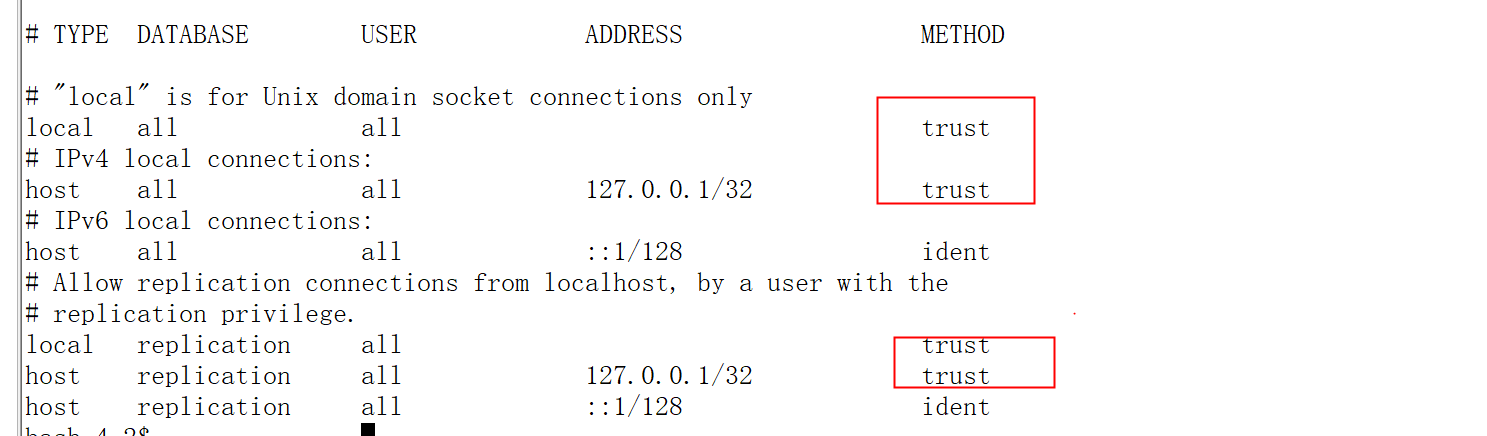
vi /var/lib/pgsql/10/data/pg_hba.conf

将localhost和127.0.0.1的两行的ident修改成trust,然后重启服务
我想为Heroku构建一个Rails3应用程序。他们使用Postgres作为他们的数据库,所以我通过MacPorts安装了postgres9.0。现在我需要一个postgresgem并且共识是出于性能原因你想要pggem。但是我对我得到的错误感到非常困惑当我尝试在rvm下通过geminstall安装pg时。我已经非常明确地指定了所有postgres目录的位置可以找到但仍然无法完成安装:$envARCHFLAGS='-archx86_64'geminstallpg--\--with-pg-config=/opt/local/var/db/postgresql90/defaultdb/po
我打算为ruby脚本创建一个安装程序,但我希望能够确保机器安装了RVM。有没有一种方法可以完全离线安装RVM并且不引人注目(通过不引人注目,就像创建一个可以做所有事情的脚本而不是要求用户向他们的bash_profile或bashrc添加一些东西)我不是要脚本本身,只是一个关于如何走这条路的快速指针(如果可能的话)。我们还研究了这个很有帮助的问题:RVM-isthereawayforsimpleofflineinstall?但有点误导,因为答案只向我们展示了如何离线在RVM中安装ruby。我们需要能够离线安装RVM本身,并查看脚本https://raw.github.com/wayn
我有一个奇怪的问题:我在rvm上安装了rubyonrails。一切正常,我可以创建项目。但是在我输入“railsnew”时重新启动后,我有“程序'rails'当前未安装。”。SystemUbuntu12.04ruby-v"1.9.3p194"gemlistactionmailer(3.2.5)actionpack(3.2.5)activemodel(3.2.5)activerecord(3.2.5)activeresource(3.2.5)activesupport(3.2.5)arel(3.0.2)builder(3.0.0)bundler(1.1.4)coffee-rails(
我刚刚为fedora安装了emacs。我想用emacs编写ruby。为ruby提供代码提示、代码完成类型功能所需的工具、扩展是什么? 最佳答案 ruby-mode已经包含在Emacs23之后的版本中。不过,它也可以通过ELPA获得。您可能感兴趣的其他一些事情是集成RVM、feature-mode(Cucumber)、rspec-mode、ruby-electric、inf-ruby、rinari(用于Rails)等。这是我当前用于Ruby开发的Emacs配置:https://github.com/citizen428/emacs
我正在尝试在我的centos服务器上安装therubyracer,但遇到了麻烦。$geminstalltherubyracerBuildingnativeextensions.Thiscouldtakeawhile...ERROR:Errorinstallingtherubyracer:ERROR:Failedtobuildgemnativeextension./usr/local/rvm/rubies/ruby-1.9.3-p125/bin/rubyextconf.rbcheckingformain()in-lpthread...yescheckingforv8.h...no***e
我的最终目标是安装当前版本的RubyonRails。我在OSXMountainLion上运行。到目前为止,这是我的过程:已安装的RVM$\curl-Lhttps://get.rvm.io|bash-sstable检查已知(我假设已批准)安装$rvmlistknown我看到当前的稳定版本可用[ruby-]2.0.0[-p247]输入命令安装$rvminstall2.0.0-p247注意:我也试过这些安装命令$rvminstallruby-2.0.0-p247$rvminstallruby=2.0.0-p247我很快就无处可去了。结果:$rvminstall2.0.0-p247Search
我实际上是在尝试使用RVM在我的OSX10.7.5上更新ruby,并在输入以下命令后:rvminstallruby我得到了以下回复:Searchingforbinaryrubies,thismighttakesometime.Checkingrequirementsforosx.Installingrequirementsforosx.Updatingsystem.......Errorrunning'requirements_osx_brew_update_systemruby-2.0.0-p247',pleaseread/Users/username/.rvm/log/138121
由于fast-stemmer的问题,我很难安装我想要的任何rubygem。我把我得到的错误放在下面。Buildingnativeextensions.Thiscouldtakeawhile...ERROR:Errorinstallingfast-stemmer:ERROR:Failedtobuildgemnativeextension./System/Library/Frameworks/Ruby.framework/Versions/2.0/usr/bin/rubyextconf.rbcreatingMakefilemake"DESTDIR="cleanmake"DESTDIR=
当我尝试安装Ruby时遇到此错误。我试过查看this和this但无济于事➜~brewinstallrubyWarning:YouareusingOSX10.12.Wedonotprovidesupportforthispre-releaseversion.Youmayencounterbuildfailuresorotherbreakages.Pleasecreatepull-requestsinsteadoffilingissues.==>Installingdependenciesforruby:readline,libyaml,makedepend==>Installingrub
当我执行>rvminstall1.9.2时一切顺利。然后我做>rvmuse1.9.2也很顺利。但是当涉及到ruby-v时..sam@sjones:~$rvminstall1.9.2/home/sam/.rvm/rubies/ruby-1.9.2-p136,thismaytakeawhiledependingonyourcpu(s)...ruby-1.9.2-p136-#fetchingruby-1.9.2-p136-#downloadingruby-1.9.2-p136,thismaytakeawhiledependingonyourconnection...%Total%Rece
