QT 串口调试工具
-----------------------------------------下载所需工具---------------------------------------------------------------------
链接:https://pan.baidu.com/s/1QkT36S4EnH2HEAhZ1TZ8ug?pwd=ilqg
提取码:ilqg
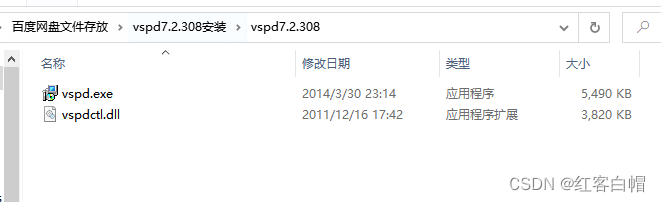
-------------------------------------首先点击.exe文件-----------------------------------------------------------------------
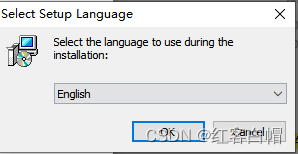
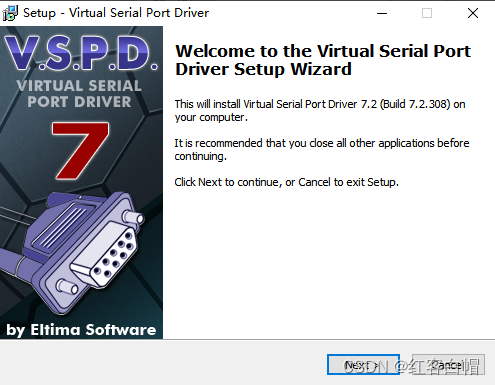
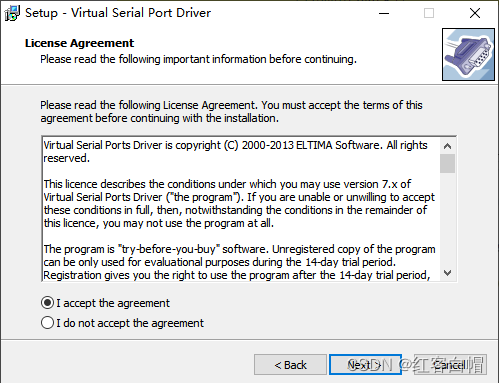

------------------------------------安装在指定目录等下要用--------------------------------------------------
将vspdctl.dll替换掉你安装文件的所在目录,不然出现错误,就掉头发了哦
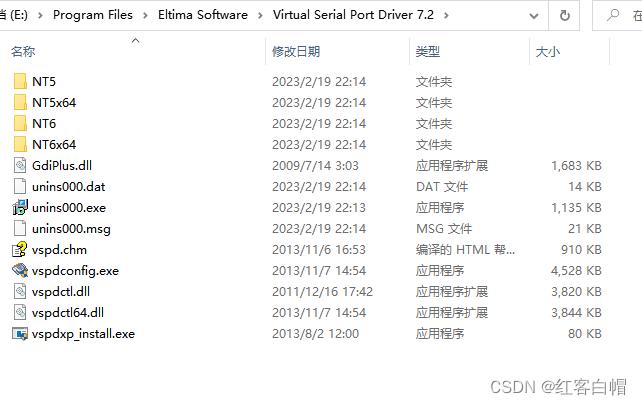
-------------------------------------打开软件看看有啥---------------------------------------------------=
注意:请记住这里的操作,后面还要用到

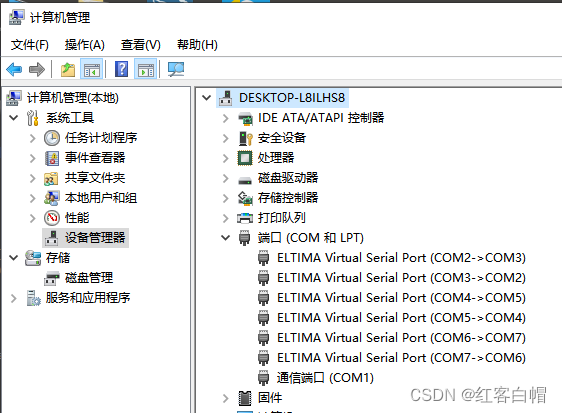
-------------------------------------------通过上面的操作,出现以下界面,说明设置成功---------------------
点击电脑—管理—设备管理器–端口–可以看到成功了

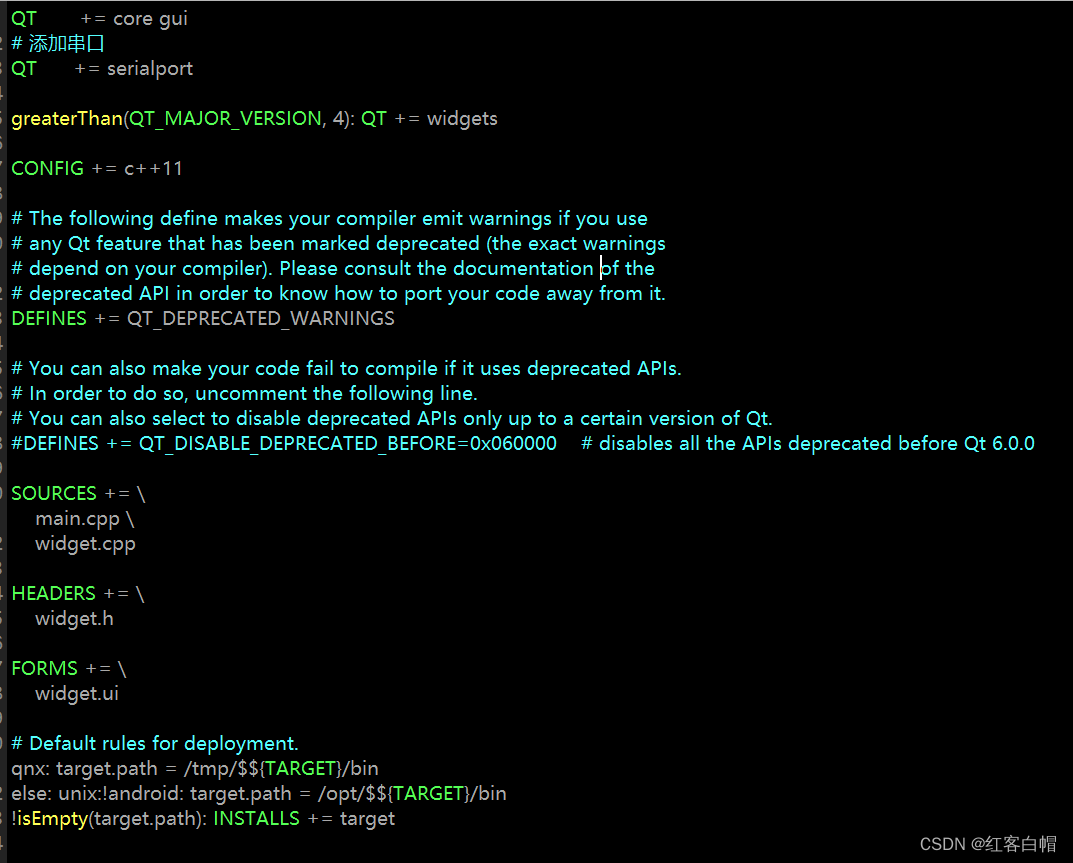
项目.pro添加以下信息
# 添加串口
QT      += serialport
这里不多说,只要是按钮都要转到槽,具体槽函数请看源代码

使用两个串口对象实现
#ifndef WIDGET_H
#define WIDGET_H

#include <QWidget>
#include <QSerialPort>          //提供访问串口得到功能
#include <QSerialPortInfo>   //提供系统中存在的串口信息
#include <QMessageBox>    //信息弹出框
#include <QDebug>

QT_BEGIN_NAMESPACE
namespace Ui { class Widget; }
QT_END_NAMESPACE

//使用枚举保存波特率
typedef enum
{
    B1200 =1200,
    B9600 = 9600,
    B115200 = 115200,
    B921600 = 921600
}Baud;

class Widget : public QWidget
{
    Q_OBJECT

public:
    Widget(QWidget *parent = nullptr);
    ~Widget();

private slots:
     //接收串口数据
     void SerialPortReadyRead();    //比作COM6
     void Serial2PortReadyRead();  //比作COM7

private slots:
    void on_PB_receive_clicked();
    void on_PB_send_clicked();
    void on_PB_detectserial_clicked();
    void on_PB_openserial_clicked();
    void on_comboBox_b_currentIndexChanged(int index);
    void on_PB_openserial_2_clicked();
    void on_PB_send_2_clicked();

private:
    Ui::Widget *ui;

    QSerialPort serial;   //串口1
    QSerialPort serial2; //串口2
};
#endif // WIDGET_H
-------------------------------------------------------------------------------------------------------------------------------------
----------------------实现信号与槽,信号为缓冲区有数据时,槽函数作为接收数据------------------------------------
  //连接信号与槽
    QObject::connect(&serial, SIGNAL(readyRead()),this, SLOT(SerialPortReadyRead()));
    QObject::connect(&serial2, SIGNAL(readyRead()),this, SLOT(Serial2PortReadyRead()));
------------------------------------------------串口对象一次性读取全部----------------------------------------------------------
//串口2接收串口1数据
void Widget::SerialPortReadyRead()
{
    qDebug()<<"===============有数据==================";
    //从缓冲区读取文件
    QByteArray buffer = serial.readAll();
    //获取界面已经读取的数据
    QString recv = ui->plainTextEdit_2->toPlainText();
    recv +=QString(buffer);

    //显示全部
    ui->plainTextEdit_2->appendPlainText(recv);
}
//串口1接收串口2数据
void Widget::Serial2PortReadyRead()
{
    qDebug()<<"===============有数据2==================";
    //从缓冲区读取文件
    QByteArray buffer = serial2.readAll();
    //获取界面已经读取的数据
    QString recv = ui->plainTextEdit->toPlainText();
    recv +=QString(buffer);

    //显示全部
    ui->plainTextEdit->appendPlainText(recv);
}
--------------------------------------------------------------向串口写入数据------------------------------------------------------
//作为串口1
void Widget::on_PB_send_clicked()
{
    //向串口写入数据
    QByteArray data = ui->plainTextEdit_2->toPlainText().toUtf8();
    qDebug()<<"发送数据 data = "<<data;
    serial.write(data);
    if(!serial.isWritable())
        qDebug()<<"写入失败";
}
//作为串口2
void Widget::on_PB_send_2_clicked()
{
    //向串口2写入数据
    QByteArray data = ui->plainTextEdit->toPlainText().toUtf8();
    qDebug()<<"发送数据 data2 = "<<data;
    serial2.write(data);
    if(!serial2.isWritable())
        qDebug()<<"写入失败";
}
-----------------------------------------配置串口并打开--------------------------------------------------------------------
void Widget::on_PB_openserial_clicked()
{
    if(ui->PB_openserial->text() == QString("打开串口1"))
    {
        //设置串口名
        serial.setPortName(ui->comboBox_id->currentText());
        //设置波特率
        serial.setBaudRate(ui->comboBox_b->currentText().toUInt());
        //设置数据位
        switch (ui->comboBox_data->currentIndex())
        {
            case 8:serial.setDataBits(QSerialPort::Data8);break;
            default:break;
        }
        //设置奇偶校验 无
        switch (ui->comboBox_crc->currentIndex())
        {
            case 0:serial.setParity(QSerialPort::NoParity);break;
            default:break;
        }
        //设置停止位
        switch (ui->comboBox_stop->currentIndex())
        {
            case 1:serial.setStopBits(QSerialPort::OneStop);break;
            default:break;
        }
        //设置流控 无
        serial.setFlowControl(QSerialPort::NoFlowControl);

        //打开串口
        if(!serial.open(QIODevice::ReadWrite))
        {
            QMessageBox::about(NULL,"提示","串口1打开失败");
        }
        if(serial.isOpen())
            QMessageBox::about(NULL,"提示","串口1打开成功");
        //下拉菜单控件失能
        ui->comboBox_b->setEnabled(false);
        ui->comboBox_id->setEnabled(false);
        ui->comboBox_crc->setEnabled(false);
        ui->comboBox_data->setEnabled(false);
        ui->comboBox_stop->setEnabled(false);

        ui->PB_openserial->setText(tr("关闭串口1"));
        //发送按键使能
        ui->PB_send->setEnabled(true);
    }
    else
    {
        //关闭串口
        serial.close();

        //下拉使能
        ui->comboBox_b->setEnabled(true);
        ui->comboBox_id->setEnabled(true);
        ui->comboBox_crc->setEnabled(true);
        ui->comboBox_data->setEnabled(true);
        ui->comboBox_stop->setEnabled(true);

         ui->PB_openserial->setText(tr("打开串口1"));

        //发送失能
        ui->PB_send->setEnabled(false);
    }
}

//获取波特率索引
void Widget::on_comboBox_b_currentIndexChanged(int index)
{
     if(ui->comboBox_b->itemText(index).toUInt() == B9600)
     {
         qDebug()<<"itemText = "<<ui->comboBox_b->itemText(index);
         ui->comboBox_b->setCurrentIndex(index);
     }
     else if(ui->comboBox_b->itemText(index).toUInt() == B115200)
     {
         qDebug()<<"itemText = "<<ui->comboBox_b->itemText(index);
         ui->comboBox_b->setCurrentIndex(index);
     }
}


void Widget::on_PB_openserial_2_clicked()
{
    if(ui->PB_openserial_2->text() == QString("打开串口2"))
    {
        //设置串口名
        serial2.setPortName(ui->comboBox_id_2->currentText());
        //设置波特率
        serial2.setBaudRate(ui->comboBox_b->currentText().toUInt());
        //设置数据位
        switch (ui->comboBox_data->currentIndex())
        {
            case 8:serial2.setDataBits(QSerialPort::Data8);break;
            default:break;
        }
        //设置奇偶校验 无
        switch (ui->comboBox_crc->currentIndex())
        {
            case 0:serial2.setParity(QSerialPort::NoParity);break;
            default:break;
        }
        //设置停止位
        switch (ui->comboBox_stop->currentIndex())
        {
            case 1:serial2.setStopBits(QSerialPort::OneStop);break;
            default:break;
        }
        //设置流控 无
        serial2.setFlowControl(QSerialPort::NoFlowControl);

        //打开串口
        if(!serial2.open(QIODevice::ReadWrite))
        {
            QMessageBox::about(NULL,"提示","串口2打开失败");
        }

        if(serial2.isOpen())
            QMessageBox::about(NULL,"提示","串口2打开成功");
        //下拉菜单控件失能
        ui->comboBox_b->setEnabled(false);
        ui->comboBox_id_2->setEnabled(false);
        ui->comboBox_crc->setEnabled(false);
        ui->comboBox_data->setEnabled(false);
        ui->comboBox_stop->setEnabled(false);

        ui->PB_openserial_2->setText(tr("关闭串口2"));
        //发送按键使能
        ui->PB_send_2->setEnabled(true);
    }
    else
    {
        //关闭串口
        serial2.close();

        //下拉使能
        ui->comboBox_b->setEnabled(true);
        ui->comboBox_id_2->setEnabled(true);
        ui->comboBox_crc->setEnabled(true);
        ui->comboBox_data->setEnabled(true);
        ui->comboBox_stop->setEnabled(true);

         ui->PB_openserial_2->setText(tr("打开串口2"));

        //发送失能
        ui->PB_send_2->setEnabled(false);
    }
}
-----------------------------------------------------------------源码------------------------------------------------------------
#include "widget.h"
#include "ui_widget.h"

Widget::Widget(QWidget *parent)
    : QWidget(parent)
    , ui(new Ui::Widget)
{
    ui->setupUi(this);

    //连接信号与槽
    QObject::connect(&serial, SIGNAL(readyRead()),this, SLOT(SerialPortReadyRead()));
    QObject::connect(&serial2, SIGNAL(readyRead()),this, SLOT(Serial2PortReadyRead()));

    //发送按钮不使能
    ui->PB_send->setDisabled(true);
    ui->PB_send_2->setDisabled(true);
}

Widget::~Widget()
{
    delete ui;
}

//串口2接收串口1数据
void Widget::SerialPortReadyRead()
{
    qDebug()<<"===============有数据==================";
    //从缓冲区读取文件
    QByteArray buffer = serial.readAll();
    //获取界面已经读取的数据
    QString recv = ui->plainTextEdit_2->toPlainText();
    recv +=QString(buffer);

    //显示全部
    ui->plainTextEdit_2->appendPlainText(recv);
}
//串口1接收串口2数据
void Widget::Serial2PortReadyRead()
{
    qDebug()<<"===============有数据2==================";
    //从缓冲区读取文件
    QByteArray buffer = serial2.readAll();
    //获取界面已经读取的数据
    QString recv = ui->plainTextEdit->toPlainText();
    recv +=QString(buffer);

    //显示全部
    ui->plainTextEdit->appendPlainText(recv);
}


void Widget::on_PB_receive_clicked()
{
    //清空接收框数据
    ui->plainTextEdit->clear();
    ui->plainTextEdit_2->clear();
}
//作为串口1
void Widget::on_PB_send_clicked()
{
    //向串口写入数据
    QByteArray data = ui->plainTextEdit_2->toPlainText().toUtf8();
    qDebug()<<"发送数据 data = "<<data;
    serial.write(data);
    if(!serial.isWritable())
        qDebug()<<"写入失败";
}
//作为串口2
void Widget::on_PB_send_2_clicked()
{
    //向串口2写入数据
    QByteArray data = ui->plainTextEdit->toPlainText().toUtf8();
    qDebug()<<"发送数据 data2 = "<<data;
    serial2.write(data);
    if(!serial2.isWritable())
        qDebug()<<"写入失败";
}
//检测串口
void Widget::on_PB_detectserial_clicked()
{
    //清空串口id
    ui->comboBox_id->clear();
    ui->comboBox_id_2->clear();

    //通过这个类查找可用串口1
    foreach(const QSerialPortInfo &info, QSerialPortInfo::availablePorts())
    {
        qDebug()<<"info.portName() = "<<info.portName();
        ui->comboBox_id->addItem(info.portName());
    }

    //通过这个类查找可用串口2
    foreach(const QSerialPortInfo &info, QSerialPortInfo::availablePorts())
    {
        qDebug()<<"info.portName() = "<<info.portName();
        ui->comboBox_id_2->addItem(info.portName());
    }
}

void Widget::on_PB_openserial_clicked()
{
    if(ui->PB_openserial->text() == QString("打开串口1"))
    {
        //设置串口名
        serial.setPortName(ui->comboBox_id->currentText());
        //设置波特率
        serial.setBaudRate(ui->comboBox_b->currentText().toUInt());
        //设置数据位
        switch (ui->comboBox_data->currentIndex())
        {
            case 8:serial.setDataBits(QSerialPort::Data8);break;
            default:break;
        }
        //设置奇偶校验 无
        switch (ui->comboBox_crc->currentIndex())
        {
            case 0:serial.setParity(QSerialPort::NoParity);break;
            default:break;
        }
        //设置停止位
        switch (ui->comboBox_stop->currentIndex())
        {
            case 1:serial.setStopBits(QSerialPort::OneStop);break;
            default:break;
        }
        //设置流控 无
        serial.setFlowControl(QSerialPort::NoFlowControl);

        //打开串口
        if(!serial.open(QIODevice::ReadWrite))
        {
            QMessageBox::about(NULL,"提示","串口1打开失败");
        }
        if(serial.isOpen())
            QMessageBox::about(NULL,"提示","串口1打开成功");
        //下拉菜单控件失能
        ui->comboBox_b->setEnabled(false);
        ui->comboBox_id->setEnabled(false);
        ui->comboBox_crc->setEnabled(false);
        ui->comboBox_data->setEnabled(false);
        ui->comboBox_stop->setEnabled(false);

        ui->PB_openserial->setText(tr("关闭串口1"));
        //发送按键使能
        ui->PB_send->setEnabled(true);
    }
    else
    {
        //关闭串口
        serial.close();

        //下拉使能
        ui->comboBox_b->setEnabled(true);
        ui->comboBox_id->setEnabled(true);
        ui->comboBox_crc->setEnabled(true);
        ui->comboBox_data->setEnabled(true);
        ui->comboBox_stop->setEnabled(true);

         ui->PB_openserial->setText(tr("打开串口1"));

        //发送失能
        ui->PB_send->setEnabled(false);
    }
}

//获取波特率索引
void Widget::on_comboBox_b_currentIndexChanged(int index)
{
     if(ui->comboBox_b->itemText(index).toUInt() == B9600)
     {
         qDebug()<<"itemText = "<<ui->comboBox_b->itemText(index);
         ui->comboBox_b->setCurrentIndex(index);
     }
     else if(ui->comboBox_b->itemText(index).toUInt() == B115200)
     {
         qDebug()<<"itemText = "<<ui->comboBox_b->itemText(index);
         ui->comboBox_b->setCurrentIndex(index);
     }
}


void Widget::on_PB_openserial_2_clicked()
{
    if(ui->PB_openserial_2->text() == QString("打开串口2"))
    {
        //设置串口名
        serial2.setPortName(ui->comboBox_id_2->currentText());
        //设置波特率
        serial2.setBaudRate(ui->comboBox_b->currentText().toUInt());
        //设置数据位
        switch (ui->comboBox_data->currentIndex())
        {
            case 8:serial2.setDataBits(QSerialPort::Data8);break;
            default:break;
        }
        //设置奇偶校验 无
        switch (ui->comboBox_crc->currentIndex())
        {
            case 0:serial2.setParity(QSerialPort::NoParity);break;
            default:break;
        }
        //设置停止位
        switch (ui->comboBox_stop->currentIndex())
        {
            case 1:serial2.setStopBits(QSerialPort::OneStop);break;
            default:break;
        }
        //设置流控 无
        serial2.setFlowControl(QSerialPort::NoFlowControl);

        //打开串口
        if(!serial2.open(QIODevice::ReadWrite))
        {
            QMessageBox::about(NULL,"提示","串口2打开失败");
        }

        if(serial2.isOpen())
            QMessageBox::about(NULL,"提示","串口2打开成功");
        //下拉菜单控件失能
        ui->comboBox_b->setEnabled(false);
        ui->comboBox_id_2->setEnabled(false);
        ui->comboBox_crc->setEnabled(false);
        ui->comboBox_data->setEnabled(false);
        ui->comboBox_stop->setEnabled(false);

        ui->PB_openserial_2->setText(tr("关闭串口2"));
        //发送按键使能
        ui->PB_send_2->setEnabled(true);
    }
    else
    {
        //关闭串口
        serial2.close();

        //下拉使能
        ui->comboBox_b->setEnabled(true);
        ui->comboBox_id_2->setEnabled(true);
        ui->comboBox_crc->setEnabled(true);
        ui->comboBox_data->setEnabled(true);
        ui->comboBox_stop->setEnabled(true);

         ui->PB_openserial_2->setText(tr("打开串口2"));

        //发送失能
        ui->PB_send_2->setEnabled(false);
    }
}
#include "widget.h"

#include <QApplication>

int main(int argc, char *argv[])
{
    QApplication a(argc, argv);
    Widget w;
    w.show();
    return a.exec();
}


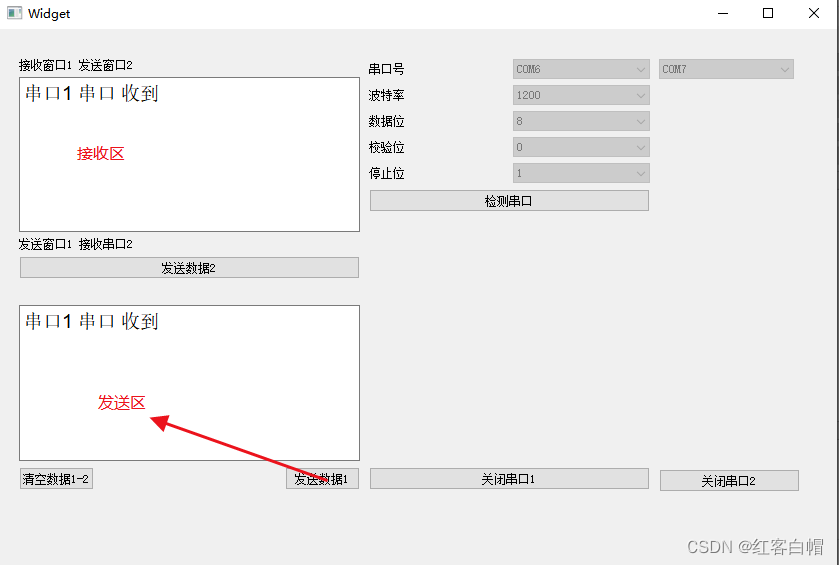
--------------------------------不想编写两个串口的,安装的串口助手里面有一个工具----------------------------------


可以看到,可以实现所需的功能
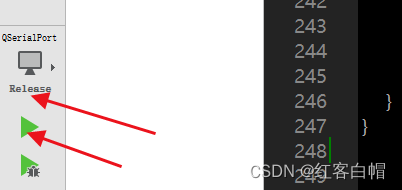
第一步QT编译使用如下
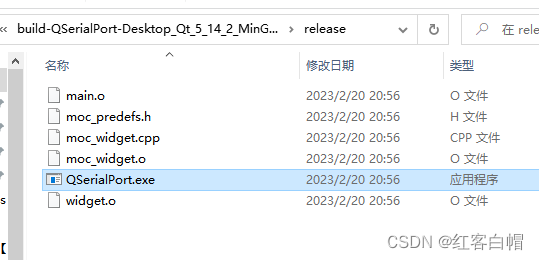
第二部,执行上述以后,去以下目录复制.exe文件到一个新建的文件夹
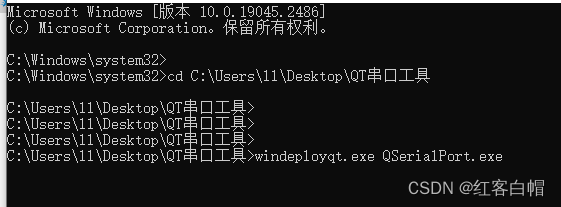
以管理员身份打开cmd,进入的这个新建的文件夹
windeployqt.exe 你的.exe文件名
由于没有一台未安装QT的电脑作为模拟,有些遗憾
为了提高成功率打开如下:

cd D:\Qt\Qt5.14.2\Tools\QtCreator\bin
进入以上目录,执行如下命令
D:\Qt\Qt5.14.2\5.14.2\mingw73_64>windeployqt.exe C:\Users\ll\Desktop\QT串口工具\QSerialPort.exe

-------------------------------------本次任务over-----------------------------------------------------------
假设我做了一个模块如下:m=Module.newdoclassCendend三个问题:除了对m的引用之外,还有什么方法可以访问C和m中的其他内容?我可以在创建匿名模块后为其命名吗(就像我输入“module...”一样)?如何在使用完匿名模块后将其删除,使其定义的常量不再存在? 最佳答案 三个答案:是的,使用ObjectSpace.此代码使c引用你的类(class)C不引用m:c=nilObjectSpace.each_object{|obj|c=objif(Class===objandobj.name=~/::C$/)}当然这取决于
作为我的Rails应用程序的一部分,我编写了一个小导入程序,它从我们的LDAP系统中吸取数据并将其塞入一个用户表中。不幸的是,与LDAP相关的代码在遍历我们的32K用户时泄漏了大量内存,我一直无法弄清楚如何解决这个问题。这个问题似乎在某种程度上与LDAP库有关,因为当我删除对LDAP内容的调用时,内存使用情况会很好地稳定下来。此外,不断增加的对象是Net::BER::BerIdentifiedString和Net::BER::BerIdentifiedArray,它们都是LDAP库的一部分。当我运行导入时,内存使用量最终达到超过1GB的峰值。如果问题存在,我需要找到一些方法来更正我的代
使用带有Rails插件的vim,您可以创建一个迁移文件,然后一次性打开该文件吗?textmate也可以这样吗? 最佳答案 你可以使用rails.vim然后做类似的事情::Rgeneratemigratonadd_foo_to_bar插件将打开迁移生成的文件,这正是您想要的。我不能代表textmate。 关于ruby-使用VimRails,您可以创建一个新的迁移文件并一次性打开它吗?,我们在StackOverflow上找到一个类似的问题: https://sta
我需要从一个View访问多个模型。以前,我的links_controller仅用于提供以不同方式排序的链接资源。现在我想包括一个部分(我假设)显示按分数排序的顶级用户(@users=User.all.sort_by(&:score))我知道我可以将此代码插入每个链接操作并从View访问它,但这似乎不是“ruby方式”,我将需要在不久的将来访问更多模型。这可能会变得很脏,是否有针对这种情况的任何技术?注意事项:我认为我的应用程序正朝着单一格式和动态页面内容的方向发展,本质上是一个典型的网络应用程序。我知道before_filter但考虑到我希望应用程序进入的方向,这似乎很麻烦。最终从任何
我想要做的是有2个不同的Controller,client和test_client。客户端Controller已经构建,我想创建一个test_clientController,我可以使用它来玩弄客户端的UI并根据需要进行调整。我主要是想绕过我在客户端中内置的验证及其对加载数据的管理Controller的依赖。所以我希望test_clientController加载示例数据集,然后呈现客户端Controller的索引View,以便我可以调整客户端UI。就是这样。我在test_clients索引方法中试过这个:classTestClientdefindexrender:template=>
我有一个包含模块的模型。我想在模块中覆盖模型的访问器方法。例如:classBlah这显然行不通。有什么想法可以实现吗? 最佳答案 您的代码看起来是正确的。我们正在毫无困难地使用这个确切的模式。如果我没记错的话,Rails使用#method_missing作为属性setter,因此您的模块将优先,阻止ActiveRecord的setter。如果您正在使用ActiveSupport::Concern(参见thisblogpost),那么您的实例方法需要进入一个特殊的模块:classBlah
如果您尝试在Ruby中的nil对象上调用方法,则会出现NoMethodError异常并显示消息:"undefinedmethod‘...’fornil:NilClass"然而,有一个tryRails中的方法,如果它被发送到一个nil对象,它只返回nil:require'rubygems'require'active_support/all'nil.try(:nonexisting_method)#noNoMethodErrorexceptionanymore那么try如何在内部工作以防止该异常? 最佳答案 像Ruby中的所有其他对象
关闭。这个问题需要detailsorclarity.它目前不接受答案。想改进这个问题吗?通过editingthispost添加细节并澄清问题.关闭8年前。Improvethisquestion为什么SecureRandom.uuid创建一个唯一的字符串?SecureRandom.uuid#=>"35cb4e30-54e1-49f9-b5ce-4134799eb2c0"SecureRandom.uuid方法创建的字符串从不重复?
我刚刚被困在这个问题上一段时间了。以这个基地为例:moduleTopclassTestendmoduleFooendend稍后,我可以通过这样做在Foo中定义扩展Test的类:moduleTopmoduleFooclassSomeTest但是,如果我尝试通过使用::指定模块来最小化缩进:moduleTop::FooclassFailure这失败了:NameError:uninitializedconstantTop::Foo::Test这是一个错误,还是仅仅是Ruby解析变量名的方式的逻辑结果? 最佳答案 Isthisabug,or
我有一个正在构建的应用程序,我需要一个模型来创建另一个模型的实例。我希望每辆车都有4个轮胎。汽车模型classCar轮胎模型classTire但是,在make_tires内部有一个错误,如果我为Tire尝试它,则没有用于创建或新建的activerecord方法。当我检查轮胎时,它没有这些方法。我该如何补救?错误是这样的:未定义的方法'create'forActiveRecord::AttributeMethods::Serialization::Tire::Module我测试了两个环境:测试和开发,它们都因相同的错误而失败。 最佳答案
