JCVideoPlayer 是一款开源的播放器
如果通过控件播放网络视频和本地视频?
代码很简单:
 JCVideoPlayer.toFullscreenActivity(this,
                "http://vfx.mtime.cn/Video/2019/03/09/mp4/190309153658147087.mp4",
                "http://p.qpic.cn/videoyun/0/2449_43b6f696980311e59ed467f22794e792_1/640",
                "简单代码实现视频播放");
一行代码搞定视频播放。
1,视频支持离线播放,
2,视频播放最新视频。
3,视频支持视频轮播。
视频下载播放?
1,获取当前sdk卡的缓存目录,然后把视频通过file文件流下载到磁盘当中。
2,下载视频需要注意网络问题,下载视频是无法播放的。
    static public void getCreateVidioDir() {
        try {
            String bufferDir = Environment.getExternalStorageDirectory()
                    .getAbsolutePath() + "/videos/files";
            new File(bufferDir).mkdirs();
        } catch (Exception e) {
            e.printStackTrace();
        }

    }
初始化视频,通过java程序实现轮播。
  /**
     * 初始化视频数据
     */
    @RequiresApi(api = Build.VERSION_CODES.N)
    public static void initVideoList() throws Exception {
         File file = new File(filePath);
         if(file.list() == null || file.list().length ==0 ){
             return;
         }
         List<String>  list =  Arrays.asList(file.list());
        Collections.sort(list);
        System.out.println(list);
        //再反转
        Collections.reverse(list);
        Map<Integer, VideoEachPlayUtlis.VideoParms> videoParmsMap = new LinkedHashMap<>();
        String defulatThumb ="http://p.qpic.cn/videoyun/0/2449_43b6f696980311e59ed467f22794e792_1/640";
        //排序获取最大的下标开始
        for(int i =0 ; i<list.size(); i++){
            int index = list.size()-i;
            String videoUrl = list.get(i);
            videoParmsMap.put(index, new VideoEachPlayUtlis.VideoParms(videoUrl
                    , defulatThumb, "测试-标题---"+index));
        }

         VideoEachPlayUtlis.setVideoParmsMap(videoParmsMap);
    }
初始化线程池定时线程:
    /**
     * 初始化定时线程
     */
    public void initTaskTherad(){
        ScheduledExecutorService service = Executors.newScheduledThreadPool(2);
        //15分钟下载一次视频
        service.scheduleAtFixedRate(new VedioTask(),15, 15, TimeUnit.MINUTES);
        //30分钟上报一次心跳
        service.scheduleAtFixedRate(new HeartbeatTask(),30, 30, TimeUnit.MINUTES);
    }
通过java程序下标控制视频轮播,初始化视频设置下标,根据下标的增长获取指定视频的下标播放视频:
if (event.type == VideoEvents.POINT_AUTO_COMPLETE_FULLSCREEN) {
            init_count++;
            if (init_count % 2 == 0) {
                init_count = 2;
                if(VideoEachPlayUtlis.getVideoParmsMap().isEmpty()){
                    //播放默认视频
                   return;
                }
                Object[] obj = VideoEachPlayUtlis.getVideoParmsMap().keySet().toArray();
                Arrays.sort(obj);
                Integer key = Integer.valueOf(obj[0].toString());
                nowIndex = nowIndex == null ? initNum : nowIndex - 1;
                if (key == nowIndex) {
                    nowIndex = key;
                } else if (nowIndex < key) {
                    nowIndex = Integer.valueOf(obj[obj.length - 1].toString());
                }
                VideoEachPlayUtlis.VideoParms videoParms = VideoEachPlayUtlis.getVideoParmsMap().get(nowIndex);
                JCVideoPlayer.toFullscreenActivity(this,
                        filePath+videoParms.getUrl(),
                        videoParms.getThumb(),
                        videoParms.getTitle());
            }
package com.ocwvar.video_svg.task;
import android.util.Log;
import com.ocwvar.video_svg.utils.Contans;
import com.ocwvar.video_svg.utils.HttpGetProxy;
import com.ocwvar.video_svg.utils.VideoEachPlayUtlis;
import java.io.File;
import java.io.FileNotFoundException;
import java.io.FileOutputStream;
import java.io.IOException;
import java.io.InputStream;
import java.net.MalformedURLException;
import java.net.URL;
import java.net.URLConnection;
import java.util.Arrays;
import java.util.Collections;
import java.util.LinkedHashMap;
import java.util.List;
import java.util.Map;
/**
* 定时拉取最新视频的线程
*/
public class VedioTask implements Runnable {
private static volatile int mTargetSize;
String filePath = "/storage/emulated/0/videos/files/";
public static int getmTargetSize() {
return mTargetSize;
}
public static void setmTargetSize(int mTargetSize) {
VedioTask.mTargetSize = mTargetSize;
}
@Override
public void run() {
String url = "http://vfx.mtime.cn/Video/2019/03/09/mp4/190309153658147087.mp4";
int PREBUFFER_SIZE = 600000;
HttpGetProxy proxy = new HttpGetProxy(filePath,// 预加载视频文件存放路径
PREBUFFER_SIZE,// 预加载体积
100);// 预加载文件上限
// 设置视频ID
String id = (System.currentTimeMillis() / 1000) + "";
try {
// 开始缓存视频
download(url,filePath+id);
File file = new File(filePath + id);
//判断下载的视频是否存在
if (file.exists()) {
Log.i(file.length() + "", VedioTask.getmTargetSize() + "");
//判断文件大小是否下载成功
if (file.length() != 0 && file.length() >= VedioTask.getmTargetSize()) {
Log.i("视频下载成功", "返回视频状态");
swapCache();
} else {
file.delete();
}
}
} catch (Exception e) {
e.printStackTrace();
}
}
/**
* 更新轮播视频的状态
*/
public void swapCache() {
File file = new File(Contans.filePath);
List<String> list = Arrays.asList(file.list());
Collections.sort(list);
//再反转
Collections.reverse(list);
Map<Integer, VideoEachPlayUtlis.VideoParms> sowapCatche = new LinkedHashMap<>();
String defulatThumb = "http://p.qpic.cn/videoyun/0/2449_43b6f696980311e59ed467f22794e792_1/640";
for (int i = 0; i < list.size(); i++) {
int index = list.size() - i;
String videoUrl = list.get(i);
sowapCatche.put(index, new VideoEachPlayUtlis.VideoParms(videoUrl
, defulatThumb, "测试-标题---" + index));
}
Log.i("清除缓存", VideoEachPlayUtlis.getVideoParmsMap().size() + "");
VideoEachPlayUtlis.getVideoParmsMap().clear();
Log.i("复制缓存", sowapCatche.size() + "");
VideoEachPlayUtlis.setVideoParmsMap(sowapCatche);
}
private void download(String mUrl, String mPath) throws MalformedURLException {
// 下载网络文件
int byteread = 0;
int mDownloadSize = 0;
URL url = new URL(mUrl);
URLConnection conn = null;
InputStream is = null;
FileOutputStream os = null;
try {
conn = url.openConnection();
is = conn.getInputStream();
os = new FileOutputStream(mPath);
byte[] buffer = new byte[1204];
int length;
while ((byteread = is.read(buffer)) != -1) {
mDownloadSize += byteread;
//System.out.println(bytesum);
os.write(buffer, 0, byteread);
}
mTargetSize = mDownloadSize;
Log.i("文件下载成功-------", mPath);
} catch (FileNotFoundException e) {
e.printStackTrace();
} catch (IOException e) {
e.printStackTrace();
} finally {
VedioTask.setmTargetSize(mTargetSize);
// 关闭输出流
if (os != null) {
try {
os.close();
} catch (IOException e) {
e.printStackTrace();
}
}
// 关闭输入流
if (is != null) {
try {
is.close();
} catch (IOException e) {
e.printStackTrace();
}
}
}
}
}
定时下载视频到本地,根据时间戳生成排序。
我们的程序代码就写好了,现在通过模拟器播放视频。
连接到模拟器:adb connect 127.0.0.1:7555
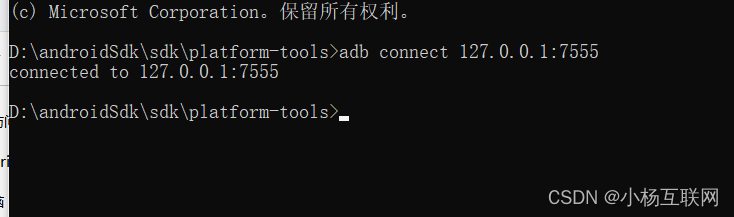
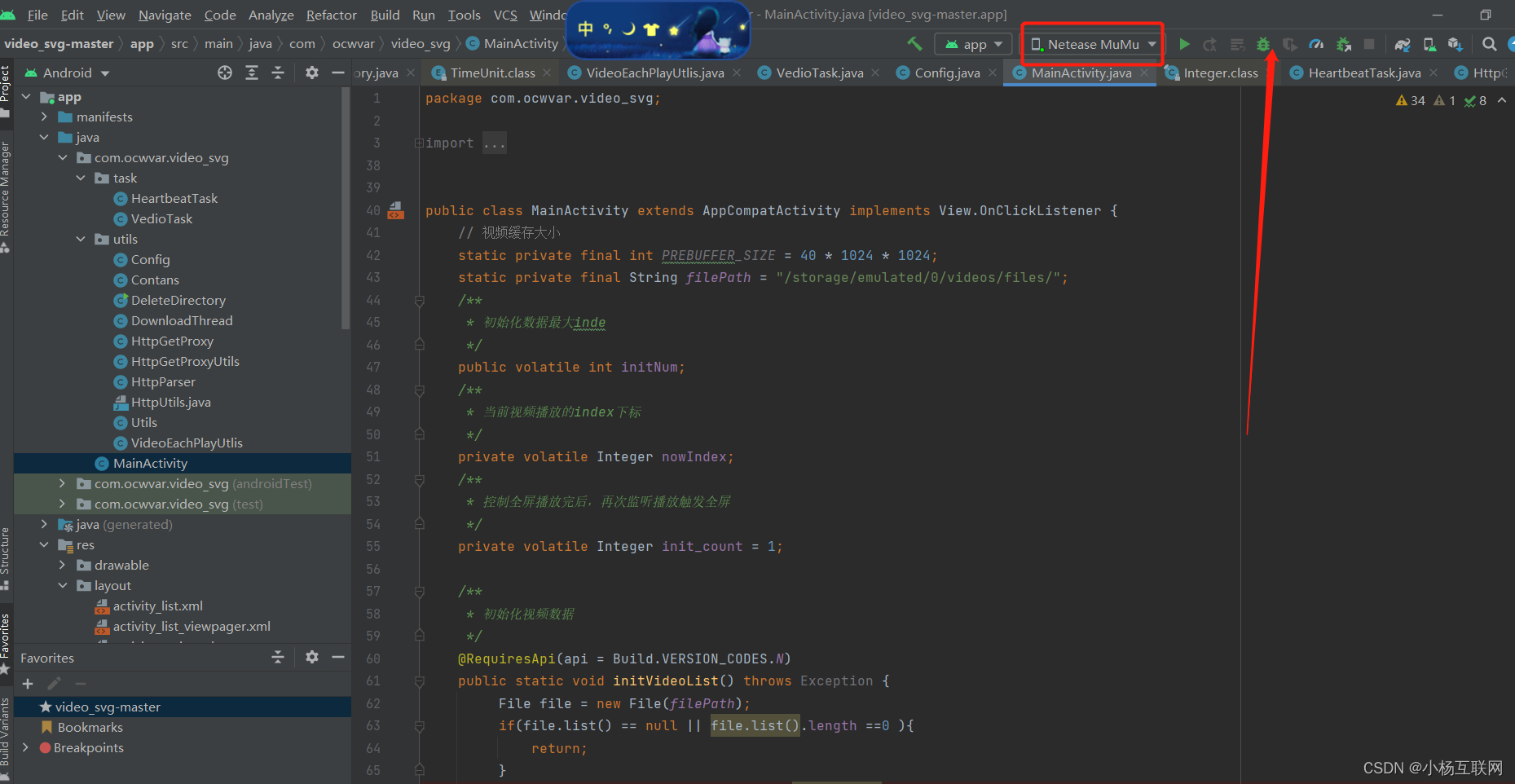

视频轮播和本地我们已经处理好了。由于安卓就是java写的,所以java开发起来还是有一定的基础,都是变通的。迎难而上。
我正在编写一个包含C扩展的gem。通常当我写一个gem时,我会遵循TDD的过程,我会写一个失败的规范,然后处理代码直到它通过,等等......在“ext/mygem/mygem.c”中我的C扩展和在gemspec的“扩展”中配置的有效extconf.rb,如何运行我的规范并仍然加载我的C扩展?当我更改C代码时,我需要采取哪些步骤来重新编译代码?这可能是个愚蠢的问题,但是从我的gem的开发源代码树中输入“bundleinstall”不会构建任何native扩展。当我手动运行rubyext/mygem/extconf.rb时,我确实得到了一个Makefile(在整个项目的根目录中),然后当
我真的很习惯使用Ruby编写以下代码:my_hash={}my_hash['test']=1Java中对应的数据结构是什么? 最佳答案 HashMapmap=newHashMap();map.put("test",1);我假设? 关于java-等价于Java中的RubyHash,我们在StackOverflow上找到一个类似的问题: https://stackoverflow.com/questions/22737685/
我有一个用户工厂。我希望默认情况下确认用户。但是鉴于unconfirmed特征,我不希望它们被确认。虽然我有一个基于实现细节而不是抽象的工作实现,但我想知道如何正确地做到这一点。factory:userdoafter(:create)do|user,evaluator|#unwantedimplementationdetailshereunlessFactoryGirl.factories[:user].defined_traits.map(&:name).include?(:unconfirmed)user.confirm!endendtrait:unconfirmeddoenden
我们的git存储库中目前有一个Gemfile。但是,有一个gem我只在我的环境中本地使用(我的团队不使用它)。为了使用它,我必须将它添加到我们的Gemfile中,但每次我checkout到我们的master/dev主分支时,由于与跟踪的gemfile冲突,我必须删除它。我想要的是类似Gemfile.local的东西,它将继承从Gemfile导入的gems,但也允许在那里导入新的gems以供使用只有我的机器。此文件将在.gitignore中被忽略。这可能吗? 最佳答案 设置BUNDLE_GEMFILE环境变量:BUNDLE_GEMFI
我想在Ruby中创建一个用于开发目的的极其简单的Web服务器(不,不想使用现成的解决方案)。代码如下:#!/usr/bin/rubyrequire'socket'server=TCPServer.new('127.0.0.1',8080)whileconnection=server.acceptheaders=[]length=0whileline=connection.getsheaders想法是从命令行运行这个脚本,提供另一个脚本,它将在其标准输入上获取请求,并在其标准输出上返回完整的响应。到目前为止一切顺利,但事实证明这真的很脆弱,因为它在第二个请求上中断并出现错误:/usr/b
尝试在我的RoR应用程序中实现计数器缓存列时出现错误Unknownkey(s):counter_cache。我在这个问题中实现了模型关联:Modelassociationquestion这是我的迁移:classAddVideoVotesCountToVideos0Video.reset_column_informationVideo.find(:all).eachdo|p|p.update_attributes:videos_votes_count,p.video_votes.lengthendenddefself.downremove_column:videos,:video_vot
我正在尝试使用boilerpipe来自JRuby。我看过guide从JRuby调用Java,并成功地将它与另一个Java包一起使用,但无法弄清楚为什么同样的东西不能用于boilerpipe。我正在尝试基本上从JRuby中执行与此Java等效的操作:URLurl=newURL("http://www.example.com/some-location/index.html");Stringtext=ArticleExtractor.INSTANCE.getText(url);在JRuby中试过这个:require'java'url=java.net.URL.new("http://www
我只想对我一直在思考的这个问题有其他意见,例如我有classuser_controller和classuserclassUserattr_accessor:name,:usernameendclassUserController//dosomethingaboutanythingaboutusersend问题是我的User类中是否应该有逻辑user=User.newuser.do_something(user1)oritshouldbeuser_controller=UserController.newuser_controller.do_something(user1,user2)我
什么是ruby的rack或python的Java的wsgi?还有一个路由库。 最佳答案 来自Python标准PEP333:Bycontrast,althoughJavahasjustasmanywebapplicationframeworksavailable,Java's"servlet"APImakesitpossibleforapplicationswrittenwithanyJavawebapplicationframeworktoruninanywebserverthatsupportstheservletAPI.ht
导读:随着叮咚买菜业务的发展,不同的业务场景对数据分析提出了不同的需求,他们希望引入一款实时OLAP数据库,构建一个灵活的多维实时查询和分析的平台,统一数据的接入和查询方案,解决各业务线对数据高效实时查询和精细化运营的需求。经过调研选型,最终引入ApacheDoris作为最终的OLAP分析引擎,Doris作为核心的OLAP引擎支持复杂地分析操作、提供多维的数据视图,在叮咚买菜数十个业务场景中广泛应用。作者|叮咚买菜资深数据工程师韩青叮咚买菜创立于2017年5月,是一家专注美好食物的创业公司。叮咚买菜专注吃的事业,为满足更多人“想吃什么”而努力,通过美好食材的供应、美好滋味的开发以及美食品牌的孵
