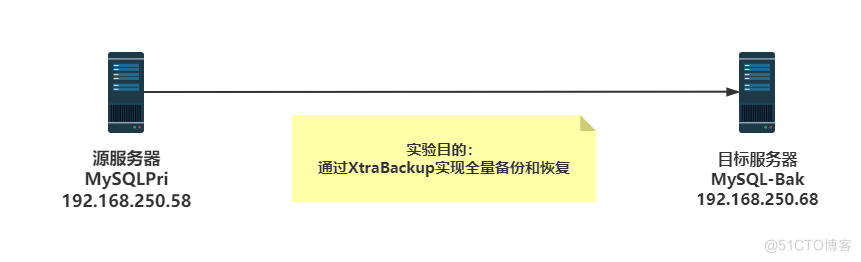
两台服务器
1  源服务器:
MySQLPri
CentOS 8.4
IP: 192.168.250.58/24
MySQL 8.0.26
percona-xtrabackup-80-8.0.27-19.1.el8.x86_64

2  目标服务器:
MySQL-Bak
CentOS 8.4
IP: 192.168.250.68/24
MySQL 8.0.26
percona-xtrabackup-80-8.0.27-19.1.el8.x86_64

# 基本思路:在源服务器上完成数据库文件备份,传到目标服务器上,在目标服务器上恢复好数据库,确保恢复出来的目标服务器与源服务器的数据一致。在生产中可以用来实现迁移数据库服务器和定时备份数据库。[root@CentOS84 ]#hostnamectl set-hostname MySQLPri
[root@CentOS84 ]#hostname
MySQLPri
[root@CentOS84 ]#exit
[root@MySQLPri ]#
[root@MySQLPri ]#hostname -I
192.168.250.58
[root@MySQLPri ]#getenforce
Disabled
[root@MySQLPri ]#systemctl status firewalld
● firewalld.service - firewalld - dynamic firewall daemon
Loaded: loaded (/usr/lib/systemd/system/firewalld.service; disabled; vendor preset: enabled)
Active: inactive (dead)
Docs: man:firewalld(1)
[root@MySQLPri ]#systemctl enable --now chronyd.service
Created symlink /etc/systemd/system/multi-user.target.wants/chronyd.service → /usr/lib/systemd/system/chronyd.service.
[root@MySQLPri ]#date
Fri Feb 25 14:09:42 CST 2022
[root@MySQLPri ]#
[root@MySQLPri ]#pwd
/root
# 下载数据库yum源rpm包,并更新本机的yum源配置,再安装 MySQL 8.0.26
[root@MySQLPri ]#wget https://repo.mysql.com//mysql80-community-release-el8-1.noarch.rpm
--2022-02-25 15:29:12-- https://repo.mysql.com//mysql80-community-release-el8-1.noarch.rpm
Resolving repo.mysql.com (repo.mysql.com)... 23.12.149.85
Connecting to repo.mysql.com (repo.mysql.com)|23.12.149.85|:443... connected.
HTTP request sent, awaiting response... 200 OK
Length: 30388 (30K) [application/x-redhat-package-manager]
Saving to: ‘mysql80-community-release-el8-1.noarch.rpm’
mysql80-community-release-el8-1.noarch 100%[==========================================================================>] 29.68K 113KB/s in 0.3s
2022-02-25 15:29:14 (113 KB/s) - ‘mysql80-community-release-el8-1.noarch.rpm’ saved [30388/30388]
[root@MySQLPri ]#rpm -ivh mysql80-community-release-el8-1.noarch.rpm
warning: mysql80-community-release-el8-1.noarch.rpm: Header V3 DSA/SHA1 Signature, key ID 5072e1f5: NOKEY
Verifying... ################################# [100%]
Preparing... ################################# [100%]
Updating / installing...
1:mysql80-community-release-el8-1 ################################# [100%]
# 此步骤开始 yum 在线安装 MySQL 8.0.26 数据库
[root@MySQLPri ]#yum install mysql-server
# 查看监听端口
[root@MySQLPri ]#ss -tnl
State Recv-Q Send-Q Local Address:Port Peer Address:Port Process
LISTEN 0 32 192.168.122.1:53 0.0.0.0:*
LISTEN 0 128 0.0.0.0:22 0.0.0.0:*
LISTEN 0 5 127.0.0.1:631 0.0.0.0:*
LISTEN 0 128 0.0.0.0:111 0.0.0.0:*
LISTEN 0 128 [::]:22 [::]:*
LISTEN 0 5 [::1]:631 [::]:*
LISTEN 0 128 [::]:111 [::]:*
# 在源服务器上启动,并开启开机自启动 MySQL8.0.26数据库
[root@MySQLPri ]#systemctl enable --now mysqld.service
Created symlink /etc/systemd/system/multi-user.target.wants/mysqld.service → /usr/lib/systemd/system/mysqld.service.
[root@MySQLPri ]#
[root@MySQLPri ]#ss -tnl
State Recv-Q Send-Q Local Address:Port Peer Address:Port Process
LISTEN 0 151 *:3306 *:*
# 默认 root账号是没有密&码的
[root@MySQLPri ]#mysql -u root -p
Enter password:
Welcome to the MySQL monitor. Commands end with ; or \g.
Your MySQL connection id is 8
Server version: 8.0.26 Source distribution
Copyright (c) 2000, 2021, Oracle and/or its affiliates.
Oracle is a registered trademark of Oracle Corporation and/or its
affiliates. Other names may be trademarks of their respective
owners.
Type 'help;' or '\h' for help. Type '\c' to clear the current input statement.
# 登录进数据库,修改root账号的密&码
mysql> alter user'root'@'localhost' identified by 'shone2022';
Query OK, 0 rows affected (0.01 sec)
mysql> flush privileges;
Query OK, 0 rows affected (0.00 sec)
mysql> quit
Bye
# 导入用于测试的 hellodb 数据库
[root@MySQLPri ]#rz
rz waiting to receive.
Starting zmodem transfer. Press Ctrl+C to cancel.
Transferring hellodb_innodb.sql...
100% 7 KB 7 KB/sec 00:00:01 0 Errors
[root@MySQLPri ]#ll
total 847304
-rw-r--r-- 1 root root 30388 Oct 4 2019 mysql80-community-release-el8-1.noarch.rpm
-rw-r--r-- 1 root root 13738948 Sep 1 18:13 percona-xtrabackup-80-8.0.23-16.1.el8.x86_64.rpm
[root@MySQLPri ]#mysql -uroot -pshone2022 < hellodb_innodb.sql
mysql: [Warning] Using a password on the command line interface can be insecure.
[root@MySQLPri ]#mysql -uroot -pshone2022
mysql: [Warning] Using a password on the command line interface can be insecure.
Welcome to the MySQL monitor. Commands end with ; or \g.
Your MySQL connection id is 13
Server version: 8.0.26 Source distribution
Copyright (c) 2000, 2021, Oracle and/or its affiliates.
Oracle is a registered trademark of Oracle Corporation and/or its
affiliates. Other names may be trademarks of their respective
owners.
Type 'help;' or '\h' for help. Type '\c' to clear the current input statement.
mysql> show databases;
+--------------------+
| Database |
+--------------------+
| hellodb |
| information_schema |
| mysql |
| performance_schema |
| sys |
+--------------------+
5 rows in set (0.01 sec)
mysql> quit
Bye
[root@MySQLPri ]#ll /var/lib/mysql/
total 188884
-rw-r----- 1 mysql mysql 56 Feb 25 15:34 auto.cnf
-rw-r----- 1 mysql mysql 11209 Feb 25 15:41 binlog.000001
-rw-r----- 1 mysql mysql 16 Feb 25 15:34 binlog.index
-rw------- 1 mysql mysql 1676 Feb 25 15:34 ca-key.pem
-rw-r--r-- 1 mysql mysql 1112 Feb 25 15:34 ca.pem
-rw-r--r-- 1 mysql mysql 1112 Feb 25 15:34 client-cert.pem
-rw------- 1 mysql mysql 1676 Feb 25 15:34 client-key.pem
drwxr-x--- 2 mysql mysql 132 Feb 25 15:41 hellodb
-rw-r----- 1 mysql mysql 196608 Feb 25 15:42 '#ib_16384_0.dblwr'
-rw-r----- 1 mysql mysql 8585216 Feb 25 15:34 '#ib_16384_1.dblwr'
-rw-r----- 1 mysql mysql 5498 Feb 25 15:34 ib_buffer_pool
-rw-r----- 1 mysql mysql 12582912 Feb 25 15:41 ibdata1
-rw-r----- 1 mysql mysql 50331648 Feb 25 15:42 ib_logfile0
-rw-r----- 1 mysql mysql 50331648 Feb 25 15:34 ib_logfile1
-rw-r----- 1 mysql mysql 12582912 Feb 25 15:34 ibtmp1
drwxr-x--- 2 mysql mysql 187 Feb 25 15:34 '#innodb_temp'
drwxr-x--- 2 mysql mysql 143 Feb 25 15:34 mysql
-rw-r----- 1 mysql mysql 25165824 Feb 25 15:41 mysql.ibd
srwxrwxrwx 1 mysql mysql 0 Feb 25 15:34 mysql.sock
-rw------- 1 mysql mysql 6 Feb 25 15:34 mysql.sock.lock
-rw-r--r-- 1 mysql mysql 7 Feb 25 15:34 mysql_upgrade_info
srwxrwxrwx 1 mysql mysql 0 Feb 25 15:34 mysqlx.sock
-rw------- 1 mysql mysql 7 Feb 25 15:34 mysqlx.sock.lock
drwxr-x--- 2 mysql mysql 8192 Feb 25 15:34 performance_schema
-rw------- 1 mysql mysql 1680 Feb 25 15:34 private_key.pem
-rw-r--r-- 1 mysql mysql 452 Feb 25 15:34 public_key.pem
-rw-r--r-- 1 mysql mysql 1112 Feb 25 15:34 server-cert.pem
-rw------- 1 mysql mysql 1680 Feb 25 15:34 server-key.pem
drwxr-x--- 2 mysql mysql 28 Feb 25 15:34 sys
-rw-r----- 1 mysql mysql 16777216 Feb 25 15:42 undo_001
-rw-r----- 1 mysql mysql 16777216 Feb 25 15:42 undo_002[root@CentOS84 ]#hostnamectl set-hostname MySQL-Bak
[root@CentOS84 ]#exit
[root@MySQL-Bak ]#hostname -I
192.168.250.68
[root@MySQL-Bak ]#getenforce
Disabled
[root@MySQL-Bak ]#systemctl status firewalld
● firewalld.service - firewalld - dynamic firewall daemon
Loaded: loaded (/usr/lib/systemd/system/firewalld.service; disabled; vendor preset: enabled)
Active: inactive (dead)
Docs: man:firewalld(1)
[root@MySQL-Bak ]#systemctl enable --now chronyd.service
Created symlink /etc/systemd/system/multi-user.target.wants/chronyd.service → /usr/lib/systemd/system/chronyd.service.
[root@MySQL-Bak ]#cd /data
[root@MySQL-Bak ]#
# 准备和主生产服务器一样版本的 MySQL8.0.26 数据库环境,
[root@MySQL-Bak ]#wget https://repo.mysql.com//mysql80-community-release-el8-1.noarch.rpm
[root@MySQL-Bak ]#rpm -ivh mysql80-community-release-el8-1.noarch.rpm
[root@MySQL-Bak ]#yum install mysql-server
# 至此目标服务器用于恢复的数据库准备完毕,不启动数据库,确保/var/lib/mysql/目录为空# 下载percona-xtrabackup-80-8.0.27-19.1.el8.x86_64.rpm,并安装
[root@MySQLPri ]#cd /data/
[root@MySQLPri ]#wget https://downloads.percona.com/downloads/Percona-XtraBackup-LATEST/Percona-XtraBackup-8.0.27-19/binary/redhat/8/x86_64/percona-xtrabackup-80-8.0.27-19.1.el8.x86_64.rpm
[root@MySQLPri ]#cd /data/
[root@MySQLPri ]#yum -y install percona-xtrabackup-80-8.0.27-19.1.el8.x86_64.rpm
# 在源服务器上创建备份目录,目标服务器无需手工创建,直接全目录复制
[root@MySQLPri ]#mkdir /backup
# 用xtrabackup全量备份 MySQL 8.0.26 数据库文件
[root@MySQLPri ]#xtrabackup -uroot -pshone2022 --backup --target-dir=/backup/base
xtrabackup: recognized server arguments: --datadir=/var/lib/mysql
xtrabackup: recognized client arguments: --user=root --password=* --backup=1 --target-dir=/backup/base
xtrabackup version 8.0.27-19 based on MySQL server 8.0.27 Linux (x86_64) (revision id: 50dbc8dadda)
220225 19:14:12 version_check Connecting to MySQL server with DSN 'dbi:mysql:;mysql_read_default_group=xtrabackup' as 'root' (using password: YES).
220225 19:14:12 version_check Connected to MySQL server
220225 19:14:12 version_check Executing a version check against the server...
220225 19:14:12 version_check Done.
220225 19:14:12 Connecting to MySQL server host: localhost, user: root, password: set, port: not set, socket: not set
Using server version 8.0.26
220225 19:14:12 Executing LOCK INSTANCE FOR BACKUP...
xtrabackup: uses posix_fadvise().
xtrabackup: cd to /var/lib/mysql
xtrabackup: open files limit requested 0, set to 1000000
xtrabackup: using the following InnoDB configuration:
xtrabackup: innodb_data_home_dir = .
xtrabackup: innodb_data_file_path = ibdata1:12M:autoextend
xtrabackup: innodb_log_group_home_dir = ./
xtrabackup: innodb_log_files_in_group = 2
xtrabackup: innodb_log_file_size = 50331648
Number of pools: 1
xtrabackup: inititialize_service_handles suceeded
220225 19:14:12 Connecting to MySQL server host: localhost, user: root, password: set, port: not set, socket: not set
xtrabackup: Redo Log Archiving is not set up.
220225 19:14:13 >> log scanned up to (18249870)
xtrabackup: Generating a list of tablespaces
xtrabackup: Generating a list of tablespaces
Scanning './'
Completed space ID check of 2 files.
Allocated tablespace ID 2 for hellodb/classes, old maximum was 0
Using undo tablespace './undo_001'.
Using undo tablespace './undo_002'.
Opened 2 existing undo tablespaces.
220225 19:14:13 [01] Copying ./ibdata1 to /backup/base/ibdata1
220225 19:14:13 [01] ...done
#省略很多雷同的数据拷贝内容,这段执行过程可细致研读,便于从原理上去理解xtrabackup备份过程
220225 19:14:15 [00] Writing /backup/base/xtrabackup_binlog_info
220225 19:14:15 [00] ...done
220225 19:14:15 Executing FLUSH NO_WRITE_TO_BINLOG ENGINE LOGS...
xtrabackup: The latest check point (for incremental): '18249870'
xtrabackup: Stopping log copying thread at LSN 18249870.
Starting to parse redo log at lsn = 18249774
220225 19:14:15 Executing UNLOCK INSTANCE
220225 19:14:15 All tables unlocked
220225 19:14:15 [00] Copying ib_buffer_pool to /backup/base/ib_buffer_pool
220225 19:14:15 [00] ...done
220225 19:14:15 Backup created in directory '/backup/base/'
MySQL binlog position: filename 'binlog.000003', position '156'
220225 19:14:15 [00] Writing /backup/base/backup-my.cnf
220225 19:14:15 [00] ...done
220225 19:14:15 [00] Writing /backup/base/xtrabackup_info
220225 19:14:15 [00] ...done
xtrabackup: Transaction log of lsn (18249870) to (18249880) was copied.
220225 19:14:16 completed OK!
# 查看备份目录及内部备份的文件、文件属性和文件内容
[root@MySQLPri ]#ll -h /backup/
total 4.0K
drwxr-x--- 6 root root 4.0K Feb 25 19:14 base
[root@MySQLPri ]#ll -h /backup/base
total 69M
-rw-r----- 1 root root 475 Feb 25 19:14 backup-my.cnf
-rw-r----- 1 root root 156 Feb 25 19:14 binlog.000003
-rw-r----- 1 root root 16 Feb 25 19:14 binlog.index
drwxr-x--- 2 root root 132 Feb 25 19:14 hellodb
-rw-r----- 1 root root 5.4K Feb 25 19:14 ib_buffer_pool
-rw-r----- 1 root root 12M Feb 25 19:14 ibdata1
drwxr-x--- 2 root root 143 Feb 25 19:14 mysql
-rw-r----- 1 root root 24M Feb 25 19:14 mysql.ibd
drwxr-x--- 2 root root 8.0K Feb 25 19:14 performance_schema
drwxr-x--- 2 root root 28 Feb 25 19:14 sys
-rw-r----- 1 root root 16M Feb 25 19:14 undo_001
-rw-r----- 1 root root 16M Feb 25 19:14 undo_002
-rw-r----- 1 root root 18 Feb 25 19:14 xtrabackup_binlog_info
-rw-r----- 1 root root 102 Feb 25 19:14 xtrabackup_checkpoints
-rw-r----- 1 root root 470 Feb 25 19:14 xtrabackup_info
-rw-r----- 1 root root 2.5K Feb 25 19:14 xtrabackup_logfile
-rw-r----- 1 root root 39 Feb 25 19:14 xtrabackup_tablespaces
# 查看文件格式
[root@MySQLPri ]#file /backup/base/*
/backup/base/backup-my.cnf: ASCII text
/backup/base/binlog.000003: MySQL replication log, server id 1 MySQL V5+, server version 8.0.26
/backup/base/binlog.index: ASCII text
/backup/base/hellodb: directory
/backup/base/ib_buffer_pool: ASCII text
/backup/base/ibdata1: data
/backup/base/mysql: directory
/backup/base/mysql.ibd: data
/backup/base/performance_schema: directory
/backup/base/sys: directory
/backup/base/undo_001: data
/backup/base/undo_002: data
/backup/base/xtrabackup_binlog_info: ASCII text
/backup/base/xtrabackup_checkpoints: ASCII text
/backup/base/xtrabackup_info: ASCII text
/backup/base/xtrabackup_logfile: X11 SNF font data, MSB first
/backup/base/xtrabackup_tablespaces: ASCII text, with no line terminators
# 查看备份的binlog文件信息
[root@MySQLPri ]#cat /backup/base/xtrabackup_binlog_info
binlog.000003 156
[root@MySQLPri ]#cat /backup/base/xtrabackup_checkpoints
backup_type = full-backuped
from_lsn = 0
to_lsn = 18249870
last_lsn = 18249870
flushed_lsn = 18249870
[root@MySQLPri ]#cat /backup/base/xtrabackup_info
uuid = 1155ff04-962c-11ec-82ce-005056a30f34
name =
tool_name = xtrabackup
tool_command = -uroot -pshone2022 --backup --target-dir=/backup/base
tool_version = 8.0.27-19
ibbackup_version = 8.0.27-19
server_version = 8.0.26
start_time = 2022-02-25 19:14:12
end_time = 2022-02-25 19:14:15
lock_time = 1
binlog_pos = filename 'binlog.000003', position '156'
innodb_from_lsn = 0
innodb_to_lsn = 18249870
partial = N
incremental = N
format = file
compressed = N
encrypted = N
# 复制备份好的全量完整数据库备份文件到目标服务器,按照先前的规划需要全目录复制
[root@MySQLPri ]#scp -r /backup/ 192.168.250.68:/
[root@MySQLPri ]#
## 至此数据库全量备份文件的过程在主生产服务器IP192.168.250.58上的工作全部完成,下面切换到目标服务器IP192.168.250.68服务器上去,实现数据库恢复# 下载xtrabackup 8.0.27 并安装
[root@MySQL-Bak ]#cd /data/
[root@MySQL-Bak ]#wget https://downloads.percona.com/downloads/Percona-XtraBackup-LATEST/Percona-XtraBackup-8.0.27-19/binary/redhat/8/x86_64/percona-xtrabackup-80-8.0.27-19.1.el8.x86_64.rpm
[root@MySQL-Bak ]#
[root@MySQL-Bak ]#cd /data/
[root@MySQL-Bak ]#yum -y install percona-xtrabackup-80-8.0.27-19.1.el8.x86_64.rpm
# 在源生产服务器已经将全量数据库备份文件通过scp传到恢复用的目标服务器上,开始在目标服务器上实现全量数据库的恢复过程
[root@MySQL-Bak ]#ll /backup/
total 4
drwxr-x--- 7 root root 4096 Feb 25 17:25 base
[root@MySQL-Bak ]#du -sh /backup/base/
71M /backup/base/
# 备份文件的预处理:为了确保数据一致,提交完成的事务,回滚未完成的事务,用xtrabackup 8.0.27命令来完成这个过程
[root@MySQL-Bak ]#xtrabackup --prepare --target-dir=/backup/base
xtrabackup: recognized server arguments: --innodb_checksum_algorithm=crc32 --innodb_log_checksums=1 --innodb_data_file_path=ibdata1:12M:autoextend --innodb_log_files_in_group=2 --innodb_log_file_size=50331648 --innodb_page_size=16384 --innodb_undo_directory=./ --innodb_undo_tablespaces=2 --server-id=0 --innodb_log_checksums=ON --innodb_redo_log_encrypt=0 --innodb_undo_log_encrypt=0
xtrabackup: recognized client arguments: --prepare=1 --target-dir=/backup/base
xtrabackup version 8.0.27-19 based on MySQL server 8.0.27 Linux (x86_64) (revision id: 50dbc8dadda)
xtrabackup: cd to /backup/base/
xtrabackup: This target seems to be not prepared yet.
#省略部分屏显内容,可以对照上文中的备份恢复原理图,研读这部分内容,利于理解xtrabackup工作机制
Log background threads are being closed...
Shutdown completed; log sequence number 18250262
220225 19:28:52 completed OK! #一定要注意出现此行OK提示,再进行下一步的操作
[root@MySQL-Bak ]#du -sh /backup/base/
187M /backup/base/
# 将预处理好的数据库文件复制到目标服务器的数据库对应目录。并确保停掉了目标服务器上的数据库服务和目录为空,再复制数据库文件
[root@MySQL-Bak ]#ll /var/lib/mysql/
total 0
[root@MySQL-Bak ]#systemctl stop mysqld
[root@MySQL-Bak ]#systemctl status mysqld
● mysqld.service - MySQL 8.0 database server
Loaded: loaded (/usr/lib/systemd/system/mysqld.service; enabled; vendor preset: disabled)
Active: inactive (dead) since Fri 2022-02-25 19:24:29 CST; 1min 23s ago
# 将预处理好的数据库文件复制到目标服务器的数据库对应目录
[root@MySQL-Bak ]#xtrabackup --copy-back --target-dir=/backup/base
xtrabackup: recognized server arguments: --datadir=/var/lib/mysql
xtrabackup: recognized client arguments: --copy-back=1 --target-dir=/backup/base
xtrabackup version 8.0.27-19 based on MySQL server 8.0.27 Linux (x86_64) (revision id: 50dbc8dadda)
220225 19:30:34 [01] Copying undo_001 to /var/lib/mysql/undo_001
#省略很多执行过程中的屏显内容,显示的日志性文件利于理解回归和提交过程
220225 19:30:35 [01] Copying ./ibtmp1 to /var/lib/mysql/ibtmp1
220225 19:30:35 [01] ...done
220225 19:30:35 [01] Creating directory ./#innodb_temp
220225 19:30:35 [01] ...done.
220225 19:30:35 completed OK! #一定要注意出现此行OK提示,再进行下一步的操作
# 查看复制后的相应数据库的目录及文件
[root@MySQL-Bak ]#du -sh /var/lib/mysql
179M /var/lib/mysql
[root@MySQL-Bak ]#ll /var/lib/mysql
total 180260
-rw-r----- 1 root root 156 Feb 25 19:30 binlog.000003
-rw-r----- 1 root root 14 Feb 25 19:30 binlog.index
drwxr-x--- 2 root root 132 Feb 25 19:30 hellodb
-rw-r----- 1 root root 5498 Feb 25 19:30 ib_buffer_pool
-rw-r----- 1 root root 12582912 Feb 25 19:30 ibdata1
-rw-r----- 1 root root 50331648 Feb 25 19:30 ib_logfile0
-rw-r----- 1 root root 50331648 Feb 25 19:30 ib_logfile1
-rw-r----- 1 root root 12582912 Feb 25 19:30 ibtmp1
drwxr-x--- 2 root root 143 Feb 25 19:30 mysql
-rw-r----- 1 root root 25165824 Feb 25 19:30 mysql.ibd
drwxr-x--- 2 root root 8192 Feb 25 19:30 performance_schema
drwxr-x--- 2 root root 28 Feb 25 19:30 sys
-rw-r----- 1 root root 16777216 Feb 25 19:30 undo_001
-rw-r----- 1 root root 16777216 Feb 25 19:30 undo_002
-rw-r----- 1 root root 470 Feb 25 19:30 xtrabackup_info
-rw-r----- 1 root root 1 Feb 25 19:30 xtrabackup_master_key_id
# 还原数据库目录的权属属性给mysql用户和组
[root@MySQL-Bak ]#chown -R mysql:mysql /var/lib/mysql
[root@MySQL-Bak ]#ll /var/lib/mysql
total 180260
-rw-r----- 1 mysql mysql 156 Feb 25 19:30 binlog.000003
-rw-r----- 1 mysql mysql 14 Feb 25 19:30 binlog.index
drwxr-x--- 2 mysql mysql 132 Feb 25 19:30 hellodb
-rw-r----- 1 mysql mysql 5498 Feb 25 19:30 ib_buffer_pool
-rw-r----- 1 mysql mysql 12582912 Feb 25 19:30 ibdata1
-rw-r----- 1 mysql mysql 50331648 Feb 25 19:30 ib_logfile0
-rw-r----- 1 mysql mysql 50331648 Feb 25 19:30 ib_logfile1
-rw-r----- 1 mysql mysql 12582912 Feb 25 19:30 ibtmp1
drwxr-x--- 2 mysql mysql 143 Feb 25 19:30 mysql
-rw-r----- 1 mysql mysql 25165824 Feb 25 19:30 mysql.ibd
drwxr-x--- 2 mysql mysql 8192 Feb 25 19:30 performance_schema
drwxr-x--- 2 mysql mysql 28 Feb 25 19:30 sys
-rw-r----- 1 mysql mysql 16777216 Feb 25 19:30 undo_001
-rw-r----- 1 mysql mysql 16777216 Feb 25 19:30 undo_002
-rw-r----- 1 mysql mysql 470 Feb 25 19:30 xtrabackup_info
-rw-r----- 1 mysql mysql 1 Feb 25 19:30 xtrabackup_master_key_id
# 至此恢复过程已经完成,可以启动数据库服务
[root@MySQL-Bak ]#systemctl enable --now mysqld
# 登录 MySQ,并验证数据库的内容
[root@MySQL-Bak ]#mysql -uroot -pshone2022
mysql: [Warning] Using a password on the command line interface can be insecure.
Welcome to the MySQL monitor. Commands end with ; or \g.
Your MySQL connection id is 10
Server version: 8.0.26 Source distribution
Copyright (c) 2000, 2021, Oracle and/or its affiliates.
Oracle is a registered trademark of Oracle Corporation and/or its
affiliates. Other names may be trademarks of their respective
owners.
Type 'help;' or '\h' for help. Type '\c' to clear the current input statement.
mysql> show databases;
+--------------------+
| Database |
+--------------------+
| hellodb |
| information_schema |
| mysql |
| performance_schema |
| sys |
+--------------------+
5 rows in set (0.00 sec)
mysql>
# 至此全量的MySQ备份和恢复全部完成!!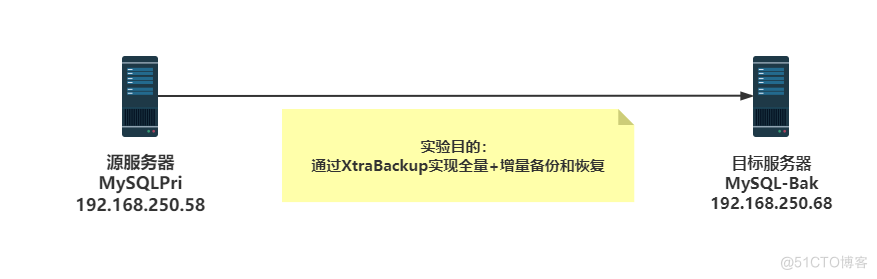
两台服务器
1  源服务器:
MySQLPri
CentOS 8.4
IP: 192.168.250.58/24
MySQL 8.0.26
percona-xtrabackup-80-8.0.27-19.1.el8.x86_64

2  目标服务器:
MySQL-Bak
CentOS 8.4
IP: 192.168.250.68/24
MySQL 8.0.26
percona-xtrabackup-80-8.0.27-19.1.el8.x86_64

# 基本思路:在源服务器上完成数据库文件base备份,再修改两次hellodb数据库,模拟两次数据库增量变化,并完成增量备份,将所有的备份文件传到目标服务器上,在目标服务器上对备份的文件进行三次初处理,合并好数据库文件,再完成数据库的恢复,这样就能确保恢复出来的目标服务器与源服务器的数据完全一致。在生产中可以用来实现数据库异机异地定时备份。[root@CentOS84 ]#hostnamectl set-hostname MySQLPri
[root@CentOS84 ]#hostname
MySQLPri
[root@CentOS84 ]#exit
[root@MySQLPri ]#
[root@MySQLPri ]#hostname -I
192.168.250.58
[root@MySQLPri ]#getenforce
Disabled
[root@MySQLPri ]#systemctl status firewalld
[root@MySQLPri ]#systemctl enable --now chronyd.service
[root@MySQLPri ]#date
Fri Feb 25 14:09:42 CST 2022
[root@MySQLPri ]#
# 下载数据库yum源rpm包,并更新本机的yum源配置,再安装 MySQL 8.0.26
[root@MySQLPri ]#cd /data/
[root@MySQLPri ]#wget https://repo.mysql.com//mysql80-community-release-el8-1.noarch.rpm
[root@MySQLPri ]#rpm -ivh mysql80-community-release-el8-1.noarch.rpm
# yum 在线安装 MySQL 8.0.26 数据库
[root@MySQLPri ]#yum install mysql-server
# 查看监听端口
[root@MySQLPri ]#ss -tnl
# 在源服务器上启动,并开启开机自启动 MySQL8.0.26数据库
[root@MySQLPri ]#systemctl enable --now mysqld.service
[root@MySQLPri ]#ss -tnl
State Recv-Q Send-Q Local Address:Port Peer Address:Port Process
LISTEN 0 151 *:3306 *:*
# 默认 root账号是没有密&码的
[root@MySQLPri ]#mysql -u root -p
# 登录进数据库,修改root账号的密&码
mysql> alter user'root'@'localhost' identified by 'shone2022';
Query OK, 0 rows affected (0.01 sec)
mysql> flush privileges;
Query OK, 0 rows affected (0.00 sec)
mysql> quit
Bye
# 导入用于测试的 hellodb 数据库
[root@MySQLPri ]#cd /data/
[root@MySQLPri ]#rz
rz waiting to receive.
Starting zmodem transfer. Press Ctrl+C to cancel.
Transferring hellodb_innodb.sql...
100% 7 KB 7 KB/sec 00:00:01 0 Errors
[root@MySQLPri ]#mysql -uroot -pshone2022 < hellodb_innodb.sql
mysql: [Warning] Using a password on the command line interface can be insecure.
[root@MySQLPri ]#mysql -uroot -pshone2022
mysql> show databases;
+--------------------+
| Database |
+--------------------+
| hellodb |
| information_schema |
| mysql |
| performance_schema |
| sys |
+--------------------+
5 rows in set (0.01 sec)
mysql> quit
Bye
[root@MySQLPri ]#ll /var/lib/mysql/
total 188884
-rw-r----- 1 mysql mysql 56 Feb 25 15:34 auto.cnf
-rw-r----- 1 mysql mysql 11209 Feb 25 15:41 binlog.000001
-rw-r----- 1 mysql mysql 16 Feb 25 15:34 binlog.index
-rw------- 1 mysql mysql 1676 Feb 25 15:34 ca-key.pem
-rw-r--r-- 1 mysql mysql 1112 Feb 25 15:34 ca.pem
-rw-r--r-- 1 mysql mysql 1112 Feb 25 15:34 client-cert.pem
-rw------- 1 mysql mysql 1676 Feb 25 15:34 client-key.pem
drwxr-x--- 2 mysql mysql 132 Feb 25 15:41 hellodb
-rw-r----- 1 mysql mysql 196608 Feb 25 15:42 '#ib_16384_0.dblwr'
-rw-r----- 1 mysql mysql 8585216 Feb 25 15:34 '#ib_16384_1.dblwr'
-rw-r----- 1 mysql mysql 5498 Feb 25 15:34 ib_buffer_pool
-rw-r----- 1 mysql mysql 12582912 Feb 25 15:41 ibdata1
-rw-r----- 1 mysql mysql 50331648 Feb 25 15:42 ib_logfile0
-rw-r----- 1 mysql mysql 50331648 Feb 25 15:34 ib_logfile1
-rw-r----- 1 mysql mysql 12582912 Feb 25 15:34 ibtmp1
drwxr-x--- 2 mysql mysql 187 Feb 25 15:34 '#innodb_temp'
drwxr-x--- 2 mysql mysql 143 Feb 25 15:34 mysql
-rw-r----- 1 mysql mysql 25165824 Feb 25 15:41 mysql.ibd
srwxrwxrwx 1 mysql mysql 0 Feb 25 15:34 mysql.sock
-rw------- 1 mysql mysql 6 Feb 25 15:34 mysql.sock.lock
-rw-r--r-- 1 mysql mysql 7 Feb 25 15:34 mysql_upgrade_info
srwxrwxrwx 1 mysql mysql 0 Feb 25 15:34 mysqlx.sock
-rw------- 1 mysql mysql 7 Feb 25 15:34 mysqlx.sock.lock
drwxr-x--- 2 mysql mysql 8192 Feb 25 15:34 performance_schema
-rw------- 1 mysql mysql 1680 Feb 25 15:34 private_key.pem
-rw-r--r-- 1 mysql mysql 452 Feb 25 15:34 public_key.pem
-rw-r--r-- 1 mysql mysql 1112 Feb 25 15:34 server-cert.pem
-rw------- 1 mysql mysql 1680 Feb 25 15:34 server-key.pem
drwxr-x--- 2 mysql mysql 28 Feb 25 15:34 sys
-rw-r----- 1 mysql mysql 16777216 Feb 25 15:42 undo_001
-rw-r----- 1 mysql mysql 16777216 Feb 25 15:42 undo_002[root@CentOS84 ]#hostnamectl set-hostname MySQL-Bak
[root@CentOS84 ]#exit
[root@MySQL-Bak ]#hostname -I
192.168.250.68
[root@MySQL-Bak ]#getenforce
Disabled
[root@MySQL-Bak ]#systemctl status firewalld
[root@MySQL-Bak ]#systemctl enable --now chronyd.service
[root@MySQL-Bak ]#cd /data
[root@MySQL-Bak ]#
# 准备和主生产服务器一样版本的 MySQL8.0.26 数据库环境
[root@MySQL-Bak ]#wget https://repo.mysql.com//mysql80-community-release-el8-1.noarch.rpm
[root@MySQL-Bak ]#rpm -ivh mysql80-community-release-el8-1.noarch.rpm
[root@MySQL-Bak ]#yum install mysql-server
# 至此目标服务器用于恢复的数据库准备完毕,不启动数据库,确保/var/lib/mysql/目录为空# 创建或者清空/backup/目录
[root@MySQLPri ]#mkdir /backup/
[root@MySQLPri ]#ll /backup
total 0
# 用xtrabackup完成一次全量的数据库备份 base
[root@MySQLPri ]#xtrabackup -uroot -pshone2022 --backup --target-dir=/backup/base
....................
220225 19:47:52 completed OK! #必须见到行备份成功提示
[root@MySQLPri ]#ll /backup/base
total 69684
-rw-r----- 1 root root 475 Feb 25 19:47 backup-my.cnf
-rw-r----- 1 root root 156 Feb 25 19:47 binlog.000004
-rw-r----- 1 root root 16 Feb 25 19:47 binlog.index
drwxr-x--- 2 root root 132 Feb 25 19:47 hellodb
-rw-r----- 1 root root 5498 Feb 25 19:47 ib_buffer_pool
-rw-r----- 1 root root 12582912 Feb 25 19:47 ibdata1
drwxr-x--- 2 root root 143 Feb 25 19:47 mysql
-rw-r----- 1 root root 25165824 Feb 25 19:47 mysql.ibd
drwxr-x--- 2 root root 8192 Feb 25 19:47 performance_schema
drwxr-x--- 2 root root 28 Feb 25 19:47 sys
-rw-r----- 1 root root 16777216 Feb 25 19:47 undo_001
-rw-r----- 1 root root 16777216 Feb 25 19:47 undo_002
-rw-r----- 1 root root 18 Feb 25 19:47 xtrabackup_binlog_info
-rw-r----- 1 root root 102 Feb 25 19:47 xtrabackup_checkpoints
-rw-r----- 1 root root 470 Feb 25 19:47 xtrabackup_info
-rw-r----- 1 root root 2560 Feb 25 19:47 xtrabackup_logfile
-rw-r----- 1 root root 39 Feb 25 19:47 xtrabackup_tablespaces
# 模拟第一次增量:登录 MySQL进入hellodb库,插入三行记录
[root@MySQLPri ]#mysql -uroot -pshone2022 hellodb
mysql: [Warning] Using a password on the command line interface can be insecure.
Reading table information for completion of table and column names
You can turn off this feature to get a quicker startup with -A
Welcome to the MySQL monitor. Commands end with ; or \g.
Your MySQL connection id is 25
Server version: 8.0.26 Source distribution
Copyright (c) 2000, 2021, Oracle and/or its affiliates.
Oracle is a registered trademark of Oracle Corporation and/or its
affiliates. Other names may be trademarks of their respective
owners.
Type 'help;' or '\h' for help. Type '\c' to clear the current input statement.
mysql> select * from teachers;
+-----+---------------+-----+--------+
| TID | Name | Age | Gender |
+-----+---------------+-----+--------+
| 1 | Song Jiang | 45 | M |
| 2 | Zhang Sanfeng | 94 | M |
| 3 | Miejue Shitai | 77 | F |
| 4 | Lin Chaoying | 93 | F |
+-----+---------------+-----+--------+
4 rows in set (0.00 sec)
#插入三行记录
mysql> insert teachers values(null,'xiao yu',10,'F');
Query OK, 1 row affected (0.00 sec)
mysql> insert teachers values(null,'xia qingqing',16,'F');
Query OK, 1 row affected (0.00 sec)
mysql> insert teachers values(null,'Summer',46,'F');
Query OK, 1 row affected (0.00 sec)
mysql> select * from teachers;
+-----+---------------+-----+--------+
| TID | Name | Age | Gender |
+-----+---------------+-----+--------+
| 1 | Song Jiang | 45 | M |
| 2 | Zhang Sanfeng | 94 | M |
| 3 | Miejue Shitai | 77 | F |
| 4 | Lin Chaoying | 93 | F |
| 5 | xiao yu | 10 | F |
| 6 | xia qingqing | 16 | F |
| 7 | Summer | 46 | F |
+-----+---------------+-----+--------+
7 rows in set (0.00 sec)
mysql>
mysql> quit
Bye
# 第一次增量备份
[root@MySQLPri ]#xtrabackup -uroot -pshone2022 --backup --target-dir=/backup/inc1 --incremental-basedir=/backup/base
...................
220225 19:56:12 completed OK! #必须见到行备份成功提示
# 查看备份文件,多了一个inc1文件夹,此为第一次增量备份文件
[root@MySQLPri ]#ll /backup/
total 8
drwxr-x--- 6 root root 4096 Feb 25 19:47 base
drwxr-x--- 6 root root 4096 Feb 25 19:56 inc1
[root@MySQLPri ]#cat /backup/inc1/xtrabackup_info
uuid = ed151d04-9631-11ec-82ce-005056a30f34
name =
tool_name = xtrabackup
tool_command = -uroot -pshone2022 --backup --target-dir=/backup/inc1 --incremental-basedir=/backup/base
tool_version = 8.0.27-19
ibbackup_version = 8.0.27-19
server_version = 8.0.26
start_time = 2022-02-25 19:56:09
end_time = 2022-02-25 19:56:11
lock_time = 0
binlog_pos = filename 'binlog.000005', position '156'
innodb_from_lsn = 18249890
innodb_to_lsn = 18254005
partial = N
incremental = Y
format = file
compressed = N
encrypted = N
[root@MySQLPri ]#cat /backup/inc1/xtrabackup_binlog_info
binlog.000005 156
[root@MySQLPri ]#
# 模拟第二次增量:登录 MySQL进入hellodb库,再插入三行记录
[root@MySQLPri ]#mysql -uroot -pshone2022 hellodb
mysql: [Warning] Using a password on the command line interface can be insecure.
Reading table information for completion of table and column names
You can turn off this feature to get a quicker startup with -A
Welcome to the MySQL monitor. Commands end with ; or \g.
Your MySQL connection id is 29
Server version: 8.0.26 Source distribution
Copyright (c) 2000, 2021, Oracle and/or its affiliates.
Oracle is a registered trademark of Oracle Corporation and/or its
affiliates. Other names may be trademarks of their respective
owners.
Type 'help;' or '\h' for help. Type '\c' to clear the current input statement.
# 再次插入三行记录
mysql> insert teachers values(null,'SummerAAAAAAA',36,'F');
Query OK, 1 row affected (0.07 sec)
mysql> insert teachers values(null,'BBBBBBBBBB',36,'F');
Query OK, 1 row affected (0.01 sec)
mysql> insert teachers values(null,'CCCCCCCCC',36,'F');
Query OK, 1 row affected (0.00 sec)
mysql> select * from teachers;
+-----+---------------+-----+--------+
| TID | Name | Age | Gender |
+-----+---------------+-----+--------+
| 1 | Song Jiang | 45 | M |
| 2 | Zhang Sanfeng | 94 | M |
| 3 | Miejue Shitai | 77 | F |
| 4 | Lin Chaoying | 93 | F |
| 5 | xiao yu | 10 | F |
| 6 | xia qingqing | 16 | F |
| 7 | Summer | 46 | F |
| 8 | SummerAAAAAAA | 36 | F |
| 9 | BBBBBBBBBB | 36 | F |
| 10 | CCCCCCCCC | 36 | F |
+-----+---------------+-----+--------+
10 rows in set (0.00 sec)
mysql> QUIT
Bye
# 在第一次inc1增量备份的基础上完成第二次增量备份
[root@MySQLPri ]#xtrabackup -uroot -pshone2022 --backup --target-dir=/backup/inc2 --incremental-basedir=/backup/inc1
................................
220225 20:01:17 completed OK! #必须见到行备份成功提示
# 查看备份文件,多了第二次增量备份的 inc2 文件夹
[root@MySQLPri ]#ll /backup/
total 12
drwxr-x--- 6 root root 4096 Feb 25 19:47 base
drwxr-x--- 6 root root 4096 Feb 25 19:56 inc1
drwxr-x--- 6 root root 4096 Feb 25 20:01 inc2
# 将所有的备份文件复制到目标服务器
[root@MySQLPri ]#scp -r /backup/ 192.168.250.68:/
[root@MySQLPri ]#
# 至此源服务器上的备份文件作业已经全部完成了,切换到目标服务器上去做恢复实验### 目标服务器利用源服务器的备份的全量和两次增量备份文件恢复数据库的过程
# 确保目标服务器的数据库服务停止、
[root@MySQL-Bak ]#systemctl stop mysqld
# 查看源服务器通过scp命令复制到目标服务器上备份文件
[root@MySQL-Bak ]#ll /backup/
total 12
drwxr-x--- 6 root root 4096 Feb 25 20:06 base
drwxr-x--- 6 root root 4096 Feb 25 20:06 inc1
drwxr-x--- 6 root root 4096 Feb 25 20:06 inc2
[root@MySQL-Bak ]#du -sh /backup/*
71M /backup/base
2.2M /backup/inc1
2.2M /backup/inc2
# 预处理备份文件:用xtrabackup对源服务器传送过来的备份文件进行预处理,因后面有增量备份需要合并进来,所以对base不做回滚未完成事务(--apply-log-only);
[root@MySQL-Bak ]#xtrabackup --prepare --apply-log-only --target-dir=/backup/base
........................
220225 21:17:54 completed OK!
# 预处理备份文件:合并第一次增量inc1到上步处理后的完全备份,因有inc2还需要合并进来,本次也不做回滚未完成事务(--apply-log-only)
[root@MySQL-Bak ]#xtrabackup --prepare --apply-log-only --target-dir=/backup/base --incremental-dir=/backup/inc1
................................
220225 21:18:39 completed OK!
# 预处理备份文件:合并第二次增量inc2到上步处理后的完全备份,后来没有需要合并的增量文件了,本次需要回滚未完成事务(不需要加--apply-log-only)
[root@MySQL-Bak ]#xtrabackup --prepare --target-dir=/backup/base --incremental-dir=/backup/inc2
.......................
220225 21:20:50 completed OK!
# 将经过上面几个步骤处理好的备份文件复制到准备好的MySQL相应目录中去,启动数据库,并验证
[root@MySQL-Bak ]#xtrabackup --copy-back --target-dir=/backup/base
.......................
220225 21:21:31 completed OK!
# 查看预处理好并复制到目标服务器MySQL相应目录后的数据库文件
[root@MySQL-Bak ]#ll /var/lib/mysql
total 180260
-rw-r----- 1 root root 156 Feb 25 21:21 binlog.000006
-rw-r----- 1 root root 14 Feb 25 21:21 binlog.index
drwxr-x--- 2 root root 132 Feb 25 21:21 hellodb
-rw-r----- 1 root root 5498 Feb 25 21:21 ib_buffer_pool
-rw-r----- 1 root root 12582912 Feb 25 21:21 ibdata1
-rw-r----- 1 root root 50331648 Feb 25 21:21 ib_logfile0
-rw-r----- 1 root root 50331648 Feb 25 21:21 ib_logfile1
-rw-r----- 1 root root 12582912 Feb 25 21:21 ibtmp1
drwxr-x--- 2 root root 143 Feb 25 21:21 mysql
-rw-r----- 1 root root 25165824 Feb 25 21:21 mysql.ibd
drwxr-x--- 2 root root 8192 Feb 25 21:21 performance_schema
drwxr-x--- 2 root root 28 Feb 25 21:21 sys
-rw-r----- 1 root root 16777216 Feb 25 21:21 undo_001
-rw-r----- 1 root root 16777216 Feb 25 21:21 undo_002
-rw-r----- 1 root root 512 Feb 25 21:21 xtrabackup_info
-rw-r----- 1 root root 1 Feb 25 21:21 xtrabackup_master_key_id
# 修改目录权属
[root@MySQL-Bak ]#chown -R mysql:mysql /var/lib/mysql
[root@MySQL-Bak ]#ll /var/lib/mysql
total 180260
-rw-r----- 1 mysql mysql 156 Feb 25 21:21 binlog.000006
-rw-r----- 1 mysql mysql 14 Feb 25 21:21 binlog.index
drwxr-x--- 2 mysql mysql 132 Feb 25 21:21 hellodb
-rw-r----- 1 mysql mysql 5498 Feb 25 21:21 ib_buffer_pool
-rw-r----- 1 mysql mysql 12582912 Feb 25 21:21 ibdata1
-rw-r----- 1 mysql mysql 50331648 Feb 25 21:21 ib_logfile0
-rw-r----- 1 mysql mysql 50331648 Feb 25 21:21 ib_logfile1
-rw-r----- 1 mysql mysql 12582912 Feb 25 21:21 ibtmp1
drwxr-x--- 2 mysql mysql 143 Feb 25 21:21 mysql
-rw-r----- 1 mysql mysql 25165824 Feb 25 21:21 mysql.ibd
drwxr-x--- 2 mysql mysql 8192 Feb 25 21:21 performance_schema
drwxr-x--- 2 mysql mysql 28 Feb 25 21:21 sys
-rw-r----- 1 mysql mysql 16777216 Feb 25 21:21 undo_001
-rw-r----- 1 mysql mysql 16777216 Feb 25 21:21 undo_002
-rw-r----- 1 mysql mysql 512 Feb 25 21:21 xtrabackup_info
-rw-r----- 1 mysql mysql 1 Feb 25 21:21 xtrabackup_master_key_id
# 启动服务,并验证数据库的数据
[root@MySQL-Bak ]#service mysqld start
Redirecting to /bin/systemctl start mysqld.service
[root@MySQL-Bak ]#mysql -uroot -pshone2022
mysql: [Warning] Using a password on the command line interface can be insecure.
Welcome to the MySQL monitor. Commands end with ; or \g.
Your MySQL connection id is 8
Server version: 8.0.26 Source distribution
Copyright (c) 2000, 2021, Oracle and/or its affiliates.
Oracle is a registered trademark of Oracle Corporation and/or its
affiliates. Other names may be trademarks of their respective
owners.
Type 'help;' or '\h' for help. Type '\c' to clear the current input statement.
mysql> show database;
ERROR 1064 (42000): You have an error in your SQL syntax; check the manual that corresponds to your MySQL server version for the right syntax to use near 'database' at line 1
mysql> show databases;
+--------------------+
| Database |
+--------------------+
| hellodb |
| information_schema |
| mysql |
| performance_schema |
| sys |
+--------------------+
5 rows in set (0.01 sec)
mysql> select * from teachers;
ERROR 1046 (3D000): No database selected
mysql> use hellodb
Reading table information for completion of table and column names
You can turn off this feature to get a quicker startup with -A
Database changed
mysql> select * from teachers;
+-----+---------------+-----+--------+
| TID | Name | Age | Gender |
+-----+---------------+-----+--------+
| 1 | Song Jiang | 45 | M |
| 2 | Zhang Sanfeng | 94 | M |
| 3 | Miejue Shitai | 77 | F |
| 4 | Lin Chaoying | 93 | F |
| 5 | xiao yu | 10 | F |
| 6 | xia qingqing | 16 | F |
| 7 | Summer | 46 | F |
| 8 | SummerAAAAAAA | 36 | F |
| 9 | BBBBBBBBBB | 36 | F |
| 10 | CCCCCCCCC | 36 | F |
+-----+---------------+-----+--------+
10 rows in set (0.00 sec)
mysql> quit
Bye
# 查看启动后的MySQL目录
[root@MySQL-Bak ]#ll /var/lib/mysql
total 188884
-rw-r----- 1 mysql mysql 56 Feb 25 21:22 auto.cnf
-rw-r----- 1 mysql mysql 156 Feb 25 21:22 binlog.000006
-rw-r----- 1 mysql mysql 156 Feb 25 21:22 binlog.000007
-rw-r----- 1 mysql mysql 30 Feb 25 21:22 binlog.index
-rw------- 1 mysql mysql 1680 Feb 25 21:22 ca-key.pem
-rw-r--r-- 1 mysql mysql 1112 Feb 25 21:22 ca.pem
-rw-r--r-- 1 mysql mysql 1112 Feb 25 21:22 client-cert.pem
-rw------- 1 mysql mysql 1680 Feb 25 21:22 client-key.pem
drwxr-x--- 2 mysql mysql 132 Feb 25 21:21 hellodb
-rw-r----- 1 mysql mysql 196608 Feb 25 21:24 '#ib_16384_0.dblwr'
-rw-r----- 1 mysql mysql 8585216 Feb 25 21:22 '#ib_16384_1.dblwr'
-rw-r----- 1 mysql mysql 5498 Feb 25 21:21 ib_buffer_pool
-rw-r----- 1 mysql mysql 12582912 Feb 25 21:23 ibdata1
-rw-r----- 1 mysql mysql 50331648 Feb 25 21:24 ib_logfile0
-rw-r----- 1 mysql mysql 50331648 Feb 25 21:21 ib_logfile1
-rw-r----- 1 mysql mysql 12582912 Feb 25 21:22 ibtmp1
drwxr-x--- 2 mysql mysql 187 Feb 25 21:22 '#innodb_temp'
drwxr-x--- 2 mysql mysql 143 Feb 25 21:21 mysql
-rw-r----- 1 mysql mysql 25165824 Feb 25 21:22 mysql.ibd
srwxrwxrwx 1 mysql mysql 0 Feb 25 21:22 mysql.sock
-rw------- 1 mysql mysql 6 Feb 25 21:22 mysql.sock.lock
srwxrwxrwx 1 mysql mysql 0 Feb 25 21:22 mysqlx.sock
-rw------- 1 mysql mysql 7 Feb 25 21:22 mysqlx.sock.lock
drwxr-x--- 2 mysql mysql 8192 Feb 25 21:21 performance_schema
-rw------- 1 mysql mysql 1680 Feb 25 21:22 private_key.pem
-rw-r--r-- 1 mysql mysql 452 Feb 25 21:22 public_key.pem
-rw-r--r-- 1 mysql mysql 1112 Feb 25 21:22 server-cert.pem
-rw------- 1 mysql mysql 1676 Feb 25 21:22 server-key.pem
drwxr-x--- 2 mysql mysql 28 Feb 25 21:21 sys
-rw-r----- 1 mysql mysql 16777216 Feb 25 21:24 undo_001
-rw-r----- 1 mysql mysql 16777216 Feb 25 21:24 undo_002
-rw-r----- 1 mysql mysql 512 Feb 25 21:21 xtrabackup_info
-rw-r----- 1 mysql mysql 1 Feb 25 21:21 xtrabackup_master_key_id
[root@MySQL-Bak ]#du -sh /var/lib/mysql
188M /var/lib/mysql
[root@MySQL-Bak ]#
# 至此全量和两次增量的备份和恢复全部完成
# 思考:本次实验都是在相对理想的环境下完成的,比如数据库是默认安装、库表相对简单、路径简洁等等,要想xtrabackup用于实际实际上次中去,还需要去研读官方文档,并结合定时备份、定时合并增量文件等脚本才能更好用于实际生产环境。我主要使用Ruby来执行此操作,但到目前为止我的攻击计划如下:使用gemsrdf、rdf-rdfa和rdf-microdata或mida来解析给定任何URI的数据。我认为最好映射到像schema.org这样的统一模式,例如使用这个yaml文件,它试图描述数据词汇表和opengraph到schema.org之间的转换:#SchemaXtoschema.orgconversion#data-vocabularyDV:name:namestreet-address:streetAddressregion:addressRegionlocality:addressLocalityphoto:i
我有一个用户工厂。我希望默认情况下确认用户。但是鉴于unconfirmed特征,我不希望它们被确认。虽然我有一个基于实现细节而不是抽象的工作实现,但我想知道如何正确地做到这一点。factory:userdoafter(:create)do|user,evaluator|#unwantedimplementationdetailshereunlessFactoryGirl.factories[:user].defined_traits.map(&:name).include?(:unconfirmed)user.confirm!endendtrait:unconfirmeddoenden
有时我需要处理键/值数据。我不喜欢使用数组,因为它们在大小上没有限制(很容易不小心添加超过2个项目,而且您最终需要稍后验证大小)。此外,0和1的索引变成了魔数(MagicNumber),并且在传达含义方面做得很差(“当我说0时,我的意思是head...”)。散列也不合适,因为可能会不小心添加额外的条目。我写了下面的类来解决这个问题:classPairattr_accessor:head,:taildefinitialize(h,t)@head,@tail=h,tendend它工作得很好并且解决了问题,但我很想知道:Ruby标准库是否已经带有这样一个类? 最佳
我正在尝试使用Curbgem执行以下POST以解析云curl-XPOST\-H"X-Parse-Application-Id:PARSE_APP_ID"\-H"X-Parse-REST-API-Key:PARSE_API_KEY"\-H"Content-Type:image/jpeg"\--data-binary'@myPicture.jpg'\https://api.parse.com/1/files/pic.jpg用这个:curl=Curl::Easy.new("https://api.parse.com/1/files/lion.jpg")curl.multipart_form_
无论您是想搭建桌面端、WEB端或者移动端APP应用,HOOPSPlatform组件都可以为您提供弹性的3D集成架构,同时,由工业领域3D技术专家组成的HOOPS技术团队也能为您提供技术支持服务。如果您的客户期望有一种在多个平台(桌面/WEB/APP,而且某些客户端是“瘦”客户端)快速、方便地将数据接入到3D应用系统的解决方案,并且当访问数据时,在各个平台上的性能和用户体验保持一致,HOOPSPlatform将帮助您完成。利用HOOPSPlatform,您可以开发在任何环境下的3D基础应用架构。HOOPSPlatform可以帮您打造3D创新型产品,HOOPSSDK包含的技术有:快速且准确的CAD
华为OD机试题本篇题目:明明的随机数题目输入描述输出描述:示例1输入输出说明代码编写思路最近更新的博客华为od2023|什么是华为od,od薪资待遇,od机试题清单华为OD机试真题大全,用Python解华为机试题|机试宝典【华为OD机试】全流程解析+经验分享,题型分享,防作弊指南华为o
本教程将在Unity3D中混合Optitrack与数据手套的数据流,在人体运动的基础上,添加双手手指部分的运动。双手手背的角度仍由Optitrack提供,数据手套提供双手手指的角度。 01 客户端软件分别安装MotiveBody与MotionVenus并校准人体与数据手套。MotiveBodyMotionVenus数据手套使用、校准流程参照:https://gitee.com/foheart_1/foheart-h1-data-summary.git02 数据转发打开MotiveBody软件的Streaming,开始向Unity3D广播数据;MotionVenus中设置->选项选择Unit
文章目录一、概述简介原理模块二、配置Mysql使用版本环境要求1.操作系统2.mysql要求三、配置canal-server离线下载在线下载上传解压修改配置单机配置集群配置分库分表配置1.修改全局配置2.实例配置垂直分库水平分库3.修改group-instance.xml4.启动监听四、配置canal-adapter1修改启动配置2配置映射文件3启动ES数据同步查询所有订阅同步数据同步开关启动4.验证五、配置canal-admin一、概述简介canal是Alibaba旗下的一款开源项目,Java开发。基于数据库增量日志解析,提供增量数据订阅&消费。Git地址:https://github.co
C#实现简易绘图工具一.引言实验目的:通过制作窗体应用程序(C#画图软件),熟悉基本的窗体设计过程以及控件设计,事件处理等,熟悉使用C#的winform窗体进行绘图的基本步骤,对于面向对象编程有更加深刻的体会.Tutorial任务设计一个具有基本功能的画图软件**·包括简单的新建文件,保存,重新绘图等功能**·实现一些基本图形的绘制,包括铅笔和基本形状等,学习橡皮工具的创建**·设计一个合理舒适的UI界面**注明:你可能需要先了解一些关于winform窗体应用程序绘图的基本知识,以及关于GDI+类和结构的知识二.实验环境Windows系统下的visualstudio2017C#窗体应用程序三.
我正在尝试在Rails上安装ruby,到目前为止一切都已安装,但是当我尝试使用rakedb:create创建数据库时,我收到一个奇怪的错误:dyld:lazysymbolbindingfailed:Symbolnotfound:_mysql_get_client_infoReferencedfrom:/Library/Ruby/Gems/1.8/gems/mysql2-0.3.11/lib/mysql2/mysql2.bundleExpectedin:flatnamespacedyld:Symbolnotfound:_mysql_get_client_infoReferencedf
