paddleocr最后几个库一个比一个难装,特别是 lanms 库,巨难装,拒绝任何花里胡哨,十分钟,三步内解决问题。
Keyring is skipped due to an exception: 'keyring.backends'
Collecting lanms
  Using cached lanms-1.0.2.tar.gz (973 kB)
    ERROR: Command errored out with exit status 1:
     command: 'C:\Users\TensorFlow\anaconda3\python.exe' -c 'import sys, setuptools, tokenize; sys.argv[0] = '"'"'C:\\Users\\TENSOR~1\\AppData\\Local\\Temp\\pip-install-46p1kew5\\lanms\\setup.py'"'"'; __file__='"'"'C:\\Users\\TENSOR~1\\AppData\\Local\\Temp\\pip-install-46p1kew5\\lanms\\setup.py'"'"';f=getattr(tokenize, '"'"'open'"'"', open)(__file__);code=f.read().replace('"'"'\r\n'"'"', '"'"'\n'"'"');f.close();exec(compile(code, __file__, '"'"'exec'"'"'))' egg_info --egg-base 'C:\Users\TENSOR~1\AppData\Local\Temp\pip-install-46p1kew5\lanms\pip-egg-info'
         cwd: C:\Users\TENSOR~1\AppData\Local\Temp\pip-install-46p1kew5\lanms\
    Complete output (11 lines):
    Traceback (most recent call last):
      File "<string>", line 1, in <module>
      File "C:\Users\TENSOR~1\AppData\Local\Temp\pip-install-46p1kew5\lanms\setup.py", line 27, in <module>
        if subprocess.call(['make', '--always-make','-C', BASE_DIR]) != 0:
      File "C:\Users\TensorFlow\anaconda3\lib\subprocess.py", line 339, in call
        with Popen(*popenargs, **kwargs) as p:
      File "C:\Users\TensorFlow\anaconda3\lib\subprocess.py", line 800, in __init__
        restore_signals, start_new_session)
      File "C:\Users\TensorFlow\anaconda3\lib\subprocess.py", line 1207, in _execute_child
        startupinfo)
    FileNotFoundError: [WinError 2] 系统找不到指定的文件。
    ----------------------------------------
ERROR: Command errored out with exit status 1: python setup.py egg_info Check the logs for full command output.
是以上这样或者是,下载好了一部分后面直接报错(无法复原了)。
https://github.com/SakuraRiven/LANMS
上面是网址。
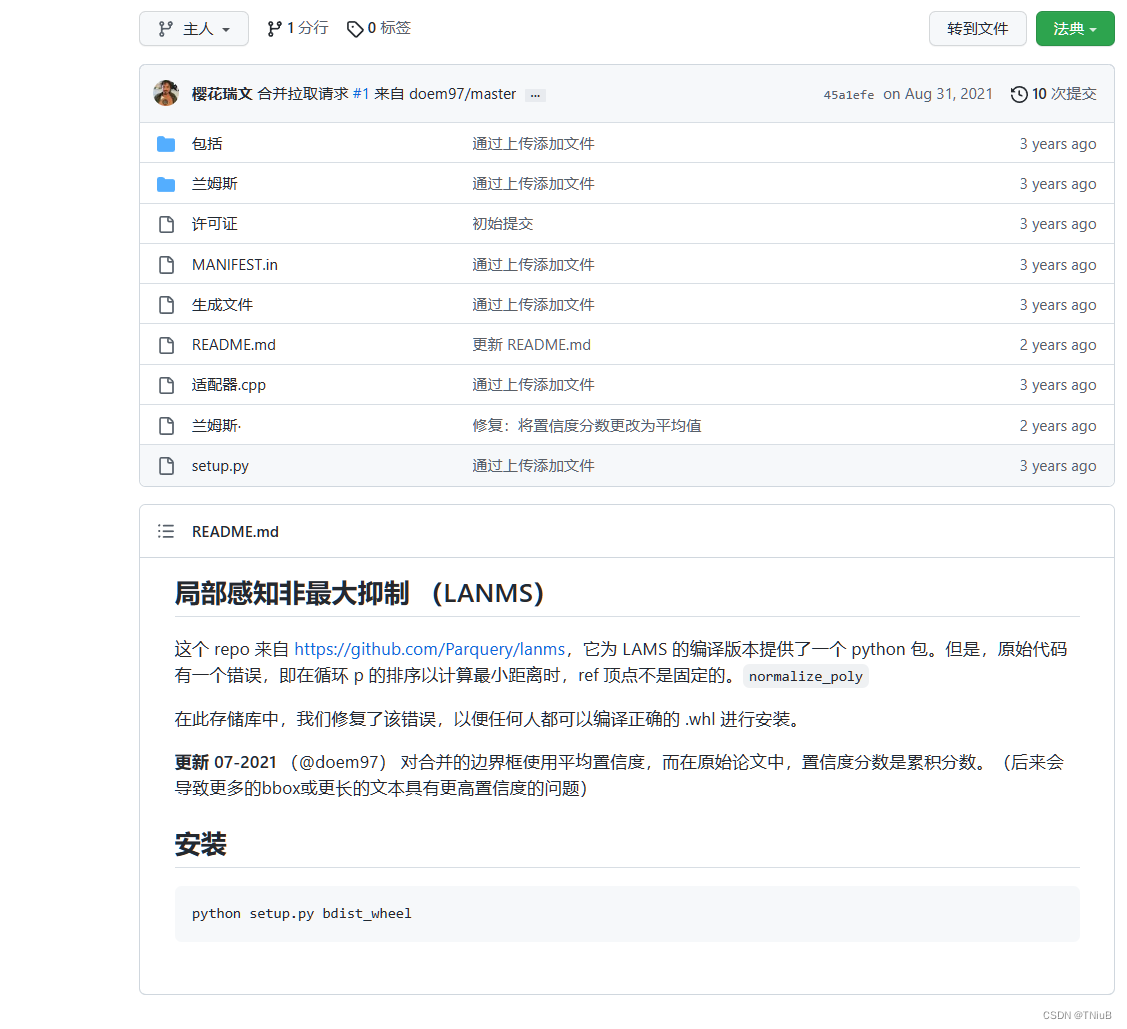
内容是这个样子,下载后安装他说的使用 python setup.py bdist_wheel 进行编译。
注意:报错
(venv3) D:\study\配料表分析\lanms-master>python setup.py bdist_wheel
Traceback (most recent call last):
  File "setup.py", line 27, in <module>
    if subprocess.call(['make', '--always-make','-C', BASE_DIR]) != 0:
  File "C:\Users\TensorFlow\anaconda3\lib\subprocess.py", line 339, in call
    with Popen(*popenargs, **kwargs) as p:
  File "C:\Users\TensorFlow\anaconda3\lib\subprocess.py", line 800, in __init__
    restore_signals, start_new_session)
  File "C:\Users\TensorFlow\anaconda3\lib\subprocess.py", line 1207, in _execute_child
    startupinfo)
FileNotFoundError: [WinError 2] 系统找不到指定的文件。
if subprocess.call(['make', '--always-make','-C', BASE_DIR]) != 0:
   raise RuntimeError('Cannot compile lanms in the directory: {}'.format(BASE_DIR))
我也不晓得这是缺了个什么文件,只是个判断而已注释这两行代码就好了。
运行完毕后,在dist文件夹下就能找到 whl 格式的库文件,放到环境下安装即可。
pip install lanms-1.0.2-cp37-cp37m-win_amd64.whl
到这里就算是安装完毕了,如果报错看看是不是第三步的样子。
安装后运行可能还会报错,但是已经和之前不一样了,报错:
Traceback (most recent call last):
  File "D:/study/配料表分析/PaddleOCR-release-2.6/test.py", line 1, in <module>
    from paddleocr import PaddleOCR
  File "D:\study\配料表分析\PaddleOCR-release-2.6\paddleocr.py", line 34, in <module>
    from tools.infer import predict_system
  File "D:\study\配料表分析\PaddleOCR-release-2.6\tools\infer\predict_system.py", line 33, in <module>
    import tools.infer.predict_det as predict_det
  File "D:\study\配料表分析\PaddleOCR-release-2.6\tools\infer\predict_det.py", line 31, in <module>
    from ppocr.data import create_operators, transform
  File "D:\study\配料表分析\PaddleOCR-release-2.6\ppocr\data\__init__.py", line 35, in <module>
    from ppocr.data.imaug import transform, create_operators
  File "D:\study\配料表分析\PaddleOCR-release-2.6\ppocr\data\imaug\__init__.py", line 48, in <module>
    from .drrg_targets import DRRGTargets
  File "D:\study\配料表分析\PaddleOCR-release-2.6\ppocr\data\imaug\drrg_targets.py", line 21, in <module>
    from lanms import merge_quadrangle_n9 as la_nms
  File "C:\Users\TensorFlow\anaconda3\envs\AI\lib\site-packages\lanms\__init__.py", line 2, in <module>
    from .adaptor import merge_quadrangle_n9 as nms_impl
ModuleNotFoundError: No module named 'lanms.adaptor'
定位到报错的源码,读源码可以看到其实这里是个递归,不知道什么原因函数的调用出了些问题。
此处改动源码请保存好原来的源码
直接替换掉 __init __.py 文件下的代码。
import numpy as np


def merge_quadrangle_n9(polys, thres=0.3, precision=10000):
    if len(polys) == 0:
        return np.array([], dtype='float32')
    p = polys.copy()
    p[:, :8] *= precision
    ret = np.array(merge_quadrangle_n9(p, thres), dtype='float32')
    ret[:, :8] /= precision
    return ret
如果还有其他问题,可以留言。
我想为Heroku构建一个Rails3应用程序。他们使用Postgres作为他们的数据库,所以我通过MacPorts安装了postgres9.0。现在我需要一个postgresgem并且共识是出于性能原因你想要pggem。但是我对我得到的错误感到非常困惑当我尝试在rvm下通过geminstall安装pg时。我已经非常明确地指定了所有postgres目录的位置可以找到但仍然无法完成安装:$envARCHFLAGS='-archx86_64'geminstallpg--\--with-pg-config=/opt/local/var/db/postgresql90/defaultdb/po
我打算为ruby脚本创建一个安装程序,但我希望能够确保机器安装了RVM。有没有一种方法可以完全离线安装RVM并且不引人注目(通过不引人注目,就像创建一个可以做所有事情的脚本而不是要求用户向他们的bash_profile或bashrc添加一些东西)我不是要脚本本身,只是一个关于如何走这条路的快速指针(如果可能的话)。我们还研究了这个很有帮助的问题:RVM-isthereawayforsimpleofflineinstall?但有点误导,因为答案只向我们展示了如何离线在RVM中安装ruby。我们需要能够离线安装RVM本身,并查看脚本https://raw.github.com/wayn
我有一个奇怪的问题:我在rvm上安装了rubyonrails。一切正常,我可以创建项目。但是在我输入“railsnew”时重新启动后,我有“程序'rails'当前未安装。”。SystemUbuntu12.04ruby-v"1.9.3p194"gemlistactionmailer(3.2.5)actionpack(3.2.5)activemodel(3.2.5)activerecord(3.2.5)activeresource(3.2.5)activesupport(3.2.5)arel(3.0.2)builder(3.0.0)bundler(1.1.4)coffee-rails(
我刚刚为fedora安装了emacs。我想用emacs编写ruby。为ruby提供代码提示、代码完成类型功能所需的工具、扩展是什么? 最佳答案 ruby-mode已经包含在Emacs23之后的版本中。不过,它也可以通过ELPA获得。您可能感兴趣的其他一些事情是集成RVM、feature-mode(Cucumber)、rspec-mode、ruby-electric、inf-ruby、rinari(用于Rails)等。这是我当前用于Ruby开发的Emacs配置:https://github.com/citizen428/emacs
我正在尝试在我的centos服务器上安装therubyracer,但遇到了麻烦。$geminstalltherubyracerBuildingnativeextensions.Thiscouldtakeawhile...ERROR:Errorinstallingtherubyracer:ERROR:Failedtobuildgemnativeextension./usr/local/rvm/rubies/ruby-1.9.3-p125/bin/rubyextconf.rbcheckingformain()in-lpthread...yescheckingforv8.h...no***e
我的最终目标是安装当前版本的RubyonRails。我在OSXMountainLion上运行。到目前为止,这是我的过程:已安装的RVM$\curl-Lhttps://get.rvm.io|bash-sstable检查已知(我假设已批准)安装$rvmlistknown我看到当前的稳定版本可用[ruby-]2.0.0[-p247]输入命令安装$rvminstall2.0.0-p247注意:我也试过这些安装命令$rvminstallruby-2.0.0-p247$rvminstallruby=2.0.0-p247我很快就无处可去了。结果:$rvminstall2.0.0-p247Search
我实际上是在尝试使用RVM在我的OSX10.7.5上更新ruby,并在输入以下命令后:rvminstallruby我得到了以下回复:Searchingforbinaryrubies,thismighttakesometime.Checkingrequirementsforosx.Installingrequirementsforosx.Updatingsystem.......Errorrunning'requirements_osx_brew_update_systemruby-2.0.0-p247',pleaseread/Users/username/.rvm/log/138121
由于fast-stemmer的问题,我很难安装我想要的任何rubygem。我把我得到的错误放在下面。Buildingnativeextensions.Thiscouldtakeawhile...ERROR:Errorinstallingfast-stemmer:ERROR:Failedtobuildgemnativeextension./System/Library/Frameworks/Ruby.framework/Versions/2.0/usr/bin/rubyextconf.rbcreatingMakefilemake"DESTDIR="cleanmake"DESTDIR=
有没有办法在这个简单的get方法中添加超时选项?我正在使用法拉第3.3。Faraday.get(url)四处寻找,我只能先发起连接后应用超时选项,然后应用超时选项。或者有什么简单的方法?这就是我现在正在做的:conn=Faraday.newresponse=conn.getdo|req|req.urlurlreq.options.timeout=2#2secondsend 最佳答案 试试这个:conn=Faraday.newdo|conn|conn.options.timeout=20endresponse=conn.get(url
当我尝试安装Ruby时遇到此错误。我试过查看this和this但无济于事➜~brewinstallrubyWarning:YouareusingOSX10.12.Wedonotprovidesupportforthispre-releaseversion.Youmayencounterbuildfailuresorotherbreakages.Pleasecreatepull-requestsinsteadoffilingissues.==>Installingdependenciesforruby:readline,libyaml,makedepend==>Installingrub
