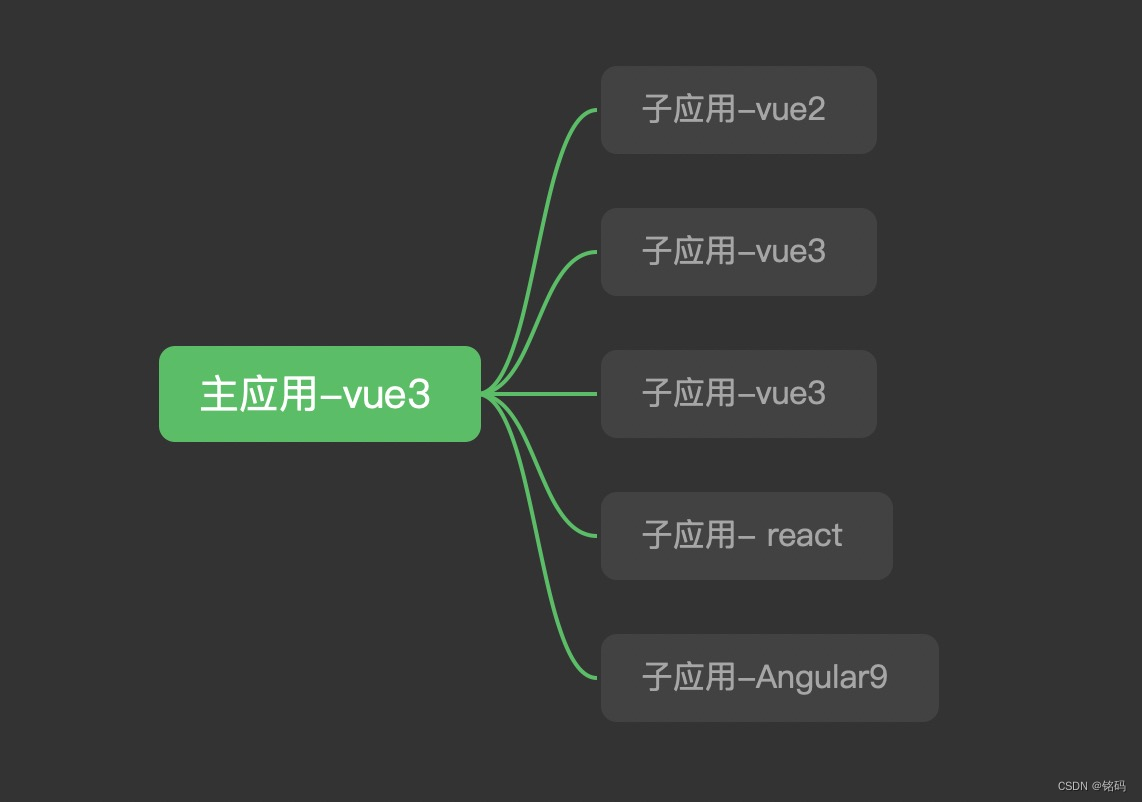
本文章介绍了qiankun在vue3的应用,其中子应用有vue2、vue3、react、angular
qiankun 是一个基于 single-spa 的微前端实现库,旨在帮助大家能更简单、无痛的构建一个生产可用微前端架构系统。
其他几款([single-spa]、[micro-app]、[百度emp]])
使用 iframe 整合系统时,假设我们有系统 A, 当我们想把系统 B 引入 A 系统时,只需要 B 系统提供一个 url 给 A 系统引用即可,这里我们把 A 系统叫做父应用,把 B 系统叫做子应用。同样的,微前端也延续了这个概念,微前端在使用起来基本和使用 iframe 一样平滑。
主应用(父),微应用(子)
npm install @vue/cli -g

vue create qiankun-tast
$ yarn add qiankun # 或者 npm i qiankun -S
main.js:
import { createApp } from 'vue'
import App from './App.vue'
import router from './router/index'
import ElementPlus from 'element-plus'
import 'element-plus/dist/index.css'
import 'zone.js';

import { registerMicroApps } from 'qiankun';

registerMicroApps([
  // {
  //     name: "vue2App",
  //     props: { age: 10 }, //给子应用传数据
  //     entry: "//localhost:3001", //默认会加载这个html,解析里面的js,动态执行(子应用必须支持跨域)里面,是用fetch去请求的数据
  //     container: "#out-main", //挂载到主应用的哪个元素下
  //     activeRule: "/vue2", //当我劫持到路由地址为/vue2时,我就把http://localhost:3000这个应用挂载到#app-main的元素下
  // },
  {
    name: "vueChildOne",
    entry: "//localhost:3001",
    container: "#child-vue3-one-content",
    activeRule: "/child-one",
  },
  {
    name: "vueChildTwo",
    entry: "//localhost:3002",
    container: "#child-vue3-two-content",
    activeRule: "/child-two",
  },
  {
    name: "vue2Child",
    entry: "//localhost:3003",
    container: "#child-vue2-one-content",
    activeRule: "/child-vue2-one",
  },
  {
    name: "reactApp1",
    entry: "//localhost:4001",
    container: "#child-react-one-content",
    activeRule: "/child-react-one",
  },
  {
    name: "angularApp1",
    entry: "//localhost:4200",
    container: "#child-angular-one-content",
    activeRule: "/child-angular-one",
  },
]);

// setDefaultMountApp('/child-one')

// 启动 qiankun
// start();

createApp(App).use(ElementPlus).use(router).mount('#app-base')
App.vue
<template>
  <div class="common-layout">
    <el-container>
      <el-aside width="200px">
        <el-menu>
          <el-menu-item index="1">
            <el-icon><icon-menu /></el-icon>
            <span @click="goHome">首页</span>
          </el-menu-item>
          <el-menu-item index="2">
            <el-icon><icon-menu /></el-icon>
            <span @click="$router.push('/child-one')">child-vue3-one</span>
          </el-menu-item>
          <el-menu-item index="3">
            <el-icon><document /></el-icon>
            <span @click="$router.push('/child-two')">child-vue3-one</span>
          </el-menu-item>
          <el-menu-item index="4">
            <el-icon><document /></el-icon>
            <span @click="$router.push('/child-vue2-one')">child-vue2-one</span>
          </el-menu-item>
          <el-menu-item index="5">
            <el-icon><document /></el-icon>
            <span @click="$router.push('/child-react-one')">child-react-one</span>
          </el-menu-item>
          <el-menu-item index="6">
            <el-icon><document /></el-icon>
            <span @click="$router.push('/child-angular-one')">child-angular-one</span>
          </el-menu-item>
        </el-menu>
      </el-aside>
      <el-main> <router-view></router-view></el-main>
    </el-container>
  </div>
</template>

<script>
export default {
  name: "App",
  components: {},
  methods: {
    // 跳转页面方法

    goHome() {
      this.$router.push("/");
    },
  },
};
</script>

<style>
.bens {
  width: 100%;
  display: flex;
  justify-content: center;
  position: absolute;
  top: 15px;
  left: 0;
  z-index: 9999999;
}
#app-base {
  font-family: Avenir, Helvetica, Arial, sans-serif;
  -webkit-font-smoothing: antialiased;
  -moz-osx-font-smoothing: grayscale;
  text-align: center;
  color: #2c3e50;
  margin-top: 60px;
}
</style>
index.html:
// 将id:app 改为 app-base  自定义就行,只要与main.js对应起来,切不与微应用重复
<div id="app-base"></div>
router.js
import { createRouter, createWebHistory } from "vue-router";

// 2. 配置路由
const routes = [
  {
    path: "/",
    name: "home",
    component: () => import("@/views/home/index.vue"),
  },
  {
    path: "/child-one",
    component: () => import("@/views/childOne/index.vue"),
  },
  {
    path: "/child-two",
    component: () => import("@/views/childTwo/index.vue"),
  },
  {
    path: "/child-vue2-one",
    component: () => import("@/views/childVue2One/index.vue"),
  },
  {
    path: "/child-react-one",
    component: () => import("@/views/childReactOne/index.vue"),
  },
  {
    path: "/child-angular-one",
    component: () => import("@/views/childAgOne/index.vue"),
  },
];
// 1.返回一个 router 实列,为函数,里面有配置项(对象) history
const router = createRouter({
    mode: 'history',
    history: createWebHistory(),
    routes,
});

// 3导出路由   然后去 main.ts 注册 router.ts
export default router
// 选择vue3这个版本
vue create child-one
在 src 目录新增 public-path.js
解决静态文件跨域
// src/public-path.js
if(window.__POWERED_BY_QIANKUN__) {
  __webpack_public_path__ = window.__INJECTED_PUBLIC_PATH_BY_QIANKUN__;
}
import { createRouter, createWebHashHistory, createWebHistory } from "vue-router";

// 2. 配置路由
const routes = [
    {
        path: '/',
        component: () => import('@/views/home/index.vue'),
    },
    {
        path: '/about',
        component: () => import('@/views/about/index.vue'),
    },

];
// 1.返回一个 router 实列,为函数,里面有配置项(对象) history
const router = createRouter({
    mode: 'history',
    base: window.__POWERED_BY_QIANKUN__ ? "/child-one" : "/",
    history: createWebHashHistory('/child-one'),
    routes,
});

// 3导出路由   然后去 main.ts 注册 router.ts
export default router
import { createApp } from 'vue'
import App from './App.vue'
import router from './router/index'
import './public-path'

// createApp(App).mount('#app')

let instance = null;
function render(props = {}) {
  if (instance) return;
  const { container } = props;
  console.log(container);
  instance = createApp(App)
    .use(router)
    .mount(container ? container.querySelector("#app-child-one") : "#app-child-one");
}

// 独立运行时
if (!window.__POWERED_BY_QIANKUN__) {
  render();
}

export async function bootstrap() {
  console.log("[vue] vue app bootstraped");
}
export async function mount(props) {
  console.log("[vue] props from main framework", props);
  render(props);
}
export async function unmount() {
  //可选链操作符
  instance.$destroy?.();
  instance = null;
}
<template>
  <h2>我是子应用 vue3-one</h2>
  <div id="child-vue3-one-content"></div>
</template>

<script>
import { start } from "qiankun";
export default {
  name: "childOne",
  components: {},
  mounted() {
    if (!window.qiankunStarted) {
      window.qiankunStarted = true;
      start();
    }
  },
};
</script>

<style>
</style>

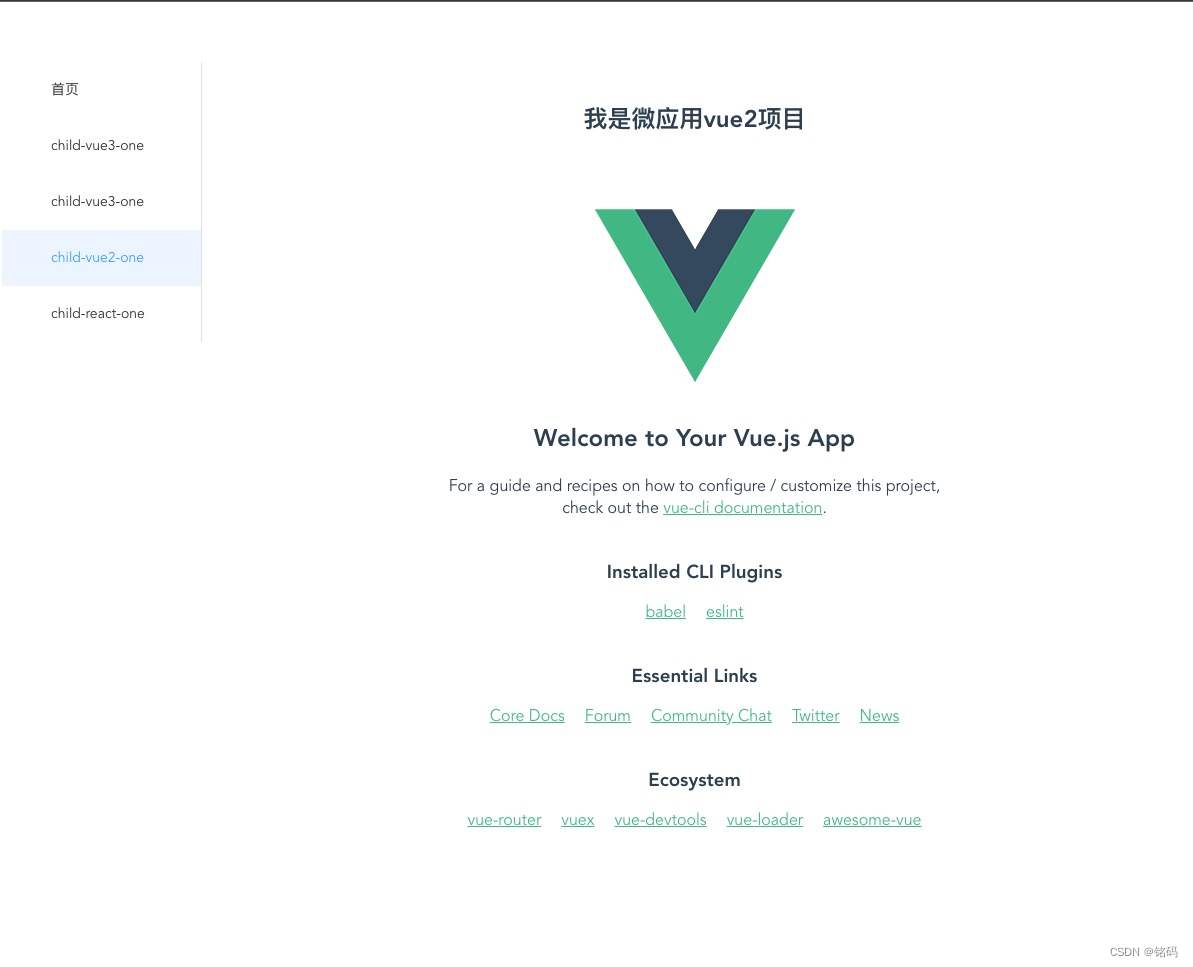
childVue2One/index.vue
<template>
  <h2>我是微应用vue2项目</h2>
  <div id="child-vue2-one-content"></div>
</template>

<script>
import { start } from "qiankun";
export default {
  name: "vueChild",
  components: {},
  mounted() {
    this.$nextTick(() => {
      if (!window.qiankunStarted) {
        window.qiankunStarted = true;
        start();
      }
    });
  },
};
</script>

<style>
</style>
src下创建public-path.js
if (window.__POWERED_BY_QIANKUN__) {
    __webpack_public_path__ = window.__INJECTED_PUBLIC_PATH_BY_QIANKUN__
}
main.js
// src/main.js
import Vue from 'vue'
import App from './App'
import router from './router'
import "./public-path";

Vue.config.productionTip = false

// 定义一个Vue实例
let instance = null
// 渲染方法
function render(props = {}) {
  const { container } = props
  instance = new Vue({
    router,
    render: (h) => h(App)
  }).$mount(container ? container.querySelector('#app'): '#app')
}
// 独立运行时
if(!window.__POWERED_BY_QIANKUN__) {
  render()
}
//暴露主应用生命周期钩子
/**
 * bootstrap : 在微应用初始化的时候调用一次,之后的生命周期里不再调用
 */
export async function bootstrap() {
  console.log('vue2-app bootstraped');
}
/**
 * mount : 在应用每次进入时调用
 */
export async function mount(props) {
  console.log('vue2-app mount', props);
  render(props);
}
/**
 * unmount :应用每次 切出/卸载 均会调用
 */
export async function unmount() {
  console.log("vue2-app unmount")
  instance.$destroy();
  instance.$el.innerHTML = '';
  instance = null;
}
vue.config.js
module.exports = {
    lintOnSave: false,
    devServer: {
        port: "3003",
        headers: {
            "Access-Control-Allow-Origin": "*", //所有人都可以访问我的服务器
        },
    },
    configureWebpack: {
        output: {
            // library: `${name}-[name]`,
            library: `vueChildOne`,
            libraryTarget: "umd", // 把微应用打包成 umd 库格式
            // jsonpFunction: `webpackJsonp_${name}`,
        },
    },
};
router.js
import { createRouter, createWebHashHistory, createWebHistory } from "vue-router";

// 2. 配置路由
const routes = [
    {
        path: '/',
        component: () => import('@/views/home/index.vue'),
    },
    {
        path: '/about',
        component: () => import('@/views/about/index.vue'),
    },

];
// 1.返回一个 router 实列,为函数,里面有配置项(对象) history
const router = createRouter({
    mode: 'history',
    base: window.__POWERED_BY_QIANKUN__ ? "/child-one" : "/",
    history: createWebHashHistory('/child-one'),
    routes,
});

// 3导出路由   然后去 main.ts 注册 router.ts
export default router
路由版本不对
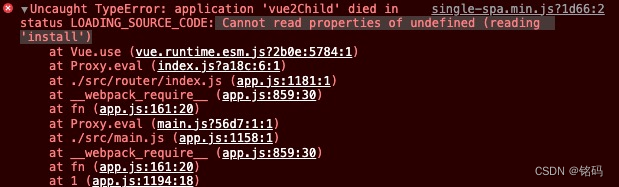
下载指定版本在3*的就行
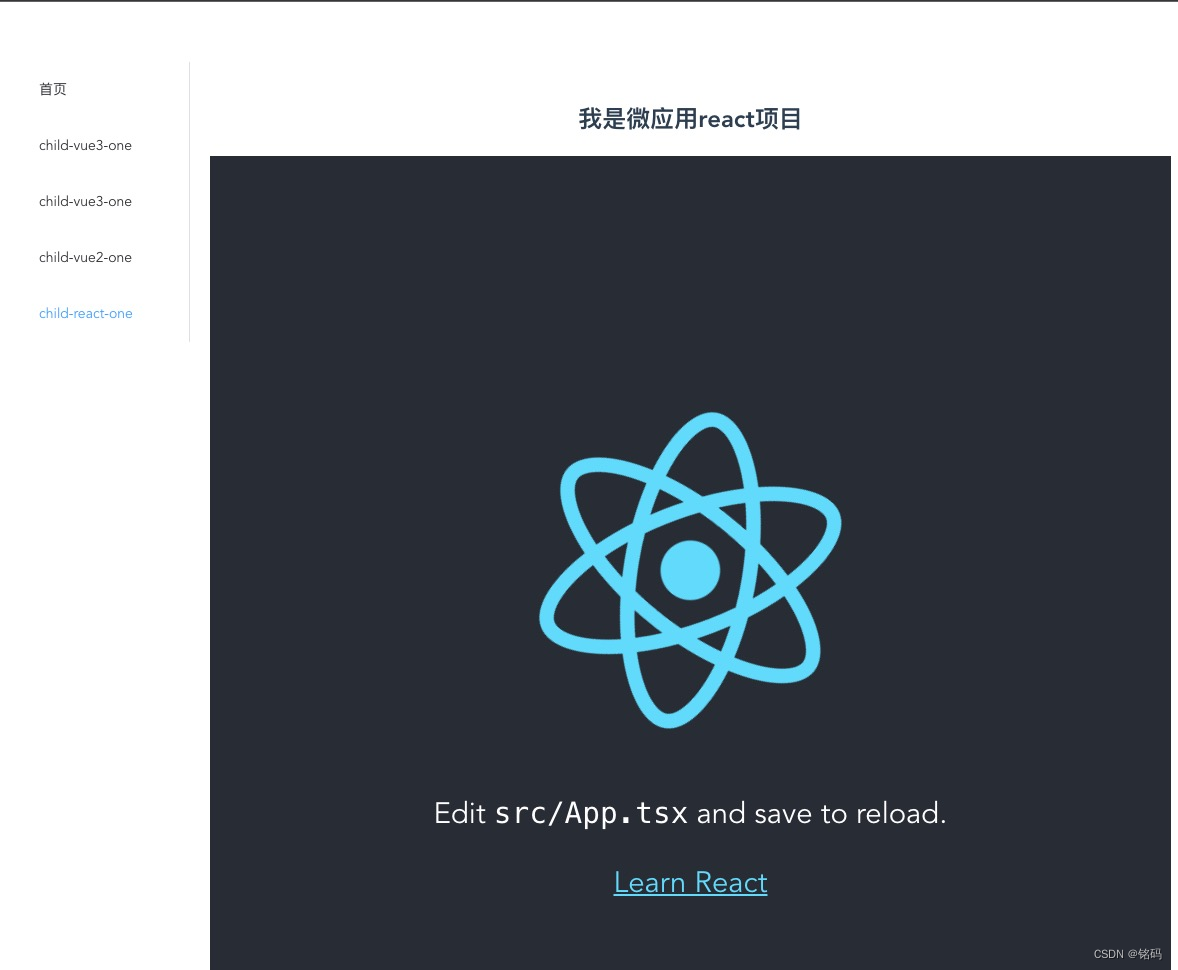
– You need to export lifecycle functions in reactApp1 entry
明明我已经写了生命周期但是没有生效。
问题出在:官方问题使用的js语法,我使用的是ts语法。
解决:用react-app-rewired方案复写webpack就可以了。作用:通过react-app-rewired插件,react-app-rewired的作用就是在不eject的情况下,覆盖create-react-app的配置.
angular由于在国内用的不多所以我是按照官方教程完成的,当然中间出了很多狗血的错误
官方:以 Angular-cli 9 生成的 angular 9 项目为例,其他版本的 angular 后续会逐渐补充。
这句话就是一个坑,首先我自己原有的angular版本是12,用 ng 命令安装的项目就是最新的了。这个导致我安装官方操作一直没有成功,不断报错。------我放弃了,做个乖孩子,用angular9
由于不能降低电脑全局版本,于是我在本项目中安装了一个angular-cli9
npm install  @angular/cli@9.0.1
ng new child-angular1
版本搞成了9那就好办了
注意:在qiankun的文档中第二步,child-angular-one这个是和主应用配置路由一致
设置 history 模式路由的 base,src/app/app-routing.module.ts 文件:
import { NgModule } from '@angular/core';
import { Routes, RouterModule } from '@angular/router';
import { APP_BASE_HREF } from '@angular/common';

const routes: Routes = [];

@NgModule({
  imports: [RouterModule.forRoot(routes)],
  exports: [RouterModule],
  // @ts-ignore
  // child-angular-one 必须和主路由向对应
  providers: [{ provide: APP_BASE_HREF, useValue: window.__POWERED_BY_QIANKUN__ ? '/child-angular-one' : '/' }]
})
export class AppRoutingModule { }
gitee地址:qiankun-vue3
对于具有离线功能的智能手机应用程序,我正在为Xml文件创建单向文本同步。我希望我的服务器将增量/差异(例如GNU差异补丁)发送到目标设备。这是计划:Time=0Server:hasversion_1ofXmlfile(~800kiB)Client:hasversion_1ofXmlfile(~800kiB)Time=1Server:hasversion_1andversion_2ofXmlfile(each~800kiB)computesdeltaoftheseversions(=patch)(~10kiB)sendspatchtoClient(~10kiBtransferred)Cl
我构建了两个需要相互通信和发送文件的Rails应用程序。例如,一个Rails应用程序会发送请求以查看其他应用程序数据库中的表。然后另一个应用程序将呈现该表的json并将其发回。我还希望一个应用程序将存储在其公共(public)目录中的文本文件发送到另一个应用程序的公共(public)目录。我从来没有做过这样的事情,所以我什至不知道从哪里开始。任何帮助,将不胜感激。谢谢! 最佳答案 无论Rails是什么,几乎所有Web应用程序都有您的要求,大多数现代Web应用程序都需要相互通信。但是有一个小小的理解需要你坚持下去,网站不应直接访问彼此
我尝试运行2.x应用程序。我使用rvm并为此应用程序设置其他版本的ruby:$rvmuseree-1.8.7-head我尝试运行服务器,然后出现很多错误:$script/serverNOTE:Gem.source_indexisdeprecated,useSpecification.Itwillberemovedonorafter2011-11-01.Gem.source_indexcalledfrom/Users/serg/rails_projects_terminal/work_proj/spohelp/config/../vendor/rails/railties/lib/r
刚入门rails,开始慢慢理解。有人可以解释或给我一些关于在application_controller中编码的好处或时间和原因的想法吗?有哪些用例。您如何为Rails应用程序使用应用程序Controller?我不想在那里放太多代码,因为据我了解,每个请求都会调用此Controller。这是真的? 最佳答案 ApplicationController实际上是您应用程序中的每个其他Controller都将从中继承的类(尽管这不是强制性的)。我同意不要用太多代码弄乱它并保持干净整洁的态度,尽管在某些情况下ApplicationContr
我是一个Rails初学者,但我想从我的RailsView(html.haml文件)中查看Ruby变量的内容。我试图在ruby中打印出变量(认为它会在终端中出现),但没有得到任何结果。有什么建议吗?我知道Rails调试器,但更喜欢使用inspect来打印我的变量。 最佳答案 您可以在View中使用puts方法将信息输出到服务器控制台。您应该能够在View中的任何位置使用Haml执行以下操作:-puts@my_variable.inspect 关于ruby-on-rails-如何在我的R
是否可以在应用程序中包含的gem代码中知道应用程序的Rails文件系统根目录?这是gem来源的示例:moduleMyGemdefself.included(base)putsRails.root#returnnilendendActionController::Base.send:include,MyGem谢谢,抱歉我的英语不好 最佳答案 我发现解决类似问题的解决方案是使用railtie初始化程序包含我的模块。所以,在你的/lib/mygem/railtie.rbmoduleMyGemclassRailtie使用此代码,您的模块将在
无论您是想搭建桌面端、WEB端或者移动端APP应用,HOOPSPlatform组件都可以为您提供弹性的3D集成架构,同时,由工业领域3D技术专家组成的HOOPS技术团队也能为您提供技术支持服务。如果您的客户期望有一种在多个平台(桌面/WEB/APP,而且某些客户端是“瘦”客户端)快速、方便地将数据接入到3D应用系统的解决方案,并且当访问数据时,在各个平台上的性能和用户体验保持一致,HOOPSPlatform将帮助您完成。利用HOOPSPlatform,您可以开发在任何环境下的3D基础应用架构。HOOPSPlatform可以帮您打造3D创新型产品,HOOPSSDK包含的技术有:快速且准确的CAD
导读:随着叮咚买菜业务的发展,不同的业务场景对数据分析提出了不同的需求,他们希望引入一款实时OLAP数据库,构建一个灵活的多维实时查询和分析的平台,统一数据的接入和查询方案,解决各业务线对数据高效实时查询和精细化运营的需求。经过调研选型,最终引入ApacheDoris作为最终的OLAP分析引擎,Doris作为核心的OLAP引擎支持复杂地分析操作、提供多维的数据视图,在叮咚买菜数十个业务场景中广泛应用。作者|叮咚买菜资深数据工程师韩青叮咚买菜创立于2017年5月,是一家专注美好食物的创业公司。叮咚买菜专注吃的事业,为满足更多人“想吃什么”而努力,通过美好食材的供应、美好滋味的开发以及美食品牌的孵
在应用开发中,有时候我们需要获取系统的设备信息,用于数据上报和行为分析。那在鸿蒙系统中,我们应该怎么去获取设备的系统信息呢,比如说获取手机的系统版本号、手机的制造商、手机型号等数据。1、获取方式这里分为两种情况,一种是设备信息的获取,一种是系统信息的获取。1.1、获取设备信息获取设备信息,鸿蒙的SDK包为我们提供了DeviceInfo类,通过该类的一些静态方法,可以获取设备信息,DeviceInfo类的包路径为:ohos.system.DeviceInfo.具体的方法如下:ModifierandTypeMethodDescriptionstatic StringgetAbiList()Obt
我们目前正在为ROR3.2开发自定义cms引擎。在这个过程中,我们希望成为我们的rails应用程序中的一等公民的几个类类型起源,这意味着它们应该驻留在应用程序的app文件夹下,它是插件。目前我们有以下类型:数据源数据类型查看我在app文件夹下创建了多个目录来保存这些:应用/数据源应用/数据类型应用/View更多类型将随之而来,我有点担心应用程序文件夹被这么多目录污染。因此,我想将它们移动到一个子目录/模块中,该子目录/模块包含cms定义的所有类型。所有类都应位于MyCms命名空间内,目录布局应如下所示:应用程序/my_cms/data_source应用程序/my_cms/data_ty
