对ONNX的介绍强烈建议看,本文做了很多参考:模型部署入门教程(一):模型部署简介
模型部署入门教程(三):PyTorch 转 ONNX 详解
以及Pytorch的官方介绍:(OPTIONAL) EXPORTING A MODEL FROM PYTORCH TO ONNX AND RUNNING IT USING ONNX RUNTIME
C++的部署:详细介绍 Yolov5 转 ONNX模型 + 使用 ONNX Runtime 的 C++ 部署(包含官方文档的介绍)。
我用的是自己训练好的一个yolov5-5.0模型。
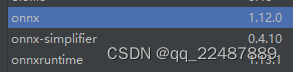
PyCharm环境如下:
yolov5 可以使用官方的 export.py 脚本进行转换,这里不做详细解析
可参考:yolov5转onnx,c++调用完美复现
在网站 Netron (开源的模型可视化工具)来可视化 ONNX 模型。
想要理解 1.2 节的内容,请看对参数详细介绍的第3章。
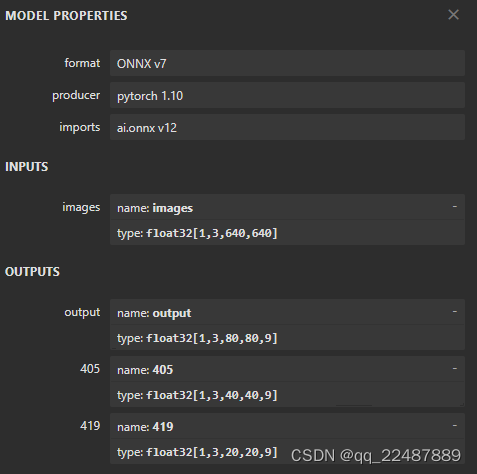
python ./models/export.py --weights ./weights/best20221027.pt --img 640 --batch 1 --dynamic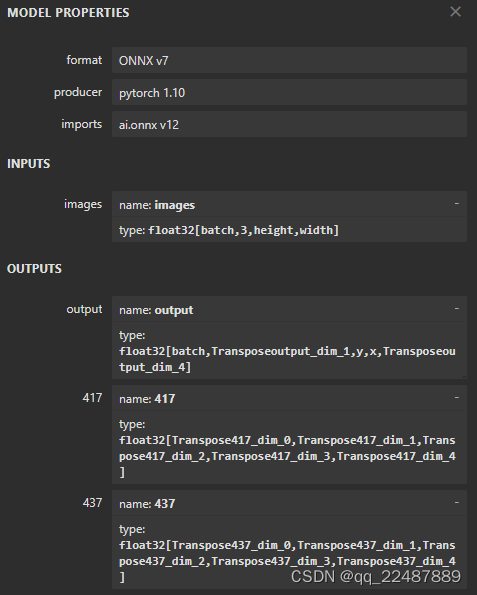
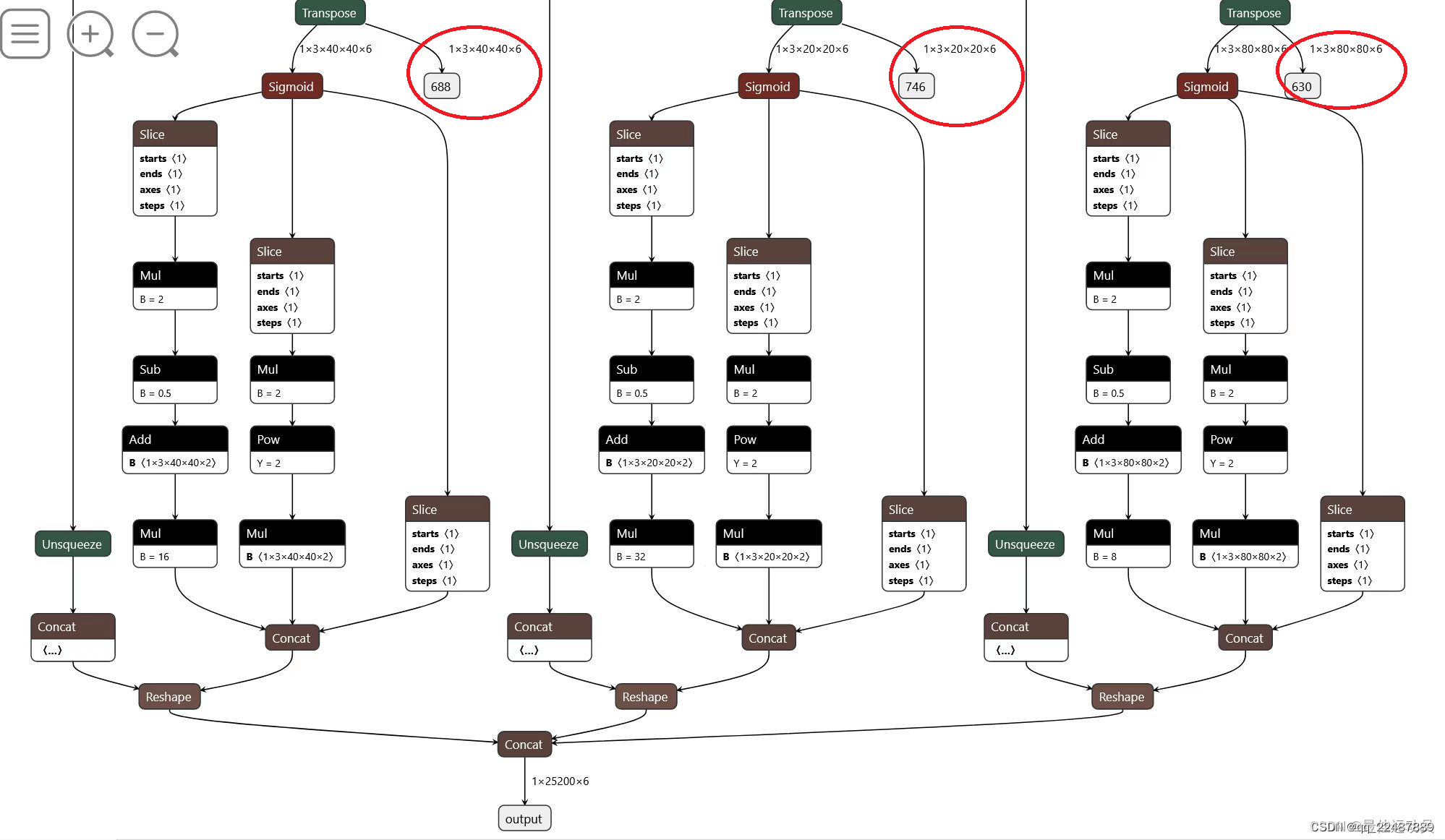
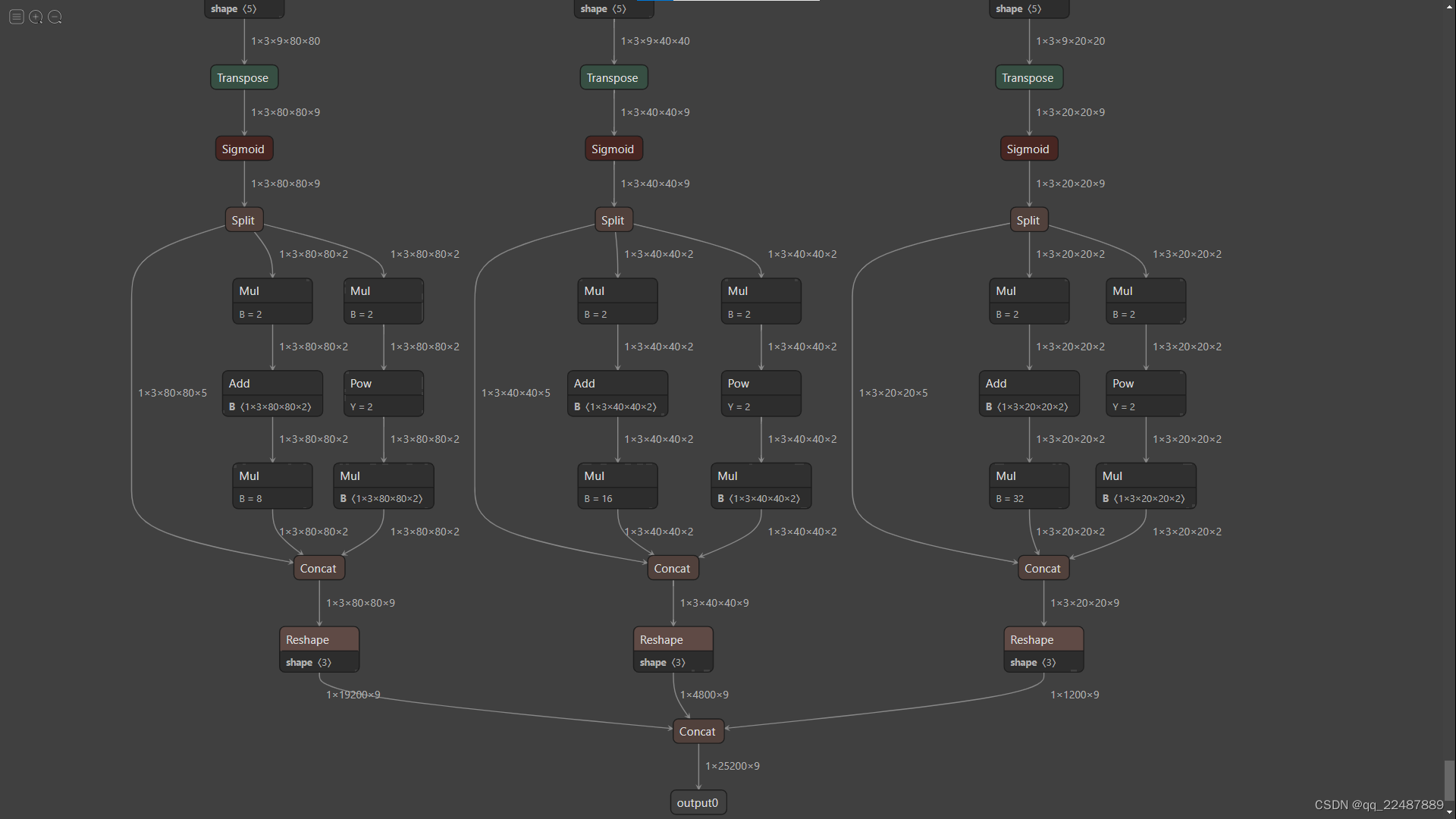
上面的三个输出结构很清晰,但是这种多输出的情况是一个问题,维度太多且参数还没有进行处理,很很很不利于部署,不如在导出的时候就处理好参数为单输出的情况,输出转成常用的 1 × Anchors数目 × 9(即红圈中的结果转换成),这样的话每个Anchor的坐标信息就是映射到原图中的,省去了很多处理数据的麻烦。步骤如下,参考 YOLOv5导出onnx、TrensorRT部署(LINUX):
我采取的方案是,训练好的模型用yolov5-master的export.py来导出即可解决:python ./export.py --weights ./best20221027.pt --img 640 --batch 1 --include=onnx
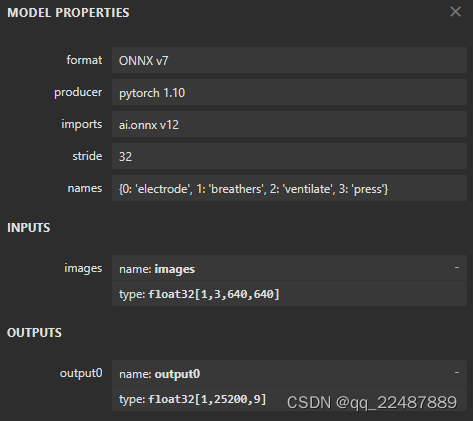
得到的onnx文件如下! 25200 = 3 × ( 802 + 402 + 202 ),接下来就可以部署了
onnx模型可视化,看出输出部分进行的处理如下:三输出模型的输出结果是 tx ty tw th 和 t0,即下图中sigmoid之前的参数,单输出的模型直接输出的是 bx by bw bh 和 score,即直接对应到原图中的坐标参数。
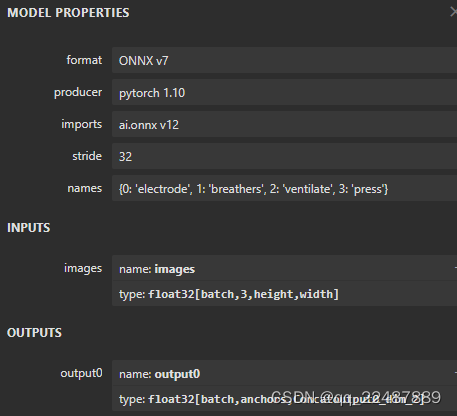
如果此时导出为动态模型python ./export.py --weights ./best20221027.pt --img 640 --batch 1 --dynamic ,则如下图所示:
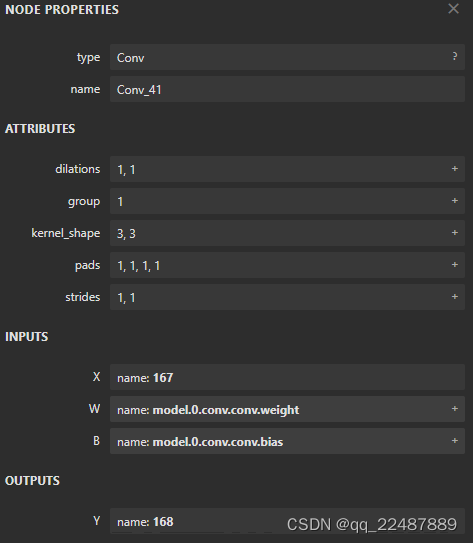
点击某一个算子节点,可以看到算子的具体信息。比如点击第一个 Conv 可以看到每个算子记录了算子属性、图结构、权重三类信息。
参考:【OpenVino CPU模型加速(二)】使用openvino加速推理
yolov5部署1——pytorch->onnx
简化步骤:
pip install onnx-simplifier
python -m onnxsim input_onnx_model output_onnx_model
结果如下:
python -m onnxsim  ./best20221027.onnx ./sim_best20221027.onnx

Simplifying...
Finish! Here is the difference:
┏━━━━━━━━━━━━┳━━━━━━━━━━━━━━━━┳━━━━━━━━━━━━━━━━━━┓
┃            ┃ Original Model ┃ Simplified Model ┃
┡━━━━━━━━━━━━╇━━━━━━━━━━━━━━━━╇━━━━━━━━━━━━━━━━━━┩
│ Add        │ 7              │ 7                │
│ Concat     │ 14             │ 14               │
│ Constant   │ 34             │ 0                │
│ Conv       │ 62             │ 62               │
│ MaxPool    │ 3              │ 3                │
│ Mul        │ 59             │ 59               │
│ Reshape    │ 3              │ 3                │
│ Resize     │ 2              │ 2                │
│ Sigmoid    │ 59             │ 59               │
│ Slice      │ 8              │ 8                │
│ Transpose  │ 3              │ 3                │
│ Model Size │ 27.0MiB        │ 27.0MiB          │
└────────────┴────────────────┴──────────────────┘
Constant 变成了 0 ,得到了简化。
onnxruntime python 推理模型,主要是为了测试模型的准确,模型部署的最终目的的用 C++ 部署,从而部署在嵌入式设备等。
ONNX Runtime Docs(官方文档)
推理总流程示例如下:
# 检验模型是否正确
import onnx
onnx_model = onnx.load("fashion_mnist_model.onnx")
onnx.checker.check_model(onnx_model)

# 加载和运行 ONNX 模型,以及指定环境和应用程序配置
import onnxruntime as ort
import numpy as np
x, y = test_data[0][0], test_data[0][1]
ort_sess = ort.InferenceSession('fashion_mnist_model.onnx')
outputs = ort_sess.run(None, {'input': x.numpy()})

# Print Result
predicted, actual = classes[outputs[0][0].argmax(0)], classes[y]
print(f'Predicted: "{predicted}", Actual: "{actual}"')
推理的全部代码如下:其中 输入和输出的数据 需要根据ONNX模型的输入输出格式进行处理
代码参考的文章是(基本是复制过来进行微小修改和添加注释,建议收藏原文):YOLOV5模型转onnx并推理,后面的章节均是对代码的介绍。
import onnx
import onnxruntime as ort
import numpy as np

import sys

import onnx
import onnxruntime as ort
import cv2
import numpy as np

CLASSES = ['person', 'bicycle', 'car', 'motorcycle', 'airplane', 'bus', 'train', 'truck', 'boat', 'traffic light',
           'fire hydrant', 'stop sign', 'parking meter', 'bench', 'bird', 'cat', 'dog', 'horse', 'sheep', 'cow',
           'elephant', 'bear', 'zebra', 'giraffe', 'backpack', 'umbrella', 'handbag', 'tie', 'suitcase', 'frisbee',
           'skis', 'snowboard', 'sports ball', 'kite', 'baseball bat', 'baseball glove', 'skateboard', 'surfboard',
           'tennis racket', 'bottle', 'wine glass', 'cup', 'fork', 'knife', 'spoon', 'bowl', 'banana', 'apple',
           'sandwich', 'orange', 'broccoli', 'carrot', 'hot dog', 'pizza', 'donut', 'cake', 'chair', 'couch',
           'potted plant', 'bed', 'dining table', 'toilet', 'tv', 'laptop', 'mouse', 'remote', 'keyboard', 'cell phone',
           'microwave', 'oven', 'toaster', 'sink', 'refrigerator', 'book', 'clock', 'vase', 'scissors', 'teddy bear',
           'hair drier', 'toothbrush']  # coco80类别

# CLASSES = ['electrode', 'breathers', 'ventilate', 'press']


class Yolov5ONNX(object):
    def __init__(self, onnx_path):
        """检查onnx模型并初始化onnx"""
        onnx_model = onnx.load(onnx_path)
        try:
            onnx.checker.check_model(onnx_model)
        except Exception:
            print("Model incorrect")
        else:
            print("Model correct")

        options = ort.SessionOptions()
        options.enable_profiling = True
        # self.onnx_session = ort.InferenceSession(onnx_path, sess_options=options,
        #                                          providers=['CUDAExecutionProvider', 'CPUExecutionProvider'])
        self.onnx_session = ort.InferenceSession(onnx_path)
        self.input_name = self.get_input_name()  # ['images']
        self.output_name = self.get_output_name()  # ['output0']

    def get_input_name(self):
        """获取输入节点名称"""
        input_name = []
        for node in self.onnx_session.get_inputs():
            input_name.append(node.name)

        return input_name

    def get_output_name(self):
        """获取输出节点名称"""
        output_name = []
        for node in self.onnx_session.get_outputs():
            output_name.append(node.name)

        return output_name

    def get_input_feed(self, image_numpy):
        """获取输入numpy"""
        input_feed = {}
        for name in self.input_name:
            input_feed[name] = image_numpy

        return input_feed

    def inference(self, img_path):
        """ 1.cv2读取图像并resize
        2.图像转BGR2RGB和HWC2CHW(因为yolov5的onnx模型输入为 RGB:1 × 3 × 640 × 640)
        3.图像归一化
        4.图像增加维度
        5.onnx_session 推理 """
        img = cv2.imread(img_path)
        or_img = cv2.resize(img, (640, 640))  # resize后的原图 (640, 640, 3)
        img = or_img[:, :, ::-1].transpose(2, 0, 1)  # BGR2RGB和HWC2CHW
        img = img.astype(dtype=np.float32)  # onnx模型的类型是type: float32[ , , , ]
        img /= 255.0
        img = np.expand_dims(img, axis=0)  # [3, 640, 640]扩展为[1, 3, 640, 640]
        # img尺寸(1, 3, 640, 640)
        input_feed = self.get_input_feed(img)  # dict:{ input_name: input_value }
        pred = self.onnx_session.run(None, input_feed)[0]  # <class 'numpy.ndarray'>(1, 25200, 9)

        return pred, or_img


# dets:  array [x,6] 6个值分别为x1,y1,x2,y2,score,class
# thresh: 阈值
def nms(dets, thresh):
    # dets:x1 y1 x2 y2 score class
    # x[:,n]就是取所有集合的第n个数据
    x1 = dets[:, 0]
    y1 = dets[:, 1]
    x2 = dets[:, 2]
    y2 = dets[:, 3]
    # -------------------------------------------------------
    #   计算框的面积
    #	置信度从大到小排序
    # -------------------------------------------------------
    areas = (y2 - y1 + 1) * (x2 - x1 + 1)
    scores = dets[:, 4]
    # print(scores)
    keep = []
    index = scores.argsort()[::-1]  # np.argsort()对某维度从小到大排序
    # [::-1] 从最后一个元素到第一个元素复制一遍。倒序从而从大到小排序

    while index.size > 0:
        i = index[0]
        keep.append(i)
        # -------------------------------------------------------
        #   计算相交面积
        #	1.相交
        #	2.不相交
        # -------------------------------------------------------
        x11 = np.maximum(x1[i], x1[index[1:]])
        y11 = np.maximum(y1[i], y1[index[1:]])
        x22 = np.minimum(x2[i], x2[index[1:]])
        y22 = np.minimum(y2[i], y2[index[1:]])

        w = np.maximum(0, x22 - x11 + 1)
        h = np.maximum(0, y22 - y11 + 1)

        overlaps = w * h
        # -------------------------------------------------------
        #   计算该框与其它框的IOU,去除掉重复的框,即IOU值大的框
        #	IOU小于thresh的框保留下来
        # -------------------------------------------------------
        ious = overlaps / (areas[i] + areas[index[1:]] - overlaps)
        idx = np.where(ious <= thresh)[0]
        index = index[idx + 1]
    return keep


def xywh2xyxy(x):
    # [x, y, w, h] to [x1, y1, x2, y2]
    y = np.copy(x)
    y[:, 0] = x[:, 0] - x[:, 2] / 2
    y[:, 1] = x[:, 1] - x[:, 3] / 2
    y[:, 2] = x[:, 0] + x[:, 2] / 2
    y[:, 3] = x[:, 1] + x[:, 3] / 2
    return y


def filter_box(org_box, conf_thres, iou_thres):  # 过滤掉无用的框
    # -------------------------------------------------------
    #   删除为1的维度
    #	删除置信度小于conf_thres的BOX
    # -------------------------------------------------------
    org_box = np.squeeze(org_box)  # 删除数组形状中单维度条目(shape中为1的维度)
    # (25200, 9)
    # […,4]:代表了取最里边一层的所有第4号元素,…代表了对:,:,:,等所有的的省略。此处生成:25200个第四号元素组成的数组
    conf = org_box[..., 4] > conf_thres  # 0 1 2 3 4 4是置信度,只要置信度 > conf_thres 的
    box = org_box[conf == True]  # 根据objectness score生成(n, 9),只留下符合要求的框
    print('box:符合要求的框')
    print(box.shape)

    # -------------------------------------------------------
    #   通过argmax获取置信度最大的类别
    # -------------------------------------------------------
    cls_cinf = box[..., 5:]  # 左闭右开(5 6 7 8),就只剩下了每个grid cell中各类别的概率
    cls = []
    for i in range(len(cls_cinf)):
        cls.append(int(np.argmax(cls_cinf[i])))  # 剩下的objecctness score比较大的grid cell,分别对应的预测类别列表
    all_cls = list(set(cls))  # 去重,找出图中都有哪些类别
    # set() 函数创建一个无序不重复元素集,可进行关系测试,删除重复数据,还可以计算交集、差集、并集等。
    # -------------------------------------------------------
    #   分别对每个类别进行过滤
    #   1.将第6列元素替换为类别下标
    #	2.xywh2xyxy 坐标转换
    #	3.经过非极大抑制后输出的BOX下标
    #	4.利用下标取出非极大抑制后的BOX
    # -------------------------------------------------------
    output = []
    for i in range(len(all_cls)):
        curr_cls = all_cls[i]
        curr_cls_box = []
        curr_out_box = []

        for j in range(len(cls)):
            if cls[j] == curr_cls:
                box[j][5] = curr_cls
                curr_cls_box.append(box[j][:6])  # 左闭右开,0 1 2 3 4 5

        curr_cls_box = np.array(curr_cls_box)  # 0 1 2 3 4 5 分别是 x y w h score class
        # curr_cls_box_old = np.copy(curr_cls_box)
        curr_cls_box = xywh2xyxy(curr_cls_box)  # 0 1 2 3 4 5 分别是 x1 y1 x2 y2 score class
        curr_out_box = nms(curr_cls_box, iou_thres)  # 获得nms后,剩下的类别在curr_cls_box中的下标

        for k in curr_out_box:
            output.append(curr_cls_box[k])
    output = np.array(output)
    return output


def draw(image, box_data):
    # -------------------------------------------------------
    #	取整,方便画框
    # -------------------------------------------------------

    boxes = box_data[..., :4].astype(np.int32)  # x1 x2 y1 y2
    scores = box_data[..., 4]
    classes = box_data[..., 5].astype(np.int32)
    for box, score, cl in zip(boxes, scores, classes):
        top, left, right, bottom = box
        print('class: {}, score: {}'.format(CLASSES[cl], score))
        print('box coordinate left,top,right,down: [{}, {}, {}, {}]'.format(top, left, right, bottom))

        cv2.rectangle(image, (top, left), (right, bottom), (255, 0, 0), 2)
        cv2.putText(image, '{0} {1:.2f}'.format(CLASSES[cl], score),
                    (top, left),
                    cv2.FONT_HERSHEY_SIMPLEX,
                    0.6, (0, 0, 255), 2)
    return image


if __name__ == "__main__":
    # onnx_path = 'weights/sim_best20221027.onnx'
    onnx_path = 'weights/yolov5s.onnx'
    model = Yolov5ONNX(onnx_path)
    # output, or_img = model.inference('data/images/img.png')
    output, or_img = model.inference('data/images/street.jpg')
    print('pred: 位置[0, 10000, :]的数组')
    print(output.shape)
    print(output[0, 10000, :])
    outbox = filter_box(output, 0.5, 0.5)  # 最终剩下的Anchors:0 1 2 3 4 5 分别是 x1 y1 x2 y2 score class
    print('outbox( x1 y1 x2 y2 score class):')
    print(outbox)
    if len(outbox) == 0:
        print('没有发现物体')
        sys.exit(0)
    or_img = draw(or_img, outbox)
    cv2.imwrite('./run/images/res.jpg', or_img)
下面对代码进行展开介绍:
对于 PyTorch - ONNX - ONNX Runtime 这条部署流水线,只要在目标设备中得到 .onnx 文件,并在 ONNX Runtime 上运行模型,模型部署就算大功告成了。
这里进行 Python ONNX Runtime 的推理尝试,如果不需要的直接看下一章节的 TensorRT 部署。
参考官网:ONNX Runtime | Home 的CV部分
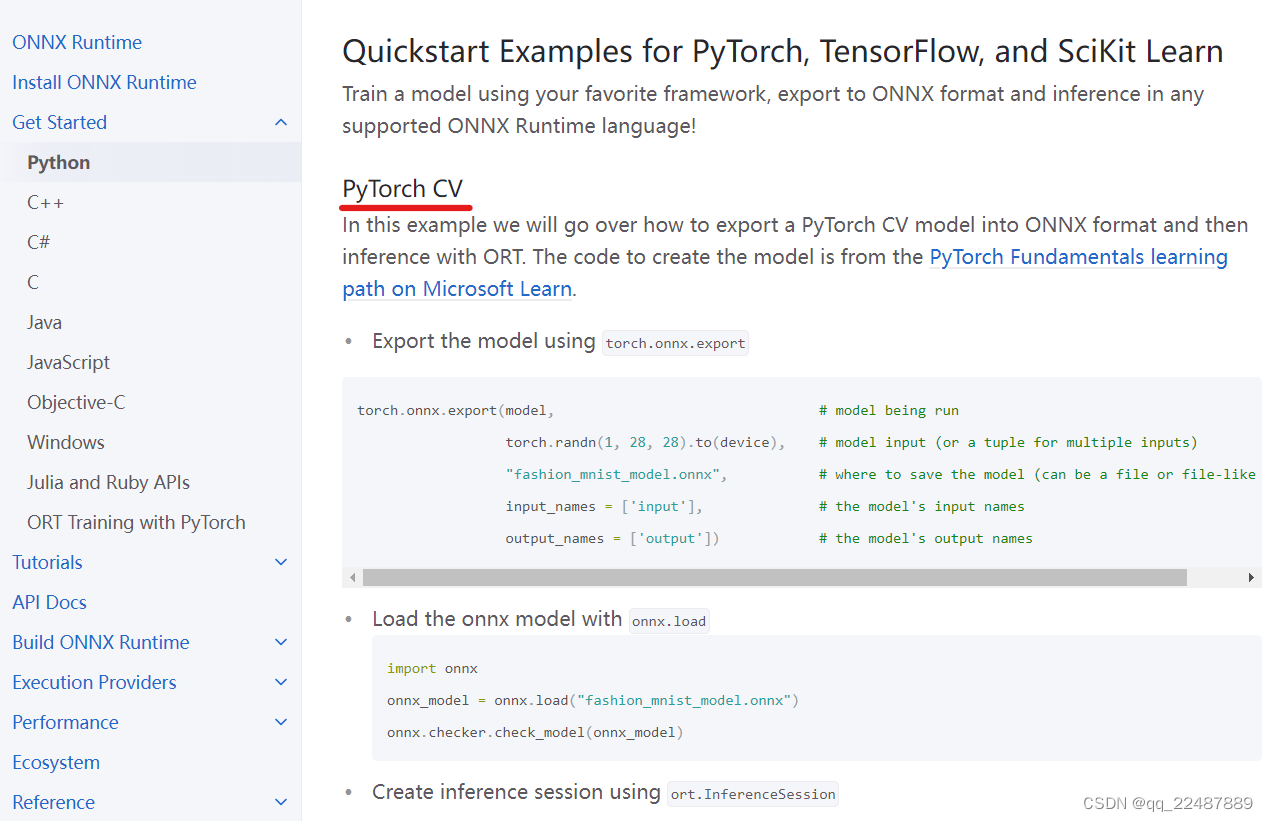
对函数有疑问参考官方API :Python API Reference Docs
代码的解释和 ONNX Runtime 的学习如下:
onnx.load,并检查模型:import onnx
onnx_model = onnx.load("sim_best20221027.onnx")
try:
onnx.checker.check_model(onnx_model)
except Exception:
print("Model incorrect")
else:
print("Model correct")
检测异常:try except (异常捕获),没有问题,可以开始下一步,Load and run a model。
using ort.InferenceSession
流程如下:
import onnxruntime as ort
options = ort.SessionOptions()
options.enable_profiling=True
ort_sess = ort.InferenceSession('sim_best20221027.onnx', sess_options=options, providers=['CUDAExecutionProvider', 'CPUExecutionProvider'])
outputs = ort_sess.run([output names], inputs)

# Print Result
predicted, actual = classes[outputs[0][0].argmax(0)], classes[y]
print(f'Predicted: "{predicted}", Actual: "{actual}"')
其中对onnxruntime.InferenceSession.run()的解释:API Detail | InferenceSession
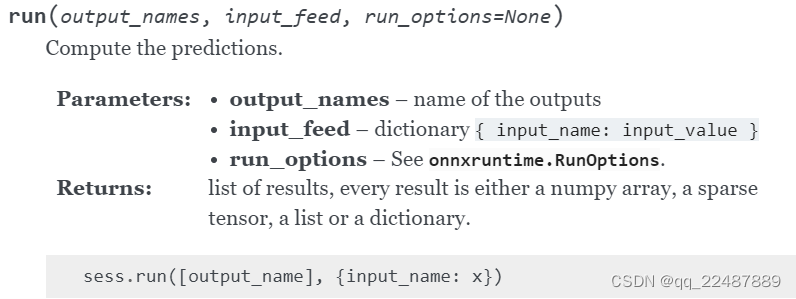
InferenceSession 是 ONNX Runtime 的主要类。它用于加载和运行 ONNX 模型,以及指定环境和应用程序配置选项。import onnxruntime as ort
ort_sess = ort.InferenceSession('sim_best20221027.onnx')
outputs = ort_sess.run([output names], inputs)
session = onnxruntime.InferenceSession(model,
                                       providers=['CUDAExecutionProvider', 'CPUExecutionProvider'])
onnxruntime.SessionOptions().enable_profiling=Trueonnxruntime.SessionOptions() 的解释 :Ort::SessionOptions Struct Referenceoptions = onnxruntime.SessionOptions()
options.enable_profiling=True
session = onnxruntime.InferenceSession('model.onnx', sess_options=options, providers=['CUDAExecutionProvider', 'CPUExecutionProvider']))
The ONNX Runtime Inference Session consumes and produces data using its OrtValue class.
数据的处理代码如下:选择的方案是
# X is numpy array on cpu
ortvalue = onnxruntime.OrtValue.ortvalue_from_numpy(X)
ortvalue.device_name()  # 'cpu'
ortvalue.shape()        # shape of the numpy array X
ortvalue.data_type()    # 'tensor(float)'
ortvalue.is_tensor()    # 'True'
np.array_equal(ortvalue.numpy(), X)  # 'True'

# ortvalue can be provided as part of the input feed to a model
session = onnxruntime.InferenceSession('model.onnx', providers=['CUDAExecutionProvider', 'CPUExecutionProvider']))
results = session.run(["Y"], {"X": ortvalue})
默认情况下,ONNX 运行时始终将输入和输出放在 CPU 上。如果在 CPU 以外的设备上消耗和生成输入或输出,则将数据放在 CPU 上可能不是最佳选择,因为它会在 CPU 和设备之间引入数据复制。
ONNX 运行时支持自定义数据结构,该结构支持所有 ONNX 数据格式,允许用户将支持这些格式的数据放置在设备上,例如,支持 CUDA 的设备上。在 ONNX Runtime 中,这称为 IOBinding。
要使用 IOBinding 功能,需要将 InferenceSession.run() 替换为 InferenceSession.run_with_iobinding()。
例如 CUDA。用户可以使用 IOBinding 将数据复制到 GPU 上:
# X is numpy array on cpu
session = onnxruntime.InferenceSession('model.onnx', providers=['CUDAExecutionProvider', 'CPUExecutionProvider']))
io_binding = session.io_binding()
# OnnxRuntime will copy the data over to the CUDA device if 'input' is consumed by nodes on the CUDA device
io_binding.bind_cpu_input('input', X)
io_binding.bind_output('output')
session.run_with_iobinding(io_binding)
Y = io_binding.copy_outputs_to_cpu()[0]
用户直接使用输入。输出数据在 CPU 上:
# X is numpy array on cpu
X_ortvalue = onnxruntime.OrtValue.ortvalue_from_numpy(X, 'cuda', 0)
session = onnxruntime.InferenceSession('model.onnx', providers=['CUDAExecutionProvider', 'CPUExecutionProvider']))
io_binding = session.io_binding()
io_binding.bind_input(name='input', device_type=X_ortvalue.device_name(), device_id=0, element_type=np.float32, shape=X_ortvalue.shape(), buffer_ptr=X_ortvalue.data_ptr())
io_binding.bind_output('output')
session.run_with_iobinding(io_binding)
Y = io_binding.copy_outputs_to_cpu()[0]
用户直接使用输入,也可以将输出放在设备上:
#X is numpy array on cpu
X_ortvalue = onnxruntime.OrtValue.ortvalue_from_numpy(X, 'cuda', 0)
Y_ortvalue = onnxruntime.OrtValue.ortvalue_from_shape_and_type([3, 2], np.float32, 'cuda', 0)  # Change the shape to the actual shape of the output being bound
session = onnxruntime.InferenceSession('model.onnx', providers=['CUDAExecutionProvider', 'CPUExecutionProvider']))
io_binding = session.io_binding()
io_binding.bind_input(name='input', device_type=X_ortvalue.device_name(), device_id=0, element_type=np.float32, shape=X_ortvalue.shape(), buffer_ptr=X_ortvalue.data_ptr())
io_binding.bind_output(name='output', device_type=Y_ortvalue.device_name(), device_id=0, element_type=np.float32, shape=Y_ortvalue.shape(), buffer_ptr=Y_ortvalue.data_ptr())
session.run_with_iobinding(io_binding)
这对于动态整形输出特别有用。用户可以使用 get_outputs() API 来访问与分配的输出对应的 OrtValue。因此,用户可以将 ONNX 运行时分配的内存作为 OrtValue 用于输出:
#X is numpy array on cpu
X_ortvalue = onnxruntime.OrtValue.ortvalue_from_numpy(X, 'cuda', 0)
session = onnxruntime.InferenceSession('model.onnx', providers=['CUDAExecutionProvider', 'CPUExecutionProvider']))
io_binding = session.io_binding()
io_binding.bind_input(name='input', device_type=X_ortvalue.device_name(), device_id=0, element_type=np.float32, shape=X_ortvalue.shape(), buffer_ptr=X_ortvalue.data_ptr())
#Request ONNX Runtime to bind and allocate memory on CUDA for 'output'
io_binding.bind_output('output', 'cuda')
session.run_with_iobinding(io_binding)
# The following call returns an OrtValue which has data allocated by ONNX Runtime on CUDA
ort_output = io_binding.get_outputs()[0]
此外,ONNX 运行时支持直接使用 OrtValue (s),同时推断模型(如果作为输入提要的一部分提供):
#X is numpy array on cpu
#X is numpy array on cpu
X_ortvalue = onnxruntime.OrtValue.ortvalue_from_numpy(X, 'cuda', 0)
Y_ortvalue = onnxruntime.OrtValue.ortvalue_from_shape_and_type([3, 2], np.float32, 'cuda', 0)  # Change the shape to the actual shape of the output being bound
session = onnxruntime.InferenceSession('model.onnx', providers=['CUDAExecutionProvider', 'CPUExecutionProvider']))
io_binding = session.io_binding()
io_binding.bind_ortvalue_input('input', X_ortvalue)
io_binding.bind_ortvalue_output('output', Y_ortvalue)
session.run_with_iobinding(io_binding)
# X is a PyTorch tensor on device
session = onnxruntime.InferenceSession('model.onnx', providers=['CUDAExecutionProvider', 'CPUExecutionProvider']))
binding = session.io_binding()

X_tensor = X.contiguous()

binding.bind_input(
    name='X',
    device_type='cuda',
    device_id=0,
    element_type=np.float32,
    shape=tuple(x_tensor.shape),
    buffer_ptr=x_tensor.data_ptr(),
    )

## Allocate the PyTorch tensor for the model output
Y_shape = ... # You need to specify the output PyTorch tensor shape
Y_tensor = torch.empty(Y_shape, dtype=torch.float32, device='cuda:0').contiguous()
binding.bind_output(
    name='Y',
    device_type='cuda',
    device_id=0,
    element_type=np.float32,
    shape=tuple(Y_tensor.shape),
    buffer_ptr=Y_tensor.data_ptr(),
)

session.run_with_iobinding(binding)
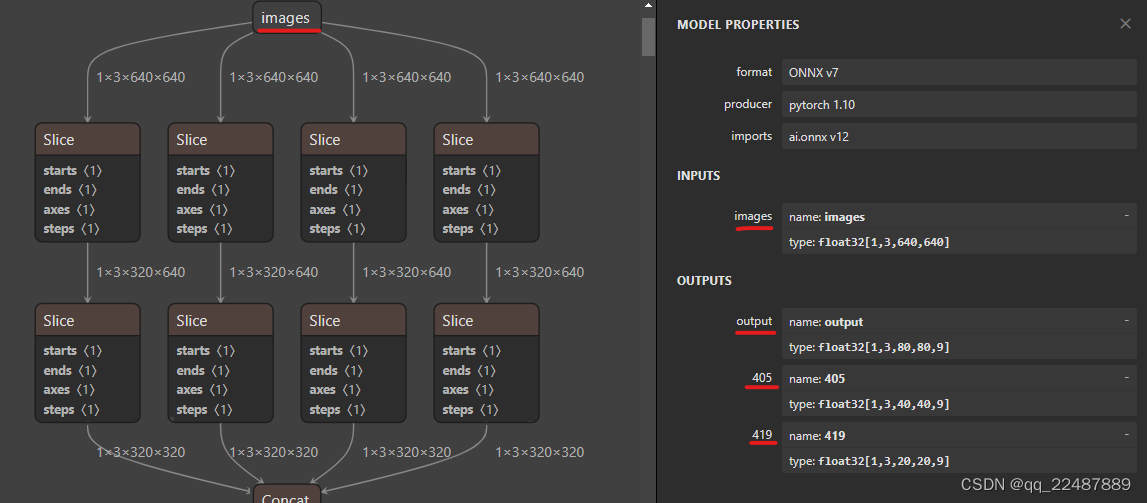
可以从ONNX 格式的模型看到数据的输入输出格式为:展示的是整个模型的所有输入输出节点,可以看到有一个输入(名称为images)和三个输出。实际部署的时候是导出的单输出模型,三个输出只是便于介绍。
输入格式:1x3x640x640,3是RGB三通道,总体是 Batch Channel H W。
输出有三层,分别在三个不同的位置,有不同的格式。
下面对其进行简单的解释。
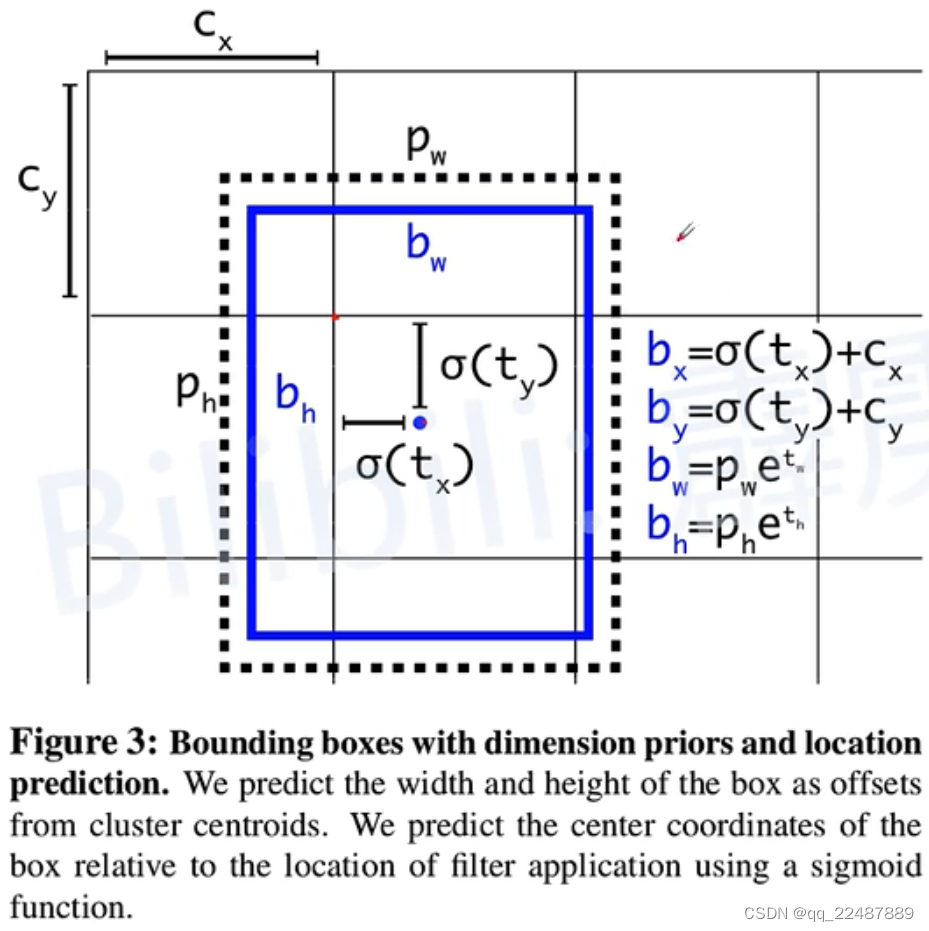
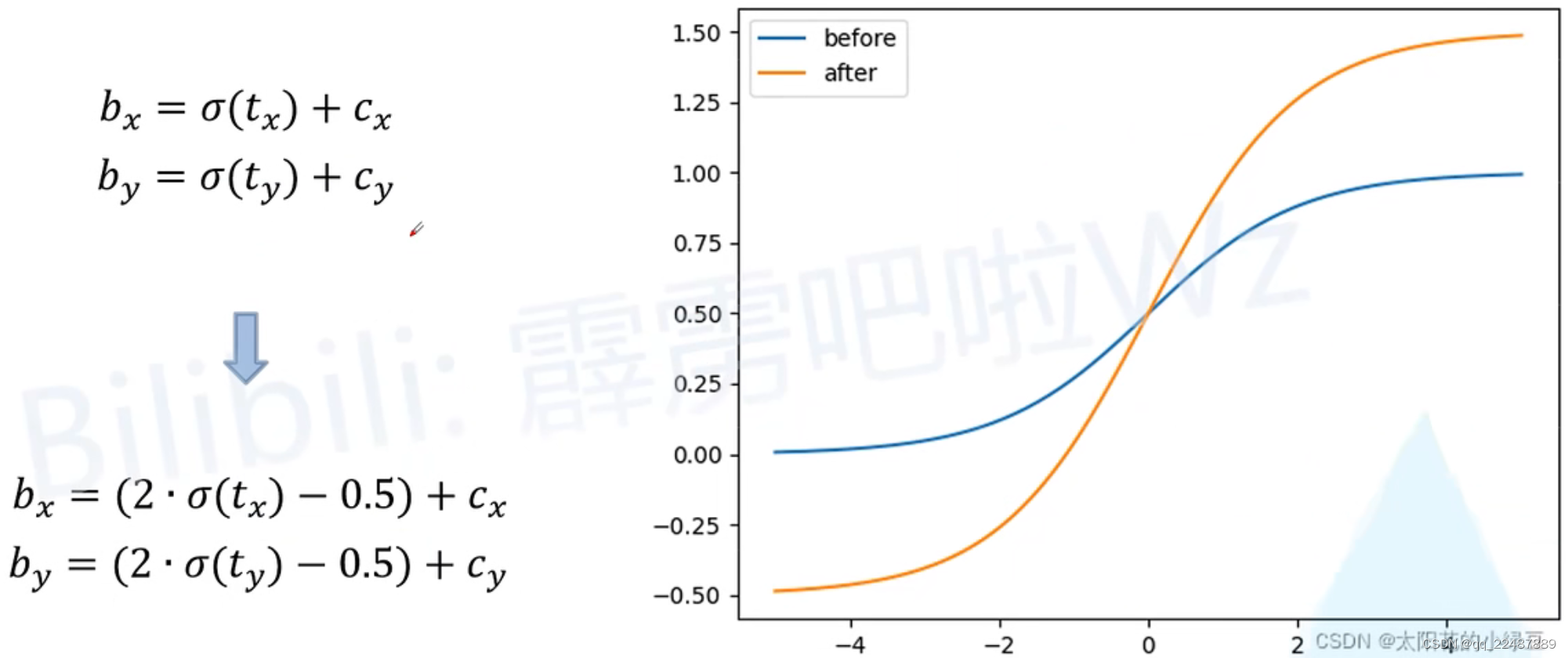
实际上在 YOLOV4 和 YOLOV5 中为了消除 Grid 敏感度,参数关系略有不同,如下图所示:这样可以取到 0 和 1。
YOLOV4:对 bx by 的改进如下
YOLOV5:在YOLOV4对对 bx by 的改进基础上,对 bw bh进行了改进
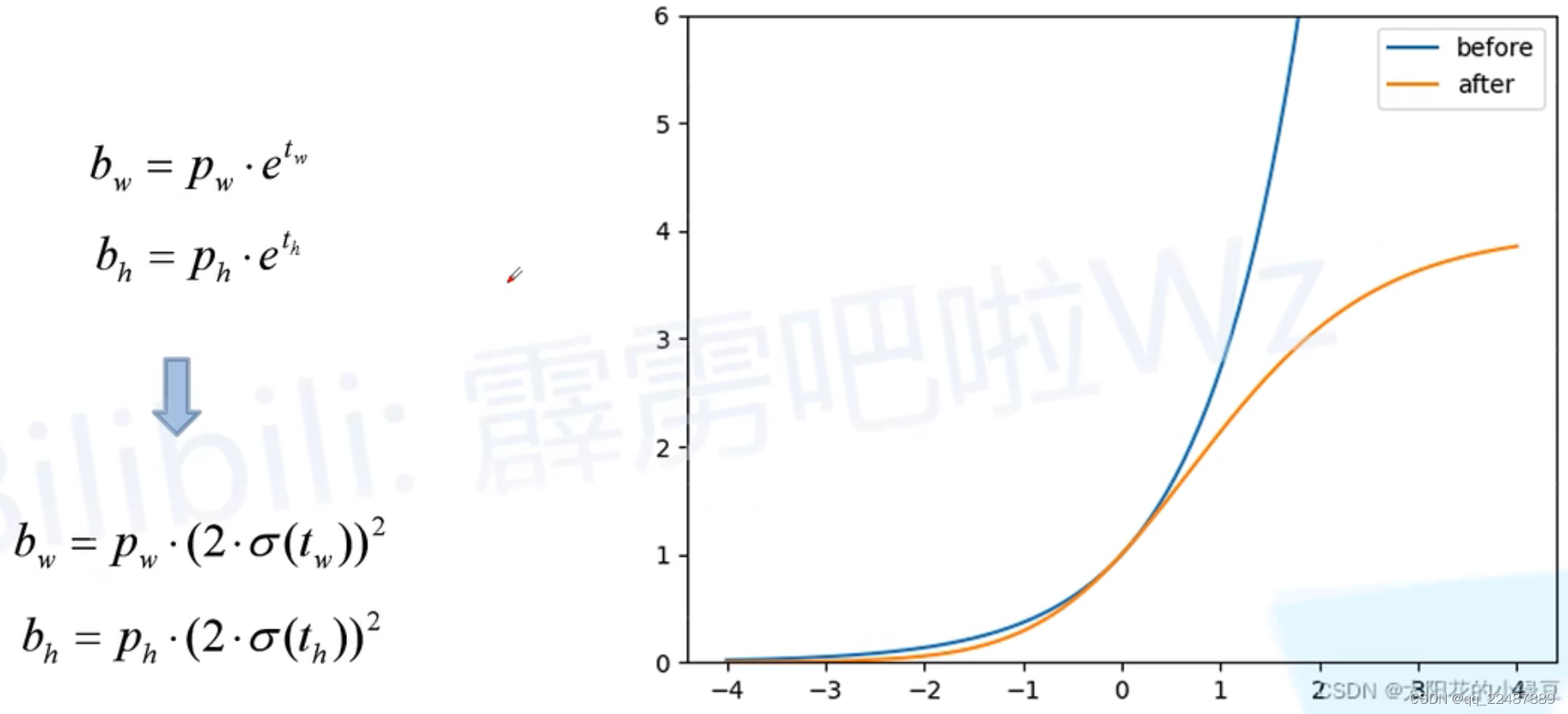
根据论文和代码,上面的虚线部分,在80×80;40×40 和 20×20 大小的输出中,锚框大小(pw ph)为:
[(10,13), (16,30), (33,23)] # 80×80的三个锚框
[(30,61), (62,45), (59,119)] # 40×40的三个锚框
[(116,90), (156,198), (373,326)] #20×20 的三个锚框
其损失函数是结合三层输出的损失值:

代码:
    def inference(self, img_path):
        """ 1.cv2读取图像并resize
        2.图像转BGR2RGB和HWC2CHW(因为yolov5的onnx模型输入为 RGB:1 × 3 × 640 × 640)
        3.图像归一化
        4.图像增加维度
        5.onnx_session 推理 """
        img = cv2.imread(img_path)
        or_img = cv2.resize(img, (640, 640))  # resize后的原图 (640, 640, 3)
        img = or_img[:, :, ::-1].transpose(2, 0, 1)  # BGR2RGB和HWC2CHW
        img = img.astype(dtype=np.float32)  # onnx模型的类型是type: float32[ , , , ]
        img /= 255.0
        img = np.expand_dims(img, axis=0)  # [3, 640, 640]扩展为[1, 3, 640, 640]
        # img尺寸(1, 3, 640, 640)
        input_feed = self.get_input_feed(img)  # dict:{ input_name: input_value }
        pred = self.onnx_session.run(None, input_feed)[0]  # <class 'numpy.ndarray'>(1, 25200, 9)

        return pred, or_img
把输入的图片转换成 1x3x640x640,再作为模型的输入:
opencv python 把图(cv2下)BGR转RGB,且HWC转CHW
如果想要使用可变的输入尺寸,参考下面yolov5的源码中的 padded resize 方法,检测效果其实更好:
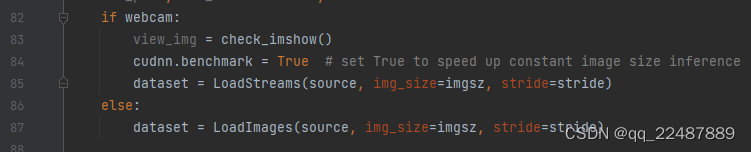
class LoadImages:的函数
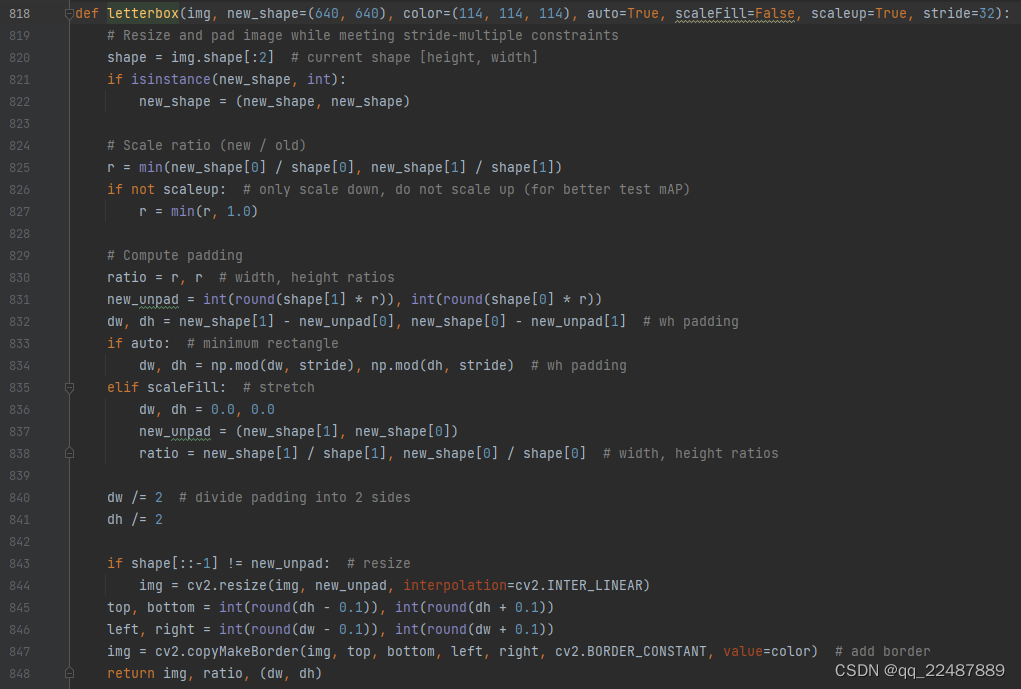
当输入图像是 640×640 时,输出数据是 (1, 25200, 4+1+class):4+1+class 是检测框的坐标、大小 和 分数。导出为这种单输出,直接获得的就是 每个预测框 的 bx by bw bh,而不是 Anchor 的 tx ty tw th。
def filter_box(org_box, conf_thres, iou_thres):  # 过滤掉无用的框
    # -------------------------------------------------------
    #   删除为1的维度
    #	删除置信度小于conf_thres的BOX
    # -------------------------------------------------------
    org_box = np.squeeze(org_box)  # 删除数组形状中单维度条目(shape中为1的维度)
    # (25200, 9)
    # […,4]:代表了取最里边一层的所有第4号元素,…代表了对:,:,:,等所有的的省略。此处生成:25200个第四号元素组成的数组
    conf = org_box[..., 4] > conf_thres  # 0 1 2 3 4 4是置信度,只要置信度 > conf_thres 的
    box = org_box[conf == True]  # 根据objectness score生成(n, 9),只留下符合要求的框
    print('box:符合要求的框')
    print(box.shape)

    # -------------------------------------------------------
    #   通过argmax获取置信度最大的类别
    # -------------------------------------------------------
    cls_cinf = box[..., 5:]  # 左闭右开(5 6 7 8),就只剩下了每个grid cell中各类别的概率
    cls = []
    for i in range(len(cls_cinf)):
        cls.append(int(np.argmax(cls_cinf[i])))  # 剩下的objecctness score比较大的grid cell,分别对应的预测类别列表
    all_cls = list(set(cls))  # 去重,找出图中都有哪些类别
    # set() 函数创建一个无序不重复元素集,可进行关系测试,删除重复数据,还可以计算交集、差集、并集等。
    # -------------------------------------------------------
    #   分别对每个类别进行过滤
    #   1.将第6列元素替换为类别下标
    #	2.xywh2xyxy 坐标转换
    #	3.经过非极大抑制后输出的BOX下标
    #	4.利用下标取出非极大抑制后的BOX
    # -------------------------------------------------------
    output = []
    for i in range(len(all_cls)):
        curr_cls = all_cls[i]
        curr_cls_box = []
        curr_out_box = []

        for j in range(len(cls)):
            if cls[j] == curr_cls:
                box[j][5] = curr_cls
                curr_cls_box.append(box[j][:6])  # 左闭右开,0 1 2 3 4 5

        curr_cls_box = np.array(curr_cls_box)  # 0 1 2 3 4 5 分别是 x y w h score class
        # curr_cls_box_old = np.copy(curr_cls_box)
        curr_cls_box = xywh2xyxy(curr_cls_box)  # 0 1 2 3 4 5 分别是 x1 y1 x2 y2 score class
        curr_out_box = nms(curr_cls_box, iou_thres)  # 获得nms后,剩下的类别在curr_cls_box中的下标

        for k in curr_out_box:
            output.append(curr_cls_box[k])
    output = np.array(output)
    return output
其中非极大值抑制 curr_out_box = nms(curr_cls_box, iou_thres) 和 坐标转换 curr_cls_box = xywh2xyxy(curr_cls_box):
# dets:  array [x,6] 6个值分别为x1,y1,x2,y2,score,class
# thresh: 阈值
def nms(dets, thresh):
    # dets:x1 y1 x2 y2 score class
    # x[:,n]就是取所有集合的第n个数据
    x1 = dets[:, 0]
    y1 = dets[:, 1]
    x2 = dets[:, 2]
    y2 = dets[:, 3]
    # -------------------------------------------------------
    #   计算框的面积
    #	置信度从大到小排序
    # -------------------------------------------------------
    areas = (y2 - y1 + 1) * (x2 - x1 + 1)
    scores = dets[:, 4]
    # print(scores)
    keep = []
    index = scores.argsort()[::-1]  # np.argsort()对某维度从小到大排序
    # [::-1] 从最后一个元素到第一个元素复制一遍。倒序从而从大到小排序

    while index.size > 0:
        i = index[0]
        keep.append(i)
        # -------------------------------------------------------
        #   计算相交面积
        #	1.相交
        #	2.不相交
        # -------------------------------------------------------
        x11 = np.maximum(x1[i], x1[index[1:]])
        y11 = np.maximum(y1[i], y1[index[1:]])
        x22 = np.minimum(x2[i], x2[index[1:]])
        y22 = np.minimum(y2[i], y2[index[1:]])

        w = np.maximum(0, x22 - x11 + 1)
        h = np.maximum(0, y22 - y11 + 1)

        overlaps = w * h
        # -------------------------------------------------------
        #   计算该框与其它框的IOU,去除掉重复的框,即IOU值大的框
        #	IOU小于thresh的框保留下来
        # -------------------------------------------------------
        ious = overlaps / (areas[i] + areas[index[1:]] - overlaps)
        idx = np.where(ious <= thresh)[0]
        index = index[idx + 1]
    return keep


def xywh2xyxy(x):
    # [x, y, w, h] to [x1, y1, x2, y2]
    y = np.copy(x)
    y[:, 0] = x[:, 0] - x[:, 2] / 2
    y[:, 1] = x[:, 1] - x[:, 3] / 2
    y[:, 2] = x[:, 0] + x[:, 2] / 2
    y[:, 3] = x[:, 1] + x[:, 3] / 2
    return y
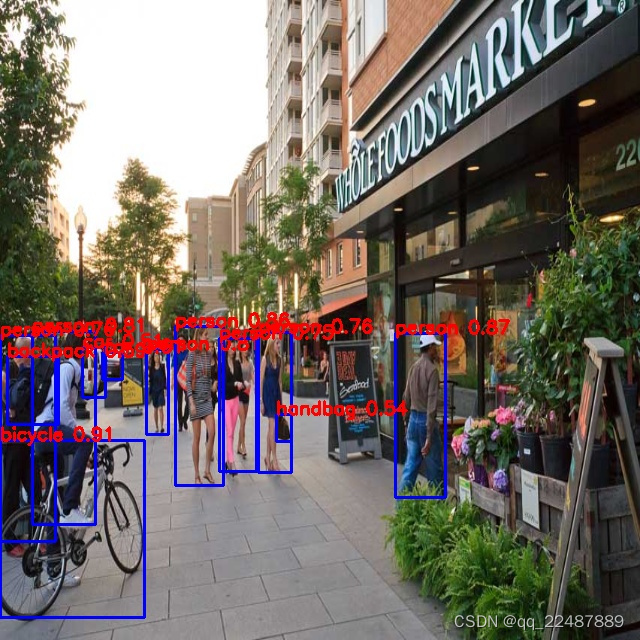
识别结果如下:脱离Pytorch环境部署成功!如果对输入数据处理时,长宽比不变,效果会更好,如何处理参考 YOLOV5源码。
我正在学习如何使用Nokogiri,根据这段代码我遇到了一些问题:require'rubygems'require'mechanize'post_agent=WWW::Mechanize.newpost_page=post_agent.get('http://www.vbulletin.org/forum/showthread.php?t=230708')puts"\nabsolutepathwithtbodygivesnil"putspost_page.parser.xpath('/html/body/div/div/div/div/div/table/tbody/tr/td/div
我有一个Ruby程序,它使用rubyzip压缩XML文件的目录树。gem。我的问题是文件开始变得很重,我想提高压缩级别,因为压缩时间不是问题。我在rubyzipdocumentation中找不到一种为创建的ZIP文件指定压缩级别的方法。有人知道如何更改此设置吗?是否有另一个允许指定压缩级别的Ruby库? 最佳答案 这是我通过查看rubyzip内部创建的代码。level=Zlib::BEST_COMPRESSIONZip::ZipOutputStream.open(zip_file)do|zip|Dir.glob("**/*")d
类classAprivatedeffooputs:fooendpublicdefbarputs:barendprivatedefzimputs:zimendprotecteddefdibputs:dibendendA的实例a=A.new测试a.foorescueputs:faila.barrescueputs:faila.zimrescueputs:faila.dibrescueputs:faila.gazrescueputs:fail测试输出failbarfailfailfail.发送测试[:foo,:bar,:zim,:dib,:gaz].each{|m|a.send(m)resc
很好奇,就使用rubyonrails自动化单元测试而言,你们正在做什么?您是否创建了一个脚本来在cron中运行rake作业并将结果邮寄给您?git中的预提交Hook?只是手动调用?我完全理解测试,但想知道在错误发生之前捕获错误的最佳实践是什么。让我们理所当然地认为测试本身是完美无缺的,并且可以正常工作。下一步是什么以确保他们在正确的时间将可能有害的结果传达给您? 最佳答案 不确定您到底想听什么,但是有几个级别的自动代码库控制:在处理某项功能时,您可以使用类似autotest的内容获得关于哪些有效,哪些无效的即时反馈。要确保您的提
假设我做了一个模块如下:m=Module.newdoclassCendend三个问题:除了对m的引用之外,还有什么方法可以访问C和m中的其他内容?我可以在创建匿名模块后为其命名吗(就像我输入“module...”一样)?如何在使用完匿名模块后将其删除,使其定义的常量不再存在? 最佳答案 三个答案:是的,使用ObjectSpace.此代码使c引用你的类(class)C不引用m:c=nilObjectSpace.each_object{|obj|c=objif(Class===objandobj.name=~/::C$/)}当然这取决于
我正在尝试使用ruby和Savon来使用网络服务。测试服务为http://www.webservicex.net/WS/WSDetails.aspx?WSID=9&CATID=2require'rubygems'require'savon'client=Savon::Client.new"http://www.webservicex.net/stockquote.asmx?WSDL"client.get_quotedo|soap|soap.body={:symbol=>"AAPL"}end返回SOAP异常。检查soap信封,在我看来soap请求没有正确的命名空间。任何人都可以建议我
关闭。这个问题是opinion-based.它目前不接受答案。想要改进这个问题?更新问题,以便editingthispost可以用事实和引用来回答它.关闭4年前。Improvethisquestion我想在固定时间创建一系列低音和高音调的哔哔声。例如:在150毫秒时发出高音调的蜂鸣声在151毫秒时发出低音调的蜂鸣声200毫秒时发出低音调的蜂鸣声250毫秒的高音调蜂鸣声有没有办法在Ruby或Python中做到这一点?我真的不在乎输出编码是什么(.wav、.mp3、.ogg等等),但我确实想创建一个输出文件。
我有一个模型:classItem项目有一个属性“商店”基于存储的值,我希望Item对象对特定方法具有不同的行为。Rails中是否有针对此的通用设计模式?如果方法中没有大的if-else语句,这是如何干净利落地完成的? 最佳答案 通常通过Single-TableInheritance. 关于ruby-on-rails-Rails-子类化模型的设计模式是什么?,我们在StackOverflow上找到一个类似的问题: https://stackoverflow.co
我在我的项目目录中完成了compasscreate.和compassinitrails。几个问题:我已将我的.sass文件放在public/stylesheets中。这是放置它们的正确位置吗?当我运行compasswatch时,它不会自动编译这些.sass文件。我必须手动指定文件:compasswatchpublic/stylesheets/myfile.sass等。如何让它自动运行?文件ie.css、print.css和screen.css已放在stylesheets/compiled。如何在编译后不让它们重新出现的情况下删除它们?我自己编译的.sass文件编译成compiled/t
我想将html转换为纯文本。不过,我不想只删除标签,我想智能地保留尽可能多的格式。为插入换行符标签,检测段落并格式化它们等。输入非常简单,通常是格式良好的html(不是整个文档,只是一堆内容,通常没有anchor或图像)。我可以将几个正则表达式放在一起,让我达到80%,但我认为可能有一些现有的解决方案更智能。 最佳答案 首先,不要尝试为此使用正则表达式。很有可能你会想出一个脆弱/脆弱的解决方案,它会随着HTML的变化而崩溃,或者很难管理和维护。您可以使用Nokogiri快速解析HTML并提取文本:require'nokogiri'h
